
Gamma is the strongest choice among the best ai pitch deck makers for founders, because it turns a single prompt into a full draft deck in minutes, its layouts stay clean without a designer on the team, and its free plan is generous enough to build a real fundraise deck before you pay. Founders do not need the most powerful presentation software. They need a deck that reads clearly in the six minutes an investor gives it, exports cleanly to PowerPoint, and can be rebuilt overnight when the story changes.
That need shapes every pick below. A pitch deck is not a marketing deck and it is not a sales deck. It has one job, which is to get a meeting, and every slide that does not serve that job is weight. The tools that rank highest here generate a solid first draft, keep the design consistent, and show whether anyone opened the link.
Price matters for a pre-seed founder, but it is not the deciding factor. The difference between the cheapest and the most expensive tool here is about 20 dollars a month, which is nothing next to the value of one investor meeting.
The eight tools below were checked against live pricing pages in November 2026. Every price is the published starting point, and every drawback is one you would meet while building a real deck.
What Investors Actually Read in a Pitch Deck
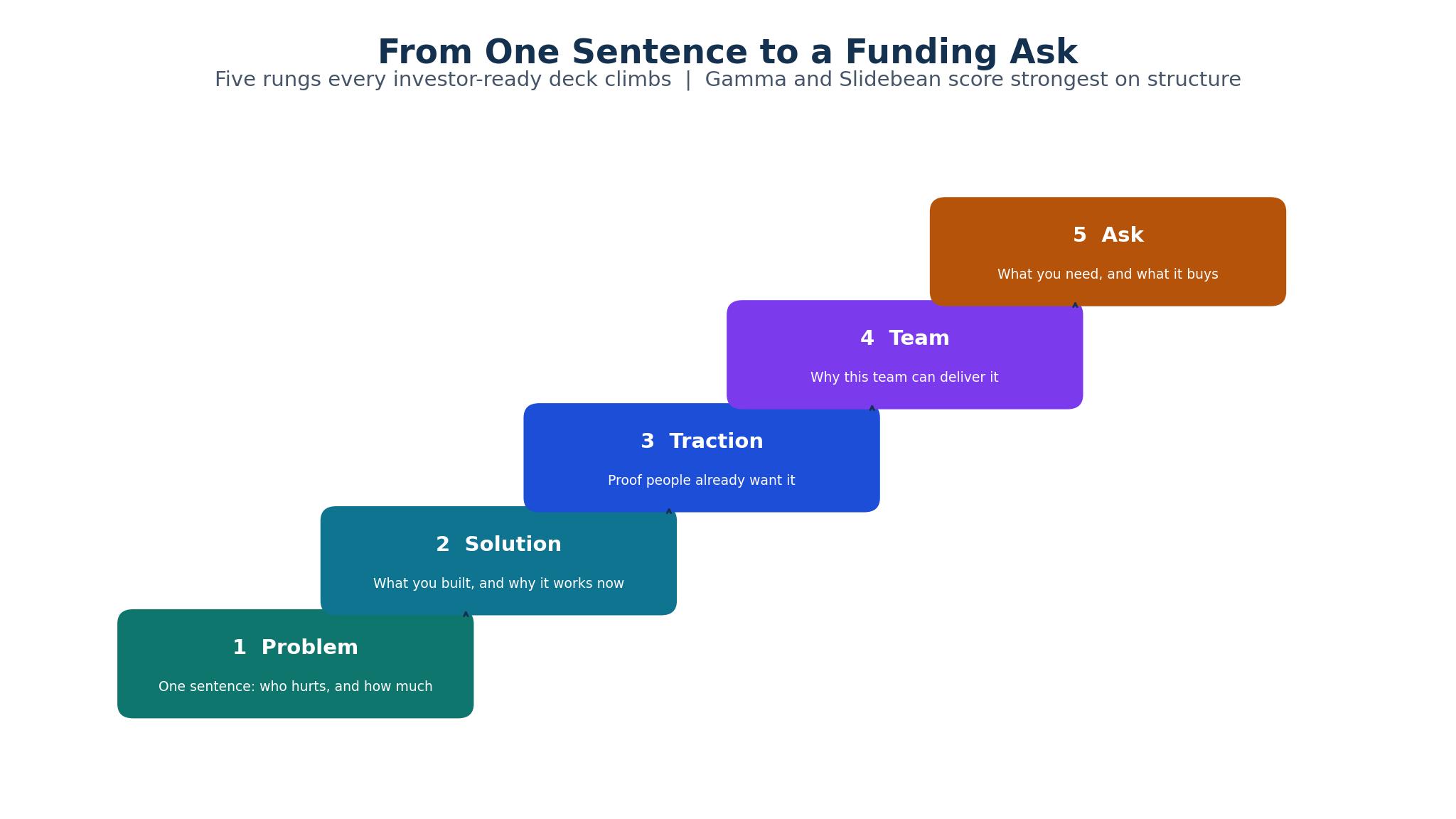
Investors read a deck in a fixed order, and the order is not the order you wrote it. They check the problem slide, the solution slide, and the traction slide first, then they look at the team and the ask. If those five slides are weak, the rest of the deck never gets read. The best ai pitch deck makers for founders earn their place by making those five slides strong by default, with layouts that put the claim first and the evidence second.
The problem slide needs one sharp sentence, not a paragraph about the market. A tool that fills the slide with generic text about a large market is doing you harm, because an investor has seen the same paragraph a hundred times. Gamma and Slidebean both generate problem slides that stay specific, while Beautiful.ai keeps the layout tight enough that a long sentence cannot hide. Read your own problem slide cold. If a stranger cannot repeat it back after ten seconds, rewrite it.
Traction is where most decks fail, and no tool can invent it. What a tool can do is present the numbers you do have in a form an investor trusts. Plus AI builds editable charts inside PowerPoint, so your revenue and growth figures stay live and checkable.
The ask slide closes the meeting, and it needs three numbers: how much you are raising, what it buys, and how long it lasts. Tools that generate a generic closing slide leave this blank or vague, which forces the investor to ask. Slidebean includes fundraising structure and runway calculators, which is why it ranks highly for founders raising a first round. Whatever tool you pick, write the ask yourself, in your own numbers, before you send anything.
Design Quality, Editing Speed and Export Options
Design quality is the first thing an investor notices and the last thing a founder has time to fix. A deck that looks like a template tells the reader you did not care enough to make it your own, while a deck with consistent type, spacing, and colour tells the reader you run a tight operation. Among the best ai pitch deck makers for founders, Beautiful.ai leads on design quality, because its Smart Slides hold the layout together no matter how much you edit.
Editing speed decides whether the deck gets better or just gets finished. A founder rewrites a deck a dozen times during a raise, and a tool that makes each rewrite slow will cost you evenings you do not have. Gamma generates a full draft from one prompt in minutes. Plus AI edits inside PowerPoint and Google Slides, so you never leave the file your co-founder already knows. Presentations.ai works through a chat interface, which suits founders who think out loud and want the deck to keep up.
Export is the quiet deal-breaker. Your deck will end up as a PDF in an email, a PowerPoint file on a partner’s laptop, and a link in a data room, and it has to look right in all three. Check that your tool exports to PPTX without breaking the layout, and that fonts and charts survive the trip. Slidebean exports to PPTX and PDF, Pitch exports PPTX on paid plans, and Canva exports cleanly to both. A deck that only looks right inside its own app is a deck you cannot send.
Pricing That Fits a Pre-Seed Budget
Every tool among the best ai pitch deck makers for founders except Storydoc has a free tier or a cheap entry plan, and the free tier is often enough for a first raise. Gamma gives 400 one-time credits free, Pitch gives a free plan for up to five members, and Slidebean lets you build unlimited decks free, charging only for export and sharing. A founder can build a real deck, share it with two advisors, and revise it twice without spending anything.
The paid plans cluster between 7 and 20 dollars a month, and the difference is what you get for the money. Slidebean Starter at 7 dollars a month is the cheapest paid entry, and it unlocks the export and branding a founder needs to send a deck out. Gamma Plus at 9 dollars a seat a month adds unlimited generations and removes branding. Pitch Pro at 8 dollars a user a month adds analytics and more AI credits. None of these prices will strain a pre-seed budget.
The plan that costs the most here is Presentations.ai at 20 dollars a month, and it is also the most specialised, with a chat-based workflow that some founders love and others find slow. Canva Pro at 15 dollars a month is the generalist option, strong on design assets but weaker on pitch-specific structure than the tools built for the job.
Watch for the costs that sit behind the headline price. Some tools charge per seat, so a three-person founding team pays three times the listed rate. Others limit AI generations per month, which means a heavy rewrite week can hit the cap. Check the seat count, the generation limit, and the export terms before you commit, because the number that matters is the cost of your whole team for the whole raise.
The 8 Tools at a Glance
| Tool | Main job | Best for | Starting price |
|---|---|---|---|
| Gamma | Prompt-to-deck generation with clean cards | Fastest first draft | From $9 per seat per month |
| Beautiful.ai | Auto-formatting slides that stay designed | Design quality under editing | From $12 per month |
| Slidebean | Startup pitch decks and fundraising | Investor-ready structure | From $7 per month |
| Pitch | Team decks with live collaboration | Founding teams editing together | From $8 per user per month |
| Plus AI | AI editing inside PowerPoint and Slides | Founders who live in PowerPoint | From $10 per user per month |
| Storydoc | Trackable interactive decks | Decks you need to measure | From $30 per month |
| Presentations.ai | Chat-based deck building | Founders who prefer conversation | From $20 per month |
| Canva | General design with AI deck tools | Design assets and brand kits | From $15 per month |
Best Pick by Job
| Job type | First pick | Second tool | Why this pair works |
|---|---|---|---|
| Fastest first draft | Gamma | Beautiful.ai | Gamma drafts in minutes, and Beautiful.ai polishes the design when time allows |
| Raising a first round | Slidebean | Gamma | Slidebean structures the fundraise, and Gamma rebuilds slides overnight |
| Team editing together | Pitch | Plus AI | Pitch handles live collaboration, and Plus AI edits inside PowerPoint |
| Measuring investor interest | Storydoc | Pitch | Storydoc tracks opens slide by slide, and Pitch adds viewer analytics |
| Design-heavy brand deck | Canva | Beautiful.ai | Canva supplies the assets, and Beautiful.ai holds the layout together |
How to Choose Among the Best AI Pitch Deck Makers for Founders
A one-week trial beats a month of reading reviews, because a deck tool is judged by the deck it produces from your story, not by its feature list. Pick two tools from the glance table and build the same ten-slide deck in both. Use your real problem, your real numbers, and your real ask. Then show both decks to one advisor and ask which one they would send to an investor. The answer is usually clear within five minutes.
Start with the draft quality. Paste the same brief into both tools and compare the first draft slide by slide. Does the problem slide state the problem in one sentence. Does the traction slide put the numbers where an investor looks first. Does the team slide read like a team or like a list of names. If neither draft is close to sendable, the tool is not saving you time.
Then test the rewrite. Change the story in one material way, such as moving from a consumer pitch to a business pitch, and rebuild the deck. Time how long the rebuild takes and how much of the design survives. A tool that forces you to start over on every rewrite will cost you the evenings a raise demands. Plus AI earns its place here, because it edits the existing PowerPoint file rather than generating a new deck from scratch.
Finish by checking the send. Export the deck to PDF and to PowerPoint, open both files on a different machine, and send the link to yourself. Check the fonts, the charts, and the slide order in each format. Then check whether the tool tells you when the link is opened.
The 8 Tools in Detail
1. Gamma
Gamma is the fastest way from a brief to a full deck, and that speed is why it leads. You paste a prompt, and Gamma returns a complete deck with a narrative flow, images, and layouts that hold together without a designer. Plus costs 9 dollars a seat a month on annual billing, and the free plan gives 400 one-time credits, which is enough to build several real decks.
Depth is where it falls short. Gamma drafts fast, but the slides can feel generic on a second reading, and the financial slides need your own numbers and your own judgement. The tool will not tell you that your traction slide is weak, and its templates can make two different startups look alike. Founders who rely on Gamma alone risk sending a deck that reads like every other Gamma deck an investor saw that week.
It suits founders weighing the best ai pitch deck makers for founders who need a strong first draft today. If your raise starts next week and your deck is still a pile of notes, Gamma gets you to a sendable version before the weekend. It also suits solo founders without a design-minded co-founder, since the layouts carry the visual quality on their own.
Test it by feeding it your real brief and timing the draft, then reading the deck as an investor would. Mark every slide that states a generic claim instead of your specific fact, and count them. If fewer than three slides need a rewrite, Gamma is doing the job. If half the deck needs rewriting, the speed is not saving you anything.
2. Beautiful.ai
Beautiful.ai is the design-first pick. Its Smart Slides adjust the layout in real time as you type, so a long headline cannot break the slide and a new chart cannot push the text off the page. Pro costs 12 dollars a month on annual billing, and the Team plan at 40 dollars a month adds brand kits and a shared library.
There is no free tier, and the pitch depth is thin. Beautiful.ai keeps a deck beautiful, but it does not know what a fundraise deck needs the way Slidebean does. The financial templates are thinner, and the AI writes competent copy rather than sharp copy. Founders raising a first round will still need to supply the structure themselves.
It suits founders whose brand and visual quality matter as much as the numbers. If your product is design-led, or your investors will judge the deck as a proxy for the product, Beautiful.ai makes the strongest impression. It also suits teams where several people edit the deck, since the layouts stop well-meaning edits from breaking the design.
Test it by handing the deck to a colleague and asking them to add a slide and rewrite two others, then checking whether the design held. If the deck still looks like one person made it, Beautiful.ai has done its job. If the new slides look pasted in, the guardrails are not as strong as the marketing claims.
3. Slidebean
Slidebean is the only tool here built specifically around fundraising. It offers investor-specific templates, financial modelling, runway calculators, and an Investor Finder CRM, which makes it the most complete package for a founder raising a first round. Starter costs 7 dollars a month on annual billing, and the free plan lets you build unlimited decks, charging only for sharing, download, and premium branding.
The design range is narrow. Slidebean decks look professional but they look like Slidebean decks, with less room for a distinctive visual identity than Gamma or Beautiful.ai. The AI design is competent rather than striking, and founders with a strong brand may feel constrained.
It suits first-time founders who need structure more than style. If you have never raised before and you are not sure what belongs on each slide, Slidebean tells you, and its financial tools help you answer the questions investors will ask about burn and runway. It also suits founders who want the investor search built into the same tool as the deck.
Test it by building your deck with its fundraising template and then presenting it to an advisor who has raised before. Ask them which slides feel thin and which feel strong. If the template caught the gaps you would have missed, such as the use of funds or the runway math, Slidebean has earned its fee.
4. Pitch
Pitch is the collaboration pick. It offers real-time co-editing, version history, and viewer analytics, so a founding team can build a deck together and see whether investors actually open it. The free plan covers up to five members with unlimited presentations, and Pro costs 8 dollars a user a month on annual billing.
Pitch is a general presentation tool, not a pitch specialist. Its AI drafts are useful but thinner than Gamma, and it has no fundraising structure or financial modelling. A team that needs the deck to teach them what a fundraise looks like will get more from Slidebean. Pitch also charges per seat, so a larger team pays more than the headline price suggests.
It suits founding teams of two or three who edit together and iterate fast. If your co-founder rewrites the problem slide while you fix the financials, Pitch keeps both edits in sync without version chaos. It also suits founders who send many decks and want to know which slides investors actually read.
Test it by building a deck with your co-founder in the same session, then checking the version history after an hour of edits. If you can see who changed what and roll back a bad edit in seconds, the collaboration is real. Then send the link to a friendly reader and check whether the analytics show which slides they spent time on.
5. Plus AI
Plus AI works inside the tools founders already use. It adds AI generation and editing to PowerPoint and Google Slides, so you keep your existing file, your existing brand, and your existing workflow. It costs 10 dollars a user a month, and it edits decks in place, adds editable charts, and rewrites slides from a prompt without exporting to a separate app.
Plus AI is an add-in, not a deck builder. It will not generate a full fundraise deck from a blank page as confidently as Gamma, and its design help is limited to the templates you already have.
It suits founders who already have a deck and need to improve it. If your v1 exists and the raise starts in two weeks, Plus AI helps you rewrite slides, rebuild charts, and tighten the story without moving to a new tool. It also suits corporate founders and teams whose IT rules keep them inside Microsoft or Google.
Test it by taking your weakest slide and asking Plus AI to rewrite it three different ways, then picking the best version. Check whether the charts it builds stay editable in PowerPoint, and whether the text fits the slide without manual fixing. If the rewrite is genuinely better and the chart survives export, the add-in earns its place.
6. Storydoc
Storydoc makes decks you can measure. It builds interactive, trackable decks that show you when a prospect opens the link, which slides they read, and how long they stay. Plans start at 30 dollars a month, and the free tier is limited.
Price and scope both work against it. Thirty dollars a month is the highest entry price in this list, and Storydoc is built for trackable sales decks as much as for pitch decks. A founder who only needs a fundraise deck may find the interactivity more than the job requires, and the design templates are fewer than Canva or Beautiful.ai. The learning curve is also longer than Gamma.
It suits founders who send many decks and need to learn from each send. If you are running a wide outreach to investors and you want to know whether the problem slide or the traction slide is losing people, Storydoc gives you that answer. It also suits founders whose product story benefits from an interactive format, such as a demo embedded in the deck.
Test it by sending the same deck to five friendly readers and reading the analytics the next day. Note which slides held attention and which were skipped, then rewrite the skipped slides and send again. If the second send holds attention longer, the measurement is paying for itself.
7. Presentations.ai
Presentations.ai builds decks through conversation. You describe what you want in chat, and the tool generates and edits slides in response, which suits founders who think out loud and iterate by talking through the story. Plans cost 20 dollars a month on annual billing, and the free Starter plan lets you try the workflow before paying.
Speed and control are the trade-offs. A chat interface is slower than a direct editor when you know exactly what you want, and the design output is solid rather than striking. At 20 dollars a month it is also the second most expensive tool here, and the value depends on whether the conversational style fits how you work. Founders who prefer to drag, drop, and type will find it frustrating.
It suits founders who struggle with a blank page. If you can explain your startup in conversation but you freeze when you open a slide editor, Presentations.ai turns the conversation into a deck. It also suits non-native English speakers who want help phrasing the story, since the chat format makes it easy to ask for a rewrite in plainer language.
Test it by describing your startup in three chat messages and seeing what deck comes back. Then ask for three specific changes, such as a stronger problem slide and a shorter team slide, and check whether the edits land where you asked. If the conversation feels like working with a helpful colleague, the tool fits. If it feels like arguing with a form, move on.
8. Canva
Canva is the generalist. Its Magic Design tools generate deck drafts, its template library is the largest here, and its brand kit keeps colours, fonts, and logos consistent across every slide. Pro costs 15 dollars a month, and the free plan is generous for basic decks.
Pitch specificity is thin. Canva is a design tool, not a fundraise tool, so it will not tell you what belongs on a traction slide or how to structure an ask. The AI deck generation is newer and thinner than Gamma, and the decks can look like Canva templates unless you customise them heavily. Founders who need fundraising structure should pair Canva with Slidebean rather than relying on it alone.
It suits founders who need design assets beyond the deck. If your raise also needs a one-pager, a LinkedIn banner, and a product sheet, Canva produces all of them in one place. It also suits teams with a strong visual brand, since the brand kit applies across every asset without extra work.
Test it by building your deck and a one-pager from the same brand kit, then checking whether both look like they came from the same company. If the deck and the one-pager match without manual fixing, Canva is doing the job a specialist tool cannot. If the deck still needs Slidebean structure, use both and let each do what it does best.
From One Prompt to an Investor-Ready Deck in a Day
A fundraise deck does not need a month. It needs one focused day, a clear story, and a tool that gets out of the way. Start the morning by writing the story in five sentences: the problem, the solution, the traction, the team, and the ask. Do not open any tool until those five sentences are written, because a tool cannot fix a story that does not exist yet.
Feed the five sentences into your chosen tool and let it draft the deck. Gamma will return a full draft in minutes, and Slidebean will return a structured fundraise deck with the financial slides in place. Spend the middle of the day rewriting, not designing. Fix the problem slide until a stranger can repeat it back, fix the traction slide until the numbers are honest and visible, and write the ask in your own numbers.
Spend the afternoon on the send. Export the deck to PDF and PowerPoint, open both on a different machine, and send the link to two advisors. Ask them the only question that matters, which is whether they would take the meeting. Their answers tell you what to fix overnight. Among the best ai pitch deck makers for founders, the winner is the one that gets you to that advisor test fastest, not the one with the longest feature list.

The Checks to Run Before You Send a Deck to Investors
Run a cold read before you send anything. Open the deck as if you have never seen the company, and read it in six minutes, which is the time an investor gives it. Note every slide that confuses you, every number without a source, and every claim without evidence. Fix those three things before you fix anything else, because they are the reasons decks get deleted.
Check the numbers twice. Every figure on the traction slide should trace to a real source, and every projection should state its assumptions. An investor who finds one wrong number will assume the rest are wrong too. Do not let an AI tool invent a market size or a growth rate, and check every number it generates.
Check the file itself. Open the PDF on a phone, open the PowerPoint on a different laptop, and click every link in the deck. A broken link or a garbled chart on the investor’s machine is a first impression you cannot take back. Then check the sharing settings, so the link works without a login and the analytics record the open. Send the deck only when all three checks pass.
Frequently Asked Questions
Can an AI tool really build a pitch deck investors take seriously?
Yes, if you treat the output as a draft. Gamma and Slidebean produce decks with sound structure and clean design, but the story, the numbers, and the ask must come from you. Investors judge the thinking, not the template. A deck built entirely by AI reads as generic, while a deck where AI did the layout and you supplied the thinking reads as professional.
Which pitch deck tool is best for a first-time founder?
Slidebean is the strongest pick for a first-time founder, because its templates and financial tools teach you what a fundraise deck needs. Gamma is the strongest pick if you already know the structure and you need speed.
How much should a founder pay for a pitch deck tool?
Very little. The paid plans here run from 7 to 30 dollars a month, and the free tiers cover a first raise for most founders. Pay when you need export, branding, or analytics, not before. The cost of the tool is trivial next to the value of one investor meeting, so the real question is whether the tool produces a deck you would send.
Do investors care which tool made the deck?
No. Investors care whether the problem is clear, the traction is real, and the ask is specific. They never ask which software produced the file. A beautiful deck with a weak story fails, and a plain deck with a strong story gets the meeting. Pick the tool that helps you tell the story best, and do not worry about the brand on the file.
Should I use the same deck for every investor?
No. Keep one master deck and adjust the emphasis for each investor. A fintech investor wants the regulatory slide, a consumer investor wants the retention numbers, and a deep-tech investor wants the technical proof. Pitch and Storydoc help here, because their analytics show which slides each reader spent time on, so you learn what each type of investor cares about.
What is the biggest mistake founders make with AI deck tools?
Letting the tool write the story. AI tools generate confident, generic copy that sounds professional and says nothing specific about your company. The biggest mistake is sending that copy without rewriting it in your own words, with your own numbers. Use the tool for layout, structure, and speed, and keep the thinking, the claims, and the ask firmly in your own hands.
The Verdict for Founders Raising Now
Gamma is the pick for most founders comparing the best ai pitch deck makers for founders, because it drafts fastest, its free plan covers a real raise, and its layouts stay clean without a designer. Slidebean is the pick for first-time founders who need fundraising structure, and Pitch is the pick for teams editing together. Build the story yourself, let the tool do the layout, and send the deck only after an advisor has read it cold. The tool that gets you to that test fastest is the tool that earns its place in your raise.