

Day 1: the sign-up form went live, and by lunch there were 12 names on it. That is how a first event begins, not with a launch meeting but with a form, a link, and a hope that people will show up. The best volunteer management software for events is judged on whether those 12 names become 50 volunteers on the day, and VolunteerHub is the pick I would start with because it handles sign-up, scheduling, and check-in in one place without making the organiser learn a new system.
What Should the best volunteer management software for events Do in the First Month?
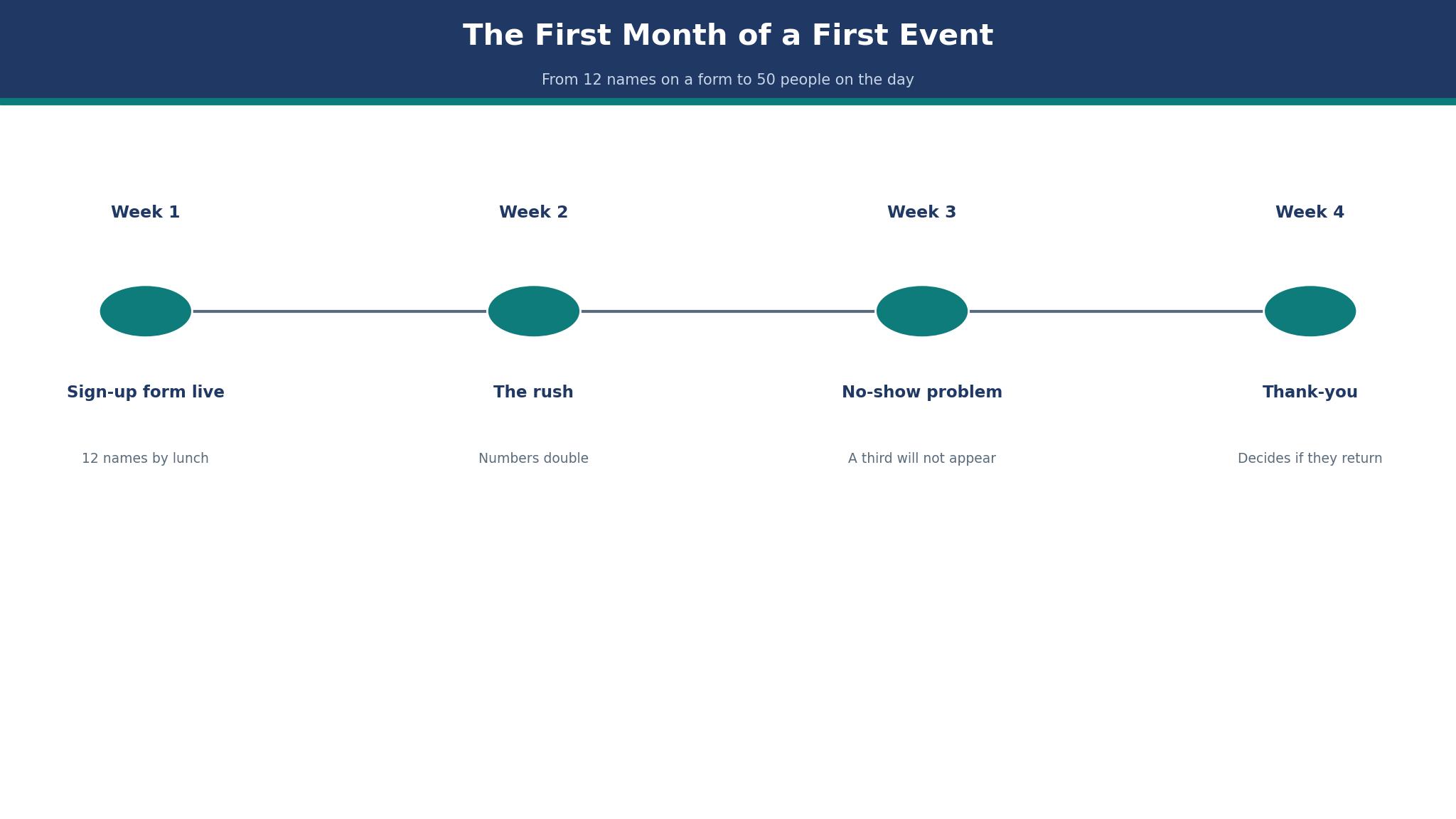
The first month has a shape, and it repeats for almost every event. Week one is the form and the first sign-ups. Week two is the rush, when the numbers double. Week three is the no-show problem, when the organiser learns that a third of the names will not appear. Week four is the thank-you, which decides whether they come back.
A good tool supports each week differently. In week one it needs a form that works on a phone, because most volunteers sign up from one. In week two it needs reminders that go out on their own. In week three it needs a waitlist that fills the gaps. In week four it needs hours tracking, because a volunteer who can prove their hours will volunteer again.
How to Choose Volunteer Management Software for Events
Start with the sign-up form, because that is where volunteers meet the tool. Open it on a phone, fill it in as a volunteer would, and count the taps. If it takes more than two minutes, people will abandon it. The best volunteer management software for events should get a volunteer from the link to a confirmed shift in under two minutes.
Then check the reminder system. A tool that sends automatic reminders two days before and on the morning of the event will cut no-shows by a third, because most no-shows are forgotten shifts, not changed minds. Ask whether reminders are included or an add-on, because the answer changes the price.
Finally, check the hours record. Volunteers need proof of hours for school, work, or court, and the tool should produce a clean record without the organiser retyping anything. A system that tracks hours automatically is worth more than a system with a prettier form.
How Many Volunteers Will Actually Show Up?
Plan for 70 percent of the confirmed list, because that is the honest number for a free community event. A paid or ticketed event will see 85 percent. The gap is not laziness, it is life, and the tool cannot fix it, but it can warn you early.
A waitlist is the answer. If the tool fills gaps from the waitlist automatically, a 70 percent turnout still fills the event. Without a waitlist, the organiser spends the morning ringing people.
The 12 Tools at a Glance
best volunteer management software for events is a crowded market, and the table below lines up every tool by who it suits and what it costs, with VolunteerHub at the top for the reasons in the opening.
| Tool | Best for | Starting price |
|---|---|---|
| VolunteerHub | Events that need sign-up, scheduling, and check-in in one system | reported from around $75 a month |
| Bloomerang Volunteer | Organisations whose volunteers are also donors | quote only |
| SignUpGenius | Simple events with one shift and one list | free plan, paid from $10 a month |
| VolunteerLocal | Festivals and multi-day events with many roles | reported from $495 a year |
| Golden Volunteer | Nonprofits that want volunteers, donors, and events together | quote only |
| GivePulse | Schools and universities that need hours verified | free for small groups, paid reported from $100 a month |
| Better Impact | Organisations that schedule volunteers every week | reported from $69 a month |
| Rosterfy | Large events with thousands of volunteers and complex shifts | quote only |
| Get Connected | Community foundations that match volunteers with many nonprofits | quote only |
| POINT | Nonprofits that want a modern volunteer app | free plan, paid reported from $99 a month |
| Track It Forward | Groups that need simple hours tracking and little else | from $25 a month |
| VolunteerMatters | Organisations that need background checks with scheduling | reported from $49 a month |
VolunteerHub vs Bloomerang Volunteer for a 200-Volunteer Event
VolunteerHub and Bloomerang Volunteer are the two names an event organiser compares first. VolunteerHub is built for events, with sign-up, scheduling, check-in, and hours tracking in one system. Bloomerang Volunteer grew out of donor management, and it is strongest when the volunteers are also donors, because the two records live together.
On price, both are largely quote-based for larger events, and smaller events can start on published plans. VolunteerHub’s entry plans have been reported from around $75 a month, while Bloomerang Volunteer pricing is custom, so treat both figures as reported and get a written quote. A 200-volunteer event should budget for the annual plan rather than paying by the month.
The choice comes down to who the volunteers are. If they are event volunteers who come for the day, VolunteerHub’s scheduling and check-in are the better fit. If they are supporters who also give money, Bloomerang’s combined record is worth more. For a pure event, VolunteerHub leads this list.

The Volunteer Who Showed Up at the Wrong Gate
Check-in is where the plan meets the day. A volunteer arrives at the wrong gate, the assignment sheet is at the other gate, and the volunteer stands around for 20 minutes while the organiser finds the right list. The event has not failed, but the volunteer’s first impression is that nobody is in charge.
VolunteerHub handles this with a check-in app that shows the assignment on the volunteer’s phone, so the gate does not matter. Bloomerang Volunteer does it with self check-in kiosks. The tools that struggle here are the ones that print a list and hope the list is at the right gate.
Print the list anyway, as a backup. Phones die, signals fail, and a paper list at each gate costs nothing. The tool should make the paper list unnecessary on a good day, and the paper list should save the day on a bad one.
Should Volunteers Pay to Sign Up?
No, not for a community event. A fee, even a small one, cuts sign-ups sharply, and it changes the relationship from giving to buying. Charge for the training or the shirt if you must, but keep the sign-up free.
For a professional conference where volunteers get a ticket worth hundreds, a deposit that is refunded on attendance is fair. Make the rule clear on the form, and refund it fast, because a slow refund is the story the volunteer will tell.
The 12 Tools in Detail
Here is every tool in detail, in ranked order. The best volunteer management software for events below starts with VolunteerHub, and each section says what the tool costs, what it does well, and where it falls short.
1. VolunteerHub
VolunteerHub is events that need sign-up, scheduling, and check-in in one system. Paid plans start at reported from around $75 a month. Its check-in app shows the assignment on the volunteer’s phone, and its scheduling handles multiple roles and locations
At about $75 a month, the cost works out to $0.38 per volunteer a month, or $900 a year.
The trade-off is its pricing is largely quote-based for larger events, so a big event cannot budget it from the website. Treat the $75 figure as reported, and get a written quote for your volunteer count.
Run the VolunteerHub trial across a live event week, because a quiet week never tests sign-up, scheduling, and check-in at the same time.
It suits events that need sign-up, scheduling, and check-in in one system.
What I would do with VolunteerHub first is test it on the problem in the The Volunteer Who Showed Up at the Wrong Gate section, with real work and a two-week clock, then decide on the evidence.
Check the VolunteerHub renewal before the $75 rate sets the budget. VolunteerHub is reported from around $75 a month, so ask what that figure becomes at renewal, because an opening rate that climbs in year two changes the cost of a 200-volunteer event.
When check-in breaks with volunteers queuing at the gate, VolunteerHub’s help matters more than its feature list. With VolunteerHub, pin down the support channel and whether the $75-a-month plan covers a human answer when check-in breaks mid-event.
The last check on VolunteerHub is the exit. Before signing for VolunteerHub, check how the contract ends and how fast the volunteer list comes back, since sign-up, scheduling, and check-in should not hold the list hostage.
2. Bloomerang Volunteer
Bloomerang Volunteer is organisations whose volunteers are also donors. Paid plans start at quote only. The volunteer and donor records live in one place, so a supporter is one person rather than two records
A team should expect an annual contract, and should ask whether the price covers events or only the donor database.
The trade-off is its event scheduling is less deep than VolunteerHub, so a pure event organiser will feel the gap. Self check-in kiosks let volunteers sign themselves in at the gate.
A small team can have Bloomerang Volunteer running in an afternoon, because the import takes the donor-volunteer list as it stands and the starting settings fit that work.
It suits organisations whose volunteers are also donors.
Hand Bloomerang Volunteer a donor who also volunteers, with duplicate records, and watch the demo cope with that tangle instead of a tidy sample.
Ask Bloomerang Volunteer whether the donor-volunteer records stay linked at renewal. Find out what Bloomerang Volunteer charges once any opening discount ends, since renewal jumps catch donor-volunteer teams off guard at budget time every year.
When the donor-volunteer record breaks on event day, Bloomerang Volunteer’s help matters more than its feature list. Ask Bloomerang Volunteer which help channels the donor-volunteer plan includes, and whether a person answers or only a ticket queue.
The last check on Bloomerang Volunteer is the exit. Before signing for Bloomerang Volunteer, check how the contract ends, since a tool that welcomes donor-volunteers in easily should let them go just as easily.
3. SignUpGenius
SignUpGenius is simple events with one shift and one list. Free to start, SignUpGenius charges from $10 a month for paid plans. It is free to start, it takes minutes to set up, and almost every volunteer already knows how to use it
At $10 a month, the cost works out to $0.05 per volunteer a month, or $120 a year.
The trade-off is it has no hours tracking, no check-in app, and no role management, so a multi-day event outgrows it fast. The reminder emails are included on the paid plans.
With SignUpGenius, bring the single shift list over first, send the sign-up link second, and only close the old sheet once the first event fills.
It suits simple events with one shift and one list.
On the SignUpGenius demo, ask them to fill one shift from a real list with duplicate names, instead of the staged walkthrough.
Check the SignUpGenius renewal before the free tier shapes the decision. SignUpGenius starts free and paid plans open at $10 a month, so check what the second year costs before the free tier shapes a decision it cannot carry for a big event.
With one shift and one list, SignUpGenius help matters more than features when the form fails. With SignUpGenius, check whether help comes by chat, email, or phone, and whether the plan for one shift and one list includes it at all.
The last check on SignUpGenius is the exit. Before paying for SignUpGenius, check how the $10-a-month plan ends, since a free start means little if billing runs on after the event.
4. VolunteerLocal
VolunteerLocal is festivals and multi-day events with many roles. Paid plans start at reported from $495 a year. Its role-based scheduling suits a festival with dozens of jobs, and its check-in is fast
- Best for: festivals and multi-day events with many roles
- Price: reported from $495 a year
- Strength: its role-based scheduling suits a festival with dozens of jobs, and its check-in is fast
- Watch out: its interface is plain, and the reporting is lighter than VolunteerHub
5. Golden Volunteer
Golden Volunteer is nonprofits that want volunteers, donors, and events together. Paid plans start at quote only. Its volunteer matching suggests the right people for each role, which saves the organiser hours of reading profiles
A nonprofit should ask for a quote on its volunteer count and its event frequency, because both change the price.
The trade-off is there is no published price, and it is built for nonprofits rather than one-off events. The mobile app lets volunteers find and join shifts from their phone.
Moving to Golden Volunteer starts with cleaning the list, because volunteers who also donate usually appear twice, once as a donor and once as a volunteer.
It suits nonprofits that want volunteers, donors, and events together.
Put Golden Volunteer through a real nonprofit that mixes donors, volunteers and events, and see if the demo survives the overlap without a tidy sample.
Ask Golden Volunteer whether all three tools stay bundled at renewal. Check what Golden Volunteer bills in year two, since a nonprofit joining donors, volunteers and events together feels any rise three times over.
6. GivePulse
GivePulse is schools and universities that need hours verified. Paid plans start at free for small groups, paid reported from $100 a month. Its hours verification is the strongest here, and it connects to university systems
At about $100 a month, the cost works out to $0.50 per volunteer a month, or $1,200 a year.
The trade-off is its event scheduling is simpler than VolunteerHub, and the paid plans start higher than most. Treat the $100 figure as reported, because GivePulse pricing varies by organisation.
GivePulse takes about an hour of training per person, and teams that skip it end up verifying hours by hand because they never learned the approval flow.
It suits schools and universities that need hours verified.
At the GivePulse demo, hand them a real school group with messy hour records and ask them to verify the hours, instead of the polished walkthrough.
7. Better Impact
Better Impact is organisations that schedule volunteers every week. Better Impact starts at a reported $69 a month. Its recurring scheduling handles weekly shifts well, and its hours tracking is clean
Q: What does Better Impact do best?
A: Its recurring scheduling handles weekly shifts well, and its hours tracking is clean
A: The catch is its interface feels dated, and the check-in app is less polished than VolunteerHub.
8. Rosterfy
Rosterfy is large events with thousands of volunteers and complex shifts. Paid plans start at quote only. Its scale is the best here, and its onboarding handles background checks and training
A large event should expect an implementation project, not a self-serve signup.
The trade-off is there is no published price, and it is too heavy for a 200-volunteer event. The automated onboarding collects forms, checks, and training before the event.
Rosterfy takes longer to shape than to install, because thousands of volunteers and complex shifts need the roles built properly before the first event opens.
It suits large events with thousands of volunteers and complex shifts.
During the Rosterfy demo, hand them a thousand volunteers across overlapping shifts and ask them to roster it, not the clean walkthrough.
9. Get Connected
Get Connected is community foundations that match volunteers with many nonprofits. Paid plans start at quote only. Its matching engine connects volunteers with the right nonprofit, which suits a community-wide programme
A foundation should ask for a quote on its nonprofit count, because that is what decides the price.
The trade-off is it is built for foundations, not for a single event organiser. The volunteer profiles carry skills and interests, so the match is better than a first-come list.
With Get Connected, bring the volunteer list over first and the partner nonprofits second, and only close the old system once matches run through it.
It suits community foundations that match volunteers with many nonprofits.
Ask Get Connected to match one volunteer across five nonprofits live, and judge the demo on that real match, not a tidy sample.
Ask Get Connected whether partner nonprofits stay matched after year one. Ask what Get Connected costs after its first year, because the renewal rate is the figure a community foundation actually budgets for.
10. POINT
POINT is nonprofits that want a modern volunteer app. POINT is free to start, with paid plans reported from $99 a month. Its mobile app is the most modern here, and volunteers actually enjoy using it
At about $99 a month, the cost works out to $0.49 per volunteer a month, or $1,188 a year.
The trade-off is its scheduling is less deep than VolunteerHub for a multi-day event. Treat the $99 figure as reported, because POINT pricing varies by organisation.
POINT opens with a guided trial, so put it on a live volunteer drive from the start, because sample screens say nothing about a real event.
It suits nonprofits that want a modern volunteer app.
On the POINT demo, ask them to run a real volunteer drive through the app, rather than the rehearsed walkthrough.
11. Track It Forward
Track It Forward is groups that need simple hours tracking and little else. Track It Forward costs from $25 a month. Its hours tracking is simple and reliable, and it costs less than most tools here
At $25 a month, the cost works out to $0.12 per volunteer a month, or $300 a year.
The trade-off is it has no real scheduling or check-in, so it suits a group that already manages shifts elsewhere. The hours reports are clean enough to hand to a school or a court.
Track It Forward exposes the same mess every small group carries, which is one name spelled three ways across a season of hours sheets.
It suits groups that need simple hours tracking and little else.
The question to ask on the demo of Track It Forward is whether it handles your messiest real case, not the clean one in the sales deck.
Ask Track It Forward whether hours history stays exportable after year one. Ask Track It Forward whether the $25-a-month rate still holds after year one, because a small group notices even a few dollars.
12. VolunteerMatters
VolunteerMatters is organisations that need background checks with scheduling. VolunteerMatters runs from a reported $49 a month. Its background check integration is built in, which saves the organiser a separate process
At about $49 a month, the cost works out to $0.24 per volunteer a month, or $588 a year.
The trade-off is its interface is plain, and the volunteer-facing side is less polished than POINT. Treat the $49 figure as reported, because VolunteerMatters pricing varies by size.
VolunteerMatters takes about an hour of training per person, and teams that skip it end up running background checks outside the system they paid for.
It suits organisations that need background checks with scheduling.
At the VolunteerMatters demo, hand them a volunteer whose background check is still pending and ask them to schedule them, rather than the tidy walkthrough.
Best Pick by Job
The right pick depends on the job, not the ranking. The table below matches each situation to a tool, and VolunteerHub is the pick for most buyers. The best volunteer management software for events for a team that is just starting is not the same as the one for a team that is growing fast.
| Team size | Pick | Why |
|---|---|---|
| Small (1 to 5) | VolunteerHub | Fits a small team without waste |
| Mid-size (6 to 25) | Bloomerang Volunteer | Handles growth without a switch |
| Large (25 plus) | SignUpGenius | Built to scale |
Counting the Cost Before You Buy
A 200-volunteer event with a 30 percent no-show rate loses 60 volunteers on the day. If each volunteer covers a four-hour shift, that is 240 hours of help lost, which is the work of 30 people for a full day. A reminder system that cuts no-shows to 15 percent saves 30 volunteers, or 120 hours. These numbers are the reason the best volunteer management software for events matters when you run VolunteerHub at your size.
Check-in time is the second number. If check-in takes two minutes per volunteer, 200 volunteers take 400 minutes, or nearly seven hours of queue time. At 30 seconds each with a phone app, the same 200 take 100 minutes. The difference is five hours of standing in line.
Per-volunteer cost is the third number. A plan at $75 a month costs $900 a year. Spread over 200 volunteers, that is $4.50 per volunteer a year. Against the cost of a single unfilled shift, which can mean a closed gate or an unstaffed stall, that is a small number.
How to Trial VolunteerHub in One Week
Run the trial on a real week. Put VolunteerHub in front of 200 volunteers, give them the jobs they already do, and watch what breaks with VolunteerHub. A VolunteerHub trial loaded with sample rows proves little, since those rows hold no duplicate sign-ups, no volunteers who turn up at the wrong gate, and no last-minute cancellations.
Track time, errors and Friday use across the trial. First, how long the core job takes for 200 volunteers on VolunteerHub. Second, how many mistakes 200 volunteers make in a week with VolunteerHub. Third, whether the team still opens VolunteerHub without prompting. When Friday use stays low, fast check-in and fewer errors count for little with VolunteerHub.
Fix the VolunteerHub move-over date before the trial week opens. Without a date fixed before the VolunteerHub trial, the trial drifts on beside the old spreadsheet and nobody is responsible for ending it. Pick the date, run the week with 200 volunteers on VolunteerHub, and on the date either switch or walk away.
The First 30 Days With VolunteerHub
The first month with VolunteerHub should be boring on purpose. Run VolunteerHub beside the old system for two weeks, with the volunteer data moved across, before anything gets switched off. Move every volunteer onto VolunteerHub on day one and the month goes to repairing the move, not running the event.
By day 30, 200 volunteers should be using VolunteerHub without thinking about it. A month in, volunteers still lost at check-in means the training ran short or the setup misled them. Fix VolunteerHub’s setup before blaming the volunteers using it.
Review the numbers at day 30 for VolunteerHub. Weigh the trial week against the month before VolunteerHub on time, errors, and mood. If two of the three moved, VolunteerHub has earned another quarter. If nothing got better, the fault lies in the rota itself, not in VolunteerHub.
What to Ask on the Demo of VolunteerHub
Ask VolunteerHub to show the core job on your data, not theirs. Ask VolunteerHub to run the demo on your own volunteer list, because tidy sample rows hide the duplicate sign-ups, the half-filled profiles, and the gate mix-ups a real event week produces.
Ask VolunteerHub what 400 volunteers would cost before you sign. A tool that is cheap for 200 volunteers and expensive for double that number will punish growth, and the quote from VolunteerHub should show the curve before you sign.
Ask who answers when VolunteerHub breaks. The VolunteerHub demo tours the sign-up form and the check-in app, yet the support queue stays off screen, so pin down the support hours, the reply speed, and whether the $75-a-month plan includes a human being.
Ask VolunteerHub how the volunteer list is returned if you cancel. If VolunteerHub needs a week and a charge to hand back your volunteer list, that is a lock-in, so get the export time and cost in writing before the trial starts.
The Verdict: VolunteerHub for Events, Bloomerang for Donor-Volunteers
VolunteerHub is the pick for events because it covers the whole first month, from the sign-up form to the thank-you, and its check-in app solves the wrong-gate problem. A 200-volunteer event can run on it without a spreadsheet alongside.
Bloomerang Volunteer is the better tool when the volunteers are also donors, because the donor and volunteer records live in one place. The trade-off is that its event scheduling is less deep than VolunteerHub’s, so a pure event organiser will feel the gap.
What I would do is this. Run the sign-up form for the next event on VolunteerHub, set automatic reminders for two days before and the morning of, and keep a paper list at each gate as a backup. Count the no-shows and the check-in times, and compare them with the last event. If the numbers improve, stay. The best volunteer management software for events you pick should turn 12 names on a form into 50 people on the day, and bring them back next time.
Frequently Asked Questions
Can I switch volunteer software between events without losing my volunteer list?
Yes. Export the list as a spreadsheet before you cancel, import it into the new tool, and check that the hours carried over. Run both tools side by side for one small event first.
How much does volunteer management software cost?
Entry plans have been reported from around $75 a month for VolunteerHub, while Bloomerang Volunteer and larger platforms are quote-based. Confirm the price in writing for your volunteer count.
Do volunteers need an app to use these tools?
No, most work by text and email, with an app as an option. A tool that forces every volunteer to install an app will lose sign-ups, so check that the phone web form works well.
Can I track volunteer hours for school or court requirements?
Yes, and this is a core feature. The tool should record check-in and check-out times and produce a clean hours report. Test the report before you promise it to a school.
What happens when a volunteer cancels at the last minute?
A good tool fills the gap from the waitlist automatically and notifies the replacement. Without a waitlist, the organiser has to ring around, so set the waitlist up from the start.
Is a free sign-up tool like SignUpGenius enough for a big event?
For a simple event with one shift, yes. For a multi-day event with roles, locations, and hours tracking, a dedicated tool like VolunteerHub saves the organiser a spreadsheet and a headache.