

The problem is not that an advisory firm lacks client information. The problem is that the information lives in too many places. Notes sit in an inbox, household details sit in a spreadsheet, compliance tasks sit in a calendar, and portfolio data sits in a separate system that does not talk to any of them. When a client calls, the advisor spends the first minutes reconstructing context instead of giving advice. That is the gap the best client management software for financial advisors is supposed to close.
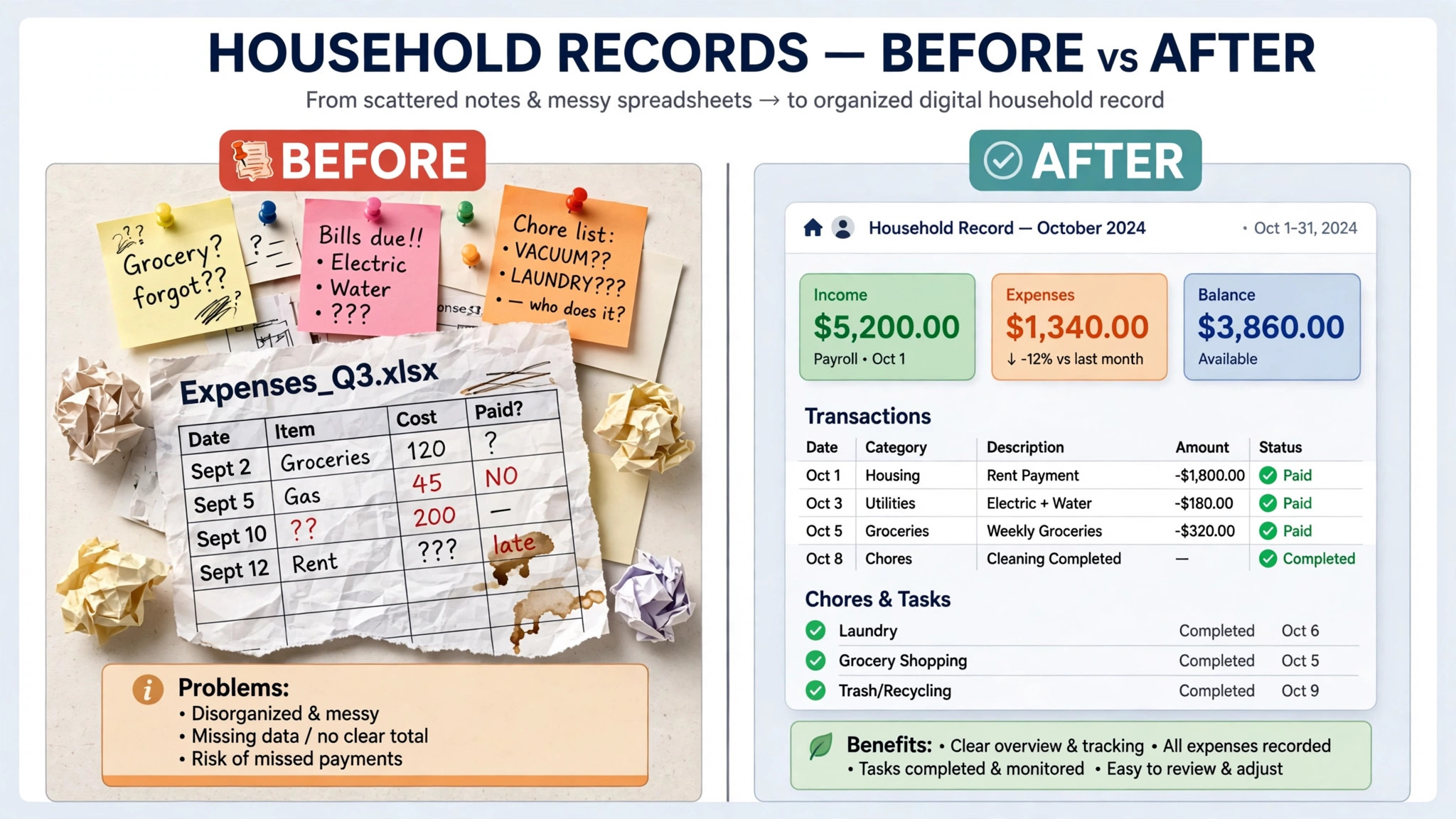
A good advisor CRM does four things well. It holds the household as one record, not as a set of disconnected contacts. It records every interaction in a way a compliance reviewer can follow. It connects to custodians, planning tools, and portfolio reporting where possible. And it turns routine work, such as annual reviews, onboarding, and follow-ups, into repeatable workflows instead of memory tests.
This guide compares fourteen tools, from advisor built CRMs to general sales platforms that advisors adapt. Prices are starting prices where published, and several wealth platforms quote by scope. Check the vendor’s current pricing page before you budget, since per user pricing, implementation fees, and bundled reporting change the total cost.
Why Advisor Client Management Differs From General Sales CRM
An advisor does not sell to a single contact and move on. The client is usually a household, with spouses, dependents, related accounts, and sometimes a business entity or trust. A sales CRM that treats each person as an isolated lead will fragment that household, and the advisor will lose the context that matters before a meeting. Household linking, with a clear view of relationships and accounts, is therefore a core requirement rather than a nice extra.
Compliance is the second difference. Advisory firms must keep records of client communications, reviews, and advice related activity in a form that can be audited. A CRM that only tracks deals will not help when a reviewer asks for the history of a client relationship. Advisor built tools tend to include archiving, workflow controls, and integration with compliance systems, while general tools need add-ons or manual processes to reach the same standard.
The third difference is the surrounding stack. Custodian data feeds, financial planning software, portfolio reporting, and billing systems all touch the client record. A CRM that integrates cleanly with that stack saves hours of retyping. A CRM that does not will become another silo, even if its own interface is attractive.
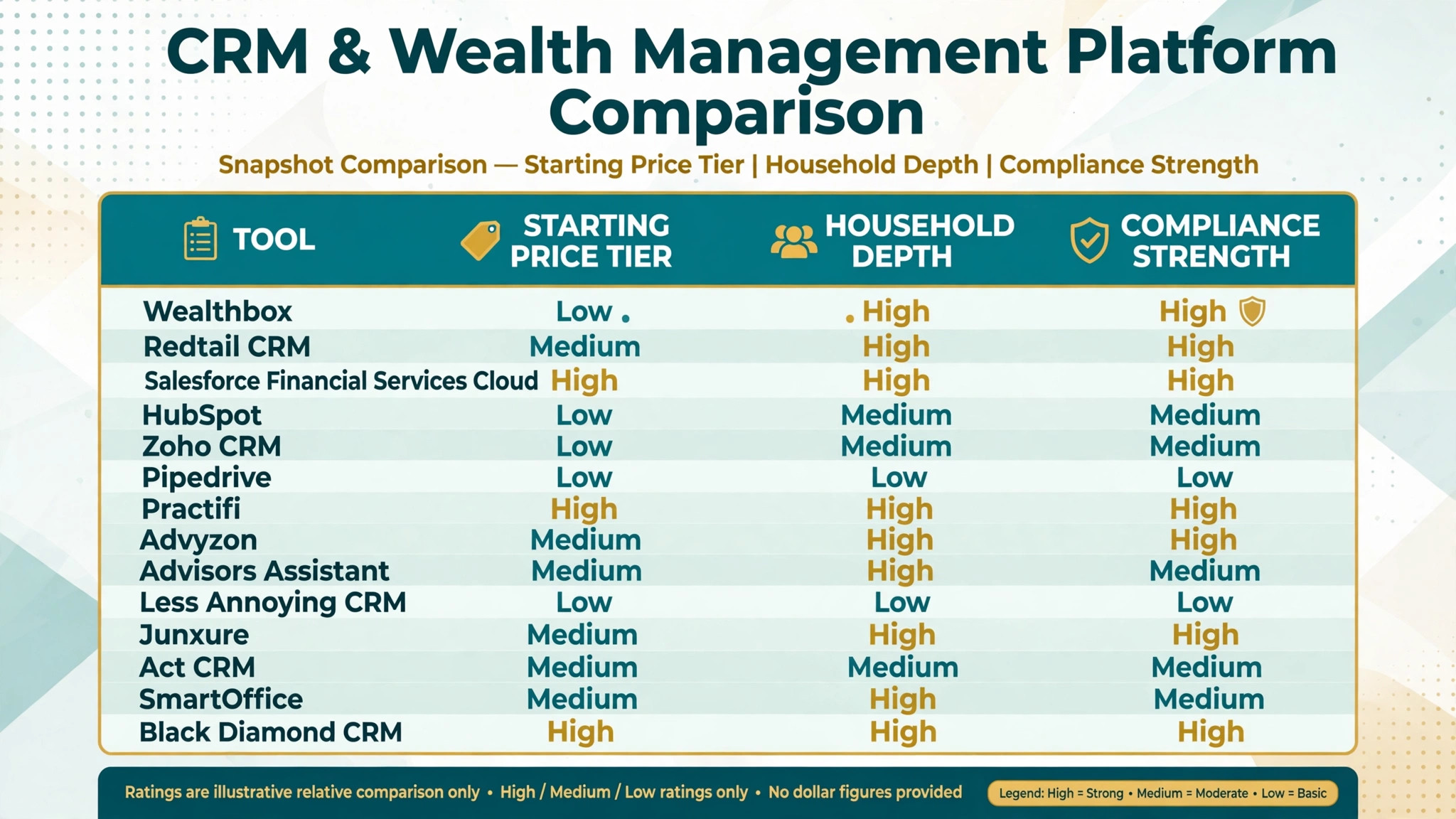
The 14 Tools at a Glance
| Tool | Starting price | Best for | Advisor depth |
|---|---|---|---|
| Wealthbox | 59 dollars per user per month | Small to mid sized RIAs | Strong |
| Redtail CRM | 39 dollars per user per month | Budget conscious advisor firms | Strong |
| Salesforce Financial Services Cloud | 325 dollars per user per month | Large firms with admin resources | Strong |
| HubSpot | Free for up to 2 users | Marketing led practices | Good |
| Zoho CRM | 14 dollars per user per month | Budget flexibility | Good |
| Pipedrive | 14 dollars per seat per month | Sales pipeline focus | Good |
| Practifi | About 120 dollars per user per month | Growing RIAs on Salesforce | Strong |
| Advyzon | Check the vendor pricing page | CRM plus reporting and billing | Strong |
| Advisors Assistant | 52 dollars per month for the first user | Insurance heavy practices | Good |
| Less Annoying CRM | 15 dollars per user per month | Solo advisors wanting simplicity | Good |
| Junxure | 65 dollars per user per month | Workflow led practices | Strong |
| Act CRM | 30 dollars per user per month | Marketing automation focus | Good |
| SmartOffice | Check the vendor pricing page | Insurance focused advisors | Good |
| Black Diamond CRM | About 100 to 175 dollars per user per month bundled | High touch client service | Strong |
Prices come from recent comparisons that checked vendor pricing pages in October 2026. When you compare the best client management software for financial advisors, compare the bundled total as well as the CRM price, since reporting and compliance add-ons change the ranking. Where sources disagree, for example on Practifi tiers, the figure above is marked as about and should be confirmed on the vendor’s current pricing page. Free tiers and trials also vary, so confirm trial length and user limits before a team wide rollout.
Best Pick by Job
| Job type | First pick | Why it fits | Watch out for |
|---|---|---|---|
| Solo advisor | Wealthbox | Fast adoption and household records | Cost rises per user as staff are added |
| Small practice | Redtail CRM | Advisor compliance depth at a lower entry price | Launch tier caps at 5 users |
| Multi-advisor firm | Salesforce Financial Services Cloud | Enterprise depth and custom workflows | Needs an admin or consulting partner |
| Marketing led practice | HubSpot | Lead nurturing and campaign tools | Compliance needs add-ons |
| Reporting led firm | Advyzon | CRM, reporting, and billing in one system | Compare against the whole tech stack cost |
The job type matters more than the headline price when choosing the best client management software for financial advisors. A solo advisor who buys an enterprise platform will spend more time administering the CRM than advising clients. A multi-advisor firm that buys a simple contact database will outgrow it as soon as workflows, permissions, and reporting become serious requirements.
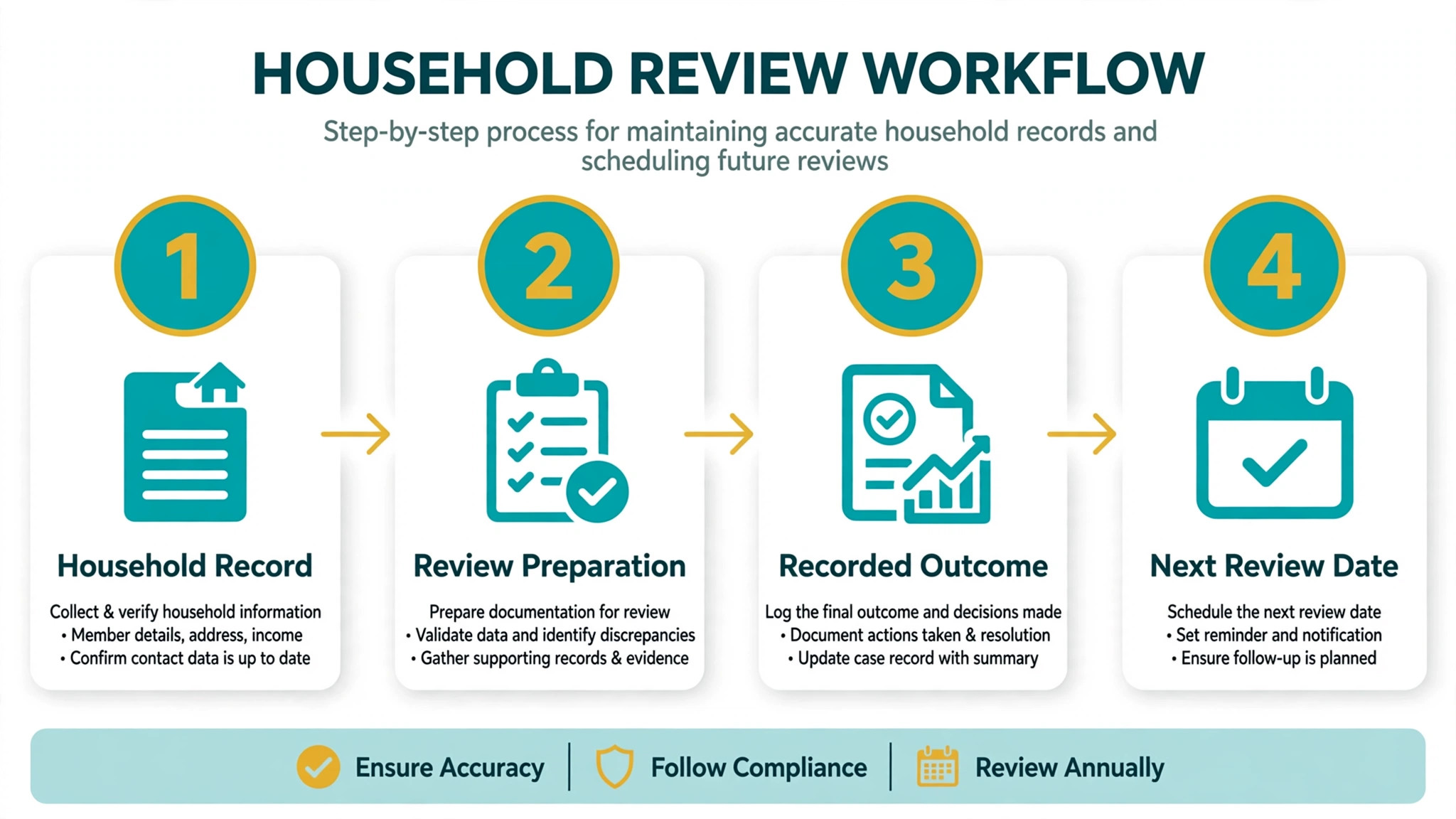
Annual Review Checklist
Use this checklist to test whether the best client management software for financial advisors actually supports the annual review, rather than merely storing a client name.
– Confirm the household record is complete, including spouses, dependents, related accounts, and beneficiaries where relevant. – Review the full interaction history since the last review, including calls, emails, meetings, and documents shared. – Check that portfolio, planning, and billing data in the CRM match the source systems, or note where they differ. – List open tasks, follow-ups, and compliance items from the previous review, and confirm each is closed or carried forward. – Prepare the review agenda from the CRM record, with goals, risk notes, and life changes recorded since the last meeting. – Record the review outcome, decisions, and next steps in the household record on the same day as the meeting. – Set the next review date, assign owners to each follow-up, and trigger reminders that do not depend on memory. – Confirm that the review record, documents, and communications are archived in a form a compliance reviewer can follow.
A CRM that makes this checklist easy will improve review quality. A CRM that makes it hard will push advisors back to spreadsheets, and the household record will slowly become unreliable.
The 14 Tools in Detail
1. Wealthbox
Wealthbox is a client and household CRM built for small to mid sized RIAs, with a modern interface that teams adopt quickly. Basic pricing starts at 59 dollars per user per month, with Pro at 75 dollars and Premier at 99 dollars. The layout feels like a social feed, so an operations assistant can usually find a client’s last touchpoint without training.
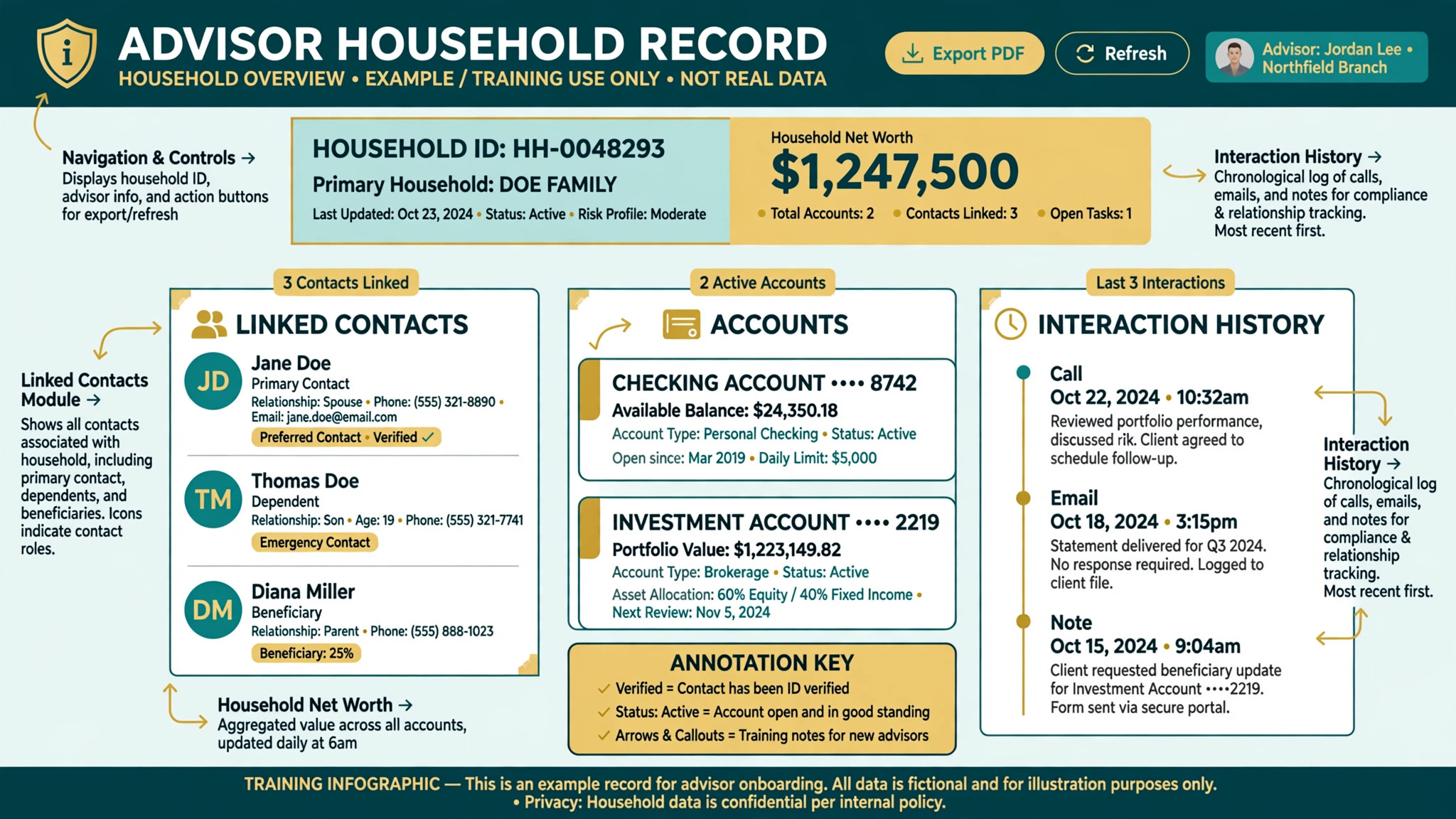
The strength is adoption speed and household structure. A small practice can move from spreadsheets to a structured household record in weeks rather than months. The limit is depth at enterprise scale. Very large firms with complex workflows, heavy customisation, or deep reporting needs may outgrow Wealthbox, or need companion tools for portfolio reporting and billing.
Best for a solo advisor or a small practice that wants an advisor built CRM without an enterprise implementation.
2. Redtail CRM
Redtail CRM is the consensus choice for advisor compliance and client tracking, with more than 100 integrations and Launch pricing at 39 dollars per user per month billed yearly. That Launch tier caps at 5 users, which matters for a growing practice, and higher tiers should be priced before a team expands past that limit.
The strength is compliance depth and integration breadth at a lower entry price than Wealthbox. Advisors on a broker dealer or custodian that supports Redtail get a familiar, well supported workflow. The limit is the user cap on the cheapest tier and an interface that some newer teams find less modern than Wealthbox. Test the daily workflow, not only the price, before choosing on entry cost alone.
Best for a budget conscious small practice that values compliance depth and a large integration ecosystem.
3. Salesforce Financial Services Cloud
Salesforce Financial Services Cloud is the enterprise platform for large firms, starting at 325 dollars per user per month billed annually for Sales Core or Service Core, with higher tiers above that. Implementation costs are commonly reported in the tens of thousands of dollars and above, which is why this tool suits firms with an admin or a consulting partner.
The strength is unmatched customisation, household relationship mapping, and AppExchange depth. A multi-advisor firm can build workflows, permissions, and reporting to match its exact process. The weakness for a small firm is cost and complexity. Without an admin, the platform becomes a burden rather than a benefit, and a two person practice should not buy enterprise depth it cannot maintain.
Best for a multi-advisor firm, a large RIA, or a broker dealer operation with admin resources and complex workflow needs.
4. HubSpot
HubSpot is a sales and marketing CRM that advisors use for prospecting, lead nurturing, and client engagement. The free tier covers up to 2 users, and Starter costs 20 dollars per seat per month. Marketing tools, including newsletters, seminars, and automated campaigns, are the most comprehensive on this list.
The strength is growth. A practice that wins clients through content, events, and referrals gets a pipeline and marketing system in one place. The limit is advisor specificity. Household structures, custodian feeds, and compliance workflows need add-ons or manual work, so HubSpot suits a marketing led practice better than a compliance led firm that needs advisor depth from day one.
Best for a solo advisor or small practice whose main problem is winning new clients, not managing a large existing book.
5. Zoho CRM
Zoho CRM starts at 14 dollars per user per month on its lowest tier, with higher tiers up to 65 dollars per user per month on Ultimate in some comparisons. It offers deep customisation, automation, and a large app ecosystem at a price that undercuts most advisor built tools.
The strength is flexibility per dollar. A practice that is comfortable configuring workflows, fields, and automations can build a respectable advisor CRM without advisor specific pricing. The limit is the work required to get there. Household structures, compliance archiving, and custodian integrations must be built or bought, and that setup time should be counted in the total cost.
Best for a cost conscious practice with someone willing to configure the system, or with a consultant who can build the advisor workflow properly.
6. Pipedrive
Pipedrive starts at 14 dollars per seat per month on Lite billed annually, and is built around a clear sales pipeline. It suits a practice with a dedicated business development person who needs to track prospects, referral partners, and conversion stages without distraction.
The strength is pipeline clarity. Prospects move through visible stages, follow-ups are easy to see, and a small team can adopt it in days. The limit is client management depth. Once a prospect becomes a client, the household, compliance, and review workflows that advisor tools provide are thinner here, so a practice should check whether Pipedrive will remain the system of record after onboarding.
Best for a practice whose main gap is prospect and referral pipeline tracking, paired with a separate system for ongoing client management if needed.
7. Practifi
Practifi is built on Salesforce and designed for growing RIAs that want Salesforce depth with advisor workflows already in place. Pricing is reported at about 120 dollars per user per month in some comparisons and 135 dollars per user per month on a newer tier in others, so check the vendor’s current pricing page for the tier that matches your firm size.
The strength is the middle path between a simple advisor CRM and a raw Salesforce build. Workflows, compliance controls, and referral pipelines are advisor shaped, while the underlying platform still allows deep customisation. The limit is cost and Salesforce complexity. A small practice may find the price and the admin needs higher than a standalone advisor CRM justifies.
Best for a growing RIA that wants Salesforce power without building advisor workflows from scratch.
8. Advyzon
Advyzon bundles CRM with portfolio reporting and billing in one system, so the right comparison is against the whole tech stack rather than against a standalone CRM alone. Pricing is quoted by scope and is not published as a simple starting price, so a firm should request a quote that includes reporting, billing, and user count together.
The strength is consolidation. A firm that currently pays separately for CRM, reporting, and billing can simplify vendors, data flows, and support. The weakness is the comparison trap. A bundled price that looks high against a standalone CRM may be low against three separate subscriptions, and vice versa, so the firm must price the full stack before deciding.
Best for an RIA that wants CRM, reporting, and billing in one system and that will compare the bundled total, not only the CRM line item.
9. Advisors Assistant
Advisors Assistant is priced at 52 dollars per month for the first user on its web hosted Core CRM, with 12 dollars per additional user, making it attractive for insurance heavy practices and small agencies. It covers client records, workflows, and advisor specific data in a system built for insurance and financial practices.
The strength is the pricing shape for a small agency. The first user cost is the main expense, and additional users are inexpensive, which suits a practice with several support staff. The limit is modern workflow depth compared with Wealthbox or Redtail, so a firm should test the daily interface, integrations, and mobile access before choosing on price structure alone.
Best for an insurance heavy practice or small agency that wants advisor specific records at a predictable, staff friendly price.
10. Less Annoying CRM
Less Annoying CRM costs 15 dollars per user per month, with a 30 day trial, and is the simplest tool on this list. It offers a clean contact database, tasks, and pipeline tracking without the complexity of an enterprise platform or the configuration burden of a general CRM.
The strength is simplicity and price. A solo advisor who wants a reliable client database, with no admin overhead, can start in a day. The limit is advisor depth. Household structures, custodian feeds, and compliance workflows are thinner here, so a growing practice should treat Less Annoying CRM as a starting point rather than a long term enterprise system.
Best for a solo advisor who wants the cheapest simple client database that staff will actually use every day.
11. Junxure
Junxure starts at 65 dollars per user per month in recent comparisons, and is known for performance reporting and workflow depth. It suits practices that want structured workflows for onboarding, reviews, and client service, with a clear task trail for each household.
The strength is workflow discipline. A practice can standardise how a new client is onboarded, how a review is prepared, and how follow-ups are tracked, which improves consistency as staff change. The limit is adoption effort. Workflow tools only help if the team follows the workflow, so a firm should test whether advisors actually complete tasks in Junxure or work around it.
Best for a workflow led practice that wants consistent onboarding and review processes across several advisors.
12. Act CRM
Act CRM, sold for advisors as Act4Advisors, starts at 30 dollars per user per month in recent comparisons, with a focus on marketing automation and contact management. It suits a practice that wants to combine client records with campaign follow-up and prospect nurturing.
The strength is the marketing and contact combination at a mid range price. A practice can track clients and run campaigns from one record, without buying a separate marketing platform. The limit is advisor specificity compared with Wealthbox and Redtail. Household depth, compliance archiving, and custodian integration should be tested explicitly before a firm relies on Act as its system of record.
Best for a practice that values marketing automation alongside client records, and that does not need the deepest advisor compliance tooling.
13. SmartOffice
SmartOffice is best known for insurance focused financial advisors, combining client management with insurance workflow needs. Pricing is quoted by scope and is not published as a simple starting price, so check the vendor’s current pricing page and request a quote for your user count and module needs.
The strength is the insurance fit. A practice with a large insurance book gets workflows and data structures shaped for that work, rather than adapting a pure investment CRM. The limit is breadth outside insurance. An investment led RIA should test portfolio, planning, and reporting integrations carefully, since those are not SmartOffice’s primary strength.
Best for an insurance focused advisor or small agency whose book is dominated by insurance clients and related workflows.
14. Black Diamond CRM
Black Diamond CRM is part of the SS&C Advent platform, combining client reporting with CRM workflows for high touch client service. Pricing is reported as custom, bundled at about 100 to 175 dollars per user per month, so a firm should compare it against reporting and CRM costs together rather than against a standalone CRM price alone.
The strength is the reporting and service combination. A firm that prizes polished client reporting and high touch service gets a CRM that sits close to the reporting workflow. The limit is the bundled scope. A small practice that only needs a CRM will pay for reporting depth it may not use, while a larger firm may find the bundle efficient.
Best for a firm that wants high touch reporting and CRM in one platform, and that will price the bundle against its full reporting stack.
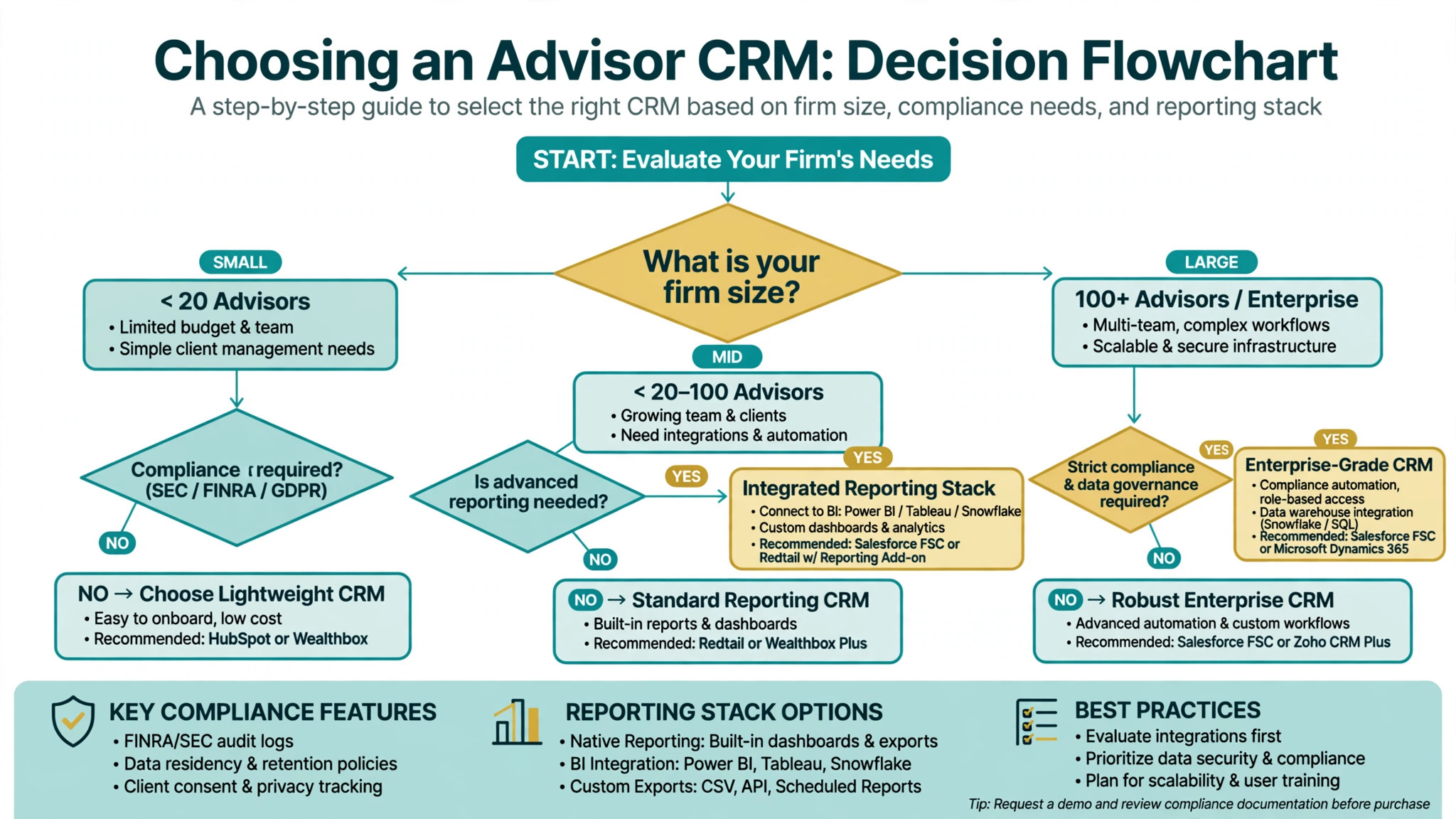
How to Choose the Best Client Management Software for Financial Advisors
Start with the household test for the best client management software for financial advisors. Take five real households, including one complex household with related accounts and a business entity, and enter them in the trial. Then ask a colleague to find the full household view, the last interaction, and the next review date without help. If that test fails, the CRM will fail in a real client meeting.
Next, test compliance in a realistic way. Ask the vendor to show how communications, review records, and workflow approvals are archived and retrieved. Ask what happens when a staff member leaves, and how permissions change. A CRM that cannot answer those questions clearly will create risk as the firm grows.
Then price the whole stack. Add CRM seats, reporting, planning, custodian feeds, and any compliance add-ons, and compare that total across shortlisted tools. A cheap CRM with expensive add-ons is not cheap, and a bundled platform that looks expensive may be cheaper than three separate subscriptions.
Finally, test adoption with the people who will use it daily, not only with the owner. Give the trial to an operations assistant and to an advisor for two weeks of real work. Watch whether tasks are completed in the CRM, whether notes are entered on the same day, and whether anyone reverts to a spreadsheet. Adoption, more than features, decides whether a CRM becomes the system of record.
Common Mistakes When Buying Advisor CRM Software
The first mistake is buying for prospecting when the real problem is client retention. A sales pipeline tool will not fix a messy household record, missed reviews, or poor follow-up. Diagnose the real gap first, then choose the tool that fixes that gap.
The second mistake is underestimating implementation. Data migration, household cleanup, workflow setup, and staff training take time, especially on an enterprise platform. A firm that budgets only for the subscription will be surprised by the first three months of effort, even on a simple tool.
The third mistake is ignoring compliance until after rollout. Archiving, permissions, and audit trails should be tested before the firm depends on the CRM for client records. Retrofitting compliance onto a system that was bought for marketing is expensive and often incomplete.
The fourth mistake is buying seats for everyone before proving adoption. Start with the advisors and operations staff who will use the CRM daily, prove the household and review workflows, and then expand. A firm wide rollout of an unproven CRM creates resistance that is hard to reverse.
The fifth mistake is treating the CRM as a one time purchase. Client data, workflows, and integrations need ongoing ownership. Assign someone to own the CRM, clean the data, update workflows, and review integrations quarterly, or the system will slowly decay back into spreadsheets.
Frequently Asked Questions
How much does client management software for financial advisors cost?
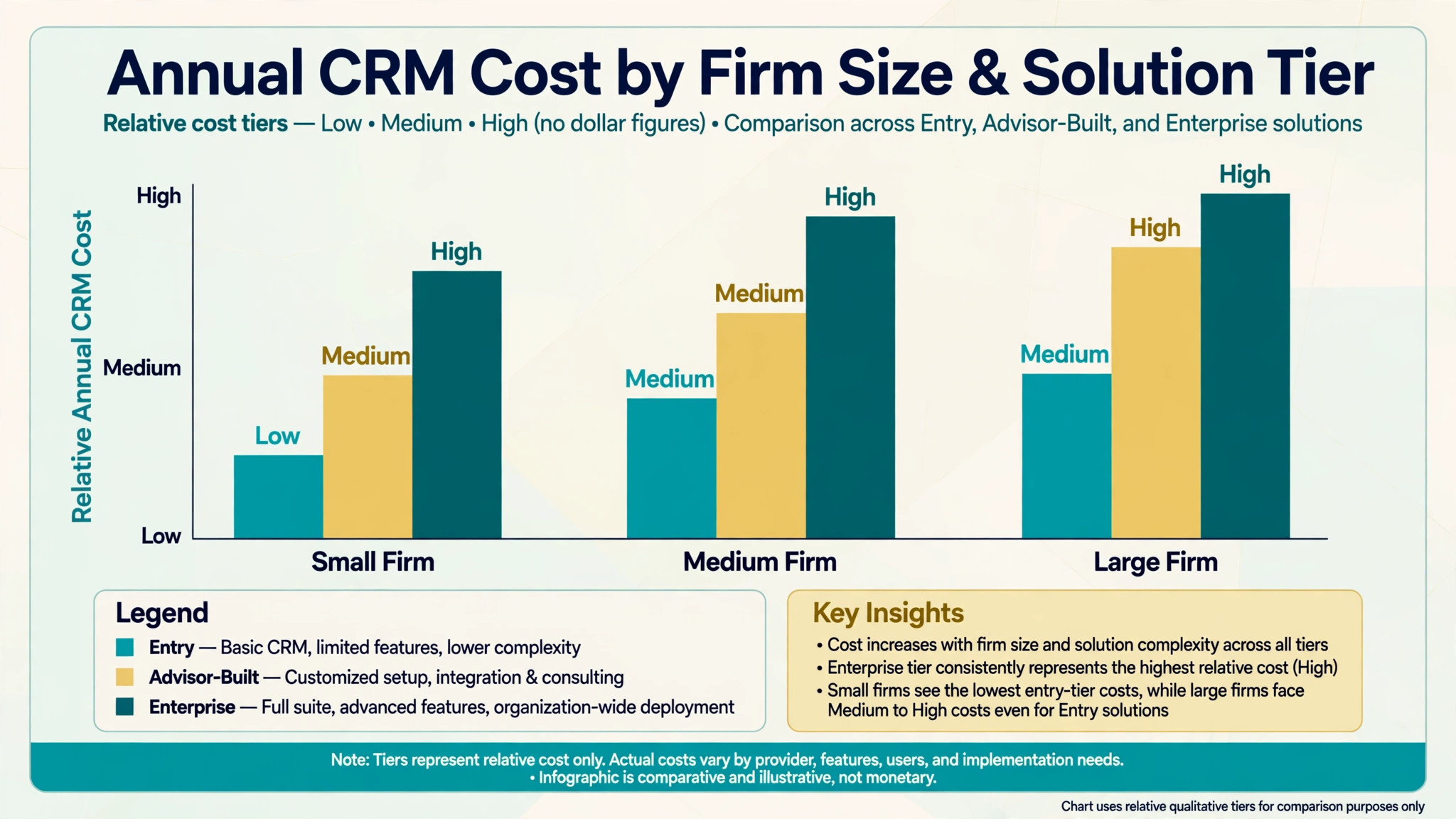
Starting prices in this guide range from free for HubSpot up to 2 users, through 14 to 15 dollars per user per month for general tools, 39 to 99 dollars for advisor built CRMs, and 325 dollars per user per month for Salesforce Financial Services Cloud, with bundled wealth platforms quoted by scope. The final cost depends on seats, reporting, planning, and compliance add-ons, so price the full stack before comparing headline rates.
What is the best CRM for a solo financial advisor?
For many solo advisors, Wealthbox is the strongest starting point among the best client management software for financial advisors, because it combines household records, tasks, and a fast interface at 59 dollars per user per month on Basic. A solo advisor on a tight budget may prefer Less Annoying CRM at 15 dollars per user per month, or Redtail Launch at 39 dollars per user per month, depending on whether simplicity or advisor compliance depth matters more.
Do financial advisors need a specialised CRM, or will a general CRM work?
A general CRM can work for prospecting and simple contact tracking, but it usually needs configuration or add-ons for household linking, compliance archiving, and custodian integration. A specialised advisor CRM includes those structures from the start. The right choice depends on firm size, compliance requirements, and whether someone is available to configure a general tool properly.
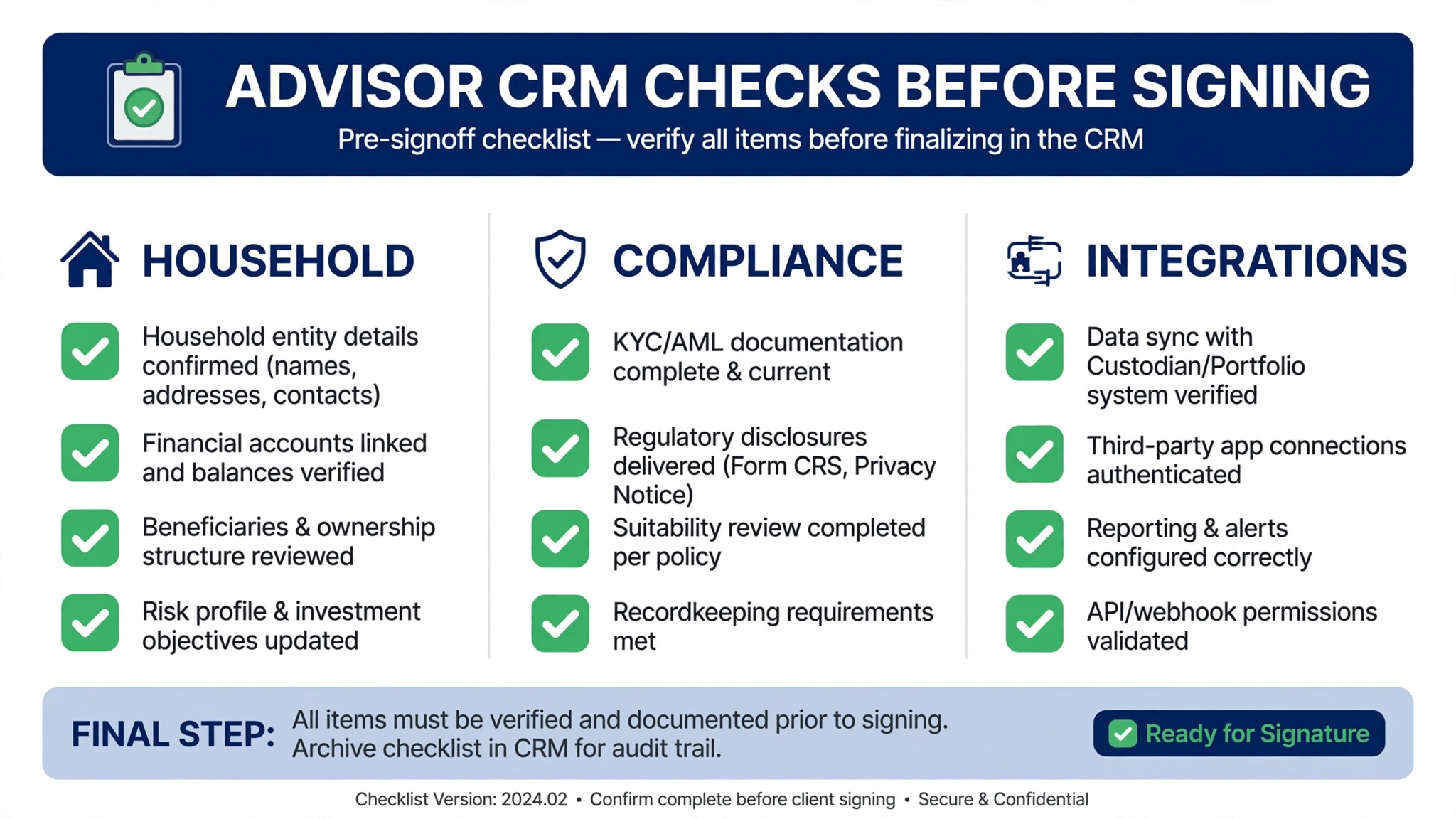
How does a CRM help with compliance for advisors?
A good advisor CRM records client interactions, review outcomes, tasks, and documents in a structured household record that can be retrieved for review. It also supports permissions, workflow approvals, and archiving, depending on the platform and its integrations. Compliance requirements vary by firm type and regulator, so a firm should confirm its specific archiving and recordkeeping needs with its compliance provider before relying on any CRM alone.
Can a CRM integrate with custodian and portfolio reporting tools?
Many advisor CRMs integrate with custodians, planning tools, and portfolio reporting systems, but the depth varies widely. Wealthbox and Redtail offer broad integration ecosystems, while bundled platforms such as Advyzon and Black Diamond include reporting in the same system. Test the specific integrations your firm uses, and confirm whether data flows automatically or requires manual import.
What should I check in a CRM trial for an advisory firm?
Check the household view on a complex household, the annual review workflow, compliance archiving, and the integrations your firm actually uses. Give the trial to operations staff as well as advisors, and run two weeks of real work through it. A trial that only tests contact entry will hide the workflow and compliance gaps that matter most.
How long does it take to switch advisor CRM software?
A solo advisor can switch in two to four weeks if household records are cleaned before migration. A small practice should allow four to eight weeks, including workflow setup and staff training. A multi-advisor firm on an enterprise platform should allow eight to twelve weeks, including data migration, permissions, and parallel running on live client work.
Is HubSpot a good CRM for financial advisors?
HubSpot can be a good choice for a marketing led practice that needs lead nurturing, campaigns, and a clear pipeline, especially at the free tier for up to 2 users. It is less strong as a pure advisor system of record, because household depth and compliance workflows need add-ons. A firm that chooses HubSpot should plan how compliance and household records will be handled alongside it.
What to Do This Week
Do not buy fourteen tools, and do not buy the first tool that offers a demo. Pick three finalists that match your job type. For a solo advisor, that usually means Wealthbox, Redtail, and one budget option. For a small practice, it usually means Wealthbox, Redtail, and Practifi or Advyzon if reporting matters. For a multi-advisor firm, it usually means Salesforce Financial Services Cloud, Practifi, and one advisor built alternative to test adoption against enterprise depth.
Run the household test, the annual review checklist, and the compliance questions on all three finalists for the best client management software for financial advisors. Give each tool to the same operations person for a week of real work, and compare how much retyping, searching, and spreadsheet work remains. Then choose the tool that staff actually use, that compliance can audit, and that the firm can afford at its real headcount. That tool, not the longest feature list, is the right client management system for the firm.
More Reading on Stratilyze
– Best CRM for Wedding Vendors Small Business – Best CRM for Recruitment Agencies Small Business – Best CRM for Franchise Owners Small Business – Best CRM for Ecommerce Brands Small Business – Best Invoicing Software for Consultants – How to Set Up a Client Feedback Loop Small Business