

For most small septic companies, Bella FSM is the strongest starting point among the best field service software for septic companies, because it combines recurring pump out reminders, tank records, routing, and on site payments at a published starting price of 35 dollars per month. That verdict holds for a pump out led business with a small crew. It does not hold for every septic company, which is why this guide compares ten tools rather than naming one winner and stopping there.
A septic business is not a generic field service business. The work repeats on a cycle, the tank location matters for years, the disposal paperwork matters for compliance, and rural routes punish bad scheduling harder than city routes do. A tool that only books appointments will not remind a homeowner at the right interval, will not keep a usable tank history, and will not help a driver find a lid that was buried three years ago.
Prices below come from a recent comparison that pulled pricing from vendor sites, checked in October 2026. Several prices are estimates where vendors do not publish a simple rate, and those are marked as approximate. Check the vendor’s current pricing page before you budget, since seat counts, add-ons, and billing terms change the monthly total.
Why Septic Work Needs Its Own Software Logic
Septic service runs on repeat cycles. The United States Environmental Protection Agency notes that more than one in five American households rely on a septic system, and routine pumping and inspection are the main defence against a costly system failure. That means a large share of revenue is not new sales. It is reminders sent at the right time, routes grouped by area, and customers who rebook because the last visit was documented well.
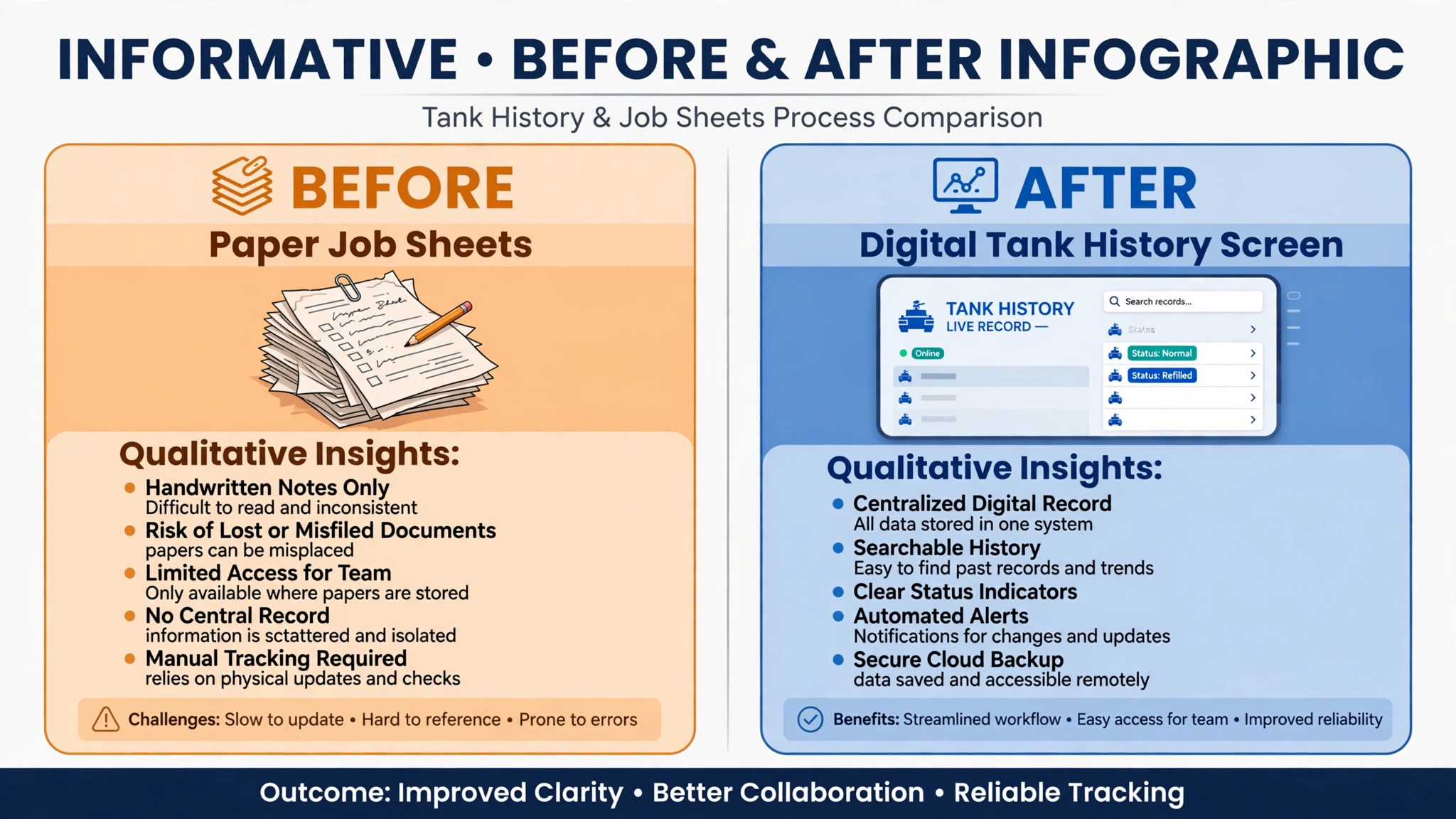
Tank records are the second difference. A good record includes tank size and material, lid location and depth, baffle and filter condition, drainfield notes, and any access problems the next technician will face. Without that record, every visit starts from scratch, and the technician spends paid time searching for a lid or guessing at the last pump date. With it, a new hire can work a route that an experienced technician built.
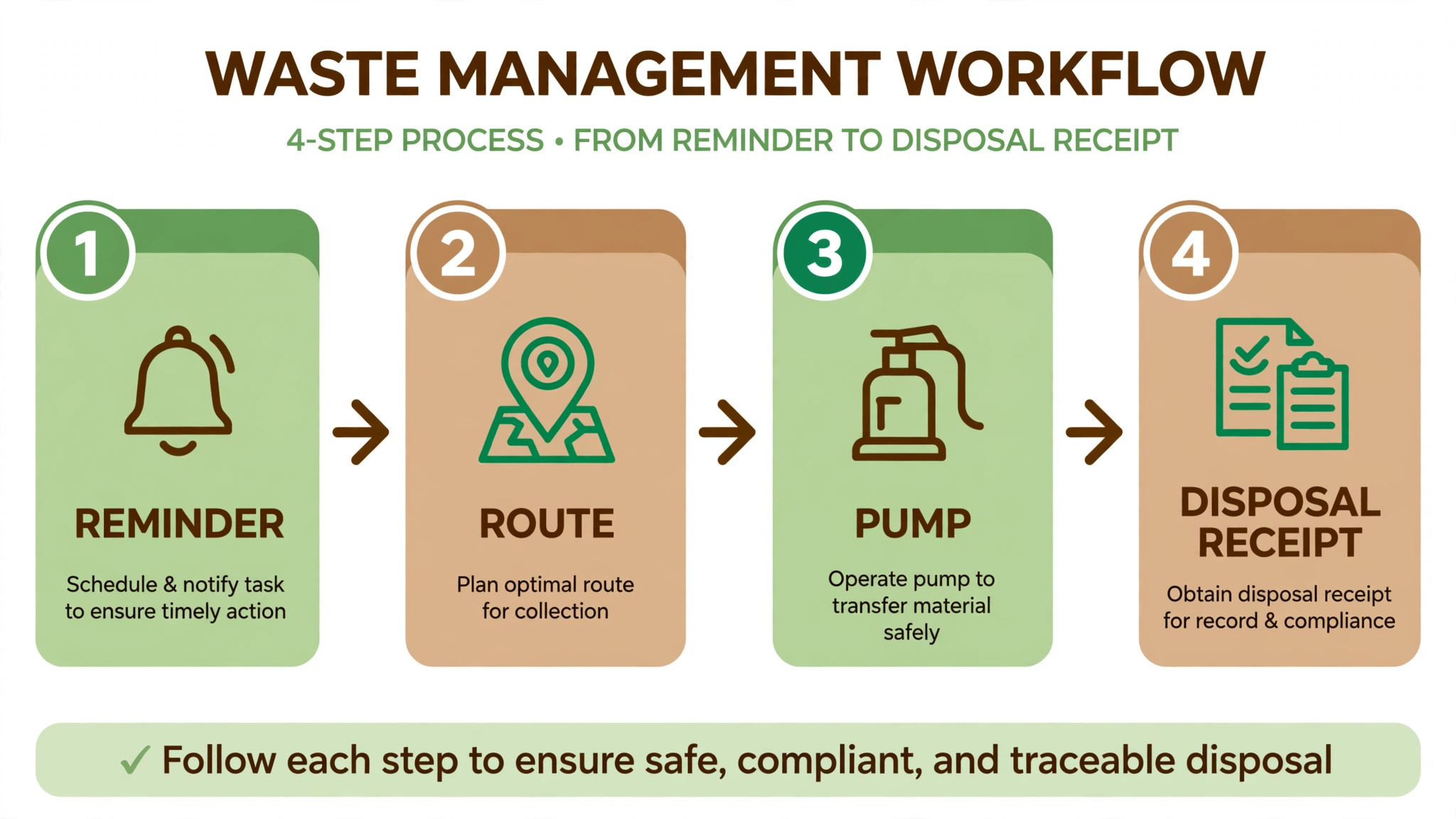
Routing and disposal complete the picture. Rural routes cover long distances, so grouping jobs by area and by disposal site matters for fuel and time. Liquid waste manifests and disposal records matter for compliance, especially where a municipality requires formal documentation. A general scheduling tool can book a job. It rarely handles all three layers together.
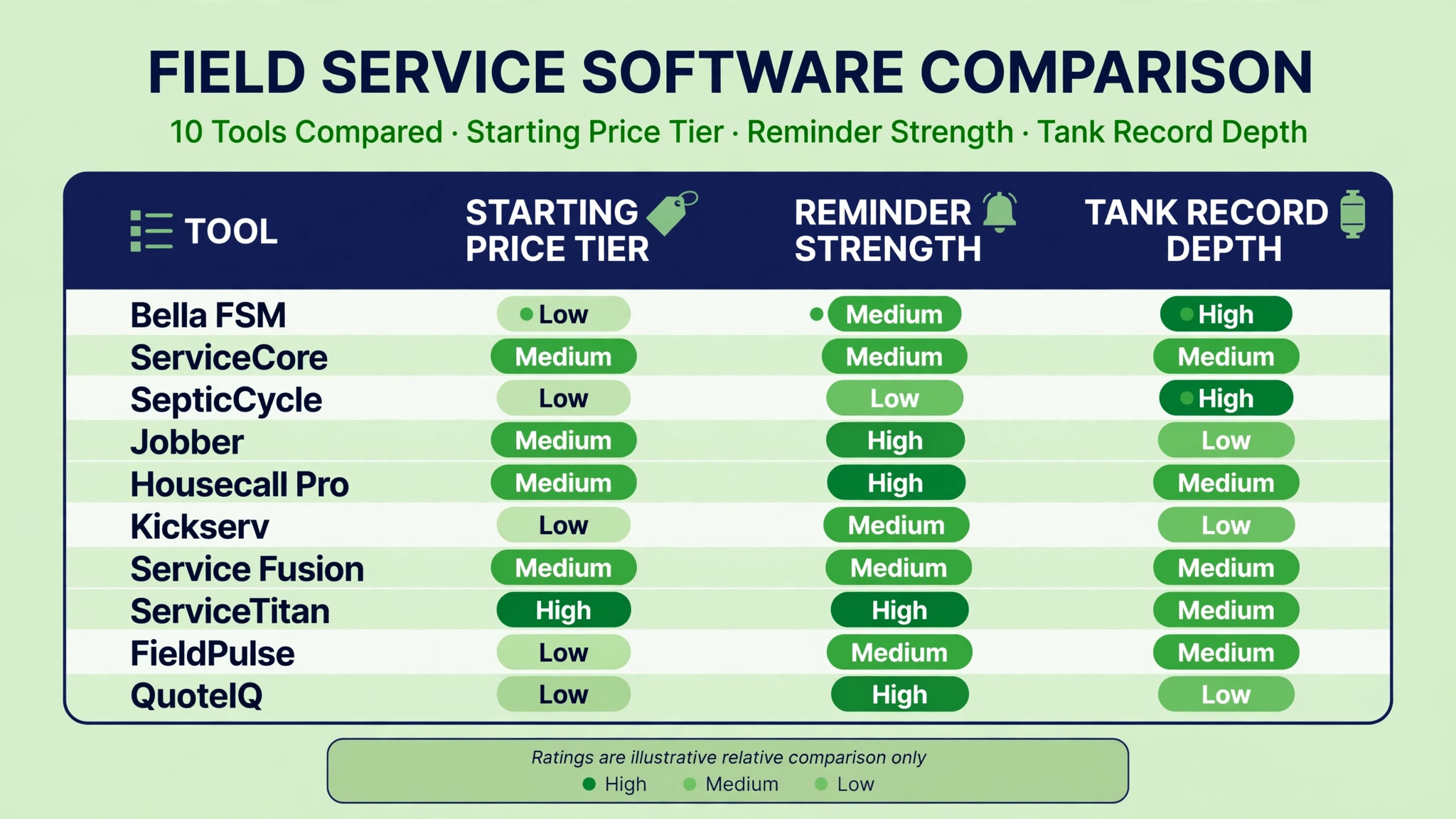
The 10 Tools at a Glance
| Tool | Starting price | Best for | Septic depth |
|---|---|---|---|
| Bella FSM | 35 dollars per month | Small septic companies | Strong |
| ServiceCore | About 200 dollars per month | Liquid waste specialists | Strong |
| SepticCycle | 149 dollars per month | Recurring septic routes | Strong |
| Jobber | 29 dollars per month | Solo operators and small crews | Good |
| Housecall Pro | 59 dollars per month | Growing service crews | Good |
| Kickserv | 60 dollars per month | Simple job and payment flow | Good |
| Service Fusion | 208 dollars per month | Larger service operations | Good |
| ServiceTitan | About 245 dollars per technician per month | Large fleets with a dispatch office | Good |
| FieldPulse | About 99 dollars per month | Small to mid sized field teams | Good |
| QuoteIQ | 29.99 dollars per month | Tiered estimates and job costing | Good |
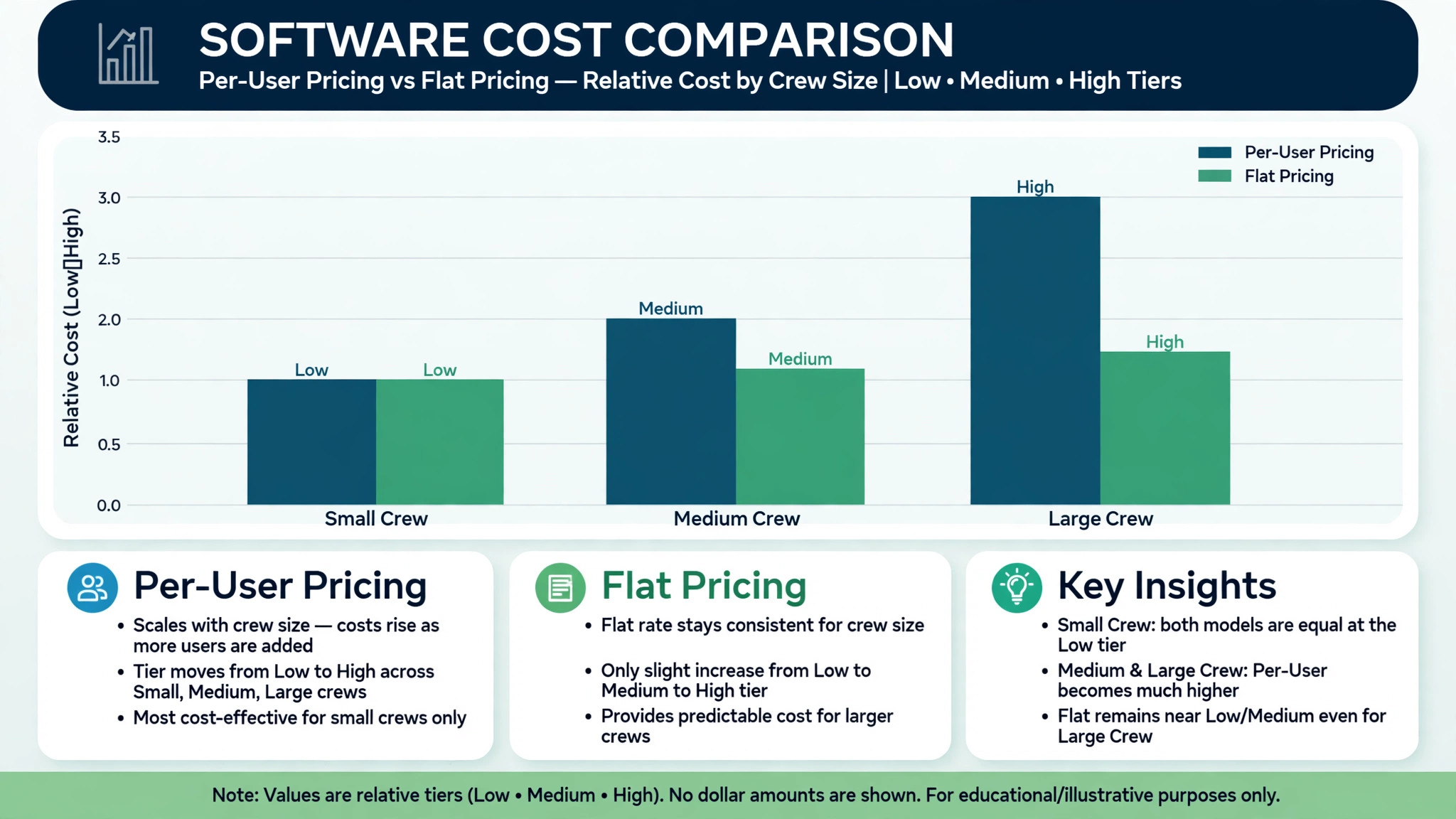
Prices are monthly starting prices where published, with approximate figures marked as about. A five person crew will not pay the starting price on a per user plan, so model the cost at your real headcount, including office staff who need access but do not go on site. That crew level comparison is where the best field service software for septic companies shows its real price, because a low solo rate can double once the office and a second truck are added. Trial lengths also vary, from 14 days on several tools to 90 days on SepticCycle, which matters when you want to test a full reminder cycle.
Best Pick by Job
| Job type | First pick | Why it fits | Watch out for |
|---|---|---|---|
| Pump outs only | Bella FSM | Reminders, routing, and payments at a low starting price | Less depth on formal manifests |
| Installs plus service | ServiceCore | Liquid waste and install workflow in one specialist system | Higher starting price |
| Rural routes | SepticCycle | Recurring route planning for dispersed customers | Smaller ecosystem than general tools |
| Solo operator | Jobber | Low starting price and simple scheduling | Septic specific records need setup |
| Large fleet | ServiceTitan | Dispatch office depth and reporting | High per technician cost |
The job type that dominates your week should decide the shortlist for the best field service software for septic companies. A pump out company that buys a large fleet platform pays for dispatch depth it will rarely use. An install led company that buys a simple scheduling tool will still need a separate way to track permits, inspections, and system records.
Tank Location and Permit Checklist
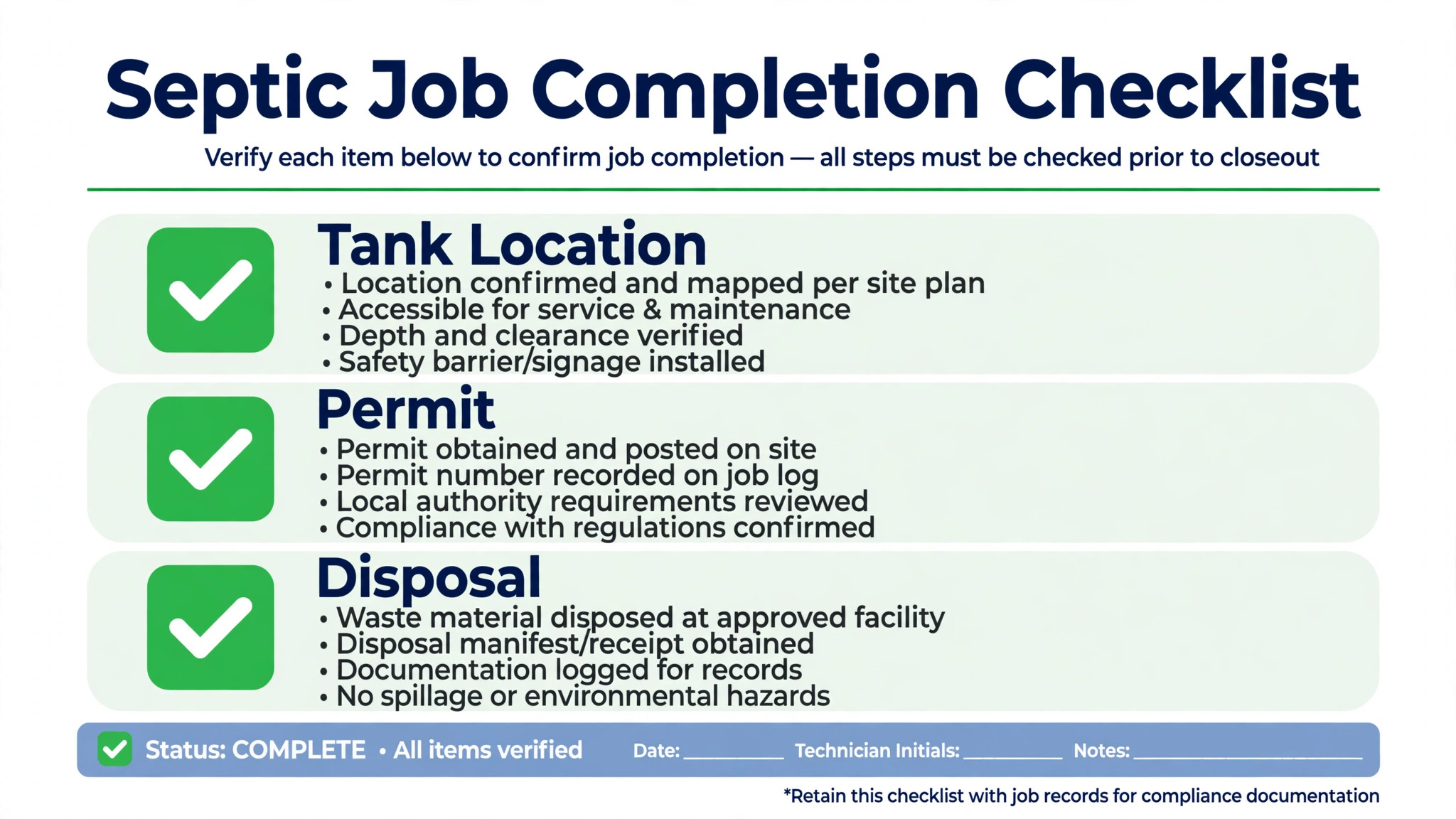
Use this checklist before a job is marked complete. It turns a single visit into a record the next technician can trust.
– Record the tank location with a clear description, a photo, and a marker note the next crew can follow. – Note lid depth, lid material, and any access problem, including driveways, landscaping, or locked gates. – Record tank size, material, and compartment details, plus baffle and effluent filter condition. – Note drainfield location and any signs of surfacing, odour, or slow drainage observed on site. – Record gallons pumped, disposal site, and any manifest or receipt number the jurisdiction requires. – Check permit and inspection requirements for the work type, and attach the correct documents to the job record. – Set the next service date based on tank size, household size, and observed condition, not on a generic interval alone. – Confirm the customer received a clear summary, including what was pumped, what was inspected, and what needs attention next.
Software earns its fee when this checklist becomes the job form, not a separate paper habit. If the technician must write the same notes twice, once in the app and once on paper, the record will eventually be incomplete.
The 10 Tools in Detail
1. Bella FSM
Bella FSM is the small septic company pick in recent comparisons, with a published starting price of 35 dollars per month and 75 dollars per month for five users in the comparison table. It covers routing, tank records, and on site payments, with recurring reminders that suit a pump out business. The free trial runs 14 days.
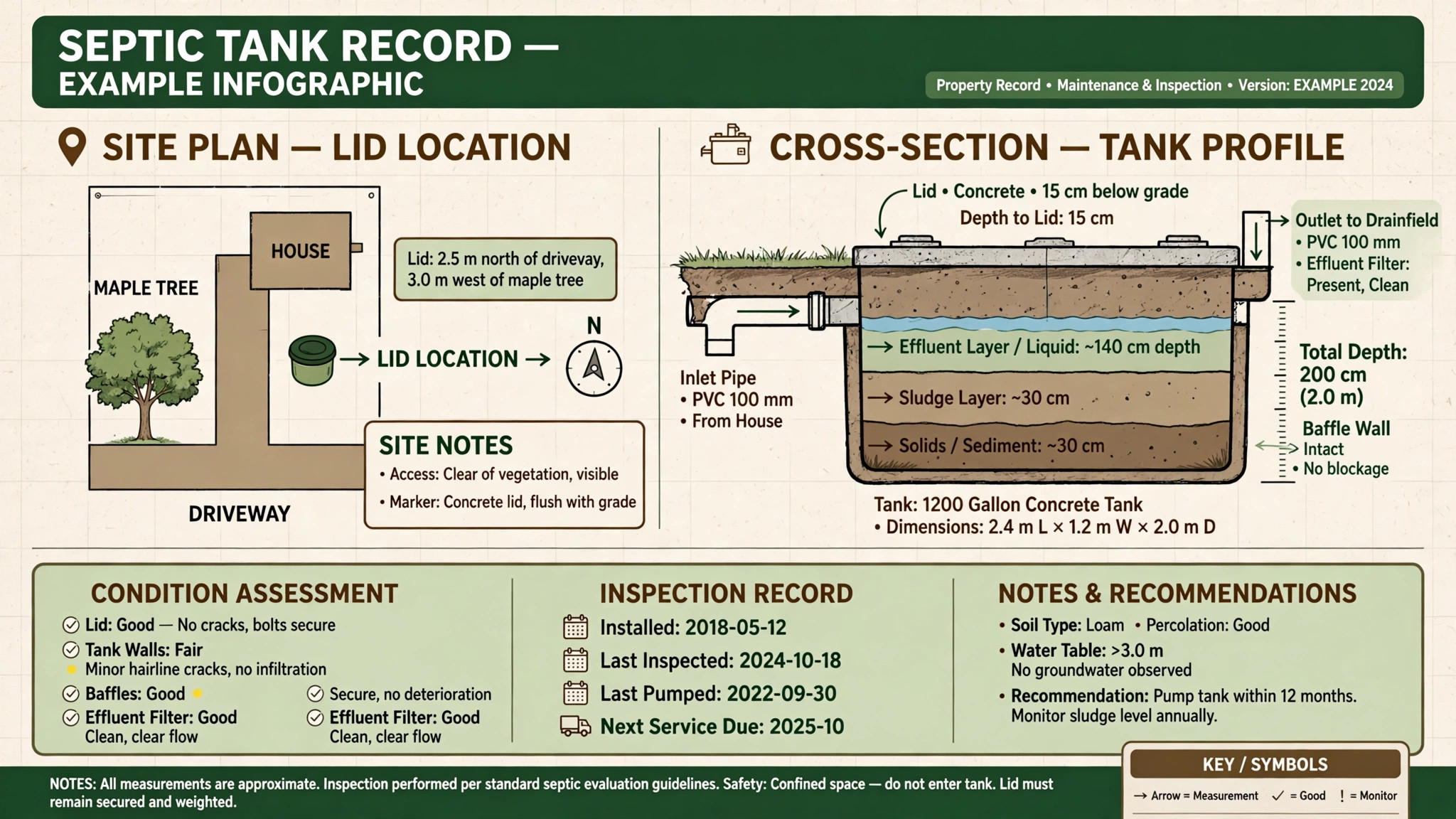
The strength is predictable pricing and septic relevant coverage without paying for seats a small crew does not need. A two truck company can see the monthly cost before booking a demo, which is not true of every tool on this list. The limit is specialist compliance depth. A hauler that needs formal liquid waste manifests with disposal facility and licence fields should compare ServiceCore before deciding on price alone.
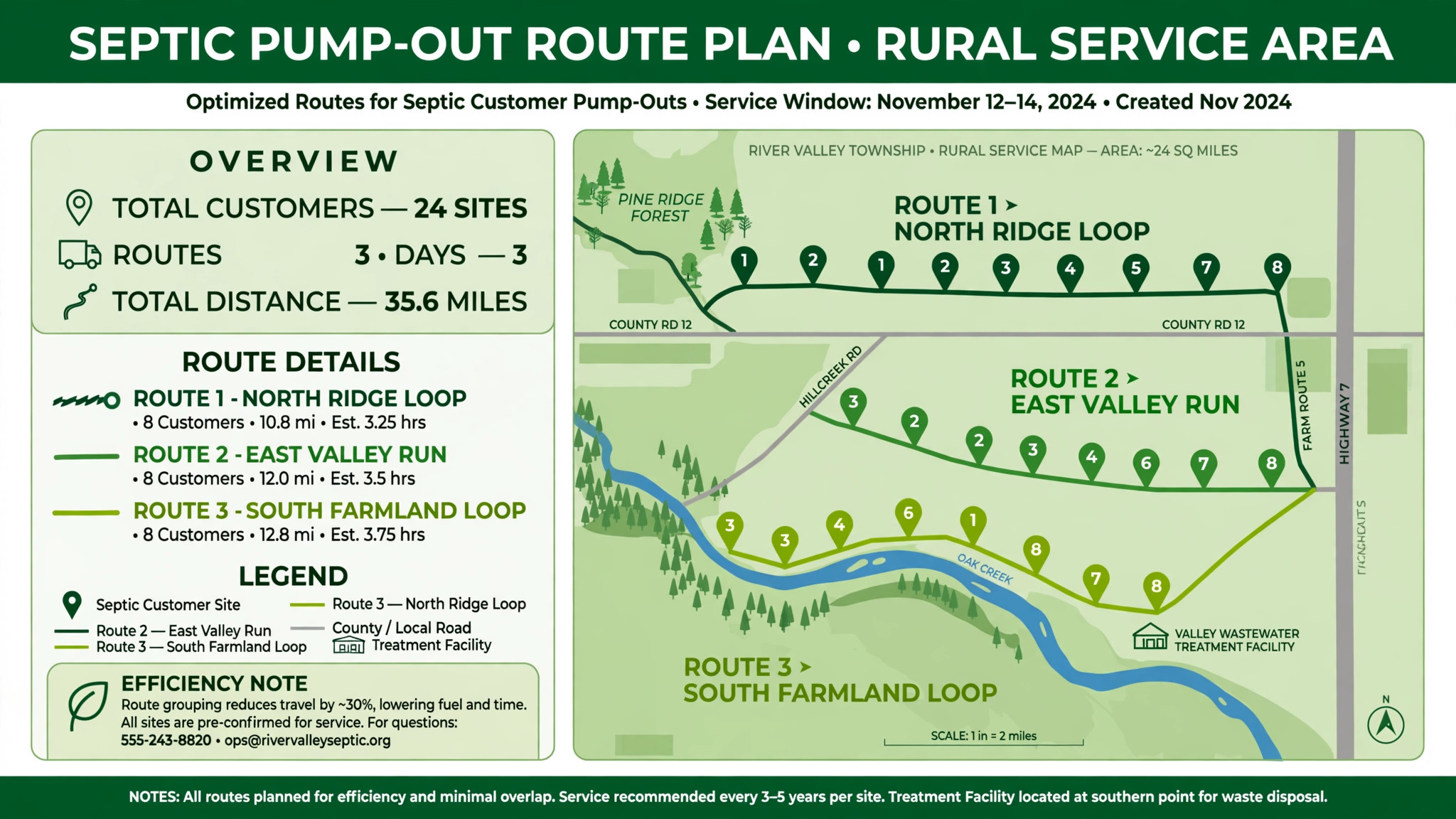
Best for pump out led companies, small crews, and rural operators who need reminders, routing, and payments in one affordable system.
2. ServiceCore
ServiceCore is the septic only specialist for liquid waste businesses, covering septic pumping, grease trap cleaning, portable restroom rental, and roll-off operations. The comparison price is about 200 dollars per month, and the vendor does not offer a free trial, only a demo, so a buyer should use the demo to test real workflows rather than relying on a feature list.
The strength is manifest and compliance depth. For haulers whose municipality demands formal manifests, ServiceCore is built around that paperwork rather than treating it as an add-on. The trade-off is price and transparency. Hidden pricing counted against it in the comparison, even though specialist depth kept it near the top, so a buyer should get a written quote that includes every module the crew will use.
Best for liquid waste specialists, haulers with formal manifest requirements, and companies that run installs plus service from one system.
3. SepticCycle
SepticCycle is priced at 149 dollars per month for its starting plan, with a 90 day trial that stands out on this list. That long trial matters for a septic business, because a two week trial rarely covers a full reminder cycle, a rural route pattern, and a disposal workflow. A 90 day window lets a company test whether customers actually rebook on the reminders the tool sends.
The strength is recurring route focus. A company whose work is mostly repeat pump outs needs a system that groups customers by area, by due date, and by disposal route, and that keeps the cycle moving without constant office chasing. The limit is ecosystem size. A general platform offers more integrations and a larger support community, so a buyer who needs many third party connections should test those links explicitly.
Best for rural routes and repeat pump out businesses that want to test a full service cycle before committing.
4. Jobber
Jobber starts at 29 dollars per month on its solo Core plan, with a 14 day trial, making it the lowest published starting price on this list. It is a general field service platform, widely used by small service businesses, with scheduling, quoting, invoicing, and customer records. The five user cost varies by plan, so a growing crew should price the tier it will actually use rather than the solo rate.
The strength is simplicity and adoption. A solo operator or a small crew can start quickly, send quotes, book jobs, and take payments without a long implementation. The limit is septic specificity. Tank records, recurring pump cycles, and disposal workflows need careful setup, and the system will not guide a new user toward a septic specific record structure on its own.
Best for a solo operator, a new septic business, or a small crew that wants a proven general platform and is willing to set up septic records properly.
5. Housecall Pro
Housecall Pro starts at 59 dollars per month, with 149 dollars per month for five users in the comparison table, and a 14 day trial. It is a general field service platform with scheduling, dispatch, invoicing, and customer communication, used by many home service companies beyond septic.
The strength is the breadth of the service workflow, from booking and reminders to payments and reviews, in a system many technicians already know. The limit, as with other general tools, is septic depth. A septic company should test how tank history, recurring cycles, and disposal notes are stored, and whether the office can find a three year old tank record in seconds during a customer call.
Best for a growing crew that wants a familiar general platform, strong customer communication, and a clear path to more users as the fleet grows.
6. Kickserv
Kickserv starts at 60 dollars per month, with a 30 day trial, and the same monthly figure for five users in the comparison table. That flat pattern suits a small team that wants predictable pricing without a sharp jump as office staff are added. It covers job scheduling, customer records, invoicing, and payments in a straightforward field service workflow.
The strength is simplicity of cost and workflow. A small septic company can run the core job cycle without learning a large enterprise system. The limit is specialist depth and ecosystem. A company with formal manifest needs, complex install tracking, or many integrations should test those requirements before choosing on price and simplicity alone.
Best for a small septic crew that wants a simple, predictable job and payment flow and that does not need heavy specialist compliance tooling.
7. Service Fusion
Service Fusion starts at 208 dollars per month, with a Pro tier at 533 dollars per month billed annually in the comparison notes, and no free trial listed. It is a larger field service platform, suited to operations that need deeper dispatch, inventory, and reporting than a small crew tool offers.
The strength is operational depth for a larger team. Dispatch, job tracking, and reporting can support multiple crews and a busier office. The trade-off is cost and commitment. Without a free trial, a buyer should insist on a thorough demo on real septic jobs, including a recurring route, a tank record lookup, and a disposal workflow, before signing.
Best for a mid sized to large septic operation that needs dispatch depth and that can use the reporting and inventory features to justify the higher monthly cost.
8. ServiceTitan
ServiceTitan is the large fleet platform on this list, at about 245 dollars per technician per month, or about 1225 dollars per month for five technicians in the comparison table, with a demo only trial. It is built for companies with a dedicated dispatch office, strong reporting needs, and a large technician base.
The strength is scale and process control. Dispatch, marketing, reporting, and customer communication can run from one system at a volume that would overwhelm a small crew tool. The weakness for a small septic company is cost and complexity. A two truck business would pay for enterprise depth it cannot staff, and implementation takes real management time.
Best for large septic fleets, multi crew operations, and companies with a dispatch office that will use the reporting and automation daily.
9. FieldPulse
FieldPulse is priced at about 99 dollars per month in the comparison table, with no free trial listed, and a quote required for a five user cost. It is a general field service platform for small to mid sized teams, covering scheduling, job management, invoicing, and customer records.
The strength is a middle path between solo tools and enterprise platforms. A growing septic company can get more structure than a solo plan offers without jumping to enterprise pricing. The limit is the lack of a trial, which makes a thorough demo essential. A buyer should test tank records, recurring reminders, and route grouping on real customer examples during that demo.
Best for a growing septic team that wants more structure than a solo tool, and that will use the demo to prove septic workflows before buying.
10. QuoteIQ
QuoteIQ starts at 29.99 dollars per month, with a 14 day trial, and is built around tiered estimates, satellite property measurement, parts inventory, and per job costing. For septic service, it presents a standard pump out beside an enhanced service and a premium service on one estimate, which can lift the average ticket when the customer sees the value gap clearly.
The strength is the sales and costing workflow. A septic company that wants to present Good, Better, and Best service tiers, track parts, and see margin per job gets those tools in one plan, with plans running up to 699 dollars per month at the top end. The limit is that QuoteIQ is a general contractor CRM adapted to septic, rather than a septic only specialist, so manifest depth and route specific features should be tested against ServiceCore and SepticCycle.
Best for a septic company that wants tiered pricing, job costing, and a strong estimate presentation, especially where inspection and repair upsells matter.
What a Good Septic Reminder System Is Worth
A reminder system is easy to undervalue until it is missing. A septic company without reliable reminders must chase customers by phone, guess at due dates, or wait for a customer to call with a problem. That reactive pattern creates uneven weeks, with too many emergency calls and too few planned routes. A good reminder system smooths the work across the year, because customers are booked when they are due, not when they remember to call.
The value also shows up in route density. When reminders go out by area and by due date together, the office can build a full rural route from customers who are due in the same week, rather than driving across the county for a single job. Fuel, time, and driver fatigue all fall when routes are dense. The customer also benefits, because a planned visit is cheaper to deliver than an emergency visit, and the price can reflect that.
There is a trust effect as well. A homeowner who receives a clear reminder, with the last service date, the tank details, and a simple booking link, is more likely to stay with the same company year after year. A homeowner who receives no reminder may drift to a competitor, or may wait until a backup forces an urgent call. Over five years, that retention difference is worth far more than the monthly software fee. Judged on retention, route density, and office time saved, the best field service software for septic companies is the tool whose reminders actually produce booked routes, not the tool with the most reminder settings on a settings page.
Test that outcome directly. Send reminders to a defined group, measure how many book within two weeks, and measure how many of those bookings form a dense route. If the numbers are weak, the problem may be timing, message clarity, or record accuracy, and each of those can be fixed before the whole customer base is moved onto the system.
How to Choose the Best Field Service Software for Septic Companies
Start with your service mix. Count the share of pump outs, inspections, repairs, and installs in a typical month. A pump out company needs reminders and routing first. An install company needs project tracking, permits, and system records first. A company that does both needs a tool that does not force one workflow to fit the other.
Next, test the tank record. Take five real customer records, including one old record with a hard to find lid, and enter them in the trial. Then ask a colleague who did not enter them to find the lid location, the last pump date, and the next due date in under a minute. If that test fails, the tool will fail on a busy route, no matter how good the scheduling screen looks.
Then price the crew you actually have. Add office staff, part time technicians, and any seasonal help who need access. A per technician price looks different from a per user price once the office is included, and a flat plan looks different once add-ons are added. Get the monthly total in writing for your real team size.
Finally, test the reminder cycle. Send reminders to a small group of real customers, or to test numbers, and watch the rebooking rate and the office workload. A reminder system that creates more phone chasing than it saves has not solved the septic business problem, even if the scheduling screen is attractive.
Common Mistakes When Buying Septic Software
The first mistake is buying a general tool and assuming septic records will sort themselves out. They will not. Tank location, lid depth, baffle condition, and disposal records need a deliberate record structure, and that structure should be set up before the first live route.
The second mistake is choosing on the starting price alone. A 29 dollar solo plan and a 245 dollar per technician enterprise plan are not comparable products. Compare the monthly cost for your real crew, with the modules you will use, over a full year, including any annual billing discount or penalty.
The third mistake is ignoring the disposal workflow. Pumping is only half the job. Disposal site, manifest, and receipt records protect the company when a regulator, a customer, or a buyer asks what happened to the waste. Test that workflow in the trial, not after the first route.
The fourth mistake is running a trial that is too short to test reminders. A 14 day trial can test scheduling and invoicing, but it cannot test a three year pump cycle or a seasonal reminder pattern. Use a longer trial where available, or simulate the cycle with test customers and due dates.
The fifth mistake is forgetting the driver. A technician who must enter notes twice, or who cannot find a tank record on a phone in a rural area with weak signal, will stop entering notes. Test the mobile workflow on a real route, in real conditions, before the whole company depends on it.
Frequently Asked Questions
How much does septic field service software cost?
Starting prices in this guide range from 29 dollars per month for Jobber and 29.99 dollars for QuoteIQ to about 245 dollars per technician per month for ServiceTitan, with several tools in the 35 to 208 dollar range. The final cost depends on user count, modules, and billing terms, so model the price for your real crew before comparing headline rates.
What is the best septic software for a small company?
For most small pump out companies, Bella FSM is the strongest starting point among the best field service software for septic companies, because it combines reminders, tank records, routing, and payments at a published 35 dollar starting price. A solo operator may prefer Jobber for simplicity and low entry cost, while a liquid waste specialist should compare ServiceCore for manifest depth before deciding on price alone.
Do I need septic specific software, or will a general field service tool work?
A general tool can work if the septic record structure is set up deliberately, with tank location, lid depth, condition notes, and disposal records as required fields. A septic specific tool reduces that setup work and usually handles reminders, routes, and manifests more naturally. The right choice depends on how much setup time the owner is willing to invest and how formal the local compliance requirements are.
How do recurring pump out reminders work?
The system stores the last service date, tank size, household size, and observed condition, then calculates a next due date and sends a reminder by text or email when that date approaches. The customer can book from the reminder, and the office can group due customers by route. Test the reminder timing and message on real customers, since a reminder that arrives too early or too late will be ignored.
Can septic software track tank location and history?
Yes, if the record is set up correctly. A good tank record includes location description, photos, lid depth and material, tank size, baffle and filter condition, drainfield notes, and disposal history. The test is whether a new technician can find that record in under a minute during a customer call, and whether the record survives staff changes without becoming a paper file in a truck.
What about permits and inspections for septic work?
Permit and inspection requirements vary by jurisdiction and by work type, from routine pumping to new installs and repairs. Software helps by attaching documents to the job record, tracking inspection stages, and keeping a clear history for the customer and the authority. Check the vendor’s current guidance for your jurisdiction, and confirm that the documents your authority requires can be stored and retrieved from the job record.
How long does it take to switch septic software?
A small company can switch in two to four weeks if customer records, tank histories, and reminder dates are cleaned before migration. A larger company should allow six to eight weeks, including data migration, route testing, and parallel running on live jobs. The slowest part is usually cleaning old tank records, not learning the new scheduling screen.
Is a free trial long enough to test septic software?
A 14 day trial tests scheduling, invoicing, and mobile use, but it rarely tests a full reminder cycle. SepticCycle offers a 90 day trial, which is better suited to testing repeat bookings and rural routes. Where only a short trial is available, simulate the cycle with test customers, due dates, and route groups, and ask the vendor to show a full cycle in the demo.
Final Call Before You Sign
Do not sign on a demo alone. Shortlist two tools that match your dominant job type, then run both on the same two weeks of real work. Enter five real tank records in each, send reminders to a small test group, run a rural route, and complete a disposal workflow from pump to receipt. Compare the office time, the driver time, and the customer response, not only the monthly price.
If Bella FSM wins that test among the best field service software for septic companies, it will usually win on cost and simplicity for a pump out business. If ServiceCore wins, it will usually win on manifest and install depth. If a general tool wins, it will usually win because your team already knows it and the septic records were set up properly. Any of those outcomes is a good decision, provided the test was real. A software choice made on a feature list, without a route test, is the choice most likely to be replaced within a year.
More Reading on Stratilyze
– Best Field Service Software for Appliance Repair Companies – Best Dispatch Software for Pest Control Companies – Best Booking Software for Outdoor Rental Businesses – Cost of Jobber for Small Business Monthly – Cost of Housecall Pro for Small Business Monthly – How to Choose a Payment Processor for Small Business