

The best AI tools for consultants in 2026 are not the ones with the longest feature lists. They are the ones that cut the hours between a signed engagement and a delivered recommendation, without making the work look generic. A consultant sells judgment, and clients notice quickly when a deck reads like a template, when a proposal promises what the team cannot deliver, or when follow-up falls through the cracks between projects.
This guide tests eleven tools against the four jobs that actually fill a consultant’s week: research and decks, client proposals, time and billing, and CRM and follow-up. Each tool was judged on the same questions. Does it save measurable time on a real task? Does the output need heavy editing before a client sees it? What does it cost once you use it properly, not just on the free tier? And what breaks first when the work gets complicated?
The honest answer is that no single tool covers all four jobs well. The strongest setups pair one research tool, one proposal tool, one billing tool, and one system for tracking clients. That stack costs less than a single enterprise platform, and each piece can be replaced without rebuilding everything else. The picks below are built around that idea: a practical stack, not a trophy cabinet.
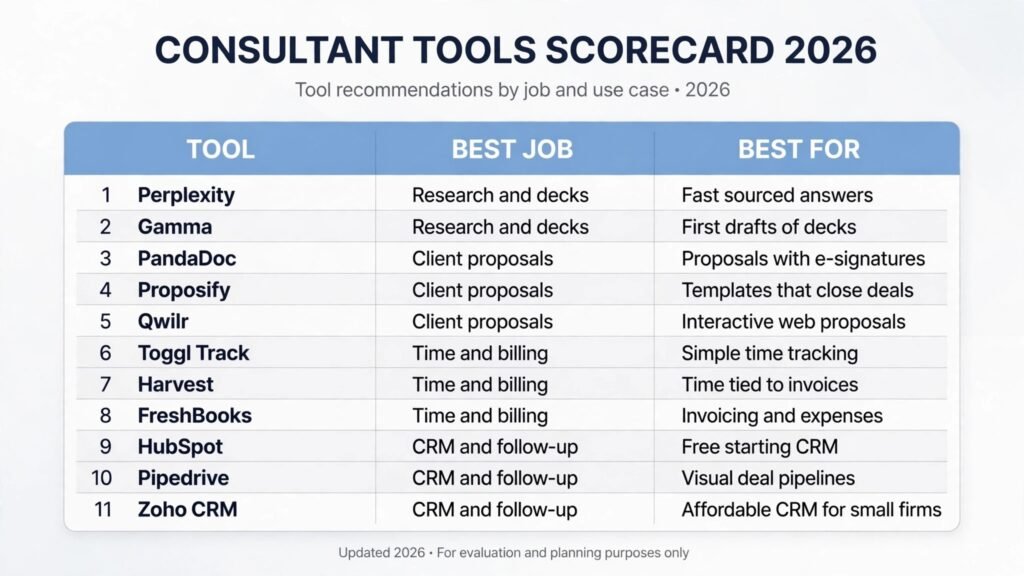
The 11 best AI tools for consultants at a glance
| Tool | Best job | Best for |
|---|---|---|
| Perplexity | Research and decks | Fast, sourced answers to client questions |
| Gamma | Research and decks | First drafts of client decks in minutes |
| PandaDoc | Client proposals | Proposals with e-signatures built in |
| Proposify | Client proposals | Proposal templates that close deals |
| Qwilr | Client proposals | Interactive, web based proposals |
| Toggl Track | Time and billing | Simple, reliable time tracking |
| Harvest | Time and billing | Time tracking tied to invoices |
| FreshBooks | Time and billing | Invoicing and expenses for solo consultants |
| HubSpot | CRM and follow-up | Free starting CRM with room to grow |
| Pipedrive | CRM and follow-up | Visual pipelines for active deals |
| Zoho CRM | CRM and follow-up | Affordable CRM for small firms |
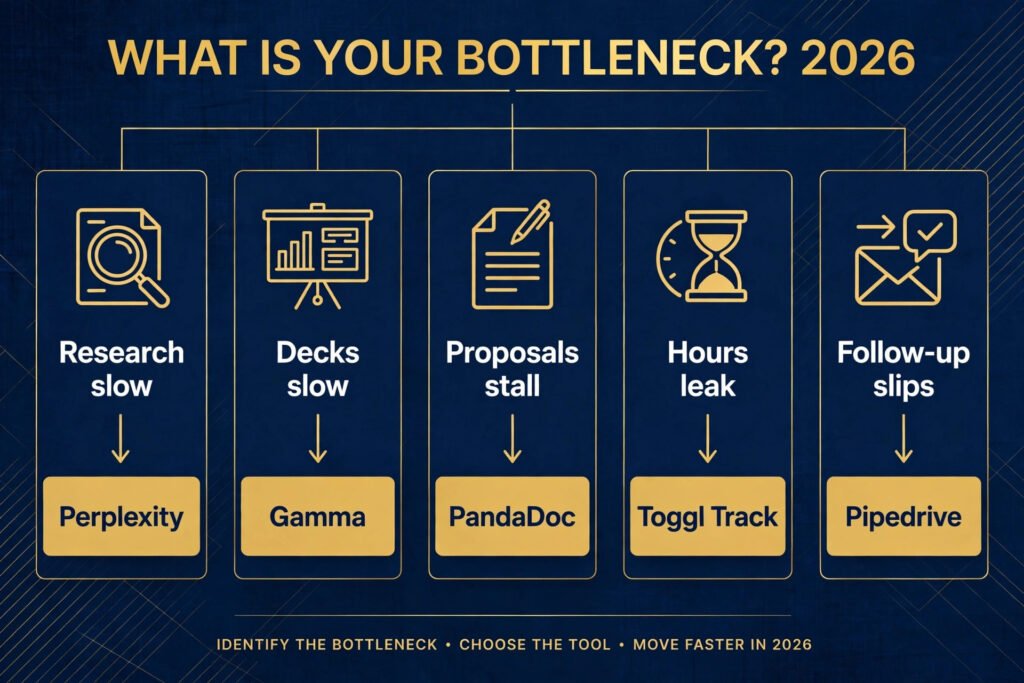
Start here: the best pick by job
| Your bottleneck | Start with | Why |
|---|---|---|
| Research takes too long | Perplexity | Cited answers you can verify before they reach a deck |
| Decks eat your evenings | Gamma | A structured first draft you can reshape, not a blank page |
| Proposals stall in inboxes | PandaDoc | Signatures, tracking, and payment in one document |
| Hours leak between projects | Toggl Track | One click tracking that survives a busy week |
| Invoices go out late | Harvest | Time turns into an invoice without retyping |
| Follow-up depends on memory | Pipedrive | Every deal visible in one pipeline view |
Research and decks
1. Perplexity
Perplexity answers research questions with sources attached, which is the feature that matters most for consulting work. Ask it to compare two vendors, summarise a regulation, or find recent market figures, and it returns a written answer plus the pages it drew on. That citation trail is what separates it from a chatbot answer you cannot defend in front of a client.
It works best as a first pass. Use it to map a topic, find the key sources, and spot the numbers worth checking. Then open the sources yourself before any figure goes into a deck. Perplexity sometimes cites a secondary summary rather than the original report, and a client who checks will notice.
Pricing: Free tier available for basic searches; paid plans by seat, check checkout for current rates.
Best for: Consultants who answer varied client questions every week and need sources, not just text.
Watch out for: Figures still need verification against the original source before they go to a client.
Try it at: Perplexity

2. Gamma
Gamma turns a short brief into a full slide deck in minutes. Give it a topic, an outline, or a pasted document, and it produces structured slides with headings, bullet points, and suggested visuals. For a consultant, the value is the starting structure: the argument order, the section breaks, and the slide count are usually sensible, which removes the hardest part of deck building.
The output still needs a human pass. Gamma decks tend toward even, safe phrasing, and the example numbers it invents must be replaced with your client’s real data. Treat it as a draft machine, not a finished product, and budget an hour of editing for a twenty slide deck.
Pricing: Free tier with limited credits; paid plans by seat and usage, check checkout for current rates.
Best for: Consultants who build many decks and want a solid first draft fast.
Watch out for: Replace every example figure with real client data before delivery.
Try it at: Gamma
Client proposals
3. PandaDoc
PandaDoc covers the whole proposal workflow: drafting from templates, sending for signature, tracking when a client opens the document, and collecting payment. That tracking is the practical advantage. Knowing a proposal was opened three times this week tells you more than silence does, and it tells you when to follow up.
Its template library covers common consulting engagements, from audits to retainers, and the editor is strong enough that most proposals need no outside design help. The pricing is by seat, so a solo consultant pays less than a firm, but costs rise as the team grows.
Pricing: Free trial available; paid plans by seat, check checkout for current rates.
Best for: Consultants who send proposals weekly and want signatures and payment in the same flow.
Watch out for: Seat based pricing adds up quickly for larger teams.
Try it at: PandaDoc

4. Proposify
Proposify is built around proposal templates that are designed to close. It tracks views, lets clients comment on specific sections, and shows which parts of a proposal get read and which get skipped. Over a few months, that data teaches you which sections to shorten and which objections to answer earlier.
The tool suits consultants who send similar proposals repeatedly, such as a fixed scope audit or a standard workshop package. Build the template once, customise the scope and price per client, and the turnaround drops from days to hours. It is less suited to fully bespoke proposals where every engagement looks different.
Pricing: Free trial available; paid plans by seat, check checkout for current rates.
Best for: Consultants with repeatable offers who want data on what clients actually read.
Watch out for: Fully bespoke proposals still need heavy custom work outside the template.
Try it at: Proposify
5. Qwilr
Qwilr turns proposals into web pages rather than PDF attachments. Clients open a link, read an interactive proposal with embedded video or pricing options, and accept online. That format suits modern clients, especially smaller firms and startups, who read on phones and expect a link, not a file.
The interactive format also supports optional add-ons a client can tick, which makes upselling feel natural rather than pushy. The trade-off is control: a web page can render differently across devices, and some traditional clients still prefer a PDF they can file. Send both formats for formal procurement processes.
Pricing: Free trial available; paid plans by seat, check checkout for current rates.
Best for: Consultants pitching to modern, mobile first clients who prefer links over attachments.
Watch out for: Traditional procurement teams may still ask for a PDF version.
Try it at: Qwilr
Time and billing
6. Toggl Track
Toggl Track does one job extremely well: it records where your hours go. One click starts a timer, one click stops it, and the weekly report shows exactly how each engagement consumed your time. For consultants who bill hourly or want to know which clients are actually profitable, that record is the foundation of every pricing decision.
Its strength is simplicity. There is almost no setup, the mobile app works well, and the reports are clear enough to share with a client if a bill is questioned. It does not invoice on its own, so pair it with an invoicing tool or export the data to one. Consultants who only need time tracking, and nothing else, will not find a cleaner option.
Pricing: Free tier for small teams; paid plans by seat, check checkout for current rates.
Best for: Solo consultants and small firms who need honest time data above all.
Watch out for: No built-in invoicing, so you need a second tool to bill from the tracked hours.
Try it at: Toggl Track
7. Harvest
Harvest connects time tracking directly to invoicing, which removes the most error prone step in consulting admin. Track hours against a project, and the invoice pulls those hours in automatically, with the right rates applied. Expenses can be attached the same way, so a client bill reflects the full cost of the engagement.
Harvest also shows project budgets against actual hours, which warns you before a fixed fee engagement quietly becomes unprofitable. That budget view is the reason many consultants switch from a standalone timer: it turns time data into a management tool, not just a record.
Pricing: Free trial available; paid plans by seat, check checkout for current rates.
Best for: Consultants who bill by the hour and want invoices built from tracked time.
Watch out for: The interface is practical rather than beautiful, and reporting is less deep than dedicated analytics tools.
Try it at: Harvest

8. FreshBooks
FreshBooks is the best fit for solo consultants who want invoicing, expenses, and basic time tracking in one place. Invoices look professional, clients can pay online, and late payment reminders go out automatically. That automation matters: consultants lose real income to invoices that sit unpaid because nobody chased them.
It is less suited to firms with complex project accounting or multi-currency needs at scale, where a full accounting platform fits better. But for a solo practice or a two person firm, FreshBooks covers the financial admin without hiring a bookkeeper, and the time saved each month pays for the subscription several times over.
Pricing: Free trial available; paid plans by client count and features, check checkout for current rates.
Best for: Solo consultants who want invoicing, expenses, and payments handled in one tool.
Watch out for: Complex multi-entity accounting needs a fuller accounting platform instead.
Try it at: FreshBooks
CRM and follow-up
9. HubSpot
HubSpot offers a genuinely useful free CRM, which makes it the safest starting point for consultants who have never used one. Contacts, deals, emails, and tasks live in one place, and the free tier covers the core needs of a small practice. As the firm grows, paid tiers add automation, sequences, and reporting without forcing a migration.
The risk with HubSpot is scope creep: the platform can do so much that a small firm ends up paying for marketing and service tools it never uses. Start with the CRM only, add features when a specific pain appears, and review the subscription every six months. Used that way, it is the most forgiving CRM on this list.
Pricing: Free tier for core CRM; paid plans by seat and hub, check checkout for current rates.
Best for: Consultants starting a CRM habit who want a free base with room to grow.
Watch out for: Paid tiers can grow expensive if you add hubs you do not need.
Try it at: HubSpot
10. Pipedrive
Pipedrive is built around a visual sales pipeline, and that single view is its whole appeal. Deals sit in columns by stage, drag forward as they progress, and stall visibly when follow-up slips. For a consultant juggling ten conversations at once, that visibility replaces the spreadsheet and the memory game.
It is deliberately narrower than HubSpot: less marketing automation, fewer extras, and a faster learning curve. That focus suits consultants whose main CRM job is winning the next engagement, not running campaigns. If you need deep email automation or complex reporting, look elsewhere, but for pipeline discipline, Pipedrive is hard to beat.
Pricing: Free trial available; paid plans by seat, check checkout for current rates.
Best for: Consultants whose main problem is deals stalling between first call and signature.
Watch out for: Marketing automation and reporting are thinner than on larger CRM platforms.
Try it at: Pipedrive

11. Zoho CRM
Zoho CRM gives small firms a full featured CRM at a lower price than most competitors. Pipelines, automation rules, email integration, and reporting are all included, and it connects to the wider Zoho suite for invoicing and projects if you want one vendor for everything.
The trade-off is setup effort. Zoho rewards a day spent configuring it properly and punishes a rushed install with confusing defaults. Consultants willing to invest that setup day get enterprise grade features at a small firm price, which is a strong deal for a growing practice that cannot yet justify a premium CRM.
Pricing: Free tier for small teams; paid plans by seat, check checkout for current rates.
Best for: Small firms that want full CRM features without a premium price tag.
Watch out for: Budget a full day for setup, or the defaults will confuse the team.
Try it at: Zoho CRM
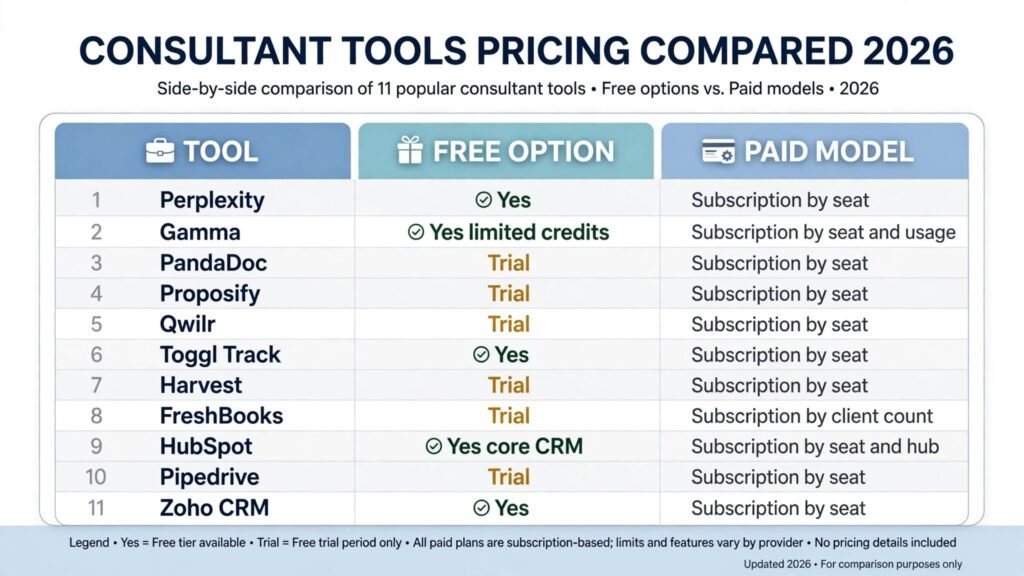
Pricing compared
| Tool | Free option | Paid model |
|---|---|---|
| Perplexity | Yes | Subscription by seat, check checkout |
| Gamma | Yes, limited credits | Subscription by seat and usage, check checkout |
| PandaDoc | Trial | Subscription by seat, check checkout |
| Proposify | Trial | Subscription by seat, check checkout |
| Qwilr | Trial | Subscription by seat, check checkout |
| Toggl Track | Yes | Subscription by seat, check checkout |
| Harvest | Trial | Subscription by seat, check checkout |
| FreshBooks | Trial | Subscription by client count, check checkout |
| HubSpot | Yes, core CRM | Subscription by seat and hub, check checkout |
| Pipedrive | Trial | Subscription by seat, check checkout |
| Zoho CRM | Yes | Subscription by seat, check checkout |
The cheapest honest stack is Perplexity free, Gamma free, Toggl Track free, and HubSpot free. That combination covers research, decks, time, and follow-up for nothing, and it is enough for a consultant starting out. Paid money should go first to the tool that removes your biggest bottleneck, which is usually proposals or invoicing, not another research subscription.
How to Choose
Start from the bottleneck, not the tool list. If research eats your week, Perplexity plus Gamma changes your output fastest. If proposals sit unsigned, PandaDoc or Qwilr matters more than any research tool. If money leaks through late invoices, Harvest or FreshBooks pays for itself in the first month. Write down the one job that costs you the most hours, then buy for that job only.
Next, run a two week trial on a live engagement, not a demo project. Draft a real deck in Gamma, send a real proposal through PandaDoc, track a real week in Toggl Track. A tool that feels good in a demo can still fail on your actual workflow, and two weeks of real use reveals that before you commit a team to it.
Finally, check the exit cost. Can you export your data, your templates, and your client history? Tools that lock data in are expensive to leave, and consultants change tools as their practice grows. Prefer tools with clean exports, even if a competitor looks slightly better on features.
Writers facing a similar choice should also read our guide to the best AI tools for freelance writers, which covers drafting and editing tools that pair well with the research and deck tools above.
Mistakes to avoid
The most common mistake is buying the full stack on day one. Eleven subscriptions bought at once guarantee that most go unused, and unused tools still charge every month. Start with two tools, master them, then add a third only when a clear gap appears.
The second mistake is sending AI output to a client without editing. A Gamma deck with invented figures, or a proposal with generic promises, damages trust faster than a late delivery. Every AI draft needs a human pass that checks numbers, names, and claims against reality.
The third mistake is tracking time inconsistently. A timer used three days a week produces data too patchy to price from, and patchy data leads to undercharging. If you adopt Toggl Track or Harvest, use it every working day for a month before judging it.
The fourth mistake is letting the CRM go stale. A pipeline updated once a month is a museum, not a tool. Spend ten minutes each Friday moving deals, logging follow-ups, and clearing dead leads, or the CRM will quietly stop reflecting reality.
The fifth mistake is choosing on price alone. The cheapest proposal tool that nobody on the team uses costs more than the pricier one that actually gets proposals signed. Judge tools on signed deals and hours saved, not on the monthly fee.
Frequently asked questions
What is the single best AI tool for a new consultant?
Perplexity, because research is the first bottleneck for most new consultants, and its free tier is genuinely useful. Add Toggl Track free alongside it, and you have research plus honest time data for nothing.
Do I need all eleven tools?
No. Most consultants need four: one research tool, one deck tool, one proposal or billing tool, and one CRM. The list gives you the best option in each job so you can pick the combination that fits your practice.
Can AI tools replace the consultant’s judgment?
No, and any vendor claiming otherwise should be avoided. These tools speed up research, drafting, and admin. The recommendation, the pricing call, and the client relationship still depend on human judgment, and clients pay for that judgment.
How much should a solo consultant budget for tools?
A practical budget is the cost of one paid tool per bottleneck, starting from free tiers. Many consultants run well on under fifty dollars a month in total, with the rest covered by free tiers, until revenue justifies more.
Is client data safe in these tools?
Check each vendor’s data policy before uploading sensitive client material. Avoid pasting confidential figures, contracts, or personal data into free AI tools with unclear retention policies, and use your firm’s own systems for anything a client would consider private.
Which tool helps most with winning more work?
Pipedrive or PandaDoc, depending on where deals stall. If follow-up slips, Pipedrive fixes visibility. If proposals sit unsigned, PandaDoc fixes tracking and signatures. Pick the one that matches your actual stall point.
Conclusion
The best AI tools for consultants in 2026 share one trait: they remove a specific, named bottleneck instead of promising to transform everything. Perplexity shortens research. Gamma shortens deck building. PandaDoc, Proposify, and Qwilr shorten the path from proposal to signature. Toggl Track, Harvest, and FreshBooks stop hours and income from leaking. HubSpot, Pipedrive, and Zoho CRM stop follow-up from depending on memory.
Start with your biggest bottleneck, trial one tool on live work for two weeks, and add the next tool only when the gap is clear. That discipline builds a stack that earns its cost every month, and it keeps the consultant’s real product, sound judgment, at the centre of the work.