Listeners forgive a shaky camera, but bad audio ends podcasts. That sentence appears in almost every beginner guide because it is true, and it explains why microphone choice matters more than camera choice for a new show. The good news is that the best microphone for podcast beginners need not cost 400 dollars to sound professional. A 70 dollar microphone in a quiet room, positioned correctly, with basic level control, will outperform a 400 dollar microphone in an echoing kitchen recorded from across the table. Room, position, and workflow matter more than capsule prestige at beginner level, and this guide proves that point with six real microphones, their prices, their connections, and a specific reason to skip each one.
If you are looking for the best microphone for podcast beginners, start with your room, not with a brand, because your room decides whether you need a forgiving dynamic microphone or whether a sensitive condenser will flatter your voice.
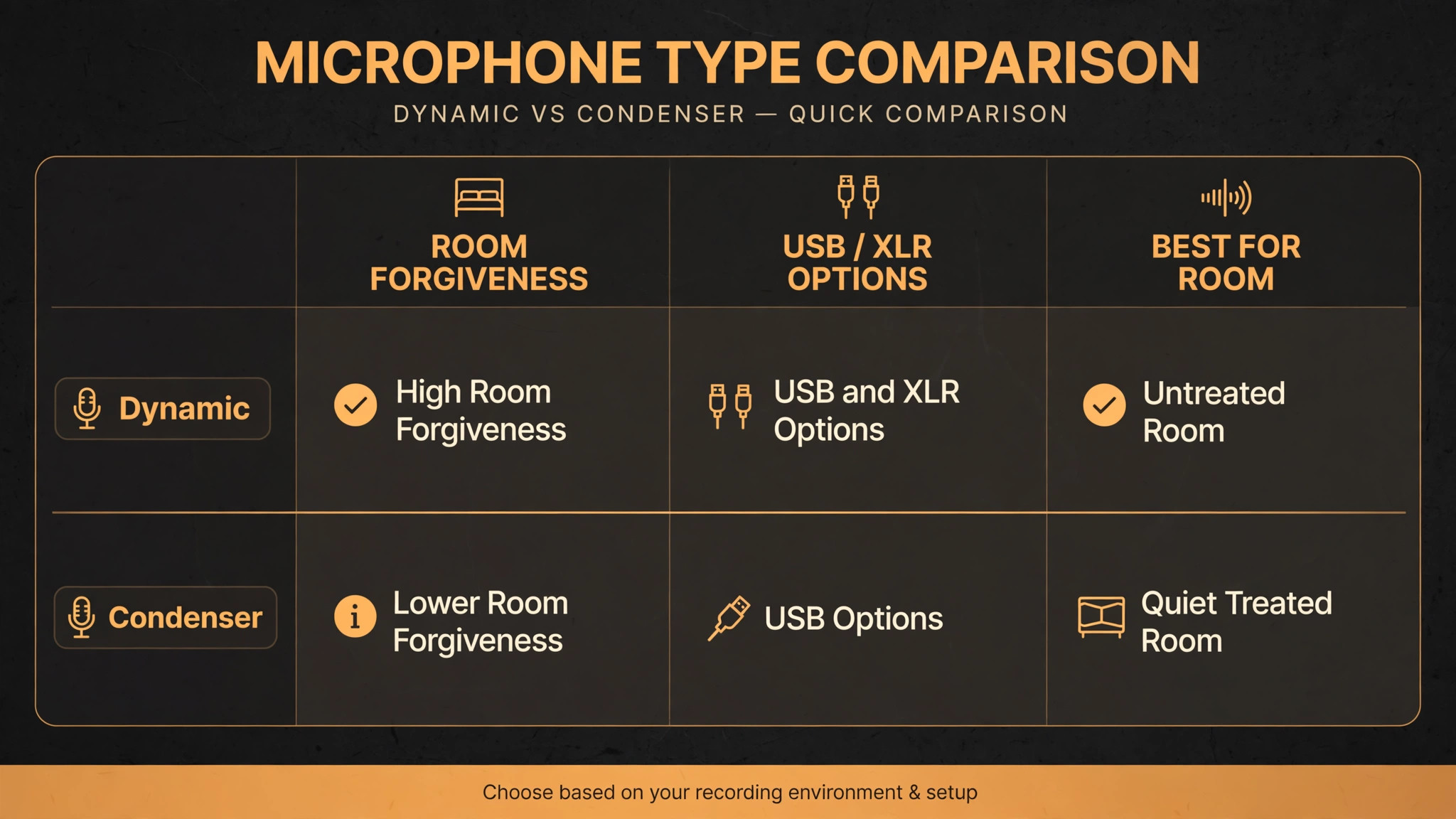
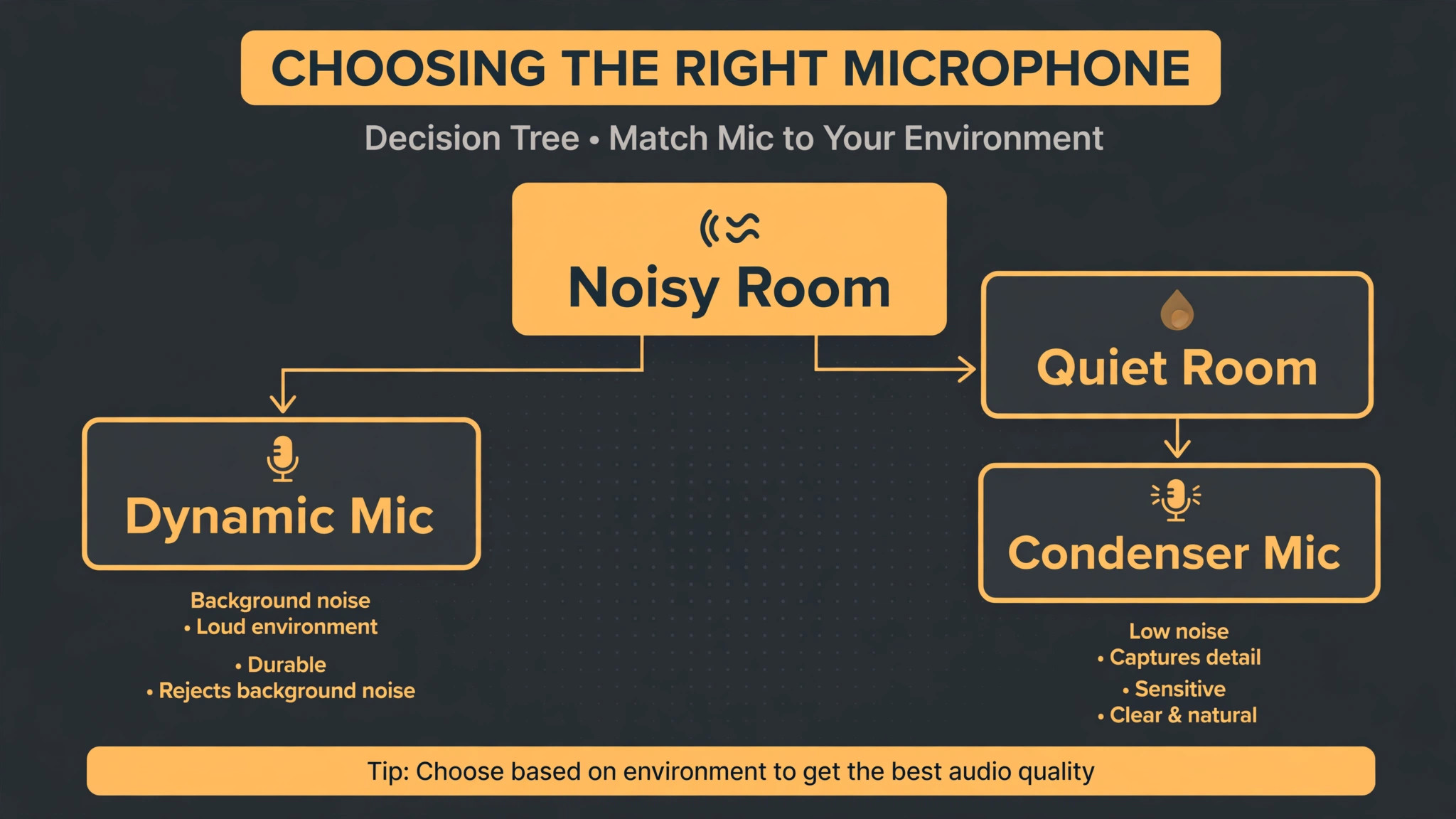
The first decision is microphone type, and it follows room quality. Dynamic microphones, which are less sensitive and reject background noise better, suit untreated rooms, shared houses, street noise, and beginners who have not treated a space. Condenser microphones, which are more sensitive and capture more detail and air, suit quiet, treated rooms, where that detail becomes an advantage rather than a liability that captures the fridge, the traffic, and the echo. Most beginners live in untreated rooms, which is why dynamic microphones dominate beginner recommendations, even though condensers sound more open in ideal conditions. Choose dynamic unless your room is genuinely quiet and treated, and you will be happier with the result from episode one.
The second decision is connection, and it follows growth plans. USB microphones combine microphone and interface in one unit, plug into a laptop, and record immediately, which is ideal for solo beginners. XLR microphones need an audio interface, which adds cost and learning, but which enables multi microphone setups, better preamps, and a professional upgrade path. Hybrid microphones with both USB and XLR give you the beginner simplicity today and the XLR path tomorrow, without buying twice. That hybrid path is why the cheapest microphone in this guide is also one of the most recommended, because it defers the interface decision until you know you need it.
How to Choose a Beginner Podcast Microphone
Room forgiveness is the single biggest driver of beginner happiness, ahead of frequency response, brand, and price. A microphone that rejects room echo, keyboard clicks, and household noise will make a beginner sound professional in a normal room, while a sensitive microphone that captures everything will make the same beginner sound amateur in the same room, no matter how good the capsule is on paper. Test your room honestly. Record thirty seconds of silence in your recording space and listen for fridge hum, traffic, air conditioning, computer fans, and echo. If that silence is noisy or echoing, choose dynamic. If it is quiet and dry, a condenser becomes viable, and you can enjoy its detail advantage.
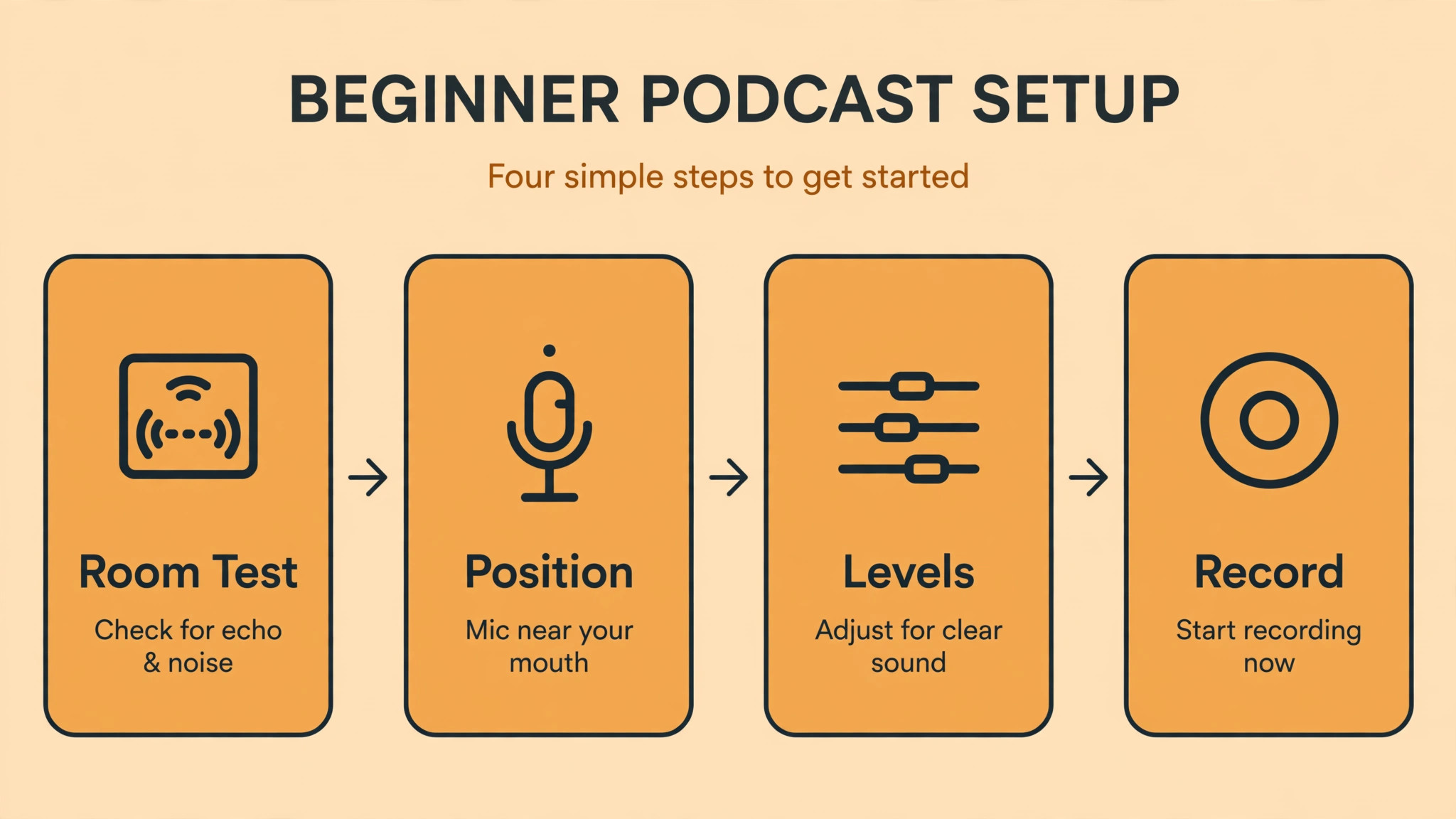
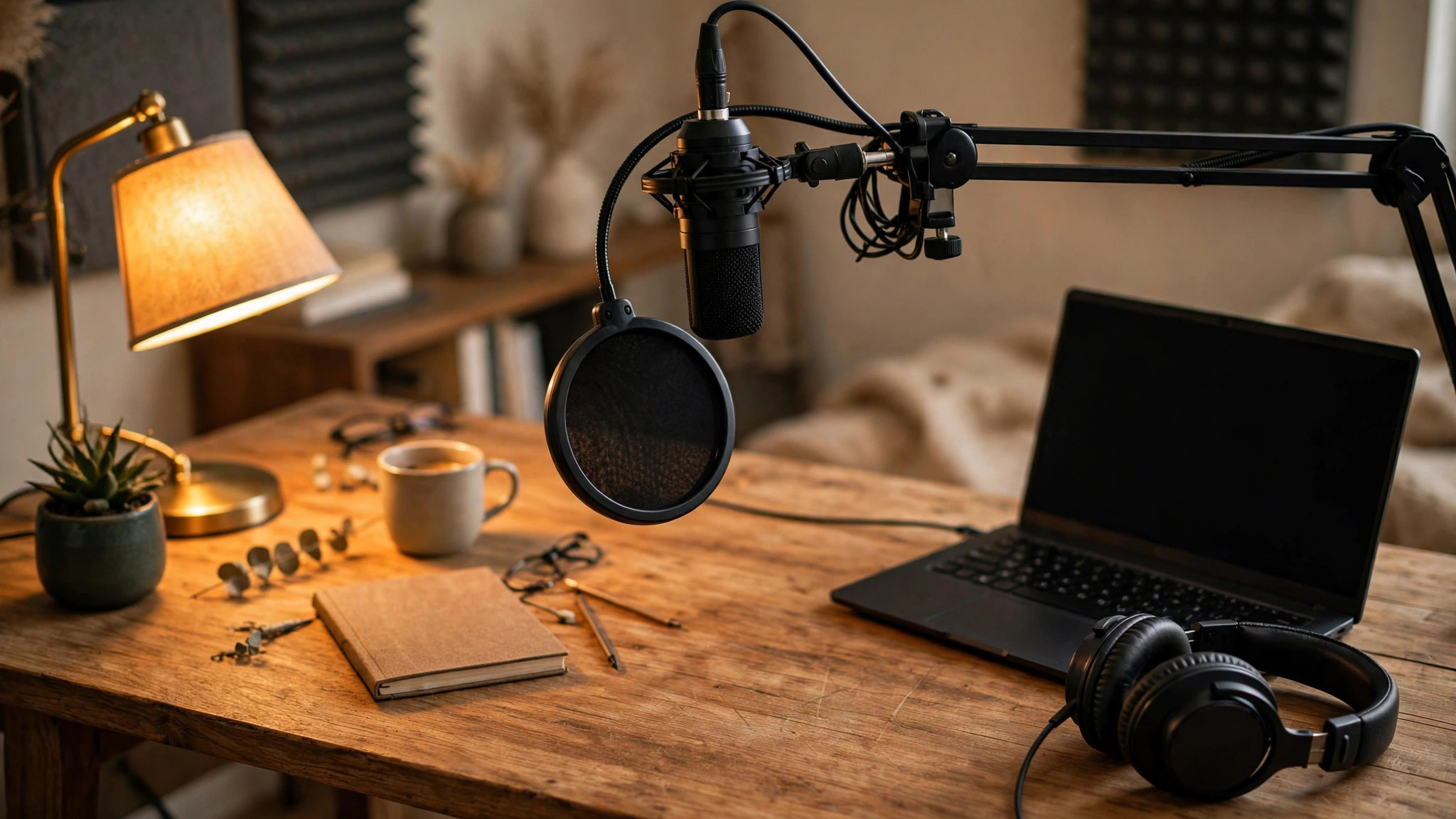
Position matters as much as microphone choice, and it costs nothing to get right. Speak 15 to 20 centimetres from a dynamic microphone, slightly off axis to reduce plosives, with a pop filter between mouth and capsule. Speak closer for warmth and presence, and further for a more open sound, but do not drift during an episode, since distance changes level and tone more than any equaliser can fix. Use closed back headphones for monitoring, so headphone sound does not leak into the microphone, and monitor your own voice while recording, so you hear plosives, mouth clicks, and room noise before they become an editing problem.
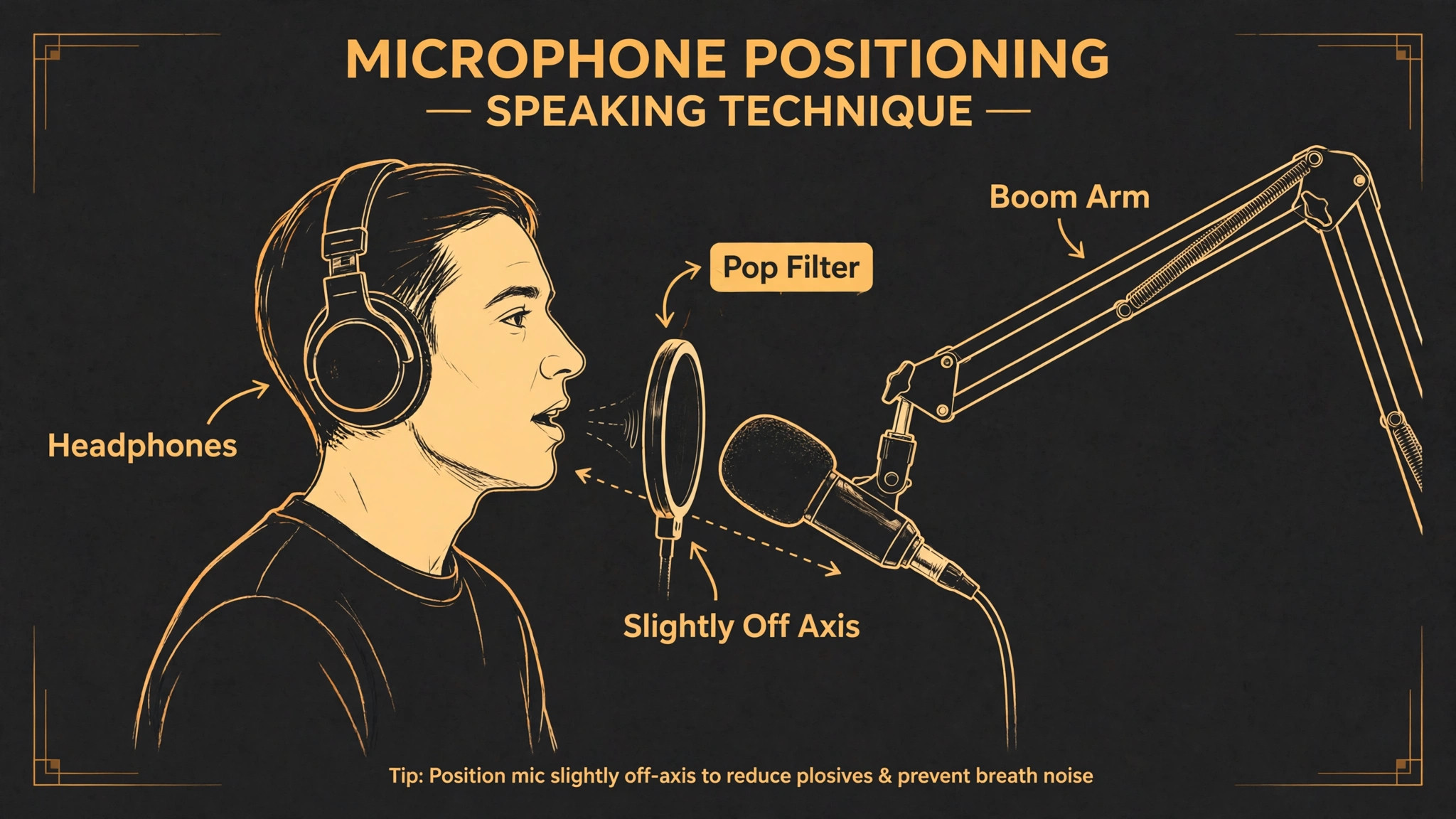
A microphone on a boom arm, positioned correctly, beats a microphone on a desk stand picking up desk vibrations, and a 30 dollar boom arm is one of the best beginner investments available.
Gain, levels, and monitoring complete the beginner setup. Set gain so your normal speaking voice peaks well below clipping, with headroom for laughs and emphasis, and do not chase loudness during recording, since loudness can be added safely in editing while clipped audio cannot be repaired. Use onboard monitoring where the microphone offers a headphone jack, since zero latency monitoring lets you hear yourself without distracting delay. Learn one editing tool well enough to trim silences, remove obvious mistakes, and apply gentle loudness normalisation, rather than buying plugins you do not understand. A clean recording with simple editing beats a noisy recording with expensive processing every time.
Best Microphone for Podcast Beginners Compared in Six Models
| Microphone | Type and connection | Price noted | Polar pattern and response | Best for |
|---|---|---|---|---|
| Samson Q2U | Dynamic, USB and XLR | About 69 to 80 dollars | Cardioid, 50 Hz to 15 kHz | Lowest cost hybrid starter |
| Audio-Technica ATR2100x-USB | Dynamic, USB and XLR | About 80 dollars | Cardioid, USB-C plus XLR | Q2U rival, slightly brighter voice |
| Rode PodMic | Dynamic, XLR only | About 99 dollars | Cardioid, 50 Hz to 15 kHz | Broadcast tone, interface already planned |
| Blue Yeti | Condenser, USB | About 110 to 140 dollars | Cardioid plus other patterns, 20 Hz to 20 kHz | Solo beginners in quiet rooms, interviews |
| Elgato Wave 3 | Condenser, USB-C | About 149 dollars | Cardioid, 70 Hz to 20 kHz | Streamers, treated rooms, software control |
| Shure MV7+ | Dynamic, USB-C and XLR | About 279 to 299 dollars | Cardioid, 50 Hz to 16 kHz | Noisy rooms, long term growth, onboard processing |
Prices are manufacturer and published comparison snapshots and move with sales, so confirm the current price and included accessories before ordering. Several models ship without a boom arm, shock mount, or pop filter, and those accessories add 30 to 80 dollars to the true first setup cost. A microphone price alone is not a setup price, and a budget that forgets the arm, the cable, and the headphones will surprise you at checkout. Check what is in the box for the exact listing, since bundles vary by retailer.
Samson Q2U, the Default First Microphone
The Samson Q2U, at about 69 to 80 dollars, is the default first microphone recommendation for a decade, because nothing under 100 dollars beats its combination of room rejection and upgrade flexibility. Its dynamic capsule forgives untreated rooms, its USB output records immediately on a laptop, and its XLR output lets you move to an interface later without buying a new microphone. It includes a headphone jack for zero latency monitoring, a desk stand for immediate use, and a sound that is warm and intelligible for speech, even if it lacks the sparkle of dearer microphones. For a beginner starting from zero, this is the best microphone for podcast beginners on value alone.
Skip it if you need premium sound character, a refined industrial design, or a microphone that looks impressive on camera, since the Q2U is practical rather than beautiful, and its included desk stand is basic. Also skip it if you already own an interface and want a broadcast tone from day one, since the Rode PodMic or Shure options offer more character for a higher price. Buy the Q2U when budget and room forgiveness matter most, and spend the saving on a boom arm, a pop filter, and room treatment, which will improve sound more than a dearer microphone would in the same room.
Audio-Technica ATR2100x-USB, the Closest Rival
The Audio-Technica ATR2100x-USB, at about 80 dollars, is the Q2U closest rival, with the same dual output design, USB-C instead of older USB, and a slightly brighter voicing that some voices prefer. Its dynamic capsule offers similar room forgiveness, its USB and XLR outputs offer the same upgrade path, and its included desk tripod and cables make it a complete starter kit. Choosing between the Q2U and the ATR2100x is largely a matter of price, availability, and voice preference, since their differences are marginal for most beginners, and either will serve a first show well.
Skip it if you want the absolute lowest price, since the Q2U often undercuts it by a few dollars, or if you want a broadcast tone with more weight, since neither budget hybrid matches the PodMic character in that regard. Also check USB-C cable and adapter compatibility with your computer, since USB-C implementation varies by device, and test monitoring latency on your setup before recording an important episode. Buy the ATR2100x when its price beats the Q2U, when USB-C matters for your laptop, or when its brighter voicing suits your voice better in a test recording.
Rode PodMic, the Broadcast Tone Starter
The Rode PodMic, at about 99 dollars, delivers a rich broadcast tone that embarrasses microphones twice its price, with a rugged build that feels permanent rather than starter grade. Its dynamic capsule rejects room noise well, its internal pop filter reduces plosives, and its sound suits spoken voice with warmth and presence that listeners associate with professional radio. For a beginner who already plans an interface, or who wants a microphone that will stay in the studio for years, the PodMic is a compelling step up from budget hybrids, and it pairs well with a decent interface and boom arm.
Skip it if you do not own an interface and do not plan to buy one soon, since the standard PodMic is XLR only and cannot plug directly into a laptop. Its low output also wants a strong preamp, and a weak interface preamp will produce hiss when gain is pushed high, which may require an inline booster that adds cost. It ships without a stand, so budget for a boom arm and a shock mount separately. Buy the PodMic when an interface is already in the plan, and choose the USB version, near 200 dollars, only if you want PodMic sound with USB simplicity and are willing to pay for that convenience.
Blue Yeti, the Classic USB Condenser
The Blue Yeti, at about 110 to 140 dollars depending on sale, is the classic beginner USB microphone, with plug and play simplicity, broadcast quality audio without an interface, and four polar patterns including cardioid, bidirectional, omnidirectional, and stereo. Cardioid suits solo podcasting, bidirectional suits two person interviews facing each other, and stereo suits music or ambient recording, which makes the Yeti unusually flexible for a single microphone. Its condenser capsule captures detail and air that dynamic budget microphones miss, and its built in headphone monitoring and gain control make it easy to use from day one.
Skip it if your room is untreated or noisy, since the Yeti condenser capsule will capture echo, keyboard clicks, and household noise that a dynamic microphone would reject, and that capture cannot be fully removed in editing. Also skip it if you plan multi microphone setups, since most computers accept only one USB audio input cleanly, which makes two Yetis awkward for co-hosted shows in the same room. Buy the Yeti for solo recording in a quiet room, for interviews using bidirectional mode, or for a creator who values pattern flexibility over room forgiveness, and treat the room with blankets or panels if echo appears.
Elgato Wave 3, the Streamer Friendly Condenser
The Elgato Wave 3, at about 149 dollars, is a USB-C condenser microphone designed for streamers and podcasters who work in treated rooms and value software control. Its cardioid pattern, 70 Hz to 20 kHz response, and onboard monitoring suit solo voice work, while its software mixing tools let streamers blend microphone, game, and music sources for live shows. For a creator who podcasts and streams from the same desk, in a quiet room, the Wave 3 integrates well with streaming software and offers a polished workflow that simpler USB microphones lack.
Skip it if your room is untreated, since it is a condenser and shares the Yeti room sensitivity, and skip it if you want an XLR upgrade path, since the Wave 3 is USB-C only with no XLR output. Its software advantages matter less for pure podcast recording, where a simpler microphone plus a standard editor achieves the same result, so podcast only beginners should weigh whether streaming features justify the price over the Q2U or Yeti. Buy the Wave 3 when streaming and podcasting share a desk, the room is treated, and software mixing is a daily need rather than a nice extra.
Shure MV7+, the Long Term Dynamic Investment
The Shure MV7+, at about 279 to 299 dollars, is the long term investment pick for beginners who want dynamic room forgiveness plus USB simplicity plus an XLR future in one body. Its dynamic capsule forgives untreated rooms, its USB-C output records immediately, its XLR output moves to an interface later, and its onboard digital processing, including auto level, tone presets, and real time denoising, helps beginners sound consistent without learning compression on day one. Its touch panel, headphone monitoring, and build quality suit a weekly show that must sound reliable for years, and it is the microphone many guides recommend for recording in noisy environments.
Skip it if budget is tight, since at nearly four times the Q2U price it buys refinement rather than a transformation, and a beginner in a quiet room with a Q2U and good position will sound close enough that listeners will not notice the difference. Also skip it if you want a condenser airiness for music or voiceover in a treated room, since the MV7+ is a dynamic voice microphone first, and its character is warm and controlled rather than open and airy. Buy the MV7+ when you know podcasting is a long term commitment, when your room is noisy, and when onboard processing and dual output justify the price over a budget hybrid plus a future upgrade.
Rejection Reasons and Room First Buying
Each microphone has a clear skip reason, and those reasons protect beginners from the most common disappointment, which is buying a sensitive microphone for a noisy room. Skip the Q2U and ATR2100x if premium character or camera presence matters more than value. Skip the PodMic if you lack an interface or a strong preamp. Skip the Yeti and Wave 3 if your room is untreated or if you need multi microphone XLR setups. Skip the MV7+ if budget matters more than refinement, since a budget hybrid plus treatment will serve a first show nearly as well. A microphone bought against its skip reason will frustrate, even if reviewers praised it for a different room and workflow.
Room treatment for podcasting is simpler and cheaper than studio treatment, and it should precede a microphone upgrade. Hang heavy blankets or moving blankets on walls near the recording position, close curtains, place a rug under the desk, and record in a smaller room with soft furnishings rather than a large empty room with hard floors. A closet full of clothes, famously, makes an excellent vocal booth for beginners, because clothes absorb reflections effectively. Test recordings before and after treatment, and listen for echo reduction, since treatment that you can hear working is treatment worth keeping.
Spend 50 to 100 dollars on blankets, a boom arm, and a pop filter before spending 200 dollars more on a microphone, because the room improvement will benefit every microphone you ever use.
Setup Checklist, First Episode Workflow, and Mistakes
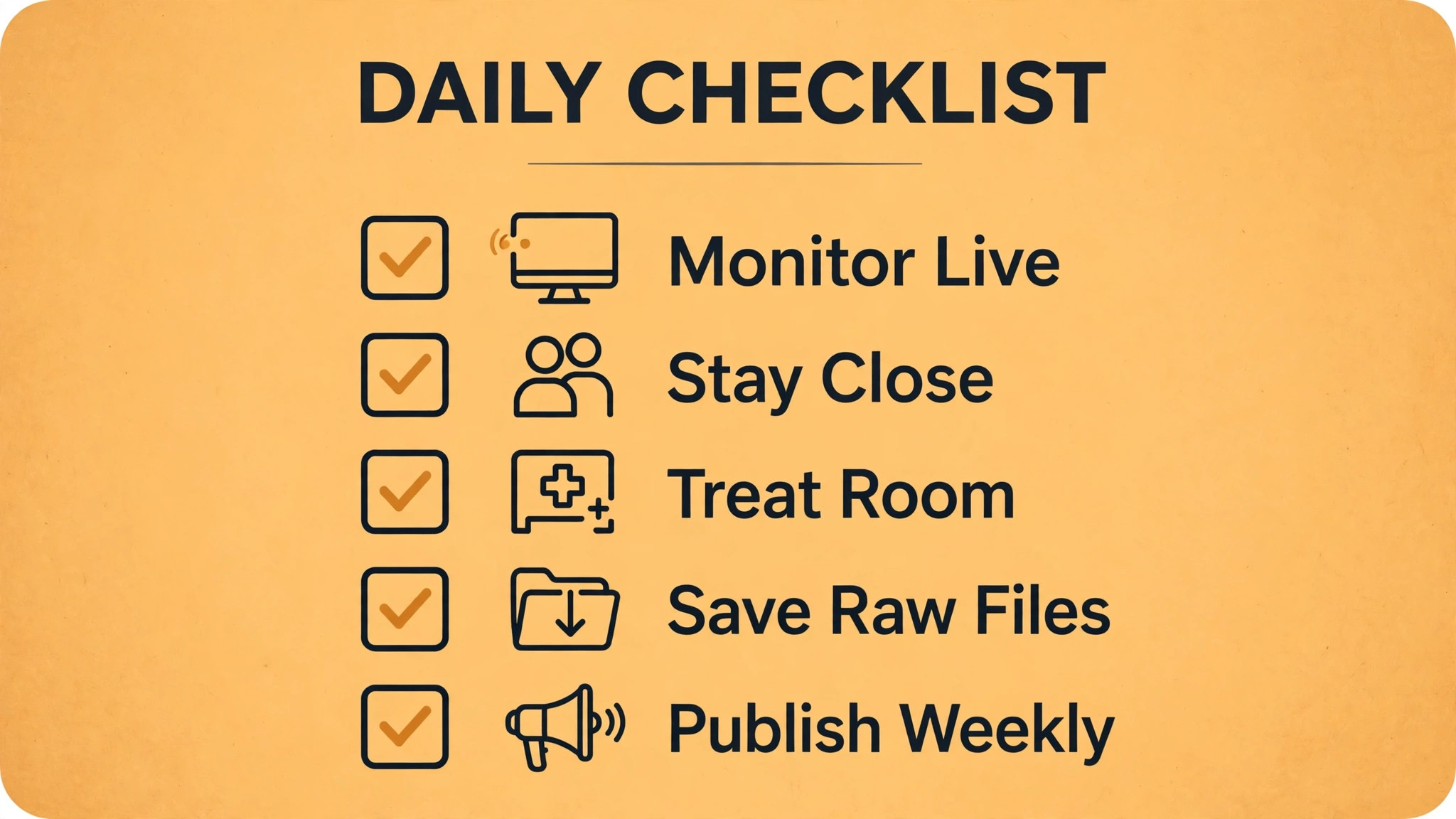
- Record a thirty second silence test in your room and listen for noise and echo before choosing dynamic or condenser.
- Position the microphone 15 to 20 centimetres away, slightly off axis, with a pop filter, on a boom arm rather than a desk stand.
- Use closed back headphones and onboard monitoring to hear plosives and room noise live.
- Set gain for headroom below clipping, and do not chase loudness during recording.
- Record a test episode with a friend or solo, listen on headphones and on a phone speaker, and fix position before publishing.
- Edit simply, trimming mistakes and silences, normalising loudness gently, and exporting at podcast standard settings.
- Publish consistently, since a regular schedule builds audience faster than perfect audio ever will.
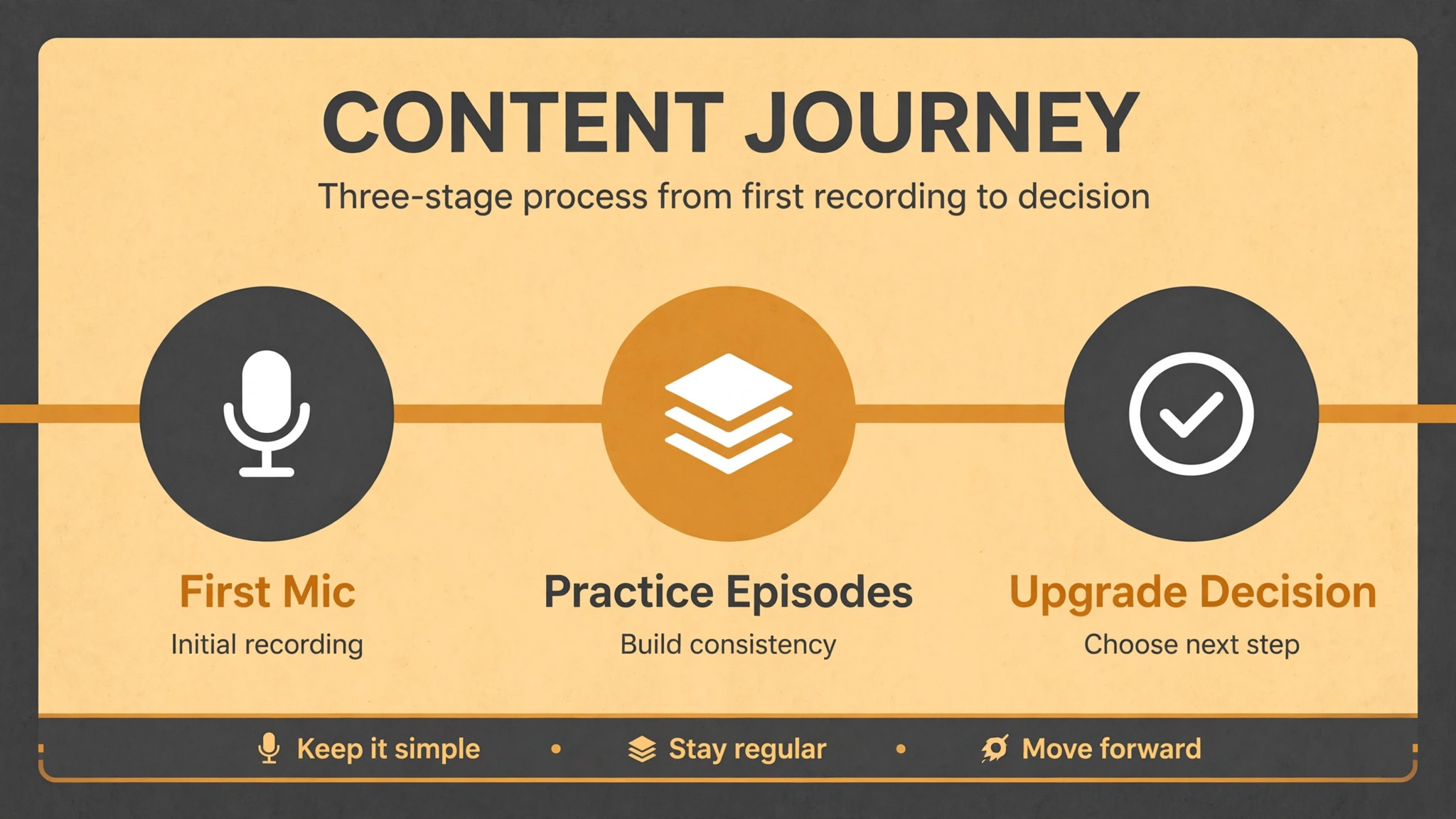
First episode workflow should be boring on purpose. Record in the same place, at the same distance, with the same gain, every time, so listeners learn your sound and you learn your room. Save raw recordings before editing, back up episodes to cloud storage, and keep a simple show notes template that you reuse. Consistency in sound and schedule matters more than novelty in microphone choice, and a show that publishes weekly with good enough audio will outgrow a show that publishes rarely with perfect audio.
Mistakes beginners make with microphones follow a pattern. The first mistake is recording too far from the microphone, which captures room echo and weak voice, and which no plugin fixes well. Move closer, treat the room, and test distance deliberately. The second mistake is buying a condenser for an untreated room, then fighting echo in editing for hours per episode. Choose dynamic for noisy rooms, or treat the room before choosing condenser. The third mistake is ignoring monitoring, recording deaf, and discovering plosives, clicks, and clipping only after a guest has left. Monitor every recording live. The fourth mistake is upgrading microphones before finishing ten episodes, when practice, position, and editing skill would improve sound more than any new capsule.
Finish ten episodes on one microphone, learn its sound, and only then judge whether an upgrade is needed.
Microphone Accessories That Matter More Than Upgrades
Accessories decide beginner sound quality more than microphone upgrades do, because they fix position, vibration, plosives, and monitoring, which are the four problems that ruin otherwise good recordings. A boom arm, costing roughly 30 to 50 dollars for a solid beginner model, positions the microphone at mouth height, off the desk, and away from keyboard vibrations, which a desk stand cannot do. A desk stand transmits every keystroke, mouse click, and desk bump directly into the recording, while a boom arm with a shock mount isolates the microphone from those vibrations. Buy the arm before the next microphone, since a well positioned budget microphone on an arm beats an expensive microphone on a vibrating desk stand.
A pop filter, costing roughly 10 to 20 dollars, tames plosive bursts from P and B sounds that otherwise distort recordings and distract listeners. A metal mesh or nylon filter placed a few centimetres from the capsule diffuses the air burst without dulling voice tone, and it also protects the capsule from moisture over time. Some microphones include an internal pop filter, such as the PodMic, but most budget microphones benefit from an external filter, and a filter that you can see working is easier to position correctly than an internal one you must trust blindly. Test plosives with and without the filter, using words heavy in P sounds, and keep the filter position that removes bursts without muffling voice.
Closed back headphones, a shock mount, and a simple room treatment kit complete the accessory set that matters. Closed back headphones prevent monitoring sound leaking into the microphone, which is essential for clean recordings, and they let you hear problems live. A shock mount, often included with better microphones or bought separately for 20 to 40 dollars, suspends the microphone in elastic and absorbs handling noise. Room treatment with blankets or panels, costing 50 to 100 dollars, reduces echo more than any microphone upgrade at beginner level.
When you total accessories, a beginner setup of microphone plus arm plus filter plus headphones plus treatment costs roughly 150 to 250 dollars on top of the microphone, and that total is the true first setup cost to budget. A buyer who judges the best microphone for podcast beginners by microphone price alone will underestimate setup cost, while a buyer who budgets accessories honestly will sound better on day one with any microphone in this guide. Accessories also transfer to the next microphone, so money spent on an arm, headphones, and treatment is never wasted when you eventually upgrade, unlike money spent on a second budget microphone that duplicates the first.
More Reading for Podcast and Creator Gear
If a microphone choice is clearer now, the wider creator guides on Stratilyze cover the rest of the setup. The guide to headphones for online teaching helps you choose monitoring headphones, the guide to a webcam for online tutoring helps you look good on video versions of your show, the guide to a keyboard for programming beginners covers comfortable typing for show notes and scripts, and the guide to a tablet for digital art beginners helps visual creators in the same studio. Read the headphones guide next if monitoring leakage or comfort affects your recordings, since headphone choice directly affects microphone results.
Frequently Asked Questions
What is the best microphone for podcast beginners overall?
For most beginners, the Samson Q2U at about 69 to 80 dollars is the best overall value, because its dynamic capsule forgives untreated rooms, its USB output records immediately, and its XLR output provides an upgrade path without buying twice. Value plus upgrade path is why it leads most lists for the best microphone for podcast beginners. For beginners in quiet treated rooms who value flexibility, the Blue Yeti near 110 to 140 dollars is a strong alternative, while beginners committed long term with noisy rooms should consider the Shure MV7+ near 279 to 299 dollars. Choose by room and growth plan, using the setup checklist, rather than by a single best label.
Do I need an audio interface for podcasting as a beginner?
No, not to start. USB microphones such as the Q2U, Yeti, and Wave 3 record directly into a laptop without an interface, which is ideal for solo beginners. An interface becomes valuable when you record multiple microphones at once, want better preamps, or move to XLR only microphones such as the PodMic or SM7B. Hybrid microphones with USB and XLR let you start without an interface and add one later, which is why they are recommended for beginners who are unsure about future growth.
Is a dynamic or condenser microphone better for beginners?
Dynamic microphones are better for most beginners, because they reject background noise and room echo better, which suits untreated rooms, shared houses, and everyday recording spaces. Room forgiveness is the deciding factor for the best microphone for podcast beginners in a normal home. Condenser microphones capture more detail and air, but they also capture room noise and echo, so they suit quiet treated rooms where detail becomes an advantage. If your silence test reveals noise or echo, choose dynamic. If your room is quiet and dry, a condenser can flatter your voice with extra detail.
How far should I sit from a podcast microphone?
Speak about 15 to 20 centimetres from a dynamic microphone, slightly off axis to reduce plosives, with a pop filter between mouth and capsule. Closer distance adds warmth and presence, while further distance sounds more open but captures more room. Keep distance consistent during an episode, since drifting changes level and tone more than editing can fix. Test distances with a short recording and listen on headphones before recording a full episode, so you know your best position in your room.
Can I record a podcast with two USB microphones?
Most computers accept only one USB audio input cleanly, which makes two USB microphones awkward for co-hosted shows in the same room. For two hosts, use XLR microphones into an interface with at least two inputs, or record each host on a separate device and sync in editing, or use a bidirectional condenser such as the Yeti in bidirectional mode for two people facing each other. Plan multi host recording before buying, since a solo USB setup does not scale to two hosts without an interface or a workaround.
When should a beginner upgrade their podcast microphone?
Upgrade after finishing at least ten episodes, when you can name a specific limit of the current microphone, such as insufficient output for an interface, lack of XLR for multi host work, or a character mismatch for your voice that position and treatment cannot fix. Upgrading before ten episodes usually wastes money, since practice, position, room treatment, and editing skill improve sound more than a new capsule at beginner level. When you do upgrade, keep the old microphone as a backup or guest microphone, since redundancy protects future episodes.
The Mic to Start With
A beginner microphone is a tool for finishing episodes, not a trophy for a studio shelf. The Q2U finishes episodes cheaply and reliably, the Yeti finishes them flexibly in a quiet room, the PodMic finishes them with broadcast character once an interface exists, and the MV7+ finishes them with long term polish in noisy rooms. When you judge the best microphone for podcast beginners by room forgiveness, connection path, and position discipline, you choose a microphone that helps you publish weekly, which is the only metric that builds a podcast audience.
Buy the microphone your room needs, position it correctly, monitor every recording, and publish consistently. That routine will make a 70 dollar microphone sound professional, while no microphone, at any price, will rescue a show that never publishes. Start with the mic that fits your room today, and let your tenth episode, not a review, decide whether an upgrade is ever needed.