
Verdict first: if you run a small business and need contracts this week, start with PandaDoc for combined proposals and contracts, test LawDepot for a single straightforward agreement, and look at Juro if a growing team will handle contracts every week. That shortlist covers most real cases, and the rest of this guide explains why, because the best AI contract generators differ far more in workflow than in template count. A tool that is perfect for a one off freelance agreement can be wrong for a company that negotiates, renews, and stores hundreds of contracts a year, and a powerful enterprise platform can be overkill for a shop that needs five solid agreements.
Important disclaimer before anything else: generated contracts are not legal advice. The tools in this guide help you draft, organise, and sign agreements faster, but they do not replace a lawyer for high value deals, employment terms, intellectual property transfers, property agreements, or any contract where a mistake could cost serious money or create lasting obligations. Key agreements should be reviewed by a lawyer in your jurisdiction before you sign. Laws differ by country and state, templates age quickly, and an AI draft can look complete while missing a clause that matters for your situation. Use these tools to get a strong first draft and a clean process, then get human review where the stakes justify it.
Most small businesses do not need a perfect contract. They need a clear contract, signed, stored, and easy to find later. That is where AI generators help most. They turn a blank page into a structured draft, prompt you for names, dates, payment terms, and scope, and reduce the chance that you forget a basic term such as payment timing, late fees, or what happens if work is cancelled. They also help with consistency. When every client gets the same core terms, with only scope and price changed, disputes become easier to resolve, because you are not arguing about which version someone signed.

Why the best AI contract generators save time, and where they stop
The time saving comes from structure, not magic. A good generator asks questions in plain language, fills a template with your answers, and produces a document you can read, edit, and send for signature. Some tools add clause libraries, so you can reuse approved wording for confidentiality, liability limits, or payment terms instead of rewriting them each time. Others add negotiation tracking, so comments, redlines, and approvals stay in one place instead of scattering across email threads. The best tools for teams also store signed contracts in a searchable place, with renewal dates and key terms easy to find, so you do not discover an auto renewal the week after it triggered.
The limits matter just as much. AI drafting can miss jurisdiction specific rules, can miss a risk such as data handling or subcontracting, and cannot judge whether a deal is fair or whether you should walk away. Read every draft fully, and get review for anything beyond routine low risk agreements.
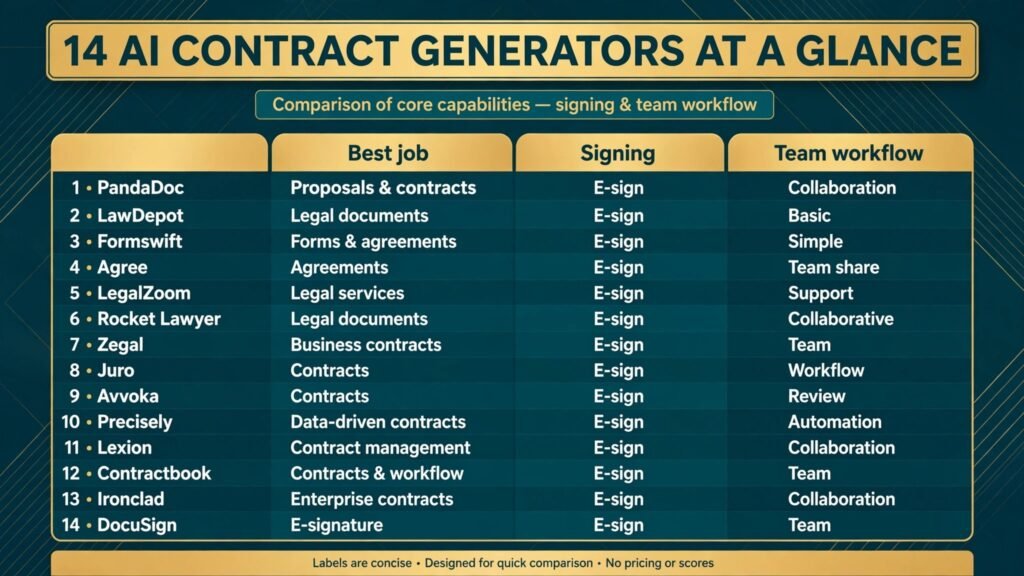
At a glance
| Tool | Best for | Signing included | Team workflow | Check before buying |
|---|---|---|---|---|
| LegalZoom | Guided small business agreements | Yes, on many plans | Basic | Plan scope and review options on the checkout page |
| Rocket Lawyer | Ongoing small business legal help | Yes | Basic to team | Membership versus one off document terms |
| LawDepot | Single, straightforward agreements | Yes, on many plans | Solo | Licence and reuse terms for the document |
| PandaDoc | Proposals plus contracts | Yes | Strong | Plan limits for templates and users |
| Juro | Growing teams, frequent contracts | Yes | Strong | Approval and storage features on the chosen plan |
| Ironclad | Large teams, complex contracting | Yes | Strong | Implementation time and plan scope |
| Contractbook | European teams, automated contracts | Yes | Good | Jurisdiction coverage for your country |
| DocuSign | Signing plus contract lifecycle | Yes | Strong | Which CLM features are in the plan you buy |
| Formswift | Simple forms and templates | Yes | Basic | Template depth for your agreement type |
| Avvoka | Negotiated business contracts | Yes | Good | Collaboration and redline tools on the plan |
| Precisely | Contract storage and automation | Yes | Good | Search and deadline tracking on the plan |
| Lexion | AI review and repository for teams | Yes, on many plans | Strong | Review scope and data handling terms |
| Agree | Free leaning, simple agreements | Yes | Basic | Free plan limits and commercial terms |
| Zegal | Small businesses, Asia Pacific focus | Yes | Basic to team | Jurisdiction coverage for your location |
Best pick by job
| Job | First pick | Why it fits | Second option to test |
|---|---|---|---|
| Freelancer client agreement | PandaDoc | Proposal, contract, and signature in one flow | LawDepot |
| One off NDA or service agreement | LawDepot | Fast, guided, single document focus | Formswift |
| Ongoing small business legal needs | Rocket Lawyer | Documents plus access to legal help options | LegalZoom |
| Growing team, weekly contracts | Juro | Approvals, templates, and storage built for teams | PandaDoc |
| Large company, high volume | Ironclad | Lifecycle, approvals, and reporting at scale | DocuSign |
| Negotiated supplier or partner deal | Avvoka | Redlines and collaboration kept in one document | Precisely |
| Finding and tracking signed contracts | Precisely | Searchable storage with deadlines and key terms | Lexion |
| Simple agreement at low cost | Agree | Low friction start for routine agreements | Zegal |
For solo owners and freelancers
1. PandaDoc
PandaDoc is the most practical starting point for many service businesses, because it covers the full path from proposal to signed contract. You can send a priced proposal, let the client accept, and move to contract terms and electronic signature without switching tools or retyping client details. That single flow reduces errors, such as a price in the proposal that differs from the price in the contract, and it gives the client a professional experience. For consultants and for contractors, that matters, because clients judge reliability from the first document they receive.
PandaDoc templates cover common service, consulting, and sales agreements, and you can save your own approved wording for repeat use. The watch point is template discipline. Save one approved version for each agreement type, and do not let team members edit core clauses in individual deals without approval. If you need a lawyer review, get it on the template once, then reuse the reviewed version. Visit PandaDoc and check the current checkout page for template, user, and signature limits.
Watch out for: edited core clauses drifting across deals, and assuming a proposal acceptance automatically covers every contract term you need.
2. LawDepot
LawDepot suits a single, straightforward agreement. It asks guided questions, produces a readable document, and avoids the blank page problem that stops many owners from using contracts at all. For a basic NDA, a simple service agreement, or a short term rental style agreement, that guided flow is enough, provided you read the draft and get review for anything unusual. LawDepot is also useful for owners who need one document now, rather than a full platform they will use every day.
The limit is depth. LawDepot is not built for complex negotiation, team approvals, or a large contract library. If your work involves subcontractors, intellectual property, data access, or long term obligations, use LawDepot only as a starting draft and get it reviewed. Do not stretch a simple template to cover a complex deal, because the missing clause is usually the one you need later. Visit LawDepot and check the current plan page for reuse and signing terms.
Watch out for: using a simple template for a complex deal, and skipping a full read because the questions felt thorough.
3. Formswift
Formswift is similar in spirit to LawDepot, with a focus on simple forms and templates that you can complete quickly. It suits owners who need a standard document, want to fill it online, and want to send it for signature without learning a contract platform. For routine internal forms, simple agreements, and documents you use occasionally, Formswift keeps the process short.
Its weakness is the same as its strength: simplicity. It does not offer the negotiation, approval, or storage depth of team platforms, so it is best for low volume, low complexity work. If you find yourself editing the same Formswift document heavily for every client, that is a sign you need a saved template in a stronger tool, or a lawyer reviewed master agreement you can reuse. Visit Formswift and check template depth for your specific agreement type before you buy.
Watch out for: heavy edits on every use, which signal that the template does not fit your work.
4. Agree
Agree appeals to owners who want low friction and low cost for routine agreements. The pitch is simple: create an agreement, send it, sign it, and store it, without a long setup. For early stage businesses, side projects, and freelancers testing a new service, that low friction helps, because the alternative is often no contract at all, which is far riskier than a simple signed agreement.
Check the free and paid limits carefully, because low cost plans often limit templates, users, or advanced terms. Also check commercial use terms and storage limits, so a growing business does not outgrow the tool in the middle of active deals. Agree is a good first step, not necessarily a forever platform, and that is fine. Start simple, learn what clauses you actually use, then move to a stronger tool when volume or complexity grows. Visit Agree and check the current checkout page for plan limits.
Watch out for: outgrowing a simple plan mid deal, and treating a simple agreement as enough for a high value project.

For small businesses that need ongoing legal support
5. LegalZoom
LegalZoom is a familiar name for business formation and legal documents, and its contract tools benefit from that breadth. Owners who already use LegalZoom for formation, trademarks, or compliance may find it convenient to keep contracts in the same place. The guided questionnaires are clear, and the documents are written for non lawyers to read, which helps owners who want to understand what they are signing. For accountants and other advisers, LegalZoom documents are also easy to share with a client for review.
The check is scope. LegalZoom offers documents and, on some plans, access to attorney help, but the exact review options, response times, and costs differ by plan and location. Read the plan page for your jurisdiction, and do not assume that a document plan automatically includes a full review of a negotiated agreement. For routine agreements, LegalZoom is solid. For negotiated deals, pair the draft with independent review. Visit LegalZoom and check the current checkout page for plan scope.
Watch out for: assuming document access equals legal review, and using a generic template where local rules matter.
6. Rocket Lawyer
Rocket Lawyer suits owners who need documents regularly and want a membership style route to legal help. Instead of buying one document at a time, you get ongoing access to templates, signatures, and, depending on plan and location, attorney questions. That model fits businesses that hire, rent, sell, and sign partner agreements through the year, because the cost spreads across many documents, and the habit of using contracts becomes normal rather than exceptional.
As with LegalZoom, check what is included in your location. Attorney access, document review, and registered services vary, and a plan that looks complete in one state or country may be thinner in another. Rocket Lawyer is strongest when you actually use it often. If you sign one contract a year, a one off document tool may cost less overall. Visit Rocket Lawyer and check membership terms on the checkout page.
Watch out for: paying for a membership you rarely use, and skipping review on the one high value deal that justifies the membership.
7. Zegal
Zegal focuses on small businesses, with strength in Asia Pacific jurisdictions, where template coverage and local compliance matter more than a huge global template library. For owners in Singapore, Hong Kong, Australia, and nearby markets, a tool that understands local company and employment basics can be more useful than a larger tool built mainly for US law. Zegal also covers common business documents beyond contracts, which helps early stage companies that need several documents at once.
If your business is mainly in the US or Europe, check Zegal coverage for your specific agreements before committing, because jurisdiction fit is the whole point of choosing a regional tool. Visit Zegal and check jurisdiction coverage on the current plan page.
Watch out for: using a regional template for a deal governed by another jurisdiction’s law.
For teams that negotiate and manage contracts every week
8. Juro
Juro is built for teams that treat contracts as a weekly workflow, not an occasional document. It combines templates, approvals, negotiation, signature, and storage, so a contract moves from draft to signed deal without leaving the platform or losing track of who approved what. For sales, operations, and legal teams in a growing company, that visibility reduces the classic problems: a deal signed on old terms, an approval given by email and then lost, or a signed contract nobody can find when a renewal approaches.
Juro works best when a team commits to it. Set up approved templates, define who can approve which clauses, and train the team to negotiate inside the tool rather than in scattered email attachments. Without that discipline, even a good platform becomes a storage folder. Check implementation time and plan features, because team platforms need setup, and the cheapest plan may not include the approval workflow you need. Visit Juro and check the current plan page for approval and storage features.
Watch out for: buying a team platform and then negotiating in email anyway, which defeats the tracking benefit.
9. Avvoka
Avvoka suits teams that negotiate complex business contracts, where redlines, comments, and version control matter more than template count. Supplier agreements, partnership deals, and long term service contracts often go through several rounds of edits, and Avvoka keeps those rounds in one document with clear change tracking. That reduces the risk of signing a version with an old clause, or losing a negotiated concession in a messy attachment chain.
Avvoka is less suited to simple one off agreements, where its negotiation depth adds steps you do not need. Use it where negotiation is the work, and use a simpler tool where the agreement is standard and the client signs quickly. For teams that work with lawyers on the counterparty side, Avvoka documents are also easier to share in a professional format. Visit Avvoka and check collaboration features on the plan you choose.
Watch out for: accepting redlines quickly to close a deal, without checking what each change means for liability, payment, and termination.
10. Precisely
Precisely focuses on contract automation and storage, with search and deadline tracking that help teams after signature, not only before it. Many contract problems happen after signing: a renewal date missed, a price review forgotten, or a key obligation buried in a PDF nobody reopens. Precisely helps by making signed contracts searchable, surfacing key terms and dates, and reminding owners before deadlines arrive. For businesses with dozens or hundreds of active contracts, that post signature value can exceed the drafting value.
Check how Precisely handles your existing contracts, because importing old PDFs and extracting terms takes time and checking. Do not assume extraction is perfect. Spot check imported terms against the original documents, especially for dates, amounts, and termination clauses. Visit Precisely and check search and deadline features on the current plan page.
Watch out for: trusting extracted terms without spot checking, and storing contracts without a renewal owner for each one.
11. Lexion
Lexion is aimed at teams that need AI assisted review and a searchable contract repository. It can surface key terms, flag unusual clauses, and help a team find answers across many contracts without opening each file. For legal and operations teams that answer questions such as which contracts renew next quarter, or which clients have a specific liability cap, Lexion saves hours of manual searching. It also helps new team members understand existing obligations faster.
Lexion is not a substitute for legal judgement. AI review can flag issues, but it cannot decide whether a flagged clause is acceptable in context, or whether a deal should proceed. Treat its output as a review aid, and keep a lawyer in the loop for material terms. Also check data handling terms, because contracts contain sensitive commercial information, and you should understand where documents are stored and who can access them. Visit Lexion and check review scope and data terms on the plan page.
Watch out for: treating an AI flag as a decision, and uploading sensitive contracts without checking data handling terms.
12. Contractbook
Contractbook, now part of a larger contract platform family, suits teams that want automated contract creation with a European focus. It offers templates, data driven drafting, signature, and storage, with an emphasis on making contracts easy to create from structured data rather than from scratch each time. For teams in Europe that sign repeat agreements with similar terms, that data approach reduces typing errors and speeds up routine deals.
Check jurisdiction coverage and current product naming on the vendor site before you buy, because contract platforms change ownership and packaging. Confirm that the templates you need exist for your country, and that signature and storage terms fit your compliance needs. Visit Contractbook and check the current plan page.
Watch out for: assuming a template built for one country fits another, and skipping review on data driven drafts that look clean but miss a local requirement.

For large companies and complex contracting
13. Ironclad
Ironclad is an enterprise contract lifecycle platform, built for companies where contracts pass through legal, finance, sales, and procurement, and where approvals, reporting, and compliance matter as much as drafting. It handles intake, templates, negotiation, approval workflows, signature, and repository search in one system, and it is designed for high volume and complex deals. For a large company, the value is control and visibility: who approved what, which terms are standard, and where bottlenecks slow deals.
Ironclad is overkill for a small business, and its implementation time reflects that. Expect setup, template building, and training, not a same day start. If you sign a handful of contracts a month, a team tool such as Juro or PandaDoc will serve you better and faster. Choose Ironclad when volume, complexity, and control justify the investment, and when a dedicated owner will run the platform. Visit Ironclad and check plan scope and implementation details on the vendor site.
Watch out for: buying enterprise depth without a dedicated owner, which leaves an expensive platform underused.
14. DocuSign
DocuSign is best known for electronic signature, and its contract lifecycle tools build on that strength. If your business already uses DocuSign for signing, adding contract generation and management in the same system can reduce tool switching and keep an audit trail from draft to signature in one place. For teams that deal with counterparties who already trust DocuSign, that familiarity also speeds up signing, because clients recognise the process.
The key check is which lifecycle features are in the plan you buy. DocuSign offers several products and tiers, and signature alone is not the same as full contract management. Confirm template, negotiation, approval, and storage features for your tier, and compare total cost with a dedicated contract platform before committing. Visit DocuSign and check the current checkout page for the exact tier you need.
Watch out for: buying signature only and expecting full contract management, and storing signed contracts without a renewal tracking process.
How to Choose a generator without overbuying
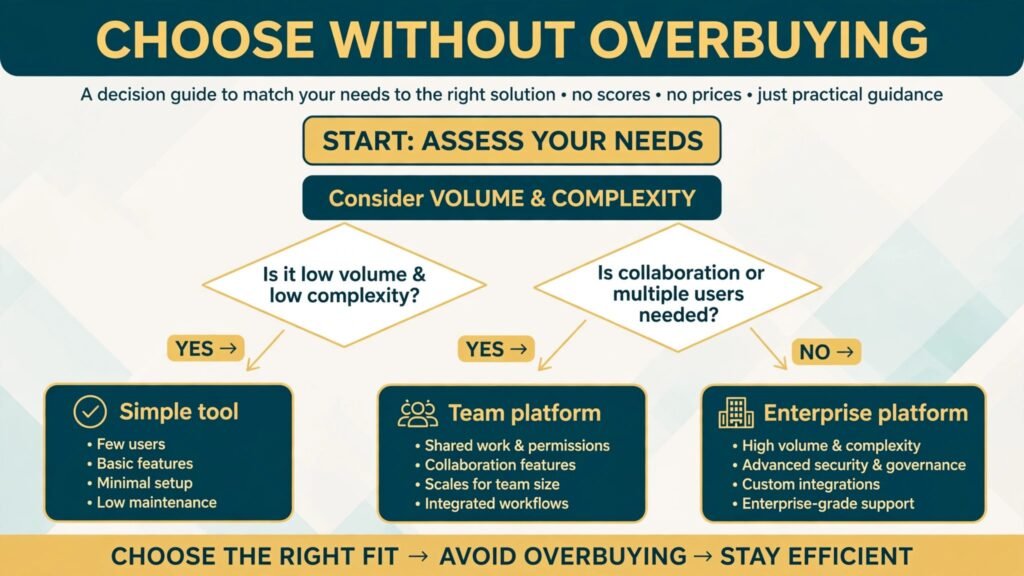
Start with volume and complexity, not brand. If you sign fewer than five contracts a month and most are standard, choose a simple guided tool and invest the saving in a lawyer review of your master template. If you sign weekly and negotiate terms, choose a team platform with approvals and storage. If you sign daily across departments, choose a lifecycle platform with reporting and a dedicated owner. Overbuying is the most common waste in this category, because enterprise features do not help a solo owner, and simple templates do not help a negotiating team.
Next, test with a real agreement, not a demo template. Take a recent client agreement, with your actual scope, payment terms, and termination clause, and rebuild it in two tools. Check how long it takes, how readable the result is, how easy it is to edit, and how clean the signature experience feels for the client. Ask a colleague to sign the test document and tell you where they hesitated. A signature flow that confuses clients delays deals, even if the drafting side is excellent. Also check storage from day one. A tool that drafts well but makes signed contracts hard to find will cost you at renewal time.
Finally, plan for review. Decide in advance which agreements get lawyer review, which get a senior internal review, and which can be signed on a template alone. Write that rule down and share it with anyone who sends contracts. A simple rule, such as all deals above a set value, all employment and intellectual property agreements, and all deals with unusual counterparty terms get external review, prevents both risky shortcuts and unnecessary legal spend. Keep reviewed templates in one place, version them, and retire old versions so nobody signs on outdated terms.
Mistakes to avoid with generated contracts
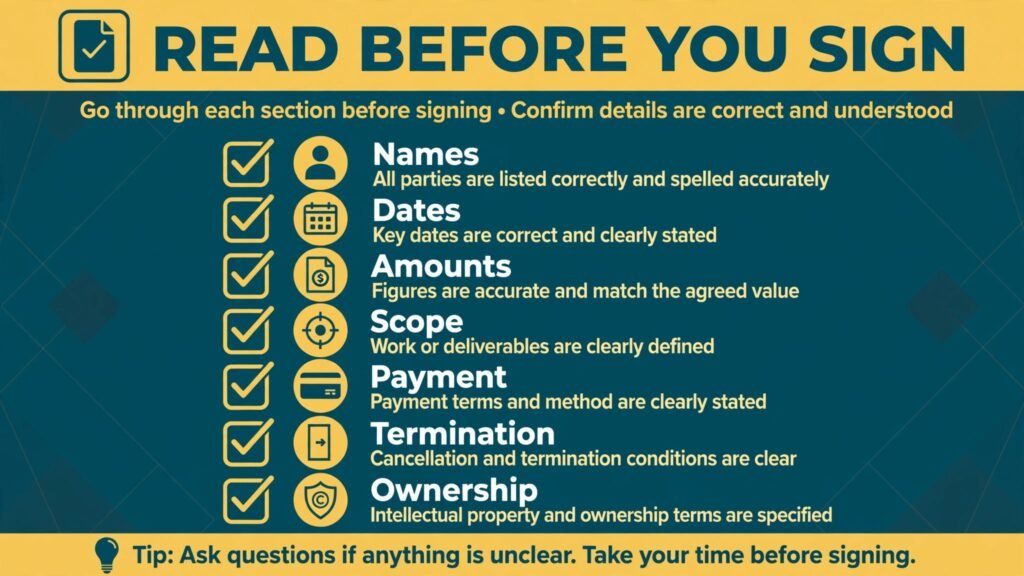
The biggest mistake is signing without reading. AI drafting feels authoritative because the document looks professional, with numbered clauses and legal phrasing, but a professional look is not proof of correctness. Read names, amounts, dates, scope, payment timing, late payment terms, termination rights, and ownership of work, every time. The second mistake is reusing a template across jurisdictions or industries without checking fit. A service agreement for a local consultant and a software licence for a global client are different documents, even if both start from a similar template.
Other mistakes are process mistakes. Letting team members edit core clauses in individual deals, storing signed contracts in personal email, missing renewal dates, and accepting counterparty redlines without review all create risk that a better generator alone will not fix. Set a rule that core clauses change only through a reviewed template, store signed contracts in one searchable place with a named owner for renewals, and treat a heavily redlined draft as a signal to pause and get advice. Also avoid vague scope. A contract that says “marketing services” without deliverables, timelines, and revision limits will cause disputes even if the legal clauses are perfect. Specific scope protects both sides.
Frequently asked questions
Are AI generated contracts legally binding?
A contract generated by AI can be binding if it meets the normal requirements for a contract in your jurisdiction, including offer, acceptance, consideration, and intention to create legal relations, and if it is signed properly. Generation method alone does not make a contract invalid, but a missing or unclear term can still make it hard to enforce. Get review for material agreements, and check electronic signature rules for your location and agreement type.
Do I still need a lawyer if I use a contract generator?
For routine low risk agreements on a reviewed template, many businesses proceed without a lawyer for each deal. For high value deals, employment, intellectual property, property, and any agreement with unusual terms, get a lawyer review. Think of the generator as a drafting assistant and the lawyer as the risk check, not as competing options.
Can I use one template in different countries?
Only with care. Contract law, employment rules, consumer protection, and signature rules differ by jurisdiction. A template built for one country may miss requirements in another, or include clauses that are unenforceable there. Use jurisdiction specific templates where available, and get local review for cross border deals.
What should a freelance client contract always include?
At minimum: parties and contact details, scope and deliverables, timelines, price and payment timing, revision limits, ownership of work and licence terms, confidentiality if needed, termination rights, liability limits where appropriate, and governing law. Add late payment terms and a clear process for changes to scope, because scope changes cause most freelance disputes.
Is electronic signature accepted?
In many jurisdictions, yes, for most business agreements, provided the signature method meets local requirements and the signed document is stored reliably. Some agreement types, such as certain property or will documents, may need wet signatures or special formalities. Check the rules for your agreement type before relying on electronic signature alone.
How do I store contracts so I can find them later?
Use one searchable repository, with consistent naming, a renewal date field, and a named owner for each contract. Store the final signed version, not a draft, and keep a separate list of key terms for active deals, such as renewal dates, price review dates, and termination notice periods. Review that list monthly, so renewals never surprise you.
What is the first contract a new business should have?
Most new service businesses should start with a client service agreement and, where relevant, an NDA. Those two documents cover the majority of early deals. Add employment or contractor agreements when you hire, and supplier agreements when you commit to regular purchases. Get the client agreement reviewed once as a template, then reuse it consistently.
Conclusion: draft fast, review where it counts
The best AI contract generators in 2026 remove the blank page and the filing chaos that stop many small businesses from using contracts at all. For most owners, PandaDoc for combined proposals and contracts, LawDepot for a single straightforward agreement, and Juro for a growing team will cover the real work. For large companies, Ironclad or DocuSign lifecycle tools add the control that high volume contracting needs. Whichever tool you choose, keep the rule simple: draft fast with the generator, read every document fully, store signed contracts in one place, and get a lawyer to review key agreements before you sign. That combination gives you speed without giving away the protection a contract is meant to provide.