
The problem on a plane is not just engine noise. It is engine noise plus a crying child two rows back, plus a neighbour’s video leaking from a phone speaker, plus an announcement you need to hear, plus a laptop call, all while your headphones run low on battery somewhere over the ocean. When you set up noise cancelling headphones for travel the day before a trip and never test them, they will solve only the first of those problems, and often badly, because the fit is wrong, the noise cancelling mode is wrong, the phone and laptop are fighting for the same Bluetooth connection, and the cable for the seatback screen is still in its wrapper at home.
If you want to set up noise cancelling headphones for travel properly, you must test the whole travel system at home, before the airport, when a fix takes five minutes instead of a frustrated hour in a departure lounge.
This guide does that testing for you in order. You will choose the right fit and ear cushion seal, pair two devices with multipoint correctly, set noise cancelling and transparency modes for each phase of a journey, pack the cables and adapters that actually matter, and build a battery plan that survives delays. It covers over ear headphones and earbuds, Android and iPhone, and laptop and tablet combinations, with the differences noted where they change the steps.
Fit First, Because Noise Cancelling Cannot Fix a Bad Seal
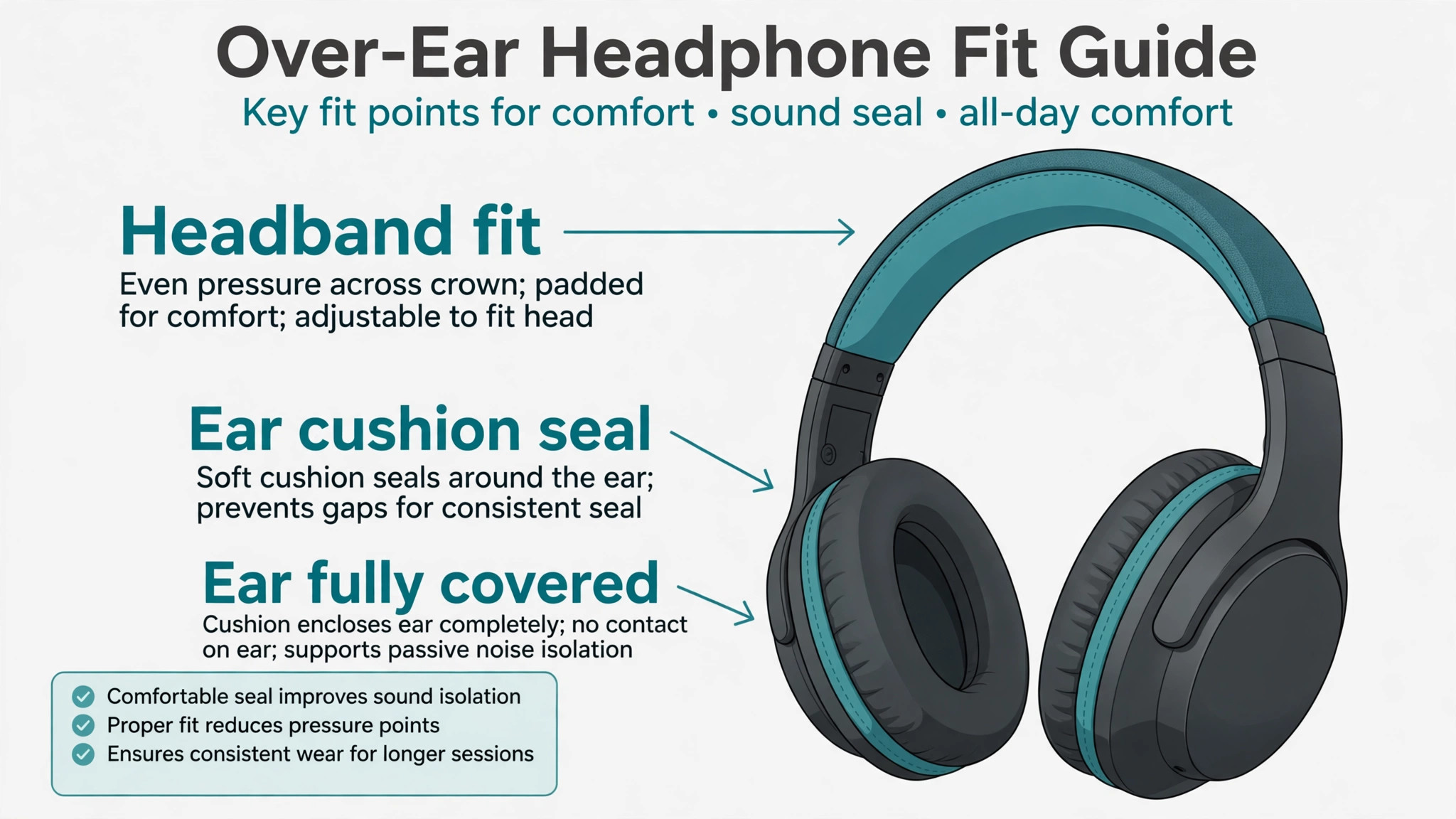
Active noise cancelling works by using microphones to listen to outside noise and playing an opposite sound wave to cancel it, and that system works best for steady, low frequency sounds such as engine hum and air conditioning. It works less well for sudden, sharp sounds such as a nearby conversation or a slamming overhead bin, and it works poorly if sound leaks in around a bad ear cushion seal. Fit is therefore not a comfort luxury, it is the foundation of noise cancelling performance, and a well fitting mid price pair often outperforms a poorly fitting premium pair on a real flight.
For over ear headphones, the ear cushions should enclose the whole ear without pressing painfully on the ear rim, and checking this fit is essential when you set up noise cancelling headphones for travel. Test fit by wearing the headphones for at least thirty minutes at home, leaning back as you would in a seat, and noting any pressure points on the ears or the top of the head.
For earbuds, try every tip size in the box, not just the size fitted at the factory, because a tip that feels fine for five minutes can ache after two hours, and a tip that is too small lets engine noise leak in and tempts you to raise volume to unsafe levels. Many headphone apps include a fit test that plays a tone and checks the seal, and that test is worth running for each tip size before you travel.
Glasses, earrings and hairstyles affect seal too. If you wear glasses, check whether the temple arms break the cushion seal and create a leak channel, and try adjusting the headphone position slightly forward or back to minimise the gap. If you wear earrings that press against the cushion, remove them for long flights or choose a looser cushion position. If you sleep on a plane, test side sleeping with the headphones at home, because over ear headphones that feel fine upright can press painfully when your head rests against a pillow or a window. A travel pillow that supports the neck without pushing the headphones forward can help, but test the combination together rather than assuming it works.
Pairing the First Device and Updating Before You Leave
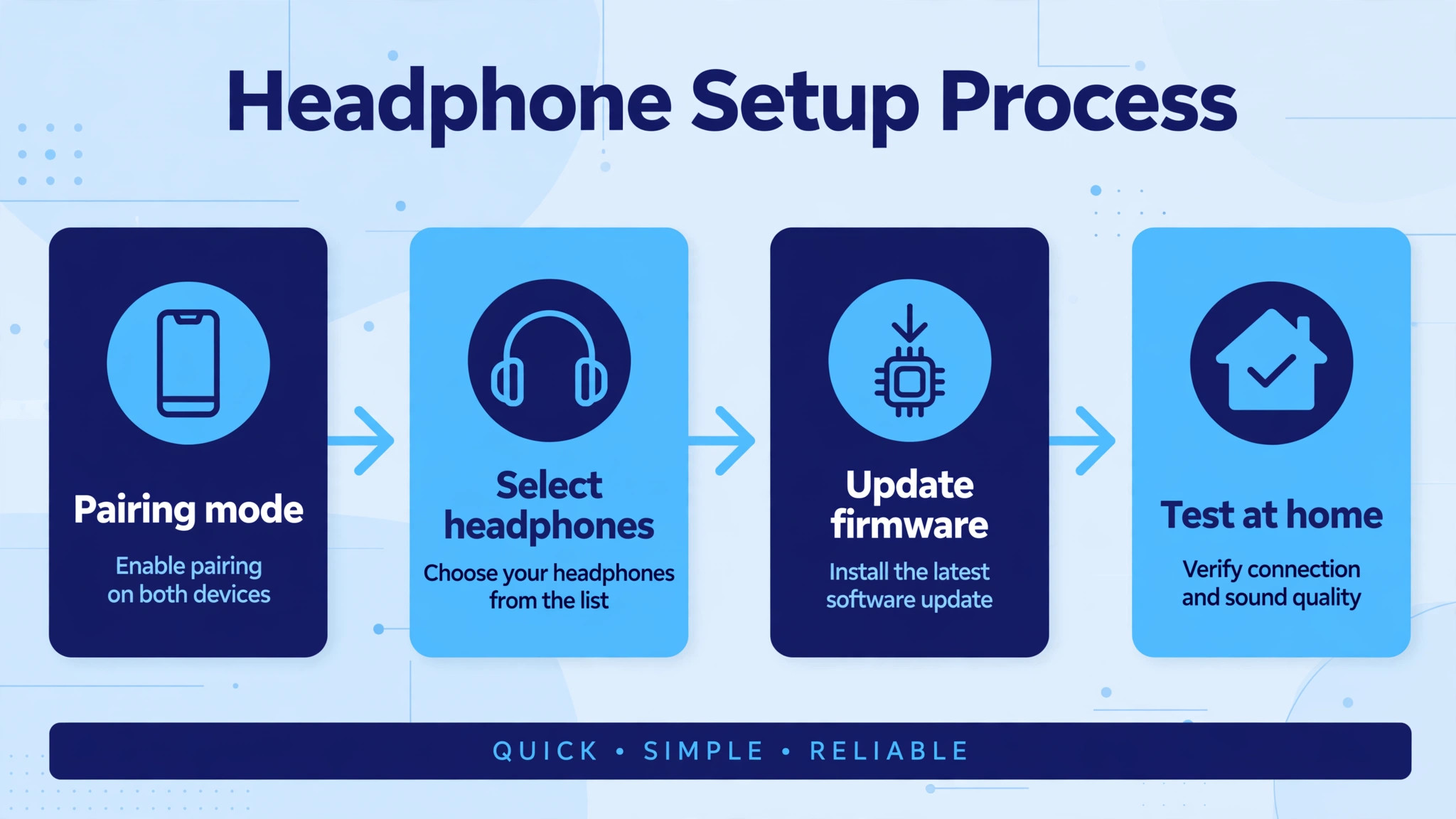
Start pairing at home, on a full charge, with the headphone app installed if your model has one. Put the headphones in pairing mode, usually by holding the power button or a dedicated Bluetooth button until a voice prompt or light indicates pairing, then open Bluetooth settings on your phone, select the headphones, and confirm the connection. Once paired, open the companion app, check for a firmware update, and install it at home on Wi-Fi, because a firmware update on airport Wi-Fi or on mobile data can fail, drain battery and leave the headphones in an uncertain state just before boarding.
In the app, set the basics before you travel. Choose a default noise cancelling level, set touch or button controls to actions you will remember, turn off any feature that announces notifications aloud if you find it distracting, and set the automatic power off time to a value that preserves battery without switching the headphones off during a quiet film. Check the equaliser preset too, because a bass heavy preset that sounds exciting for ten minutes at home can become tiring over a four hour flight, while a balanced preset usually suits films, podcasts and music across a whole journey.
Save these settings as your travel profile if the app allows profiles, so you can return to them after experimenting later.
Test the full chain at home, not just the pairing. Play music from your phone, then play a downloaded film with the headphones, then take a test call, then switch to a podcast, and check that volume, microphone and noise cancelling behave as expected in each case. A headphone that works for music but has a faint microphone on calls will disappoint on a work trip, and a headphone that sounds good for films but distorts at high volume will disappoint on a noisy train. Finding these problems at home gives you time to adjust settings, try a different equaliser preset or, if necessary, exchange the headphones before the trip.
Multipoint Pairing for a Phone and a Laptop Together
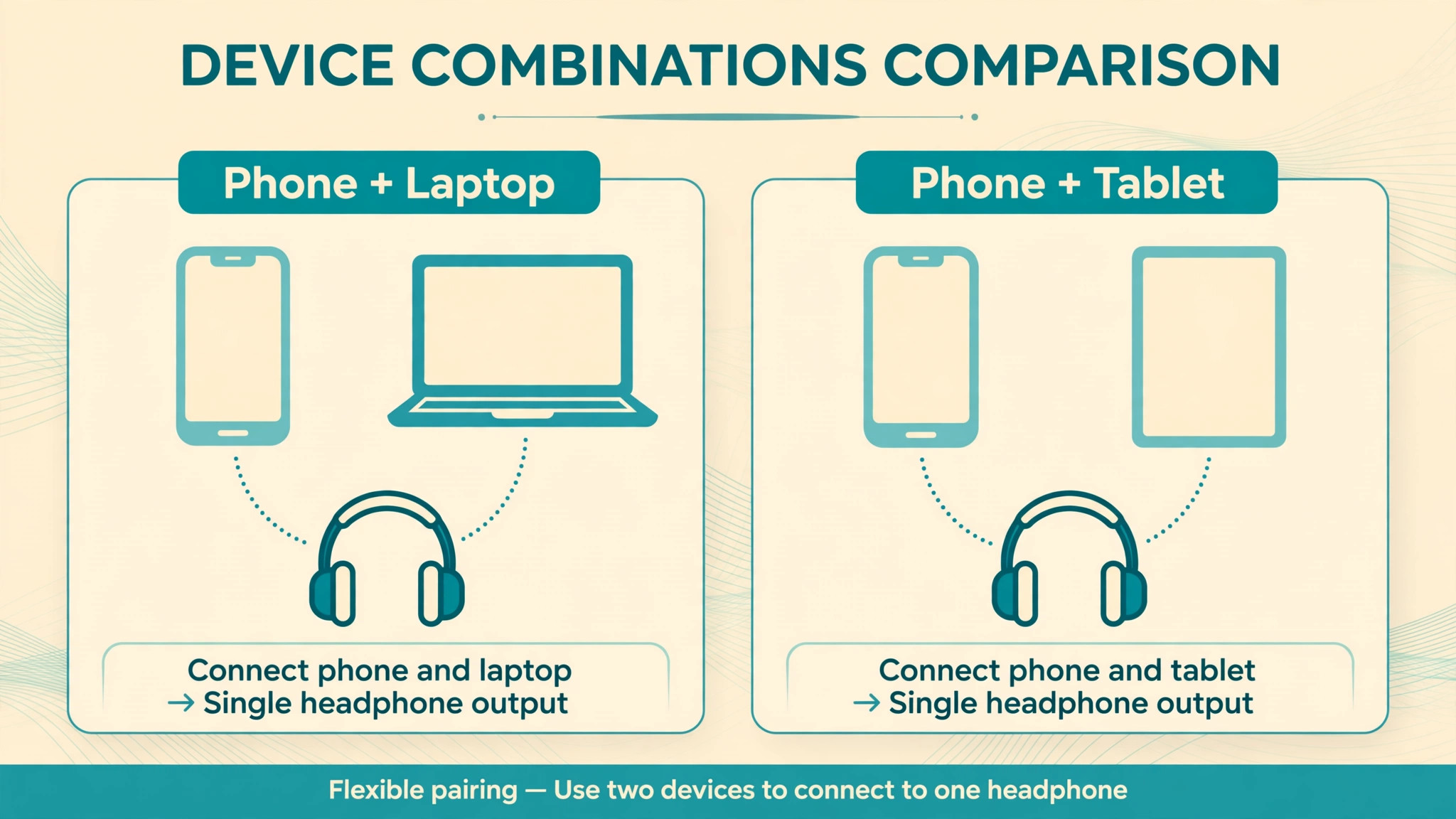
Multipoint is the feature that lets headphones stay connected to two devices at once, typically a phone and a laptop, and learning it properly matters when you set up noise cancelling headphones for travel. It is the single most useful travel feature after noise cancelling itself, because a traveller who must choose between a laptop film and a phone call will miss one or the other. Not all headphones support multipoint, and those that do implement it differently, so check your model’s manual or app for multipoint support before relying on it on a journey.
The general pairing sequence is consistent across most brands. Pair the first device normally, then put the headphones back into pairing mode without disconnecting the first device, then pair the second device. Some models require multipoint to be enabled in the app first, while others enable it automatically once a second device is paired. After both devices show as connected, test the switch deliberately, by playing music on the laptop, then playing a video on the phone, then receiving a test call on the phone while the laptop is playing, and noting which device takes priority and how quickly the switch happens.
A switch that takes a few seconds is normal, while a switch that drops both connections indicates a setting or compatibility problem to fix at home.
The multipoint table below summarises the common device combinations, the usual pairing order, and the behaviour to expect, so you can plan which device should be primary for calls and which for media.
| Device combination | Pairing order that usually works | Expected switch behaviour |
|---|---|---|
| Phone and laptop | Phone first, then laptop in pairing mode again | Call on phone interrupts laptop media |
| Phone and tablet | Phone first, then tablet in pairing mode again | Video on tablet pauses when phone rings |
| Two phones | First phone, then second phone in pairing mode again | Most recent call or media takes priority |
| Phone and smartwatch | Phone first, watch connection through phone app | Watch notifications may pause media briefly |
| Laptop and tablet | Laptop first, then tablet in pairing mode again | Media on one device pauses when the other plays |
| Phone and in flight entertainment | Phone by Bluetooth if supported, otherwise wired cable | In flight system usually needs a wired or transmitter link |
| Phone and television at a hotel | Phone first, then television if it supports Bluetooth audio | Television audio may lag slightly over Bluetooth |
| Laptop and phone for work calls | Laptop for calls app first if calls matter most | Set the call device as primary in the app if offered |
If multipoint causes confusion, such as music pausing every time a laptop notification sounds, adjust notification settings on the secondary device or temporarily disconnect it during a film. Multipoint is a tool, not a requirement, and a traveller who only needs one device at a time may prefer a single stable connection over a dual connection that interrupts at the wrong moment. Know how to disconnect and reconnect a device quickly in Bluetooth settings, because that skill solves most multipoint annoyances without a factory reset.
Noise Cancelling, Transparency and Flight Mode Settings
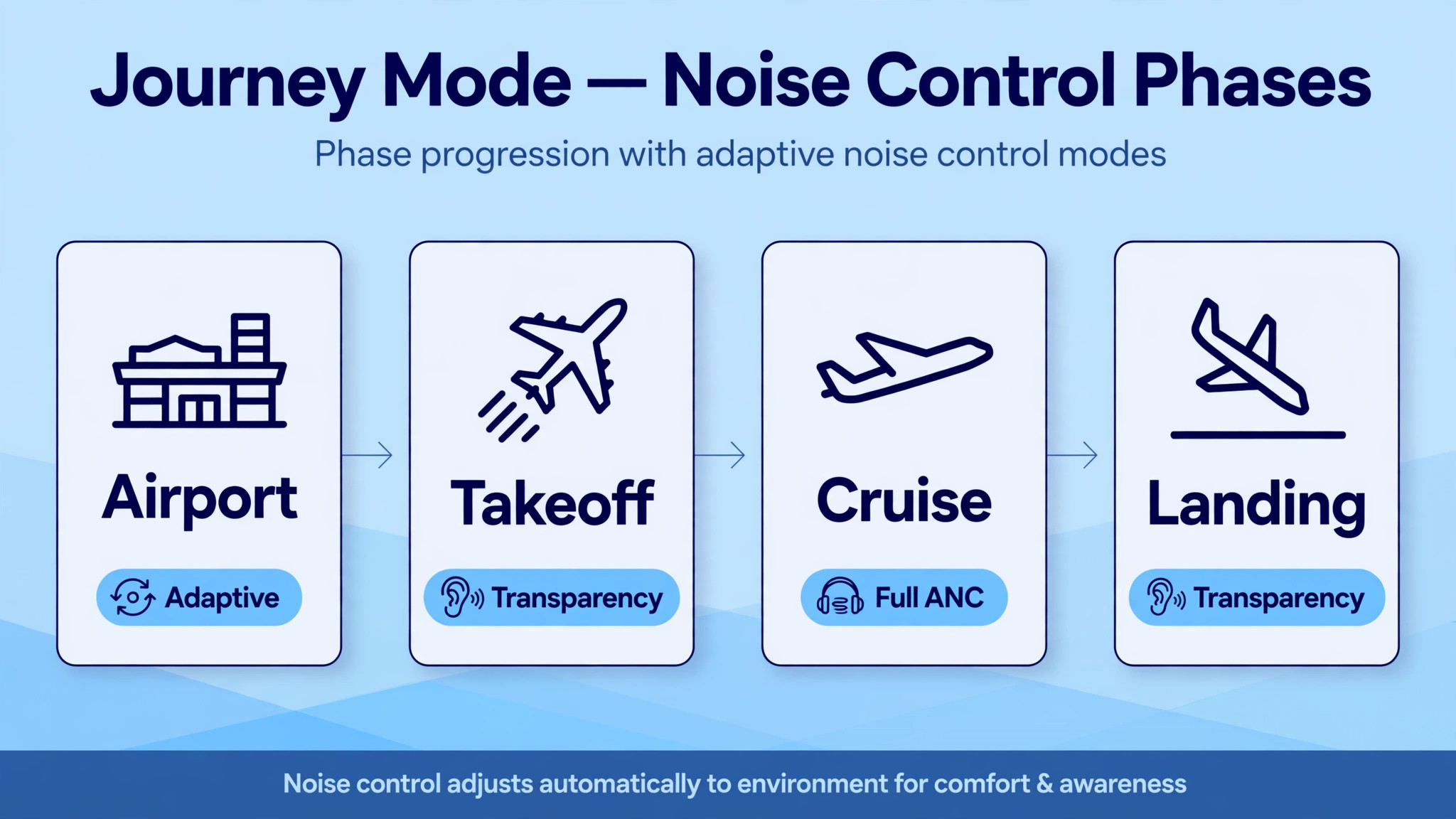
Noise cancelling modes have different names across brands, but the concepts are consistent. Full noise cancelling gives maximum reduction of steady noise and suits cruise flight, train journeys and busy offices. Adaptive or automatic noise cancelling adjusts the level based on surrounding noise and movement, which suits walking through an airport where noise levels change constantly. Transparency or ambient mode lets outside sound in through the microphones, which suits announcements, conversations with cabin crew, and crossing a road after landing. Some models offer a custom level slider, which lets you choose a middle setting for a long flight where full cancelling feels like pressure in the ears.
That pressure sensation deserves a note, because many first time users mistake it for a fault. Strong noise cancelling can create a feeling of pressure or fullness in the ears, similar to a change in altitude, especially in a quiet room where there is little noise to cancel. On a plane, the sensation usually fades as the brain adjusts, but if it persists or causes discomfort, reduce the cancelling level, switch to adaptive mode, or take a short break with transparency mode on. Ear discomfort that persists after landing, dizziness, or pain should be checked by a clinician, because headphones should never cause pain, and a comfortable level is always better than a maximum level that hurts.
Flight mode on headphones is not the same as flight mode on a phone. On headphones, a flight or airplane preset, where offered, often tunes noise cancelling for cabin noise and may adjust microphone sensitivity for calls in a noisy cabin. On a phone, flight mode turns off cellular, Wi-Fi and Bluetooth radios unless you re-enable Bluetooth manually, so remember to turn Bluetooth back on after enabling phone flight mode, or your headphones will not connect at all. Test this sequence at home, by enabling phone flight mode, re-enabling Bluetooth, and confirming the headphones reconnect, so you do not discover the sequence for the first time while the cabin crew are giving safety instructions.
The flight mode and ANC settings checklist below covers the settings to confirm before boarding, in the order you will need them during the journey.
| Checklist item | Setting to confirm | When you will need it |
|---|---|---|
| Full noise cancelling | Maximum ANC level, tested on a noisy street or train | Cruise flight and long train sections |
| Adaptive noise cancelling | Auto ANC on if your model offers it | Airport walking and changing noise levels |
| Transparency mode | Ambient level comfortable for speech | Announcements, crew conversations, boarding calls |
| Custom ANC level | Middle level saved if full ANC feels pressured | Long flights where comfort matters more than maximum quiet |
| Wind reduction | Wind mode on for outdoor walking sections | Walking to a taxi or train in wind |
| Microphone for calls | Call microphone tested on a real call | Work calls from the airport or hotel |
| Sidetone for calls | Own voice level comfortable, not echoing | Long calls where hearing yourself helps |
| Auto pause on removal | Pause when headphones are removed if desired | Quick conversations without losing your place |
| Automatic power off | Power off after a sensible idle period | Preserving battery during a long layover |
| Button or touch controls | Play, pause, ANC toggle and volume memorised | Dark cabin where you cannot see controls |
How to Set Up Noise Cancelling Headphones for Travel With a Seatback Plan
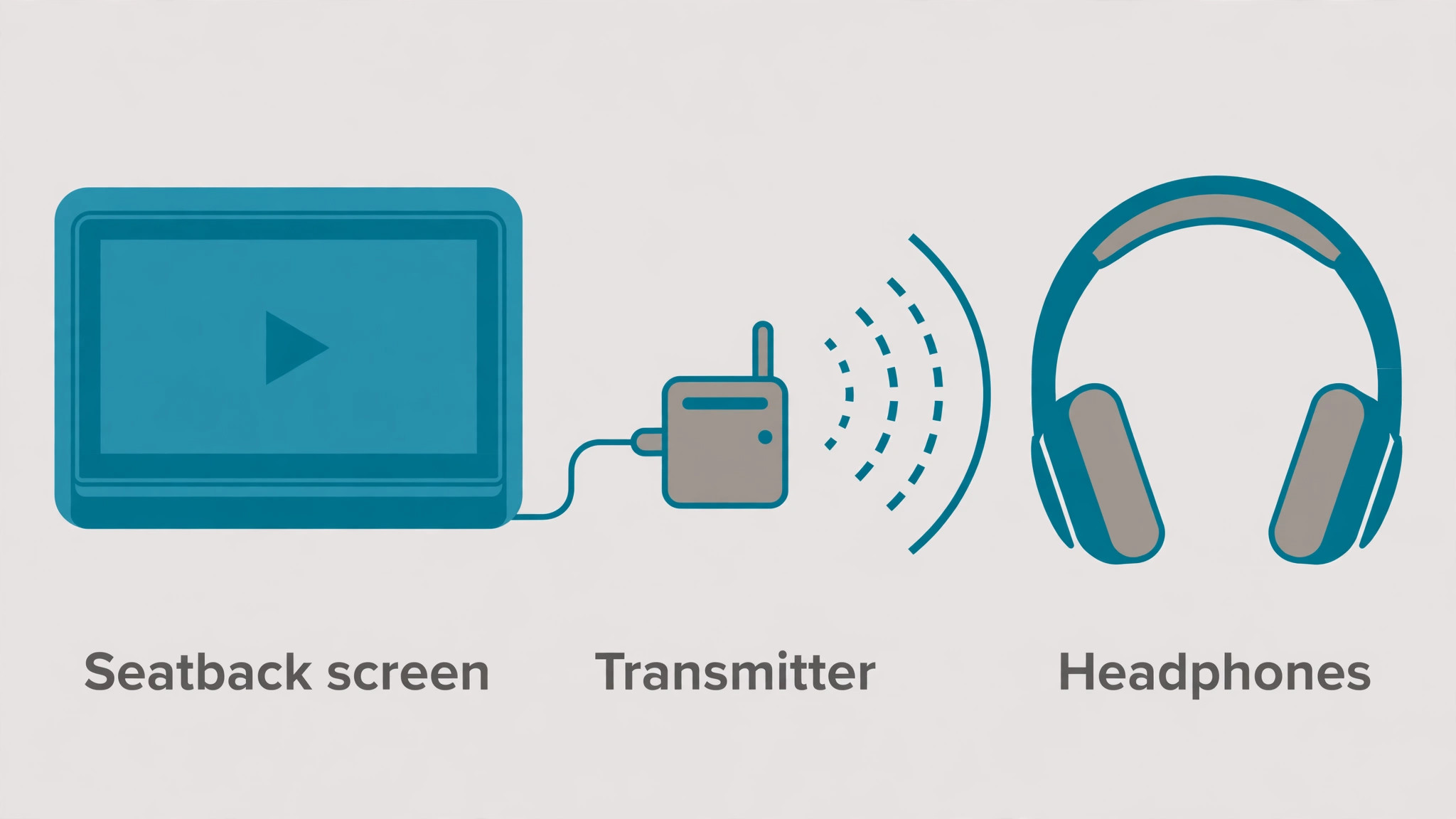
Seatback entertainment is the part of travel audio most often forgotten until boarding. Many aircraft seatback systems still use a wired headphone jack, often a single 3.5mm jack and sometimes a dual pin jack on older aircraft, and they do not support Bluetooth directly. Pack a wired cable for your headphones, even if you normally use them wirelessly, and pack a dual pin airplane adapter if you fly older aircraft frequently, because a five gram adapter can be the difference between a film with sound and a film watched in silence.
Test the wired cable at home with a phone or laptop headphone jack, and confirm that noise cancelling still works in wired mode, because on many models ANC works with power on even when the cable is used, while on others it behaves differently.
A Bluetooth transmitter solves the seatback problem differently, by plugging into the seatback jack and transmitting audio wirelessly to your headphones. Transmitters vary in latency, which is the delay between picture and sound, and a high latency transmitter can make dialogue look out of sync, which is distracting over a full film. Choose a transmitter that supports a low latency codec compatible with your headphones where possible, test it at home with a television headphone jack, and pack its charging cable, because a transmitter with a flat battery is useless at cruising altitude.
Note that a transmitter breaks multipoint in most cases, because the headphones are now connected to the transmitter instead of, or in addition to, your phone, so decide before the flight whether seatback films or phone calls matter more for that leg.
Volume safety on a plane deserves a deliberate choice. Engine noise tempts travellers to raise volume to levels that would feel loud at home, and noise cancelling should reduce that temptation by lowering the noise floor, not by encouraging louder music on top of it. Set a comfortable volume in a quiet room first, then increase it only slightly for the cabin, and use the headphone app volume limit or the phone volume limit if you tend to creep upward during a long flight. If you must raise volume to hear dialogue clearly, improve the seal or increase noise cancelling first, because a better seal often restores clarity without any volume increase at all.
Battery Planning, Charging and Delays
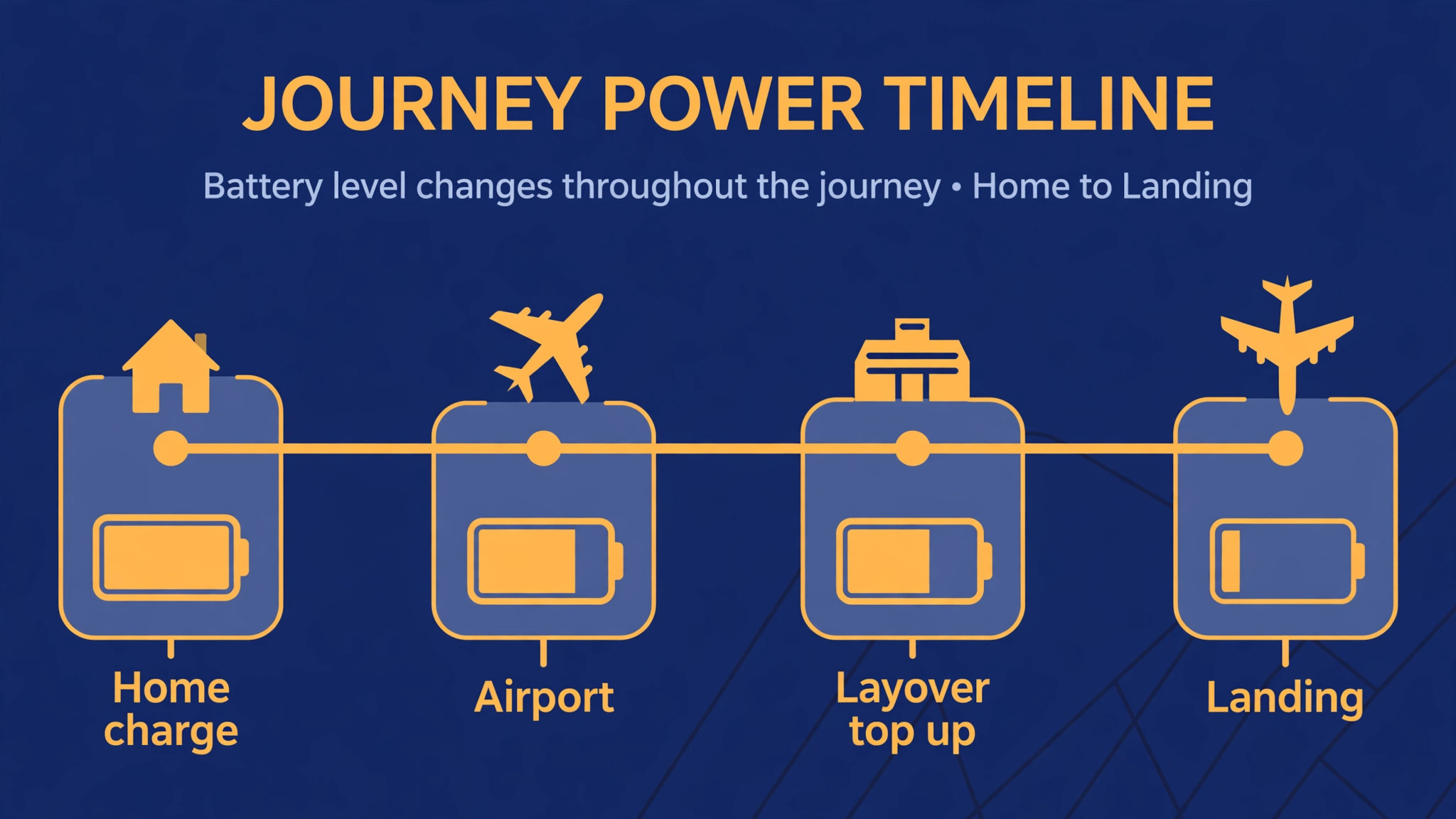
Battery life figures on headphone boxes are measured with noise cancelling on and volume at a moderate level, and planning around real use is important when you set up noise cancelling headphones for travel. Check your model’s rated life with ANC on, not the longer figure with ANC off, and plan for about three quarters of that figure as a realistic travel budget. For a long haul flight with a layover, charge to full the night before, top up during the layover if a power outlet is available, and carry a small power bank with a USB cable that matches your headphones, because airport outlets are often occupied and a power bank gives you charging independence.
Charging on a plane is unreliable, so do not plan around it. Some seats have USB power, but output can be low, outlets can be broken, and cabin crew may ask you to stow cables during takeoff and landing. Charge during layovers, in airport lounges or cafes where outlets are available, and keep the headphones in a case that protects the ear cushions and prevents accidental button presses that can switch them on inside a bag and drain the battery. If the headphones support quick charging, learn how much playback a short charge gives, because a ten minute charge during boarding can often add enough time for a short flight segment, and that knowledge reduces anxiety during delays.
Delays are where a battery plan proves itself. A two hour delay on top of a four hour flight can turn a comfortable battery margin into a flat battery before landing, especially if you used the headphones during the delay for music and calls. During a delay, switch to a lower ANC level or turn ANC off for a period if the environment is quiet, reduce volume slightly, and pause media when you are not actively listening, rather than letting music play to an empty seat while you eat. These small savings compound, and a headphone that arrives with twenty percent battery is far more useful than one that dies during descent when announcements matter most.
Packing List and a Pre Flight Test at Home
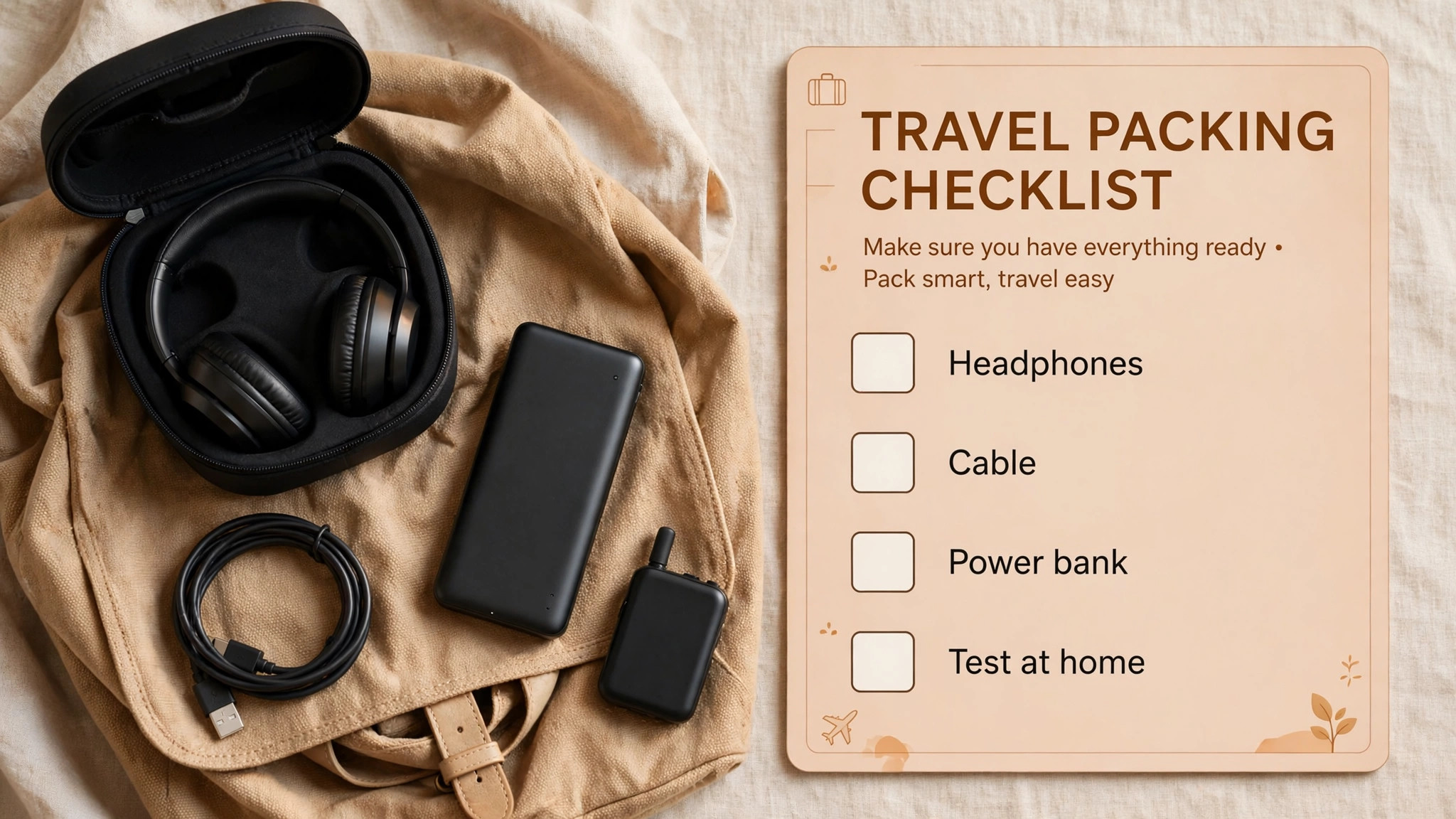
Pack methodically, because a forgotten cable cannot be bought easily after security. The core list is short, including the headphones in their case, a charging cable and a small power bank, a wired audio cable, a dual pin airplane adapter if relevant, spare ear tips if you use earbuds, and a cleaning cloth for ear cushions and sensors. Add a Bluetooth transmitter only if you plan to use seatback entertainment wirelessly, and add a second cable if your headphones use a different connector for charging and audio. Label cables if you carry several, because identical black cables become indistinguishable in a dark bag.
Run a pre flight test the evening before travel, following the sequence below, and fix any problem while you still have time and Wi-Fi. This test takes about fifteen minutes and prevents almost every common travel audio frustration, from a forgotten firmware update to a multipoint switch that surprises you during a call.
- Charge headphones to full and confirm the battery indicator in the app.
- Pair phone and laptop with multipoint and test a media to call switch.
- Test full ANC, adaptive ANC and transparency mode in a noisy room.
- Test a real phone call for microphone clarity and sidetone comfort.
- Test wired mode with a cable and confirm ANC behaviour while wired.
- Download films, podcasts and music for offline use, since in flight Wi-Fi is unreliable.
- Pack cables, adapter, transmitter if used, and spare ear tips in the headphone case.
- Set volume limit and travel equaliser preset in the app.
- Memorise the button or touch control for ANC toggle and play and pause.
- Place the headphone case in an accessible bag pocket, not at the bottom of checked luggage.
Offline downloads deserve emphasis, because streaming over in flight Wi-Fi or mobile data is often slow, expensive or unavailable. Download the films and episodes you plan to watch, download podcasts and playlists for the journey, and test one downloaded title with the headphones before leaving home, so you know the download actually plays and is not a placeholder that requires a connection. A downloaded library turns a delay or a Wi-Fi outage from a ruined journey into a minor inconvenience.
Comfort, Hearing Health and Sleeping With Headphones
Long wear comfort depends on weight, clamp force, ear cushion material and heat build up, and testing comfort at home helps when you set up noise cancelling headphones for travel. Over ear headphones with plush cushions and a well padded headband suit long flights, but they can become warm in a heated cabin, so lift them briefly every hour or so to let air circulate. Earbuds suit sleeping and walking, but they can cause ear canal soreness after several hours, so alternate between earbuds and a break with no audio if your ears feel tender.
If you plan to sleep on a plane, test sleeping with your chosen headphones at home on a pillow, because a headphone that is comfortable upright may press painfully when your head rests sideways.
Hearing health is a simple rule, which is that if someone beside you can hear your music clearly, it is too loud, and if your ears ring after removing the headphones, it was too loud for too long. Use noise cancelling to keep volume moderate, take a short break each hour on very long journeys, and use a volume limit on the phone for children, whose hearing is more vulnerable and who may not notice gradual volume creep.
A pair of headphones that lets you hear clearly at moderate volume is doing its job, while a pair that requires maximum volume to overcome poor seal or weak cancelling is telling you that fit or mode needs attention, not that your ears need more volume.
Children travelling with noise cancelling headphones need additional care. Choose a model with a volume limit designed for children, test the fit with the child’s ears, and teach the child how to switch to transparency mode for announcements and conversations. Do not assume a child will remember to remove headphones for safety instructions, so practise the transparency toggle at home and make it a game, where the child switches to transparency when you raise a hand. A child who can control their own headphones confidently is safer and happier on a journey than a child wearing adult headphones at adult volume.
Troubleshooting on the Move
If headphones will not pair, turn Bluetooth off and on on the phone, put the headphones back into pairing mode, and forget and re-pair the device if necessary, because a stale pairing entry causes many connection failures. If multipoint switches unexpectedly, check which device is playing a notification sound, mute notifications on the secondary device, or disconnect it temporarily. If noise cancelling sounds weak, check the ear cushion seal, clean the microphones gently, and confirm that ANC is actually on, because a button press in a bag can switch modes without you noticing.
If sound is out of sync on a seatback film through a transmitter, try a different codec setting if the transmitter offers one, switch to wired mode for that film, or restart the transmitter and headphones. If the microphone sounds faint on calls, check that the microphone ports are not covered by a hand, a scarf or a mask, and test the call in a quiet room to separate a microphone fault from cabin noise. If battery drains faster than expected, turn off extra features such as voice assistant announcements and high resolution audio codecs that your source does not need, and reduce ANC level in quiet environments.
Keep a wired cable as the ultimate fallback, because wired audio with ANC on, where supported, works even when Bluetooth fails completely.
More Reading on Stratilyze
Readers planning a journey may also enjoy the Apple Watch sleep tracking guide for rest on the move, the smart TV streaming setup guide for entertainment at home after a trip, and the Google Nest Hub smart home beginner guide for routines that welcome you home.
Frequently Asked Questions
Do I need multipoint to set up noise cancelling headphones for travel?
No, multipoint is helpful but not essential. It suits travellers who juggle a phone and a laptop, because calls can interrupt laptop media automatically. If you mainly use one device on a journey, a single stable Bluetooth connection is simpler and avoids unexpected switches. Test multipoint at home before relying on it, and know how to disconnect a secondary device quickly if it becomes annoying.
Why does noise cancelling feel like pressure in my ears?
Strong noise cancelling can create a sensation of pressure or fullness, especially in a quiet room, because the system alters low frequency sound perception. On a plane the sensation usually fades as you adjust, but if it persists, reduce the ANC level, switch to adaptive mode, or take a short transparency break. Persistent pain, dizziness or discomfort after landing should be checked by a clinician, because headphones should never cause pain.
Can I use Bluetooth headphones with a seatback screen?
Most seatback screens do not support Bluetooth directly, so you need a wired cable or a Bluetooth transmitter that plugs into the seatback jack. Test the wired cable at home first, and if you use a transmitter, test it for lip sync delay with a film before travel. Pack the transmitter charging cable, because a flat transmitter cannot help on a flight.
How do I set up noise cancelling headphones for travel the night before a flight?
Charge to full, install any firmware update on home Wi-Fi, pair phone and laptop with multipoint if you use it, test ANC and transparency modes, test a real call, download films and music for offline use, and pack the wired cable, airplane adapter and charging cable in the headphone case. A fifteen minute test the evening before prevents most airport frustrations.
Should I keep ANC on all the time during a flight?
Not necessarily. Use full ANC during cruise, adaptive ANC while moving through the airport, and transparency mode for announcements, conversations and boarding calls. Switching modes by journey phase gives the best balance of quiet, awareness and comfort, and it reduces the pressure sensation some travellers feel with maximum ANC for many hours continuously.
What should I pack if my headphones run out of battery mid journey?
Pack a wired cable, because many headphones can play wired audio even with a flat battery, although ANC may need power on some models. Carry a small power bank and the correct charging cable, and top up during layovers rather than relying on seat power. A wired fallback and a power bank together cover almost every battery failure that travel can produce.
A Quiet Journey Is a Tested Journey
The difference between a good travel headphone setup and a frustrating one is rarely the price paid, it is the testing done before departure. A comfortable seal, a multipoint pairing that switches predictably, ANC and transparency modes chosen for each journey phase, a wired fallback in the case, and a battery plan that survives delays together create a journey where the headphones disappear and the film, music or call takes over. If you set up noise cancelling headphones for travel with that tested system in mind, the next flight becomes a chance to relax rather than a troubleshooting session at thirty thousand feet, and that calm is exactly what good travel gear should deliver.