
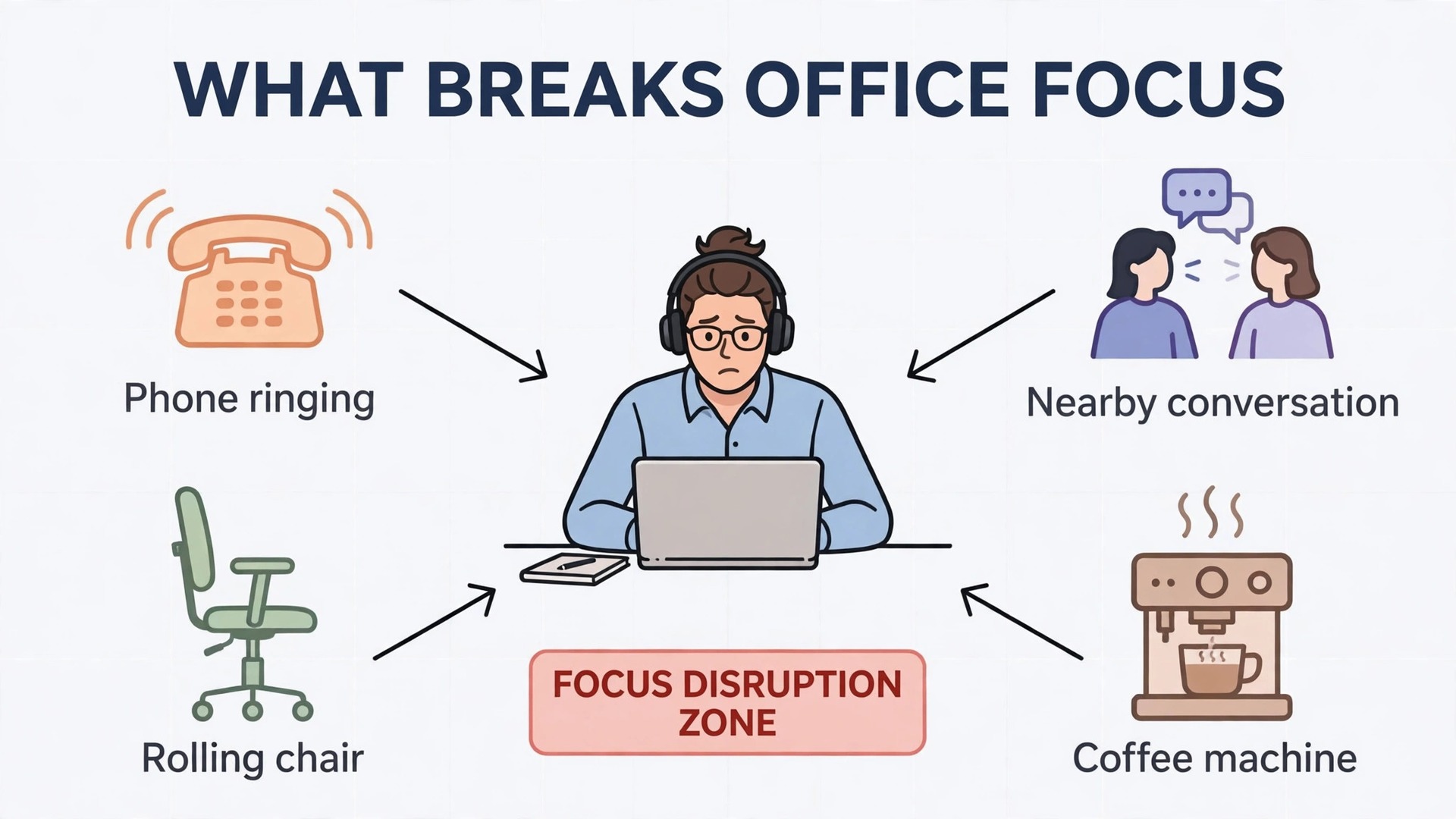
Open plan offices rarely sound loud in a single dramatic way. They sound busy in a hundred small ways. A chair rolls. A phone rings two desks away. Two people start a meeting beside your monitor. A coffee machine hisses. None of these sounds is a crisis on its own, but together they pull your attention apart every few minutes. If you want to use noise-cancelling headphones for office focus, you need more than a good pair of headphones. You need a simple system for modes, calls, battery and manners, so the headphones help your work instead of becoming one more thing to manage.
This guide gives you that system. It explains what each noise control mode actually does, when to switch modes during a workday, how to sound clear on calls, how to plan charging so the battery never dies in the middle of a meeting, and how to wear headphones all day without sore ears or annoyed colleagues. It uses real specifications from current flagship models to show the trade offs, and it ends with a mode table and a call checklist you can keep beside your desk.
Why Office Noise Breaks Concentration
Human brains are tuned to speech. That is useful in a conversation and unhelpful at a desk. When someone near you talks, your brain tries to follow the words even when you are trying to read a report. Research on open offices has returned to this point again and again. Steady background sound, such as air conditioning, is far easier to ignore than changing sound, such as half heard conversations, ringing phones and sudden laughter. Active noise cancellation is strongest against steady, low frequency sound. It is weaker against sharp, sudden sound and intelligible speech close by. That gap matters, because it explains why headphones help a great deal and still do not create total silence.
The practical result is a useful rule. Headphones reduce the noise floor and blunt the worst distractions, but your own habits still do the rest of the work. Music or brown noise at a modest volume can mask the speech that leaks through cancellation. People who expect total silence will be disappointed. People who use headphones as one part of a focus routine usually report a clear improvement.
Volume is the other hidden cost of office noise. When the room is noisy, people turn their music up to cover it. A better approach is to let cancellation do the heavy lifting at a lower volume, then add just enough masking sound to cover what remains. If you finish the day with ringing ears or a headache, the volume was too high or the fit was too tight.
How to Use Noise-Cancelling Headphones for Office Focus
A workday is not one listening situation. It is a series of different situations, and each one suits a different mode. Deep writing suits full cancellation. A quick question from a colleague suits transparency. A video call suits a mode that keeps your own voice sounding natural and lets you hear yourself without shouting. Walking to a meeting room suits awareness of footsteps, doors and announcements. The mistake most office workers make is leaving one mode switched on all day and then blaming the headphones when a call sounds odd or a colleague has to wave to get attention.
Start by learning the controls before you need them under pressure. Find the button or gesture that switches modes, the button that mutes the microphone, and the button that answers and ends calls. Practise switching modes with the headphones on, so you can do it without looking. Set up the companion app, and check that multipoint pairing is switched on if you move between a laptop and a phone.
Build mode switching into your calendar habits. Put full cancellation on for a ninety minute focus block, then switch to transparency for the ten minutes between meetings when colleagues need you. Tell your team what the pattern means, so a simple status message does the talking for you.
The Modes Explained in Plain Terms
Full active noise cancellation uses outward facing microphones to listen to the room, then plays an opposite sound wave through the drivers to cancel much of that noise before it reaches your ears. It works best on steady sounds such as fans, air conditioning, traffic hum and aircraft engines. It helps less with sudden sounds such as a door slamming or a nearby conversation, because those sounds change too fast for the system to cancel fully.
Adaptive cancellation adjusts the strength of that effect automatically. Some models use sensors and location data to raise cancellation in a noisy street and lower it in a quiet room. This can feel clever and hands free, but it can also feel unpredictable if the level changes while you are working. If your model offers a manual level, try it. Many office workers prefer a fixed strong level for focus blocks and a fixed light level for general desk work, because predictable sound is easier to think through than sound that keeps shifting.
Transparency mode, also called ambient sound mode or aware mode, does the opposite job. It uses the same microphones to pipe outside sound into your ears, so you can hear a colleague, an announcement or traffic while music still plays quietly underneath. Sony models offer up to twenty levels of ambient sound control, which lets you choose how much of the room you want. Bose models call the equivalent setting Aware mode, with an ActiveSense feature that softens sudden loud spikes while still letting normal sound through. Apple calls its version Transparency mode, and it is widely praised for sounding natural, as if you were not wearing headphones at all.
A fourth option is cancellation switched off entirely, sometimes called passive mode. The earcups still block some sound by their physical seal, but no processing is running. This saves battery and can feel more natural for short tasks, but it offers the least help in a noisy room. Some models also offer a wind reduction setting for outdoor walks between buildings.
The Mode Comparison Table
Use this table as your daily reference. It covers the modes found on most current flagship headphones, and the trade offs are the same even when brands use different names for the same idea.
| Mode | Best for | Watch out for |
|---|---|---|
| Full ANC | Deep writing, reading, data work, noisy open plans | You may miss a colleague, a name call or a fire alarm cue, so use it in agreed focus blocks |
| Adaptive ANC | Moving between quiet rooms, corridors and busy floors | The level can shift while you work, which some people find distracting |
| Transparency or Aware | Quick questions, shared desks, walking between rooms | Nearby conversations come through clearly, which breaks focus if left on all day |
| ANC off or passive | Short quiet tasks, saving battery, listening while charging | The least protection in a noisy room, and sound leaks in both directions |
| Wind reduction | Outdoor calls, walks between buildings, balconies | It can thin out music slightly, so switch it off again indoors |
| Speak to chat or quick attention | A thirty second question without removing headphones | It can trigger by accident if you hum, cough or talk to yourself while thinking |
A Mode Plan for a Typical Office Day
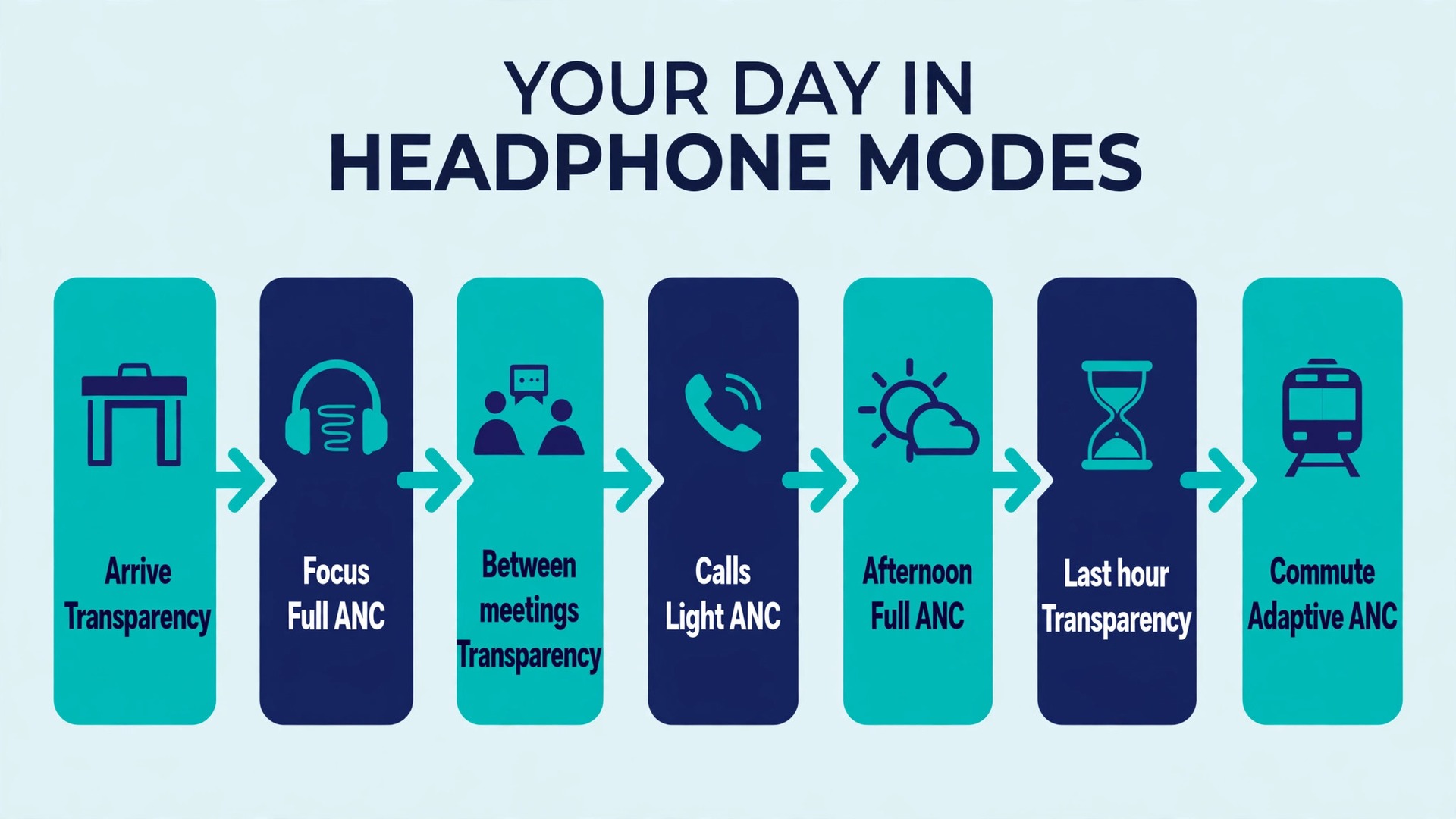
A simple plan beats a clever plan that you never follow. If you want to use noise-cancelling headphones for office focus day after day, try this pattern for a week and adjust the timings to your own meetings.
- Arrive and set up. Put the headphones on, connect to the laptop, and choose transparency while you settle in, greet people and check messages.
- First focus block. Switch to full cancellation, start a low volume masking sound or instrumental playlist, and work on your hardest task for sixty to ninety minutes.
- Between meetings. Switch to transparency ten minutes before a meeting, so you hear people arriving and you are not startled when someone speaks.
- During calls. Use transparency or a light cancellation level if your model lets you hear your own voice naturally. Test this once and keep the setting that stops you shouting.
- After lunch. Return to full cancellation for the afternoon focus block, when energy dips and the office gets louder.
- Last hour. Switch to transparency or switch the headphones off for admin, replies and end of day conversations, so you leave the office still tuned in to people.
- Commute home. Use full or adaptive cancellation on transport, and switch to transparency before crossing roads or entering a station.
If you work in a shared office where interruptions are frequent, shorten the focus blocks to forty five minutes and use transparency for the gaps. The plan still works, because the point is not the exact timings. The point is that mode changes follow the work, not the other way around.
Call Quality and Microphone Behaviour
Call quality is where many office headphone purchases succeed or fail, and it is also where specifications tell only part of the story. A headphone can cancel noise brilliantly for the wearer and still send a noisy, distant voice to everyone else on the call. That happens because listening and speaking use different microphone paths. Listening uses microphones that measure room noise. Speaking uses beamforming microphones that try to pick out your voice and reject the room. Wind, keyboard typing, a nearby conversation and a fan can all fool that system if the settings are wrong.
Sony flagship models use four beamforming microphones for calls plus artificial intelligence noise reduction, and they pair that with eight microphones in total for cancellation and voice. Bose second generation QuietComfort Ultra headphones use ten microphones across cancellation and calls. Apple AirPods Max use nine microphones in total, with three dedicated to voice pickup. More microphones do not automatically mean clearer calls, but they do give the processing more information to separate your voice from the room, and flagship models from all three brands are consistently rated well for office calls in quiet to moderately noisy rooms.
Your own setup matters as much as the microphone count. Sit a normal distance from the microphone array, which for over ear headphones means wearing them in their normal position rather than pushed forward or hanging around your neck. Speak at a normal volume. People wearing cancellation often speak too loudly, because they cannot hear themselves well, or too quietly, because they assume the microphones will compensate. A short test call with a colleague will tell you more than any specification sheet. Ask them directly whether your voice sounds clear, distant, echoey or clipped, and whether keyboard noise comes through when you type.
Software settings cause a surprising share of bad office calls. On Windows and Mac, check that the headphones are selected as both the speaker and the microphone in the meeting app, not just in system settings, because meeting apps can hold their own device choice. Watch for the hands free profile problem on Bluetooth. When a headset switches to call mode, some systems drop music quality to a narrow telephone style channel. A wired USB connection or a dedicated dongle avoids this on many models.
The Call Checklist
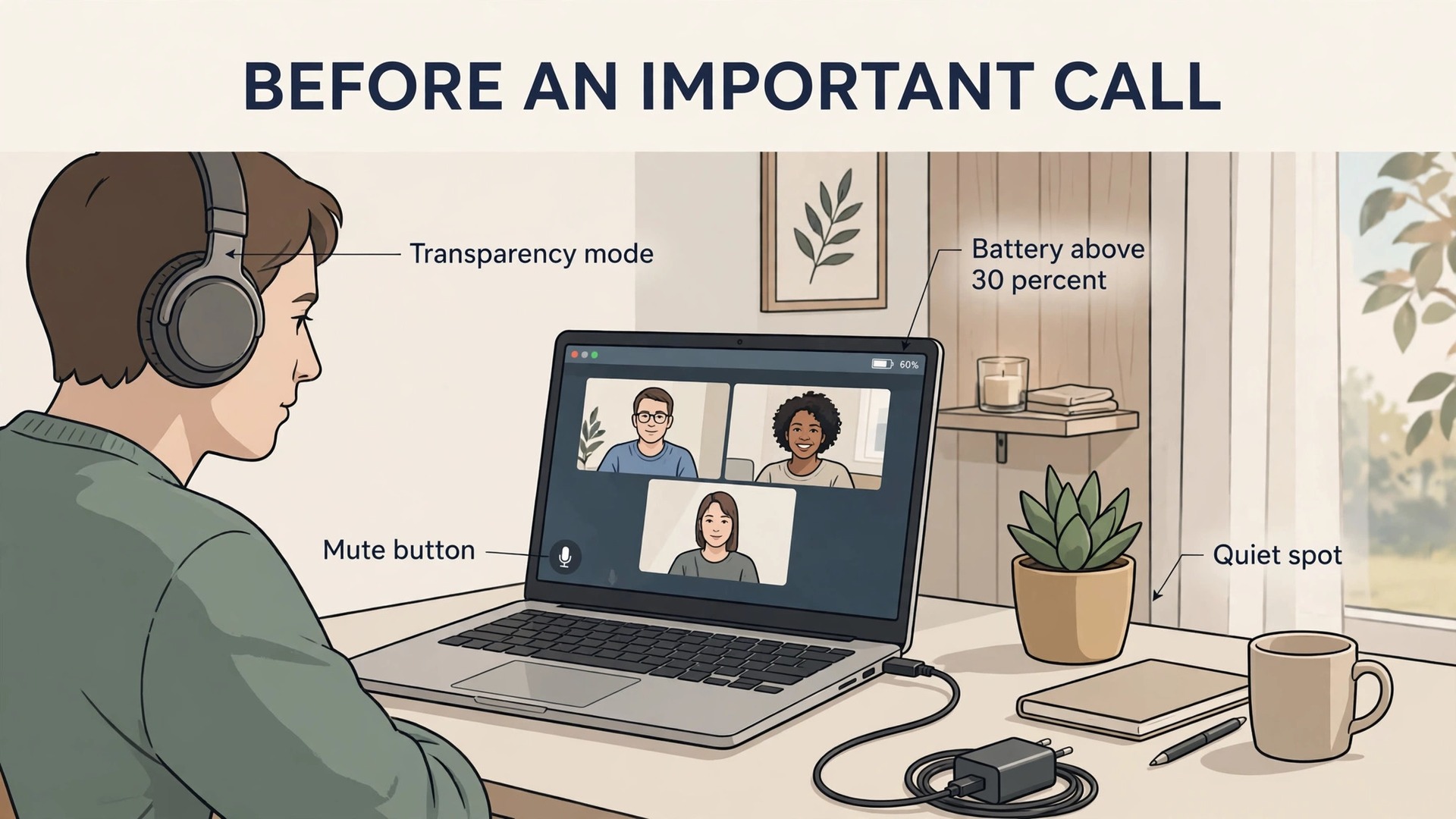
Workers who use noise-cancelling headphones for office focus should run through this checklist before an important call. It takes two minutes and it prevents most of the faults that make office workers sound unprofessional.
- [ ] Charge check. Battery above 30 percent, or the charging cable within reach, so the headphones do not die mid call.
- [ ] Mode check. Transparency or light cancellation selected, so you can hear your own voice at a natural level.
- [ ] Microphone check. The correct microphone is selected in the meeting app, and the mute button works. Test mute once before the call starts.
- [ ] Test call. A thirty second call with a colleague or a test meeting, asking about clarity, volume and background noise.
- [ ] Room check. Fans, nearby conversations and keyboard noise noted. Move to a quieter spot if a call is important and the desk is loud.
- [ ] Backup plan. A wired cable or a second headset ready, in case Bluetooth drops or the battery warning appears.
- [ ] Notification check. Phone and laptop notifications silenced, so pings do not cut across the call for everyone listening.
- [ ] Wind check for outdoor calls. Wind reduction on, and a sheltered spot chosen, rather than standing in an open doorway.
If a call still sounds poor after this checklist, change one thing at a time. Move rooms first, then switch from Bluetooth to wired, then try a different meeting app setting. Changing everything at once makes it impossible to know which change fixed the problem.
How to Sound Better Without Buying New Headphones
Small changes often beat a new purchase. Keep the earcups sealed against your head, keep the firmware updated, and turn off extra audio processing in the meeting app if your headphones already apply their own processing, because two systems fighting each other can create a hollow voice. Speaking slightly slower also helps listeners far more than a louder voice.
For workers who take calls all day, consider a dedicated headset for calls and headphones for focus. A boom microphone close to the mouth will almost always beat microphones built into earcups, because distance is the single biggest factor in voice clarity.
Battery Planning for Full Workdays
Battery figures look generous on paper and shrink in real office use. The reason is that makers quote battery life at a set volume, with certain features switched off, and real workdays mix calls, music, cancellation and standby in ways that drain faster. Understanding the three numbers that matter will stop most battery surprises.
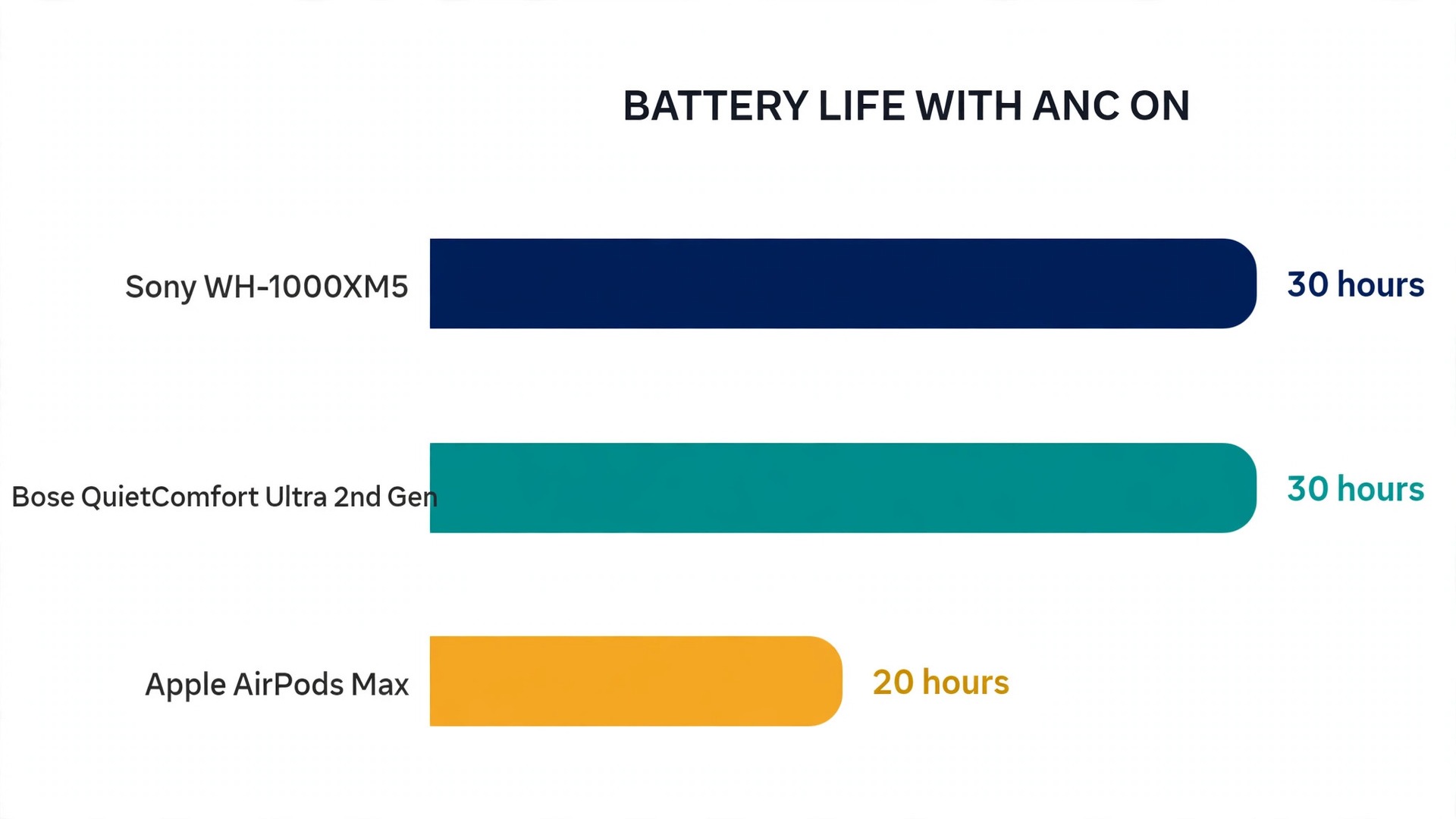
First, the headline listening time with cancellation on. Sony WH-1000XM5 headphones are rated at up to 30 hours with cancellation on and up to 40 hours with it off, at a moderate volume. Bose second generation QuietComfort Ultra headphones are rated at up to 30 hours with cancellation on, up to 23 hours with immersive audio on, and up to 45 hours with cancellation off. Apple AirPods Max are rated at up to 20 hours with cancellation and spatial audio on. Those differences matter. A 20 hour pair still covers two full workdays of listening, but it leaves less margin for a week of calls, commuting and forgotten charging than a 30 hour pair.
Second, the quick charge figure. Sony WH-1000XM5 headphones give about 3 hours of playback from a 3 minute charge with a suitable USB power delivery charger. Bose second generation QuietComfort Ultra headphones give about 3 hours from a 15 minute charge. Apple AirPods Max give about 1.5 hours from a 5 minute charge. Keep a proper wall charger in your desk drawer.
Third, the standby and auto off behaviour. Headphones that stay connected to a laptop all night will drain slowly even when you are not listening. Models with on head detection pause when you take them off, which saves battery and stops music playing to an empty desk. Models that fold flat into a low power mode, such as the Bose second generation, help here too. Switch the headphones fully off at the end of the day if you will not use them for a day or more, and check the companion app for an auto off timer. A pair that dies on Monday morning because it sat connected all weekend is a settings problem, not a battery problem.
A Weekly Charging Routine
A routine removes the need to think about battery at all when you use noise-cancelling headphones for office focus. Charge on a fixed day, top up at a fixed time, and keep a cable where you actually work.
- Sunday evening or Monday morning. Charge to full before the week starts, even if the battery shows half charge. Starting full gives you margin for a heavy call day.
- Midweek top up. Plug in during lunch on Wednesday for thirty minutes, while you are away from the desk. This covers the second half of the week without a full charge cycle.
- Before important calls. Check the battery the evening before a client presentation or an interview, and charge overnight if it is below half.
- Travel days. Charge the night before travel, and carry a short USB-C cable in your bag. Airport and train charging points are unreliable, so do not plan around them.
- Cable at the desk. Keep one cable permanently at your desk and one in your bag, so a dead battery never means a trip to a shop or a borrowed cable that does not fit.
Battery health deserves a short note. Do not leave headphones charging on a sunny windowsill all day, do not run them until they switch off every day, and use a normal charger for routine overnight charging.
Comfort for Long Days
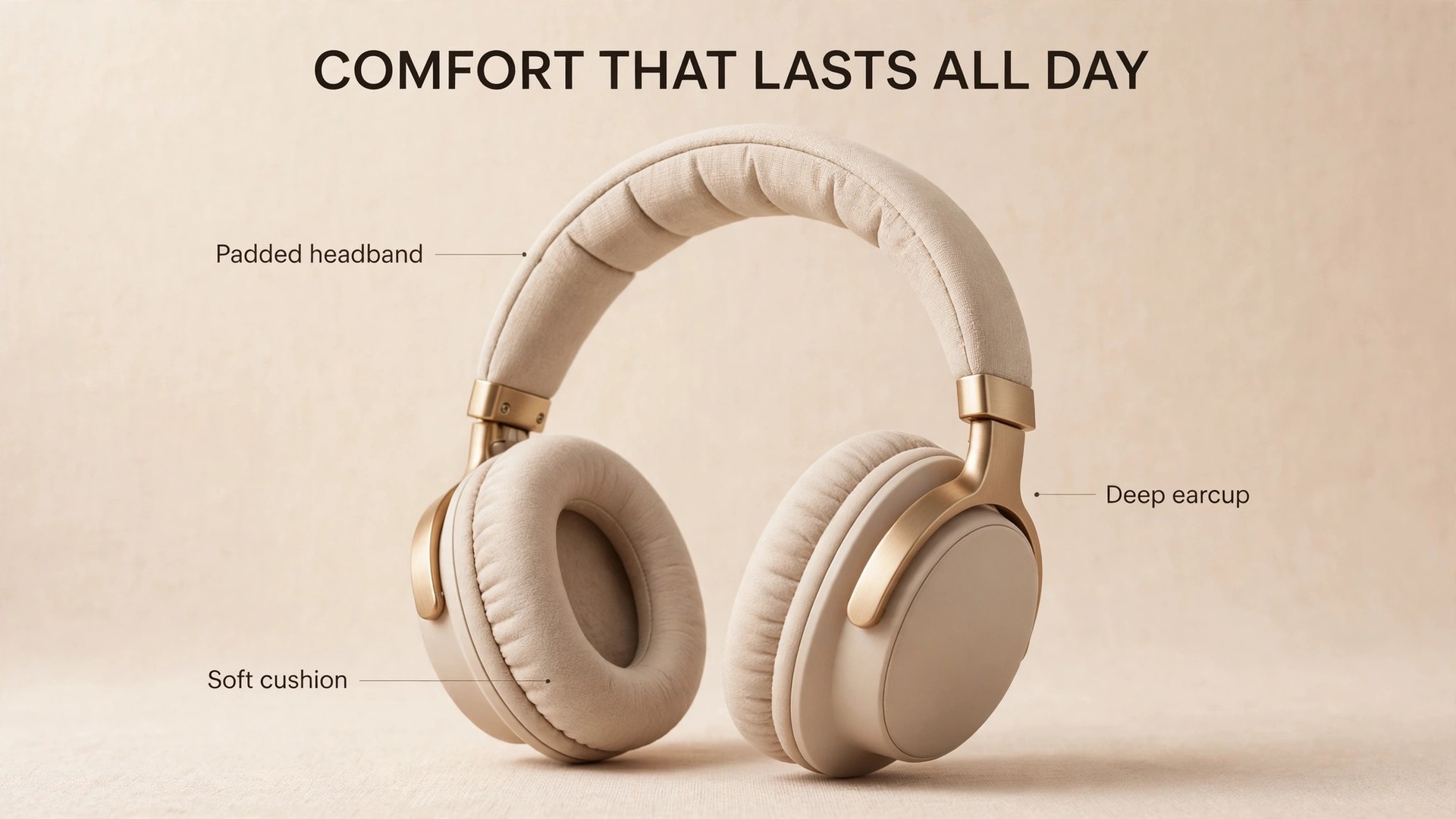
Comfort decides whether a technically excellent pair actually gets used when you use noise-cancelling headphones for office focus all day. A pair that sounds superb for thirty minutes and hurts after two hours will sit in a drawer, while a slightly less impressive pair that feels invisible will be worn every day. Weight, clamping force, earcup size, cushion material and heat build up all matter, and they matter differently for different heads.
Weight is the easiest figure to compare. Sony WH-1000XM5 headphones weigh about 250 grams. Bose second generation QuietComfort Ultra headphones weigh about 264 grams. Apple AirPods Max weigh about 385 grams, which is noticeably heavier, and the weight is one of the most common complaints from long day wearers despite the premium materials. A difference of 100 grams does not sound large on paper, but after four hours it can feel like a great deal, especially if the headband concentrates the weight in one spot rather than spreading it.
Clamping force is harder to read from a specification sheet, because it depends on head size and glasses. A firm clamp helps the seal and the cancellation, but a clamp that is too firm causes jaw ache and headaches. Try a pair for at least thirty minutes before deciding, wearing your normal glasses. Earcups that fully enclose the ear, rather than pressing on it, are usually more comfortable for long sessions.
Heat and sweat are the quiet comfort problem in offices. Leather style cushions seal well but can get warm in a heated office, while fabric cushions breathe better but may let slightly more sound leak in. Replace cushions when they flatten or crack, because worn cushions hurt both comfort and cancellation.
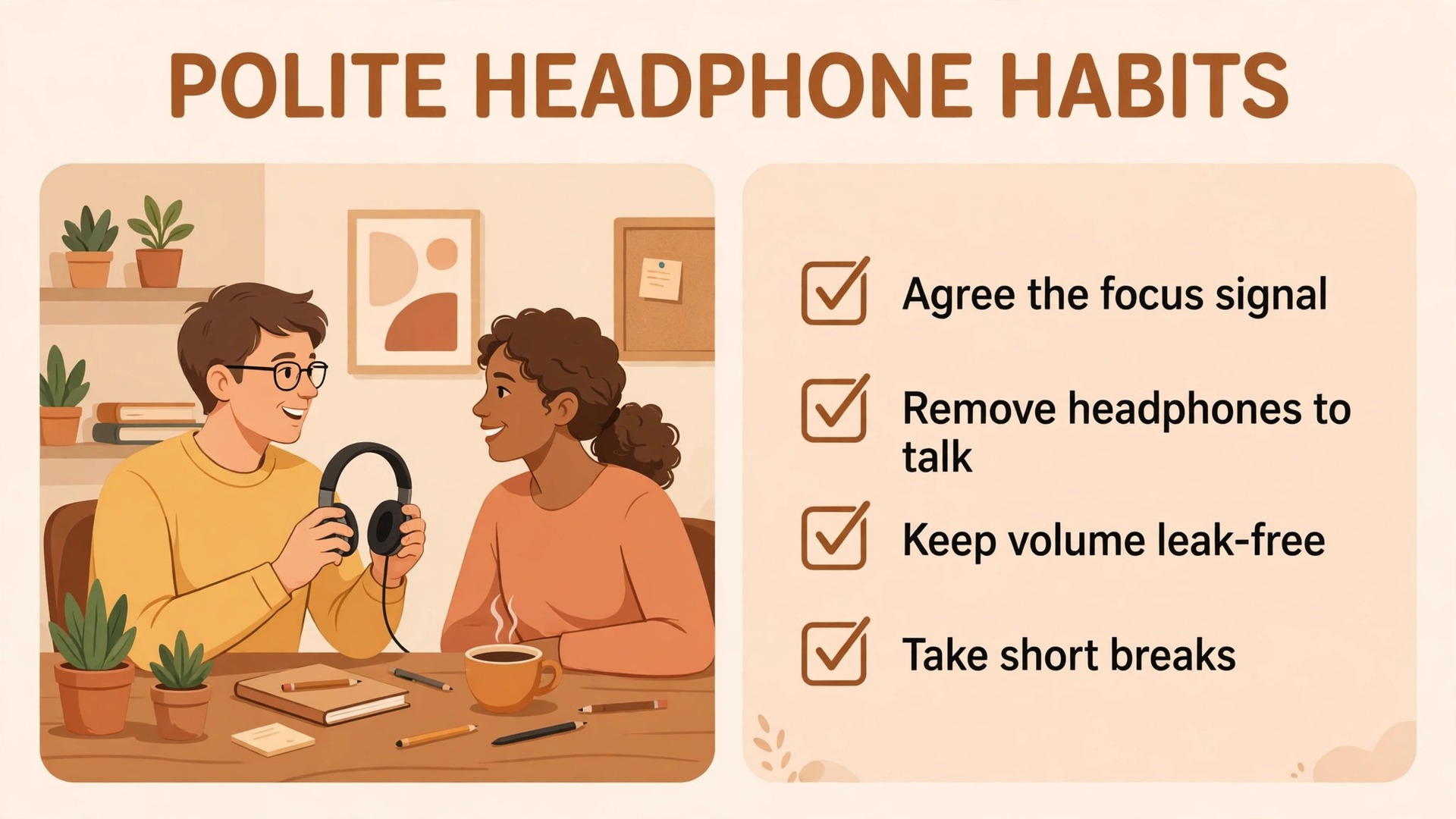
Take breaks even with the most comfortable pair. A five minute break every hour, with the headphones off, lets your ears cool and your jaw relax. Short breaks protect both your ears and your focus.
Office Etiquette for Headphone Use
Headphones change office manners, and the rules are rarely written down. That is why misunderstandings happen. One person thinks headphones mean do not disturb. Another person thinks they are just a way to listen to music while remaining available. Both people are reasonable, and both end up annoyed. A few clear habits prevent most of the friction.
Agree the signal with your team when you use noise-cancelling headphones for office focus in a shared room. A common system is simple. Headphones on plus a focus status in chat means urgent only. Headphones on without a status means a quick question is fine, but a long conversation should wait. Headphones off means available. Write the system down in a team channel once, so new joiners learn it without guessing. A small desk sign or a coloured light can help in larger offices, but the written agreement matters more than the gadget.
Do not use headphones to avoid a difficult conversation or to signal that you are too busy for colleagues. People notice, and trust drops quickly. If someone needs you, take the headphones off fully rather than leaving one earcup on while half listening. Half listening is worse than asking for five minutes, because the colleague leaves thinking they were heard when they were not. For managers, the rule is stricter. A manager who is always sealed off in cancellation sends a message that the team is an interruption, even when that is not the intent. Schedule open hours without headphones, and keep them visible.
Sound leakage is a courtesy issue too. Closed back over ear headphones leak far less than open back models, but at high volume a neighbour can still hear a hiss or a beat. If a colleague can hear your music, turn it down.
Safety and awareness deserve a final word. Keep transparency on when you walk through car parks, cross roads or use stairs. In warehouses and workshops, use hearing protection designed for the job, not consumer headphones.
Choosing a Pair for Office Work
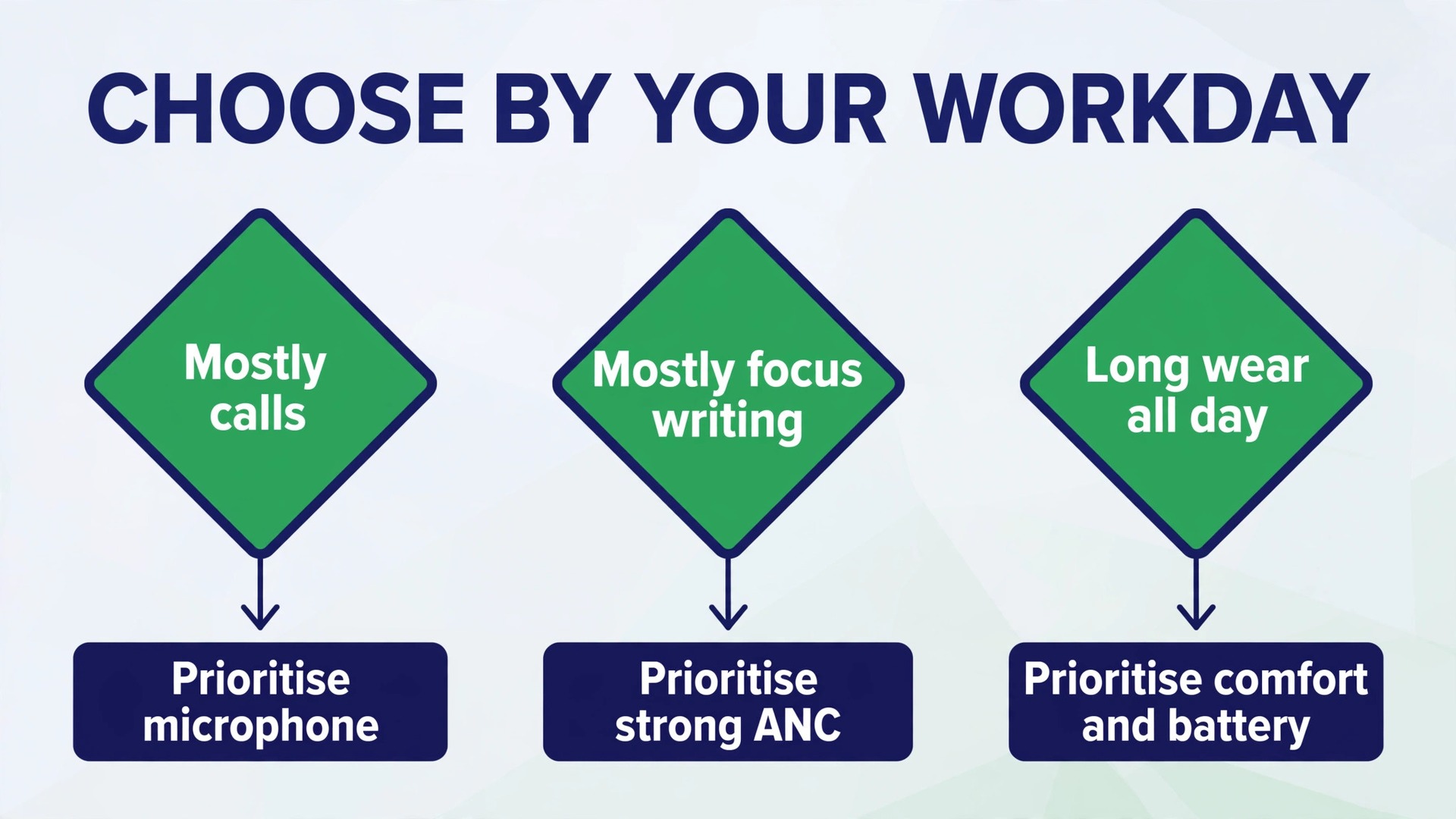
Buying advice is simpler than most buying guides suggest when you use noise-cancelling headphones for office focus, because office needs are narrower than travel or gym needs. You need strong cancellation for steady office noise, a clear microphone for calls, enough battery for a week of work, comfort for long wear, and multipoint pairing if you switch between laptop and phone. Sound quality matters, but for spoken work and background music, the differences between flagship models are smaller than the differences in comfort and call quality.
Current flagship pricing gives a useful frame, and prices change with sales, so check a retailer page before buying. Bose second generation QuietComfort Ultra headphones list at 449 dollars. Sony WH-1000XM6 headphones list at 449.99 dollars. Apple AirPods Max list at 549 dollars. The Sony WH-1000XM5, the previous flagship, often sells for less than the newer model and remains a strong office choice, with 30 hours of cancellation on battery life and a light 250 gram build. A cheaper pair with good cancellation and a decent microphone can beat a flagship that hurts after two hours, so comfort testing should come before brand loyalty.
Check four things before you pay. First, multipoint pairing, so the headphones stay connected to laptop and phone together. Second, a companion app that lets you set mode levels, auto off and sidetone, which lets you hear your own voice on calls. Third, a wired option for calls and for days when the battery is low. Fourth, replaceable ear cushions, because cushions wear out and a pair without replacements becomes disposable.
For workers on a tighter budget, mid range models from Sony, Bose, Sennheiser and Anker often give most of the flagship cancellation at half the price. The trade off is usually call quality in noisy rooms and a less refined transparency mode.
If this guide helped, the next step is to fix the problems that headphones alone cannot solve. Readers who keep losing Bluetooth connections should read the guide on fixing Bluetooth headphones that will not pair, and readers whose meeting audio echoes should read the step by step guide to fixing Zoom audio echo. Workers who spend their days on Teams calls should check the guide to fixing a Teams microphone that is not working, and anyone building a better desk should read the guide to setting up a dual monitor desk for productivity.
For noisy rooms where a separate microphone makes sense, the guide to the best microphone for a noisy room is worth a look, and laptop users whose machines run hot during calls should read the guide to fixing a laptop that overheats during video calls. Each of these guides follows the same approach as this one, with a specific fix for a specific situation rather than generic advice.
Frequently Asked Questions
Should I wear noise-cancelling headphones all day at work?
You can, but you should take short breaks. Take the headphones off for five minutes every hour, switch to transparency for conversations, and keep the volume modest. Continuous wear at high volume causes more fatigue than the headphones themselves, and breaks also keep you approachable to colleagues.
Which mode is best for deep writing in an open office?
Full cancellation is usually best for deep writing, paired with low volume instrumental music or masking sound. The combination covers the speech that cancellation alone cannot fully remove. Switch to transparency between blocks, so colleagues can reach you and you do not miss announcements.
Why do I sound distant on calls even with expensive headphones?
Distance and settings are the usual causes. Make sure the meeting app is using the headphone microphone, not the laptop microphone, and that you are wearing the headphones in their normal position. Test with a colleague, move to a quieter spot if needed, and try a wired connection if Bluetooth call quality drops after a minute.
Do noise-cancelling headphones damage hearing?
Cancellation itself does not damage hearing. High volume does. The risk in offices comes from turning music up to cover room noise. Let cancellation lower the noise floor first, then keep music at a level where you could still hear someone speaking loudly nearby. If your ears ring after work, lower the volume.
How long should office headphones last on one charge?
Flagship models range from about 20 hours to about 30 hours with cancellation on, which covers two to four workdays of mixed listening and calls. Real life use, especially calls and immersive audio, drains faster than headline figures. A midweek top up and a desk cable remove most battery anxiety.
Are expensive headphones worth it for office work alone?
It depends on how much of your day is calls and focus work. If you spend most of the day writing in a noisy room, a mid range pair with strong cancellation may be enough. If you spend most of the day on calls, microphone quality, comfort and multipoint pairing justify a higher price. Test comfort for at least thirty minutes before deciding, because an uncomfortable flagship is a poor office tool.
Make Quiet Your Default Work Setting
Good results when you use noise-cancelling headphones for office focus are not about shutting the world out completely. It is about choosing what reaches you, when it reaches you, and how clearly you reach other people in return. Learn your modes, use the table for the task in front of you, run the call checklist before important meetings, charge on a routine, and agree the headphone signal with your team. Do those five things, and a pair of noise-cancelling headphones stops being a gadget you fiddle with and becomes a quiet habit that protects your best hours.
Start with one change this week, perhaps the mode plan for your first focus block, and build the rest around it once that change feels natural.