
The verdict is simple. Do not appeal first and do not open a new account. Read the suspension notice, fix every problem it points to, and only then submit one careful appeal. That order is the whole method to fix Google Ads account suspended small business owners need, because an appeal that promises fixes you have not made gives a reviewer nothing to approve.
A suspended account stops all ads at once, which makes the pressure to act fast very real. Leads dry up, booked work thins out, and competitors keep showing while you do not. Fast action still has to be the right action. A rushed appeal, a second account opened to keep spending, or a site edit that hides the problem without fixing it can each make the situation harder to undo. Slow down for one working day, work the steps in order, and keep a record of everything you change.
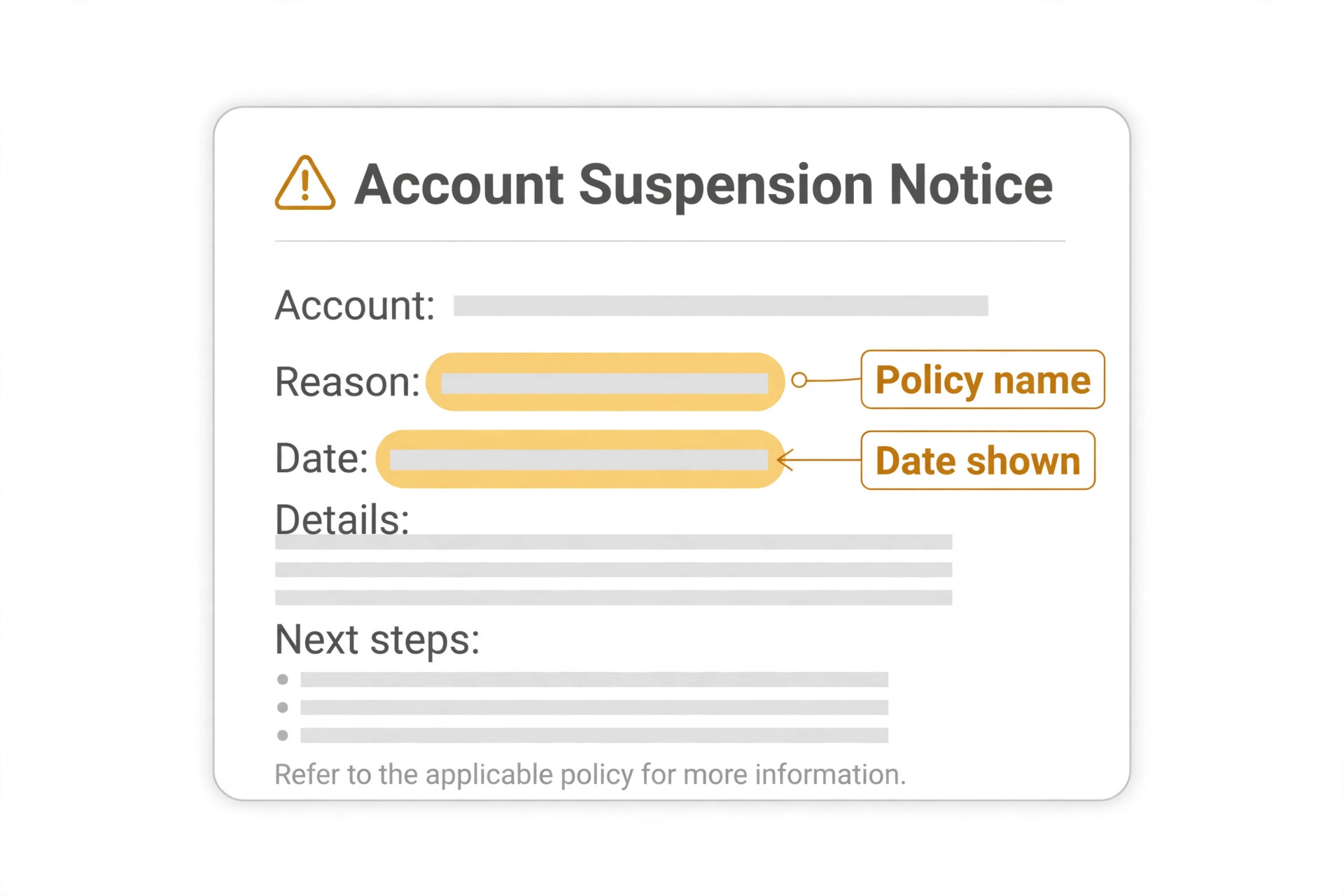
Before you change anything, capture the evidence. Screenshot the suspension notice in the account, including the policy name it cites and the date it appeared. Note which campaigns stopped, whether billing was also flagged, and what changed recently on the site, in ads, or in account access. That record matters twice over. It guides your own fix list, and it becomes the evidence section of your appeal, where specific changes with page links carry far more weight than general assurances.
How to Fix Google Ads Account Suspended Small Business Problems in Order
The workflow in this guide runs from reading the notice to checking billing, fixing the site and ads, drafting the appeal, and then resubmitting with a checklist. Each step answers a question a reviewer will ask. What policy was cited. What did you find when you checked. What did you change, and where can it be verified. If a step has no answer yet, that step is not finished, and the appeal is not ready.
Do not skip ahead to the appeal because the form is visible. Google states in its own policy help that accounts are reinstated only in compelling circumstances, such as a mistake, and that a thorough, accurate and honest appeal matters. That standard is hard to meet with a short message. It is much easier to meet with a short message backed by a fixed site, corrected ads, and clean billing, because then the message is simply describing work already done.
Work one account at a time and keep other accounts untouched while you investigate. If an agency or a colleague also has access, tell them the account is suspended and that no one should create a replacement or edit live campaigns until the fix list is complete. Shared access is a common source of confusion here. One person fixes a landing page while another launches a new ad to the old page, and the appeal then describes a site that no longer matches what the reviewer sees.
| What you see | Most likely area to check first | First action |
|---|---|---|
| Suspension notice names a policy on ads or site content | Ads and landing pages | Read the cited policy page and audit every live ad and page against it |
| Suspension notice mentions billing or payments | Billing and verification | Check the payment method, billing profile and any verification request |
| Ads stopped but no clear policy named in the notice | Account access and recent changes | List recent site changes, new users, and new campaigns |
| Appeal rejected with no new detail | Fix list gaps | Re audit the site and ads for problems the first pass missed |
| New account also suspended quickly | Circumvention risk | Stop creating accounts and focus on reinstating the original |

Read the Suspension Notice Like a Reviewer Would
Open the suspended account and read the notice in full, not just the headline. Suspended accounts cannot run ads, but they can still be accessed and their reports can still be read, according to Google policy help. That access is useful. It lets you see which campaigns were running, which ads linked where, and what changed just before the suspension, all of which feed the audit that follows.
Write down the exact policy name from the notice, in the words Google used. Your whole fix list and your whole appeal answer that policy and nothing else. A notice citing misrepresentation, for example, points at honesty and transparency problems on the site or in ads, such as claims the landing page does not support, missing business details, or prices that do not match. A billing related notice points somewhere else entirely, and fixing landing page copy will not help it. Matching the fix to the cited policy is the single most useful discipline in this process.
Check the policy page itself on Google Ads policy help before you start editing. Policy pages explain what is covered and give examples, and reading them stops two common errors. The first is fixing only the one ad you think caused the problem while leaving the same problem on ten other pages. The second is rewriting copy in a way that creates a new problem, such as removing a price to avoid a mismatch and leaving a page that now makes an unclear offer. Read first, then audit, then edit.
List every asset the cited policy could touch. That list usually includes all active ads, all landing pages those ads link to, the homepage, the contact page, pricing pages, refund and delivery pages, and any page making a claim about results, qualifications or guarantees. A small business site often has fewer than twenty such pages, so a full audit is realistic in a day. Check each one against the policy, note each gap in plain words, and keep that note. It becomes the fix list, and later the appeal evidence.
Check Billing and Verification Before You Touch Ad Copy
Billing problems suspend accounts on their own, and they are easy to miss when the notice headline looks like a content problem. Open the billing section and check the payment method, the billing profile name and address, and whether any payment failed or was flagged. A failed payment, an expired card, or a profile detail that does not match the business can each need attention before an appeal will succeed, even when the main problem sits elsewhere.
Complete any verification Google has requested, and treat it as a blocking step, not an optional extra. Some suspended advertisers must complete advertiser verification before an appeal is processed, which means confirming who owns the business with documents that match the payments profile and account details. Use the exact business name as it appears in the account, clear photos of full documents, and the correct account type, individual or organisation. Sloppy verification wastes an attempt, and policy help notes that repeated failed identity attempts can close off the appeal route.
Check who has access to the account and to the payment method. A former agency, a former employee, or a shared login can create billing and access problems that the owner never sees. Remove access you no longer need, confirm the remaining users are people you recognise, and turn on two step verification for the Google account that owns the ads account. If you suspect the account was compromised, say so plainly in your own notes and list the steps you took, such as password changes and access removal, because that history belongs in the appeal.
Do not pay your way around a suspension by adding a new payment method to a new account. Google policy help warns that accounts created to circumvent a suspension may also be suspended, and that related accounts can be affected. The safe path is slower and duller. Fix the original account, keep billing clean and consistent, and let the appeal describe a single account with a single billing profile that matches a real business.
Billing checks also deserve a second pass once the site fixes are done, because the two areas interact in ways owners miss. A corrected site that still links to an old payment profile, or an account where the billing name was updated but the site still shows an old trading name, leaves a mismatch for a reviewer to find. Reopen billing after the site work, confirm every name, address and payment detail still matches, and add that confirmation to your fix list. That second pass is part of what it means to fix Google Ads account suspended small business cases properly, rather than fixing one area and assuming the other is fine.

Fix the Site and Ads Against the Cited Policy
Start with the landing pages, because reviewers check them, not just the ad text. Every page an ad links to should show who the business is, how to contact it, what the offer actually costs, and what happens if a customer wants a refund or wants to cancel. Missing contact details, missing pricing, or a refund policy buried where no customer would find it are all common misrepresentation gaps for small businesses. Add them where customers expect them, in the footer and on the relevant service page, not on a page nothing links to.
Next, line up ad claims with page facts. If an ad promises a price, a result, a qualification or a guarantee, the landing page must support that exact claim with the same numbers and the same conditions. Where a claim cannot be supported, remove it from the ad rather than dressing it up with softer wording that still implies the same thing. Where a claim is true but unclear, rewrite it so a stranger reading it for the first time would understand the same offer you mean. Reviewers are strangers to your business, so clarity is not a courtesy here, it is the test.
Check business identity consistency across the account, the site and the billing profile. The business name, domain, contact details and location should match wherever they appear. If the site uses a trading name and billing uses a registered name, make the relationship clear on the site, for example with a short line on the contact or about page stating the registered name behind the trading name. Inconsistency alone does not prove wrongdoing, but it slows a reviewer down and invites a second look at everything else, which is the opposite of what an appeal needs.
Pause or edit every ad that touches the problem area before you appeal, and keep a list of what you paused, edited or removed. Do not delete the whole campaign history in an attempt to hide it. Reviewers can still see account history, and a clean list of specific edits reads as honest work, while a wiped account reads as concealment. Screenshots of the fixed pages, saved with dates, give you proof if a page changes again before review, and they let you check your own work a second time with fresh eyes.
One more site check pays for itself before you write the appeal. Open every fixed page on a phone, not just on a desktop, and confirm the contact details, pricing and refund links are visible there too. Small business sites often hide footer content behind mobile menus, or show a shortened mobile page that drops the very details a reviewer needs. A fix that only exists on desktop is not a complete fix, and catching that gap now is far cheaper than learning about it from a rejected appeal.

Draft an Appeal That Describes Fixes, Not Feelings
A good appeal has three parts and no more. What Google flagged, in the words of the notice. What you found when you checked. What you changed, with page links a reviewer can verify. That structure works because it mirrors the question a reviewer has to answer, which is whether the problem is fixed and whether the account can be trusted to run again. Feelings about lost revenue, however real, do not answer that question, so leave them out.
Write the appeal in plain, factual sentences. Name the policy, name the pages, name the changes. A useful sentence sounds like this. The account was suspended under the misrepresentation policy. On review, the landing page did not display a business address or a refund policy. Both are now present, the address in the site footer on every page and the refund policy linked from the service page. That sentence can be checked in under a minute, and every sentence in your appeal should pass the same test. If a sentence cannot be checked, it is probably an assurance, and assurances alone do not reinstate accounts.
Say what you do not know as well as what you do. If the notice did not name a precise trigger and your audit found several possible gaps, list all of them and state that you fixed each one. Honesty about uncertainty reads better than false certainty about a single cause, because a reviewer who finds a gap you did not mention will doubt the rest of your list. Attach or link evidence where the form allows it, such as business registration or proof of domain ownership where identity is in question, and keep copies of everything you submit.
Submit once, through the official route, and note the date. The suspension notice itself carries the appeal route, or the policy help pages describe the appeal form, and using that route matters because it ties the appeal to the suspended account. Sending several appeals at once, or the same appeal through several channels, does not speed review up. Policy help notes that misusing the appeal function can delay processing, so one careful submission, followed by patience, is the disciplined choice. Frame the outcome as uncertain in your own planning, because reinstatement is never guaranteed, and plan what the business does for leads while waiting.
Before you press submit, read the appeal aloud and cut anything that is not a fact, a finding, or a fix. Owners often add background about how long they have advertised, how much they have spent, or how important the account is to the business. Those details are understandable, but they do not help a reviewer decide, and they bury the verifiable sentences that do. A short appeal that a reviewer can check in minutes is stronger than a long appeal that a reviewer must search through for the actual changes. When every sentence in your draft can be answered with a link or a screenshot, the appeal is ready.
Resubmission Checklist and What to Do While Waiting
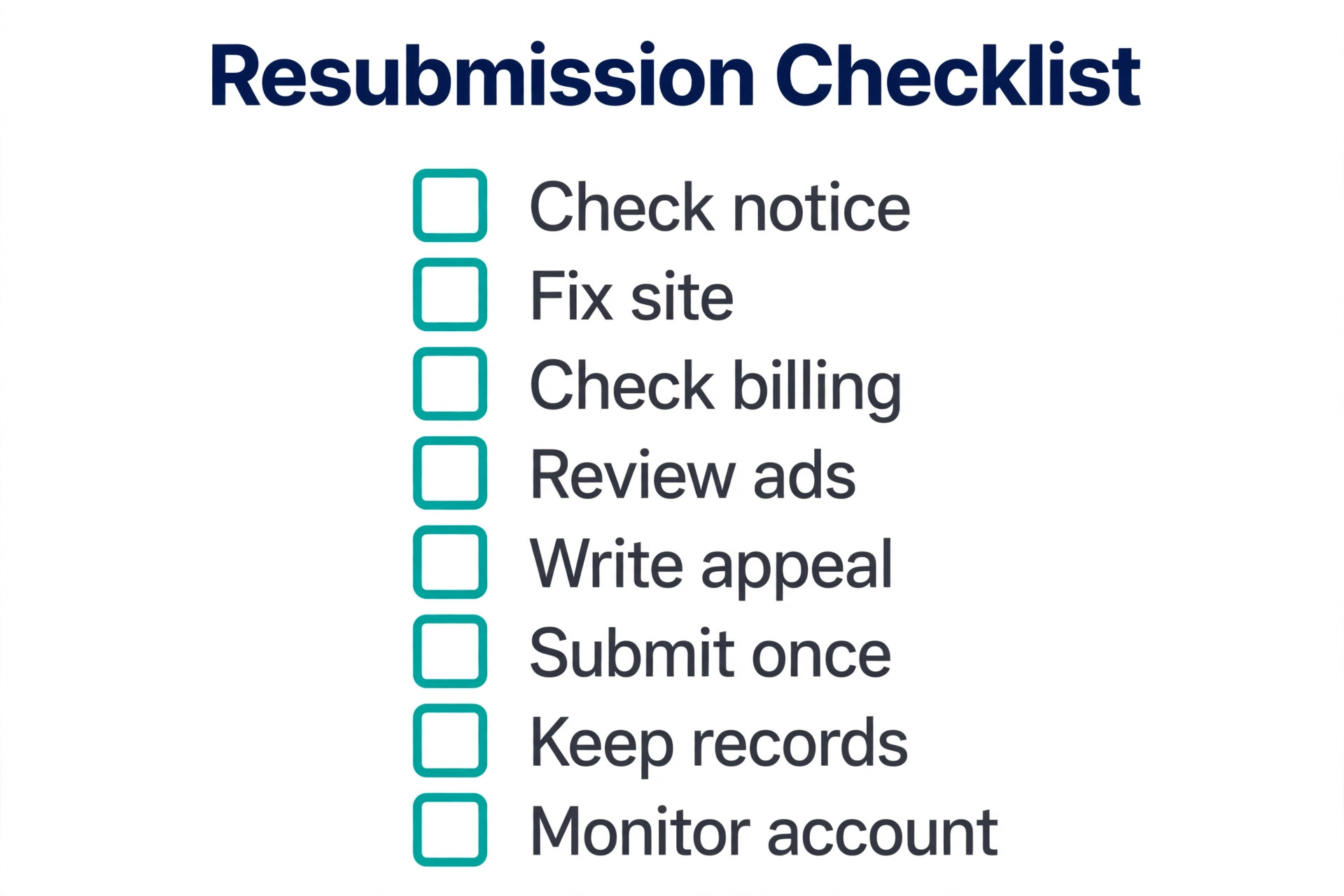
Use this checklist in order, and do not submit until every item is ticked. The checklist is the overview proof of this guide, because it turns a vague hope for reinstatement into a set of verifiable steps.
1. Read the suspension notice and write down the exact policy name it cites. 2. Check billing, the payment method, the billing profile and any verification request. 3. Audit every live ad and landing page against the cited policy and list every gap. 4. Fix the site first, with contact details, pricing, refund terms and consistent business identity. 5. Line up ad claims with page facts, removing claims the page cannot support. 6. Pause or edit every ad touching the problem area and keep a list of each change. 7. Secure the account, remove unneeded access, and turn on two step verification. 8. Draft the appeal in three parts, flagged policy, findings, and changes with page links. 9. Submit once through the official appeal route and note the date and reference. 10. Keep ads paused, keep the site as appealed, and do not open a replacement account.
While waiting, protect the pipeline without breaking the rules. Shift budget and effort to channels that do not depend on the suspended account, such as organic search, email to existing customers, local listings, and referral requests from recent happy customers. Update the website content that the audit improved, because clearer pricing and contact pages help every channel, not just ads. Do not try to run the same ads from another account, another business name, or a colleague account, because that risks a wider suspension that is harder to appeal than the first one.
If the appeal is rejected, read the response as carefully as the first notice. It may name a remaining gap or confirm that the original problem is still present in the reviewer view. Re audit from that response, fix what it points to, and only then consider a further appeal through the same official route. A rejected appeal is not proof that the account can never return. It is proof that the fix list was incomplete, and the useful response is a better fix list, not a louder appeal.
What a Reviewer Sees When Your Appeal Arrives
Picture the appeal from the other side of the screen. A reviewer opens a suspended account, reads a short message, and then checks whether the site and ads match what the message claims. That check is fast when the message names exact pages and exact changes, and slow when the message speaks in general terms. The difference matters, because a slow check invites doubt, while a fast check builds confidence in the first minute. Every sentence you write should make that check faster, not slower.
Reviewers also compare the appealed site with the site as it was when the suspension happened. That is why keeping the site exactly as appealed matters, and why a last minute offer change or a new page edit during review can undo good work. If a genuine business change cannot wait, note it, date it, and be ready to explain it if asked, but avoid optional changes entirely during review. Stability during review is part of the evidence, because it shows the fixes were deliberate rather than temporary.
A reviewer will also notice consistency across the whole account, not just the pages you mention. That is why a full audit beats a narrow one, and why the method to fix Google Ads account suspended small business owners should follow always ends with a whole account pass. Check paused campaigns too, because a paused campaign with the same problem can be reactivated later and recreate the same suspension. Fix it now, while the audit is fresh, or delete it if the business no longer needs it.
Mistakes That Make a Suspension Harder to Fix
The most common mistake is appealing before fixing. An appeal that says the business will fix the problem asks a reviewer to trust a future action, while an appeal that lists fixes already made asks a reviewer to verify present facts. Verification is easier to approve than trust, which is why the fix first order matters so much. If you already appealed too early and were rejected, the remedy is still the same. Fix everything, then appeal again with the completed list.
The second mistake is opening a new account to keep ads running. It feels like a practical workaround, and it is the fastest way to turn one suspension into two. Google treats new accounts created to get around a suspension as a circumvention problem, which is a separate and more serious policy area. The short term leads are not worth the long term account risk, especially for a small business that may rely on that one account for years.
The third mistake is editing only the flagged ad while leaving the same problem on the site. Reviewers check landing pages, not just ad text, and a fixed ad pointing at an unfixed page still fails the same policy. Audit the whole chain from ad to page to checkout or contact form, because that chain is what a customer actually experiences, and it is what a reviewer will judge.
The fourth mistake is deleting history, hiding pages, or changing the business name to look like a different business. Each of those actions destroys the record your appeal needs and creates a new trust problem. Keep the history, show the changes, and let the fixed site speak for itself. Transparency is slower than concealment, but it is the only approach that survives a second review. Owners who try to fix Google Ads account suspended small business cases by hiding the problem usually learn this the expensive way, when a reviewer finds the hidden page anyway.
How to Prove the Account Stays Compliant After Reinstatement
Reinstatement is not the end of the work, it is the start of a stricter routine. For the first month after ads resume, check the account weekly for policy notifications, disapproved ads, and landing page changes made by anyone with site access. A single disapproved ad in that first month is a warning to act on the same day, not a message to leave for later, because repeat problems after reinstatement are judged more harshly.
Build a simple pre launch check for every new ad and page. Does the page show the business name, contact details, price and refund terms. Does the ad claim match the page exactly. Does the page link work, load properly, and lead where the ad promises. Run that check before launch, not after a disapproval, and keep the check in the same document as your fix list so new team members follow it too. That routine is what turns a one time recovery into lasting compliance.
Watch the quiet signals as well as the loud ones. A landing page edited for a seasonal offer, a price changed without updating the ad, or a new team member adding a guarantee to a page can each reintroduce the original problem without anyone noticing. Treat every site and ad change as a policy check moment, and pause any change that cannot pass the check until it is rewritten. That discipline protects the account far better than a monthly audit that finds problems weeks late. It is also the habit that keeps a recovered account recovered, which is the real goal once you fix Google Ads account suspended small business troubles and get ads running again.

The Suspension Verdict for Small Businesses
A suspended account feels like a punishment, but it is more useful to treat it as an audit with consequences. The notice names a policy, the audit finds the gaps, the fixes close them, and the appeal reports them. Done in that order, with one careful submission, a small business gives itself the best possible chance of reinstatement, and it ends up with a clearer site and stronger ads even if the wait is frustrating.
Start with the notice, not the appeal form. Fix billing and verification, fix the site and ads, secure the account, and only then write the three part appeal. Keep the fix list, keep the screenshots, and keep the site exactly as appealed while waiting. That method is the practical way to fix Google Ads account suspended small business problems, and it is also the method that keeps a reinstated account safe afterwards.

Frequently Asked Questions
Can I keep running ads from a new account while my old account is suspended?
No, and trying it risks a wider problem. Google policy help warns that accounts created to circumvent a suspension may also be suspended, and related accounts can be affected. The safe path is to fix the original account and appeal it, while using other marketing channels for leads in the meantime.
How long does a Google Ads suspension appeal take?
There is no guaranteed timetable you should plan around, and any source promising a fixed number of days is guessing. Policy help says an outcome arrives by email after review, and that review depth varies with the case. Plan your pipeline as if the wait could be longer than you hope, and keep other lead channels active while waiting.
What should I write in a suspension appeal?
Write three things and nothing else. The policy Google flagged, in the words of the notice. What you found when you audited ads, pages and billing. What you changed, with page links a reviewer can verify. Short factual sentences beat long explanations, because every claim in your appeal should be checkable in under a minute.
Does fixing only the flagged ad fix a misrepresentation suspension?
Usually not, because reviewers check the landing page chain as well as the ad text. If the page still lacks contact details, clear pricing or refund terms, or still makes a claim the business cannot support, the same policy problem remains. Audit every ad and page the policy could touch, fix all of them, and list each change in the appeal.
What if my appeal is rejected?
Read the response for any remaining gap it names, re audit the site and ads from that response, and fix what it points to before considering a further appeal through the same official route. A rejection means the fix list was incomplete or unclear, not necessarily that the account can never return. Fix first, then appeal again with the completed evidence. That second pass is how you fix Google Ads account suspended small business cases after a rejection, with evidence instead of repetition.
Should I hire someone to write my appeal?
Outside help can be useful for the audit and the site fixes, especially where the cited policy is technical, but be careful about anyone promising reinstatement or quoting a success rate. No honest adviser can guarantee an outcome, because the decision sits with Google. Choose help that talks about specific fixes and evidence, not help that sells a guaranteed result.
More Reading on Stratilyze
– Automate Small Business with AI – Best Website Builder for Tradespeople – Best Quote Software for Trades Businesses – Best Customer Feedback Software for Small Business