
TikTok gives advertisers up to 180 days to appeal some ad account suspensions, and guides based on TikTok support material report replies within about two business days for ad appeals. Those two numbers frame the whole problem for a small business. You have time to appeal properly, but every day without an account is a day without the short videos that bring customers through the door. That tension is what makes the rush to fix TikTok account suspended small business trouble so costly, because a hurried appeal sent in the first hour often wastes the strongest chance a business has.
This guide takes a different route. It starts by naming exactly which TikTok account is suspended, because a profile, an ad account, a Shop, and a Business Center each follow a different appeal path, and appealing in the wrong place wastes days. Then it works through a first hour checklist, a content audit, a short appeal draft built for the in app form, and a business verification check. No step here promises a return. Appeals are decided by TikTok, and the honest goal is to give reviewers a clean, specific, evidence backed case as fast as possible.
Before you tap anything, capture the evidence. Screenshot the suspension banner, the inbox notice, and any email TikTok sent, including the date and the exact reason given. Note what still works. Can you log in, view videos, read messages, or open Ads Manager. Can customers still see old videos. Write those answers down with the time. A suspension case is much easier to argue when you can show exactly what changed and when, instead of reconstructing it from memory a week later.
Which TikTok Account Is Actually Suspended
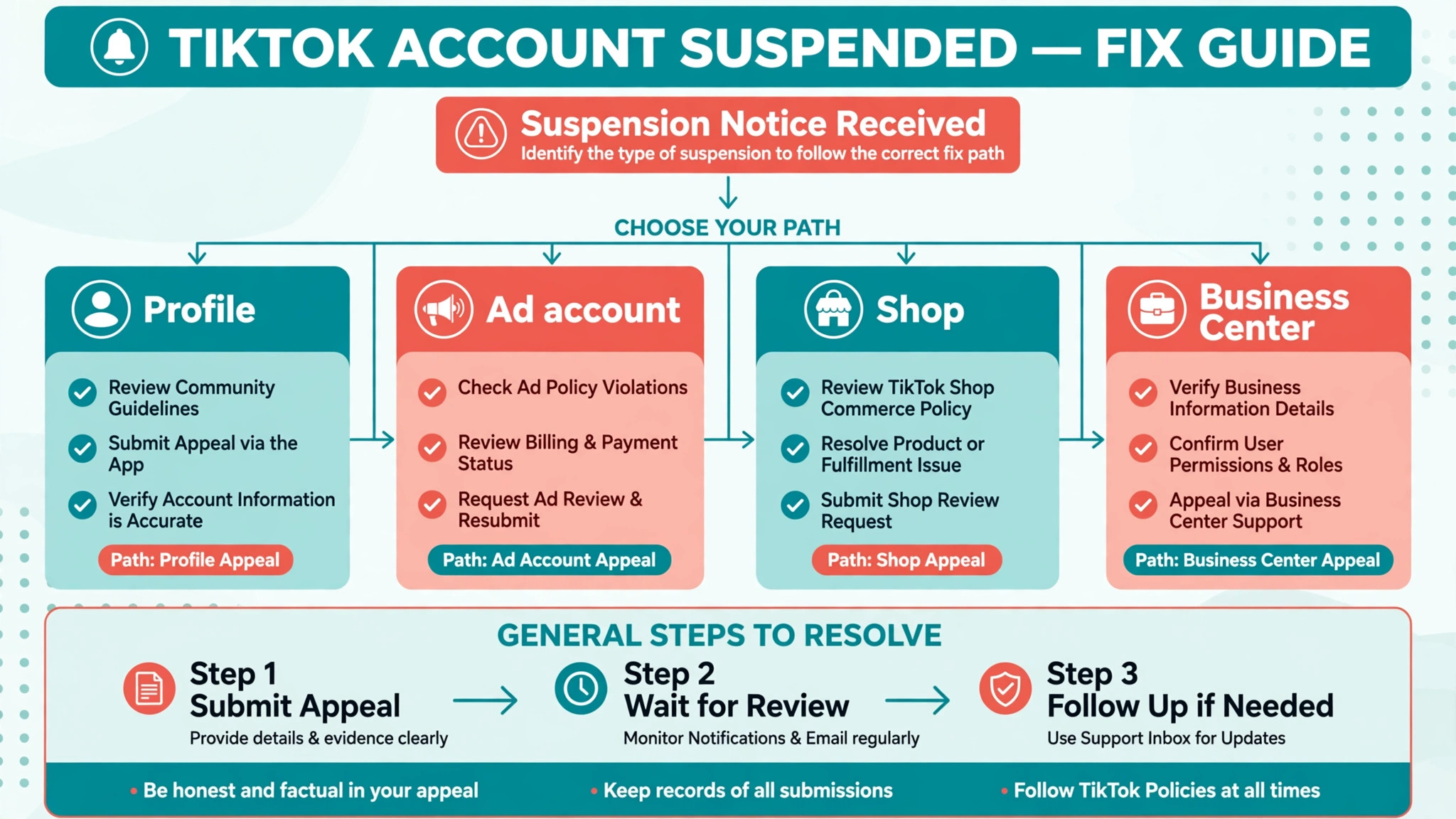
The single most common mistake in a TikTok suspension is treating every suspension as one problem. TikTok enforcement can hit four different assets, and each one stops different work. A profile suspension stops posting, live sessions, and messaging. An ad account suspension stops every campaign in that account at once. A Shop suspension stops listings, sales, and sometimes payouts. A Business Center restriction cuts access to the ad accounts and assets it manages. Appealing the profile when the ad account is the problem, or the reverse, sends your case to the wrong team.
Find where the notice appeared, because location names the account. A banner in the app or an inbox notification points to the profile. A notice in Ads Manager or an email about campaigns points to the ad account. A Seller Center inbox message or a Shop Health warning points to the Shop. A Business Center notification points to the managed assets. Check all four places before you appeal, because a restriction on one account can affect others linked to it, for example a Shop tied to a restricted profile.
| Account hit | What stops | Where you appeal |
|---|---|---|
| Profile | Posting, live, messaging, sometimes the whole profile | In the app, from the notice |
| Ad account | All campaigns in that account | Support ticket in Ads Manager |
| Shop seller account | Listings, sales, sometimes payouts | Seller Center violation records |
| Business Center | Access to managed ad accounts and assets | TikTok support for Business Center |
If more than one asset is restricted, deal with them as separate cases, because any plan to fix TikTok account suspended small business trouble that mixes two assets into one ticket will confuse reviewers. with separate evidence. A clean ad account appeal does not fix a Shop violation, and a Shop appeal does not restore a profile. List each restricted asset on paper, note its notice and its appeal path, and work them in order of revenue impact. For most small businesses that means the account that takes orders or runs paid traffic first, and the profile second, because cash flow decides how long you can afford to wait.
Read the Violation Notice Like a Reviewer
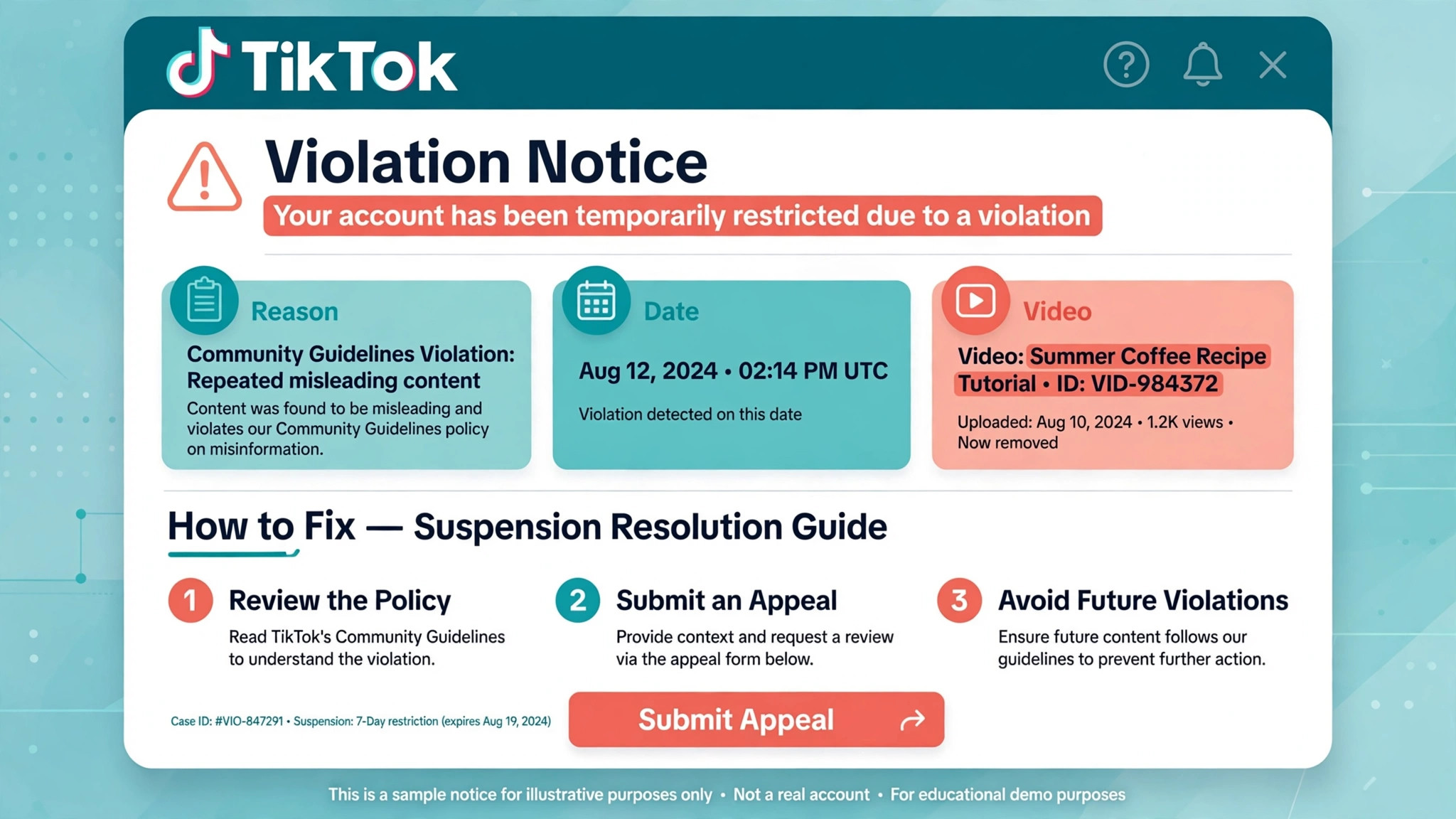
Open the notice and read it word by word, not for comfort but for the specific rule it names. A notice that names misleading claims needs a different fix from one that names a copyrighted sound, and both differ from a billing or verification problem. The appeal you write later must answer the rule that was actually cited, not the rule you wish had been cited. Reviewers compare your explanation with the violation record, and a mismatch reads as if you never read the notice at all.
Copy the exact wording of the reason into your case notes, since the first step to fix TikTok account suspended small business cases properly is a record that matches the notice word for word., along with the date, the video or ad named if any, and the policy area.
If the notice names a single video, watch that video again with fresh eyes and note every element that could have triggered the flag, including on screen text, captions, hashtags, sounds, and the landing page linked from it. If the notice names an account pattern, such as repeated violations or unusual spending, list the recent events that fit that pattern. Specificity here saves you later, because the audit in the next section builds directly on this reading.
Watch for two traps in the notice. First, a notice may describe a temporary restriction rather than a permanent ban, and temporary restrictions often lift on their own within a couple of days. Appealing a temporary restriction as if it were permanent can complicate a case that would have resolved itself. Second, a notice may arrive by email that looks official but does not match anything inside the account. If the account shows no restriction in the app or in Ads Manager, treat the email as suspect, sign in through the app you already use rather than through the email link, and verify before you send any document to anyone.
The First Hour Checklist for TikTok
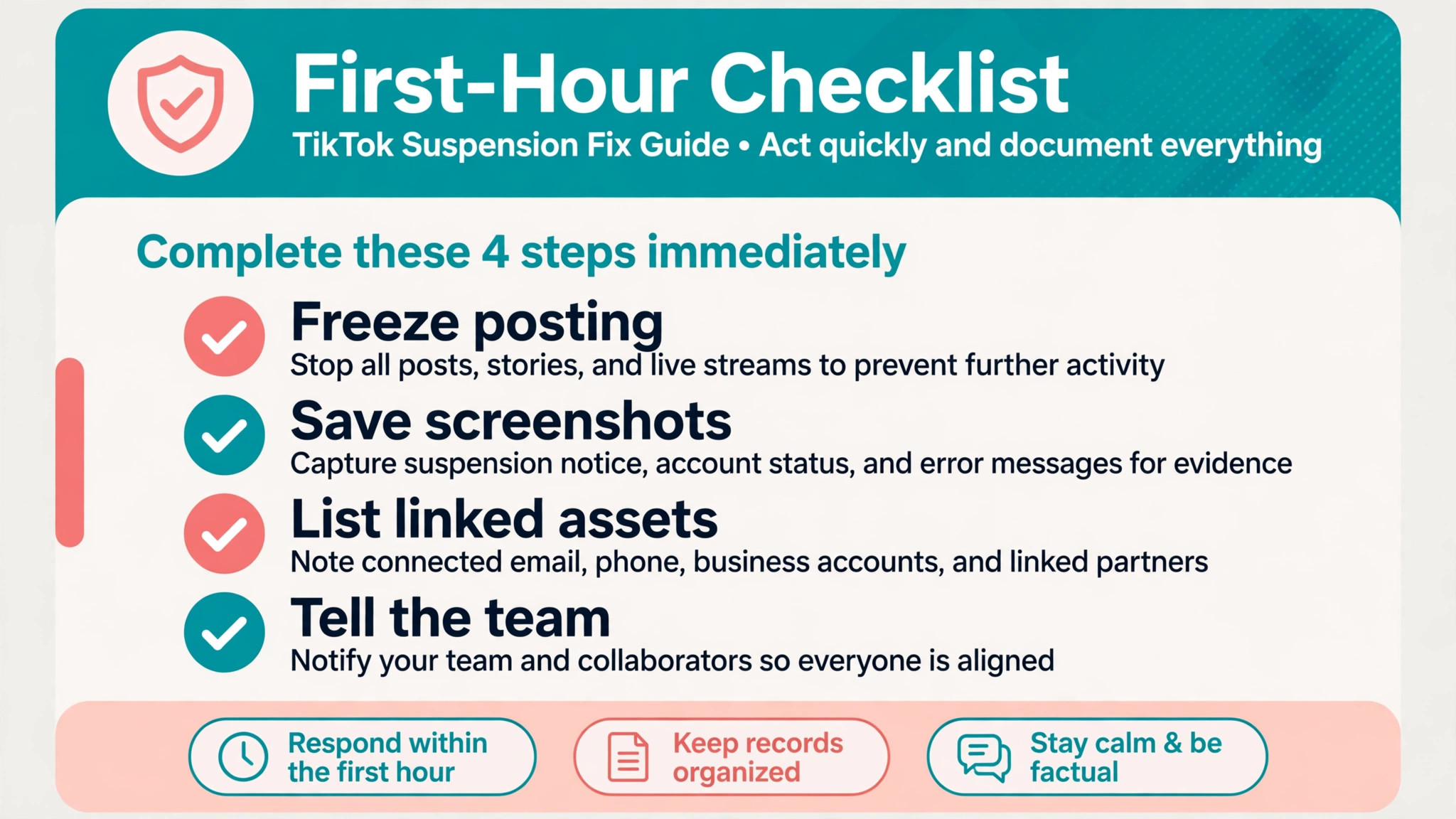
The first hour decides whether the rest of the recovery stays clean. Start by stopping all scheduled posts and ads tied to the restricted account, because new activity during a review can add fresh violations to a case that is already open. Tell the team in plain terms what happened and what not to do, meaning no new accounts, no reposted versions of flagged videos, and no messages to reviewers outside the official appeal path. One panicked workaround in the first hour can create a second case that is harder to fix than the first.
Next, save everything the platform still lets you see. Export or screenshot your recent videos, captions, ad creatives, and landing pages, especially the content named in the notice. If access later narrows, you will still have the record you need for the audit. Also save proof of the business itself in one folder, meaning a business registration document, a tax document, recent invoices, and a photo ID for the account owner. You may not need all of it, but gathering it now means the appeal is not delayed by a search for paperwork later.
Then check the linked assets. Open Ads Manager, Seller Center, and Business Center if you use them, and note the status of each. Pause any campaign that points to a flagged landing page, and tell any agency or freelancer who manages your account to pause their work too. A campaign that keeps spending while the account is under review, or an agency that files its own appeal without telling you, can split the case and confuse reviewers. One owner, one record, one appeal per enforcement action is the discipline that keeps a TikTok case readable.
Finally, set honest expectations with customers and staff. If short videos drive bookings, put a clear note on your website and your other profiles about how to reach you, and answer comments there promptly. You do not need to explain the suspension in public. A simple line that says booking is still open by phone or through the website protects revenue without turning a platform problem into a public argument. The business keeps trading while the appeal runs, and that steadiness also looks better to anyone reviewing the account later.
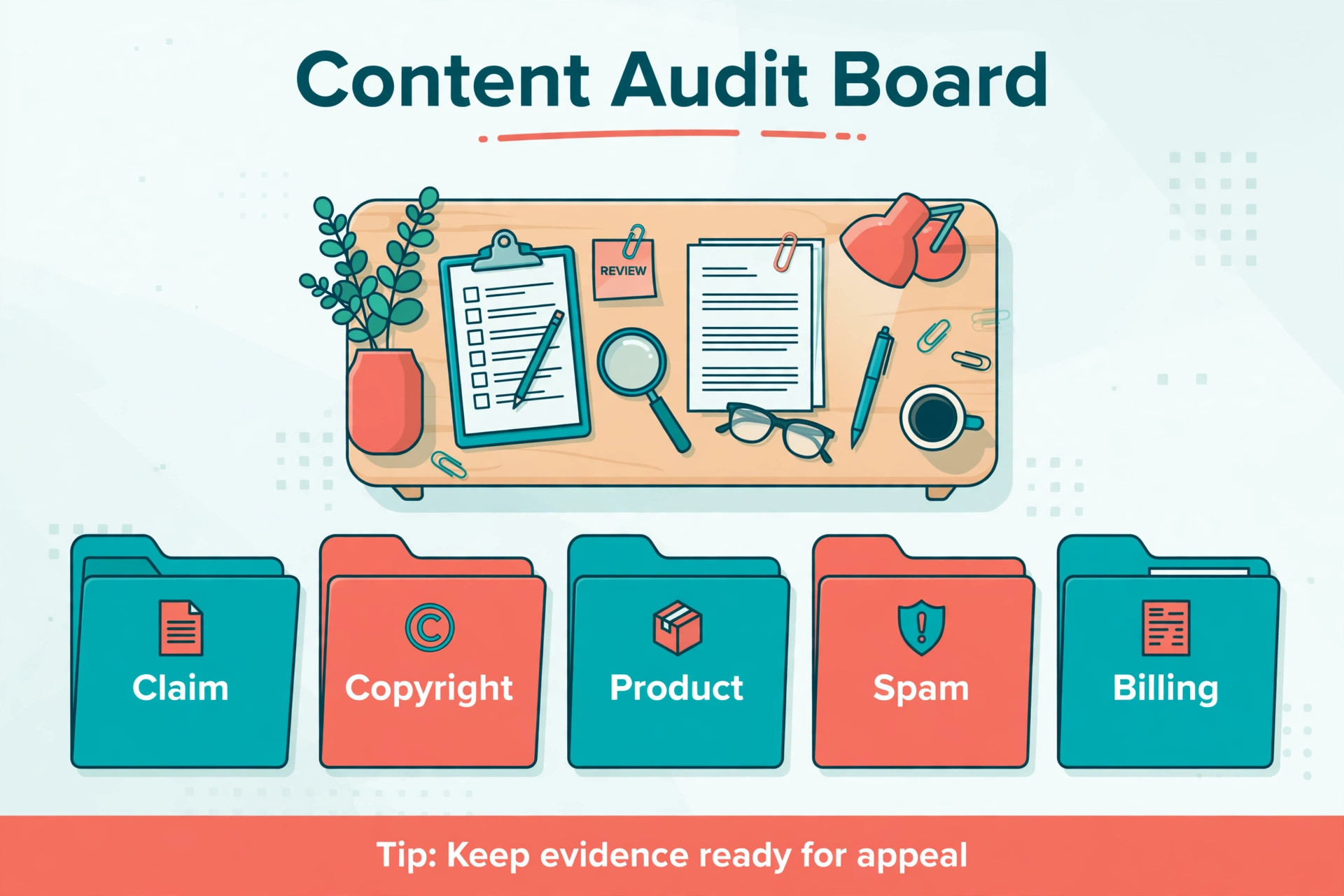
Content Audit by Risk Category
Audit recent content in categories, because a list of everything you ever posted is too long to act on, while a category check finds the pattern fast. Work back through the last few months of videos and ads, and sort anything questionable into the groups below. The goal is not to delete your whole history. It is to find the content that matches the violation named in the notice, and to remove or correct that pattern before you appeal. An appeal that says the problem is fixed carries weight only when the fix is visible in the account.
| Risk category | What to look for | Fix before appealing |
|---|---|---|
| Misleading claims | Guarantees, before and after promises, prices that do not match the landing page | Remove or correct the claim, fix the landing page |
| Copyrighted material | Sounds, clips, or images used without the right licence, especially on a business account | Remove the content or replace the sound with a licensed one |
| Prohibited products or claims | Banned items, health claims, or financial promises that break ad rules | Remove the listing or ad entirely |
| Spam patterns | Repeated identical videos, misleading hashtags, engagement bait | Delete duplicates, stop the pattern |
| Billing and verification | Failed payments, mismatched business details, unverified identity | Update payment and business details, complete verification |
Pay special attention to business account rules. A personal account used for commercial promotion can run into sound licensing problems, because sounds cleared for personal use are not always cleared for business use. If your account was set as personal while you promoted products, services, or brand partnerships, that mismatch itself may be part of the case. Switching the account type is not a fix you should rush during a suspension, but it is a question to answer honestly in your case notes, and to correct once access returns.
Delete with care, and keep a log of every deletion. Note the video, the date removed, and the reason. Reviewers for some appeal types assess the channel in its current state, so a cleaned account shows the fix. For other appeal types the original content matters as evidence, so the log preserves what changed even after the video is gone. Never delete the notice itself, and never delete the whole account. A deleted account ends the appeal path, while a cleaned account keeps it open.
Write the Appeal in the App for TikTok
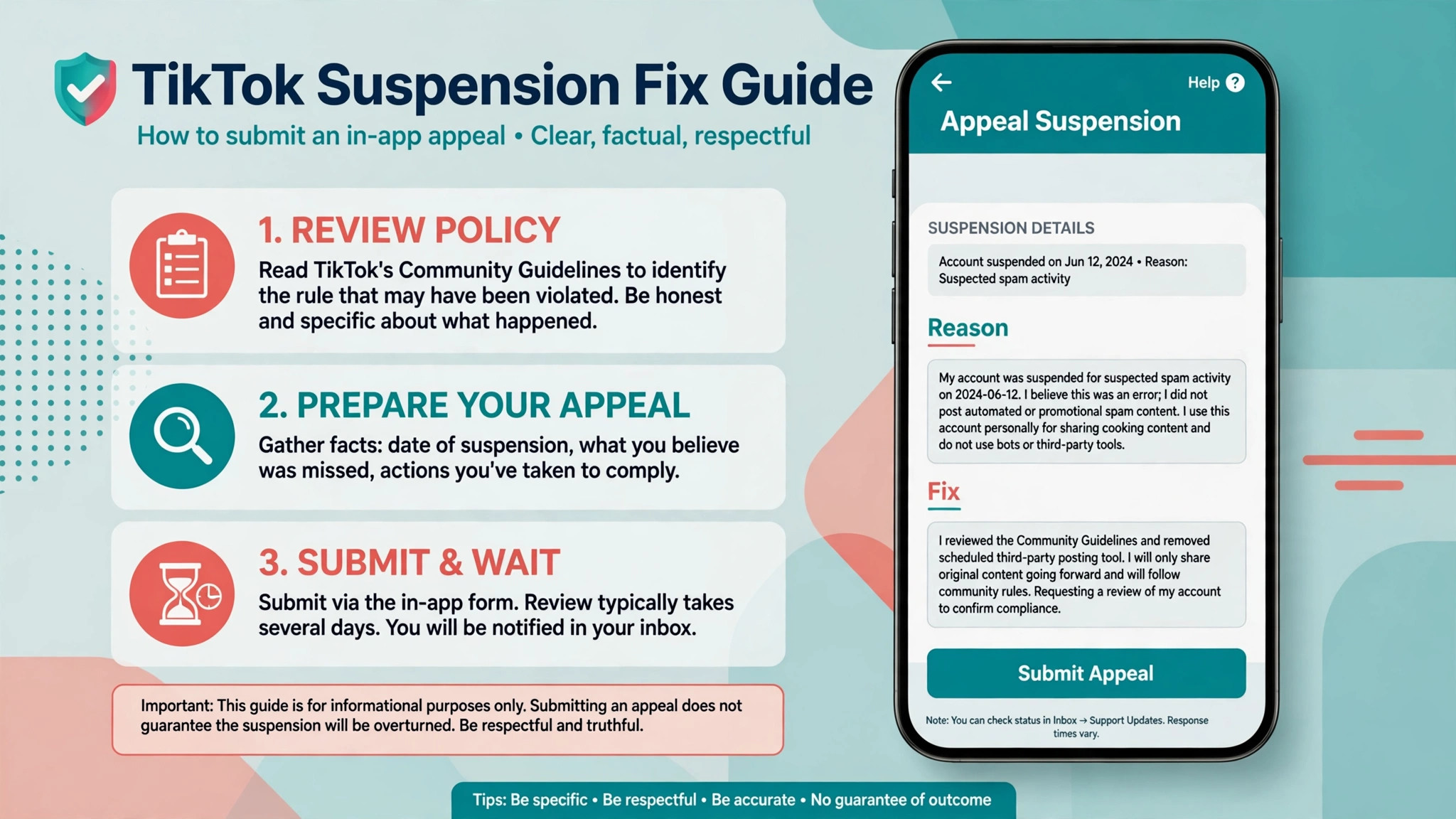
TikTok profile appeals run through the app, from the suspension notice itself or from Settings and Privacy through Report a Problem. Ad account appeals run as a support ticket in Ads Manager, under the account review category and the suspension appeal option. Shop appeals run from Seller Center, under Shop Health and violation records. Use the path that matches the asset you named earlier, and use only that path for that asset. A well written appeal sent to the wrong place still goes nowhere.
TikTok Ads Manager Appeals
For an ad account, the ticket needs the account name, the suspension date, the exact reason from the notice, the fix you already made, and the documents attached. State the business name, what it sells, and the single change that addresses the cited reason. If the cause was a landing page mismatch, say the page now matches the ad, and name what changed. If the cause was billing, say the payment method is updated and any outstanding amount is cleared. Keep the whole ticket short enough to read on a phone screen, because reviewers work through queues, and a short specific ticket moves faster than a long general one.
TikTok Seller Center Appeals
For a Shop, the appeal sits on the violation record itself. Open the record, read the violation, and answer it directly with the corrective action and the documents that prove it. Sellers are commonly asked for identity documents, business registration, invoices, or proof of stock, and guides report up to two appeal attempts for Shop cases, so the first attempt must be complete. Attach clear scans, name each file plainly, and describe what each document proves in one line each.
Here is a short appeal shape that fits the in app form. Adapt the bracketed parts, and delete any line that does not fit your case. “Account [name], suspended on [date] for [exact reason from the notice]. I have removed [specific videos or ads] and corrected [specific landing page or claim]. Attached are [business registration and ID] showing this is a genuine small business. I understand the rule on [policy area] and will [specific future practice, such as checking every sound licence before posting]. Please review the account in its current state.” That shape works because it names the rule, shows the fix, and promises a checkable future practice, without arguing about fairness or blaming the system.
Submit once per enforcement action, and then stop, because a second filing in an effort to fix TikTok account suspended small business trouble faster usually slows the review instead. Repeated appeals can delay review, and a second appeal that contradicts the first weakens both. Guides based on TikTok material report ad appeal replies within about two business days, while a permanent profile ban appeal may take closer to a week, and Shop reviews can run to several business days.
Those are reported ranges, not promises, and your case may sit outside them. Watch the inbox and the email tied to the account, answer any follow up promptly, and do not open a replacement account while you wait, because TikTok treats evasion of a restriction as a separate violation.
Business Verification Check for TikTok
Business verification answers the question reviewers ask behind every appeal, which is whether this is a real business run by a real person. Open Business Center if you use it, and confirm the business name, legal details, and contact information match your registration documents exactly. A mismatch as small as a trading name versus a registered name can stall a case, because reviewers cannot match the documents to the account. Correct the details you control, and note any detail you cannot change without support help.
Gather the documents before they are requested, and keep them in one folder with plain file names. A business registration certificate, a government photo ID for the owner, a recent utility bill or bank statement showing the registered address, and two or three recent supplier invoices together prove identity, address, and genuine trading. For a Shop, warehouse proof or stock invoices may also help. Scan in colour, keep every edge of the document visible, and check that no document is expired. A blurry or expired document is the most avoidable reason for a delayed review.
Check the people side of verification too. Confirm who owns the Business Center, who holds admin access to the ad account, and whether any former agency or freelancer still holds access they no longer need. If an agency manages the account, confirm in writing who will file the appeal, because two appeals from two senders about the same case create confusion. One sender, one ticket, one record. Remove access for anyone who no longer works with the business once the case allows it, and keep at least one trusted owner with full access so the business is never locked out by a single lost login.
Verification does not guarantee a return, and it should not be presented as if it does, even in a well prepared attempt to fix TikTok account suspended small business cases with strong documents. It removes one common reason for refusal, which is doubt about who runs the account. Combined with a cleaned content record and a specific appeal, it gives reviewers fewer reasons to say no. That is the realistic value of the check, and it is worth doing properly even when the paperwork feels tedious.
The First Week Recovery Plan
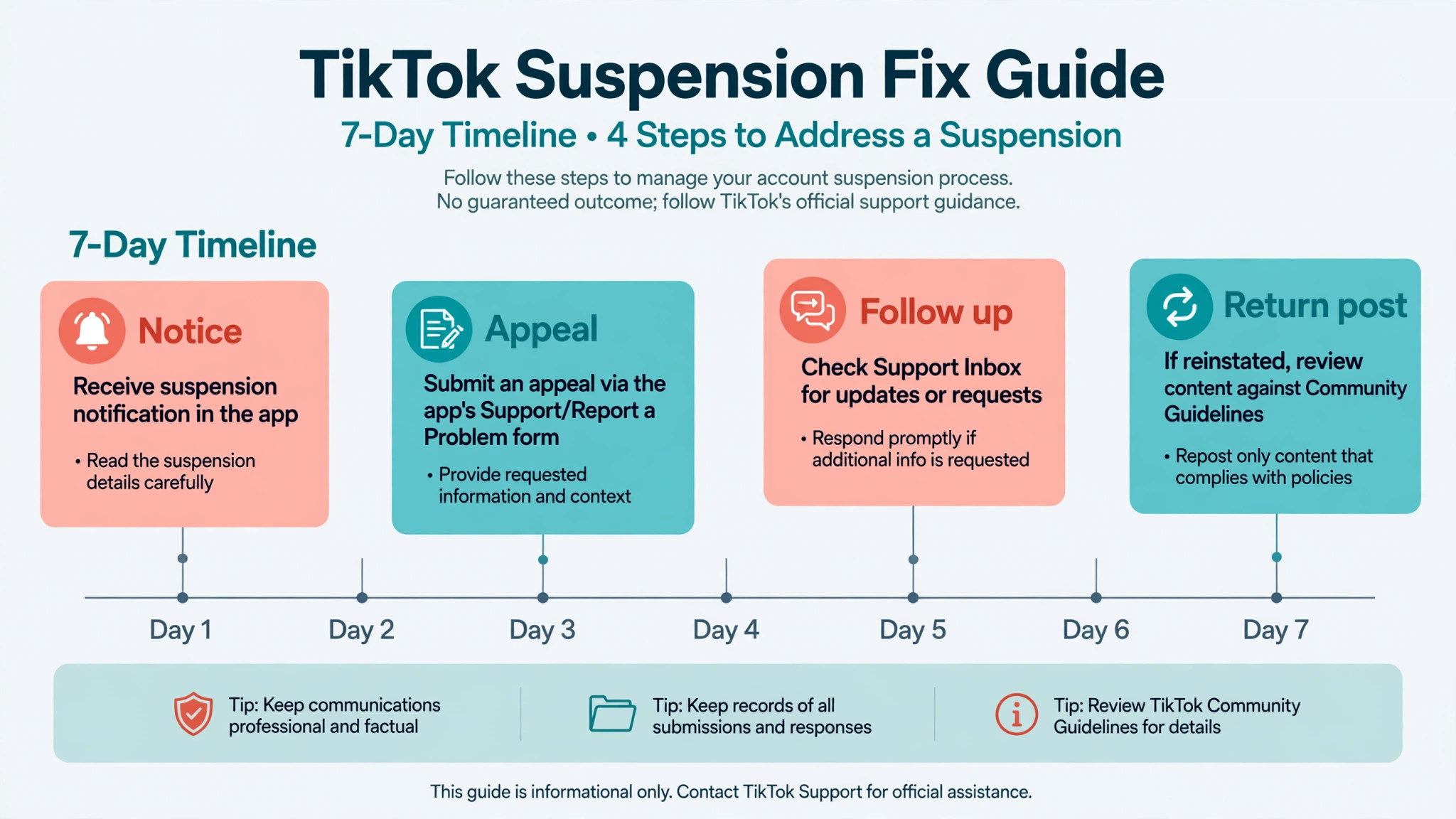
Day one is the notice, the freeze, and the audit. Day two is the cleanup and the appeal submission, with documents attached and the case reference saved. Days three to five are for watching, answering follow ups, and keeping the business visible elsewhere. If a reply arrives, answer it the same day with the document or clarification requested, and save the reply with the case file. If no reply arrives within the reported range, check the appeal path once for a status update rather than filing a duplicate appeal, because a status check is not the same as a second filing.
Use the waiting week to rebuild the content pipeline safely, so the work to fix TikTok account suspended small business trouble continues even while the appeal is pending. Draft new videos that follow the rule that was cited, check every sound licence for business use, and rewrite any claim so it matches the landing page exactly. Do not publish from a replacement account, and do not ask customers to follow a backup account as a workaround, because that pattern can be read as evasion. A clean pipeline ready to publish on return is worth more than a rushed post from a new account that creates a second problem.
Plan the return post before access comes back. The first video after a suspension should be simple, compliant, and useful, such as a genuine look at the shop, a real customer question answered plainly, or a clear offer with terms that match the website. Avoid the topics, claims, and formats that drew the flag until you understand exactly why they drew it. A quiet, clean return rebuilds trust with reviewers and with viewers faster than a loud comeback that repeats the pattern.
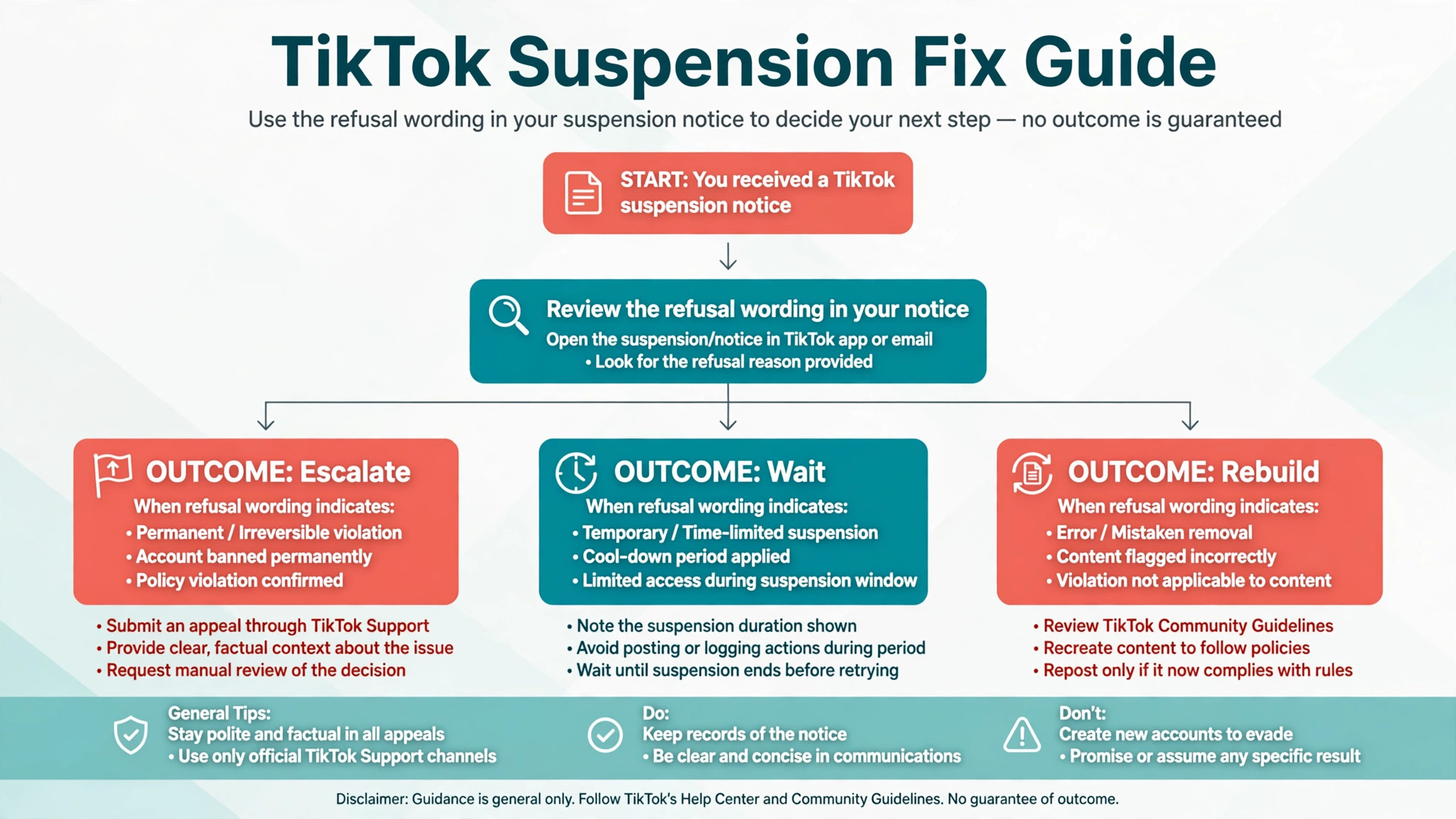
If the appeal is refused, read the refusal in full before deciding anything. Some refusals close the case, while others point to a specific remaining problem that a further allowed attempt can address. Shop guides report a second attempt in some cases, while profile appeals are commonly described as one per enforcement action, so the number of chances depends on the asset. Do not assume another attempt exists. Check the refusal wording, check the appeal path for a remaining option, and only then decide whether to file again or to rebuild elsewhere with fully compliant content.
What Fix TikTok Account Suspended Small Business Cases Teach About Prevention
Prevention after a suspension is not about posting less. It is about posting with a check that happens before anything goes live. Every video that carries a claim should be checked against the landing page it points to, every sound should be checked for business use, and every product shown should be checked against the ad rules for that category. Those three checks take a few minutes per video, and they prevent the categories of violation that most often suspend small business accounts.
Keep a simple log of those checks, with the video title, the sound used, the claim made, and the person who approved it. When a new team member starts posting, the log shows them the standard without a long training session. When a notice arrives, the log shows reviewers that the business changed its process, not just its wording. That evidence matters, because reviewers decide on patterns, and a log is proof of a new pattern.
Prevention also means separating duties. The person who films should not be the only person who approves claims, prices, and landing pages. A second pair of eyes catches the guarantee that sounds harmless in a script and reads as a promise on screen. Small businesses often skip that step because the team is small, but even a five minute review by the owner before posting is enough to catch most problems. The cheapest suspension is the one that never happens, and the check that prevents it costs minutes, not days of lost revenue.
When to Escalate and What Not to Do
Escalate through official support when the reported reply window has passed with no answer, when the appeal path shows an error, or when a linked asset such as payouts or a Shop balance is affected and needs a separate case. Use the help centre and the support ticket path for the asset in question, quote the case reference, and attach the same evidence file you used for the appeal. A support message that repeats the appeal word for word is less useful than one that states the case reference, the date filed, and the specific question you need answered.
Do not open a new account to keep posting while suspended. Do not repost flagged videos, even edited, until you understand the violation. Do not pay a recovery service that promises reinstatement for a fee, because the only legitimate path runs through TikTok itself, and paid promises are a common scam aimed at worried owners. Do not send identity documents by email to an address that arrived in an unsolicited message. Upload documents only through the appeal path inside the app, Ads Manager, or Seller Center, where the request is tied to your case.
Protect cash flow while you wait. If TikTok drove orders, shift that traffic openly to your website, your phone line, and your other profiles, and tell regular customers where to find you. Pause paid spend tied to the restricted account so money does not sit against campaigns that cannot run. A suspension is a platform problem, not a business closure, and the businesses that recover best are the ones whose customers could still buy throughout the week the account was down.
A Calm Close. One Case, One Appeal, One Clean Record
Recovery on TikTok rewards order more than urgency, and that order is what a plan to fix TikTok account suspended small business trouble should protect above speed. Name the exact account, read the exact notice, freeze the risky activity, audit by category, and file one specific appeal with real documents. That sequence will not force a return, because the decision belongs to TikTok, but it removes the avoidable reasons for refusal, and it keeps the business trading while the case runs. Most failed recoveries fail on the early steps, not on the appeal wording, because the owner appealed the wrong asset, or appealed before fixing the content, or filed twice and muddied the record.
Keep the case file after the decision, whatever it says. The notice, the audit log, the appeal text, and the reply together form a playbook for the business. If the account returns, that playbook tells every future poster what not to repeat. If it does not return, the same file tells you exactly what to build differently on the next account. Either way, the week spent working cleanly is not wasted. It becomes the standard the business posts by from now on.
Frequently Asked Questions About Fixing a TikTok Account Suspension
How long do I have to appeal a TikTok suspension?
It depends on the asset, and any guide that claims to fix TikTok account suspended small business trouble must start with that distinction. Guides based on TikTok material report up to 180 days to appeal an ad account suspension, while Shop and profile cases carry their own windows shown in the notice. Do not wait for the deadline. File once the content is cleaned and the documents are ready, because a late appeal filed after months of inactivity looks less credible than a prompt, corrected one.
How long does a TikTok appeal usually take?
Reported ranges vary by asset. Ad account appeals are commonly reported as answered within about two business days, Shop reviews can run to several business days, and a permanent profile ban appeal may take closer to a week. Those are reported ranges, not guarantees from TikTok for your case. Watch the inbox tied to the account and answer follow ups the same day.
Can I appeal a TikTok suspension more than once?
It depends on the asset and the refusal wording. Profile appeals are commonly described as one per enforcement action, while Shop guides report up to two attempts in some cases. Read the refusal carefully before filing again, and never file a duplicate appeal while the first one is still open, because that can delay review.
Should I create a new TikTok account while suspended?
No. TikTok treats opening a new account to get around a restriction as evasion, which is a separate violation and can lead to further restrictions. Work the appeal for the original account, keep the business visible through your website and other profiles, and rebuild only after the case is decided.
What documents help a TikTok business appeal?
A business registration certificate, a government photo ID for the owner, a recent bill or bank statement showing the registered address, and recent supplier invoices together prove identity and genuine trading. For a Shop, stock or warehouse proof may also help. Scan in colour, keep edges visible, and check that nothing is expired before uploading.
Why was my business account flagged for a sound I used?
Sounds cleared for personal use are not always cleared for business use. A business account promoting products or services needs sounds licensed for commercial use, and a personal account used for promotion can run into the same problem. Check the sound licence before posting, and replace any flagged sound with a commercially cleared one when access returns.
More Reading on Stratilyze
– Fix a TikTok Shop Suspension Before Your Next Sales Push, plain text title, link not verified at writing time – Small Business Short Video Checklist for Product Launches, plain text title, link not verified at writing time – How to Plan a Month of Social Content Without Burning Out, plain text title, link not verified at writing time – Fix an Instagram Account Restriction for a Small Business, plain text title, link not verified at writing time