
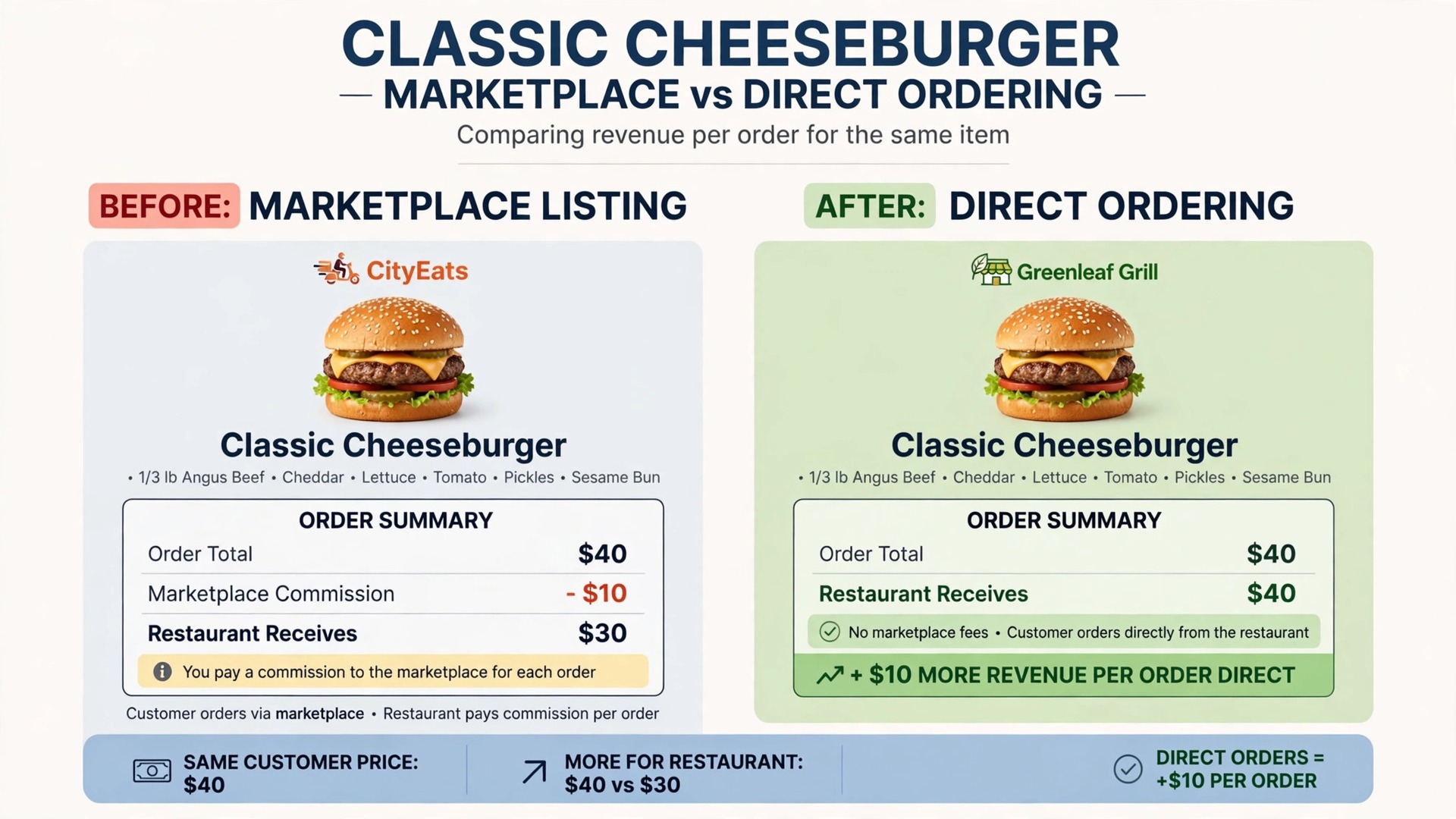
A single statistic frames the choice. Marketplace delivery can take a quarter or more of an order value in commission, which means a restaurant doing 50,000 dollars a month in marketplace delivery revenue can lose 12,500 dollars a month before card fees. Direct ordering exists to keep that margin, but only if the system is easy enough that customers actually use it. The best online ordering software for restaurants therefore has to win on customer ease first, and on fees second.
This guide compares 10 tools on direct ordering, pickup, delivery, catering, menu control, point of sale integration, and price. Where a vendor charges commission rather than a flat fee, that is stated plainly, because commission changes the real cost at high volume. Prices change, so confirm every figure on the vendor page before you sign.
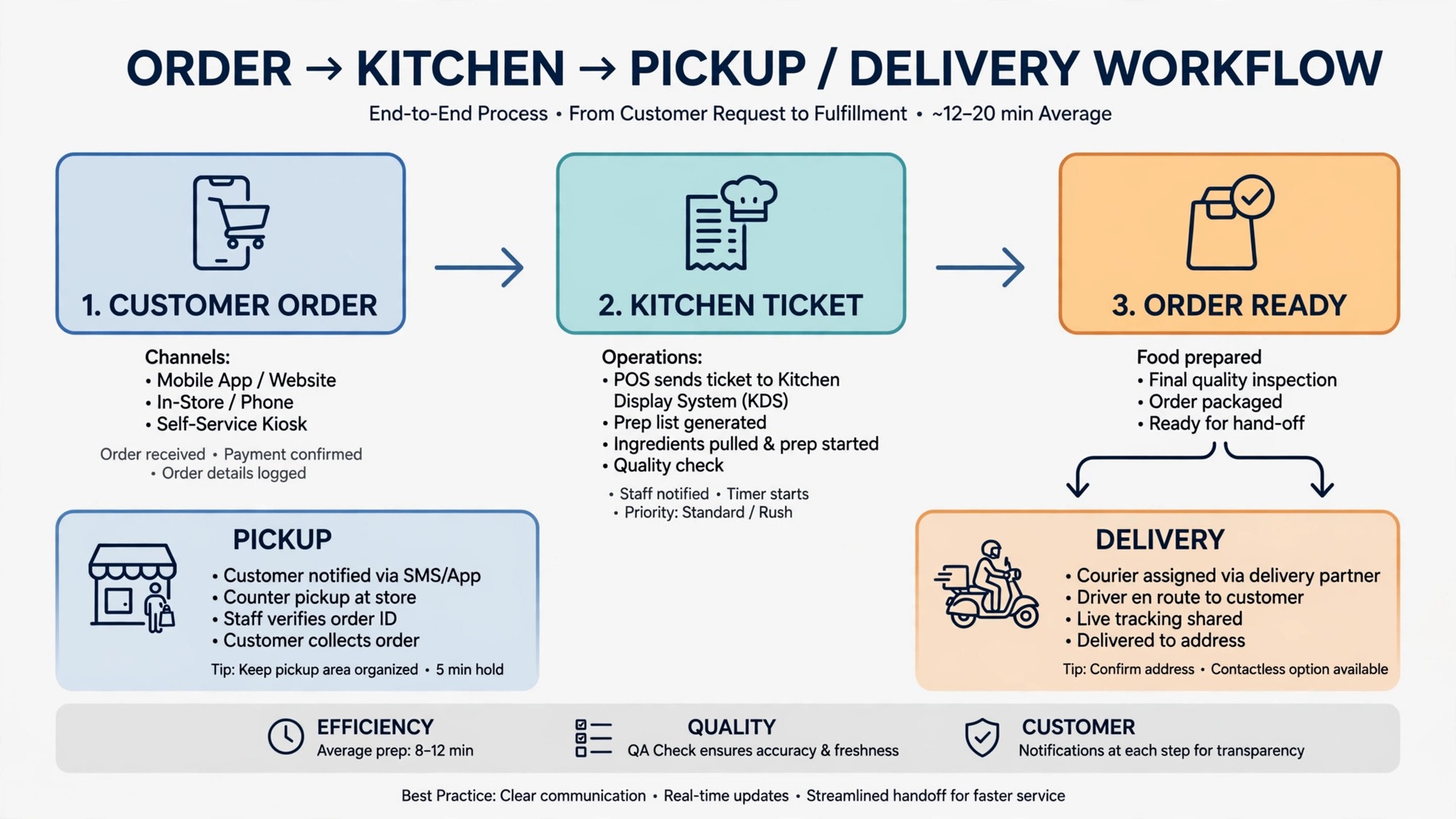
Restaurants also need a system the kitchen can trust at rush hour. Orders must flow to the kitchen without a second tablet, menu changes must take effect at once, and a sold out dish must stop selling before a customer pays for it. A ordering tool that fails any of those three tests will cost more in remakes and refunds than it saves in fees.
Restaurant Ordering Tools at a Glance
The table below gives a fast read on price and fit. Read the commission column beside the monthly price, because a free tool with commission can cost more than a paid tool at volume. Use this table to start shortlisting the best best online ordering software for restaurants for your firm.
| Tool | Starting price | Best for |
|---|---|---|
| Toast | Point of sale kits from 0 dollars Starter Kit or 69 dollars per month reported, ordering as an add on | Restaurants already running Toast point of sale |
| ChowNow | From 119 dollars per month reported, plus 2.95 percent plus 29 cents processing | Independent restaurants that want managed ordering and marketing |
| Square | Free online ordering profile, card processing from 2.9 percent plus 30 cents in the United States reported | Small restaurants already using Square point of sale |
| GloriaFood | Free, but shutting down in spring 2027 according to vendor notices | No new sign ups, migration planning only |
| Popmenu | From 179 dollars per month reported, to 499 dollars for higher tiers | Restaurants that want a menu led website and ordering |
| Sauce | 149 dollars per month flat fee reported, 0 percent commission | Delivery focused restaurants that want a driver network |
| BentoBox | 49 dollars per month plus 99 cents per order plus 3 percent processing reported | Restaurants that want catering pre-orders and brand control |
| Craver | From 99 dollars per month per location reported | Branded ordering and loyalty for growing restaurants |
| Owner.com | Flat rate 499 dollars per month plus no fees reported, flexible plan 248 dollars plus 5 percent per order reported | Independent restaurants that want website, ordering, and customer tools together |
| Olo | Check the vendor page, quoted for multi-location brands | Multi-location brands managing high volume digital ordering |
Why the best online ordering software for restaurants beats marketplace only selling
Margin is the first reason. Marketplace commission takes a large share of every order, while direct ordering keeps the sale with the restaurant apart from card processing and any platform fee. Over a year, that difference can fund a hire, a refurbishment, or a marketing budget that marketplace selling never leaves room for.
Customer data is the second reason. Marketplace orders belong to the marketplace, so the restaurant cannot easily re-engage a happy customer with a direct offer. Direct ordering builds a customer list the restaurant owns, which supports repeat orders, loyalty, and catering leads without paying commission again on the same customer.
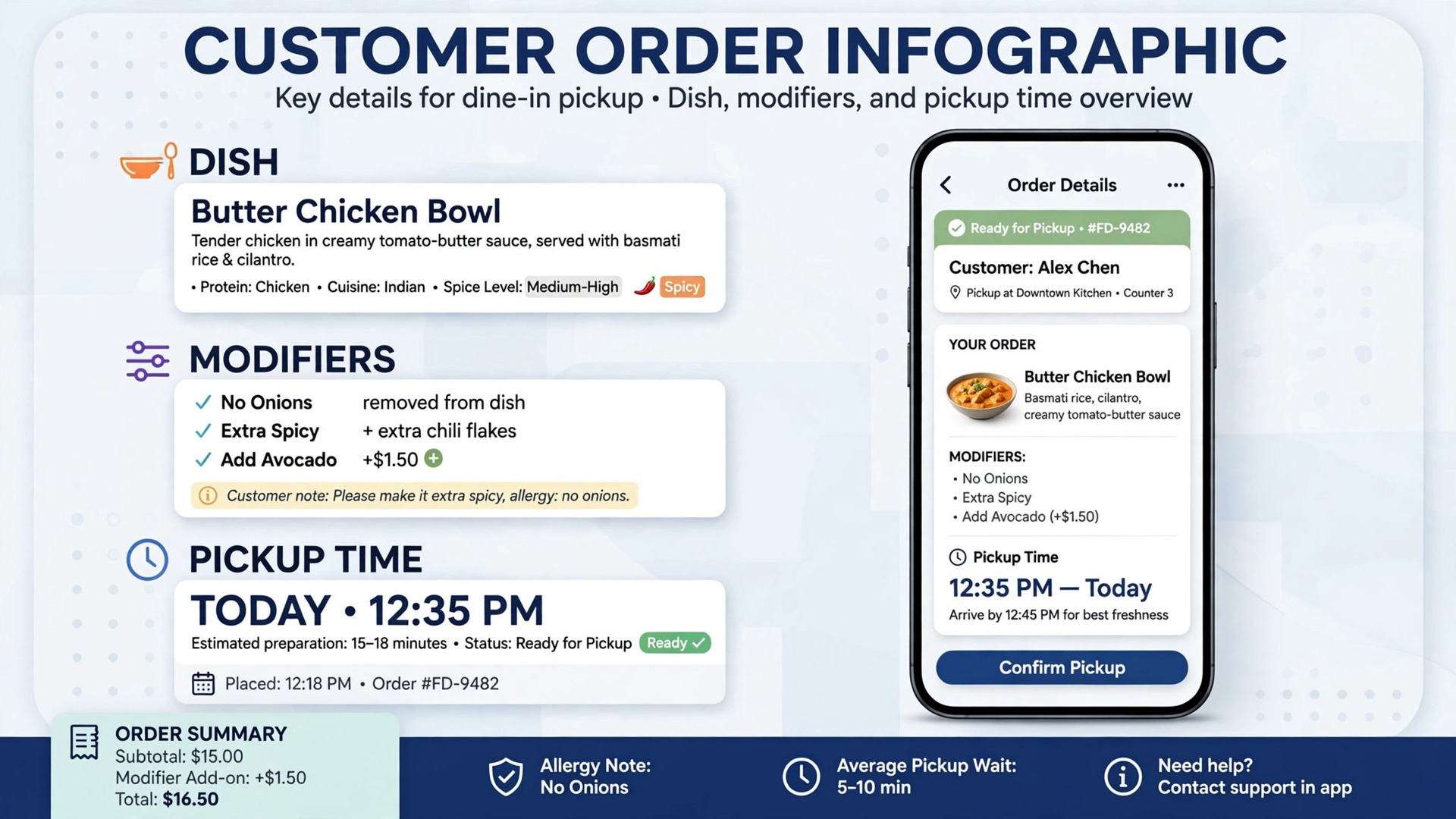
Menu control is the third reason. A direct system lets the restaurant change prices, hide a sold out dish, and promote a high margin item in minutes. Marketplace menus change slower and sit beside rival listings, which weakens both control and presentation.
Finally, direct ordering supports pickup and catering in ways marketplaces handle poorly. Scheduled pickup, large catering orders, and custom instructions fit a direct system naturally, while marketplace flows are built for fast single meal delivery. The best online ordering software for restaurants therefore covers the full order mix, not just delivery.
Ten Ordering Tools Compared
Toast
Toast offers online ordering as a Digital Storefront add on to its point of sale system, with commission free direct ordering inside the Toast ecosystem. That integration suits restaurants already committed to Toast, because orders flow to the kitchen without a second tablet. There is no standalone online ordering price published, and hardware and implementation costs vary by package, so get a written quote.
Choose Toast when Toast point of sale already runs the restaurant. Skip it when you want a standalone ordering tool without a point of sale migration, because that move is large for ordering alone.
ChowNow
ChowNow offers commission free direct ordering, branded apps, and built in marketing for independent restaurants, with integration to more than 40 point of sale systems including Toast and Square. Recent comparisons report plans from 119 dollars per month, with higher tiers to 328 dollars, and other sources report a 229 dollar starting figure, so confirm the current plan on the vendor page. Processing at 2.95 percent plus 29 cents sits on top.
Choose ChowNow when managed ordering plus marketing matters and you want to keep your current point of sale. Skip it when you want the lowest monthly bill, because the managed service carries a higher fee.
Square
Square offers a free branded ordering profile that syncs with its point of sale, supporting online and in person orders from one system. That simplicity suits a small restaurant starting direct ordering without a new platform. Card processing and any paid plan extras sit on top, so confirm the full cost for your order mix.
Choose Square when Square point of sale already runs the business and simplicity matters. Skip it when you need deep catering workflows or advanced marketing automation, because those areas need a closer look.
GloriaFood
GloriaFood offered commission free ordering with unlimited orders, website widgets, and mobile apps at no subscription cost. That free model made it popular with small restaurants. Vendor notices now state an end of life on April 30, 2027, with Oracle pages giving an earlier full end of service date of March 31, 2027 and no new sign ups, and Oracle states it offers no direct replacement. Existing users should plan migration now rather than building on it.
Choose GloriaFood only as a migration source, not as a new platform. Skip it for any new restaurant, because the shutdown dates make it a dead end.
Popmenu offers a menu forward website with interactive ordering, dish level pages for search, and automated email and text campaigns, with no commission on direct orders in recent comparisons. That menu led approach suits restaurants that win customers through search and dish discovery. Pricing is reported from 179 dollars per month, so confirm the current tier for your location count.
Choose Popmenu when the website and menu presentation drive orders. Skip it when you want the lowest bill or a bare ordering widget alone.
Sauce
Sauce offers flat fee direct ordering at 149 dollars per month reported, with 0 percent commission, Toast point of sale integration, and a national driver network for delivery. That model suits restaurants that want delivery reach without marketplace commission, while keeping customer data and profit. Confirm driver coverage in your area before committing, because coverage varies by market.
Choose Sauce when delivery reach and a flat fee matter together. Skip it when pickup only is the whole business, because the driver network adds little there.
BentoBox
BentoBox offers ordering and website tools with smart pre-ordering for catering up to a year ahead, automated upsells, and central brand control. Recent comparisons report 49 dollars per month plus 99 cents per order plus 3 percent card processing. That catering strength suits restaurants with a real catering line beside daily service.
Choose BentoBox when catering pre-orders and brand control matter. Skip it when order volume is very high, because the per order fee grows with volume.
Craver
Craver offers branded direct ordering and loyalty tools, with plans reported from 99 dollars per month per location. That loyalty focus suits restaurants building repeat direct orders rather than one off marketplace sales. Confirm what loyalty, app, and marketing features sit in the starting tier, because tiers vary.
Choose Craver when branded ordering and loyalty drive repeat visits. Skip it when you need the cheapest possible start, because per location pricing adds up across sites.
Owner.com
Owner.com offers an all in one website, ordering, and customer system for independent restaurants, with automated marketing built in. Recent comparisons report a flat rate plan at 499 dollars per month with no order fees, and a flexible plan at 248 dollars plus 5 percent per order. That breadth suits a restaurant that wants one vendor for website, ordering, and re-engagement.
Choose Owner.com when one system for website, ordering, and marketing matters. Skip it when you want a low fixed bill, because the flat rate sits above simpler tools.
Olo
Olo serves multi-location restaurant brands managing high volume digital ordering at scale, with ordering, dispatch, and integration depth built for large operations. It suits groups where volume, reliability, and system integration outweigh a simple monthly price. Pricing is quoted, so a demo and a written quote are needed.
Choose Olo when multi-location scale and high volume reliability are the job. Skip it for a single restaurant, because the platform and its price are built for larger brands.
Best Picks by Order Type
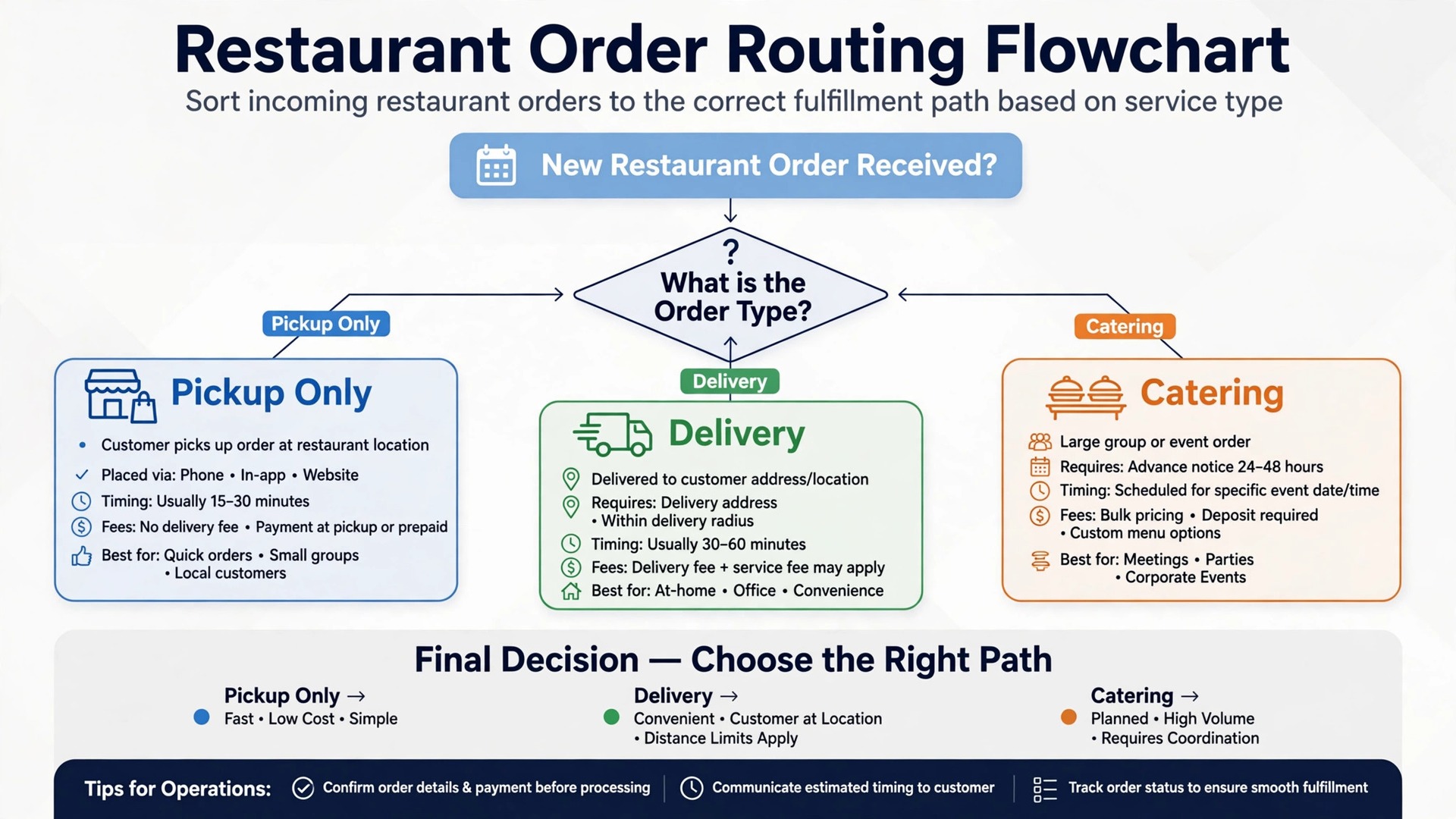
Use this table to match the tool to the order type that earns the most. A tool that fits pickup can strain on catering, where lead times, deposits, and custom instructions matter more. Keep the best best online ordering software for restaurants in view as you compare, and judge each pick on the job it must do daily.
| Job | Best pick | Why it wins |
|---|---|---|
| Pickup only | Square or Toast | Simple ordering, kitchen flow, and low fixed cost |
| Delivery | Sauce or ChowNow | Driver reach or managed delivery ordering without marketplace commission |
| Catering orders | BentoBox or Owner.com | Pre-orders, large orders, and customer re-engagement |
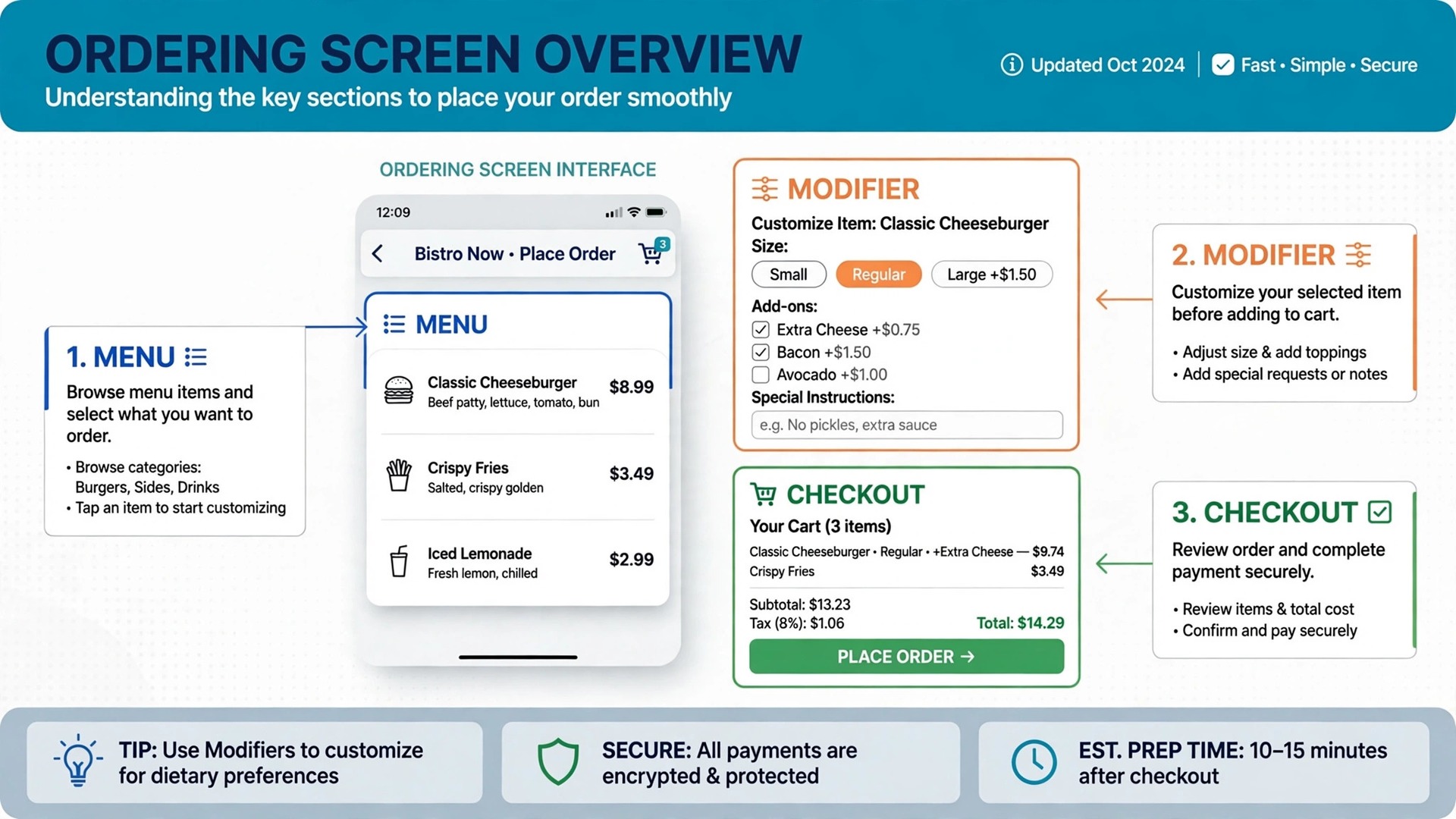
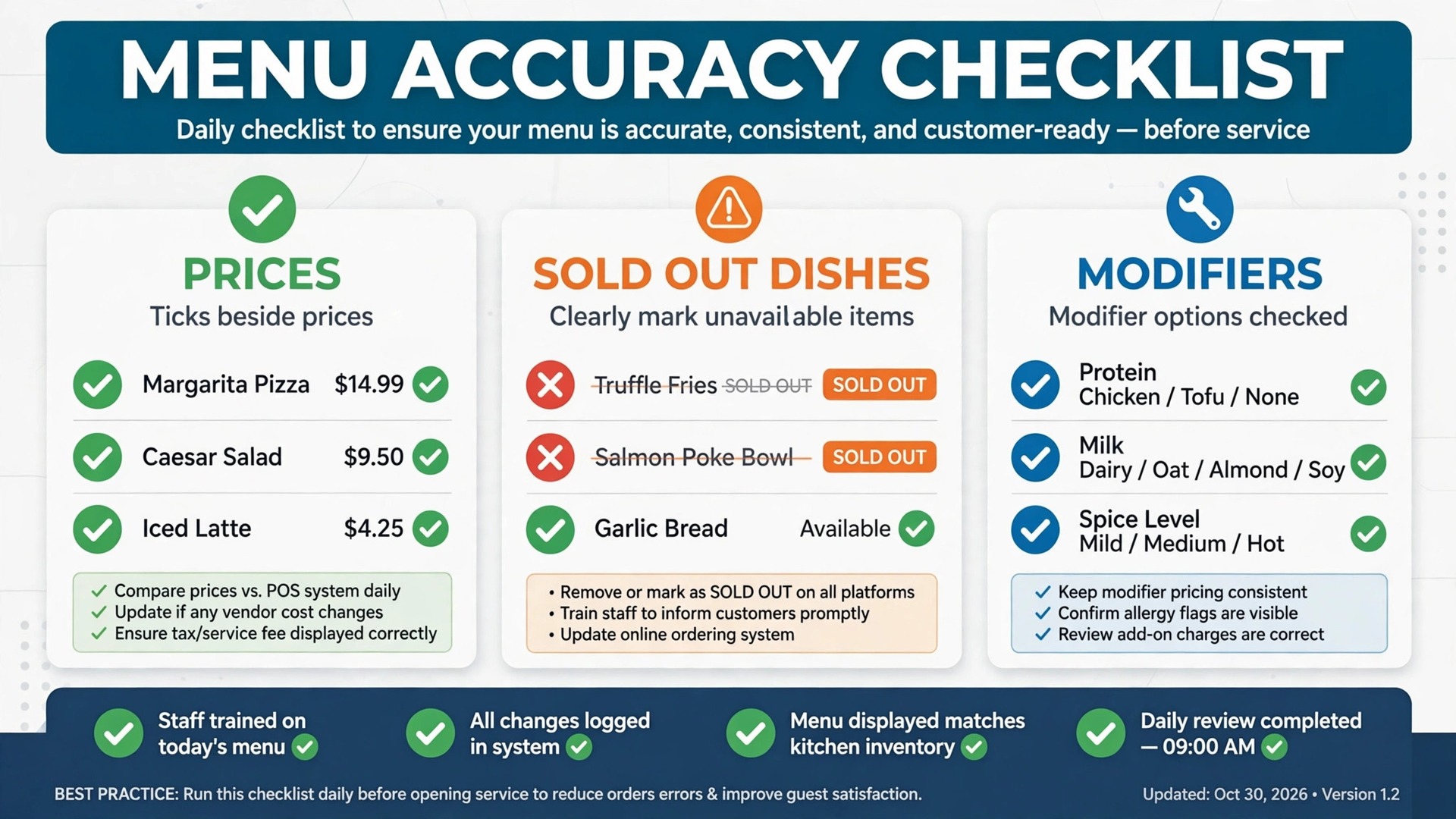
– Check every dish name, price, and description against the kitchen menu before launch, and again after any price change. – Mark allergen and dietary information on dishes where the kitchen can guarantee it, and remove claims it cannot. – Hide a dish the moment it sells out, and restore it only when the kitchen confirms stock again. – Test every modifier, size, and extra on a real order, because a broken modifier creates remakes at rush hour. – Set preparation times honestly by order type, so pickup customers are not promised food the kitchen cannot finish. – Review photos for every top dish, because a missing or stale photo lowers conversion on the highest margin items. – Run a test order through each channel every week, and fix any menu drift before customers find it.
What Ordering Really Costs
Commission is the first cost to model. Marketplace commission can reach a quarter of an order, while direct tools charge a flat fee, a per order fee, or a small processing percentage. Model each model at your real monthly order count and average order value, because the winner changes with volume.
Card processing sits on top of most models. A 2.95 percent plus 29 cents processing line looks small per order and large across thousands of orders. Ask for processing, platform, and per order fees separately in writing, so the comparison is honest.
Hardware and integration add a further layer for point of sale linked tools. A new terminal, a kitchen display, or an integration fee can exceed the first months of subscription. Get hardware and implementation quoted beside the software price, not after signing.
Marketing value is the offset. A direct system that brings repeat orders through owned customer data can pay for itself in saved marketplace commission on repeat customers alone. When you compare totals, include repeat order value, not just the subscription line.
Separate the subscription from the total cost of ownership before you compare finalists. Training time, setup help, extra users, and any second tool all sit outside the headline price, and they decide the real first year bill. The best best online ordering software for restaurants on subscription price alone can still be the expensive choice once those items are added, so build one total per finalist and compare totals, not headlines.
Ask every vendor for the renewal price in writing, not just the first year price. Introductory offers, first month discounts, and launch pricing all expire, and the renewal figure is the price you will actually live with. A vendor that will not put renewal pricing in writing is telling you something useful about the second year.
Mistakes That Cost Restaurants Margin
The most common mistake is launching direct ordering and never telling customers it exists. A direct link buried on a website will not move marketplace customers. Put the direct link on receipts, packaging, and social profiles, and offer a small first direct order reason to switch.
A second mistake is letting the online menu drift from the kitchen menu. Wrong prices, sold out dishes still selling, and missing modifiers create refunds and bad reviews at rush hour. Assign one person to own menu accuracy and check it weekly.
A third mistake is adding a second tablet instead of integrating with the kitchen. Manual re-entry slows service and creates errors when the kitchen is busiest. Insist on a kitchen flow test at rush hour during the trial, not a quiet demo.
A fourth mistake is choosing on monthly price alone and ignoring per order fees. A low monthly plan with a per order fee can cost more than a higher flat plan at volume. Run both models at your real order count before you choose.
Another common mistake is letting one person hold all the system knowledge. If only the owner knows how to fix menu and kitchen flow, a holiday or a sick day becomes a system outage. Train at least two people on the core routines, write the routines down on one page, and keep that page where the team works.
How to Test Finalists During a Real Service
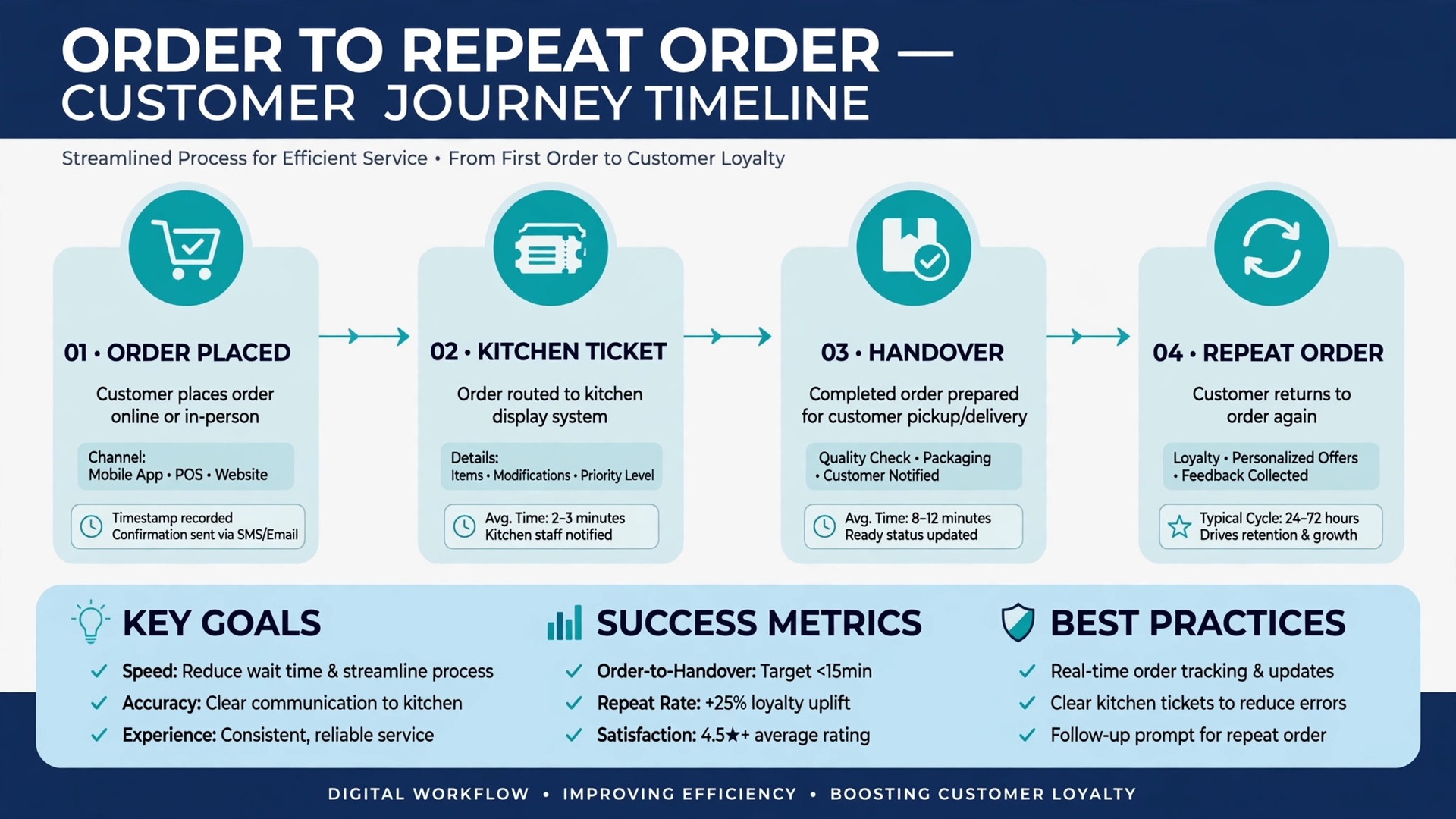
Pick two finalists and run them through a real service in trial. Place a pickup order, a delivery order, and a catering pre-order, then sell out a top dish mid service and change a price. Score how each system handles the kitchen flow, the menu change, and the customer message.
Ask kitchen staff to score each platform separately from front of house staff. Front of house values ordering ease and marketing, while kitchen staff value clear tickets, accurate modifiers, and no second tablet. A tool that only pleases one group will fail at rush hour.
Check support before you need it. Send a question about menu sync, refunds, or kitchen flow and note how fast and how clearly the team replies. Support quality matters most on a Friday night, when service cannot wait.
Finally, write down the three numbers that will prove success, such as response time, unpaid invoices, or repeat bookings, and agree on them with the team before launch. Without agreed numbers, every later argument about the tool becomes opinion, while with agreed numbers the review after three months is a simple check, not a debate.
How to Choose an Ordering Tool
Start with the work that happens every day, not with the feature list that impressed a demo. Write down the five tasks your team repeats most in restaurant ordering, then score each finalist only on those tasks. A tool that handles the daily loop cleanly will earn its fee, while a tool that shines on rare tasks and stumbles on daily ones will frustrate the team within a month.
Next, list the must have features separately from the nice to have features, and keep the must have list short. Three features used daily beat thirty features used once, so buy for the daily work and ignore the rest of the catalogue. The best best online ordering software for restaurants for your firm is the one that does the must have list without workarounds, even if a rival lists more features overall.
Check the mobile experience before anything else, because staff and diners now do most of this work on phones. If the mobile view hides key buttons, shrinks text too far, or forces endless scrolling, adoption will suffer no matter how good the desktop version looks. Judge the product on the smallest screen your team actually uses, not on a large office monitor.
Ask for references from businesses of a similar size, not just from large success stories. A vendor that serves a fifty person firm well may still fail a three person firm, because support, pricing, and setup differ by scale. A reference from a firm like yours is worth more than a polished case study, so ask for two and actually call them.
Review the contract line by line with the same care you give to a supplier agreement. Note the minimum term, the notice period, the price change clause, and any fee for extra users, locations, or transactions. A clear contract protects both sides, while a vague contract protects only the vendor, so ask for any unclear term in plain writing before signing.
Decide what happens when the system is down, because every online tool fails at some point. Write a simple fallback, such as a paper record or a phone tree, and keep it where staff can find it. A fallback plan turns a system outage into a minor delay rather than a lost day of trading, and it is a sign of a mature operation.
Plan for growth in the contract, including the price at the next tier and the cost of adding a location, a team, or a new channel. A tool that punishes growth will be replaced just when the business succeeds, which is the worst time to migrate. Growth pricing agreed in advance removes that trap and keeps the decision honest.
Setting Up Without Disrupting Service
Migration works best in small steps. Move one group of records at a time and check each group before moving the next, because a big move on a Friday night creates a Monday morning of missing records and confused staff. Small steps take longer on paper, yet they protect the business from the one error that stops trading for a day.
Keep the old system running in parallel for two weeks, so staff can check a record in the old place if the new place looks wrong. Parallel running feels like extra work, yet it catches migration errors before they affect diners. Stop the old system only after two clean weeks, and only when the team agrees the new system is trustworthy. Choosing the best best online ordering software for restaurants is only half the job, and a careful cutover is the other half.
Protect data quality from day one by setting clear rules for names, phone numbers, and record titles. Duplicate records and misspelled addresses create double bookings and failed messages, and cleaning them later takes far longer than entering them correctly at the start. A short data rule sheet, shared with the team, prevents most of the mess.
Schedule training in the week before launch, not in the month before, so skills are fresh when real work starts. Training that happens too early fades, and training that happens after launch arrives too late. A short session, followed by a real day of work, builds confidence faster than either alone, especially before a Friday night rush.
Celebrate the first month of wins with the team, such as faster follow up, fewer missed bookings, or a happier customer. A new system feels like a burden until staff see it working, and a small celebration marks the change as a success. Recognition builds the habit of using the tool well, which matters more than any launch announcement.
Keep one channel for internal questions during the first month, so staff do not learn different workarounds in separate chats. A single place for questions lets the owner spot the same problem twice and fix the workflow once, rather than answering the same question five times in five places. That discipline keeps the system clean as the team grows.
Document the daily, weekly, and monthly tasks for the new system on one page, and pin that page where the team works. A one page routine beats a long manual that nobody opens, because staff will follow a short list they can see. Update the page when the workflow changes, so it stays true to how work actually happens.
Agree on response times and support hours in writing, especially if the business trades evenings or weekends. A support team that answers only on weekday mornings is little help when the system fails on a Saturday. Ask for the real support channel, test it during the trial, and note how long a genuine question takes to reach a person who can fix it.
Review user permissions before launch, so each role sees only what it needs. Office staff need financial views, field staff need job details, and customers need only their own records. Clear permissions protect privacy, reduce confusion, and prevent accidental changes to prices or schedules that are hard to unwind later.
Build a simple weekly routine around the new system, with one person checking the key figures and one short meeting to fix problems. A tool that nobody reviews will slowly fill with stale records, duplicate customers, and outdated prices. Fifteen minutes a week keeps the data clean, and clean data keeps every later report honest and useful.
Map the customer journey before you change any setting, from first enquiry to final payment, and note every step where a customer waits, repeats information, or gets confused. A system that fixes those steps will feel like an improvement, while a system that only adds a dashboard will feel like extra work. Journey first, features second, is the order that protects adoption.
More Reading on Stratilyze
– Best Online Ordering Software for Bakeries – Best POS System for Bakeries – Best Employee Scheduling Software for Restaurants
Frequently Asked Questions
Which ordering tool is best for a small restaurant?
Square leads for a small restaurant already on Square, while ChowNow suits an independent restaurant that wants managed ordering and marketing. Toast leads when Toast point of sale already runs the restaurant, because kitchen integration is strongest there.
Is direct ordering cheaper than marketplace delivery?
Usually yes at volume, because marketplace commission can reach a quarter of an order while direct tools charge a flat fee plus card processing. Model both at your real order count and average order value, including any per order fee.
Can ordering software handle catering?
The best tools can, with pre-orders, lead times, and custom instructions built in. BentoBox is strong here, but test a full catering order during a trial, because a delivery flow alone does not prove catering fit.
What happens to GloriaFood users?
GloriaFood is shutting down in spring 2027 according to vendor notices, with no direct Oracle replacement. Existing users should export menus and customer data and migrate to a live platform well before the end of service dates.
How long does setup take?
Simple ordering tools can be live in days, while point of sale linked platforms take longer for kitchen integration and menu entry. Budget staff time for menu accuracy checks and kitchen training, and name one owner for the first month.
What should I check on a trial?
Run pickup, delivery, and catering orders through the trial, sell out a dish mid service, and change a price. Check kitchen flow, menu accuracy, and how fast support answers a real question. Those three checks reveal more than a feature list.
The Verdict for Restaurants
In short, the best online ordering software for restaurants is Square or Toast for pickup only, Sauce or ChowNow for delivery, and BentoBox or Owner.com for catering orders where pre-orders and re-engagement carry more weight. The right pick follows the order mix, not the brand name.
Start with the order type that earns the most, test two finalists through a real service, and price the full year including commission, per order fees, and card processing. A direct system that customers actually use, the kitchen trusts at rush hour, and the menu stays accurate on will keep more margin on every order.