
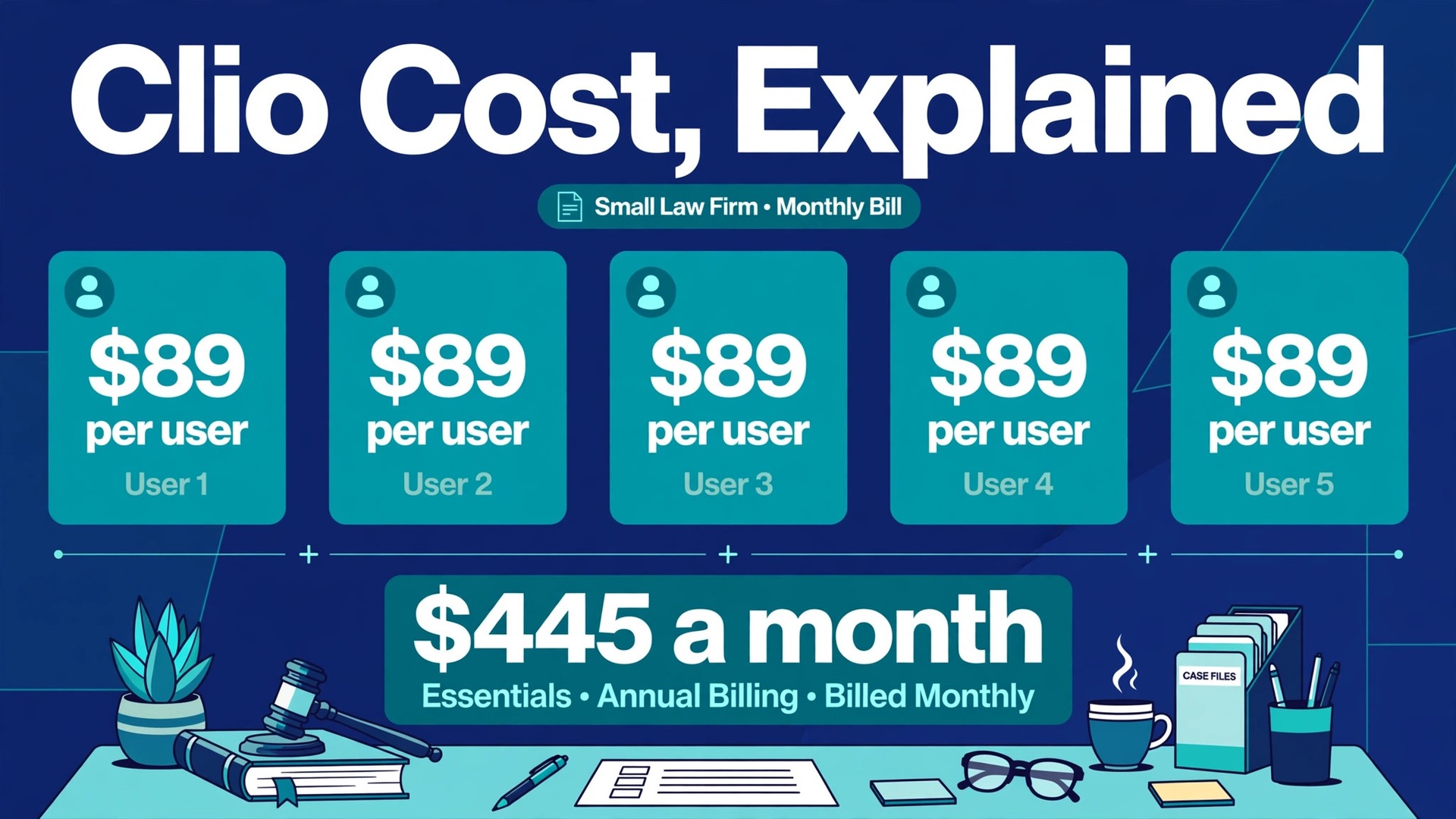
Running a small law firm means every subscription competes with rent, malpractice cover, software renewals, and the hours you cannot bill while you fix admin. The question is not whether practice management software helps. The question is what the cost of Clio for small business monthly really adds up to once every user, every billing cycle, and every add-on is counted. A headline price per user looks small on a pricing page. It stops looking small when five people use it for a full year.
Clio is built for law firms, not for general small businesses that happen to send invoices. That focus matters for the price discussion, because you are paying for matter management, trust accounting support, time capture, billing, and client intake tools that sit in one place. A cheaper generic tool can look tempting until you add the workarounds needed to track a case file, a deadline, and a client payment together. The fair comparison is therefore not Clio against a basic invoicing app. It is Clio against the combined cost of the tools and manual work it replaces.
Cost of Clio for Small Business Monthly, What the Tiers Actually Buy
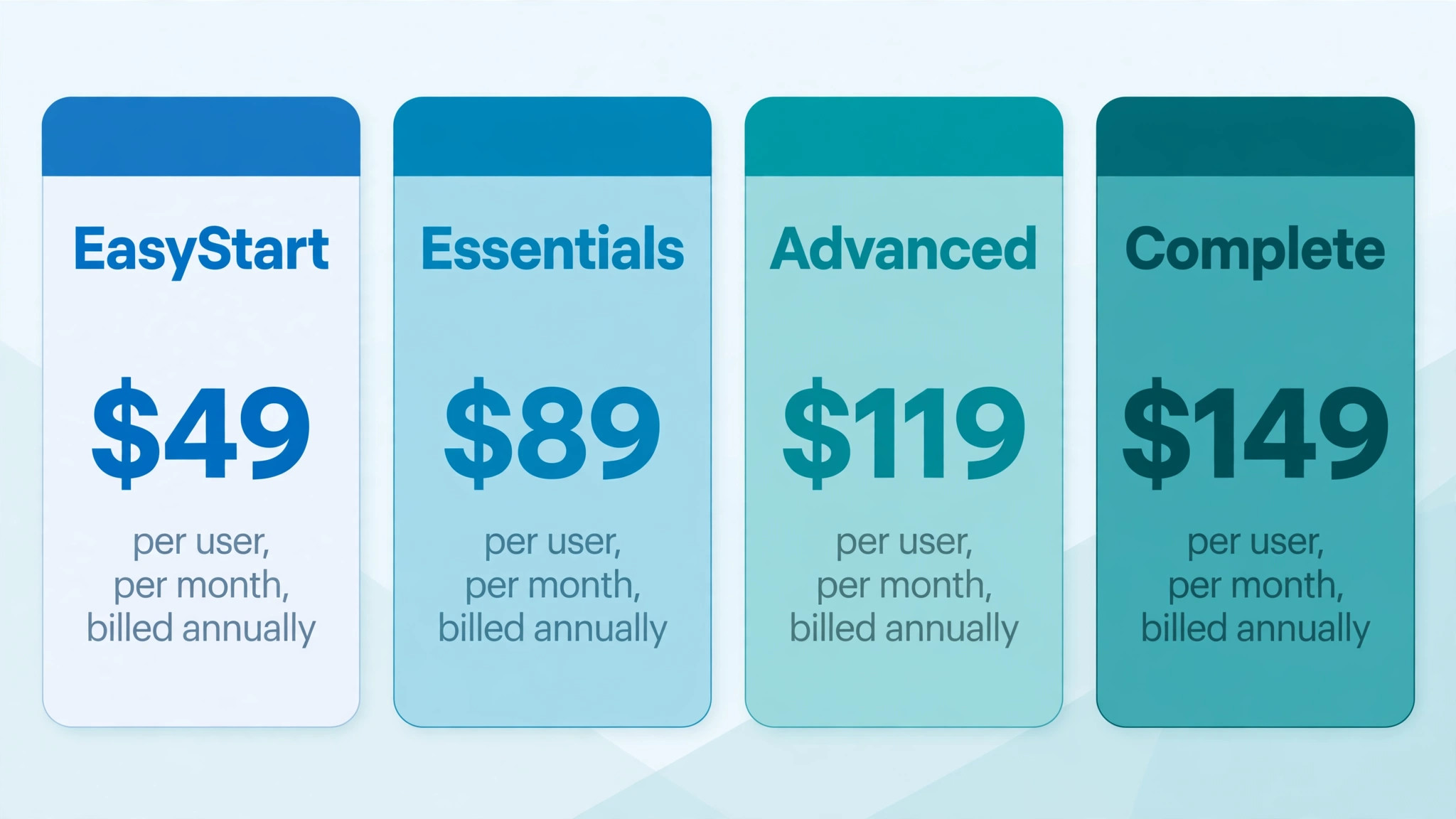
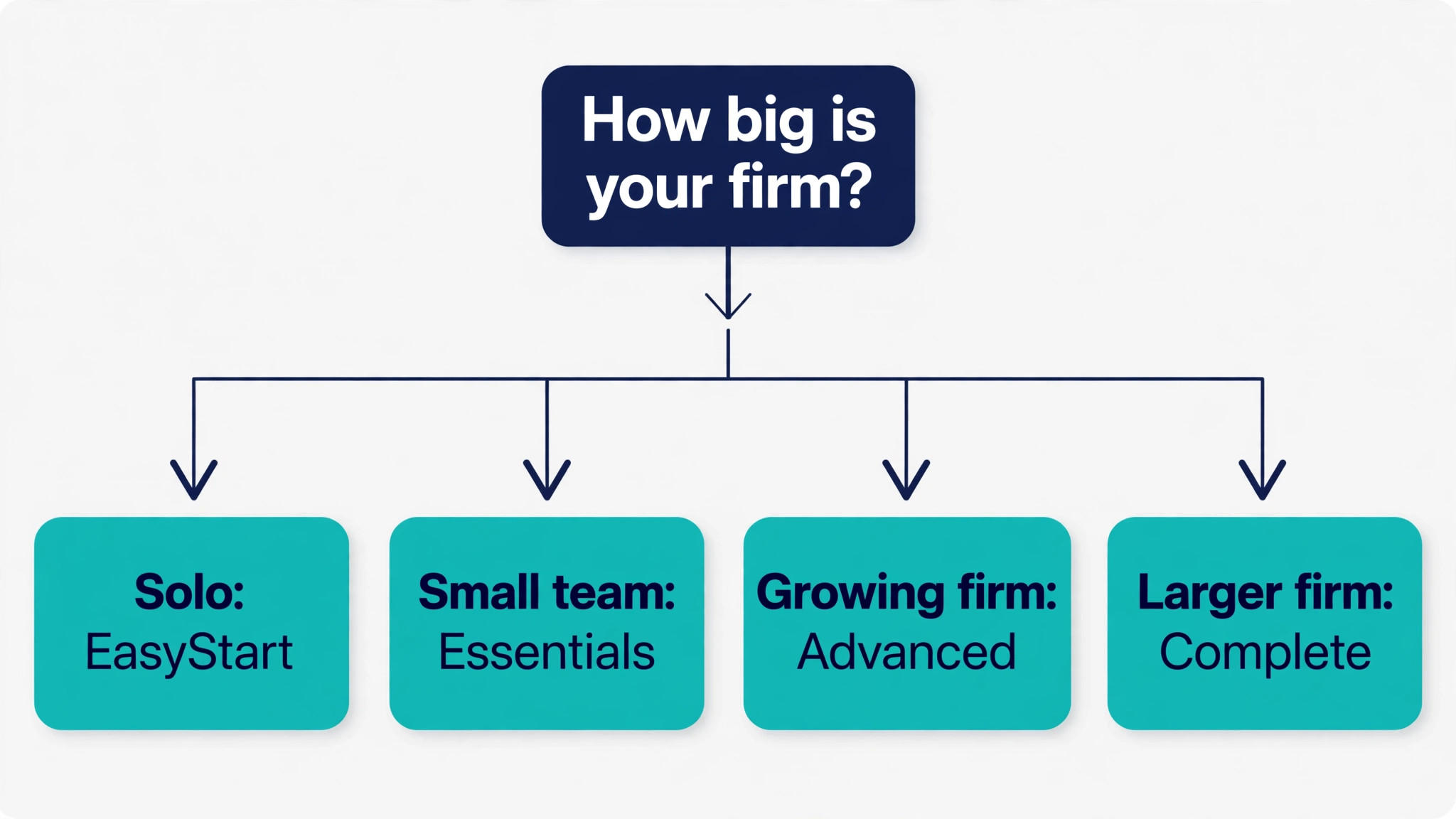
Prices below use the last fully published Clio Manage grid, with annual billing shown first and monthly billing second. EasyStart was listed at 49 dollars per user per month when billed annually, or 59 dollars when billed monthly. Essentials was listed at 89 dollars annually, or 99 dollars monthly. Advanced was listed at 119 dollars annually, or 139 dollars monthly. A higher Complete tier, now often described as Expand, was listed at 149 dollars annually, or 169 dollars monthly.
That history needs a clear warning before you budget. Recent checks of the official pricing page show only a starting figure of 49 dollars per user, with higher tiers routed to a pricing request form. Treat the Essentials and Advanced figures in this guide as the last published list prices, not as a live quote you can click and buy today. Get the current per user rate in writing, with the billing period stated, before you sign. The worked totals below still help, because they show how the maths scales once you know your quoted rate.
| Plan | Per user per month, billed annually | Per user per month, billed monthly | Best fit |
|---|---|---|---|
| EasyStart | 49 dollars | 59 dollars | A solo lawyer testing core billing and matters |
| Essentials | 89 dollars | 99 dollars | A small firm that needs a client portal and messaging |
| Advanced | 119 dollars | 139 dollars | A growing firm that needs reporting and workflows |
| Complete, now Expand | 149 dollars | 169 dollars | A firm that also wants intake and CRM in one place |
EasyStart covers the basics that keep a solo practice moving. You get calendars, documents, tasks, time tracking, billing, and online payments in one workspace. For a lawyer who mainly needs to record time, send bills, and keep matters tidy, that set is often enough for the first months. The gap appears as soon as clients expect a secure place to share documents and messages. That client portal sits at Essentials and above, and many firms discover the gap only after they have already started on EasyStart.
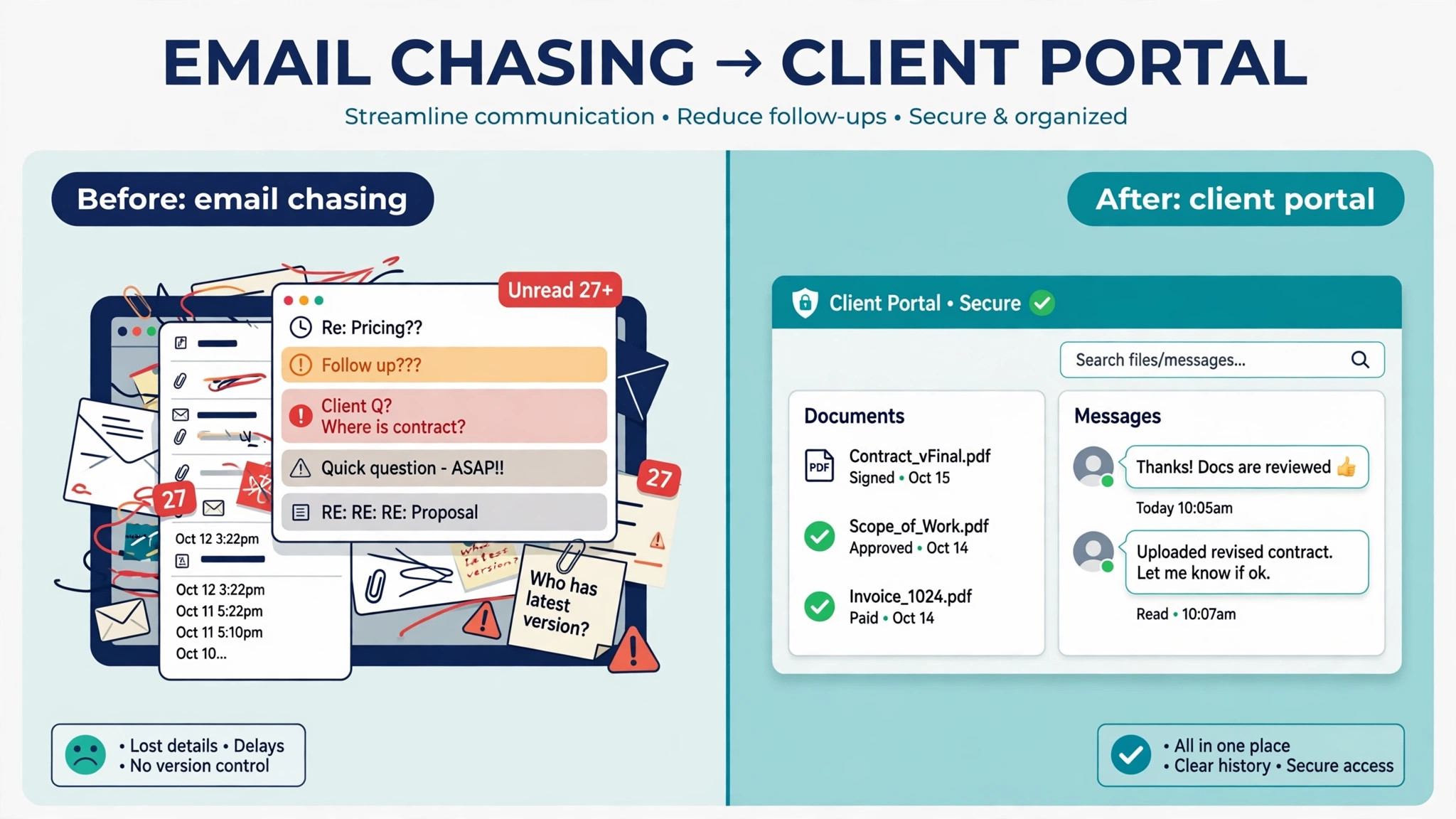
Essentials adds the client portal, text messaging, document auto-fill, court deadline scheduling, and a wide set of integrations. Those features change daily work more than the price gap suggests. A portal cuts email chasing, because clients can see documents and messages in one secure place. Auto-filled documents cut copy errors, and deadline scheduling reduces the risk of a missed court date. For most small firms, Essentials is the first tier that feels complete rather than starter level.
Advanced adds reporting, full document search, unlimited electronic signatures, automated workflows, and live onboarding support. Reporting is the feature that justifies the jump for a firm owner who wants to see realisation rates, matter profitability, and staff workload without building spreadsheets. Workflows also matter, because they turn repeated steps into a consistent process that every fee earner follows. A five person firm with steady volume will use those tools weekly, while a solo lawyer may not use them enough to justify the extra spend.
Complete, now described as Expand in newer material, bundles intake and customer relationship tools on top of Advanced. That includes centralised client intake, automated appointments and reminders, online intake forms, and related marketing support. A firm that spends real money on lead generation may value intake automation highly, because a slow response to a new enquiry often means a lost client. A firm that grows mainly by referral may find the intake bundle less urgent, and may stay on Advanced without feeling a gap.
The Solo Firm Bill, Worked Out Month by Month
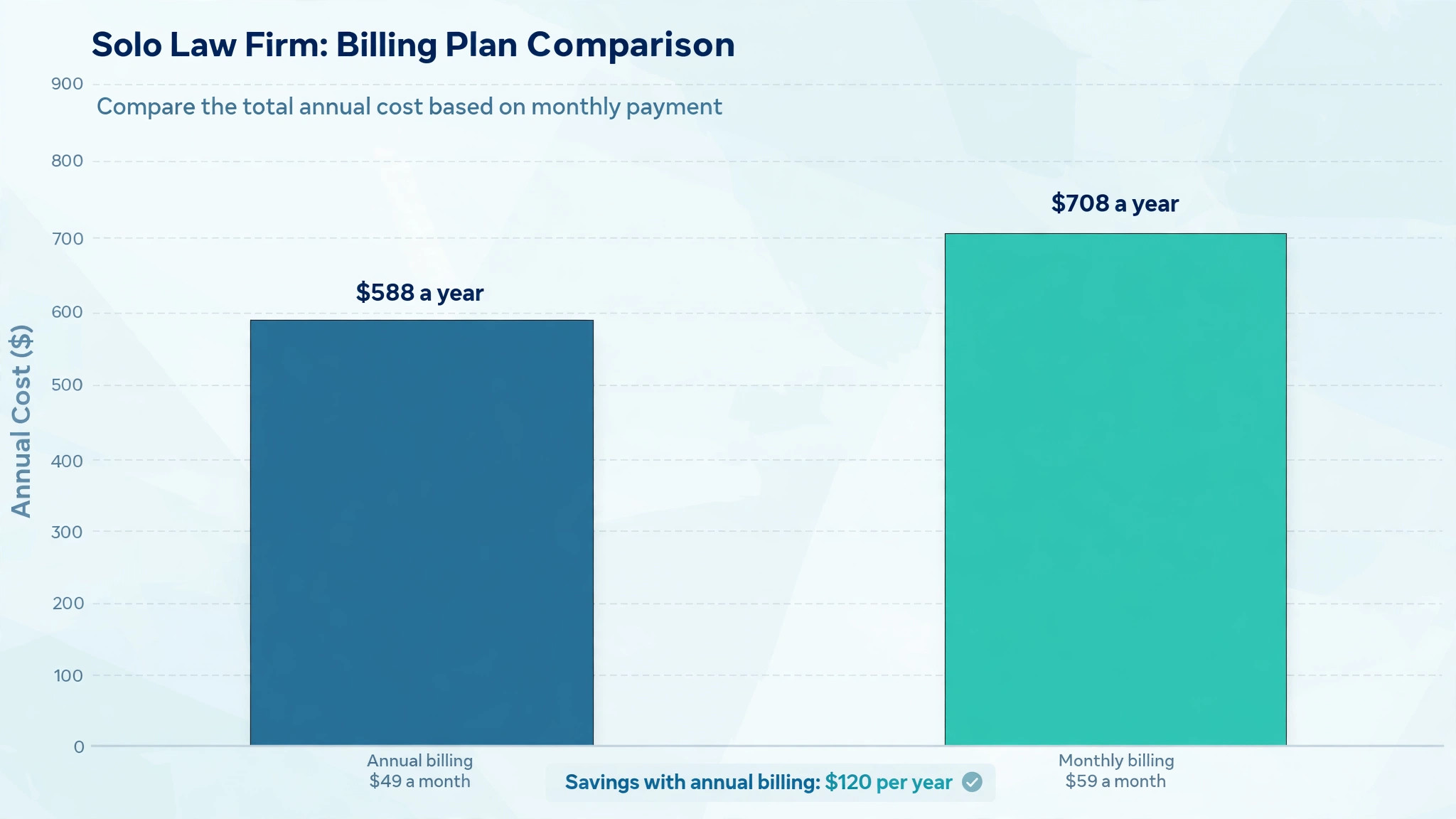
A solo lawyer on EasyStart at the last published annual rate pays 49 dollars per month for one user. On monthly billing, the same seat costs 59 dollars. Over a year, annual billing totals 588 dollars, while monthly billing totals 708 dollars. The difference is 120 dollars for the same product, which is a useful reminder to check whether cash flow or total cost matters more to you in a given year.
Move that solo lawyer to Essentials and the annual rate rises to 89 dollars per month, or 1,068 dollars per year. Monthly billing takes the same seat to 99 dollars per month, or 1,188 dollars per year. The step from EasyStart to Essentials therefore costs an extra 40 dollars per month on annual billing, or 480 dollars per year. That is the price of the client portal, messaging, and deadline tools, and it is worth judging against the hours those tools save each month.
On Advanced, a solo lawyer pays 119 dollars per month on annual billing, or 1,428 dollars per year. Monthly billing raises the seat to 139 dollars per month, or 1,668 dollars per year. The jump from Essentials to Advanced is 30 dollars per month on annual billing, or 360 dollars per year. For a solo practice, that jump only pays when reporting, workflows, or unlimited signatures solve a repeated weekly problem. If those features sit unused, the money is better kept on Essentials.
A solo firm should also count the one off and surrounding costs that never appear in the per user headline. Document automation was listed as an add-on at 59 dollars per user per month on annual billing, or 69 dollars monthly, plus a one time fee of 399 dollars in earlier published material. That add-on alone can double a solo EasyStart bill, so confirm whether you need it before you treat it as part of the base price. Training time, data migration, and template setup also carry a cost, even when no invoice shows it.
The Five Person Firm Bill, Where Per User Pricing Bites
A five person firm multiplies every per user figure by five, and that is where Clio budgeting needs care. On EasyStart at 49 dollars per user on annual billing, five seats cost 245 dollars per month, or 2,940 dollars per year. On monthly billing at 59 dollars per user, five seats cost 295 dollars per month, or 3,540 dollars per year. The annual saving across five seats is 600 dollars, which is large enough to notice in a small firm budget.
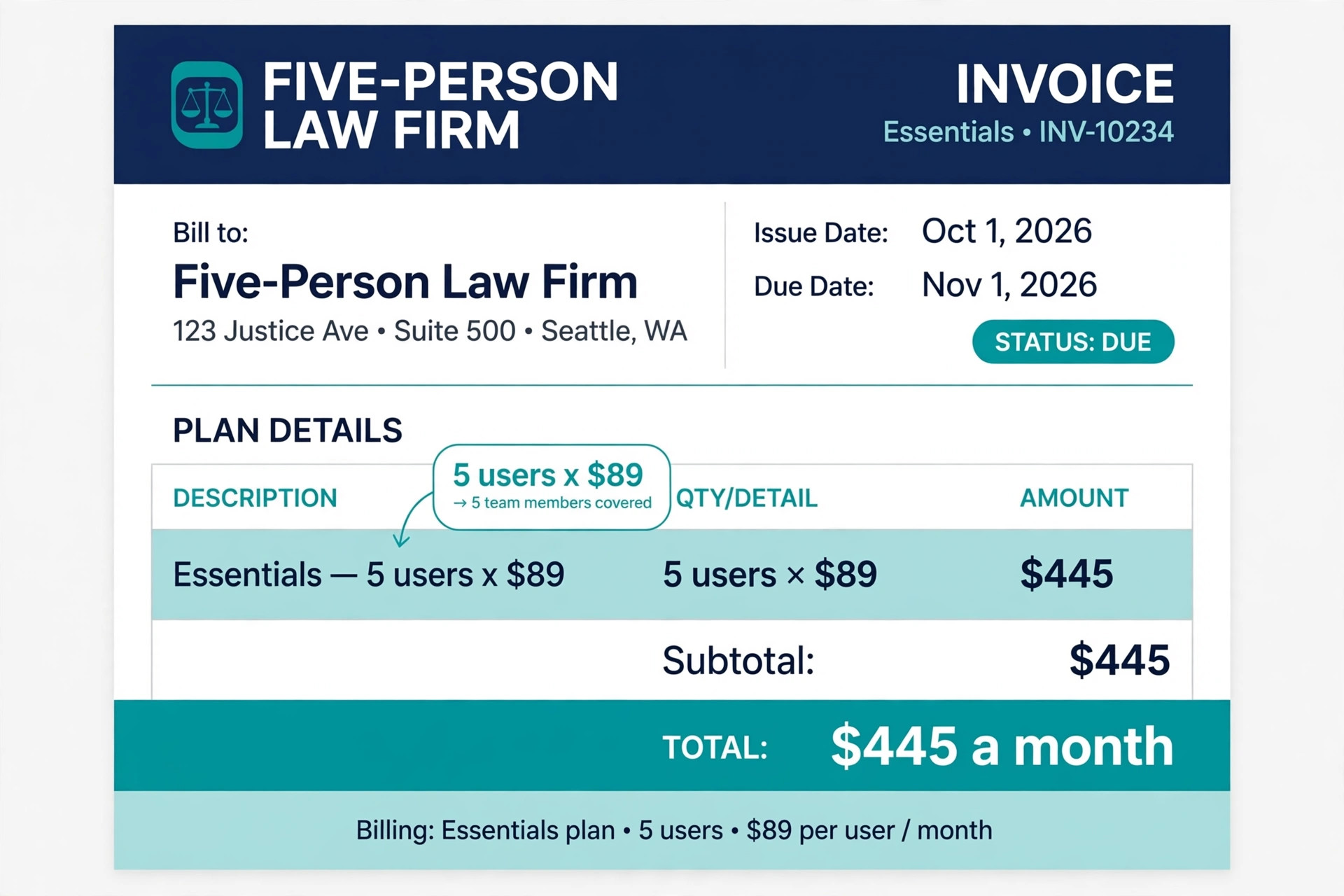
On Essentials at 89 dollars per user on annual billing, five seats cost 445 dollars per month, or 5,340 dollars per year. Monthly billing at 99 dollars per user takes five seats to 495 dollars per month, or 5,940 dollars per year. The Essentials total is the most useful planning figure for a typical small firm, because it is the tier where client communication stops relying on scattered email threads. Budget for 445 dollars per month on annual billing, then add any payment processing and add-ons on top.
On Advanced at 119 dollars per user on annual billing, five seats cost 595 dollars per month, or 7,140 dollars per year. Monthly billing at 139 dollars per user takes five seats to 695 dollars per month, or 8,340 dollars per year. The gap between Essentials and Advanced for five people is 150 dollars per month on annual billing, or 1,800 dollars per year. That gap buys reporting and workflow depth, so the decision should rest on whether the firm owner actually reviews reports and enforces workflows each week.
On Complete or Expand at 149 dollars per user on annual billing, five seats cost 745 dollars per month, or 8,940 dollars per year. Monthly billing at 169 dollars per user takes five seats to 845 dollars per month, or 10,140 dollars per year. Crossing 10,000 dollars per year for software is a serious line for a small firm, so the intake and relationship features need to earn their place. If intake volume is low, Advanced usually gives the better return for the same team size.
Seat discipline matters as much as tier choice when you judge the cost of Clio for small business monthly. Every part time assistant, paralegal, and of counsel who needs full access adds a full per user charge, even when they use the system for only a few hours per week. Before you buy five seats, list who truly needs full access, who can work through a shared process, and who only needs occasional document access. A firm that buys seats for everyone by default often pays for two seats it never needed.
Annual Billing Against Monthly Billing, the Real Trade Off
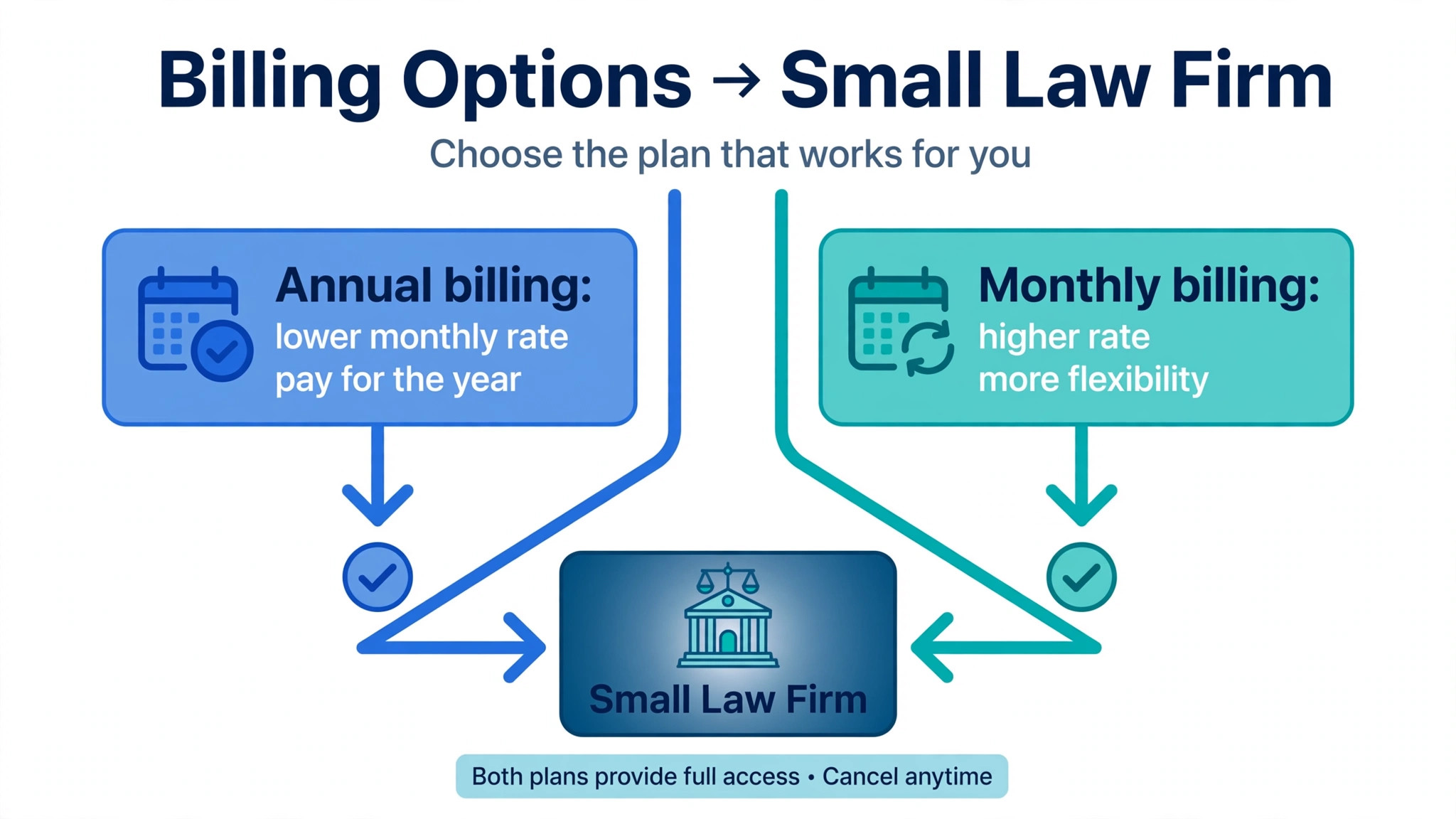
Annual billing saves 10 dollars per user per month on EasyStart, 10 dollars on Essentials, 20 dollars on Advanced, and 20 dollars on Complete under the last published grid. For a solo lawyer, the yearly saving ranges from 120 dollars to 240 dollars depending on tier. For a five person firm, the yearly saving ranges from 600 dollars on EasyStart and Essentials to 1,200 dollars on Advanced and Complete. Those savings are real, but they require paying a full year upfront or committing to an annual term.
Monthly billing suits a firm that is testing Clio, hiring unevenly, or managing tight cash flow. The higher monthly rate buys flexibility, because you are not locked into a year of seats you may not need. A firm that expects to grow from three users to five users within six months may still prefer annual billing for its core team, then add seats as hiring firms up. The key is to match the billing term to hiring certainty, not to chase the lowest headline rate at any cost.
Renewal terms deserve the same attention as the first year price when you judge the cost of Clio for small business monthly. Ask whether the renewal rate is fixed, whether it rises after an introductory period, and what notice period applies before renewal. Ask also what happens to your data if you cancel, and how long you can export matters, documents, and billing history. A low first year price loses its appeal quickly when renewal jumps and exit becomes painful. Get renewal and export terms in the same written quote as the per user rate.
Payment processing is the largest hidden cost inside the cost of Clio for small business monthly for many firms, because it scales with revenue rather than seats. Earlier published Clio payment rates listed electronic cheque and bank transfer payments at 1 percent, card payments at 2.95 percent, American Express at 3.75 percent, and a pay later option at 4.95 percent. Those percentages apply to money collected through the platform, so a firm billing 30,000 dollars per month through cards could pay close to 885 dollars in card fees alone. That figure dwarfs the subscription itself, so compare it against any existing payment provider before you switch.
Add-ons are the second hidden cost. Document automation, artificial intelligence features, and specialist integrations can each add a monthly charge per user or a flat fee. Some features that look central in a demo may sit behind an add-on paywall, so ask for a written list of what is included in your tier and what is charged separately. A demo that shows an AI assistant or advanced automation should prompt one direct question, which is whether that feature is included in the quoted tier or billed on top.
Implementation costs form the third hidden group. Migrating matters, rebuilding templates, setting up trust accounting rules, and training staff all take time. A firm that budgets only for the subscription will feel the real cost in lost billable hours during the first month. Plan a quiet migration week, assign one person to own templates and permissions, and keep the old system readable until the new workflows have survived a full billing cycle. That discipline costs little and prevents expensive rework.
Support and onboarding also vary by tier. Advanced included live onboarding in earlier published material, while lower tiers relied more on self serve help. A small firm without an IT person may value live onboarding far more than a larger firm with internal support. If onboarding help matters to you, price it as part of the tier decision rather than treating it as a free extra. Ask what onboarding covers, how long it lasts, and what support response times apply after it ends.
How to Choose Without Overbuying
Start with the work your firm actually does each week, not with the feature list that looks most impressive. Count how many matters you open per month, how many clients need portal access, how many documents need signatures, and how many bills you send. A firm opening two matters per month has different needs from a firm opening twenty, even when both firms have five people. Tier choice should follow matter volume and client contact volume, not headcount alone.
Run a two week trial with real work, not with sample data. Create a real matter, record time, generate a bill, share a document through the portal, and test a deadline reminder. Ask every user to note one task that felt faster and one task that felt slower than the old method. A trial that only tests login and navigation tells you nothing about billing accuracy or client communication, which are the areas where a wrong choice costs money later.
Check integrations before you commit, especially accounting, email, calendar, and document storage. A missing integration can force double entry, and double entry creates errors that show up in bills and trust records. List the three tools your firm cannot work without, then confirm each one connects at your chosen tier. An integration that only works on a higher tier changes the tier maths, so confirm tier availability in writing rather than assuming it.
Review seat count every quarter. Firms grow, people leave, and roles change, yet subscriptions often stay frozen at the original seat count. A quarterly review that removes one unused seat on Essentials saves 1,068 dollars per year on annual billing. That review takes ten minutes and pays better than almost any other admin task. Set a calendar reminder for the review, and assign it to the person who approves the monthly bill.
Mistakes Small Firms Make With Clio Pricing
The most common mistake is buying EasyStart to save money, then upgrading within weeks because clients need a portal. That path costs setup time twice and creates confusion for clients who were first told to use email, then told to use a portal. If client portal access matters to your practice area, start on Essentials and avoid the double migration. The 40 dollar monthly gap per user is smaller than the cost of retraining clients mid matter.
Another mistake is buying Advanced for reporting that nobody reads. Reports only save money when someone acts on them, whether by chasing unpaid bills, rebalancing workload, or fixing low realisation on a matter type. Before paying for Advanced, name the person who will review reports weekly and name the three numbers they will track. If no one owns that job, Essentials will serve the firm just as well for now.
A third mistake is ignoring payment processing when comparing tiers. Two firms on the same tier can pay very different totals, because one collects mainly by bank transfer while the other collects mainly by card. Work out your collection mix from the last three months, apply the published processing percentages, and add that figure to the subscription total. The combined number is the true monthly cost, and it is the number you should compare against your current setup.
Verdict, Which Tier Fits Which Small Firm
For a solo lawyer starting out, EasyStart at 49 dollars per month on annual billing is a fair entry point when client portal access is not yet central. Budget 49 dollars to 59 dollars per month depending on billing term, and keep an eye on the moment clients start asking for secure document sharing. That moment is the signal to move to Essentials, not a reason to keep patching email workarounds.
For most small firms with regular client contact, Essentials at 89 dollars per month on annual billing is the sensible default. Five seats cost 445 dollars per month on that basis, and the portal, messaging, and deadline tools justify the spend for firms that handle ongoing matters. Essentials balances cost against completeness better than any other tier in the range, because it removes the daily friction that eats billable time.
For a growing firm that manages workload, profitability, and process discipline seriously, Advanced at 119 dollars per month on annual billing earns its extra 30 dollars per user. Five seats cost 595 dollars per month, and the reporting and workflow tools help an owner run the firm as a business rather than a collection of individual caseloads. Choose Advanced when reports will be reviewed weekly and workflows will be enforced, not merely admired in a demo.
For a firm where intake volume drives revenue, Complete or Expand at 149 dollars per month on annual billing may pay, but only when intake automation converts enquiries that would otherwise be lost. Five seats cost 745 dollars per month on that basis, so the intake tools need to win at least a few extra matters per year to cover the gap over Advanced. Track enquiry to instruction conversion before and after the upgrade, and let that number decide whether the top tier stays.
Planning the First Year Without Surprises
A first year budget works best when it is built from three lines, not one. The first line is the subscription total for your chosen tier and seat count. The second line is payment processing, estimated from your real collection mix over the last quarter. The third line is a small reserve for add-ons, training, and template work. When you plan the cost of Clio for small business monthly in this three line way, the monthly figure stops being a surprise and becomes a number you can review.
Cash flow timing matters as much as the monthly rate. Annual billing asks for a larger payment upfront, which can strain a firm that bills clients on long payment terms. Monthly billing spreads the cost, but it raises the total over the year. If your firm collects fees unevenly, monthly billing may protect cash flow even though it costs more in total. Match the billing term to your collection pattern, not only to the headline saving.
Seat planning for the first year should assume change. A firm that plans to hire a paralegal in six months should not buy that seat on day one, because an unused seat is wasted money for half a year. Buy seats for the team you have today, then add seats when a new starter actually needs full access. When you review the cost of Clio for small business monthly each quarter, seat count is the first number to check, because it moves faster than tier price.
Matter volume is a better forecast tool than headcount alone. A firm opening many low value matters needs efficient billing and portal tools more than a firm handling a few high value matters with long timelines. Track matters opened, bills sent, and portal messages per month during the trial, then use those numbers to justify the tier. When you can link the cost of Clio for small business monthly to matters handled and bills collected, the subscription stops looking like overhead and starts looking like a working tool.
Client expectations should also shape the first year plan. Clients in litigation and family work often expect secure messaging and document sharing, while clients in transactional work may accept email for longer. If your practice area drives portal demand, budget for Essentials from the start rather than planning a mid year upgrade. A mid year upgrade is possible, but it costs staff time and client goodwill that a clean start avoids.
A simple monthly review keeps the first year on track. Each month, check seats used, bills sent through the platform, processing fees paid, and any add-on charges that appeared. Compare those figures with the original quote, and query anything that does not match. This habit takes little time, and it catches seat creep, unused add-ons, and processing drift before they grow. Over a year, the review habit can save more than any introductory discount.
Finally, keep an exit plan even when you expect to stay. Export a sample matter, a set of bills, and a document pack during the trial, and confirm the export format is usable outside the platform. A firm that knows it can leave negotiates renewals with more confidence, and a firm that never tests export discovers the problem only when it needs to move. Knowing the cost of Clio for small business monthly is useful, but knowing you can leave on fair terms is what makes the price acceptable.
Frequently Asked Questions
Does the starting price of 49 dollars cover a full small firm setup
No, the 49 dollar figure covers one user on the entry tier at the last published annual rate, and it does not include a client portal, advanced reporting, or intake tools. A firm with five users pays five times that figure, and any add-ons sit on top. Treat 49 dollars as a per seat starting point, not as a firm total, and build your budget from seat count multiplied by tier rate.
How much does a five person firm pay per month in practice
On the last published annual rates, five seats cost 245 dollars on EasyStart, 445 dollars on Essentials, 595 dollars on Advanced, and 745 dollars on Complete or Expand. Monthly billing raises those totals to 295 dollars, 495 dollars, 695 dollars, and 845 dollars respectively. Payment processing and add-ons then sit on top, so the subscription total is a floor rather than a final bill.
Is annual billing always the better deal
Annual billing is cheaper per month, but it is only better when seat count stays stable for the year. A firm that hires, loses staff, or tests the product may value monthly flexibility more than the saving. Compare the annual saving against the risk of paying for unused seats, and choose the term that matches hiring certainty. A stable team should take annual billing, while a changing team should stay monthly until headcount settles.
What pushes the bill above the subscription price
Payment processing is usually the largest extra, because card percentages apply to collected revenue rather than seats. Add-ons for document automation or artificial intelligence features can add a large monthly charge, and implementation time carries an indirect cost in lost billable hours. Ask for a written list of included features and add-on prices before signing, and model processing fees from your real collection mix.
Can a small firm start low and upgrade later without losing data
Yes, upgrades within the same product family normally keep matters, documents, time entries, and billing history intact, because the underlying workspace stays the same. The risk is not data loss but disruption, since clients and staff must learn new tools mid matter. Plan upgrades between billing cycles where possible, brief clients on portal access in advance, and test billing on the new tier before the next invoice run.
Should a solo lawyer choose Essentials from day one
A solo lawyer should choose Essentials from day one when clients expect secure document sharing, regular messaging, or deadline driven work such as litigation. EasyStart suits a solo practice with low client contact and simple billing, but most client facing practices hit the portal gap quickly. Starting on Essentials avoids a second setup, a second round of client instructions, and the awkward switch from email to portal mid matter.