
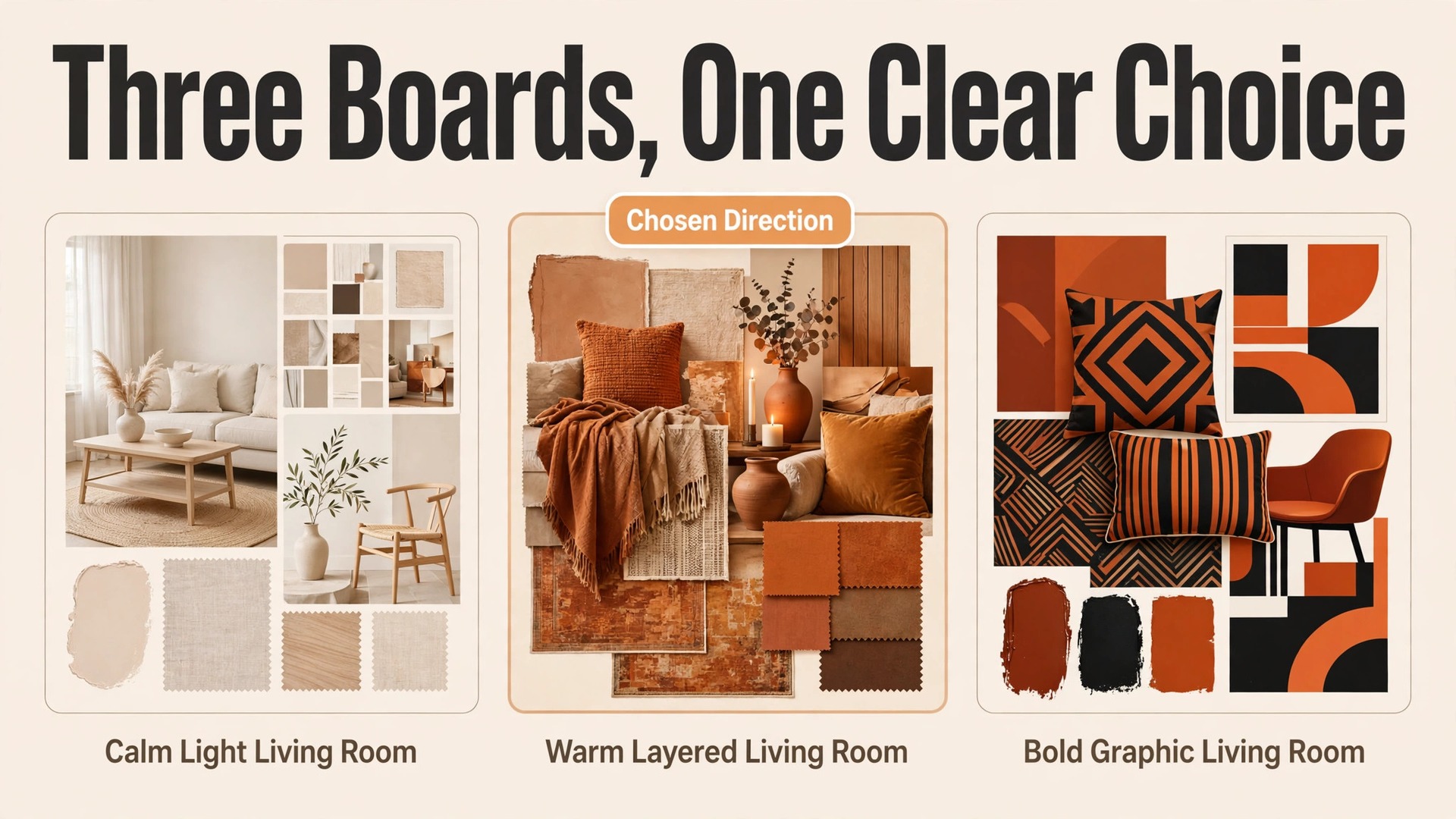
Your client loved the idea in the meeting and went quiet after the presentation. That silence is the problem this guide solves. When you use AI for interior designer client presentation workflow, the presentation stops being a single big reveal and becomes a short, clear sequence that the client can follow, compare and approve. The client sees the brief reflected back accurately, sees two or three directions instead of twenty scattered images, and knows exactly what approving the design means for budget, timeline and next steps.
Most presentation failures are not taste failures. They are communication failures. The designer understood the brief one way, the client meant it another way, and the gap only surfaced when the full design was already built. A structured workflow catches that gap early, while changes are still cheap. This guide gives you that structure, from brief capture through mood board drafts, revision rounds and a written sign-off, plus the tools, limits and checklist that keep the process professional.
Where Client Presentations Usually Go Wrong
The first failure point is the brief. A client says they want a calm, modern living room, and each person in the room pictures something different. Without a written brief that names colours, materials, dislikes, budget range and must keep items, the designer is guessing at the most expensive stage of the project. A presentation built on a guessed brief can be beautiful and still be wrong.
The second failure point is too much choice. Designers who present twelve mood boards, forty product images and three layouts in one meeting often believe they are being thorough. Clients experience that volume as pressure, not generosity. They cannot compare twelve directions fairly, so they delay, ask for more options, or pick the safest choice and regret it later. Two or three well argued directions outperform a large pile of images every time.
The third failure point is missing decisions. A presentation that shows beautiful rooms but never asks the client to decide on budget, timeline or scope leaves the meeting feeling pleasant and unfinished. The client leaves without a next step, the designer waits, and the project drifts. Every presentation should end with a specific decision, a named approver, and a date for the next step.
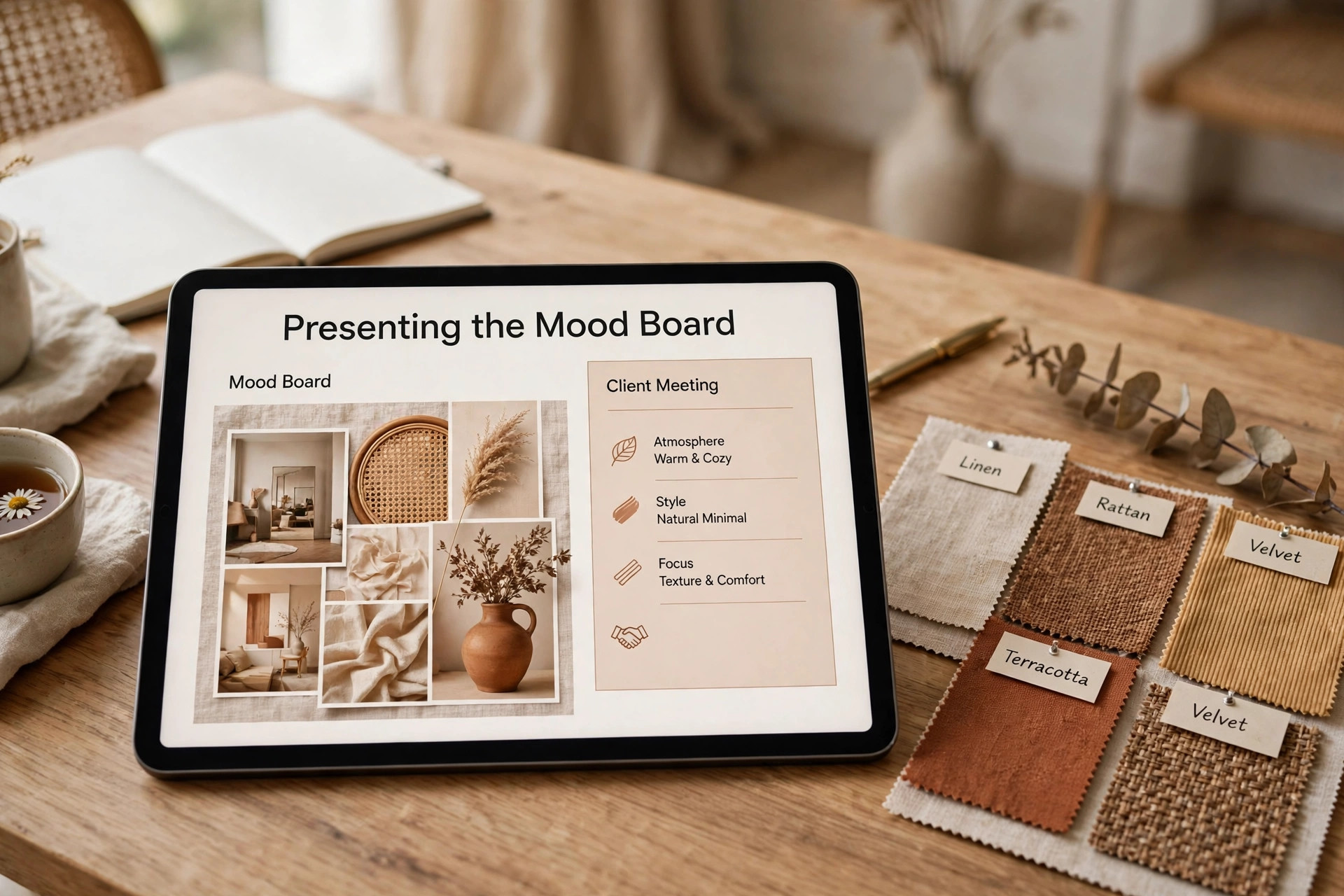
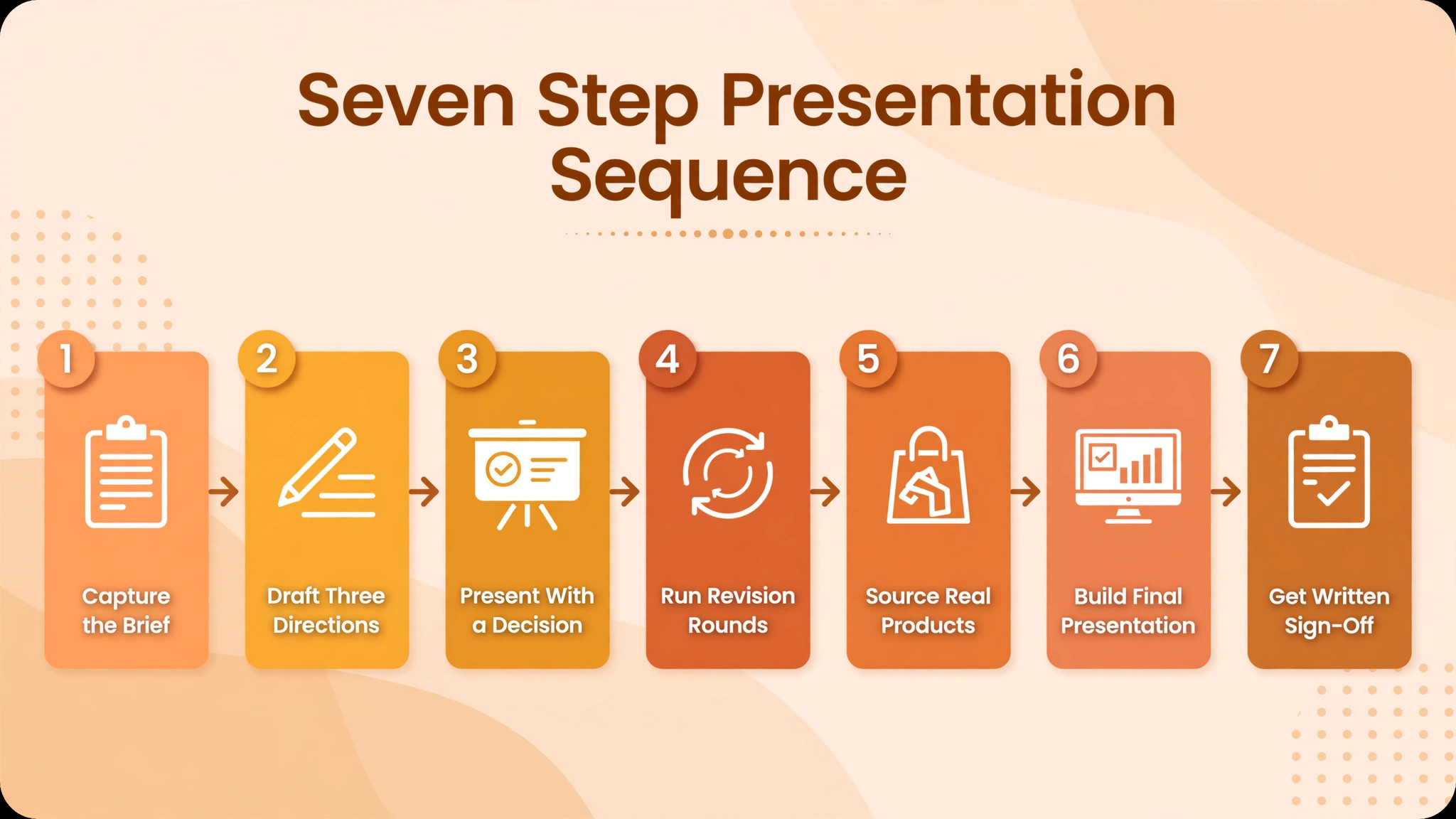
How to Use AI for Interior Designer Client Presentation Workflow in Seven Steps
Run these steps in order for each project, and keep the same structure even when the project is small. Clients learn to trust a predictable process, and a predictable process makes revisions calmer, because the client knows when their input is due and what happens after they give it.
Step 1. Capture the Brief in Writing Before Any Design Work
Start with a structured brief form, not a freeform chat. Ask about the room purpose, who uses it, daily routines, storage needs, light conditions, existing pieces to keep, colours and materials to avoid, budget range, and the decision maker if more than one person is involved. Record the answers verbatim where possible, because a paraphrase can quietly change a requirement.
Use AI to turn the completed form into a one page brief summary, then send that summary to the client for confirmation before design begins. That confirmation step is the cheapest insurance in the whole workflow. A client who corrects the summary in week one saves you a full redesign in week four. Keep the confirmed brief with the project file, and refer back to it when a revision request conflicts with an earlier decision.
Photograph and measure the space at this stage, and note constraints such as fixed plumbing, load bearing walls, window sizes and door swings. AI tools can help organise these notes, but they cannot verify a measurement. Check every dimension that affects furniture fit or layout yourself, because a presentation built on a wrong measurement will fail at installation no matter how good it looks on screen.
Step 2. Draft Three Mood Board Directions, Not One Finished Room
Generate three distinct directions from the confirmed brief, each with a name, a colour palette, key materials, and five or six hero images. Name the directions by feeling or function, such as calm and light, warm and layered, or bold and graphic, rather than by vague style labels alone. A named direction helps the client talk about what they like in plain words, which makes the next round far more precise.
Use AI to draft the boards quickly, but curate every image yourself. Remove any image that does not match the brief, any product that is discontinued or out of budget, and any colour that clashes with a fixed element in the room. Speed is useful only if the result is honest. A board that shows a sofa the client cannot buy, or a finish that does not exist in their budget, creates a disappointment that no later revision can fully undo.
Present the boards with a short written rationale for each direction. Two sentences per direction are enough. Why this palette fits the light, why these materials suit the household, and what trade-off the direction involves. Clients choose better when they understand the reasoning, and they trust a designer who names trade-offs openly instead of presenting every option as perfect.
Step 3. Present With a Clear Structure and a Decision at the End
Structure the presentation in five parts. First, restate the confirmed brief in one minute, so the client hears their own requirements reflected back. Second, show the three directions with their rationales. Third, show the preferred direction in more depth, with a layout and key products. Fourth, show the budget range for that direction, with good, better and best options where that fits. Fifth, ask for a decision, and record it in writing before the meeting ends.
Keep the meeting to the decision you need. If the goal is direction approval, do not also ask for final product approval in the same meeting, because the client will feel rushed on both. A staged approval process feels slower in week two and much faster overall, because it prevents the large late revision that derails timelines.
Record the meeting outcome the same day. Send a short summary naming the chosen direction, any changes requested, the budget range agreed, and the date of the next presentation. Ask the client to confirm by reply. That written record protects both sides, and it becomes the starting point for the revision round instead of a memory contest weeks later.
Step 4. Run Revision Rounds With a Written Change Log
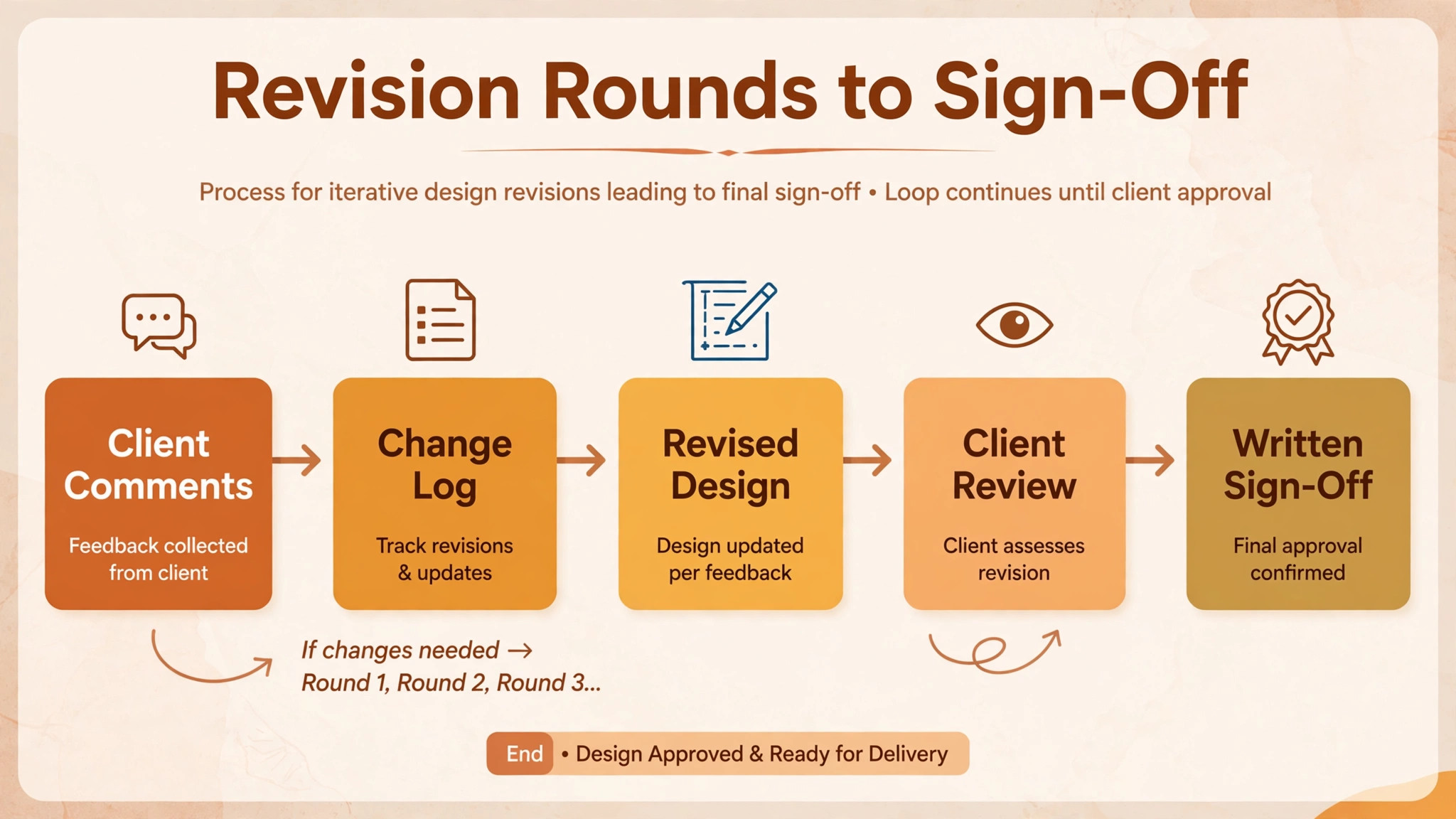
Limit revisions by agreement, and state the limit in the proposal. Two structured revision rounds suit most residential projects. Each round should collect all client comments at once, through a form or a marked up presentation, rather than through scattered messages over two weeks. Scattered comments are hard to price, hard to track, and easy to miss.
Use AI to summarise the collected comments into a change list, grouped by room, product or layout, with each change marked as in scope, out of scope, or needing a budget decision. Review that list yourself before sharing it, because AI summarising can merge two separate requests into one, or soften a firm objection into a mild preference. The change list is a contract document in practice, so accuracy matters more than speed.
Show the revised design against the previous version, so the client can see what changed and what stayed the same. Side by side views prevent the common complaint that a revision changed things nobody asked to change. When a requested change conflicts with the confirmed brief, say so plainly and offer the alternative that fits the brief, rather than silently overriding the client or silently abandoning the brief.
Step 5. Source Real Products and Verify Every Specification
Once a direction is approved, move from inspiration images to sourced products with real names, dimensions, prices, stock status and lead times. This is the step where AI assistance must be checked hardest, because a generated image can show a plausible product that does not exist, and a sourced list can carry a price from an outdated listing. Verify each hero product with the supplier or retailer before it appears in a client facing budget.
Record the specification for each product in one place, including finish, size, care needs and warranty where relevant. Clients make better decisions when they can compare two sofas on size, fabric and lead time, not just on appearance. A specification sheet also protects the installation stage, because the installer works from the same list the client approved.
Flag lead time risks early. A product with a twelve week lead time changes the project timeline, and the client should hear that fact at approval time, not at installation time. Offer a ready alternative for any product with a long or uncertain lead time, so the client chooses with full information rather than discovering a delay later.
Step 6. Build the Final Presentation as a Decision Document
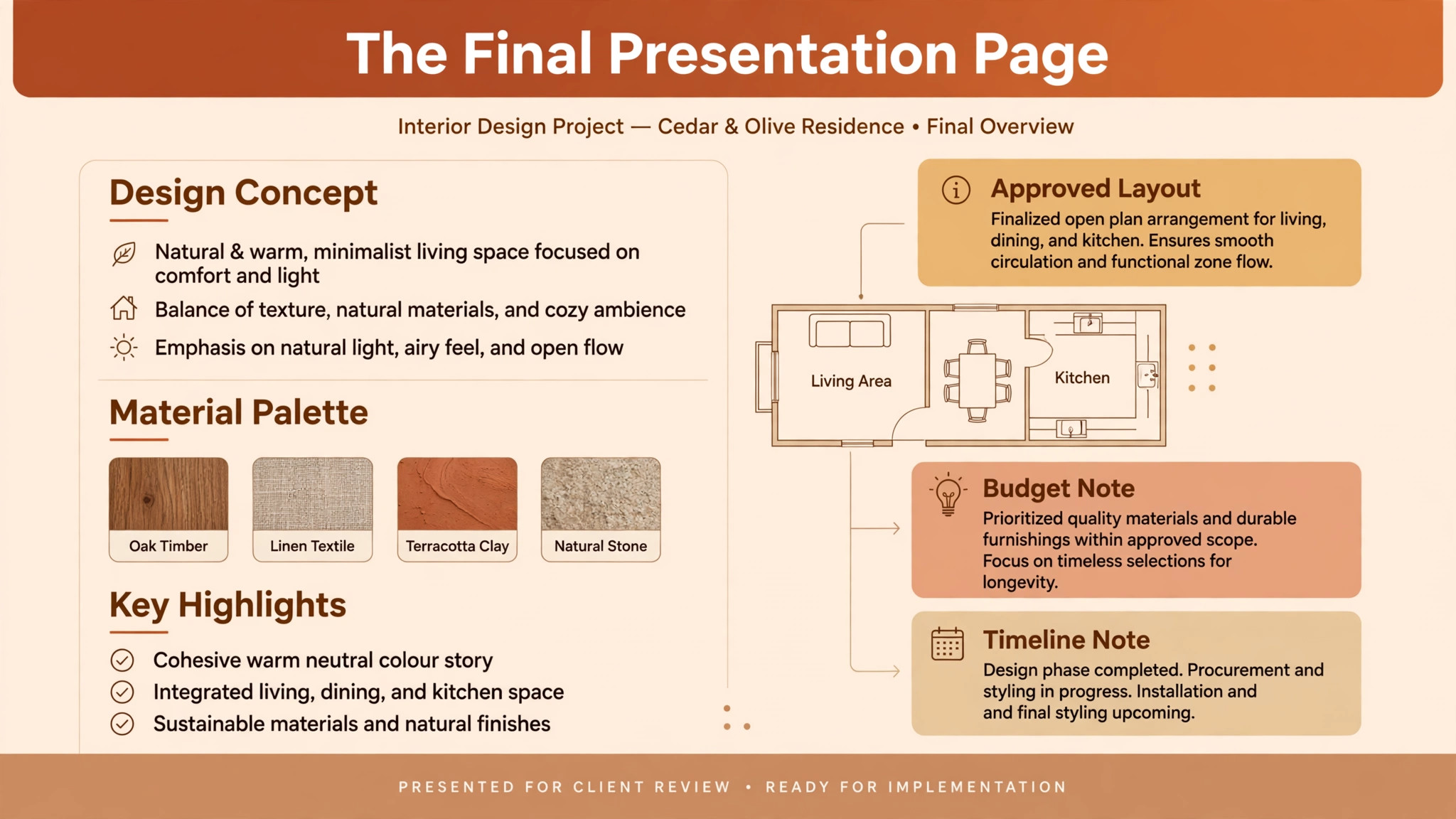
The final presentation is not a gallery. It is a decision document that contains the approved layout, the sourced product list, the budget total with a contingency note, the timeline, and the scope of what is included and excluded. A client who can read those five elements can approve with confidence, and a client who cannot will hesitate, however beautiful the images are.
Use AI to draft the document structure and to check it for gaps, such as a product in the images that is missing from the list, or a room in the list that has no image. Then review it as a whole yourself, checking that every image matches a listed product, every price matches a verified source, and every timeline date has an owner. That consistency check is unglamorous and essential.
Share the final presentation as a link or a PDF that the client can review at home, not only as slides shown in a meeting. Clients often need a quiet second look, and a partner or family member may need to review it too. A shareable document respects that reality and reduces the number of follow-up questions that come from a presentation nobody can revisit.
Step 7. Get Written Sign-Off and a Clear Next Step
Sign-off should be explicit and written. Ask the client to approve the design, the product list, the budget and the timeline, each as a separate line if the project is large, or as one combined approval for a small project. Record the date, the approver name, and any conditions, such as approval subject to confirming one fabric sample.
After sign-off, send a next steps note within one working day. Name the ordering step, the installation or delivery window, and the point of contact for questions during the wait. Silence after sign-off feels like abandonment, even when work is happening behind the scenes. A short note that says ordering has begun and the next update arrives on a named date keeps trust intact through the longest part of the project.
Keep the signed presentation with the project file as the baseline. Later changes are then measured against a clear record, priced fairly, and tracked in the change log. That discipline is what turns a good presentation into a profitable project, because it prevents scope from growing without agreement or payment.
Client Presentation Checklist You Can Copy
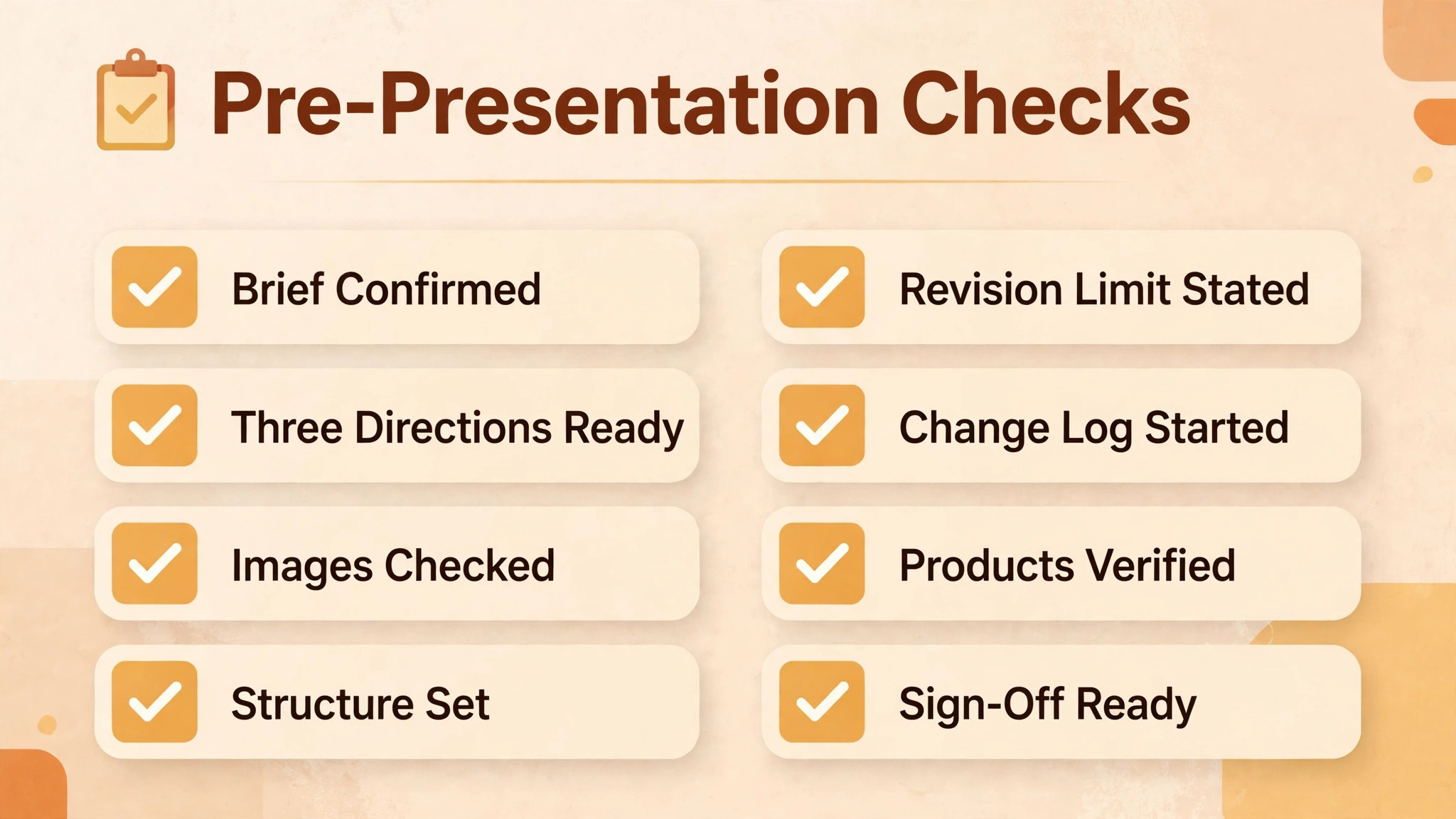
Use this checklist before every client presentation when you use AI for interior designer client presentation workflow, and tick each item in order. A presentation that passes this checklist is ready to send, even if it is not perfect in every artistic detail. Readiness means the client can decide, not that the designer is fully satisfied.
Brief confirmed in writing by the client before design work began.
Three directions drafted, each with a name, palette, materials and hero images.
Every board image checked against the brief, the budget and product availability.
Presentation structured as brief recap, directions, preferred direction, budget range and decision.
Revision limit and comment method stated in the proposal and repeated at the meeting.
Change log started, with each client comment grouped and marked in scope or needing a budget decision.
Final product list verified, with dimensions, prices, stock status and lead times.
Final document contains layout, product list, budget, timeline, scope inclusions and exclusions.
Shareable link or PDF sent, so the client can review at home and share with a decision partner.
Written sign-off recorded, with approver name, date, conditions and next steps note sent within one working day.
Keep the checklist with each project file. When a project goes wrong, the checklist usually shows where the process skipped a step, and that lesson improves the next presentation more than any single design tip.
Tools That Fit a Designer Presentation Workflow
Choose tools by the job they do in the sequence when you use AI for interior designer client presentation workflow. A mood board tool is not a presentation tool, and a presentation tool is not a sourcing tool. The tools below cover the sequence from board to final deck, and each one earns its place by solving one stage well.
Morpholio Board for Sourced Mood Boards
Morpholio Board is an interior focused board tool known for sourced, specification ready boards. It suits designers who want boards that connect images to real products, rather than boards made only of inspiration pictures. That sourcing link matters at the revision stage, because a client can approve a board knowing the products behind it are real.
The limit is that its AI features are limited compared with newer concept tools, so expect to do more curation by hand. Confirm at checkout the current plan structure and the last published list price, since pricing and features for board tools change often. For designers whose main pain is sourcing, that trade-off is usually worth it.
DesignFiles for E-Design Packages and Client Portals
DesignFiles is built for e-design studios and online interior designers who sell room packages. It combines mood boards with product sourcing, room visualisations and a branded client portal, so a designer can collect, source, present and invoice in one platform. The client portal is a practical advantage, because clients approve and comment inside a professional space instead of through scattered email threads.
Published pricing for DesignFiles paid plans has been reported around thirty nine dollars per month, with a trial available, so confirm the last published list price at checkout. The limit is fit. A designer who works mainly in person on large renovations may not need the full e-design package, while a designer selling remote room packages will use almost every feature.
Foyr Neo for Three Dimensional Room Views
Foyr Neo produces three dimensional room renders that clients can explore, which helps when a flat mood board leaves the client unsure about scale or layout. A render that shows the actual room proportions answers questions that a board cannot, such as whether a sofa overwhelms a wall or a table blocks a walkway. That clarity often shortens the revision cycle.
Published pricing for Foyr Neo has also been reported around thirty nine dollars per month, so confirm the last published list price at checkout. The limit is effort. Building an accurate three dimensional room takes measurement and modelling time, so reserve renders for the preferred direction after approval, rather than rendering all three early directions.
Gamma for Fast Client Presentation Decks
Gamma is an AI presentation tool that can turn an outline into a structured slide deck in minutes. Give it an outline covering client goals, proposed layout, design options, budget and next steps, and it drafts slides, headings and layouts that you can edit. That speed helps designers who currently spend a full day assembling slides from separate files.
The limit is that a generated deck is a starting point, not a finished presentation. Replace placeholder images with your own boards, renders and product photos, check every budget figure, and adjust the structure to match the five part meeting plan in this guide. A deck that still looks generated will undermine the professional impression you are trying to create.
RoomSketcher for Floor Plans and Room Visuals
RoomSketcher helps designers create editable floor plans and realistic interior visuals, which support both the layout discussion and the final presentation. A clear floor plan settles furniture fit and traffic flow questions early, before products are ordered. Practitioner guides for designer AI workflows cite floor plan tools as one of the most practical uses of AI in this field, because a plan prevents expensive physical mistakes.
The limit is that a plan is only as good as its measurements. Enter the room dimensions carefully, double check door swings and window positions, and treat any AI generated visual as a draft until the plan matches the measured room. A beautiful render of the wrong room is worse than a plain plan of the right one.
What AI Can and Cannot Do in a Presentation
When you use AI for interior designer client presentation workflow, AI is strong at drafting, organising and visualising early ideas. It can draft a brief summary, generate three board directions, summarise client comments into a change list, and build a first deck structure. Those tasks used to consume days, and doing them faster leaves more time for the creative decisions that actually need a designer.
AI is weak at taste, verification and accountability. It cannot know that a client dislikes a material for a personal reason, that a finish will look different in the room light, or that a supplier has discontinued a product. It can also generate a convincing image of a product that does not exist, which is why the sourcing verification step in this workflow is mandatory. The designer remains responsible for every product, price and dimension in the final document, regardless of which tool drafted it.
Clients also deserve honesty about AI use. There is no need to announce every tool, but a presentation should never imply that a generated render is a photograph of a finished room, or that an inspiration image is the exact product being ordered. Label renders as renders, label inspiration as inspiration, and keep the distinction clear in every document the client signs.
Mistakes That Weaken a Presentation
The first mistake when you use AI for interior designer client presentation workflow is presenting without a confirmed brief. A designer who skips brief confirmation to save time usually pays for it with a full redesign later. The brief confirmation message takes minutes to send and saves weeks of rework.
The second mistake is showing too many options. Twelve directions feel generous to the designer and overwhelming to the client. Three directions, each with a clear rationale, produce faster and happier decisions. If a client asks for more options, add one targeted alternative to the preferred direction rather than restarting with a new set.
The third mistake is hiding the budget until the end. Clients who fall in love with a direction they cannot afford feel misled, even if the designer intended to discuss budget later. Show a budget range with the preferred direction, and show what changes at each level, so approval is informed rather than emotional.
The fourth mistake is ending without a decision. A meeting that closes with vague praise and no next step is a meeting that will need repeating. End every presentation with a named decision, a written record, and a date for the next step, even if the decision is to take two days to review at home.
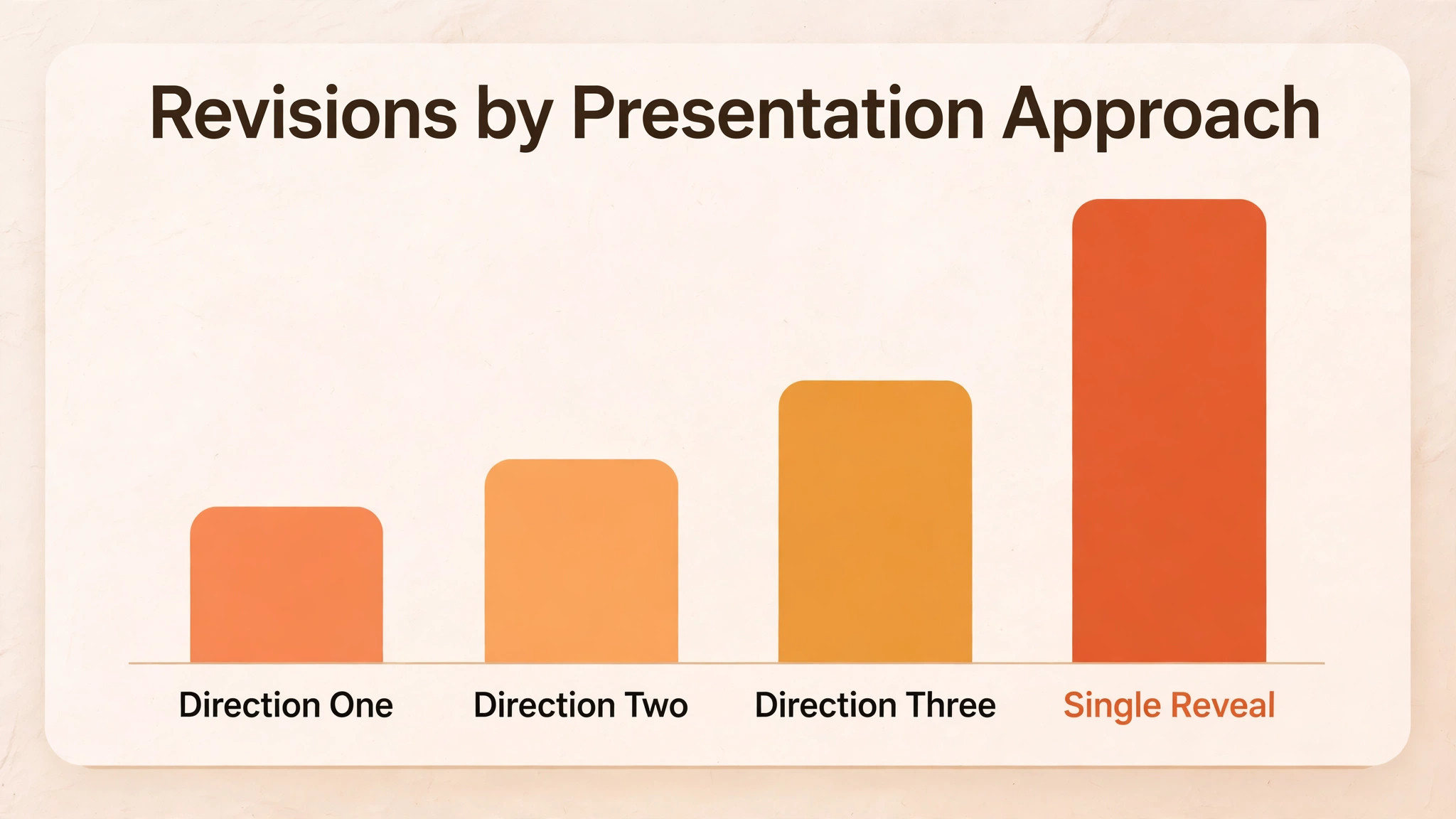
How Three Directions Compare With a Single Reveal
| Feature | Three direction presentation | Single finished reveal |
|---|---|---|
| Client understanding of choices | High, trade-offs are visible | Low, only one path is shown |
| Risk of full redesign | Low, direction is approved early | High, rejection means starting over |
| Revision count | Usually lower, changes are targeted | Often higher, feedback is broad |
| Meeting length | Similar, structure keeps it focused | Can run long, discussion wanders |
| Client confidence at sign-off | Higher, client chose the path | Lower, client accepted a proposal |
The comparison explains why the extra early work pays off when you use AI for interior designer client presentation workflow. Three directions take more effort in week one, and save far more effort in weeks three and four, when revisions would otherwise multiply.
A Five Week Presentation Plan
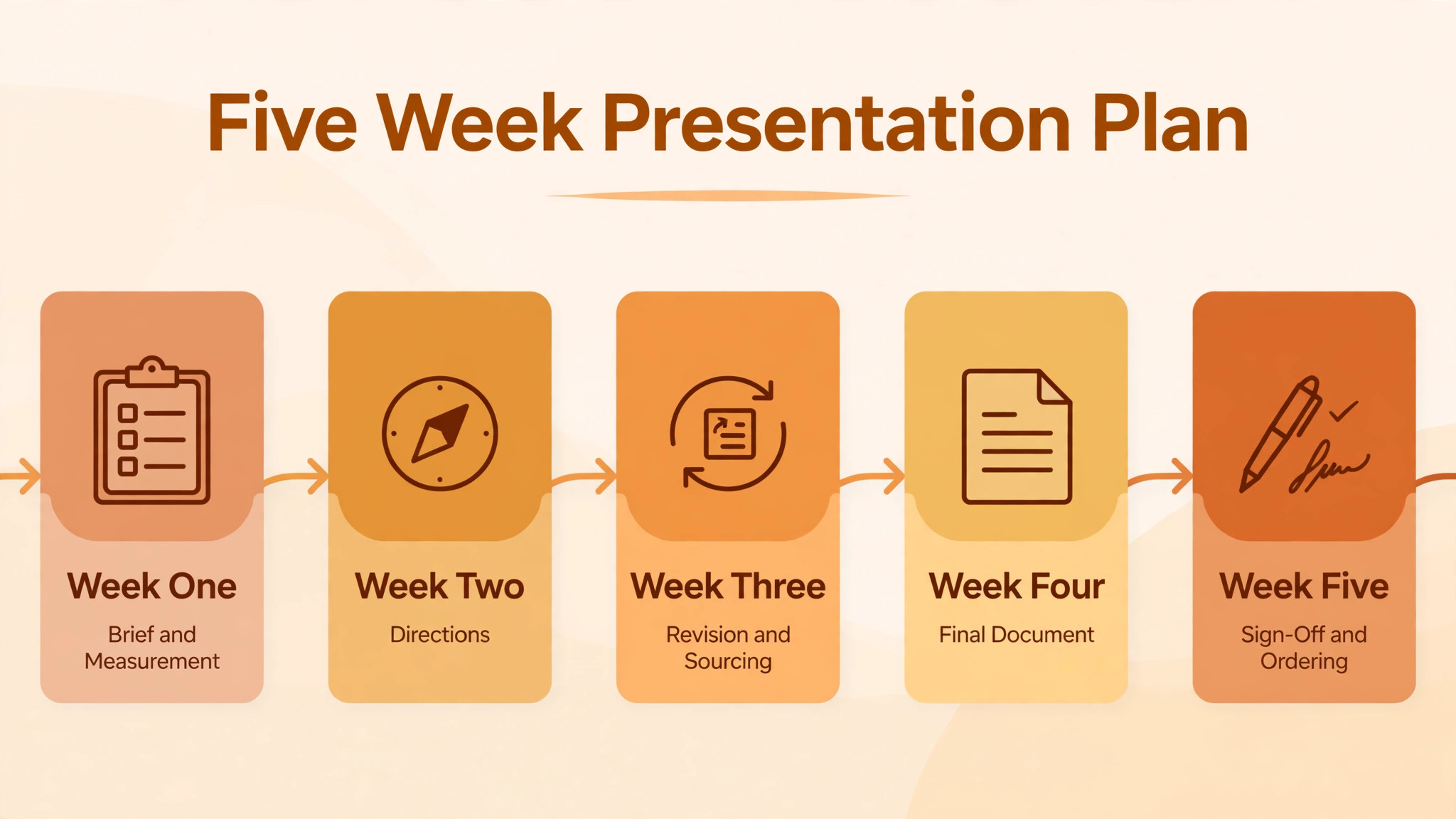
Week one is brief and measurement when you use AI for interior designer client presentation workflow. Send the brief form, confirm the summary in writing, measure and photograph the space, and note every fixed constraint. Do not start boards until the brief is confirmed.
Week two is directions. Draft three boards, curate every image, write a rationale for each direction, and present with the five part structure. Record the chosen direction and the requested changes the same day.
Week three is revision and sourcing. Run the first revision round from a collected comment list, verify hero products, and build the specification sheet with prices and lead times. Flag any long lead time product now.
Week four is the final document. Assemble layout, product list, budget, timeline and scope into one decision document, check it for gaps, and share it as a link or PDF for home review. Collect questions before the sign-off meeting.
Week five is sign-off and ordering. Get written approval, send the next steps note within one working day, and begin ordering against the signed list. Any later change goes through the change log and is priced before it is agreed.
Verdict
A strong client presentation is a process, not a performance. It starts with a brief the client has confirmed, shows three honest directions with real trade-offs, collects revisions through a written change log, verifies every product before it is priced, and ends with a signed decision and a clear next step.
AI makes each of those steps faster when you use AI for interior designer client presentation workflow, but it does not replace the designer judgment at any of them. Use it to draft boards, summarise comments and structure decks, and keep your own review as the final gate before anything reaches the client. Designers who run that process consistently will hear less silence after presentations, and more of the sentence that matters. Yes, this is the one. Let us go ahead.
Frequently Asked Questions
How many design directions should I present to a client?
Three directions suit most residential projects, because three gives real choice without overwhelming the client. Each direction needs a name, a palette, key materials and a short rationale, so the client can compare them on feeling and trade-offs, not just on images. If a client struggles to choose, add one targeted variation of the preferred direction rather than a whole new set, which keeps the decision moving.
Should I show prices during the first presentation?
Show a budget range with the preferred direction, even at the first presentation. Clients need to know whether a direction fits their budget before they fall in love with it, and a range with good, better and best options lets them choose a level honestly. Exact product prices belong in the final document after sourcing verification, but a first presentation without any budget signal invites approval of a design the client cannot afford.
How do I handle a client who keeps adding new options?
Collect all requests into one revision round, record them in a change log, and mark each as in scope, out of scope, or needing a budget decision. State the revision limit from the proposal, and price extra rounds before doing the work. That structure is fair to both sides, because it gives the client a clear way to ask, and it gives the designer a clear way to say what an extra round costs in time and money.
Can AI generate a final design that I can present without checking?
No. AI generated boards and renders are drafts that need designer review for brief fit, product reality, dimensions and budget. A generated image can show a product that does not exist, a finish that is unavailable, or a layout that ignores a fixed wall. Check every hero product with its supplier, check every dimension against your measurements, and label renders as renders so the client never mistakes a draft for a finished room.
What should a written sign-off include?
Sign-off should name the approved design, product list, budget and timeline, plus the approver name, the date, and any conditions such as confirming a fabric sample. For large projects, approve each element as a separate line. For small projects, one combined approval can work, as long as the approved document is attached or linked. After sign-off, send next steps within one working day, naming the ordering step and the next update date.
How do I present to two decision makers who disagree?
Start by confirming the brief with both decision makers present or in writing, because many disagreements trace back to different brief assumptions. Present three directions and ask each person to name what they like and dislike in each, rather than asking for a single winner immediately. That method often reveals a shared preferred direction with one or two adjustments, and it gives you a written record of both views for the revision round.
What if the client approves a direction and then changes their mind?
Treat a post sign-off change through the change log, with a clear price and timeline effect stated before the change is agreed. Small changes, such as swapping a cushion fabric, can often be absorbed. Large changes, such as changing the layout or the hero sofa, should be priced as a new revision round. Keeping the signed presentation as the baseline makes these conversations factual rather than emotional, which protects the relationship.
How long should a client presentation meeting last?
Sixty to ninety minutes suits most direction presentations, with time for the brief recap, three directions, budget discussion and a decision. Shorter meetings rush the decision, and longer meetings lose focus, especially when a client is viewing images on screen. Send the shareable document after the meeting for home review, and set a decision date two or three days later if the client needs time with a partner or family member.