
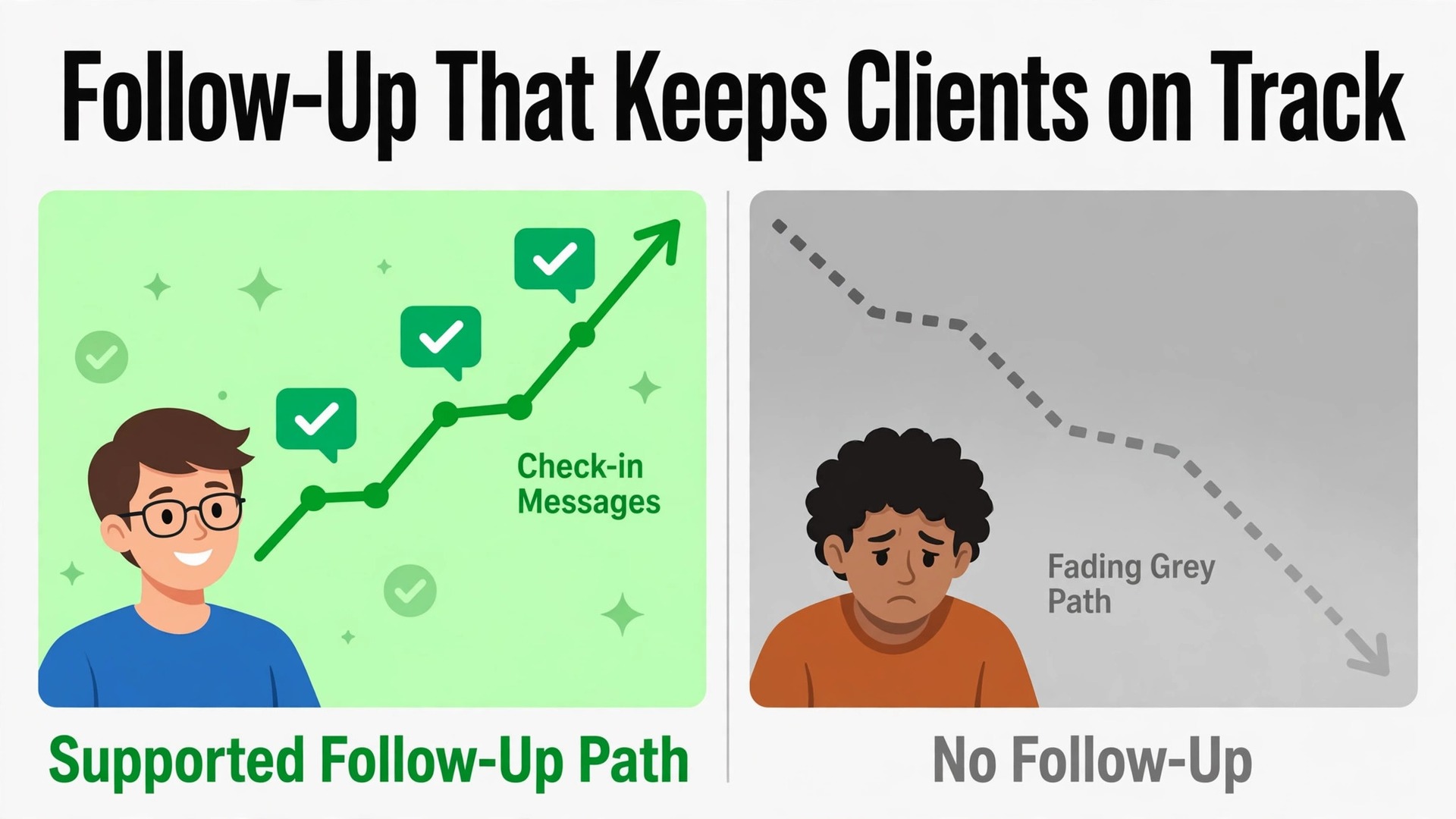
Compare two nutrition practices with the same qualifications and the same meal plan quality. In the first, clients receive a plan at the consultation and hear nothing until the next appointment. In the second, clients receive a short plan summary the same day, a gentle check-in midweek, a useful swap when they struggle, and a progress note before the next visit. When you use AI for nutritionist meal plan client follow-up, you are building the second practice, and the difference shows up in adherence, retention and results, not just in client satisfaction scores.
Follow-up is where meal plans succeed or fail. A plan that fits a client life perfectly still needs support in the first two weeks, when shopping, cooking and eating out all test it. This guide gives you a complete follow-up system, from plan summaries through adherence check-ins, swap suggestions and progress notes, plus a cadence template you can copy, tool options, and clear limits on what AI must never decide alone. The goal is support that feels personal, even when the drafting and timing are automated.
Why Meal Plans Fail Between Appointments
Most meal plans do not fail because the nutrition science is wrong. They fail in the gap between appointments, where real life intervenes. A client travels, a family member cooks differently, a work week runs long, or a favourite ingredient is out of stock. Without a check-in, that small disruption becomes a silent abandonment. The client stops following the plan, feels guilty about it, and avoids the next appointment because they expect a lecture.
The second problem is memory. Clients leave a consultation with good intentions and a long document, but they forget the reasoning behind key choices. Why this portion size, why this swap, what to do when eating out. A plan summary that restates the logic in plain words helps the client make good choices without reopening a ten page document at every meal.
The third problem is measurement. Without regular check-ins, the nutritionist only learns about adherence at the next appointment, weeks later, when the pattern is already set. Regular, light touch check-ins create a record of what worked, what did not, and where the plan needs adjusting. That record makes the next consultation far more productive, because it starts from evidence rather than from a vague memory of the last few weeks.
How to Use AI for Nutritionist Meal Plan Client Follow-Up in Seven Steps
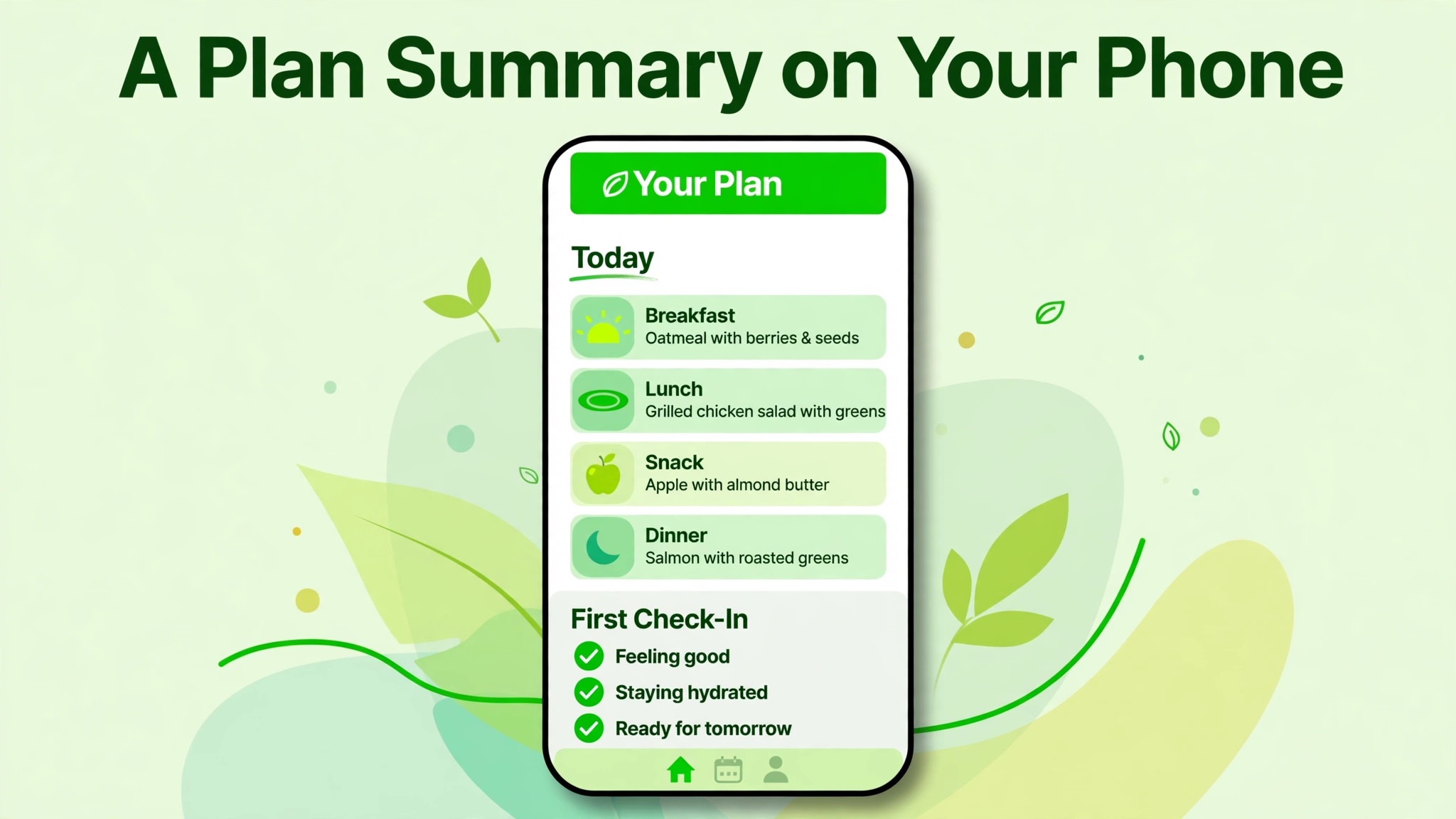
This workflow follows the client from the day the plan is issued through to the next consultation. Each step has a timing, a message type and a human check, so automation supports the relationship instead of replacing it. Adapt the timings to your practice, but keep the order, because each step depends on the one before it.
Step 1. Send a Short Plan Summary on the Day of Issue
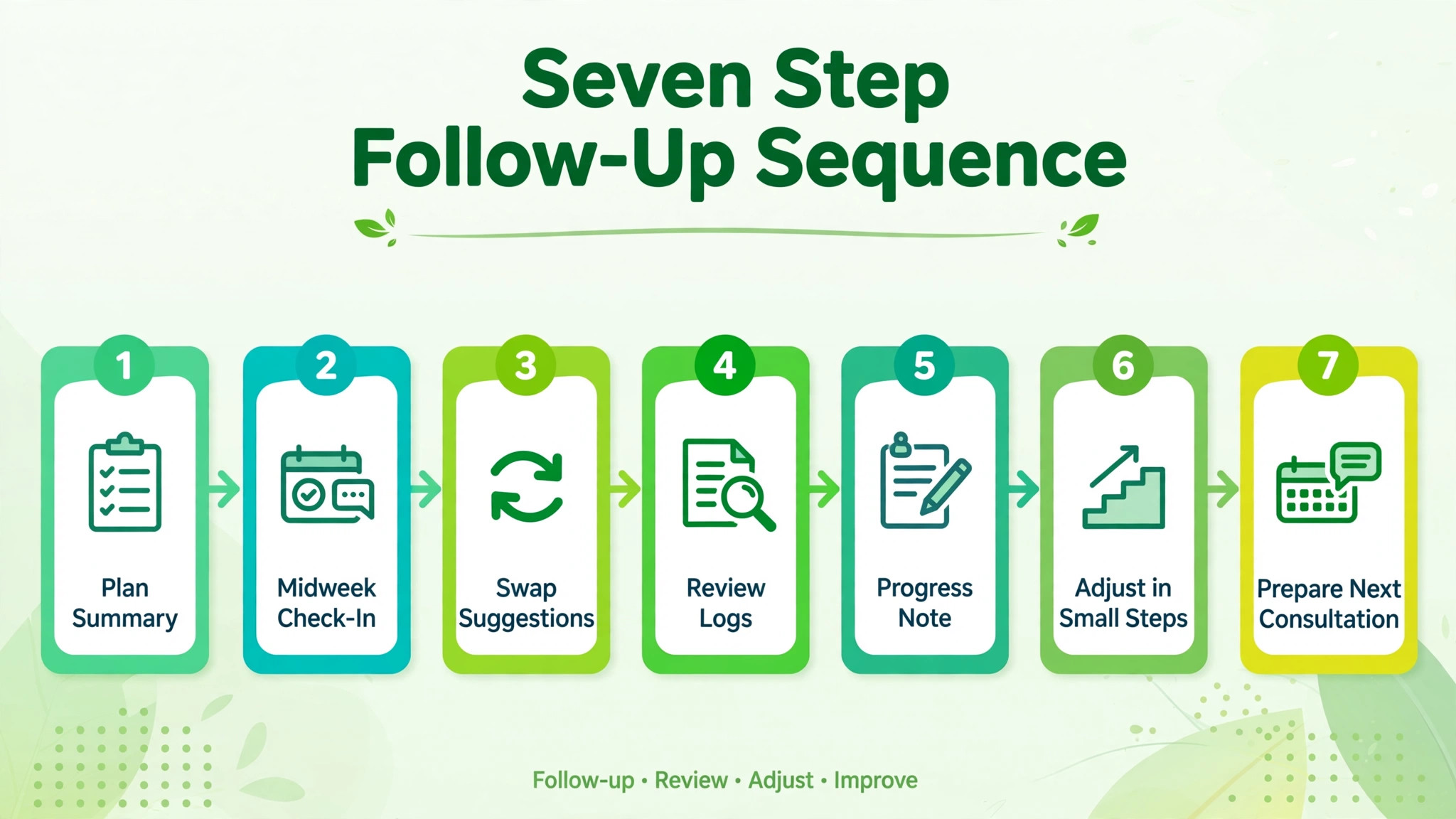
Send the plan summary within hours of the consultation, while the conversation is still fresh. The summary should fit on one page or one phone screen. It names the goal, the daily structure in plain words, the three most important habits to start with, and the first check-in date. Attach or link the full plan, but do not expect the client to read the full document to understand the starting point.
Use AI to draft the summary from your consultation notes and the plan itself, then edit it before sending. Check every portion, allergy note and medical condition flag yourself, because a summary error can mislead a client at every meal. Keep the language practical. Clients follow instructions they can act on at the next meal, not abstract guidance they must interpret.
Include one early win in the summary. Name a meal or a habit the client can complete today, such as preparing tomorrow breakfast tonight, or swapping one drink for water at lunch. An early win builds confidence, and confidence in week one predicts adherence in week four far better than enthusiasm on day one.
Step 2. Check Adherence Midweek With One Simple Question
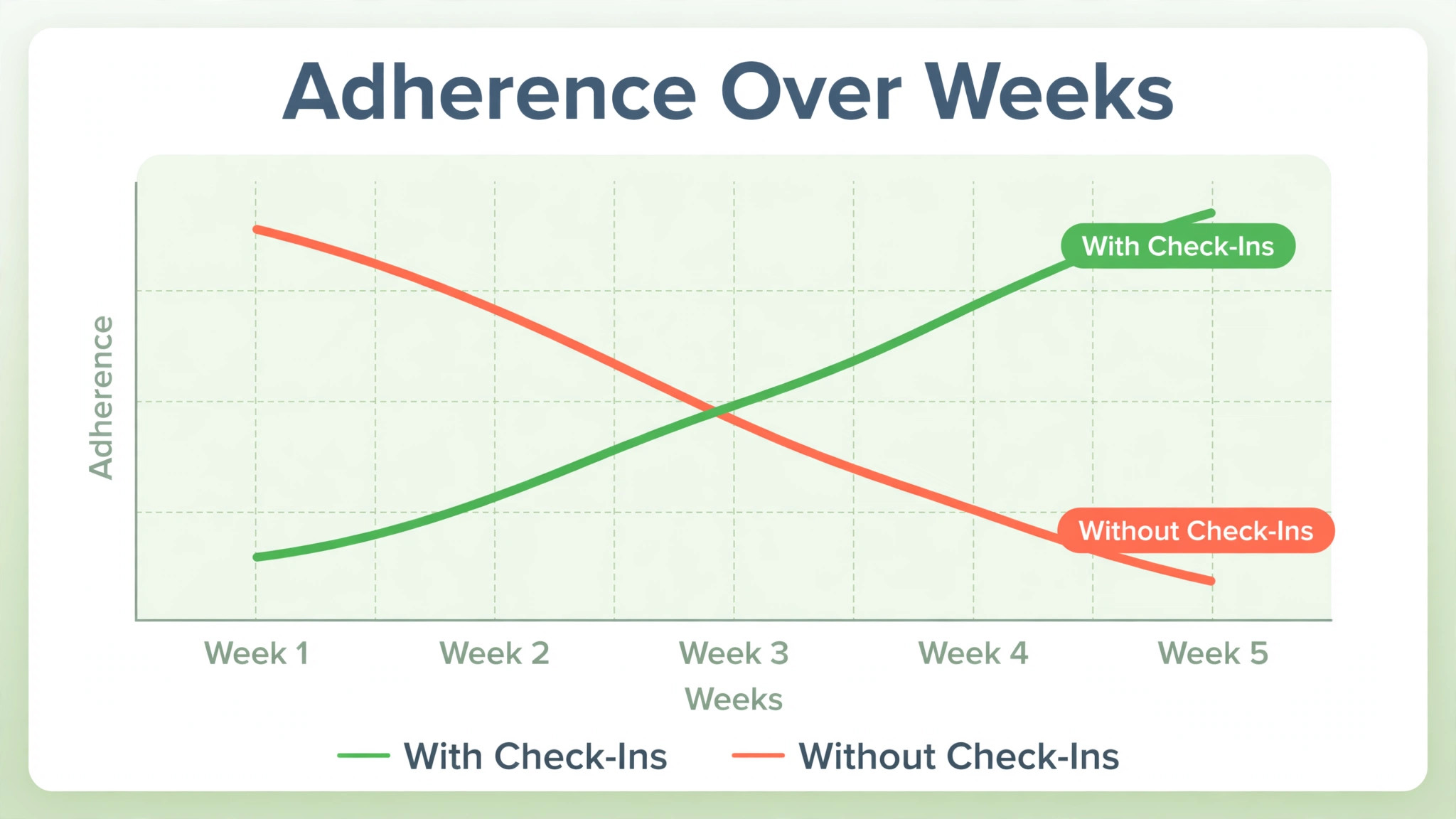
Midweek, send a short check-in that asks one question, not ten. How many planned meals did you follow on most days this week, or which meal was hardest to follow. A single question gets answered. A long survey gets postponed, and a postponed survey becomes another silent gap.
Use AI to draft the check-in from the plan, referencing the specific meals or habits in the summary, so the message feels tied to this client plan rather than generic. If the client replies, pause further automated messages until you have responded, because a reply is a conversation, not a data point. If the client does not reply, note the non response in the record and try a different channel or timing next week, rather than sending the same message louder.
Record adherence in simple terms. A three point scale, such as mostly following, partly following, or struggling, is enough for follow-up purposes. Detailed food logs have their place, but a follow-up system that demands perfect logging will lose the clients who need support most, because logging itself becomes the barrier.
Step 3. Offer Swap Suggestions When a Client Struggles
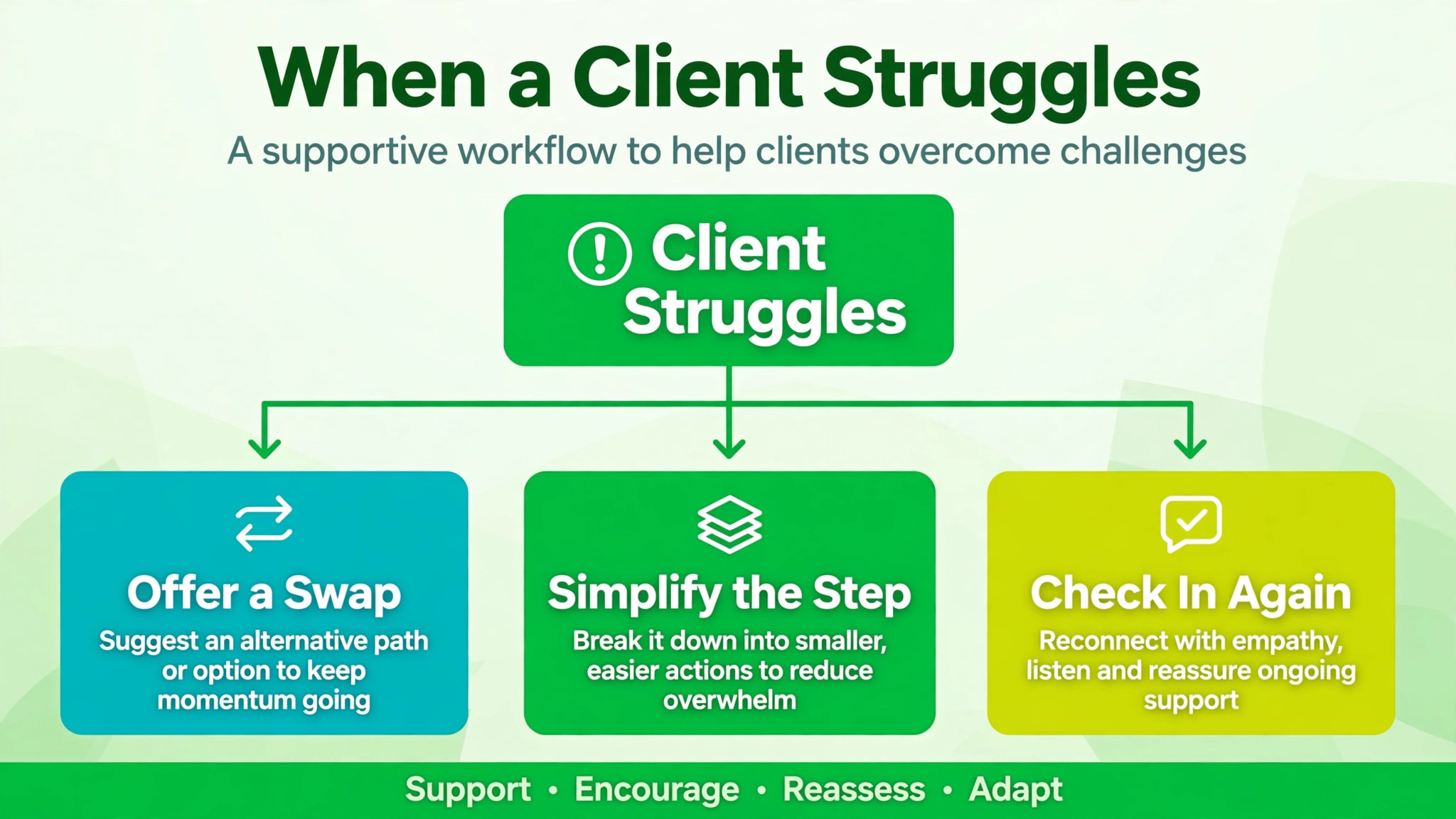
When a check-in reveals a struggle, respond with a swap, not a lecture. If breakfast is the hard meal, offer two breakfast alternatives that fit the same nutritional goal and the client stated preferences. If eating out is the problem, offer a restaurant strategy with two or three concrete choices. Swaps respect the client reality, while repeated instructions to try harder do not.
Use AI to draft swap options from the plan constraints, including allergies, preferences, budget and cooking skill, then verify each swap yourself before sending. Check portions, ingredients and any medical relevance, because a swap that ignores an allergy or a condition is dangerous, not merely unhelpful. Keep swaps simple and shoppable. A swap that needs three special ingredients the client cannot find locally will fail as surely as the original meal did.
Explain the reasoning for each swap in one sentence. This swap keeps the protein similar while cutting preparation time, or this option travels better for a work lunch. Reasoning teaches the client to make future swaps independently, which is the long term goal of nutrition coaching. A client who can swap well no longer needs you for every meal decision, and that independence is a success, not a lost client.
Step 4. Review Food Logs and Activity Without Judging Them
If your practice uses food logs or a client app, review them before the next check-in, not during it. Look for patterns, not perfection. Which days went well, which meals were skipped, whether weekends differ from weekdays, and whether a particular habit is consistently missed. AI can summarise a week of logs into those patterns, saving you from reading every entry line by line.
Present the pattern back to the client as an observation, not a judgment. Weekdays looked strong, and weekends were harder, especially dinners out. That framing invites the client to explain and to problem solve with you. A framing that lists failures invites defensiveness, and a defensive client stops logging honestly, which removes your best source of information.
When logs are missing, treat the gap as information, not as disobedience. Ask whether logging felt burdensome, whether the app was confusing, or whether life simply got busy. Offer a lighter tracking option, such as a photo log or a single daily tick, for clients who find detailed logging unsustainable. Adherence to a lighter system beats abandonment of a perfect one.
Step 5. Write Progress Notes That the Client Can Use
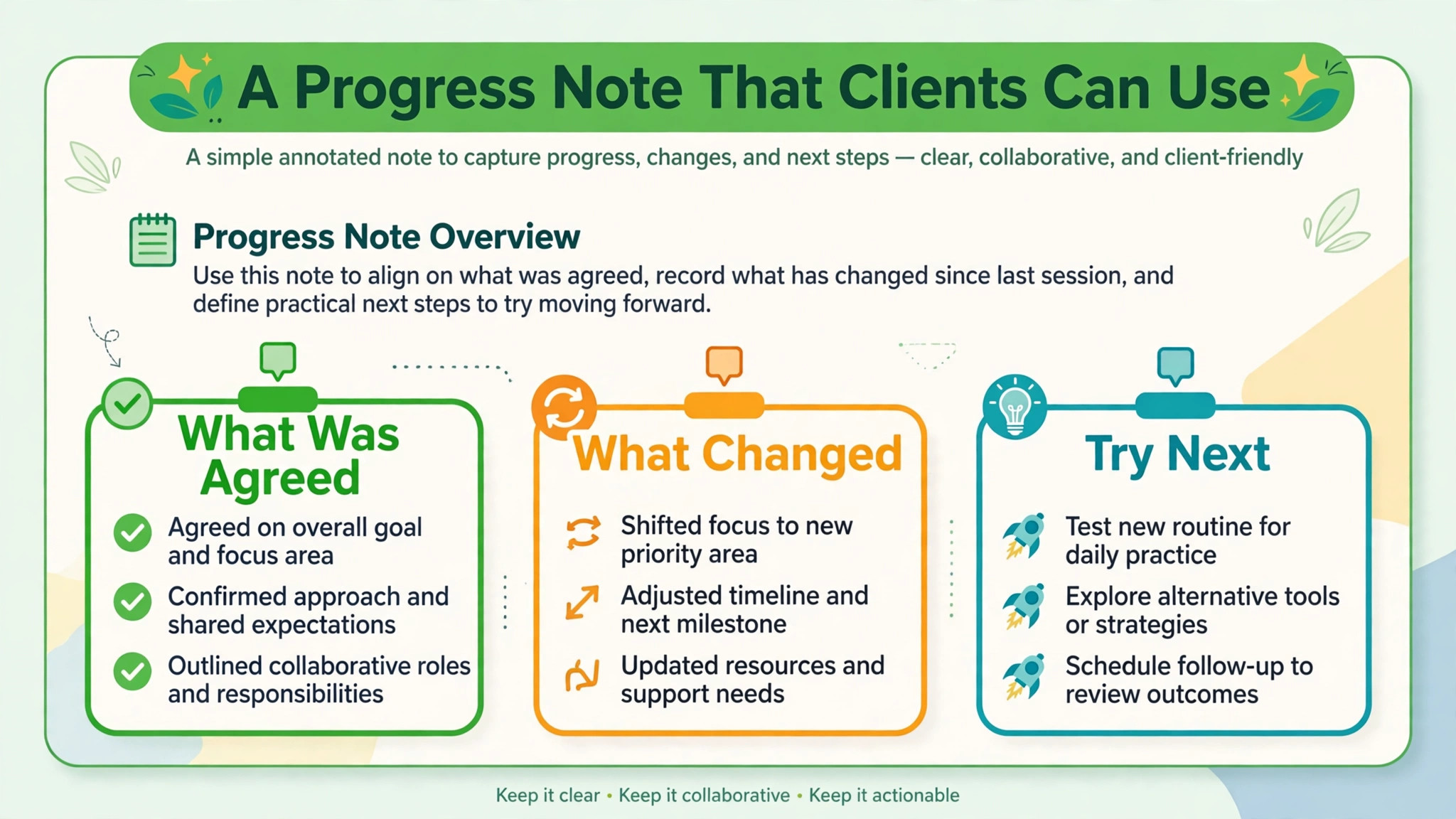
After each check-in, write a short progress note and share the relevant part with the client. The note should record what was agreed, what changed in the plan, and what the client will try before the next check-in. Keep it to a few lines, in plain words, so the client can refer back to it without reopening a clinical record.
Use AI to draft the note from the check-in and the plan changes, then edit it carefully. Check that the note matches what was actually agreed, not what the AI assumed. A progress note that misstates an agreement will confuse the client and undermine trust at the next appointment, when the client follows the note rather than your memory.
Progress notes also build the practice record over time. After a month, you can see which swaps worked, which habits stuck, and where the plan needs a structural change rather than another nudge. That history makes the next consultation shorter and sharper, because you are not reconstructing the last month from scratch.
Step 6. Adjust the Plan in Small Steps, Not Full Rewrites
Resist the urge to rewrite the whole plan when a client struggles with one part. Small, targeted adjustments preserve the habits that are working and isolate the effect of the change. If breakfast is the problem, change breakfast. If weekends are the problem, build a weekend strategy. A full rewrite discards good progress along with the problem, and it asks the client to learn a new plan from scratch.
Use AI to draft the adjusted section, showing the old version and the new version side by side, so the client can see exactly what changed. Explain why the change was made, in one sentence tied to the check-in evidence. That transparency builds trust, because the client sees that their feedback changed the plan, rather than feeling that the plan changes randomly each week.
Keep a version history for each client plan, even a simple dated list of changes. When a client asks why a meal changed, or when you review progress after three months, that history answers the question in seconds. Without it, you will guess, and guessing about a client health plan is never acceptable.
Step 7. Prepare the Next Consultation From the Follow-Up Record
Before the next appointment, review the follow-up record as a whole. Summarise adherence patterns, successful swaps, unresolved struggles and client questions into a one page brief for yourself. AI can draft that brief from the check-ins and progress notes, but read it critically, because a summary can flatten an important nuance, such as a client who followed the plan well but felt unwell, or a client who struggled for a reason unrelated to food.
Open the consultation from that brief, by naming what went well first. Clients who hear their progress acknowledged are more honest about struggles, and honesty is what you need to adjust the plan well. Then address the main struggle with a concrete plan, agree the next check-in cadence, and close by confirming the updated plan summary that will go out the same day. The cycle then repeats, with each round building on real evidence rather than on good intentions.
Follow-Up Cadence Template You Can Copy
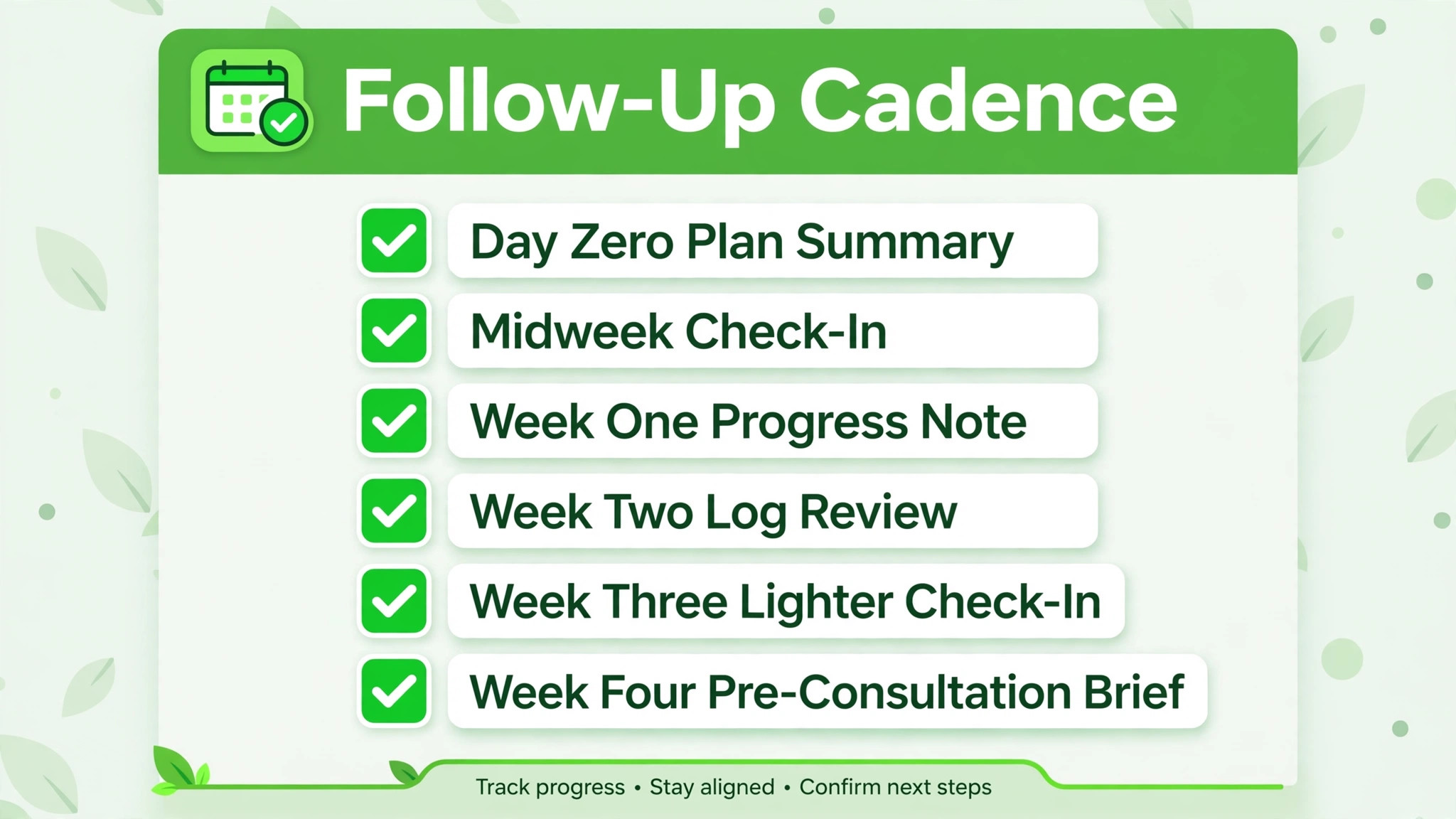
Use this cadence as the default when you use AI for nutritionist meal plan client follow-up, and adjust it by client need. A new client or a struggling client needs a tighter cadence. A stable client who is progressing well can move to a lighter cadence after the first month. State the cadence at the first consultation, so check-ins feel promised rather than intrusive.
Day zero. Plan summary sent the same day as the consultation, with the goal, daily structure, three starting habits, one early win, and the first check-in date.
Day three or four. Midweek adherence check-in with one simple question, referencing the specific plan. Reply personally to any response, and pause automation while the conversation is open.
Day seven. Short progress note shared, recording what was agreed, what changed, and what the client will try next. Include a swap if a struggle was reported.
Week two. Food log or activity pattern review, presented as an observation, plus a plan adjustment if one part needs changing. Keep adjustments small and show old and new versions side by side.
Week three. Lighter check-in, focused on the habit that is working best and the one still struggling. Celebrate the working habit explicitly, because progress deserves more attention than problems.
Week four. Pre-consultation brief prepared from the follow-up record, consultation held, updated plan summary sent the same day, and the next cadence agreed.
Between check-ins, keep a clear support route open, so a client with an urgent question does not have to wait for the next scheduled message. A cadence is a rhythm, not a wall, and clients should always be able to reach you sooner when they need to.
Tools That Fit a Nutrition Follow-Up Workflow
Pick tools that keep the plan, the logs and the messages in one record when you use AI for nutritionist meal plan client follow-up, because follow-up fails when the plan lives in one system, the logs in another, and the messages in a third. The tools below cover the main patterns nutrition practices actually use.
MealStack for an All in One Nutrition Practice
MealStack is an AI native platform for nutrition professionals that brings clients, meal plans, billing and a client app into one place. Its built-in assistant drafts plan content and checks it against the client record, and the home view surfaces overdue follow-ups, unpaid invoices and plans about to end, each with a next step beside it. That surfacing is directly useful for follow-up, because it stops a client from quietly reaching the end of a plan without a review.
The limit is that AI drafts still need professional review, especially for medical conditions, allergies and portion accuracy. Treat every draft as a starting point, check it against the client record yourself, and confirm at checkout the current plan structure and the last published list price, since the platform is evolving and pricing should be confirmed at checkout.
Practice Better for Client Records and Packages
Practice Better is a practice platform used by nutrition and wellness professionals for client records, packages, sessions and reminders. It suits practitioners who want a structured client record that holds plans, notes and follow-up tasks together, rather than spreading those pieces across email and documents. That structure makes the weekly follow-up review faster, because the record for each client is in one place.
The limit is that it is a practice system, not a nutrition content engine on its own. You still write and adjust the plans, and you still decide the follow-up cadence. Pair it with your own plan templates and check-in messages, and confirm at checkout which plan includes the automation and client portal features your workflow needs.
Meelio for Session Notes and Plan Drafts
Meelio is built for nutrition and wellness practitioners to capture consultations, pull client context, and draft nutrition and lifestyle plans grounded in client goals. It generates post consultation notes, care plans and meal plans for review, and it works with practice systems including Practice Better, so plans and notes can sync back to the client record. That drafting step saves the administrative time that often delays the day zero plan summary.
The limit is scope of judgment. Meelio drafts from consultation content and client context, but it cannot verify a medical nuance it was not told, or judge whether a plan fits a client life it has not seen. Review every draft against the consultation itself, check allergies and conditions, and keep final approval with the practitioner. Confirm at checkout the current features and the last published list price before committing a practice to it.
Moveat for Client Check-Ins and Diet Tracking
Moveat is a tracking tool for fitness coaches and nutritionists that centres on client check-ins, with weight, measurements, photos and the diet in one place. A reminder goes out on its own when a check-in is due, so the practitioner does not chase clients manually, and macros compute from a food database as meals are built. That check-in focus matches the follow-up workflow in this guide, especially for clients who need a simple, regular rhythm.
Moveat states that calories and macros come from the food database, the product label, or the practitioner own hand, never from an estimate, which is a useful discipline for plan accuracy. Its free plan has been described as covering two clients, with a paid plan needed from the third client onward, so confirm the last published list price at checkout. The limit is that it is a tracking and check-in tool, not a full practice system, so pair it with your own client record for notes and packages.
What AI Can and Cannot Do in Nutrition Follow-Up
When you use AI for nutritionist meal plan client follow-up, AI is strong at drafting, summarising and timing. It can draft a plan summary, summarise a week of logs into patterns, draft swap options within stated constraints, and send check-ins on schedule. Those tasks are repetitive and time sensitive, and automating them means clients hear from you in week one, not only at the next appointment.
AI cannot make clinical judgments, diagnose, or override a practitioner decision. It cannot know whether a symptom, a medication change, or a lab result changes a plan, unless a qualified professional tells it and checks the result. It cannot verify an allergy it was not given, judge a client relationship with food, or handle a sensitive conversation about weight, health anxiety or disordered eating. Those areas need human expertise, empathy and professional accountability, and any workflow that routes them to an automated message is unsafe.
Data handling deserves care too. Food logs, weights, photos and health notes are sensitive personal data. Keep them inside vetted practice systems with access controls, avoid pasting them into general purpose chat tools, and explain to clients where their data lives and who can see it. Trust in follow-up depends on that privacy discipline as much as on message quality.
Mistakes That Break Client Follow-Up
The first mistake when you use AI for nutritionist meal plan client follow-up is sending a long plan and then going silent until the next appointment. Silence teaches the client that the plan is a document, not a supported process. A short day zero summary and a midweek check-in prevent that lesson from forming.
The second mistake is asking for perfect logging. A client who must log every bite will stop logging when life gets busy, and then you lose all visibility. A lighter system, such as a daily tick or a photo log, keeps the data flowing through imperfect weeks, which are exactly the weeks you need to understand.
The third mistake is responding to struggle with more instructions. A client who reports a hard week does not need the plan repeated louder. They need a swap, a simpler option, or a smaller first step. Respond to struggle with help that fits the reported problem, and the client will keep reporting honestly.
The fourth mistake is letting AI send clinical content unchecked. Every plan summary, swap and progress note that reaches a client must pass a practitioner review for allergies, conditions, portions and agreement accuracy. That review is not bureaucracy. It is the line between a helpful assistant and a liability.
How Structured Follow-Up Compares With Appointment Only Care
| Feature | Structured follow-up | Appointment only care |
|---|---|---|
| Time to spot a struggle | Days, at the midweek check-in | Weeks, at the next appointment |
| Plan adjustments | Small, evidence based, frequent | Large, memory based, rare |
| Client honesty about adherence | Higher, check-ins normalise struggle | Lower, guilt builds between visits |
| Practitioner preparation | Strong, from a follow-up record | Weak, from memory alone |
| Client retention | Higher, support is visible weekly | Lower, support feels absent |
The table shows the core argument for practices that use AI for nutritionist meal plan client follow-up. Structured follow-up does not add work for its own sake. It moves the work earlier, when a small adjustment still helps, instead of leaving it until a large rewrite is needed.
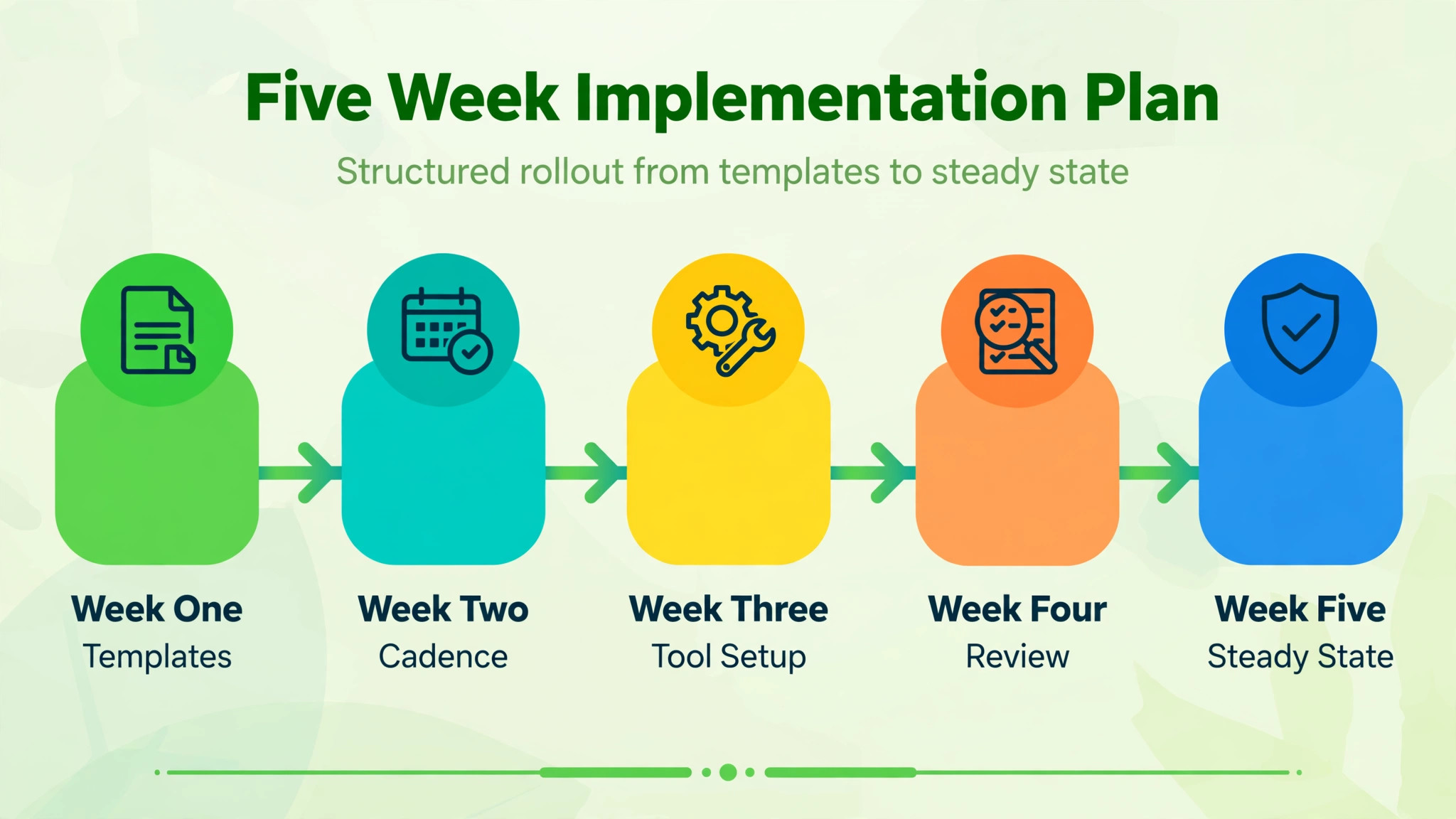
A Five Week Implementation Plan
Week one is templates when you use AI for nutritionist meal plan client follow-up. Write the plan summary template, the midweek check-in, the swap format and the progress note format. Test them on two existing clients and refine the wording before rolling them out widely.
Week two is cadence. Set the day zero, day three, day seven and week four rhythm in your practice system, with stop conditions for replies and a support route for urgent questions. Confirm that a client reply pauses automation.
Week three is tool setup. Choose the tool combination that fits your practice size, move active client plans into it, and test the check-in reminder and log review flow with a small group. Fix any data privacy or access issue before a wider launch.
Week four is review. Read the first month of check-ins as a group, look for the most common struggle, and fix the plan template or the first week guidance that addresses it. That group lesson improves every future client, not just the ones who reported it.
Week five is steady state. Move stable clients to a lighter cadence, keep new and struggling clients on the tighter rhythm, and put the monthly review in the calendar. Follow-up is now a routine, not a project, and the routine is what sustains adherence over months.
Verdict
Clients do not need a more complicated meal plan. They need a plan they understand on day zero, a check-in that notices them in week one, a swap when life gets hard, and a progress note that shows their effort was seen.
AI can draft and time all four of those touches when you use AI for nutritionist meal plan client follow-up, and that timing is what turns a good plan into a followed plan. Keep the practitioner review as the gate for every clinical message, keep logging light enough to survive a busy week, and keep adjustments small and evidence based. Practices that do those three things will keep more clients, learn faster from check-ins, and spend consultations solving real problems instead of reconstructing lost weeks. Start with the summary and the midweek question. Those two messages alone will change how your clients experience the plan.
Frequently Asked Questions
How soon after a consultation should the plan summary go out?
The same day, within hours if possible, while the conversation is still fresh. A summary that arrives a week later feels like an afterthought, and the client will have already improvised their own version of the plan in the meantime. Keep the summary to one page or one phone screen, with the goal, daily structure, three starting habits and the first check-in date, and attach the full plan for reference rather than expecting the client to read it first.
What should a midweek check-in ask?
One simple question works best, such as which meal was hardest to follow, or how many planned meals were followed on most days. A single question gets answered, and the answer tells you where to help. Reference the specific plan in the message, so it feels personal, and reply personally to any response. If there is no reply, note it in the record and try a different timing or channel next week, rather than repeating the same message.
How do I suggest a food swap safely?
Draft swaps within the client stated constraints, including allergies, medical conditions, preferences, budget and cooking skill, then verify each swap yourself before sending. Check portions and ingredients, and explain the reasoning in one sentence, so the client learns to swap independently over time. Never send an AI drafted swap to a client without that practitioner check, because a swap that ignores an allergy or a condition is a safety issue, not a minor error.
Should clients log every meal in detail?
Not necessarily. Detailed logs help some clients, but they become a barrier for others, especially in busy weeks. Offer a lighter option, such as a daily tick, a photo log, or a single evening note on what went well and what was hard. A lighter system that survives imperfect weeks gives you more useful data than a perfect system the client abandons. Review logs as patterns, not as a test, and present findings as observations rather than judgments.
How often should I check in with a stable client?
After the first month, a stable client who is progressing well can move to a lighter cadence, such as a fortnightly check-in plus a pre-consultation review. Keep the tighter weekly rhythm for new clients and for clients who are struggling, because early support prevents small problems from becoming abandonment. State the cadence at the first consultation, so a lighter rhythm feels like progress, not neglect.
Can AI write progress notes for me?
AI can draft progress notes from check-ins and plan changes, but you must edit and approve every note before it reaches the client or the record. Check that the note matches what was actually agreed, including any plan change, portion change or next step. A note that misstates an agreement will confuse the client and undermine trust. Keep notes short, plain and factual, and keep a version history of plan changes alongside them.
What do I do when a client stops replying to check-ins?
Wait, then try a different approach rather than repeating the same message. After two weeks without a reply, send one short message that acknowledges the gap without scolding, names the last agreed step, and offers a simple restart, such as a shorter check-in or a different tracking method. If there is still no reply, note it in the record and raise it at the next appointment. Silence is information, and it often points to a barrier you have not yet understood.
How do I protect client health data in an AI follow-up system?
Keep food logs, weights, photos and health notes inside vetted practice systems with access controls, and avoid pasting them into general purpose chat tools. Limit access to staff who support that client, explain to clients where their data lives, and check the privacy terms of any tool before adopting it. Good follow-up depends on trust, and trust depends on handling sensitive data with visible care, not just on message quality.