
In 2026 surveys of language teachers, more than 6 in 10 say they now translate classroom material at least once a week, and that single habit is what makes the top 10 ai translation tools for teachers worth ranking properly. A worksheet, a parent letter, and a reading passage all need different treatment, and a tool that handles one well can fail badly on another.
This guide compares ten tools teachers actually use in 2026, judged on translation quality, language coverage, document handling, classroom safety, and price. Prices come from vendor pages checked in late 2026, so confirm the pricing page before you commit, because AI tool pricing changes often. The test that matters most in a classroom is a simple one. A translation that reads naturally matters more than a long language list, because students copy what the tool gives them.
The ten tools split into three groups. DeepL and ChatGPT lead on natural wording for European languages. Google Translate and Microsoft Translator lead on coverage and free access. Papago, Reverso, and the specialist tools fill the gaps for Asian languages, document work, and offline use. Your choice should follow which languages your students actually speak.
Why Classroom Translation Is Harder Than It Looks
A classroom translation is not a tourist phrase. It has to keep the reading level right, keep names and numbers intact, and keep the tone a parent can trust. A tool that turns a Year 4 science sheet into university language has failed, even if every word is technically correct. Teachers check translations against the original meaning, the age of the reader, and the purpose of the text, and most free tools only pass the first of those three tests.
The second problem is volume. A teacher with three multilingual classes can face forty pages of translated material in a single term, and doing it by hand is not realistic. That workload is exactly why the top 10 ai translation tools for teachers earn their place in a school week, because the right tool turns an evening of work into twenty minutes of checking. The check still matters. No tool in this guide should send a parent letter without a human read.
The third problem is privacy. Student work, grades, and family details should never go through a free tool that trains on submitted text. Paid plans from DeepL and Microsoft promise not to train on your text, and that promise is worth more than any feature list when the document names a child. Keep contracts, medical notes, and safeguarding material out of free web translators entirely.
The 10 Tools at a Glance
| Tool | Main job | Best for | Starting paid price |
|---|---|---|---|
| Google Translate | Everyday translation | Widest language coverage | Free |
| DeepL | Natural document translation | Best European wording | About $8.74 a month |
| Microsoft Translator | School ecosystem translation | Microsoft 365 schools | Free |
| ChatGPT | Translation with explanation | Idioms and tone | Free, Plus $20 a month |
| Papago | Asian language translation | Korean, Japanese, Chinese | Free |
| Reverso | Translation with examples | Real usage examples | Free, Premium about $6.49 a month |
| SYSTRAN | Secure document translation | Privacy conscious schools | Pricing on the vendor site |
| Lingvanex | Offline translation | Offline and desktop use | Free, Pro about $10 a month |
| Yandex Translate | Free broad translation | Russian and Turkish | Free |
| Amazon Translate | Pay as you go translation | Bulk school documents | About $15 per million characters |
The table above shows the honest shape of this market. Google Translate wins on coverage and price, DeepL wins on wording, and ChatGPT wins on explaining what a translation means. The top 10 ai translation tools for teachers cannot be picked from this table alone, because the right answer for most teachers is two tools, not one. DeepL or ChatGPT for the wording, plus Google Translate for the language your first pick does not cover.
Free tiers help with testing. Google Translate, Microsoft Translator, Papago, and Reverso all offer free use that is enough to test a real worksheet before paying. DeepL free is limited to a small monthly character allowance and a few documents, so the paid Individual plan is the cost of using it seriously. Paid plans also bring the privacy terms a school needs, so read the data terms for the plan you buy before uploading student work.
Best Pick by Job
| Job type | First pick | Second tool | Why this pair works |
|---|---|---|---|
| Multilingual classroom, many home languages | Google Translate | DeepL | Widest coverage plus best wording for European languages |
| Parent letters in French, German, Spanish | DeepL | Microsoft Translator | Natural letters plus a free backup for rarer languages |
| Korean, Japanese, Chinese students | Papago | Google Translate | Asian language accuracy plus broad coverage |
| Explaining idioms and tone to students | ChatGPT | Reverso | Plain explanations plus real usage examples |
| Whole documents and handouts | DeepL | Lingvanex | Formatted documents plus offline desktop work |
| Budget of zero, school computers only | Google Translate | Microsoft Translator | Both free, both work in a browser |
A teacher with a multilingual classroom needs Google Translate first, because it covers the languages your students actually bring to school, and DeepL second for the letters home that must read like a person wrote them. The top 10 ai translation tools for teachers reward that pairing, because coverage and wording are different jobs and no single tool wins both. A teacher who buys one tool and expects it to do every job will be disappointed.
A teacher working mostly with Korean, Japanese, or Chinese families should start with Papago, which handles those languages with more care than the Western tools, and keep Google Translate as the backup. A teacher who needs to explain why a phrase means what it means should start with ChatGPT, which talks through idioms and register in plain words. Match the first pick to your students, not to a ranking.
How to Judge the Top 10 AI Translation Tools for Teachers
Start with your real material, not a demo sentence. Take one worksheet, one parent letter, and one reading passage, and run all three through three tools. Judge them on three tests. Does the meaning survive. Does the reading level fit your students. And does the tone fit a parent letter. The top 10 ai translation tools for teachers separate quickly on that test, because a tool that passes all three on your material is the right tool, even if it loses on a general quality ranking.
Then run the exact classroom job through it before you pay. Translate a full document, keep the formatting, export it, and print it. A tool that makes good sentences in a format your printer cannot use is a problem, not a solution. Check file handling, character limits, and whether the free plan caps the documents you need each month, because a cap that bites in week three of term is a cost, not a saving.
Then check the privacy terms in writing. Ask whether the tool trains on submitted text, how long it stores your documents, and whether a paid plan changes the answer. Free web translators are convenient, and they are the wrong place for anything naming a student. A paid plan with a no-training promise costs less than one data incident, and your school data policy probably already says so.
The 10 Tools in Detail
Three questions separate the useful tools from the merely multilingual ones. How natural is the wording. How wide is the coverage. And how safe is it for school use.
1. Google Translate
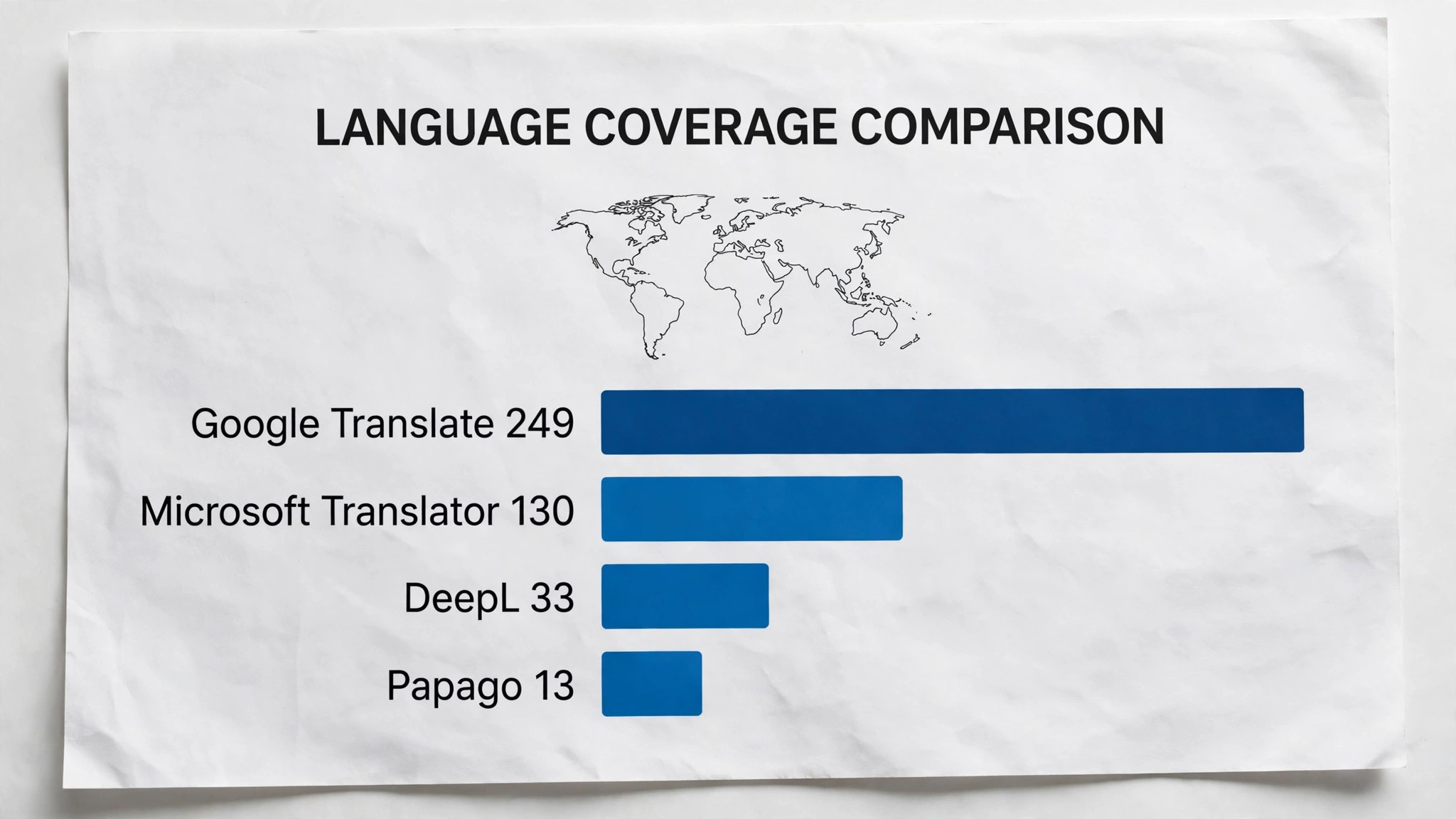
Google Translate is the default translation tool for most teachers, and its strength is coverage. It supports almost 250 languages, works in a browser and on a phone, and handles text, voice, camera, and whole web pages. A teacher can point a phone at a handwritten note from a parent and get a readable version in seconds, which no other tool in this guide matches for speed.
The limits matter for school use. Wording for European languages is a step below DeepL, and the free consumer terms are not appropriate for confidential documents. There is no support and no service promise on the free product. It suits quick comprehension and first drafts best, and paid plans are not the point. Use it to understand, then verify before you send.
Test it with a note home first. Translate a short message to a parent, print it, and ask a bilingual colleague to read it before you send anything. The colleague will catch the tone problems the tool misses, like a sentence that is polite in English but blunt in the target language. Do this test once per language you serve, and keep the approved version as your template for the term.
Its offline mode also helps on school trips and in classrooms with weak Wi-Fi, where a downloaded language pack keeps working without a connection.
2. DeepL
DeepL is the quality pick for European languages, and its strength is wording that reads like a person wrote it. French, German, Spanish, Italian, and Dutch come out fluent and natural, and document translation keeps the formatting of Word, PowerPoint, and PDF files intact. Glossaries let a teacher fix how key terms translate, so science vocabulary stays consistent across a term.
Pricing starts with a limited free tier, and the Individual plan costs about $8.74 a month billed annually, with a promise not to train on your text. Coverage is narrower than Google, with about 30 fully supported languages, so Japanese, Korean, and Arabic work less well. It suits parent letters and formal documents best, and it is the first pick for any text a family will read.
Test it with a full document, not a sentence. Take a two page handout, translate it, and check whether the headings, the tables, and the footnotes survive. A tool that handles sentences well can still break a document layout, and the fix takes longer than the translation saved. If the formatting holds on a real handout, the tool is ready for classroom use.
DeepL Write sits beside translation and helps polish the result, which is useful when a letter needs to sound warm rather than mechanical.
3. Microsoft Translator
Microsoft Translator is the sensible pick for schools already running Microsoft 365, and its strength is integration. It supports more than 130 languages, works inside Word, Teams, and PowerPoint, and lets a teacher run live translated captions in a lesson. The free tier is generous, with a large monthly character allowance before any API charge applies.
Translation quality sits between Google and DeepL, good enough for classroom use and stronger than most teachers expect. The API costs about $10 per million characters after the free allowance, which is cheap at school volumes. It suits schools that live in Microsoft tools best, because the translation appears where the work already happens instead of in another tab.
Test it inside the apps you already use. Open a Word document, translate a paragraph without leaving the app, and check whether the result keeps your school letterhead and fonts. A tool that forces you to copy text into a browser tab will slow you down every single time. The best test is a normal working day, not a demo.
Its conversation mode also helps at parents evening, translating a live discussion so a teacher and a parent can talk without an interpreter in the room.
4. ChatGPT
ChatGPT is the most flexible translator in this guide, and its strength is explanation. Ask it to translate a passage for a ten year old, or to keep the tone formal for a parent letter, and it adjusts. Ask what an idiom means and it explains it in plain words, which turns translation into a teaching moment instead of a copy and paste job.
The risk is accuracy without a warning. ChatGPT can produce fluent text that quietly changes a number, a name, or a date, so every output needs a careful read against the original. Plus costs $20 a month and adds stronger models and higher limits. It suits teachers who want to discuss language with students best, and it should never be the last check on a formal letter.
Test it with an idiom your students actually use. Give it a playground phrase, a joke, and a formal sentence, and see which ones it handles. A tool that translates all three well understands register, which is the difference between a translation and a lesson. Keep the examples that fail, and use them to teach students why machines still need a human reader.
It also handles glossaries well when given a list of terms first, keeping subject vocabulary steady across a whole set of worksheets.
5. Papago
Papago is the specialist for East Asian languages, and its strength is nuance. Built by Naver, it handles Korean, Japanese, and Chinese with more care than the Western tools, including honorifics and sentence patterns that Google often flattens. A teacher with Korean or Japanese families will notice the difference in the first paragraph.
The free app covers text, voice, image, and conversation modes, and there is no paid plan a school needs to buy. Coverage beyond Asian languages is thinner, so it works as a specialist rather than an all rounder. It suits schools with East Asian families best, paired with Google Translate for everything else.
Test it with the languages your families actually speak. Ask a parent to read a short translated notice and tell you whether it sounds natural or strange. A tool that scores well on European languages can still sound stiff in Korean or Japanese, and the parent is the only judge that matters. Run this check once a term, and switch tools when the families say so.
Its image translation reads text from photos of notices and homework, which helps when a parent sends a picture instead of a typed message.
6. Reverso
Reverso is the context tool, and its strength is showing how a phrase is actually used. Every translation comes with real examples from books, films, and documents, so a teacher can check whether a word fits a formal letter or a playground chat. That context matters when a single word can change the meaning of a sentence.
The free version covers the main European languages well, and Premium costs about $6.49 a month for more features and no ads. Document translation is weaker than DeepL, and language coverage is narrower than Google. It suits language teachers best, because the examples turn a quick lookup into a lesson about register and tone.
Test it with a real example from a textbook. Translate a paragraph with a technical term, then check the example sentences the tool gives you. A tool that shows the phrase in context helps a student learn the word, while a tool that gives a single equivalent leaves them guessing. Use the examples in class, and let students argue about which one fits best.
Its conjugation tables and grammar notes also help older students check their own writing before they hand it in.
7. SYSTRAN
SYSTRAN is the privacy first pick, and its strength is control over data. It offers on premise and private cloud options, custom dictionaries for school terminology, and document translation for Word, PDF, and Excel files. A school with strict data rules can keep translations inside its own systems instead of sending them to a public web service.
Pricing is quoted by the vendor rather than published as a simple monthly plan, so a small school should ask for a quote before assuming it fits the budget. Everyday wording is solid rather than leading. It suits schools and districts with formal data policies best, where the privacy terms matter more than a slightly smoother sentence.
Custom terminology also keeps subject words consistent, so a science term translates the same way in every handout across the year.
8. Lingvanex
Lingvanex is the offline pick, and its strength is working without a connection. Desktop and mobile apps translate text, documents, and web pages, and downloaded language packs keep working on a school trip or in a classroom with weak Wi-Fi. It supports more than 100 languages, which is enough for most school populations.
The free tier covers everyday use, and Pro costs about $10 a month for document translation and more languages. Wording quality is good rather than best in class, and it will not beat DeepL on a French letter. It suits teachers who work away from reliable internet best, and it is a strong second tool for field trips and home visits.
Its browser extension also translates whole web pages in place, which helps when a useful resource exists only in another language.
9. Yandex Translate
Yandex Translate is the free broadcaster, and its strength is coverage at no cost. It handles more than 100 languages, including Russian, Turkish, and Ukrainian, with text, image, document, and website translation. A teacher with Eastern European families gets a free tool that covers their languages well.
The interface is simple and the service is free, which makes it easy to recommend to families themselves. Wording is serviceable rather than polished, and schools should check their data policy before using any free service for student material. It suits quick checks and family communication best, as a free backup rather than a first pick.
10. Amazon Translate
Amazon Translate is the bulk pick, and its strength is scale. It translates large batches of documents through the Amazon cloud, supports more than 70 languages, and charges about $15 per million characters with a free monthly allowance. A district translating a whole handbook into five languages can do it as one job instead of fifty small ones.
It is a developer tool rather than a teacher app, so it needs some technical setup or a colleague who can run it. There is no friendly classroom interface and no free consumer app. It suits districts and multi academy trusts best, where one person can run the translation for many schools at once.
A Translation Routine That Fits a School Week
A good routine beats a good tool, because translation work arrives in bursts and the term does not wait. The routine below takes a new piece of material from first draft to a checked copy in under half an hour, and it works with the free tools as well as the paid ones. The key step is the human read, which no tool in this guide replaces.
| Step | Job | Best tool | What good looks like |
|---|---|---|---|
| 1 | Collect the source text | Google Translate | One clean document, names checked |
| 2 | Translate with your first pick | DeepL | Natural wording for the target language |
| 3 | Check the reading level | ChatGPT | Ask for a simpler version for younger readers |
| 4 | Fix names and numbers | Reverso | Every name, date, and number matches the original |
| 5 | Read it aloud once | Teacher | Awkward phrasing shows up when spoken |
| 6 | File it for reuse | Microsoft Translator | Saved glossary keeps terms steady |
Run the routine on one real document before you change anything else. Time each step, and note where the tool slows you down. The routine that takes twenty minutes per document ships translated material every week. The routine that takes two hours ships it once a term, and parents notice the difference.

What Translation Really Costs a Teacher in 2026
Most teachers can do this work for nothing, and that is worth saying plainly. The top 10 ai translation tools for teachers include four strong free tools, and a teacher with a small multilingual class may never need to pay. The paid plans earn their money on privacy, document volume, and wording quality, and those three things are worth paying for once the volume grows.
| User type | Monthly stack | Monthly cost |
|---|---|---|
| Free only | Google Translate plus Microsoft Translator | 0 dollars |
| One classroom, European languages | DeepL Individual | About 9 dollars |
| Asian language families | Papago plus Google Translate | 0 dollars |
| Explanation and idioms | ChatGPT Plus | 20 dollars |
| Whole school, privacy first | SYSTRAN quoted plan | Quote based |
A teacher paying for DeepL Individual spends about $9 a month, which is less than a single textbook, and it buys the wording and privacy terms that free tools do not offer. A school paying for a quoted SYSTRAN plan should compare it against the hours saved across all its teachers, because the saving is staff time, not software cost.
Mistakes Teachers Make With AI Translation
The first mistake is sending a translation without reading it. A fluent sentence can hide a changed number, a wrong name, or a date that moved by a month, and a parent will spot it before you do. Read every translated letter against the original, letter by letter, and check the names first, because names are where tools fail most quietly.
The second mistake is trusting one tool for every language. A tool that writes beautiful French can write clumsy Korean, and the top 10 ai translation tools for teachers exist precisely because no single engine covers every family well. Match the tool to the language pair, and keep a second tool ready for the languages your first pick handles badly.
The third mistake is uploading student work to a free tool that trains on it. Grades, behaviour notes, and family details are not translation fodder, and a free web box is the wrong place for them. Use a paid plan with a no-training promise for anything naming a child, and keep the free tools for public material like worksheets and notices.
Your Eight-Step Check Before You Send a Translation
Run this check on every translated letter before it leaves the school, and keep a copy with your class notes.
- Translate with your first pick tool, then read the original beside it.
- Check every name, date, number, and price against the original.
- Read the translation aloud once to catch awkward phrasing.
- Check the reading level fits the age of the reader.
- Confirm the tone fits a parent letter, not a playground chat.
- Check the data terms if the document names a student.
- Save the glossary terms you fixed so next time is faster.
- File the checked copy where other teachers can reuse it.
Related Guides
Keep exploring with these guides on Stratilyze:
- Top 10 AI Translation Tools for Travelers (10 Tools)
- Best AI Learning Tools for Teachers (15 Tools)
- Top 10 AI Spreadsheet Tools for Teachers (10 Tools)
Frequently Asked Questions
Which AI translation tool is best for teachers with multilingual classrooms?
Google Translate is the best starting point for a multilingual classroom, because it covers almost 250 languages for free. Pair it with DeepL for parent letters in European languages, where wording matters most. The combination covers the breadth and the quality no single tool offers.
Can teachers use DeepL for free in school?
Yes, but the free tier is limited to a small monthly character allowance and a few documents. A teacher translating regularly should budget for the Individual plan at about $8.74 a month billed annually, which also brings the no-training privacy promise a school needs.
Is it safe to translate student work with free AI tools?
No, not for anything naming a student. Free web translators may train on submitted text, so grades, behaviour notes, and family details should only go through a paid plan with a no-training promise, or stay out of machine translation entirely.
Which tool handles Korean, Japanese, and Chinese best for teachers?
Papago handles Korean, Japanese, and Chinese with more care than the Western tools, including honorifics and sentence patterns the others flatten. Keep Google Translate as the backup for languages Papago covers less well.
How do I keep translations consistent across a whole school term?
Build a glossary. DeepL glossaries, SYSTRAN custom dictionaries, and even a shared document of fixed terms all work. The top 10 ai translation tools for teachers reward the teacher who fixes key terms once, because every later translation then uses the same words.
Can ChatGPT translate better than Google Translate for teachers?
For explanation and tone, yes. ChatGPT adjusts reading level, explains idioms, and rewrites for a formal letter. For raw accuracy across many languages, Google Translate is more consistent. Use ChatGPT to understand and adapt, and Google or DeepL to produce the final text.
The Pick to Make Before Monday
DeepL is the pick for most teachers, because parent letters and formal documents are where translation quality is judged, and DeepL writes them best. Google Translate is the essential second tool, because it covers the languages DeepL does not. Start with those two, add Papago if your families speak Korean, Japanese, or Chinese, and the top 10 ai translation tools for teachers become a routine instead of a weekly scramble.
Whichever tools you choose, keep the human read at the centre. Translate with the tool, check the names and numbers yourself, and read the result aloud once. A translation earns its place in a school when a parent reads it and feels respected, and that feeling comes from the check, not the engine.