

A teacher with a 40 minute planning period can spend half of it writing one decent quiz, which is exactly the problem the best AI quiz generators in 2026 claim to solve. Ten questions, four options each, one answer key, and a check that none of the wrong answers is accidentally right. Multiply that by five classes and the week is gone before the teaching starts. That time problem is why quiz generators took off, and why the quality problem that came with them matters just as much.
The best AI quiz generators in 2026 are not the ones that produce the most questions the fastest. They are the ones whose answer keys you can trust after a quick check, whose questions match the reading level of the people taking them, and whose export options fit the classroom, training portal, or study app you already use. A generator that spits out 50 questions in a minute but gets six answers wrong has not saved time. It has moved the work from writing to checking.
This guide compares 14 tools across four jobs: classroom quizzes, corporate training, self-study, and exam prep. Every tool was judged on the same answer key test: generate ten questions from a source document, then count how many answers are wrong, ambiguous, or trivially guessable. A tool passes if eight or more survive with only light editing. The tools below passed, but none passed perfectly.
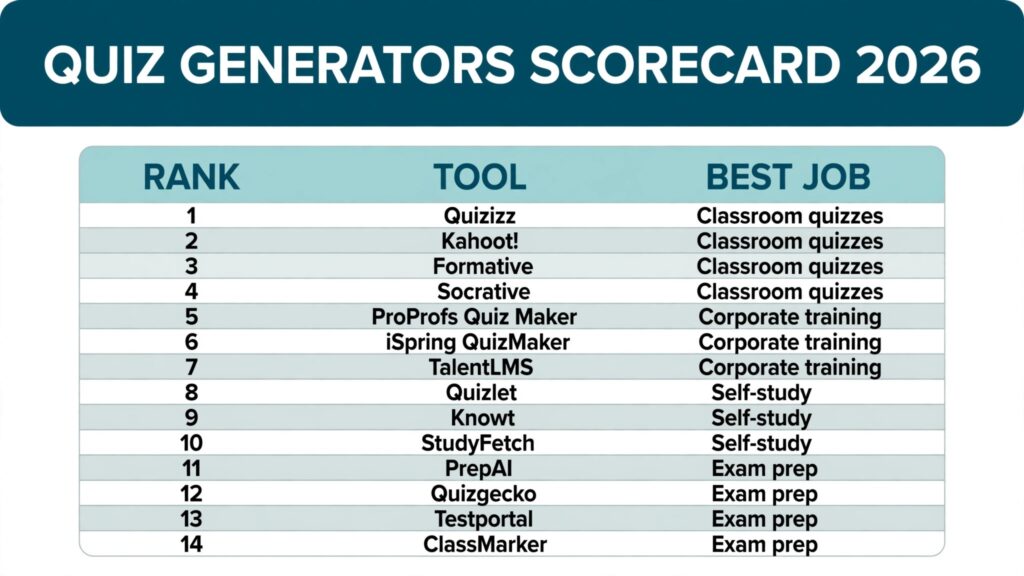
The 14 best AI quiz generators at a glance
| Tool | Best job | Standout strength | Free option |
|---|---|---|---|
| Quizizz | Classroom quizzes | Live games students actually enjoy | Free teacher plan |
| Kahoot! | Classroom quizzes | Whole class energy and competition | Free basic plan |
| Formative | Classroom quizzes | Real time answers as students work | Free teacher plan |
| Socrative | Classroom quizzes | Quick in class checks and exit tickets | Free plan |
| ProProfs Quiz Maker | Corporate training | Compliance tracking and certificates | Free basic plan |
| iSpring QuizMaker | Corporate training | Deep quiz design for course authors | Free trial |
| TalentLMS | Corporate training | Quizzes inside a full training portal | Free small plan |
| Quizlet | Self-study | Flashcards plus practice tests | Free basic plan |
| Knowt | Self-study | Notes to flashcards to quizzes in one flow | Free plan |
| StudyFetch | Self-study | Course material to full study sets | Free basic plan |
| PrepAI | Exam prep | Question papers from long documents | Free trial |
| Quizgecko | Exam prep | Fast quizzes from PDFs and web pages | Free limited plan |
| Testportal | Exam prep | Timed, proctored style assessments | Free trial |
| ClassMarker | Exam prep | Online tests with instant grading | Free trial |
Best pick by job
| Your job | Start here | Why |
|---|---|---|
| Teaching a live class | Quizizz | Game formats keep a full room engaged without extra setup |
| Running a quick whole class review | Kahoot! | Fastest path from question set to a room full of players |
| Checking understanding during a lesson | Formative | You see answers as students type, not after class ends |
| Running a quick in class check | Socrative | Rooms and instant results with almost no setup |
| Training staff and proving completion | ProProfs Quiz Maker | Scores, certificates, and reports in one place |
| Building polished course assessments | iSpring QuizMaker | Branching, scoring rules, and question pools |
| Running all training in one portal | TalentLMS | Quizzes, courses, and learner records together |
| Studying alone from notes | Quizlet | Largest practice library plus your own sets |
| Turning class notes into revision | Knowt | Notes, flashcards, and quizzes share one workspace |
| Revising a whole course at once | StudyFetch | Handles large uploads and builds full study sets |
| Writing formal exam papers | PrepAI | Built for structured papers with marking schemes |
| Making a quiz from a PDF in minutes | Quizgecko | Paste a link or upload a file and go |
| Running timed, high stakes style tests | Testportal | Time limits, random order, and result controls |
| Grading online tests automatically | ClassMarker | Question banks, timers, and instant results |
Classroom quizzes
1. Quizizz
Quizizz turns a question set into a live game, a homework assignment, or a printable worksheet, and that flexibility puts it at the top of most teacher shortlists. Students join with a code, answer at their own pace, and see streaks as they go, which keeps a mixed ability room moving. The AI generator builds questions from a topic, a document, or a web page, and handles multiple choice, fill in the blank, and open ended prompts well.

The reporting is the part teachers keep. After a game you can see which questions the class missed and which topics to reteach, without marking a single paper. The question library is large, so start from a shared set and edit.
Pricing: Free teacher plan with core game modes. Paid school plans add advanced reports and more AI generation. Check checkout for current pricing.
Best for: Teachers who want one tool for live games, homework, and quick checks.
Watch out for: The game layer can distract younger students from the content. Turn memes and music off for serious assessments.
Try it at: quizizz.com
2. Kahoot!
Kahoot! is the loudest tool on this list, and that is a feature, not a flaw. A whole class answering together on a shared screen, with a leaderboard after every question, creates an energy no worksheet matches. For revision lessons it is unbeaten. The AI generator drafts sets from a topic or an uploaded document, and the template library covers most school subjects.
Where Kahoot! is weaker is depth. Questions are built for speed and competition, so they suit recall better than extended reasoning. For a careful end of unit test, build it elsewhere and use Kahoot! for the review session before it.
Pricing: Free basic plan for individual teachers. Paid plans add AI generation limits, question types, and reports. Check checkout for current pricing.
Best for: Whole class revision sessions and fast, high energy reviews.
Watch out for: Speed beats thought in competitive mode. Slow readers and careful thinkers can look weaker than they are.
Try it at: kahoot.com
3. Formative
Formative takes a different approach. Instead of a game, it gives you a live view of student work as it happens. You assign a set, students answer in the browser, and responses appear in real time, so you can step in while a misunderstanding is still fixable. The AI generator creates questions from standards, topics, or uploaded material, and supports drawings, graphs, and short answers alongside multiple choice.
That live view changes how a lesson runs. Rather than discovering after class that half the room missed question four, you see it during class and reteach on the spot.
Pricing: Free teacher plan with core features. Paid plans add advanced question types and school reporting. Check checkout for current pricing.
Best for: Teachers who want to see understanding form during the lesson, not after it.
Watch out for: The interface is quieter than game tools, so it will not carry a tired Friday class on energy alone.
Try it at: formative.com
4. Socrative
Socrative is the quiet workhorse for in class checks. A teacher opens a room, students join with a code, and answers appear live as the class works through multiple choice, true or false, and short answer questions. There is no game layer to manage and no leaderboard to distract, which makes it a good fit for exit tickets, quick polls, and the five minute check at the end of a topic.
The Space Race mode adds light competition for teams, and reports show which students missed which questions, so follow up teaching can be targeted rather than general. Setup is minimal: build a quiz, share a room code, and watch results arrive.
Pricing: Free plan with limits on quizzes and students per room. Paid plans are per teacher per year. Check checkout for current pricing.
Best for: Teachers who want fast formative checks without game mechanics.
Watch out for: The free plan caps the number of quizzes and students per room, so a large class on a busy week will hit the limit. It also has no AI question generation as deep as the dedicated generators on this list, so expect to write or import most questions yourself.
Try it at: socrative.com
Corporate training
5. ProProfs Quiz Maker
ProProfs Quiz Maker is built for the corporate reality that a quiz is rarely just a quiz. It is evidence: a new hire completed safety training, a sales team passed product certification. ProProfs tracks scores, issues certificates, and produces the reports a manager or auditor asks for.
The AI generator drafts questions from text, documents, and topics, and the question bank supports pools, random order, and timed delivery. You can brand the quiz, set pass marks, and require retakes.
Pricing: Free basic plan with limited quizzes. Paid plans add certificates, advanced reports, and integrations. Check checkout for current pricing.
Best for: Compliance, onboarding, and certification quizzes where proof of completion matters. If you are choosing training tools for a whole team, our guide to the best AI tools for HR teams covers the wider stack.
Watch out for: The design looks functional rather than modern. If your brand standards are strict, budget time for styling.
Try it at: proprofs.com
6. iSpring QuizMaker
iSpring QuizMaker is the choice for course authors who care about question design. It supports 14 question types, branching scenarios where the next question depends on the last answer, drag and drop, hotspot images, and detailed scoring rules. The AI assistant drafts questions from text, which you refine in an editor with full control over feedback, penalties, and partial credit.
The trade is that it is a desktop authoring tool first. Output goes to SCORM or HTML5 for a learning platform, which suits professional course builders and is more setup than a teacher making a Friday quiz needs.
Pricing: Free trial. Paid licences are per author, with suite bundles available. Check checkout for current pricing.
Best for: Instructional designers and trainers building polished, scored course assessments.
Watch out for: It assumes you already have a learning platform to host the finished quiz.
Try it at: ispring.com
7. TalentLMS
TalentLMS is not a quiz tool alone. It is a training portal with quizzes built in, and that distinction decides whether it fits. If your company needs courses, learner accounts, progress tracking, and quizzes in one place, buying a standalone generator and wiring it into another system is extra work. TalentLMS covers the whole flow, and its AI tools help draft questions and course content.
Quiz features include question pools, timers, random order, and retake rules, plus reports per learner and per course. The interface is clean enough for non technical managers to run.
Pricing: Free plan for small teams with limited users. Paid plans scale by active user count. Check checkout for current pricing.
Best for: Companies that want training, quizzes, and learner records in one portal.
Watch out for: If you only need quizzes and already have a portal, a standalone tool is cheaper and simpler.
Try it at: talentlms.com
Self-study
8. Quizlet
Quizlet remains the default self-study tool for a reason: the practice library is enormous, and the study modes turn one set of material into flashcards, learn mode, practice tests, and matching games. The AI features generate flashcards and practice questions from notes and textbooks, and the Q-Chat tutor walks through material interactively.
The weakness is community set quality: a set made by a stranger can carry wrong answers. Build your own sets from your own notes for anything that counts.
Pricing: Free basic plan with ads and core study modes. Paid plans add AI features, offline access, and advanced study paths. Check checkout for current pricing.
Best for: Students who want one app for flashcards, practice tests, and revision games.
Watch out for: Community sets are not verified. Check the answer key before trusting a shared set.
Try it at: quizlet.com
9. Knowt
Knowt starts where most study sessions actually start: a pile of class notes. Paste notes or upload slides, and Knowt turns them into flashcards and then into quizzes, keeping everything in one workspace. The quiz generator pulls from your own content, which keeps questions closer to what your teacher actually taught than a generic topic generator manages.
The interface is simple, and the free plan covers a full semester of personal use. Shared sets let a class build a revision bank together.
Pricing: Free plan with core flashcard and quiz features. Paid plans add unlimited AI generation and advanced tools. Check checkout for current pricing.
Best for: Students revising from their own notes who want flashcards and quizzes in one place.
Watch out for: It is built for individual study, not for running a class or tracking a cohort.
Try it at: knowt.com
10. StudyFetch
StudyFetch is aimed at the student facing a whole course at once. Upload lecture slides, PDFs, and notes, and it builds flashcards, quizzes, summaries, and an AI tutor that answers questions about the material. The quiz generator covers multiple choice, true or false, and short answer formats.

Where it earns its place is scale. Most generators handle a page or two comfortably and weaken on a 200 slide deck. StudyFetch is built for the larger upload, and the tutor feature lets a student ask why an answer is right instead of just memorising it. Students working through technical subjects will also find our guide to the best AI tools for learning to code useful.
Pricing: Free basic plan with limited AI generation. Paid plans add unlimited sets, tutor access, and larger uploads. Check checkout for current pricing.
Best for: Students revising large courses who want quizzes, summaries, and a tutor from the same uploads.
Watch out for: Summaries can flatten nuance in technical subjects. Read the source for anything you must get exactly right.
Try it at: studyfetch.com
Exam prep
11. PrepAI
PrepAI is built for formal exam writing rather than casual quizzing. Upload a long document and it generates a structured question paper with sections, marks, and difficulty levels, which suits teachers and trainers who produce term exams, entrance practice papers, and certification mocks. The output exports as a document or PDF, and difficulty controls let you mix easy, medium, and hard questions deliberately.
That formality is the point. A classroom game tool gives you questions; PrepAI gives you a paper with the structure an exam board expects. The trade is setup time: configuring sections and marks takes longer than pasting a topic into a one click generator.
Pricing: Free trial with limited generation. Paid plans scale by question volume and features. Check checkout for current pricing.
Best for: Teachers, trainers, and coaching centres writing structured exam papers and mocks.
Watch out for: Always recheck the marking scheme. Generated marks can mismatch question difficulty.
Try it at: prepai.io
12. Quizgecko
Quizgecko is the fastest tool on this list for turning source material into a quiz. Paste a web page link, upload a PDF, or type a topic, and you get a shareable quiz in under a minute, with multiple choice, true or false, short answer, and fill in the blank formats. That speed makes it the best choice for a tutor who needs a practice set for tomorrow.
The cost of that speed is checking time. Questions from dense or technical material need a careful read through, so budget ten minutes to review a 20 question set before handing it to students.
Pricing: Free limited plan with a small monthly question allowance. Paid plans raise limits and add question types. Check checkout for current pricing.
Best for: Anyone who needs a solid practice quiz from a document in minutes.
Watch out for: Review every answer key. Fast generation and technical sources do not mix safely without a check.
Try it at: quizgecko.com
13. Testportal
Testportal is the closest thing on this list to a real exam hall. It supports timed tests, random question order, question pools, and result controls that let you decide what students see and when. Detailed analytics make it suitable for assessments where fairness matters, such as hiring screens, certification practice, and school exams delivered online.

The interface is more formal than game tools, which suits assessment and not engagement. Students will not call it fun, but they will take it seriously, which for an exam is the right outcome.
Pricing: Free trial. Paid plans scale by respondents and features. Check checkout for current pricing.
Best for: Timed, formal assessments where fairness, order control, and reporting matter.
Watch out for: Setup takes longer than game tools. Test the full flow with a small group before a live exam.
Try it at: testportal.net
14. ClassMarker
ClassMarker is a dedicated online testing platform for schools, trainers, and businesses that need tests graded without manual marking. Build a question bank, set timers and random order, share a link, and results arrive with scores, per question analysis, and certificates where needed. It supports multiple choice, short answer, matching, and other standard formats, and tests can be embedded or delivered as standalone links.
Its strength is the testing workflow rather than question creation. There is no classroom game layer and no study mode, so it suits formal quizzes, hiring screens, and certification practice where the result matters more than the experience.
Pricing: Free trial. Paid plans are by subscription. Check checkout for current pricing.
Best for: Teachers, trainers, and hiring teams running online tests that must be graded fast and fairly.
Watch out for: It is a testing tool, not a study app, so students get no revision modes or practice library. Question creation is manual, so budget writing time for large banks.
Try it at: classmarker.com
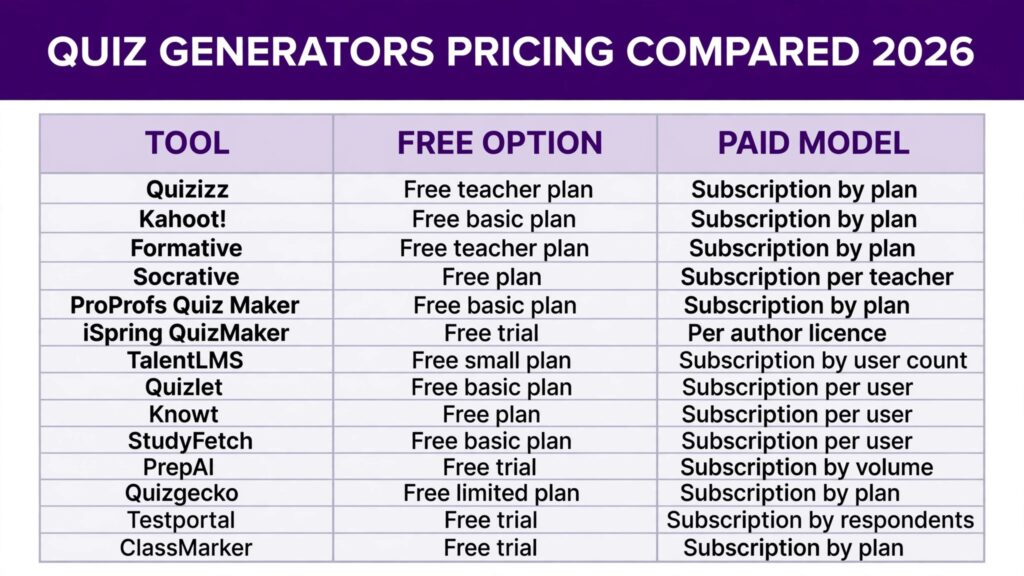
Pricing compared
| Tool | Free option | Paid model | Best value for |
|---|---|---|---|
| Quizizz | Free teacher plan | Subscription, by plan | Classroom teachers |
| Kahoot! | Free basic plan | Subscription, by plan | Whole class reviews |
| Formative | Free teacher plan | Subscription, by plan | Live feedback lessons |
| Socrative | Free plan | Subscription, per teacher | Quick in class checks |
| ProProfs Quiz Maker | Free basic plan | Subscription, by plan | Compliance and certification |
| iSpring QuizMaker | Free trial | Per author licence | Course authors |
| TalentLMS | Free small plan | Subscription, by user count | Company training portals |
| Quizlet | Free basic plan | Subscription, per user | Individual students |
| Knowt | Free plan | Subscription, per user | Note based revision |
| StudyFetch | Free basic plan | Subscription, per user | Full course revision |
| PrepAI | Free trial | Subscription, by volume | Exam paper writers |
| Quizgecko | Free limited plan | Subscription, by plan | Fast document quizzes |
| Testportal | Free trial | Subscription, by respondents | Formal assessments |
| ClassMarker | Free trial | Subscription, by plan | Online tests with grading |
Prices change, and several vendors price by seats, school size, or question volume rather than a single headline figure. Treat this table as a shape of the market, not a quote, and check checkout before budgeting. The cheapest honest stack for a teacher is a free plan on Quizizz or Formative plus Quizlet free for revision. For a small company it is ProProfs free or TalentLMS free until headcount forces a paid plan.
How to Choose
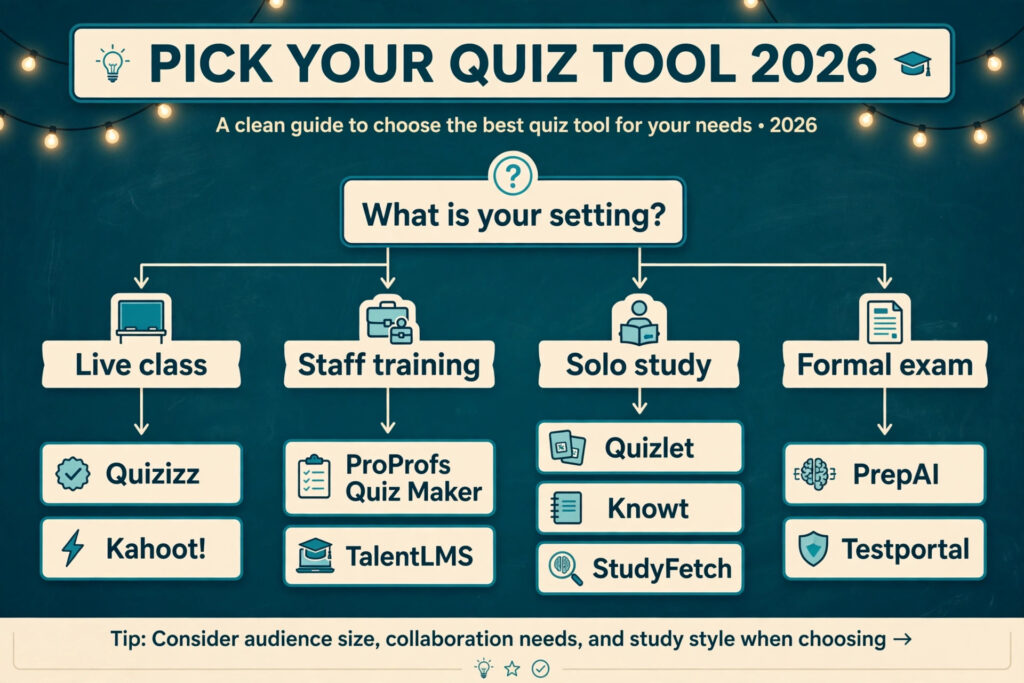
Start with the room, not the tool. A classroom of 30 teenagers, a cohort of new hires, and a student alone at a desk are three different products wearing the same name. Answer four questions before you compare features.
First, who takes the quiz and where? Live in a room points to Quizizz or Kahoot!. Alone at home points to Quizlet, Knowt, or StudyFetch. Under exam conditions points to Testportal or PrepAI.
Second, what happens to the score? If nobody needs a record, any tool works. If a manager, auditor, or exam board needs proof, you need ProProfs, TalentLMS, or Testportal.
Third, where does the content come from? If you write topics from scratch, any generator works. If you have PDFs, slides, or long documents, shortlist Quizgecko, StudyFetch, and PrepAI, and test each with your actual material before paying.
Fourth, run the answer key test on your own material. Generate ten questions, then count wrong answers, ambiguous wording, and questions a student can answer without reading the source. Eight clean out of ten is a pass. Do this test in the free plan before any purchase, and repeat it on a technical chapter, not just an easy one.
Finally, check export before you commit. A quiz locked inside one app is a quiz you rebuild next year. Confirm the format your school or company accepts: PDF, document, SCORM, or learning platform export.
Mistakes to avoid
Publishing the answer key unchecked. This is the most common and most damaging mistake. One wrong answer in a graded quiz undermines trust in the whole set, and students remember it longer than the lesson. Check every key, every time, even from tools you trust.
Judging a tool on easy material. Generators look brilliant on general knowledge topics and weaker on your actual syllabus. Test with your hardest chapter, your densest PDF, and your most technical vocabulary before deciding.
Choosing game energy over learning goals. A loud, competitive quiz feels successful and can teach little. Match the format to the goal: games for revision, quiet formats for assessment, live feedback for teaching moments.
Letting students guess their way to a pass. Four option questions with one obviously wrong answer and two joke answers are a coin flip, not an assessment. Use plausible distractors, vary correct answer positions, and mix in short answer or fill in the blank formats.
Ignoring reading level. A generator pitched at adult level will confuse younger students, and one pitched too low will bore older ones. Check the wording of five questions against your students before rolling a set out to a full class.
Buying before testing with real students. A tool that impresses in a demo can fail on your network, your devices, or your students. Run one real quiz with one real group on the free plan first.
FAQs
Are AI generated quizzes accurate enough for graded work?
They can be, after checking. The generator drafts, the teacher verifies. Treat every answer key as a draft until you have read it, and never grade from an unchecked set. For high stakes exams, add a second reviewer.
Can I generate quizzes from my own documents?
Yes, on most tools here. Quizgecko, StudyFetch, PrepAI, and Knowt all accept uploads or pasted text. Quality depends on the source: clean, structured documents produce better questions than scanned images or messy slides.
Which quiz generator is best for teachers on a tight budget?
Quizizz and Formative, because their free teacher plans cover live games, homework, and live feedback without a subscription. Quizlet free covers the student revision side. Start free and pay only when you hit a limit you actually feel.
Do these tools stop students cheating?
No tool stops cheating completely. Timers, random order, and question pools on Testportal and ProProfs raise the effort required, and open ended questions are harder to copy than multiple choice. For work that truly counts, supervised conditions matter more than software settings.
Can quiz generators handle subjects like maths and science?
Partly. They handle definitions, facts, and concept checks well. Multi step problems, diagrams, and calculations need tools with equation and image support, such as Formative or iSpring, and even then you should verify every worked answer by hand.
Should students use quiz generators for self-study?
Yes, with one rule: generate from your own notes, not from a generic topic. A quiz built from your course material tests what you will actually be examined on. A generic quiz tests what the internet thinks your subject contains, which is a different thing.
Conclusion
The right quiz generator is the one that passes the answer key test on your material, fits the room where the quiz happens, and leaves a record when a record is needed. For most teachers that means Quizizz or Formative for classwork, with Quizlet free for student revision. For companies it means ProProfs or TalentLMS, because completion evidence is the job. For exam writers it means PrepAI or Testportal, because structure and control matter more than speed.
Whichever tool you shortlist, run the same test before paying: ten questions from your hardest material, counted for wrong answers, ambiguous wording, and guessable options. Eight clean out of ten is the bar. A tool that clears it saves real hours every week. One that does not costs more time in checking than it ever saved in writing.