

The best AI meal planning tools in 2026 are not the ones that generate the prettiest weekly menu. They are the ones that survive a real week: a skipped cooking night, a half empty fridge, a child who refuses Tuesday dinner, and a grocery run that has to stay under budget. Most meal planning apps fail that test. They produce a beautiful plan on Sunday and fall apart by Wednesday, when the plan calls for an ingredient you do not own and a recipe that takes 50 minutes on a night you have 20.
That gap is why this guide judges tools differently. Instead of asking which app has the most recipes, we ask which one turns a plan into food on the table with the least extra work. A good tool should do four things well: build a plan around what you actually eat, adjust for diet goals and portion sizes, turn the plan into a grocery list without duplicates, and reuse leftovers instead of letting them rot. The 13 tools below were picked because each one is genuinely strong at one of those jobs, and each one is honest about where it stops.
Prices are October 2026 figures in US dollars. Where a vendor does not publish a single headline price, or prices vary by plan and region, the pricing line says check checkout rather than guessing a number you would find wrong at payment.
The 13 best AI meal planning tools at a glance
| Tool | Best job | Free option | Best for |
|---|---|---|---|
| Mealime | Weekly planning | Yes | Busy cooks who want fast weeknight meals |
| Plan to Eat | Weekly planning | Trial | Planners who collect recipes from anywhere |
| Paprika Recipe Manager | Weekly planning | Trial | Cooks with a large personal recipe library |
| Eat This Much | Diet and health goals | Yes | Calorie and macro targets without guesswork |
| Lifesum | Diet and health goals | Yes | Habit tracking alongside meal plans |
| Lose It! | Diet and health goals | Yes | Simple calorie counting tied to a plan |
| AnyList | Grocery lists | Yes | Shared household shopping lists |
| Bring! | Grocery lists | Yes | Couples and families who shop together |
| Samsung Food | Grocery lists | Yes | Pantry first planning from what you own |
| Yummly | Family cooking | Yes | Families with picky eaters and varied tastes |
| SideChef | Family cooking | Yes | Step by step cooking guidance for beginners |
| Cozi | Family cooking | Yes | Whole household schedules plus meals |
| PlateJoy | Family cooking | Trial | Personalised plans built around diets and allergies |

Start here: match your week to the tool
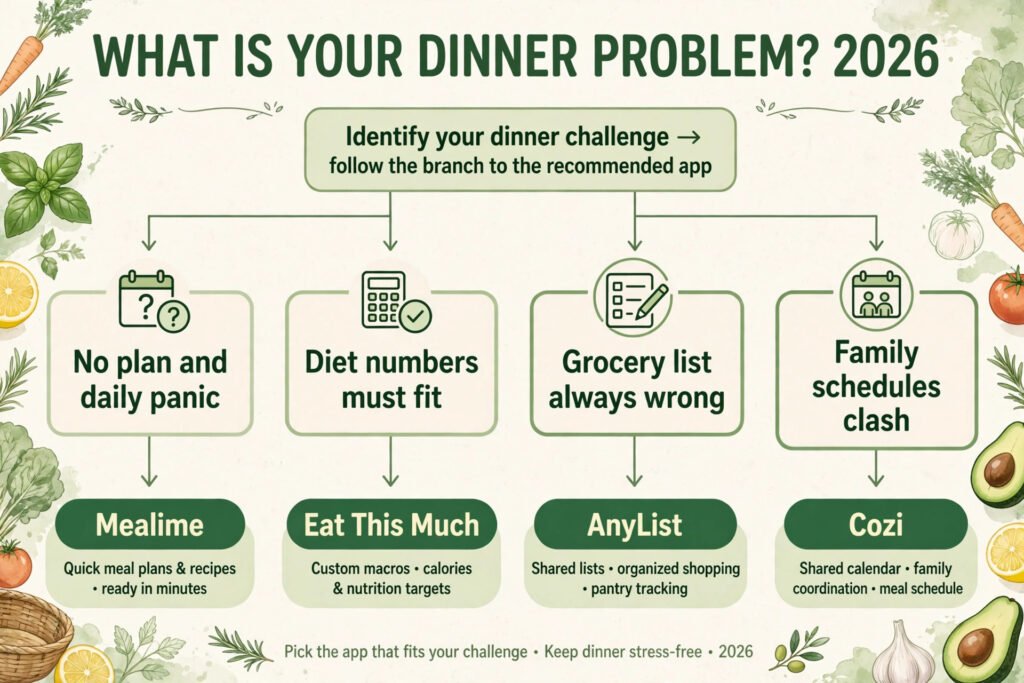
| Your biggest problem | Start with |
|---|---|
| You have no plan and dinner is a daily panic | Mealime |
| You already save recipes everywhere and need one place for them | Plan to Eat |
| You track calories or macros and the plan must fit the numbers | Eat This Much |
| The grocery list is always wrong, duplicated, or forgotten | AnyList |
| You cook for a family with different tastes and schedules | Yummly or Cozi |
Best pick by job
| Job | Best pick | Runner up |
|---|---|---|
| Fastest weeknight planning | Mealime | Eat This Much |
| Recipe collection and planning | Plan to Eat | Paprika Recipe Manager |
| Diet goals with exact targets | Eat This Much | Lifesum |
| Shared grocery lists | AnyList | Bring! |
| Family cooking and scheduling | Cozi | Yummly |
| Personalised plans for diets and allergies | PlateJoy | Eat This Much |
Weekly planning
1. Mealime
Mealime builds a weekly plan in minutes from your diet, dislikes, and serving size, then turns it into a grocery list grouped by store section. Its strength is speed. Most plans lean on meals that cook in 30 minutes or less, which is exactly what a weeknight needs. The recipe library is smaller than some rivals, and adventurous cooks may repeat meals sooner, but for the core job of answering “what is for dinner” five nights a week, it is hard to beat.
Pricing: Free tier with a solid set of recipes; paid subscription unlocks the full library and more plan options. Check checkout for the current price.
Best for: Busy cooks who want a plan without spending Sunday afternoon building one.
Watch out for: Limited recipes for very niche diets, and plans can feel repetitive after a few months.
Try it at: mealime.com

2. Plan to Eat
Plan to Eat is a planner first and a recipe app second. You import recipes from any website, drag them onto a calendar, and the shopping list builds itself from the plan. That import freedom is its superpower. If you already collect recipes from blogs, magazines, and family notes, this is the tool that finally puts them in one working system. It does not generate AI meal plans from scratch the way Mealime does, so it suits people who like choosing their own meals and want the admin handled.
Pricing: Free trial, then a paid subscription. Check checkout for the current price.
Best for: Planners who want full control over the menu and a list that follows it.
Watch out for: No built in AI plan generation, and the interface looks plain next to newer apps.
Try it at: plantoeat.com
3. Paprika Recipe Manager
Paprika is the librarian of meal planning tools. It saves recipes from the web, scales servings up or down, converts units, and builds grocery lists and meal plans from your own collection. Long term cooks with hundreds of saved recipes will appreciate how fast search and scaling feel. It is a one time purchase per platform rather than a subscription, which changes the value math in its favour over a year or two.
Pricing: One time purchase per platform, with a free trial on some platforms. Check checkout for the current price.
Best for: Cooks with a large personal recipe library who want it organised and usable.
Watch out for: No AI generated plans, and syncing across devices requires buying each platform version.
Try it at: paprikaapp.com
Diet and health goals
4. Eat This Much
Eat This Much is the most numbers honest tool in this guide. You set a calorie target, a diet style, and a budget, and it generates a full day or week of meals that hit the numbers, with a grocery list to match. It handles keto, vegan, vegetarian, paleo, and Mediterranean styles without forcing you into one philosophy. The meals are practical rather than glamorous, and that is the point: a plan you can actually eat for six weeks beats a beautiful plan you abandon in six days.
Pricing: Free tier with limited plans; paid subscription unlocks full customisation and longer plans. Check checkout for the current price.
Best for: Anyone whose plan must fit a calorie or macro target, not just a vague idea of healthy eating.
Watch out for: Generated meals can repeat, and portion sizes need checking against your own hunger and activity.
Try it at: eatthismuch.com
5. Lifesum
Lifesum pairs meal planning with habit tracking, so the plan sits next to water intake, exercise, and weight trends in one view. Its meal plans are built around diet styles and goals, and the food diary is one of the easiest to use in this list. That matters because the plan that gets logged is the plan that gets followed. Lifesum is less strong on grocery list detail than AnyList or Mealime, so many users pair it with a dedicated list app.
Pricing: Free tier with basic tracking; paid subscription unlocks full meal plans and detailed nutrition. Check checkout for the current price.
Best for: People who want diet goals, habits, and plans in one app rather than three.
Watch out for: Grocery lists are basic, and some features vary by region.
Try it at: lifesum.com
6. Lose It!
Lose It! starts from calorie counting and builds meal plans around a daily budget, with barcode scanning and a huge food database for logging what you actually ate. That feedback loop is its real value: the plan says what to eat, the log shows what happened, and the gap between them is visible instead of hidden. It is simpler than Lifesum on habit features, which some users prefer and others will find thin.
Pricing: Free tier with core tracking; paid subscription unlocks meal planning and advanced features. Check checkout for the current price.
Best for: Simple calorie counting tied to a plan, with fast food logging.
Watch out for: Meal plans are less varied than Eat This Much, and the free tier shows ads.
Try it at: loseit.com
Grocery lists
7. AnyList
AnyList is the best shared grocery list in this guide, and it earns its place here because a meal plan is only as good as its list. Lists sync instantly between household members, items sort by store aisle, and recipes can be imported so ingredients flow straight onto the list. It also handles meal planning itself, though its planning features are lighter than Mealime or Plan to Eat. For a household where two people shop, AnyList removes the classic failure of buying what is already in the fridge.
Pricing: Free tier with full lists; paid subscription adds meal planning extras and more recipe features. Check checkout for the current price.
Best for: Households that share shopping and want one list everyone trusts.
Watch out for: Meal planning is secondary, so pair it with a planner if you want generated plans.
Try it at: anylist.com

8. Bring!
Bring! is built for couples and families who shop together, with shared lists, recipe inspiration, and a clean design that works well on a phone in a store aisle. Adding items is fast, and the shared view means nobody buys duplicates. It is lighter on planning depth than AnyList, but for the job of “we both shop, one list, no confusion” it is excellent, and the price of the free tier makes it easy to try with a partner.
Pricing: Free tier with core lists; paid options add extra features. Check checkout for the current price.
Best for: Couples and families who want a simple shared list that just works.
Watch out for: Limited meal planning features and a smaller recipe library than rivals.
Try it at: getbring.com
9. Samsung Food
Samsung Food, formerly Whisk, takes a pantry first approach: it builds plans and lists from ingredients you already own, which cuts waste and saves money. You can save recipes from anywhere, plan meals, and generate a list that skips what is already in your pantry. Its recipe discovery is broad, and the pantry logic is genuinely useful for anyone tired of buying a third bottle of the same spice. The app carries Samsung branding but works on any phone.
Pricing: Free tier with core planning and lists; paid subscription unlocks premium features. Check checkout for the current price.
Best for: Cooks who want to use what they own before buying more.
Watch out for: Pantry tracking needs regular updating, or the lists drift from reality.
Try it at: samsungfood.com
Family cooking
10. Yummly
Yummly is the family friendly end of meal planning. Its recommendation engine learns tastes, allergies, and dislikes, then suggests recipes and plans that fit the whole table, including picky eaters. Filters for diet, allergy, cuisine, and cooking time are strong, and the guided cooking mode walks through steps on screen. The trade off is that the best features sit behind a subscription, and the free tier is more of a recipe browser than a full planner.
Pricing: Free tier with recipe discovery; paid subscription unlocks full meal planning and guided cooking. Check checkout for the current price.
Best for: Families with varied tastes, allergies, or picky eaters who need plans everyone can eat.
Watch out for: Full planning requires the paid tier, and recommendations improve only with regular use.
Try it at: yummly.com
11. SideChef
SideChef is the teaching tool in this list. Its step by step guided cooking, with photos, timers, and voice guidance, makes it the best pick for beginners or for anyone cooking a new cuisine for the first time. Meal plans are built around skill level and diet, and the grocery list follows the plan. Experienced cooks may find the hand holding slow, but for a household where confidence is the barrier, SideChef removes it better than any rival here.
Pricing: Free tier with guided recipes; paid subscription unlocks full meal plans and premium content. Check checkout for the current price.
Best for: Beginner cooks and anyone learning new dishes with guided steps.
Watch out for: Guided mode can feel slow for experienced cooks, and the plan library is smaller than Mealime.
Try it at: sidechef.com
12. Cozi
Cozi is not a meal planning app first. It is a family organiser with calendars, to do lists, and shopping lists, and its meal planner sits inside that system. That is exactly why it belongs here. Dinner fails most often because of scheduling, not recipes: a late practice, a work trip, a night nobody is home. Cozi puts the meal plan next to the family calendar, so the plan for Thursday reflects who is actually eating on Thursday. Pair it with a recipe app if you want generated plans, but for household coordination it is unmatched in this guide.
Pricing: Free tier with core family features; paid subscription removes ads and adds extras. Check checkout for the current price.
Best for: Families whose main problem is scheduling, not finding recipes.
Watch out for: No AI generated meal plans, and the design is functional rather than pretty.
Try it at: cozi.com

13. PlateJoy
PlateJoy builds a personalised meal plan from your diet, allergies, household size, and cooking time, then turns it into a grocery list that skips ingredients you already own. Recipes are designed by nutritionists, with full nutrition information for each meal, and the plan covers breakfast, lunch, dinner, snacks, and desserts rather than dinner alone. Grocery lists can be sent to a delivery service where available, which suits households that shop online.
Pricing: Paid subscription with a free trial. Check checkout for the current monthly and annual rates.
Best for: Households with mixed diets or allergies who want one plan that fits everyone at the table.
Watch out for: You cannot add your own recipes, so cooks with a large personal collection will still need a second app for those dishes.
Try it at: platejoy.com
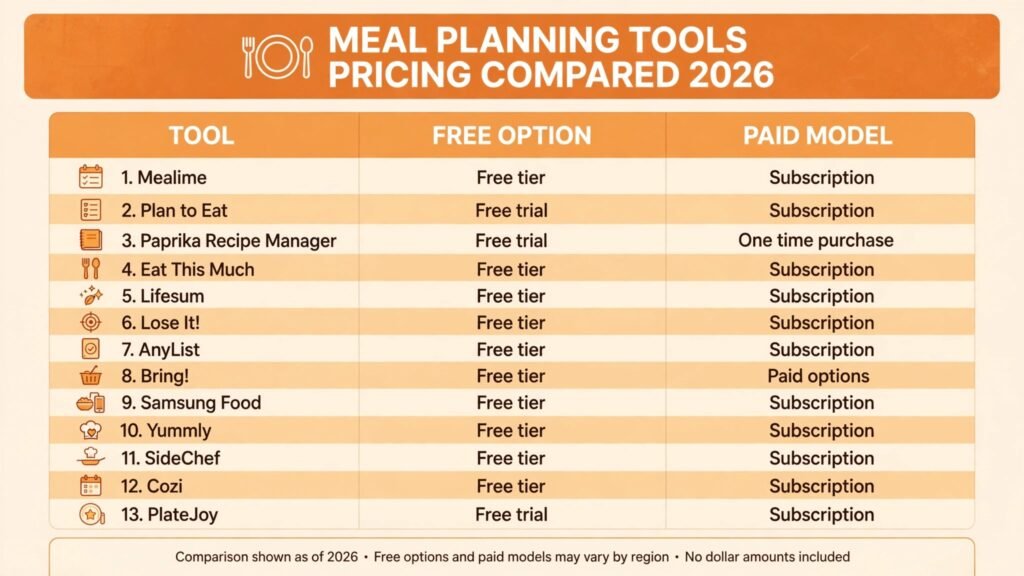
Pricing compared
| Tool | Free option | Paid model |
|---|---|---|
| Mealime | Free tier | Subscription, check checkout |
| Plan to Eat | Free trial | Subscription, check checkout |
| Paprika Recipe Manager | Free trial on some platforms | One time purchase per platform, check checkout |
| Eat This Much | Free tier | Subscription, check checkout |
| Lifesum | Free tier | Subscription, check checkout |
| Lose It! | Free tier | Subscription, check checkout |
| AnyList | Free tier | Subscription, check checkout |
| Bring! | Free tier | Paid options, check checkout |
| Samsung Food | Free tier | Subscription, check checkout |
| Yummly | Free tier | Subscription, check checkout |
| SideChef | Free tier | Subscription, check checkout |
| Cozi | Free tier | Subscription, check checkout |
| PlateJoy | Free trial | Subscription, check checkout |
The honest total cost note: most of these tools cost less than one wasted grocery trip a month, but two overlapping subscriptions quickly erase that saving. Pick one planner and one list app at most, and cancel the rest after the trial week. Paprika is the exception worth noting, since a one time purchase can be cheaper over two years than any subscription on this list.
How to Choose
Start with the Tuesday test, not the feature list. Pick your two finalists and run each for one real week. On Tuesday night, ask three questions. Did the plan give you a meal you could cook in the time you actually had? Did the grocery list match what you bought, with no duplicates and no missing staples? Did anyone at the table refuse the meal, and if so, could the tool have known that in advance? The tool that passes all three is your tool, whatever its ranking here.
Next, match the tool to your real bottleneck. If dinner planning itself is the problem, start with Mealime or Eat This Much. If you already know what you like to cook and the chaos is in lists and leftovers, start with Plan to Eat, AnyList, or Samsung Food. If diet numbers matter, nothing beats a tool that shows calories and macros before you cook, not after. If family scheduling is the real issue, Cozi next to the calendar will do more than any recipe library.
Finally, check the exit cost before you commit. Can you export your recipes and lists if you cancel? Paprika and Plan to Eat make this easy. Some subscription apps make it harder. A year of saved recipes is worth more than a month of free premium features, so favour tools that let your collection leave with you.
For writers and small teams who also plan content around food topics, our guide to the best AI tools for freelance writers covers a different kind of planning workflow, and teams hiring help with household or business admin may find the best AI tools for HR teams useful for a different reason. Neither link is forced into a tool section; both sit here as related reading for readers whose planning problem extends past the kitchen.
Mistakes to avoid
Buying for the demo week. Every tool looks great with a fresh pantry and a free weekend. Judge it on a normal week with work, tired evenings, and a half empty fridge, because that is the week it has to serve.
Ignoring portion sizes. A plan that fits your calorie target at two servings will not fit it at four. Check serving sizes in the first week, especially in Eat This Much, Lifesum, and Lose It!, where the numbers only work if the portions match reality.
Keeping two planners at once. A plan in Mealime and a list in another app that never syncs is worse than no plan at all. Pick one system of record for the menu and one for the list, and make them talk to each other or accept the manual step honestly.
Trusting generated plans without a taste check. AI plans can repeat ingredients, ignore a dislike you forgot to enter, or suggest a 50 minute recipe on a 20 minute night. Edit the first two weeks actively. The tool learns from your edits, but only if you make them.
Forgetting leftovers. The cheapest meal of the week is the one you already cooked. Tools like Samsung Food that plan from the pantry, and planners that let you schedule a leftovers night, save more money than any premium feature.
Skipping the grocery list check. A list that is never reviewed before the shop will duplicate staples and miss the one ingredient the plan depends on. Spend two minutes checking the list against the pantry before every shop. That habit matters more than which list app you use.
Frequently asked questions
What is the best AI meal planning tool overall?
For most households, Mealime is the best starting point because it produces a usable weeknight plan and grocery list in minutes. If diet numbers matter most, start with Eat This Much instead, and if shared lists are the main problem, start with AnyList.
Can AI meal planning tools handle allergies and diets?
Yes, within limits. All 13 tools in this guide support diet filters or allergy notes, but you should still read every generated recipe before cooking for someone with a serious allergy. Filters reduce risk, they do not remove it.
Do I need a paid subscription to plan meals?
No. Every tool here has a free tier or trial, and a free tier plus a shared list app covers most households. Pay only when you need full plan generation, guided cooking, or advanced nutrition detail.
How much time does meal planning actually save?
A realistic saving is 30 to 60 minutes a week on planning and one avoided impulse shop, once the tool knows your tastes. The first two weeks save less, because setup and taste tuning take time. Judge the tool after week three, not week one.
What is the best meal planning tool for families?
Cozi wins on scheduling, because the meal plan sits next to the family calendar. Yummly wins on pleasing varied tastes at one table. Many families use both: Cozi for the schedule, Yummly for the recipes.
Can I use these tools without a smart fridge or smart kitchen?
Yes. None of the 13 tools requires smart appliances. They all work with a phone, a grocery list, and a normal kitchen. Smart features are optional extras, not requirements.
Conclusion
The best AI meal planning tools in 2026 do not win by generating the most recipes. They win by surviving a real week: fast plans for tired nights, lists that match the shop, numbers that fit your diet, and schedules that reflect who is actually home for dinner. Start with the Tuesday test, pick one planner and one list app, and give the winner three weeks before judging it. Mealime is the safest first pick for busy cooks, Eat This Much is the pick for exact diet targets, AnyList is the pick for shared shopping, and Cozi is the pick when family scheduling is the real problem. Whichever you choose, the goal is the same: fewer decisions at 6pm, less food wasted, and a plan that still works on Wednesday.