

The best AI travel planning tools in 2026 are not the ones that produce the prettiest day by day itinerary. They are the ones whose plan still works at the airport, when a flight moves, a hotel cannot find the booking, or the daily budget is already gone by lunch. That is the test this guide uses. Every tool below was judged on one question: when the trip stops going to plan, does it give you a clear next step, or does it just give you a nicer document to stare at?
Most trip planning fails in the same three places. First, the itinerary lives in five different apps, so nobody can answer the simple question of where you are supposed to be at 4pm. Second, the flight and hotel prices you planned around were from a different week, so the budget was fiction before you left. Third, nobody tracked spending day by day, so the shortfall only shows up at the end of the trip, when it is too late to fix. The tools that earn their place here fix at least one of those three failures properly, and say plainly what they do not do.
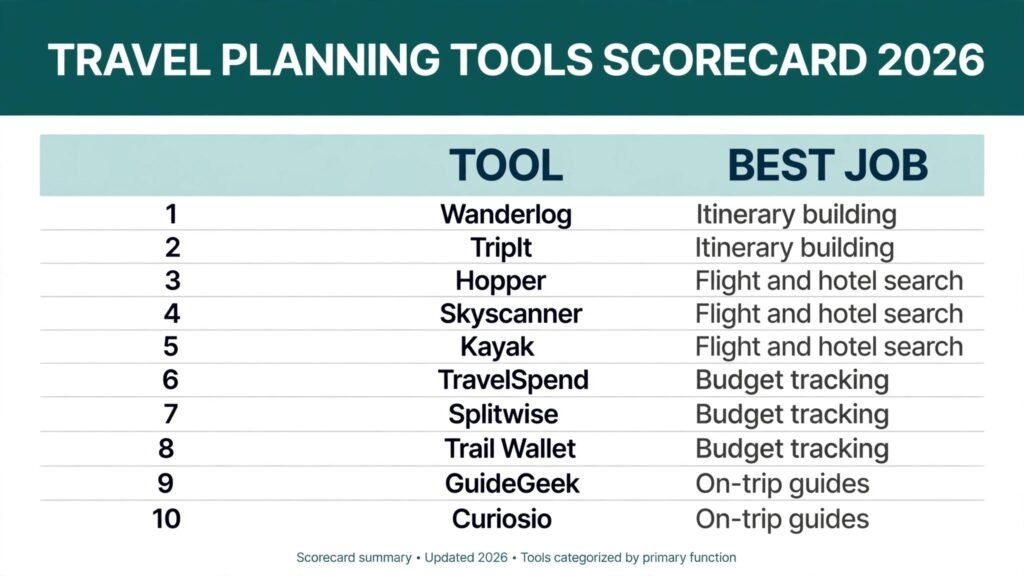
The 10 best AI travel planning tools at a glance
| Tool | Best job | Free option |
|---|---|---|
| Wanderlog | Itinerary building | Free plan |
| TripIt | Itinerary building | Free plan |
| Hopper | Flight and hotel search | Free app |
| Skyscanner | Flight and hotel search | Free search |
| Kayak | Flight and hotel search | Free search |
| TravelSpend | Budget tracking | Free plan |
| Splitwise | Budget tracking | Free plan |
| Trail Wallet | Budget tracking | Free trial |
| GuideGeek | On-trip guides | Free chat |
| Curiosio | On-trip guides | Free plan |
Pick by the job, not by the brand
| Your situation | Start here |
|---|---|
| You are planning a multi-stop trip with other people | Wanderlog |
| Your bookings already exist and you need one master plan | TripIt |
| You can shift dates and want the cheapest window | Hopper or Skyscanner |
| You want to compare flights, hotels and cars in one search | Kayak |
| You need to see daily spend before it runs away | TravelSpend |
| You are splitting costs with friends or family | Splitwise |
| You want a guide in your pocket while you walk around | GuideGeek |
| You are driving and want stops worth the detour | Curiosio |
Itinerary building
1. Wanderlog

Wanderlog turns a scattered trip into one shared plan. You add places, and it plots them on a map, orders them sensibly by location, and keeps reservations, notes and links in the same place. The group features are the real point: everyone on the trip sees the same plan, votes on options, and splits costs without a separate spreadsheet.
Pricing: free plan covers the core planner and maps. A paid Pro plan adds offline access and extra features. Check checkout for the current price.
Best for: multi-stop trips planned with friends or family, especially road trips where the order of stops matters.
Watch out for: it plans well but does not book anything for you. Flights and hotels still need a separate booking step, so keep your confirmation emails until everything is in the plan.
Try it at: https://wanderlog.com
2. TripIt
TripIt does the least glamorous job on this list, and it may be the most useful. Forward your flight, hotel, car and restaurant confirmations to TripIt, and it builds a single master itinerary automatically. No retyping, no hunting through email at check-in. The paid version adds real time flight alerts, seat tracking and refund monitoring.
Pricing: free plan covers automatic itinerary building. TripIt Pro is a yearly subscription. Check checkout for the current price.
Best for: travellers who already have bookings and want one reliable place to find them, especially frequent flyers.
Watch out for: TripIt organises what you already booked. It will not suggest where to go or build a trip from scratch, so pair it with a planning tool if you are starting from a blank page.
Try it at: https://www.tripit.com
Flight and hotel search
3. Hopper
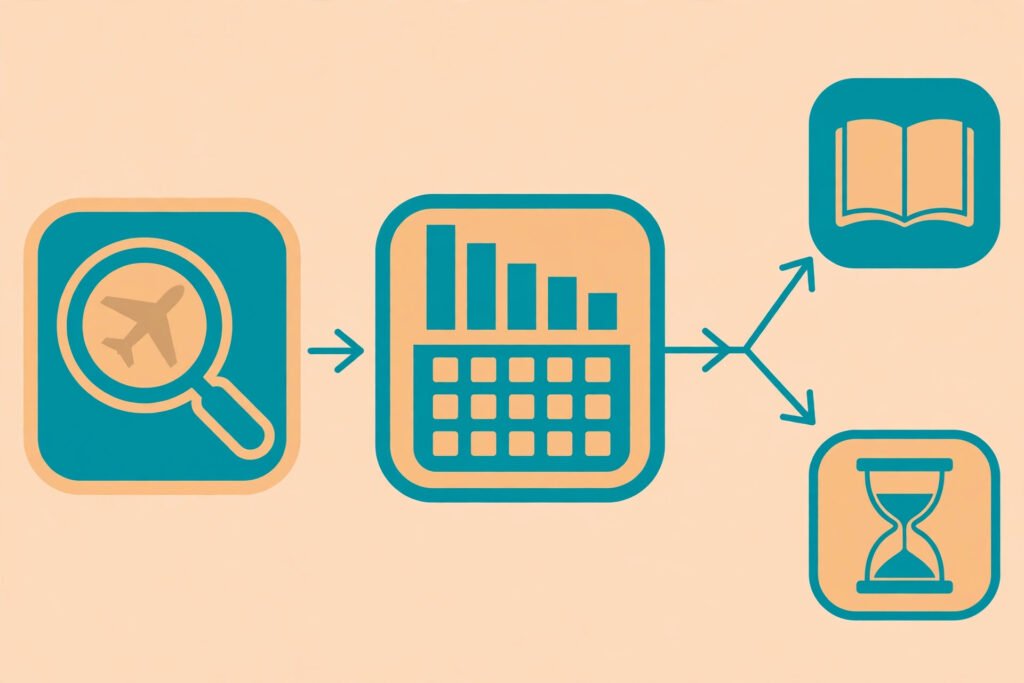
Hopper predicts whether flight and hotel prices will rise or fall, and tells you whether to book now or wait. Its calendar view shows the cheapest days to fly at a glance, which matters more than any single fare: shifting a trip by two days often saves more than any discount code. Price freeze and flexible ticket options add a safety net for travellers whose dates might move.
Pricing: free app with fare predictions. Price freeze and related protections are paid add-ons. Check checkout for the current price.
Best for: flexible travellers who can shift dates by a few days and want a clear book or wait answer.
Watch out for: predictions are probabilities, not promises. A “wait” recommendation that turns out wrong costs real money, so set a personal ceiling price in advance and book when the fare hits it, whatever the app says.
Try it at: https://www.hopper.com
4. Skyscanner
Skyscanner searches flights, hotels and car hire across airlines, agencies and booking sites, and its “Everywhere” search and cheapest month view are built for travellers with a budget but no fixed destination. It is a comparison tool, not a seller, which keeps the search honest: you see the same route priced across many sellers before you choose where to book.
Pricing: free to search. Skyscanner does not charge for searches; you pay the airline, hotel or agency you book with. Check checkout for the final price.
Best for: open ended trip planning, comparing the same route across sellers, and finding the cheapest month to travel.
Watch out for: the cheapest result is sometimes a third party seller with strict change rules. Read the baggage and cancellation terms before booking through an unfamiliar agency, and compare the airline direct price too.
Try it at: https://www.skyscanner.com
5. Kayak
Kayak compares flights, hotels, cars and packages in one search, and its price forecast and fare alerts add timing advice on top of comparison. The hotel side is stronger than most flight only tools, with filters for cancellation policy and total price including fees, which is where hotel comparisons usually mislead.
Pricing: free to search. You pay the provider you book with. Check checkout for the final price.
Best for: travellers who want one search across flights, hotels and cars, and who care about the total price rather than the headline nightly rate.
Watch out for: package deals can hide weak links, such as a hotel far from where you actually want to be. Price the parts separately before accepting a bundle that looks cheaper.
Try it at: https://www.kayak.com
Budget tracking
6. TravelSpend

TravelSpend is built for one job: telling you what you have spent today, and what that leaves for the rest of the trip. You log expenses in the local currency, it converts them, and the daily total sits next to your remaining budget. That daily view is what most travel budgets lack. A trip budget checked once at the end is a postmortem; a budget checked each evening is a steering wheel.
Pricing: free plan covers expense tracking and currency conversion. A paid version adds extra features. Check checkout for the current price.
Best for: solo travellers and couples who want a simple daily spend check without a full accounting app.
Watch out for: it only works if you log spending the same day. Set a fixed habit, such as logging every expense right after dinner, or the data goes stale and the budget view becomes guesswork.
Try it at: https://travelspend.com
7. Splitwise
Splitwise answers the question that ruins group trips: who owes whom, and how much. Everyone logs what they paid, Splitwise tracks the balances, and at the end it settles up with the fewest payments. It handles uneven splits, shared and personal expenses, and multiple currencies, which covers most real group trip situations.
Pricing: free plan covers expense tracking and settling up. Splitwise Pro is a subscription. Check checkout for the current price.
Best for: group trips, shared houses, and any trip where three or more people pay for each other.
Watch out for: agree the rules before the trip, not during it. Decide what counts as shared, how tips are handled, and who logs expenses, or the app will faithfully track a disagreement instead of preventing one.
Try it at: https://www.splitwise.com
8. Trail Wallet
Trail Wallet is a lightweight travel expense tracker with a clear trip budget view: set a daily budget, log expenses as you go, and see at a glance whether you are ahead or behind. It supports multiple currencies and works offline, which matters when you are out of signal and still spending.
Pricing: free trial covers basic tracking. A paid version unlocks full features. Check checkout for the current price.
Best for: travellers who want a minimal, fast expense log and a daily budget number, without the weight of a finance app.
Watch out for: it tracks spending, it does not plan it. Set the trip budget before you leave, based on real accommodation and transport costs, or the daily number will look reassuring while the total quietly grows.
Try it at: https://trailwallet.com
On-trip guides
9. GuideGeek

GuideGeek is an AI travel assistant that answers questions by chat message, built for the moment you are standing somewhere and need an answer now: where to eat near this museum, how to get to the station, whether this market is open today. It works through messaging apps, so there is nothing new to install and learn while travelling.
Pricing: free to chat. Check the service for any paid features before relying on them on a trip.
Best for: travellers who want quick, conversational answers on the move, especially for food, transport and opening hours.
Watch out for: verify anything that costs money or closes a day: restaurant hours, ticket prices and last entry times change often. Treat chat answers as a starting point, then confirm with the venue before walking across town.
Try it at: https://guidegeek.com
10. Curiosio
Curiosio plans road trips and multi-stop journeys, with a map based planner that suggests interesting stops along your route rather than just the fastest line between two points. Tell it where you are starting, where you are ending, and what you like, and it finds detours worth taking, with estimated driving times so you can judge whether a stop fits the day.
Pricing: free plan covers basic road trip planning. Check checkout for any paid features.
Best for: road trips and driving holidays, where the stops along the way are half the trip.
Watch out for: driving times are estimates. Add a buffer for fuel, food, roadworks and the stop you did not plan but will want anyway, or the last leg of the day becomes a rush.
Try it at: https://curiosio.com
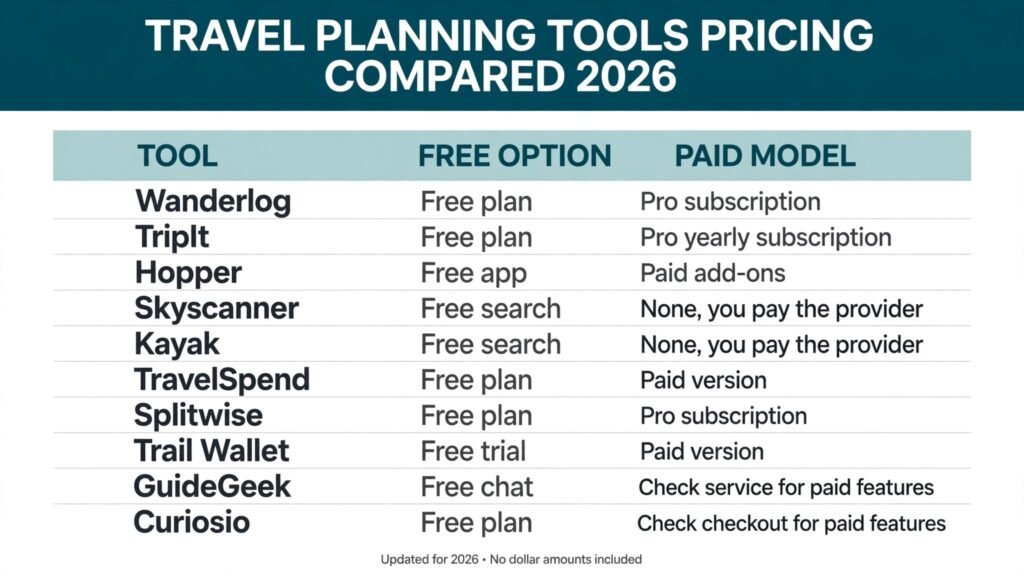
Pricing compared
| Tool | Free option | Paid model |
|---|---|---|
| Wanderlog | Free plan | Pro subscription, check checkout |
| TripIt | Free plan | Pro yearly subscription, check checkout |
| Hopper | Free app | Paid add-ons, check checkout |
| Skyscanner | Free search | None, you pay the provider |
| Kayak | Free search | None, you pay the provider |
| TravelSpend | Free plan | Paid version, check checkout |
| Splitwise | Free plan | Pro subscription, check checkout |
| Trail Wallet | Free trial | Paid version, check checkout |
| GuideGeek | Free chat | Check service for paid features |
| Curiosio | Free plan | Check checkout for paid features |
The pricing pattern is worth noticing. Search and comparison are free, because those tools earn from providers. Planning and tracking tools charge for the ongoing service, which is fair, but it means the real cost of a trip stack is the sum of two or three small subscriptions. Before you pay for three planners, check whether one of them already covers the job: Wanderlog plus TripIt plus a budget tracker covers most trips without a fourth app.
How to Choose
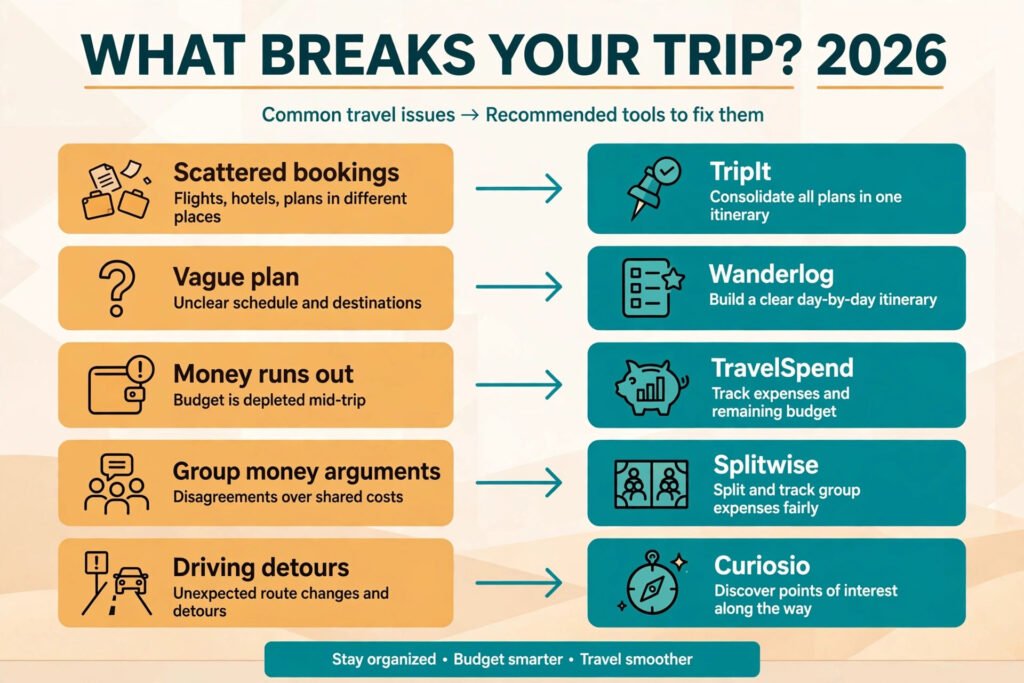
Start with your biggest failure mode, not with the most impressive demo. If your last trip fell apart because bookings were scattered, start with TripIt. If the problem was a vague plan that nobody followed, start with Wanderlog. If money ran out early, start with TravelSpend. If the group argued about money, start with Splitwise. One tool that fixes your actual problem beats five tools that fix problems you do not have.
Then run the airport test on your plan. Can you answer these three questions from your phone in under a minute, without wifi? Where are you staying tonight, with the address and confirmation number? What time do you need to leave for the next leg, and how are you getting there? How much have you spent so far against the trip budget? If any answer takes more than a minute to find, your stack has a gap, and the gap will find you at the worst moment.
Finally, keep the stack small. A planner, a fare search, a budget tracker and an on-trip guide is a complete kit. Every extra app is another place where the plan can go stale, another login to lose, and another subscription to forget. Travellers who write about their trips professionally face the same discipline in a different form: the tools that help freelance writers plan and organise their work are useful, but the trip itself still needs one master plan, not five.
Mistakes to avoid
Trusting a generated itinerary without checking it. AI plans are confident about opening hours, ticket prices and travel times that have changed. Verify the expensive and time critical items: the first night’s hotel, the first morning’s transport, and anything with a timed ticket.
Planning around a fare from last month. Flight and hotel prices move weekly. Re-check fares in the week you book, and again before you commit to a daily budget built on an old price.
Booking the cheapest seller without reading the terms. A fare that cannot be changed is only cheap if your plans cannot change either. Compare the direct price, and weigh the difference against the cost of rebooking.
Letting the budget run on autopilot. No tracker helps if nobody logs spending. Pick one person to own the log on a group trip, and one daily moment to update it, or the budget view is fiction.
Building the plan in five apps. If the itinerary, the bookings, the budget and the group chat all live in different places, nobody has the full picture. Consolidate into one master plan before departure, even if you planned in several tools.
Forgetting offline access. Signal fails in airports, rural roads and foreign networks. Download maps, confirmations and the itinerary offline before you leave, and screenshot the essentials: hotel address, confirmation numbers and emergency numbers.
FAQs
Do AI travel planning tools replace a travel agent?
For straightforward trips, mostly yes. They search, compare and organise faster than a human can. For complex trips with many moving parts, visas, or special needs, an agent’s judgement still earns its fee. Use the tools for the straightforward 90 percent and keep human help for the tricky remainder.
Are the free plans enough for a real trip?
Usually, yes, for one trip. Free plans cover searching, basic planning and basic tracking. Paid plans earn their money on longer trips, group trips and frequent travel, where offline access, alerts and collaboration matter more.
How accurate are AI generated itineraries?
Good as a first draft, unreliable as a final plan. Expect the shape to be right and the details to need checking: hours, prices, distances and whether a place still exists. Budget thirty minutes of verification for every three days of generated plan.
Should I book through a comparison site or direct?
Compare on the search tool, then check the direct price. If direct is close, book direct: changes, refunds and customer service are usually easier. Book through a third party only when the saving is large enough to justify the stricter terms.
What is the best tool for a group trip?
Wanderlog for the shared plan and Splitwise for the money. That pair covers the two things that cause most group trip arguments: nobody knowing the plan, and nobody agreeing who owes what.
Can these tools work without internet?
Partly. TripIt, Wanderlog Pro and offline maps work without signal once downloaded, and Trail Wallet logs expenses offline. Fare search, AI chat guides and live alerts need a connection, so download everything essential before you leave coverage.
Conclusion
The best trip stack is boring in the best sense: one shared plan, fares checked in the week you book, spending logged every evening, and a guide that answers questions while you walk. Wanderlog or TripIt for the plan, Skyscanner or Kayak for the fares, TravelSpend or Splitwise for the money, and GuideGeek or Curiosio for the road: that is a complete kit, and anything beyond it should have to justify itself. Build the plan, run the airport test, download it offline, and then stop planning. The trip is the point, and the tools are only there to make sure a moved flight or a closed museum does not become the story you tell about it.