

The best AI recipe generators in 2026 are not the ones with the biggest recipe libraries. They are the ones that answer a much narrower question well: what can I cook tonight, with what I already have, that I will actually want to eat again? That is the test this guide uses. A tool earns a place here only if it turns ingredients, a diet, or a craving into a recipe you can follow in a real kitchen, with quantities that make sense, steps in a sensible order, and a result that matches the promise in the title.
Most recipe tools fail in the same quiet ways. They suggest ingredients you do not have and cannot easily buy. They scale a recipe for two up to eight without adjusting cooking times. They label a dish gluten free or vegan while keeping a sauce or topping that breaks the rule. They write beautiful introductions and then give you a method that leaves the chicken raw in the middle or the cake sunk in the centre. The tools below were judged on the details that prevent those failures: ingredient flexibility, dietary filters that actually hold, portion scaling, clear timings, and grocery lists that match the recipes they come from.
This guide also keeps price in view. Several of the strongest tools here are free for everyday use, and the paid plans mostly buy unlimited generations, saved collections, or nutrition tracking rather than better recipes. Where a vendor does not publish a clear price, this guide says so instead of guessing.
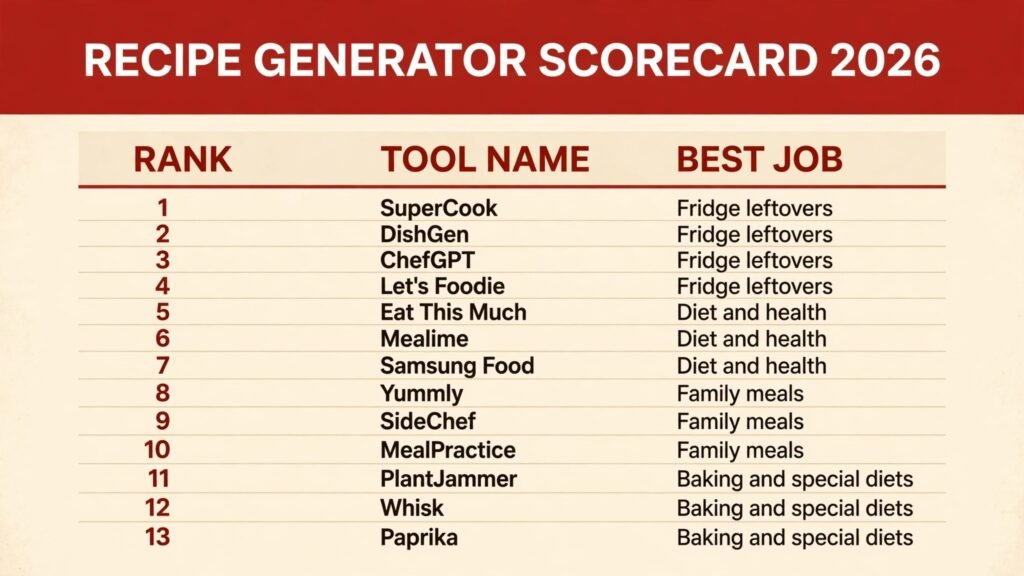
The 13 best AI recipe generators at a glance
| Tool | Best job | Free option |
|---|---|---|
| SuperCook | Fridge leftovers | Free |
| DishGen | Fridge leftovers | Free trial, check checkout |
| ChefGPT | Fridge leftovers | Free tier, check checkout |
| Let’s Foodie | Fridge leftovers | Free |
| Eat This Much | Diet and health | Free tier, check checkout |
| Mealime | Diet and health | Free tier, check checkout |
| Samsung Food | Diet and health | Free tier, check checkout |
| Yummly | Family meals | Free tier, check checkout |
| SideChef | Family meals | Free tier, check checkout |
| MealPractice | Family meals | Free tier, check checkout |
| PlantJammer | Baking and special diets | Free tier, check checkout |
| Whisk | Baking and special diets | Free |
| Paprika | Baking and special diets | Paid app, check checkout |
Best pick by job
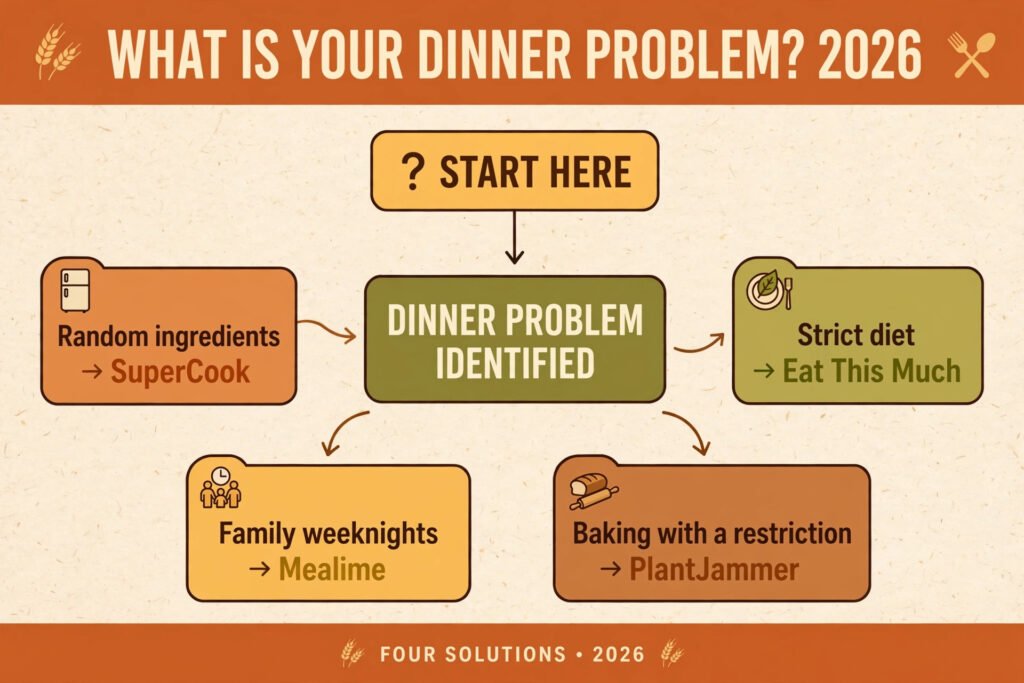
| If your problem is | Start with |
|---|---|
| Random ingredients and no plan | SuperCook |
| A diet with strict rules | Eat This Much |
| Feeding a family on weeknights | Mealime |
| Baking with a dietary restriction | PlantJammer |
| Keeping recipes organised | Paprika |
| Cooking from one pantry for a month | DishGen |
| No account, no setup, just ingredients | Let’s Foodie |
Fridge leftovers: cook from what you already own
Leftover cooking is where recipe generators prove their worth or expose themselves. A good tool treats your ingredient list as a constraint, not a suggestion, and it tells you honestly when a missing ingredient matters and when it does not.
1. SuperCook
SuperCook asks for the ingredients in your fridge and pantry, then finds recipes that use them, ranking results by how many ingredients you already have. It is refreshingly direct. There is no account needed to start, no meal plan to configure, and no long setup quiz. You type in chicken thighs, rice, and spinach, and you get dishes built around those three things rather than a generic chicken recipe that happens to mention rice.
Pricing: free to use, with no paid tier at the time of writing. Check the site for any future changes.
Best for: weeknight cooks who open the fridge first and decide second.
Watch out for: recipes come from across the web, so quality and detail vary. Read the method before you start, and check timings against your own oven and pan size.
Try it at: SuperCook

2. DishGen
DishGen generates a recipe from ingredients, a cuisine, a diet, or a single idea, and it writes the full method rather than linking out to one. That matters when your ingredients are unusual. Give it sweet potato, black beans, and feta, and it will build a coherent dish around them instead of returning the nearest popular recipe and hoping for the best. You can also set dietary rules and ask for variations on a dish you already like.
Pricing: free trial available, with paid plans for unlimited generations. Check checkout for current prices.
Best for: cooks with odd combinations, dietary rules, or a craving they cannot name precisely.
Watch out for: generated recipes still need a human eye. Check seasoning levels, cooking times for your cut of meat or size of pan, and any ingredient the tool assumed you had.
Try it at: DishGen
3. ChefGPT
ChefGPT builds recipes from ingredients, dietary preferences, and kitchen equipment, and it offers modes for different goals, including pantry cooking, meal planning, and nutrition focused dishes. The pantry mode is the most useful here: it works with what you list and flags the few extra items worth buying. The interface is simple enough that you can generate a dinner while standing in the kitchen, which is where most recipe decisions actually happen.
Pricing: free tier available, with paid plans for more generations and features. Check checkout for current prices.
Best for: cooks who want one tool for pantry dinners, meal plans, and diet aware recipes.
Watch out for: the more modes a tool offers, the easier it is to pick the wrong one. Pantry mode and meal plan mode give different answers from the same ingredients, so check which mode you are in before you trust the result.
Try it at: ChefGPT
4. Let’s Foodie
Let’s Foodie offers a free AI recipe generator that turns a list of ingredients into a complete recipe without an account or a setup quiz. You enter what you have, choose servings, a cuisine, a difficulty level, and any dietary preference, and it writes the dish around your ingredients. That no friction approach is its real strength: when dinner is thirty minutes away, a tool that asks for nothing before it starts cooking is the one you actually open.
Pricing: free to use, with no paid tier published. Check the site for any future changes.
Best for: cooks who want a fast, no signup recipe from whatever is already in the kitchen.
Watch out for: like every generated recipe, the result is untested, so read the method through and check quantities and cooking times before you serve it. It also generates single recipes rather than running a weekly plan, so pair it with Paprika or Whisk if you want to save and organise the winners.
Try it at: Let’s Foodie
Diet and health: recipes that respect the rules
Diet cooking fails when a tool treats a restriction as a preference. The tools in this section were chosen because their filters change the recipe itself, not just the label on it, and because they track portions and nutrition in a way you can check.
5. Eat This Much
Eat This Much builds meal plans around a calorie target, a diet, and a budget, then generates the recipes to match. It is the most numbers driven tool in this guide, and that is its strength. If you need a plan that hits a protein target or keeps carbs within a range, it will do the arithmetic and show its working. You can also generate a single recipe rather than a full plan, and adjust portions to fit your household.
Pricing: free tier available, with a paid plan for full meal planning and custom targets. Check checkout for current prices.
Best for: people following a measured diet who want plans, not just individual recipes.
Watch out for: the plans can feel repetitive if you do not vary the cuisine and ingredient settings. Spend five minutes setting dislikes and ingredient exclusions before your first plan, or you will see the same meals often.
Try it at: Eat This Much

6. Mealime
Mealime turns a diet, household size, and dislikes into a weekly meal plan with recipes and a single grocery list. Its real strength is weeknight practicality: most recipes are built for busy evenings, with short ingredient lists and steps that fit into about half an hour. The grocery list groups items by store section, which sounds small until you are shopping with a list that jumps from produce to dairy and back again.
Pricing: free tier available, with a paid plan for more recipes, nutrition details, and custom plans. Check checkout for current prices.
Best for: families and busy cooks who want a plan, a list, and dinner on the table without daily decisions.
Watch out for: the plan works best when you accept most of its suggestions. Heavy editing of every meal defeats the point, so treat the plan as a default you adjust, not a draft you rewrite.
Try it at: Mealime
7. Samsung Food
Samsung Food combines recipe generation with meal planning, grocery lists, and a large saved recipe library. Its diet filters cover common patterns including vegetarian, vegan, gluten free, and low carb, and it can adapt a saved recipe to a different diet or serving size. The community and library side matters too: when the generator gives you something close but not right, you can usually find a tested variation from another cook.
Pricing: free tier available, with a paid plan for advanced planning and nutrition features. Check checkout for current prices.
Best for: cooks who want generation, planning, and a recipe library in one place.
Watch out for: the app covers a lot of ground, and the best features sit behind several menus. Take ten minutes to set your diet, household size, and disliked ingredients properly, or the suggestions will stay generic.
Try it at: Samsung Food
Family meals: dinner for a table, not a single plate
Family cooking has constraints that single person cooking does not: different appetites, at least one picky eater, limited time, and a budget that notices when every meal needs a special ingredient. These tools handle scaling, repetition, and grocery lists better than the rest.
8. Yummly
Yummly personalises recipe suggestions from diets, allergies, dislikes, and cooking skill, and its search understands ingredient and nutrition filters well. For families, the useful part is the combination of search and scheduling: you can find recipes that fit everyone at the table, save them to a week plan, and build a shopping list from the plan. The recipe pages also show nutrition and timing clearly, which helps when you are choosing between three similar dinners.
Pricing: free tier available, with a paid plan for guided cooking and extra features. Check checkout for current prices.
Best for: families who want strong search, clear filters, and a plan they can shop from.
Watch out for: personalisation improves with use, so the first week is weaker than the fourth. Rate recipes and mark dislikes early, or the suggestions will keep missing the same constraints.
Try it at: Yummly
9. SideChef
SideChef pairs recipes with step by step guided cooking, including photos and timers for each stage, which helps when more than one person is cooking or when a less confident cook is making dinner. It also builds meal plans and grocery lists, and it can adjust recipes to a diet or serving size. The guided mode is the reason to choose it: following a recipe on a phone with sticky hands is much easier when each step is on its own screen.
Pricing: free tier available, with a paid plan for premium recipes and features. Check checkout for current prices.
Best for: households where different people cook, and for cooks who want guidance at each step rather than a wall of text.
Watch out for: guided cooking takes longer to follow than reading a recipe card, so it suits relaxed evenings better than rushed ones. Use the standard view when time is tight.
Try it at: SideChef
10. MealPractice
MealPractice generates a weekly meal plan from your diet, household size, and preferences, then produces a grocery list for the whole week. Its strength is consistency: the plan avoids repeating the same protein three nights in a row, balances heavier and lighter meals, and keeps the shopping list to one trip. For families, that consistency is worth more than any single clever recipe, because the weekly shop is where most meal plans fall apart.
Pricing: free tier available, with paid plans for larger plans and more customisation. Check checkout for current prices.
Best for: families who want a steady weekly plan and one organised shop.
Watch out for: generated plans still need a quick review for your week. Check the plan against school events, late work nights, and leftovers already in the fridge before you shop.
Try it at: MealPractice
Baking and special diets: where precision matters most
Baking punishes guesswork. Ratios, temperatures, and timings matter more than in most cooking, and special diets add another layer, because a substitute that works in a stew can ruin a cake. The tools here are chosen for how carefully they handle substitutions and quantities.
11. PlantJammer
PlantJammer builds recipes around the ingredients you have, with a strong focus on plant based cooking, and it explains its substitutions rather than hiding them. That explanation matters for special diets: you learn why it swapped an egg for a flax egg, or dairy butter for oil, and what that change does to texture. The tool works well for cooks moving toward plant based meals who still want dishes that taste complete, not dishes that taste like a compromise.
Pricing: free tier available, with a paid plan for more features. Check checkout for current prices.
Best for: plant based cooks, and anyone learning to substitute ingredients with confidence.
Watch out for: baking recipes need extra care. Plant based substitutions behave differently in cakes and breads than in savoury dishes, so test a new bake once before serving it to guests.
Try it at: PlantJammer

12. Whisk
Whisk turns recipes from across the web into shopping lists and meal plans, and it can adapt recipes to servings and diets. For baking and special diets, its value is organisational: you can collect recipes that already work for your diet, scale them for a gathering, and shop from one list. It also connects with grocery retailers in some regions, so the list can become an order without retyping ingredients.
Pricing: free to use for its core recipe and list features. Check the site for any paid additions.
Best for: cooks who already have trusted recipes and want to organise, scale, and shop from them.
Watch out for: Whisk organises and adapts recipes more than it invents them. If you want a brand new recipe from a strange set of ingredients, start with SuperCook or DishGen, then save the winner in Whisk.
Try it at: Whisk
13. Paprika
Paprika is a recipe manager with strong tools for saving, scaling, and planning, and it earns its place here because a good recipe collection is what makes generated recipes useful over time. You can save a generated recipe, scale it for guests, add it to a meal plan, and generate a grocery list from the plan. Its browser extension saves recipes from the web cleanly, which matters when half your best finds come from blogs and videos.
Pricing: paid app with a one time purchase model rather than a subscription, though prices vary by platform. Check checkout for current prices.
Best for: serious home cooks who want a permanent, organised recipe library.
Watch out for: Paprika does not generate recipes itself. Pair it with a generator from this guide, and use Paprika as the place where good recipes live after you have tested them.
Try it at: Paprika
Pricing compared
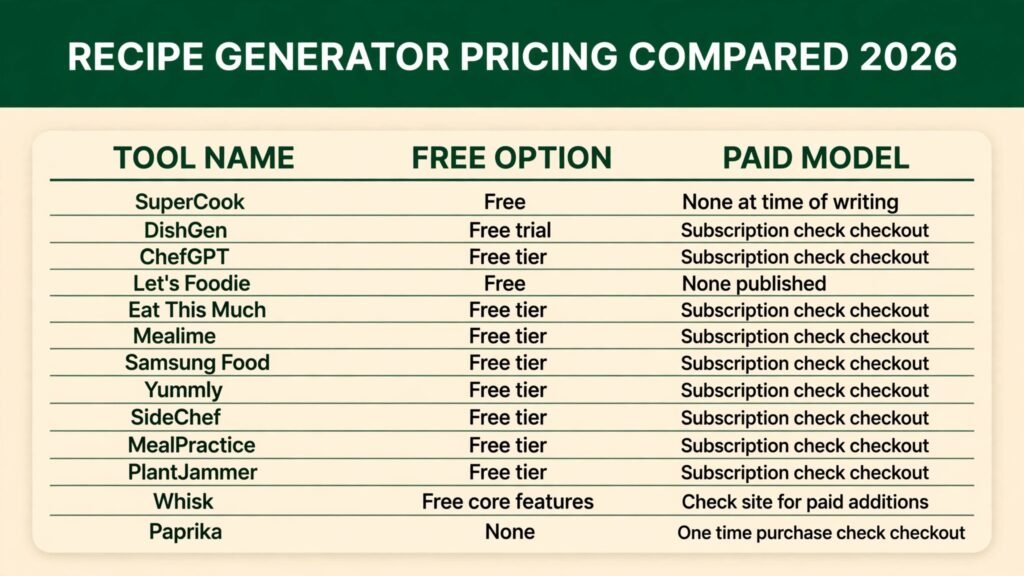
| Tool | Free option | Paid model |
|---|---|---|
| SuperCook | Free | None at time of writing |
| DishGen | Free trial | Subscription, check checkout |
| ChefGPT | Free tier | Subscription, check checkout |
| Let’s Foodie | Free | None published |
| Eat This Much | Free tier | Subscription, check checkout |
| Mealime | Free tier | Subscription, check checkout |
| Samsung Food | Free tier | Subscription, check checkout |
| Yummly | Free tier | Subscription, check checkout |
| SideChef | Free tier | Subscription, check checkout |
| MealPractice | Free tier | Subscription, check checkout |
| PlantJammer | Free tier | Subscription, check checkout |
| Whisk | Free core features | Check site for paid additions |
| Paprika | None | One time purchase, check checkout |
The pattern is clear: free tiers cover everyday generation for most cooks, and paid plans mainly buy unlimited generations, fuller planning, and nutrition detail. Start free, cook from a tool for two weeks, and only pay for the one whose recipes you actually repeat.
How to Choose
Start with your real constraint, not the tool with the longest feature list. If your constraint is ingredients, pick SuperCook or DishGen and judge them on one week of fridge cooking. If your constraint is a diet, pick Eat This Much or Mealime and check every recipe against your rules for a week before you trust the filter. If your constraint is family logistics, pick MealPractice or Yummly and judge them on the shopping list, not on any single recipe.
Then run a simple test. Cook three recipes from one tool in a week: one from ingredients you already have, one that fits your diet, and one scaled for your household. Note what went wrong, if anything. Did the timings hold? Did the grocery list match the recipes? Did anyone ask for the dish again? A tool that passes all three tests is worth paying for. A tool that fails two of them will not improve with a paid plan.
Finally, think about where recipes live after you generate them. A generator without a save and scale system means you will lose good recipes. Pairing a generator with Paprika or Whisk solves that, and it is cheaper than paying for a premium plan on a tool whose library you cannot organise.
Mistakes to avoid
The most common mistake is trusting a generated recipe without reading it through. Read the whole method before you start cooking, check that the quantities match your pan and serving count, and confirm that any dietary substitution is actually in the ingredient list, not just in the title.
Another mistake is generating a new recipe every night. Variety sounds good, but it wastes ingredients and teaches you nothing. Repeat a good recipe three times, learn its timing and seasoning, and only then look for variations. The best cooks in any kitchen are the ones who know ten recipes deeply, not a hundred recipes shallowly.
A third mistake is ignoring portion scaling. Doubling a recipe does not always mean doubling the cooking time, and halving a bake can change its texture entirely. When a tool scales a recipe, check the pan size, the oven temperature, and the time separately, and adjust from experience rather than assuming the scaled version is exact.
The last mistake is buying every tool at once. Most of these tools overlap heavily, and running three meal planners in parallel creates three shopping lists and no dinner. Pick one generator and one organiser, use them for a month, and only add a second tool when you can name the specific job the first one fails at.
Frequently asked questions
Are AI recipe generators accurate?
Mostly, for straightforward cooking, and less so for baking and strict diets. Generated recipes are a strong starting point, but you should still read the method, check timings, and verify any dietary claim against the ingredient list. Treat the first cook of any generated recipe as a test.
Can AI recipe generators handle allergies?
They can filter for common allergies, but no filter replaces your own check. Always read the full ingredient list, including sauces, stocks, and toppings, before cooking for someone with an allergy. When in doubt, choose a recipe whose ingredients you recognise completely.
Do I need a paid plan?
For most home cooks, no. Free tiers from SuperCook, DishGen, ChefGPT, and others cover everyday generation. Pay only when you hit a free limit regularly, or when you need full meal planning and nutrition tracking that the free tier does not offer.
Which tool is best for leftovers?
SuperCook is the simplest answer, because it ranks recipes by the ingredients you already have. DishGen is better when your ingredients are unusual or you want a newly written recipe rather than a match from the web.
Can these tools plan a full week of meals?
Yes. Mealime, MealPractice, Eat This Much, and Samsung Food all build weekly plans with grocery lists. The plan is only as good as the preferences you set, so spend time on dislikes, diets, and household size before your first plan.
How do I keep the recipes I like?
Save them in Paprika or Whisk as soon as you have cooked and approved them. A generated recipe you cannot find again is wasted effort, and a small library of tested recipes is more valuable than unlimited new generations.
Conclusion
The best AI recipe generators in 2026 earn their place by solving a specific kitchen problem: leftovers, a diet, a family table, or a bake that has to work. SuperCook is the fastest answer for fridge cooking, Eat This Much is the most disciplined choice for measured diets, Mealime and MealPractice are the steadiest picks for family weeks, and Paprika is the library that makes all of them useful over time. Start free, cook three test recipes, and pay only for the tool whose dishes you actually repeat. Dinner is too regular a job to leave to a tool you have not tested in your own kitchen.