
The best AI academic writing tools in 2026 are not the ones that produce the most text the fastest. They are the ones that leave every claim traceable. An academic draft lives or dies on whether a reader, a supervisor or a reviewer can open the source behind a sentence and find the same idea there. A tool that writes a smooth paragraph from a source it never shows you has not saved time. It has created a verification job that lands on you at the worst moment, usually the night before submission.
That test shapes this guide. Each tool below is judged on one question first: does it make your argument easier to check, or harder? Drafting help matters, but a clean sentence built on a missing citation is still a problem. A citation manager that stores a PDF you can no longer find is still a problem. A plagiarism report that flags your own properly quoted passage without explaining why is still a problem. The tools that earn a place here solve one of those problems well and are honest about what they do not do.
Prices below are October 2026 figures in US dollars. Where a vendor prices by institution, by credit or by document, or does not publish a single headline price, the entry says check checkout rather than guessing a number. Free tiers are noted where they genuinely exist, with their limits stated.
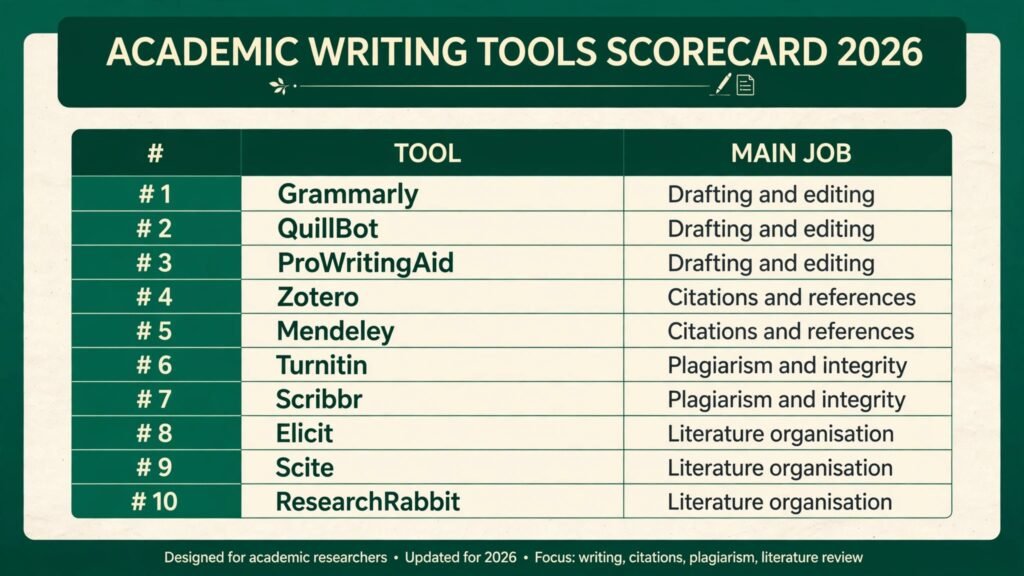
The 10 best AI academic writing tools at a glance
| Tool | Main job | Free option | Best for |
|---|---|---|---|
| Grammarly | Drafting and editing | Free tier | Everyday grammar and clarity |
| QuillBot | Drafting and editing | Free tier | Paraphrasing with control |
| ProWritingAid | Drafting and editing | Free tier, limited | Long reports and style reports |
| Zotero | Citations and references | Free | Reference libraries on a budget |
| Mendeley | Citations and references | Free basic | PDF annotation and groups |
| Turnitin | Plagiarism and integrity | Check checkout | Institutional originality checks |
| Scribbr | Plagiarism and integrity | Check checkout | One off document checks |
| Elicit | Literature organisation | Free tier | Finding and summarising papers |
| Scite | Literature organisation | Free trial | Checking how a paper was cited |
| ResearchRabbit | Literature organisation | Free | Mapping related papers visually |
Best pick by job
| Your job right now | Start here | Why |
|---|---|---|
| Clean up a draft before submission | Grammarly | Fastest pass on grammar, tone and clarity |
| Rewrite a paragraph in your own words | QuillBot | Paraphrase modes with a synonym slider |
| Fix a long report that feels uneven | ProWritingAid | Chapter level style and structure reports |
| Build a reference library from scratch | Zotero | Free, with browser capture that just works |
| Read and annotate PDFs with a group | Mendeley | Shared groups and in PDF notes |
| Check originality before you submit | Turnitin | The check most institutions already use |
| Check a single thesis or dissertation | Scribbr | Pay per document, no subscription needed |
| Find papers on a new question | Elicit | Search by question, not just by keyword |
| Verify a claim before you cite it | Scite | Shows supporting and contrasting citations |
| Discover papers you would have missed | ResearchRabbit | Visual maps of related work |
Drafting and editing
1. Grammarly
Grammarly is the everyday editor most students and researchers already know, and its strength is speed. Paste a draft or write in its editor and it flags grammar, punctuation, word choice and tone in real time. The premium tier adds clarity rewrites, formality adjustments and a plagiarism check, which makes it a reasonable first pass before a deeper edit.
Pricing: free tier available; premium is a monthly subscription, check checkout for the current rate.
Best for: students and researchers who want a fast, reliable cleanup pass on everyday writing.
Watch out for: Grammarly rewrites for fluency, not for accuracy. It will happily smooth a sentence that misstates a finding. Check every factual claim yourself after accepting its suggestions, and do not let it flatten discipline specific terminology into generic wording.
Try it at: https://www.grammarly.com

2. QuillBot
QuillBot is built around paraphrasing, which is exactly where academic writers get into trouble and exactly where a controlled tool helps. Its modes let you choose between standard, fluency, formal, academic and creative rewrites, and a synonym slider controls how far each rewrite moves from the original. Used well, it helps you restate a source in your own sentence structure instead of swapping two words and calling it done.
Pricing: free tier with a character limit per paraphrase; premium is a monthly subscription, check checkout for the current rate.
Best for: writers who struggle to restate dense source material without staying too close to the original wording.
Watch out for: paraphrasing is not citing. A rewritten paragraph still needs a citation to the original source, and QuillBot will not add one. Run its output past the source text and ask whether the meaning survived intact, because aggressive modes can quietly change it.
Try it at: https://quillbot.com
3. ProWritingAid
ProWritingAid is the slower, deeper editor of the three, and that is its point. Beyond grammar it produces reports on sentence variety, repeated words, passive voice, readability and structure, which makes it useful for long documents where problems accumulate across chapters rather than inside single sentences. If your thesis reads well paragraph by paragraph but feels uneven as a whole, this is the tool that shows you why.
Pricing: free tier with a word limit per check; premium is a subscription, check checkout for the current rate.
Best for: dissertations, theses and long reports that need structural editing, not just a grammar pass.
Watch out for: the volume of reports can pull you into editing sentences that were fine. Use two or three reports that match your actual weakness, such as sentence length and repeated words, and ignore the rest on a first pass.
Try it at: https://prowritingaid.com
Citations and references
4. Zotero
Zotero is the reference manager most researchers recommend first, largely because the free version is genuinely usable. A browser connector captures a paper, its metadata and often its PDF in one click, and the Word and Google Docs plugins insert citations and build a bibliography in your chosen style. Collections, tags and saved searches keep a growing library searchable, and group libraries let a team share sources without emailing PDFs around.
Pricing: free, with free cloud storage up to a limit and paid storage beyond it, check checkout for storage rates.
Best for: anyone building a reference library on a budget, from undergraduates to independent researchers.
Watch out for: metadata captured from the web is sometimes incomplete or wrong, especially for conference papers and preprints. Check the author, year and journal fields for every entry before you cite it, or the error will follow you into the bibliography.
Try it at: https://www.zotero.org
5. Mendeley
Mendeley pairs a reference manager with a PDF reader, which suits researchers who read inside the tool rather than in a separate app. Highlighting and notes live on the PDF itself, and shared groups let collaborators see the same annotations. Its citation plugin covers the major word processors, and its catalogue features help you discover papers related to what you already store.
Pricing: free basic plan with storage limits; premium storage plans are a subscription, check checkout for the current rate.
Best for: research groups that annotate PDFs together and want reading and referencing in one place.
Watch out for: Mendeley has changed ownership and features over the years, and some long term users have found migrations disruptive. Export your library in a standard format regularly so you are never locked into one tool.
Try it at: https://www.mendeley.com
Plagiarism and integrity
6. Turnitin
Turnitin is the originality check most universities already run, which makes it the most useful pre submission check when you can access it. Its similarity report highlights passages that match its database of student papers, journals and web sources, so you see the same flags your institution will see. Many universities let students run a draft through it before final submission, and that draft run is worth using.
Pricing: institutional licence only for most users; individual access depends on your institution, check checkout or your university library.
Best for: students who want to see the exact similarity report their institution will see, before it counts.
Watch out for: a similarity score is not a plagiarism verdict. Properly quoted passages, standard methods descriptions and your own bibliography all raise the score. Read the highlighted matches one by one instead of panicking over the percentage, and fix missing citations rather than rewriting quoted text to dodge the detector.
Try it at: https://www.turnitin.com

7. Scribbr
Scribbr sells one off checks rather than subscriptions, which suits a writer with a single thesis, dissertation or article to verify. Its plagiarism checker compares your document against a large database and returns a similarity report, and the same site offers proofreading and citation generation services if you want a human pass as well.
Pricing: pay per document, priced by word count, check checkout for the current rate.
Best for: a single high stakes document where a subscription would be wasteful.
Watch out for: a one off check is only as good as the moment you run it. If you revise heavily after the check, run it again on the final version, because new passages have never been scanned.
Try it at: https://www.scribbr.com
Literature organisation
8. Elicit
Elicit changes how you start a literature search. Instead of typing keywords and paging through results, you ask a research question and it returns relevant papers with short summaries and extracted data such as methods and outcomes. That makes it strong for scoping a new topic or for a rapid review, where you need to see what a field has actually found before you commit to a narrower search.
Pricing: free tier with a monthly credit limit; Plus is a monthly subscription, check checkout for the current rate.
Best for: researchers scoping a new question or building a rapid review from a standing start.
Watch out for: Elicit summaries are generated from abstracts and extracted text, and they can miss nuance or overstate a result. Open the full paper before you cite anything Elicit summarised, and treat its extraction tables as a reading list, not as evidence.
Try it at: https://elicit.com

9. Scite
Scite answers a question other tools skip: how was this paper actually cited? Its Smart Citations show whether later papers supported, mentioned or contrasted a claim, with the relevant passage shown. That matters because a paper can be widely cited and widely disagreed with at the same time, and a citation count alone will not tell you which. Before you lean on a single study for a key claim, Scite shows you whether the field still stands behind it.
Pricing: free trial available; subscription plans, check checkout for the current rate.
Best for: verifying a key claim before you build an argument on it, and for literature reviews that need to show debate, not just agreement.
Watch out for: coverage is strongest in journals Scite indexes well, and thinner elsewhere. A paper with few Scite citations is not necessarily unimportant; it may simply sit outside the indexed set. Pair Scite with a traditional database search for completeness.
Try it at: https://scite.ai
10. ResearchRabbit
ResearchRabbit maps related papers visually, which suits the stage where you have a few good seed papers and want to find the rest of the conversation. Add papers to a collection and it suggests related work, authors and timelines, and its visual graph makes clusters and gaps visible in a way a list never does. It is free, which removes the usual reason for skipping a discovery tool.
Pricing: free.
Best for: discovering related papers and mapping a field around a set of seed papers you already trust.
Watch out for: visual discovery rewards papers that resemble your seeds, which can narrow your view over time. Deliberately add a paper that disagrees with your position to each collection, or the map will keep showing you the same side of the debate.
Try it at: https://www.researchrabbit.ai
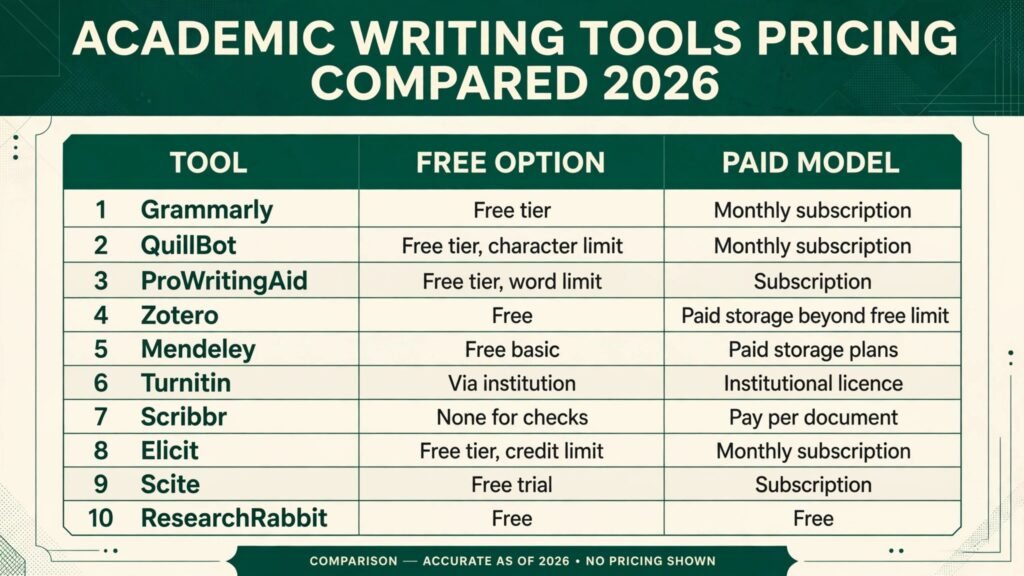
Pricing compared
| Tool | Free option | Paid model |
|---|---|---|
| Grammarly | Free tier | Monthly subscription, check checkout |
| QuillBot | Free tier, character limit | Monthly subscription, check checkout |
| ProWritingAid | Free tier, word limit | Subscription, check checkout |
| Zotero | Free | Paid storage beyond free limit, check checkout |
| Mendeley | Free basic | Paid storage plans, check checkout |
| Turnitin | Via institution | Institutional licence, check checkout |
| Scribbr | None for checks | Pay per document, check checkout |
| Elicit | Free tier, credit limit | Monthly subscription, check checkout |
| Scite | Free trial | Subscription, check checkout |
| ResearchRabbit | Free | Free |
The honest cost picture is smaller than the table suggests. A working academic stack can be free: Zotero for references, ResearchRabbit for discovery, and the free tiers of Grammarly and QuillBot for editing. Spend money first on the check your situation demands, such as a Scribbr scan for a thesis or a Scite subscription for a literature review, and only then on convenience upgrades. Two subscriptions that do the same job, such as two paraphrasers or two plagiarism checkers, are the most common waste in this category.
How to Choose
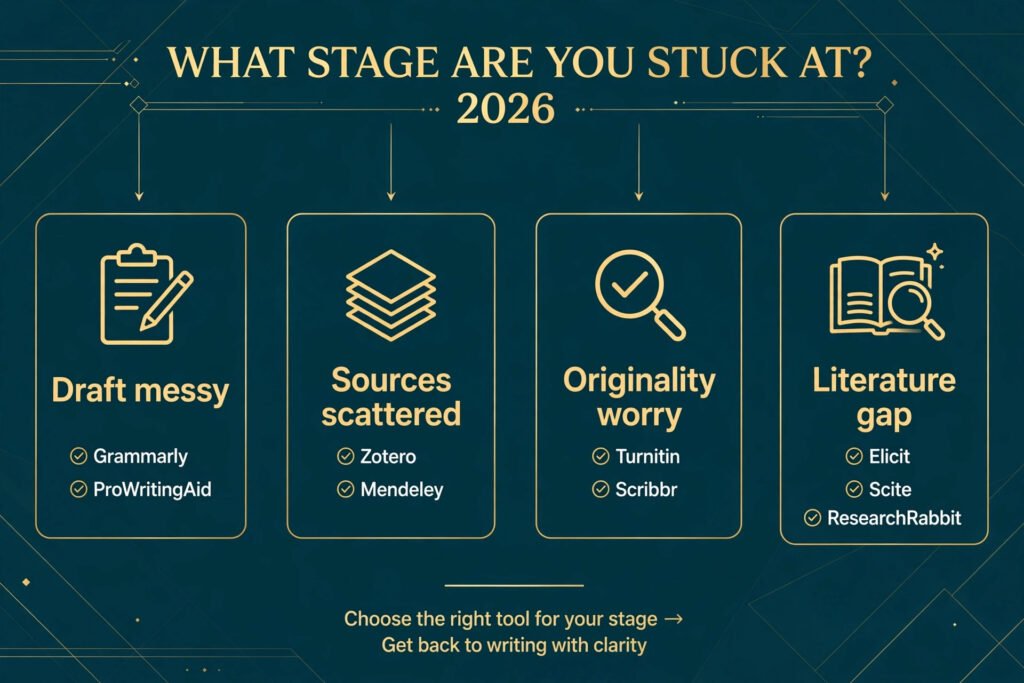
Start from the stage you are stuck at, not from the tool with the longest feature list. If your draft is written but messy, you need an editor. If your sources live in a downloads folder, you need a reference manager. If your argument rests on three papers you have not verified, you need Scite or Elicit before you need anything else. Buying a drafting tool to solve a citation problem is how researchers end up with five subscriptions and the same mess.
Then apply the citation test to any tool that generates text. Ask whether it shows its source, whether you can open that source, and whether the generated sentence matches it. A tool that fails that test is still usable for brainstorming and for cleaning up your own sentences, but it should never be the last step before a claim enters your draft. Keep a short rule for yourself: generated text gets a source attached before it gets a paragraph number.
For writers already comfortable with the basics, the question shifts to workflow. If you write in Google Docs, check the plugin situation before committing to a reference manager. If you collaborate, check group features and export formats before you import a library. And if you are a student, check what your institution already provides: Turnitin access or a library subscription to a tool on this list may already be paid for, which changes the cheapest honest stack considerably. Readers who write for clients rather than for a degree may also find the freelance writing guide useful: best AI tools for freelance writers. Those learning to use AI tools more broadly can start with best AI tools for learning to code for a sense of how these tools behave across disciplines.
Mistakes to avoid
Citing a summary instead of the paper is the most common error with AI research tools. A summary from Elicit or a paraphrase from QuillBot is a pointer to a source, not a source itself. Open the paper, find the passage, and cite that. Reviewers notice when a citation points at a paper that says something slightly different, and the correction costs more than the shortcut saved.
Treating a similarity score as a verdict is the second. A high Turnitin or Scribbr percentage often means heavy quotation, standard phrasing or a long bibliography, not misconduct. Read the matches. Fix the ones that lack citations, keep the ones that are properly quoted, and document any methods wording your field genuinely shares.
Letting an editor rewrite your argument is the third. Grammarly and ProWritingAid improve sentences; they do not understand your thesis. Accepting every suggestion can soften a precise claim into a vague one, especially where discipline specific terms get replaced with everyday words. Review edits on sentences that carry evidence, not just on sentences that read awkwardly.
Keeping sources in scattered files is the fourth, and it is the one that hurts months later. A paper saved only as a PDF in a downloads folder cannot be cited, searched or shared when you need it. The week you start a project is the week to set up Zotero or Mendeley, because migrating a hundred loose PDFs later is a job nobody schedules.
Finally, trusting an AI detector score as proof is a mistake with real consequences. Detectors flag formal prose, translated text and heavily edited text at rates their marketing rarely mentions. Use an AI detection check as a review prompt, then judge the passage on its sources and its argument. An accusation built on a detector score alone is not evidence, and in academic settings it can do lasting damage.
Frequently asked questions
Are AI academic writing tools allowed by universities?
It depends on the institution and the task. Most universities allow editing, paraphrasing and reference management tools, while restricting or banning text generation for assessed work. Read your institution’s policy and your course rules before using any tool on an assignment, and when in doubt, ask your supervisor. A tool being on this list is not permission to use it for assessed work.
Which tool should a student start with?
Start with Zotero and the free tier of Grammarly. Zotero fixes the citation problem that causes the most lost marks, and Grammarly fixes the surface errors that distract a reader from your argument. Add Elicit or ResearchRabbit when you start a literature review, and a plagiarism check when a document is close to final.
Can AI tools write a thesis or dissertation for me?
They can draft sections, summarise sources and clean up prose, but a thesis built from generated text will fail the citation test at its first serious reading. Supervisors and examiners check sources, and generated passages frequently cite papers that do not exist or misstate real ones. Use these tools to support your own argument, not to substitute for it.
How do I cite a source I found through Elicit or ResearchRabbit?
Cite the paper itself, not the tool that found it. Open the paper, read the relevant passage, and cite it in your chosen style through your reference manager. Mentioning the discovery tool in your methods is good practice for a systematic review, but it does not replace the citation.
Is Turnitin the same as a plagiarism checker I can buy?
Not exactly. Turnitin compares your work against its database of student submissions and published sources, which is why its report matches what your institution sees. Commercial checkers like Scribbr use different databases, so scores differ between tools. If your university offers a draft Turnitin run, use that one for the final check.
What is the cheapest reliable academic writing stack?
Zotero for references, ResearchRabbit for discovery, the free tiers of Grammarly and QuillBot for editing, and a single pay per document Scribbr check for a thesis. That stack costs nothing until the final check, covers drafting, citations, discovery and integrity, and avoids the duplicate subscriptions that inflate most researchers’ tool budgets.
Conclusion
The best AI academic writing tools in 2026 share one trait: they make your work easier to verify. Grammarly and ProWritingAid clean the prose, QuillBot helps you restate sources fairly, Zotero and Mendeley keep your references findable, Turnitin and Scribbr surface problems before submission, and Elicit, Scite and ResearchRabbit help you find and test the literature your argument rests on. None of them replaces reading the source, checking the citation or owning the argument. Used with that rule in place, they take hours off the mechanical parts of academic writing and leave the thinking, which was always the point, to you.