Running a rental business means answering the same questions at all hours, chasing cleaners between turnovers, adjusting prices for weekends and seasons, and remembering which guest asked for an early check in. Most of that work is repetitive, and repetitive work is exactly what software handles well. This guide explains how to automate your rental business with AI in a practical order, starting with the tasks that save the most time and ending with the ones you should keep human. No single tool does everything, and no automation removes the need for good hosting. What it does is cut the daily admin so a small team, or a single host, can run more properties without dropping standards.
Quick answer: what automation can and cannot do
Automation can handle guest messaging, pricing updates, calendar syncing, cleaning schedules, smart lock codes, payment reminders, review requests and routine reporting. AI adds a layer on top: drafting replies in your tone, answering common questions from your house manual, flagging unusual messages for a human, and summarising reviews across platforms.
Automation cannot handle a burst pipe, an angry guest who needs empathy, a cleaner who does not show up, or a pricing decision for a one off local event that no data set has seen. The hosts who get the best results automate the routine and keep a clear path for a human to step in. Expect the biggest gains in messaging and turnover coordination, not in guest relations. A realistic first month looks like this: fewer late night messages to answer by hand, fewer double bookings, fewer missed cleans, and prices that move with demand instead of sitting unchanged for months. It does not look like zero work. It looks like the same business with less repetitive work.
Before you buy anything, count your current workload. For one week, note every message you send, every price change you make, and every time you chase a cleaner or a guest. Most hosts find that messaging and turnover coordination take more time than pricing. That list becomes your automation order. Automate the top two items first, run them for a month, then add the next one.

how to automate your rental business with AI, step by step
Work through these steps in order. Each one builds on the last, and skipping ahead usually creates the mess that makes hosts abandon automation altogether.
Step 1: Map your rental workflow on one page
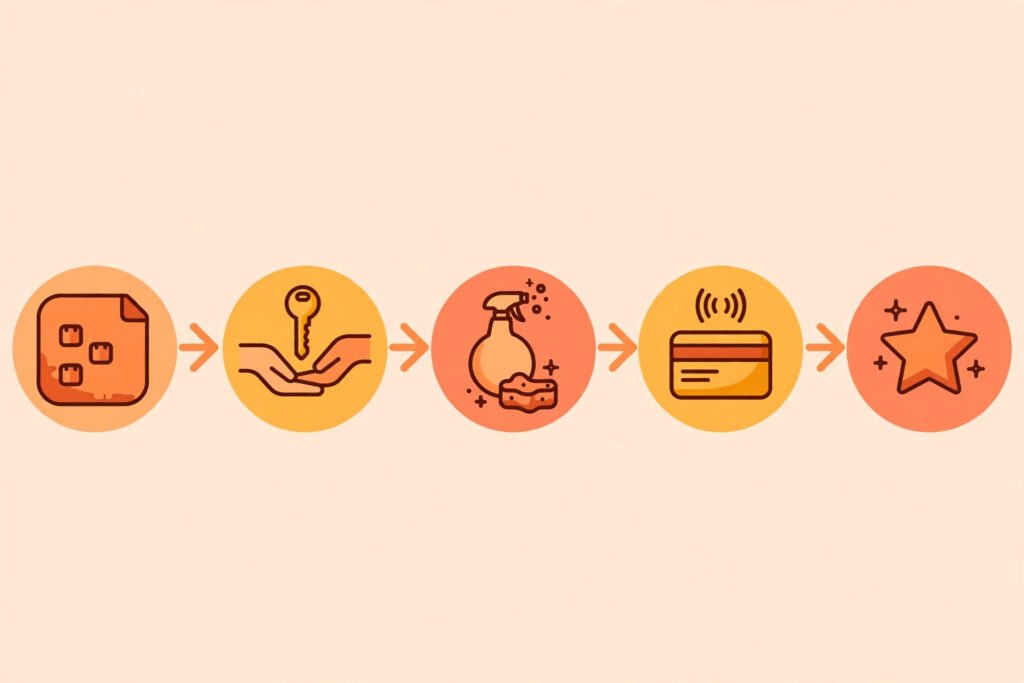
Write down every recurring task from booking to review, in order. A typical chain looks like this: booking arrives, guest gets confirmation and check in details, payment is collected, door code is created, cleaner is scheduled, guest checks in, mid stay message goes out, guest checks out, cleaner reports problems, review request goes out, calendar updates. Put a time next to each task and mark who does it now. Tasks that happen the same way every time are automation candidates. Tasks that change every time stay manual.
This map also exposes the gaps that cause bad reviews. The most common gaps are a guest who never receives check in details, a cleaner who was never told about an early check in, and a checkout message that arrives after the guest has already left. Fix the map first, then automate the fixed version. Automating a broken process only produces mistakes faster.
Step 2: Put every calendar in one place
Calendar syncing is the least exciting step and the most important one. If you list on more than one platform, connect them through a channel manager or a property management tool so a booking on one platform blocks the dates everywhere else. Test it before you rely on it: make a test booking, change it, cancel it, and check that every calendar reflects the change. Double bookings are the fastest way to lose a listing, and they are almost always a sync problem, not a guest problem.
Once calendars are synced, set your booking rules in one place: minimum stays, check in and check out times, advance booking windows, and instant booking conditions. When rules live in five different platform settings, they drift apart. When they live in one system that pushes them out, they stay consistent.
Step 3: Automate guest messaging, starting with five messages
Guest messaging is where most hosts save the most time. Start with five scheduled messages and write them carefully, because guests will read these more than any other words you produce.
First, the booking confirmation, sent immediately, which confirms dates, guest count, address, and what happens next. Second, a pre arrival message sent a few days before check in, with check in instructions, parking, door code details, and wifi information. Third, a check in day message, short and practical, confirming the code works and where to find essentials. Fourth, a mid stay check in, sent halfway through longer stays, asking whether anything is needed. Fifth, a checkout message with checkout time, checkout steps, and a thank you.
AI helps here in two ways. It can draft replies to common questions from your house manual, such as late checkout, extra guests, parking, and local recommendations, and it can flag messages that need a human, such as complaints, damage reports, and refund requests. Set a rule: AI drafts, a human approves anything involving money, damage, or an unhappy guest. Never let an automated reply promise a refund, a discount, or a policy exception. Those decisions belong to you.
Keep the tone warm and specific. A message that names the property, the dates, and one local detail reads like a host. A generic message reads like a system. Review your automated messages every quarter and update anything that guests keep asking about. If ten guests ask the same question, the answer belongs in a scheduled message, not in ten separate replies.
Step 4: Automate pricing with rules you understand
Pricing tools watch demand, seasonality, day of the week, lead time, and local events, then adjust nightly rates within limits you set. The key phrase is within limits you set. Always set a floor price below which the tool cannot go, and a ceiling for peak periods. Without a floor, a tool can discount a high demand weekend to fill a gap. Without a ceiling, a quiet Tuesday can be priced above what the market will pay.
Start with a simple setup: a base price for an average night, higher rates for weekends and holidays, a discount for weekly and monthly stays, and a last minute rule for unbooked nights close to arrival. Run the tool for a month and compare its rates with what you would have set by hand. If the tool prices far above or below your judgement on a regular basis, adjust the base price or the limits, not the tool itself. Pricing tools work best when they react to demand on top of a sensible base price set by a host who knows the property.
For hosts with one property, a pricing tool is often the second purchase after messaging, because it runs daily without attention. For hosts with several properties, it is usually the first purchase, because manual pricing across many listings is where errors multiply. Either way, check the rates weekly in the first month. Automation should reduce pricing work, not remove your judgement from it.
Step 5: Automate cleaning and maintenance scheduling
Turnover is where automation prevents the most damage. Connect your booking calendar to your cleaning schedule so every checkout creates a cleaning task with the property, the checkout time, the next check in time, and any notes about the stay. Cleaners get a notification, a checklist, and a way to report problems with photos. You get a confirmation when the clean is done, not silence that you have to interpret.
Use a checklist that matches the property: beds, bathrooms, kitchen, floors, bins, supplies, damage check, and a photo of each room when finished. Photos protect both sides. A cleaner who photographs a stain on arrival is not blamed for it later, and a host who sees a photo of a broken item can order a replacement before the next guest arrives. For maintenance, keep a simple log of every issue, every fix, and every cost. Over a year, that log shows which appliances keep failing and which properties cost the most to maintain, and that record is worth more than any single repair.
Smart locks belong in this step too. A code that is created for each stay and expires at checkout removes key handovers, lockouts, and the risk of an old code still working months later. Test the code before the guest arrives, and keep a backup entry method for lock failures. Technology fails, and a guest locked out at midnight will not care why.

Step 6: Automate payments, deposits and review requests
Payment automation covers three things: collecting the balance on schedule, handling security deposits or damage holds according to platform rules, and sending receipts. Set payment reminders that go out before the due date, not after it, and make the payment link easy to find in the same message as the booking details. Guests who have to search for a payment link pay late. Guests who get a clear link pay on time.
Review requests should go out automatically after checkout, while the stay is fresh. Keep the request short, thank the guest by name, and link directly to the review page. Do not offer incentives for positive reviews, and do not send repeated requests to guests who do not respond. One request, sent at the right time, outperforms three requests sent at the wrong time. Read every review, including the good ones, and reply to the ones that mention a fixable problem. Future guests read host replies more carefully than they read the reviews themselves.
Tools compared: what each type of tool actually does
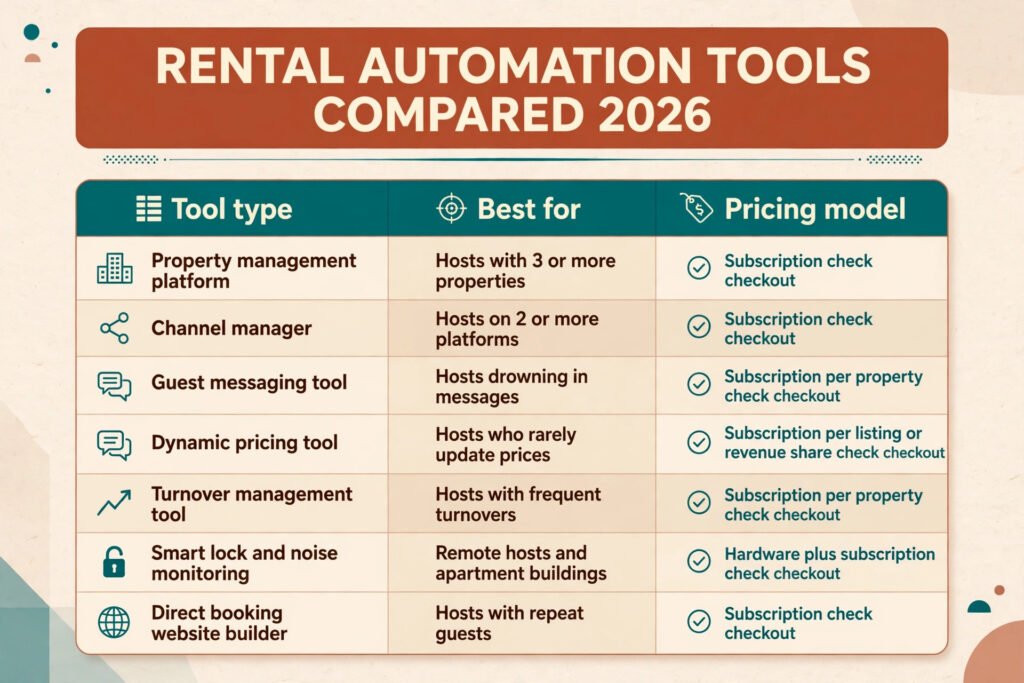
Rental automation tools fall into overlapping groups, and most hosts end up with two or three of them rather than one tool for everything. The table below compares the main types, with pricing described as a model, since exact prices change and vary by property count. Check checkout for current rates before buying.
| Tool type | What it does | Best for | Pricing model |
|---|---|---|---|
| Property management platform | Calendars, messaging, bookings and reporting in one place | Hosts with 3 or more properties | Subscription, check checkout |
| Channel manager | Syncs calendars and rates across booking platforms | Hosts listed on 2 or more platforms | Subscription, check checkout |
| Guest messaging tool | Scheduled messages and AI drafted replies | Hosts drowning in messages | Subscription per property, check checkout |
| Dynamic pricing tool | Adjusts nightly rates with demand and seasonality | Hosts who rarely update prices | Subscription per listing or percentage of revenue, check checkout |
| Turnover management tool | Cleaning schedules, checklists and cleaner coordination | Hosts with frequent turnovers | Subscription per property, check checkout |
| Smart lock and noise monitoring | Per stay codes, noise alerts and occupancy checks | Remote hosts and apartment buildings | Hardware plus subscription, check checkout |
| Direct booking website builder | Own booking site with lower commission | Hosts with repeat guests | Subscription, check checkout |
Well known names in these groups include Hospitable and OwnerRez for management and messaging, PriceLabs for dynamic pricing, Breezeway and Turnover for turnover management, and Stripe for payment processing. Visit the official site of each vendor before deciding, and trial one tool at a time. A trial that runs alongside your current system tells you more than any feature list, because it shows whether the tool fits your actual workflow, your cleaners, and your guests.
Watch for overlap. A property management platform may already include messaging and calendar syncing, so buying a separate messaging tool may duplicate what you already pay for. List what you already have before adding anything new, and cancel tools that duplicate a feature you already use. Automation should reduce the number of systems you check each day, not increase it.
How to choose tools for your property count
The right setup depends on how many properties you run, because the pain changes with scale.
With one property, start with calendar syncing and guest messaging. Those two remove the most daily work for the lowest cost. Add dynamic pricing next if you host year round, or skip it if your calendar is mostly full at a fixed rate. Cleaning automation can be a simple shared calendar and a checklist at this size, and a full turnover platform may be more system than one property needs.
With two to five properties, add a property management platform or a channel manager, plus dynamic pricing and a turnover tool. This is the size where manual work starts to break: messages arrive for different properties at the same time, cleaners need different schedules, and prices need updating across listings. A single dashboard that shows every property, every upcoming check in, and every outstanding clean is worth more at this size than any single feature.
With six or more properties, you need reporting as well as automation. Track occupancy, average nightly rate, cleaning cost per turnover, and review scores by property, every month. Properties that consistently underperform on reviews or overrun on cleaning cost need attention, and a monthly report shows that pattern before it becomes a reputation problem. At this size, also set user permissions carefully: cleaners see cleaning tasks, not guest payment details, and co hosts see messaging, not financial reports.
Whatever your size, keep one rule: every tool must save more time than it takes to maintain. If you spend an hour a week fixing a tool that saves thirty minutes, cancel it. The goal is fewer systems and fewer surprises, not a larger software bill.
One more point matters at every size. Trial tools with real bookings, not with demo data. A tool that looks simple in a sales video can feel very different when a guest changes dates at midnight, a cleaner calls in sick, and two check ins happen on the same day. A two week trial on live bookings shows whether support answers quickly, whether cleaners actually use the app, and whether guests notice any change at all.
Mistakes to avoid
The most common mistake is automating everything on day one. A host who turns on every feature at once cannot tell which one caused a problem, and guests receive a flood of messages that feel robotic. Add one automation at a time and watch it for two weeks before adding the next.
The second mistake is writing messages once and never updating them. Properties change, wifi passwords change, parking rules change, and a message that still gives old instructions creates the exact confusion it was meant to prevent. Put a quarterly review of automated messages on your calendar.
The third mistake is letting pricing run without limits. A floor and a ceiling take five minutes to set and prevent the two most expensive pricing errors: a peak weekend sold too cheaply and a quiet week priced so high that it stays empty.
The fourth mistake is ignoring the human inbox. Automation handles routine messages, but guests who write about a problem expect a person. Check flagged messages daily, reply to complaints within hours, and never let an automated reply be the last word on a complaint.
The fifth mistake is buying tools for a future portfolio. A host with one property does not need enterprise reporting, and a host with twenty does not need a tool built for a single cabin. Buy for the portfolio you have, and upgrade when the workload proves you need it.
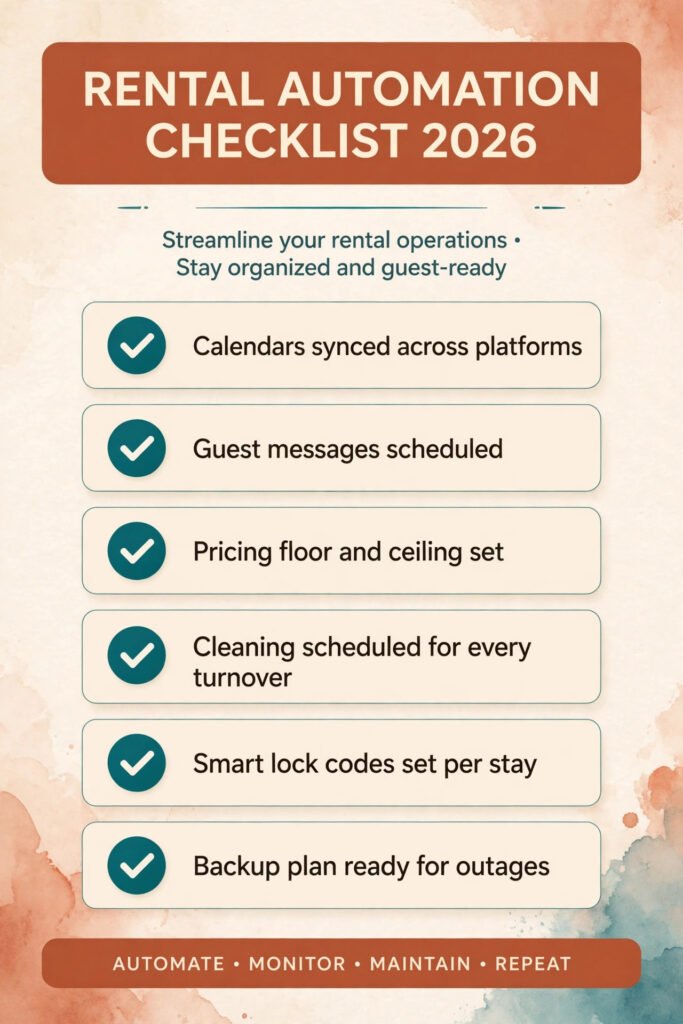
The sixth mistake is skipping the backup plan. Keep a printed house manual in the property, a spare key method for lock failures, and a cleaner phone number that is not only inside an app. When a system goes down, and one eventually will, the backup plan is what keeps the stay on track.
Frequently asked questions
Can AI reply to guests on its own?
It can draft replies and answer common questions, but it should not send messages about money, damage, refunds, or complaints without human approval. The safest setup is AI drafts for routine questions and a human for anything sensitive. Guests accept fast automated answers for wifi codes and parking. They do not accept automated answers for a flooded bathroom.
How much time does rental automation actually save?
It depends on how many properties you run and how much messaging you handle now. Hosts with several properties and frequent turnovers usually save the most, because messaging and cleaning coordination scale with every booking. Hosts with one property and a full calendar save less, because there is less repetitive work to remove. Track your own hours for a month before and after automating, and judge the tools by that record, not by vendor claims.
Do I still need a channel manager if I list on only one platform?
No. A channel manager exists to keep multiple platforms in sync. With one platform, your calendar is already consistent, and the money is better spent on messaging or pricing. Add a channel manager when you add a second platform, not before.
Will dynamic pricing lower my rates too far?
Only if you let it. Set a floor price that covers your costs and a ceiling for peak periods, and review rates weekly in the first month. A pricing tool should move rates within the range you set, not decide your strategy for you. If rates keep hitting the floor, the base price or the floor itself needs adjusting.
What happens if the automation fails during a guest stay?
Have a backup for each automated step: a printed house manual, a spare entry method, a cleaner phone number, and a way to message guests directly outside the automation tool. Check flagged messages daily so a failure is found in hours, not at checkout. Most failures are small, a missed message or a late notification, and a backup plan turns them into minor issues instead of bad reviews.
Is automation worth it for a single property?
Yes, for the two tasks that take the most time: guest messaging and calendar management. A single property host who answers the same questions every week and updates prices by hand will save real hours with those two automations alone. Skip the larger platforms until the workload grows, and add tools one at a time as the property count or booking volume rises.
Conclusion
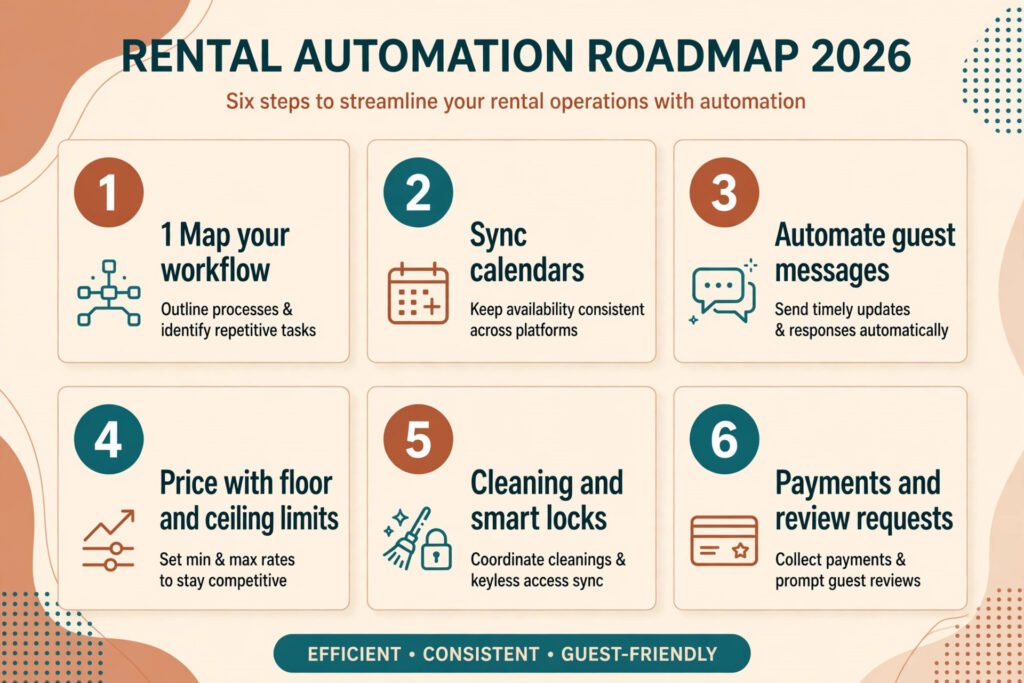
Automating a rental business is a sequence, not a purchase. Map the workflow, sync the calendars, automate five guest messages, set pricing rules with limits, connect cleaning to bookings, and automate payments and reviews. Add one step at a time, keep a human in charge of money and complaints, and review the system every quarter. Done that way, automation gives back the hours that hosting used to consume, and it gives guests faster answers, cleaner turnovers, and fewer surprises. The hosts who benefit most are not the ones with the most tools. They are the ones whose tools match their actual workflow, and whose guests still feel looked after by a person, even when a system sent the message.