
Otter.ai takes the top spot among the top 10 ai transcription tools for students because its free plan covers 300 minutes a month, its live lecture capture needs no extra hardware, and its summaries turn a two-hour class into notes you can revise from. Students rarely need the deepest editing suite or the highest accuracy tier. They need a tool that records reliably, labels speakers, finds the part of the lecture that matters, and costs nothing until the workload grows.
That need shapes every pick below. A lecture is not a podcast and a seminar is not a board meeting. Student audio is messy. A lecturer paces, a classmate asks a question from the back row, and a group project call runs over three different apps. The tools that rank highest here handle that mess.
Price matters more for students than for any other buyer. Most tools below offer a free tier, and the gap between the best free plan and the cheapest paid plan is often the whole decision. This guide states the real starting price for each tool, what the free tier limits, and where a paid plan earns its money. Every price was checked against live pricing pages in November 2026.
What Actually Matters in a Lecture Transcription Tool
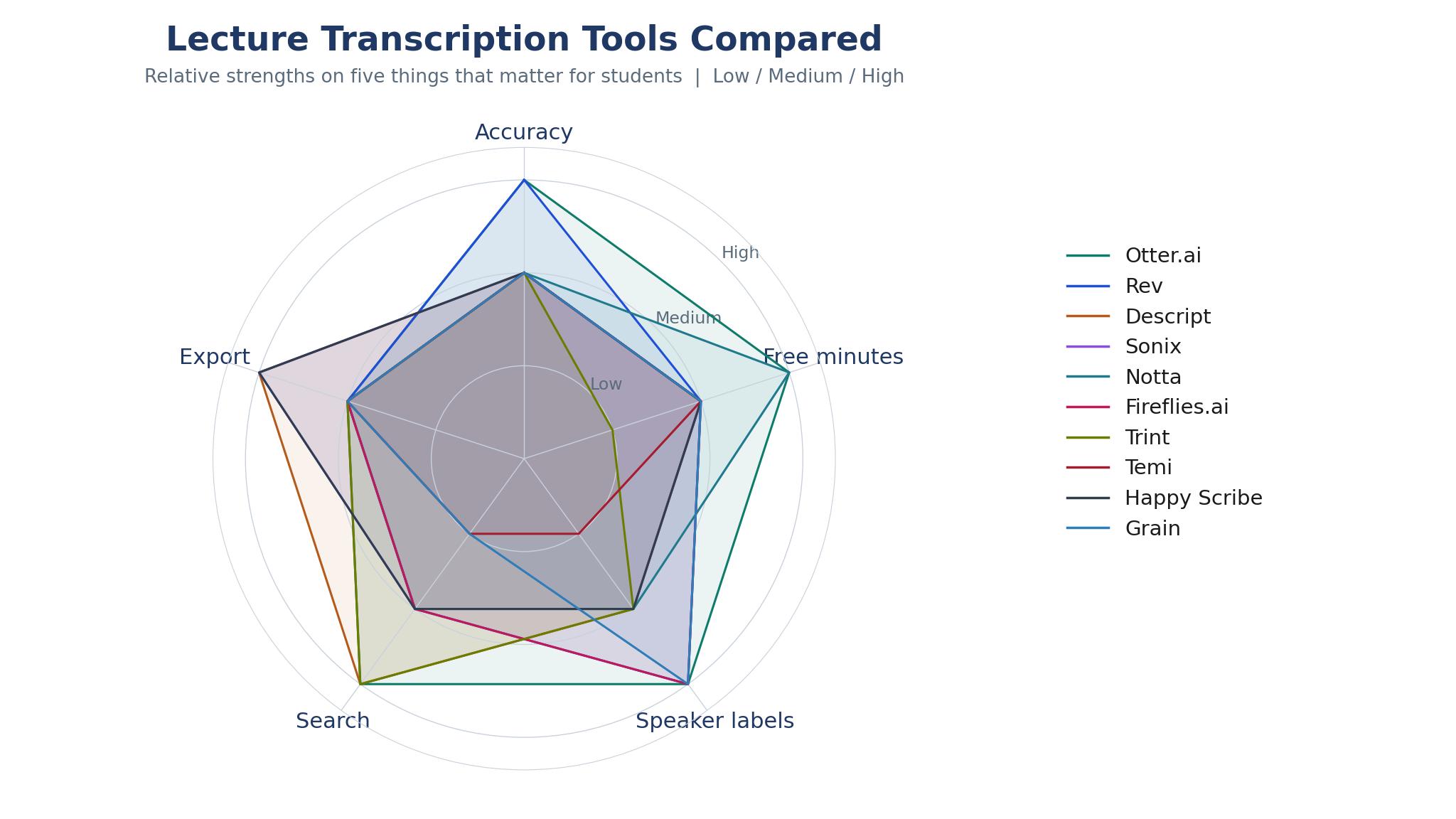
Accuracy gets the headlines, but for a student the first test is simpler. The tool has to capture the lecture at all. A recorder that needs perfect silence or a single speaker will fail in a real lecture hall, so live capture, phone recording, and file upload all matter. Otter.ai and Notta cover live capture best, while Rev and Sonix are stronger when you upload a recording after class.
Speaker labels decide whether a transcript is useful or just a wall of text. In a seminar with five voices, an unlabeled transcript forces you to replay the audio to work out who said what. Look for tools that separate speakers automatically and let you rename them once, then remember the names across recordings. Descript and Fireflies.ai handle this well, and Grain adds speaker labels to meeting recordings without extra setup.
Search is the feature students undervalue until exam season. A transcript you cannot search is barely better than no transcript. The tools worth paying for let you search by keyword, jump to the exact timestamp, and pull a summary of one topic across several lectures. Otter.ai builds this into its chat search, Trint puts search at the centre of its editor, and Happy Scribe offers strong multilingual search for students working in more than one language.
Export decides how the transcript fits the rest of your study system. A tool that only exports plain text will slow you down if your notes live in Notion or Google Docs. Check whether your pick exports SRT, Word, or PDF, and whether it connects to the apps you already use. Among the top 10 ai transcription tools for students, the cheapest tool that exports cleanly beats the cleverest tool that locks your notes inside its own window.
Free Plans, Student Discounts and the Real Monthly Cost
Free tiers in this category are genuinely usable, which is rare. Otter.ai gives 300 minutes a month free, Rev gives 45 AI minutes a month, and Descript gives 60 media minutes a month. For a student with four lecture-heavy days a week, 300 minutes covers roughly five hours of class, so Otter.ai can carry a light timetable without any payment. Heavier timetables push you to a paid plan by the second month.
Student discounts exist but they are uneven. Notta and Fireflies.ai run education pricing that cuts the monthly rate noticeably, while Rev and Sonix price by volume rather than by status, so a student pays the same as a business user. Check the vendor education page before you buy. Some discounts need a university email address and a yearly commitment, which is a poor deal if you only need the tool for one semester.
The cheapest paid plan is rarely the cheapest way to transcribe a term. Sonix charges 10 dollars per audio hour with no subscription, which beats a monthly plan if you only transcribe a handful of long lectures. Temi charges 25 cents per minute, which suits a single interview or a one-off dissertation recording. Across the top 10 ai transcription tools for students, monthly plans win once you pass roughly eight hours of audio a month, and Otter.ai Pro at 8.33 dollars a month on annual billing is the lowest monthly seat in this list.
Watch the limits behind the headline price. Several tools cap single recordings, limit file imports, or charge extra for speaker identification and translation. Fireflies.ai caps free storage, Grain limits free recording time, and Trint charges per user with no meaningful free tier. Read the plan page for minute caps, storage caps, and export limits before you commit, because the number that matters is the cost of your actual term.
The 10 Tools at a Glance
| Tool | Main job | Best for | Starting price |
|---|---|---|---|
| Otter.ai | Live lecture capture and summaries | Everyday lectures on a free plan | From $8.33 per user per month |
| Rev | High-accuracy transcripts with human review | Interviews and dissertations | From $25.49 per month |
| Descript | Transcript-based audio and video editing | Students who also edit recordings | From $16 per month |
| Sonix | Pay-as-you-go transcription and translation | Occasional long recordings | $10 per audio hour |
| Notta | Live transcription in many languages | Multilingual classes and group work | From $13.49 per user per month |
| Fireflies.ai | Meeting capture with searchable notes | Group projects and seminars | From $10 per user per month |
| Trint | Searchable transcripts for research | Research-heavy coursework | From $60 per user per month |
| Temi | Fast cheap transcripts per minute | One-off recordings and interviews | $0.25 per minute |
| Happy Scribe | Transcription and subtitles in many languages | Language students and subtitling | From $17 per month |
| Grain | Meeting notes with highlights and clips | Study groups and recorded calls | From $15 per user per month |
Best Pick by Job
| Job type | First pick | Second tool | Why this pair works |
|---|---|---|---|
| Daily lectures on a budget | Otter.ai | Notta | Free minutes cover a light week, and Notta adds languages when Otter.ai hits its cap |
| Dissertation interviews | Rev | Trint | Rev delivers the cleanest transcript, and Trint makes long interviews searchable |
| Editing audio or video | Descript | Grain | Descript edits by transcript, and Grain clips the moments worth keeping |
| Occasional long recordings | Sonix | Temi | Sonix handles hours without a subscription, and Temi is cheapest for a single short file |
| Group projects and seminars | Fireflies.ai | Grain | Fireflies.ai labels every speaker, and Grain turns calls into shareable notes |
How to Judge the Top 10 AI Transcription Tools for Students in One Week
A one-week trial beats a month of reading reviews, because transcription quality depends on your voice, your lecturer, and your room. Pick two tools from the glance table and run them side by side on the same material. Record one lecture, one seminar, and one group call, then compare the three transcripts on accuracy, speaker labels, and how fast you can find a specific point. The winner is the tool that saves you time on your worst recording, not your best one.
Start with accuracy on names and numbers. Play a ten-minute stretch that includes a technical term, a date, and a name, then count the mistakes in each transcript. Rev will usually win this test outright. If Otter.ai or Notta comes close on your material, the free plan may be all you need.
Then test the workflow, not the feature list. Time yourself turning a fresh transcript into revision notes. Can you search for a topic, jump to the timestamp, and copy the relevant passage into your notes in under two minutes. If the answer is no, the tool will sit unused by mid-term. This is where Otter.ai earns its place, because its search and summary sit in the same window as the transcript, while Sonix and Temi make you work harder to get from audio to usable notes.
Finish the week by checking the cost of your real volume. Count the minutes you actually recorded, then price that volume on each tool. A student recording six hours a week needs about 1,400 minutes a month, which breaks most free tiers and makes Otter.ai Pro or Notta Premium the realistic choice. A student recording two hours a week stays free on Otter.ai all term. Let the minutes decide.
The 10 Tools in Detail
1. Otter.ai
Otter.ai is the most complete free option in this list, and that is why it leads. The free plan gives 300 transcription minutes a month with live capture, speaker labels, and a chat search that answers questions across your recordings. Pro raises the limit to 1,200 minutes at 8.33 dollars a month on annual billing, or 16.99 dollars month to month.
Difficult audio is where the accuracy drops. Otter.ai copes well with a clear lecturer and a quiet room, but it stumbles on overlapping speech, strong accents, and technical vocabulary. Students in science and medicine should budget correction time into every session. It suits students who attend live lectures and want notes the same day.
Judge it by running one full lecture through the free plan and timing your cleanup. Open the transcript, fix every error in names and numbers, and note how long the pass takes. If the cleanup runs under ten minutes for an hour of audio, the tool is saving you time. If it runs over twenty, try Rev on the same recording and compare the two bills in time before you compare them in money.
2. Rev
Rev is the accuracy leader here, and the reason is simple. Its AI tier handles everyday recordings, and its human tier reaches the accuracy that dissertation work demands, with human transcription from 1.99 dollars a minute. The Essentials plan costs 25.49 dollars a month on annual billing and includes 5,000 AI minutes, while the free tier gives 45 AI minutes a month.
Price is the weak point here. Rev is the most expensive AI plan in this list, and the human service costs more than most students will spend on any single tool in a term. The free tier is also thin at 45 minutes, so you will pay from the first serious week. For students weighing the top 10 ai transcription tools for students, Rev suits final-year students and postgraduates whose grade depends on an exact quote.
Judge it by sending the same interview to Rev and to your current tool, then reading both transcripts side by side without the audio. Count the errors that change meaning, not the small typos. If Rev catches three or more meaning-changing errors that the other tool missed, the price is justified for that kind of work.
3. Descript
Descript turns a transcript into an editor. You delete a sentence from the text and the audio or video is cut to match, which makes it the strongest pick for students who record podcasts, video essays, or presentations. The Hobbyist plan costs 16 dollars a month on annual billing with 10 media hours, and the free plan gives 60 media minutes a month with a watermarked export. Transcription covers 25 languages on the pricing page, and speaker labels arrive automatically.
Descript remains an editor first, a lecture tool second. It has no live lecture capture to match Otter.ai, and its transcript workflow assumes you will spend time cutting and polishing. The learning curve is also steeper than a pure transcription app, so the first week feels slow. It suits media students and student podcasters whose coursework ends up as audio or video, since Descript replaces three tools at once.
Judge it by taking a five-minute recording you need to edit and cutting it twice, once in Descript and once in your usual editor. Time both passes and compare the finished clips. If Descript finishes the job in half the time and the transcript search found the section faster than scrubbing a timeline, it belongs in your kit for media work, even if you keep a simpler tool for lectures.
4. Sonix
Sonix is the pay-as-you-go specialist. It charges 10 dollars per audio hour with no subscription, or a Core plan at 25 dollars a month for five hours, and it covers more than 50 languages with strong translation. The transcript editor is clean, speaker labels work well, and exports include SRT and VTT for subtitles. Students who transcribe in bursts rather than every day will find the pricing model fits their term better than a monthly seat.
Cost climbs fast once the volume grows. Ten dollars an hour sounds cheap until you record twenty hours in a month, at which point a flat monthly plan costs less. Sonix also has no free plan beyond a 30-minute trial, so you pay from the first real recording. It suits language students, researchers with foreign-language sources, and anyone with an irregular recording schedule.
Judge it by pricing your last month of recordings at 10 dollars an hour and comparing the total with a monthly plan. Then upload one difficult file, a recording with background noise and two speakers, and check how many corrections the transcript needs. If the bill is lower than a subscription and the accuracy holds up on your hardest file, Sonix is the right shape for your workload.
5. Notta
Notta is built for live transcription in many languages, and it shows in the way it handles a real classroom. It records live, labels speakers, and produces summaries in the same session, with support for dozens of languages that most rivals do not cover. Premium starts at 13.49 dollars a month on annual billing, and the free plan gives 120 minutes a month. Students in multilingual programmes get more from Notta than from any English-first tool here.
The free tier is the weak point. One hundred and twenty minutes a month covers about two lectures, so most students will pay from week two. The summary quality also varies more than Otter.ai, and the interface carries more options than a student needs. It suits students whose lectures switch languages, exchange students, and anyone in a programme with international guest speakers.
Judge it by recording one bilingual session and checking both the transcript and the summary in each language. Look for dropped words at language switches and for names that survive translation intact. If the transcript holds up across the switch and the summary reads true in both languages, Notta earns its place for your programme in a way no English-only tool can match.
6. Fireflies.ai
Fireflies.ai captures meetings and turns them into searchable notes with speaker labels, action items, and summaries. The free plan covers limited storage and transcription, while Pro starts at 10 dollars a user a month on annual billing and adds unlimited transcription and more storage. It joins video calls automatically, which makes it the easiest tool here for group projects that happen on Zoom, Meet, or Teams.
Fireflies.ai is a meeting tool, not a lecture tool. It shines when it joins a scheduled call, and it is awkward for an in-person lecture or a recording made on your phone. The free tier also limits how much you can store, so a full term of seminars will push you to Pro. It suits students who live in group projects, since Fireflies.ai keeps the notes without anyone remembering to press record.
Judge it by letting it join three group calls in one week, then searching the archive for a decision made in the first call. Time how long it takes to find the exact quote and the person who said it. If the search returns the right moment in under a minute, the tool is doing the job a shared document never will.
7. Trint
Trint is the research-grade option. It transcribes in more than 30 languages, puts search at the centre of the editor, and lets you verify a quote by clicking straight through to the audio. The entry plan starts at 60 dollars a user a month, which makes it the priciest tool in this list, and there is no meaningful free tier. What you pay for is speed across long files and a verification workflow built for people whose quotes end up in print.
The price is high, and the gap is wide. Sixty dollars a month is hard to justify on a student budget unless the work genuinely needs Trint’s search and verification. The interface also assumes a research workflow, so a student who only needs lecture notes will find it heavier than Otter.ai for no visible gain. It suits postgraduate researchers, journalism students, and anyone handling long interviews that will be quoted.
Judge it by loading your longest interview and searching for five quotes you need for a chapter. Time the search and the verification click-through for each quote, then do the same task in a cheaper tool. If Trint saves you more than an hour across the five quotes, the price starts to make sense for research work.
8. Temi
Temi is the simplest tool here. You upload a file, it returns a transcript in minutes, and you pay 25 cents per minute with no subscription and no plan to manage. The transcript is machine-generated, speaker labels are basic, and the editor is plain, but the price is the lowest per-minute rate in this list for short files. Students who need one transcript in a hurry will finish the job before a subscription tool has finished its setup screens.
Temi does almost nothing else. There is no live capture, no summary, no search across recordings, and no app for recording lectures as they happen. The transcript is also rougher than Rev or Otter.ai on difficult audio, so you will spend more time correcting it. It suits students with a one-off need, such as a single interview for a dissertation chapter or a recording a friend sent you.
Judge it by uploading your messiest short recording and reading the transcript cold, without the audio. Count the corrections needed in the first three minutes. If the corrections are small and the transcript is usable, keep Temi in mind for one-off jobs. If the corrections are heavy, the per-minute saving is not worth the cleanup time.
9. Happy Scribe
Happy Scribe pairs transcription with subtitles in more than 120 languages, which makes it the strongest pick for language students and for anyone whose coursework involves video. The Basic plan starts at 17 dollars a month on annual billing, and the free trial gives a short taste of the service. Subtitle export in SRT and VTT is clean, the editor handles timing well, and the language coverage is wider than any other tool in this list.
The monthly cost lags the competition. Seventeen dollars a month buys a lot of Otter.ai, and Happy Scribe’s core transcription is not meaningfully more accurate than cheaper rivals. Students who never need subtitles are paying for a feature they will not use. It suits language students, film and media students, and anyone who needs subtitles for coursework or a student film.
Judge it by subtitling a three-minute video in your target language and checking the timing against the picture. Play the clip with subtitles on and note every line that arrives early, late, or garbled. If the timing holds and the translation reads naturally, Happy Scribe earns its fee for media work.
10. Grain
Grain records meetings and turns them into notes with highlights, clips, and summaries that are easy to share. The free plan covers limited recording time, and paid plans start at 15 dollars a user a month. Its best feature is the highlight: you mark a moment during a call and Grain saves it as a clip with a transcript, which makes it easy to share one key point with a study group instead of a whole hour of audio.
Grain is built for video meetings, not lectures. It has no strong live in-person capture, and the free tier runs out quickly if you record every seminar. The summary style is also geared to business meetings, so the output needs editing before it reads like study notes. It suits study groups that meet on video and students who run online revision sessions.
Judge it by marking five highlights during one study session, then sending the clips to a group member who missed the call. Ask them whether the clips alone explain the decisions made. If they can follow the discussion from the clips without asking for the full recording, Grain is doing the job it was built for.
A Lecture-to-Revision Workflow That Uses the Transcript
A transcript only helps if it feeds a routine, so build the routine before you pick the tool. Record the lecture, let the tool transcribe it, and spend fifteen minutes the same evening turning the transcript into notes. Pull the summary first, check it against the transcript for the two or three points the lecturer stressed, and write those points in your own words. That evening pass is where the learning happens.
File your transcripts by week and topic, not by date alone. A folder per module with one transcript per lecture, named by topic, turns a term of audio into a searchable archive. Otter.ai and Trint make this easy with built-in search, while Sonix and Temi need you to keep the filing tidy yourself. The students who revise best are usually the ones who can find a lecture from week three in under a minute during week eleven. Among the top 10 ai transcription tools for students, the ones with the strongest search save the most time at this stage.
Use the transcript to build exam material, not just to re-read. Turn key definitions into flashcards, turn the lecturer’s examples into practice questions, and turn the summary into a one-page outline for each topic. Descript helps here if your material is video, and Grain helps if your revision happens in group calls. The tool matters less than the habit, but the habit is easier when the transcript arrives clean, labelled, and searchable.

When to Pay, When to Stay Free, and When to Switch
Stay free while the free tier covers your real volume. Otter.ai gives 300 minutes a month, which is enough for a student with two or three lecture-heavy days a week, and Fireflies.ai covers a light run of group calls. The moment you start rationing recordings or deleting old transcripts to stay under a storage cap, the free plan is costing you more in hassle than a paid plan costs in money.
Pay when one feature changes your week. A student who records in two languages pays for Notta. A student whose dissertation rests on interviews pays for Rev. A student who edits video pays for Descript. The price is justified when the tool removes a recurring task, not when it adds a feature you might use once. Check the per-month cost against the hours it saves, and if the maths does not work, stay free and wait.
Switch when the tool stops fitting the work. A lecture tool that cannot handle seminars, a meeting tool that cannot record in person, or a cheap tool whose transcripts need heavy correction are all reasons to move. Most of these tools export cleanly, so switching costs an afternoon rather than a term. Keep your transcripts in a format you control, and never let one tool hold the only copy of a term of notes.
Frequently Asked Questions
Is a free transcription tool good enough for university lectures?
A free plan is good enough for a light timetable. Otter.ai covers 300 minutes a month free, which handles roughly five hours of lectures, and its summaries and speaker labels work on the free tier. The point where you need to pay is volume, not quality. Once you record more than five hours a week, a paid plan becomes the practical choice.
Which transcription tool is most accurate for student use?
Rev produces the cleanest transcripts in this list, with human review available when accuracy cannot be compromised. For everyday lectures, Otter.ai and Descript are close enough that the difference rarely matters, and their editing tools make corrections fast. Test two tools on the same lecture clip and count the errors that change meaning. That count matters more than any published accuracy figure.
Can I use these tools for group projects and seminars?
Yes, and Fireflies.ai and Grain are the strongest choices for group work, because they join video calls, label each speaker, and produce summaries the whole group can share. Otter.ai also works well for seminars when it records live. The key feature is speaker labels, since a group transcript without names is hard to use when you need to know who agreed to what.
Do transcription tools work with accents and technical terms?
They cope, but imperfectly. All ten tools handle clear standard speech well, and all of them struggle with heavy accents, overlapping voices, and specialised vocabulary. Rev handles difficult audio best, and Notta covers the widest range of languages. The practical fix is a correction pass after each lecture, which takes ten minutes on a clean recording and longer on a difficult one.
Is my lecture audio private when I use these tools?
Your audio is processed on the vendor’s servers, and the privacy terms differ. Otter.ai states that it trains on de-identified audio and transcripts, while Sonix states that it does not train on your files. Read the privacy policy of any tool before you upload sensitive material, and avoid uploading recordings that contain personal data about other people without their knowledge.
What is the cheapest way to transcribe a whole term?
Price your real volume first. A student recording under five hours a month pays nothing on Otter.ai, which leads the top 10 ai transcription tools for students on free value. A student recording in bursts pays per hour on Sonix or per minute on Temi, which beats a subscription for irregular work. A student recording every day should take the cheapest monthly plan that covers the volume, which is usually Otter.ai Pro at 8.33 dollars a month on annual billing.
The Verdict for Students
Otter.ai is the pick for most students weighing the top 10 ai transcription tools for students, because the free plan covers a real timetable, the live capture works in a lecture hall, and the search and summaries turn recordings into revision material without extra work. Rev is the pick when accuracy decides the grade, and Descript is the pick when the coursework is audio or video. Start free, measure your minutes, and pay only when the volume or the work demands it. The best transcription tool is the one that is still running in week ten, quietly turning lectures into notes you can actually use.