
If you want to know how to use AI for wedding planning, start with one honest fact: AI is very good at the paperwork of a wedding and very bad at the judgment calls. It can draft a budget, compare venues, mock up a table setting, chase RSVPs and build a minute by minute run sheet in an afternoon. It cannot taste the food, judge whether a photographer suits your style, or tell you if a venue feels right when you walk in. Used in that order, AI saves weeks of admin. Used the other way round, it produces a beautiful plan for a wedding you do not actually want.
This guide shows the order that works: budget and guest list first, then venue and vendors, theme, timeline and seating, invitations, and a run sheet for the day itself. Every step includes what to check by hand before you commit money.
How to use AI for wedding planning: the short answer
AI helps most with four jobs: numbers, lists, drafts and visuals. It adds up a budget across categories, keeps a guest list and RSVP count in one place, drafts invitation wording and vendor emails, and turns a sentence like “warm autumn tables with candles” into a picture you can show a florist. It helps least with taste, trust and timing on the day. A venue visit, a tasting and a call with a photographer still decide more than any tool output.
A realistic plan looks like this. Spend one weekend on budget, guest list and venue shortlist, with AI doing the arithmetic and the first drafts. Spend the next two weeks visiting venues, tasting food and confirming the three vendors who matter most: venue, photographer and music. Then let AI handle the long tail: seating drafts, invitation tracking, the timeline and the run sheet. Couples who follow that order usually plan in eight to twelve weeks of evenings. Couples who start by generating decor pictures usually spend the same time and still have no venue booked.
One rule runs through this guide: AI proposes, you decide. Check a budget split against two real quotes, a seating plan table by table, and every vendor email once before sending.

Step 1: Set the budget and the guest list first
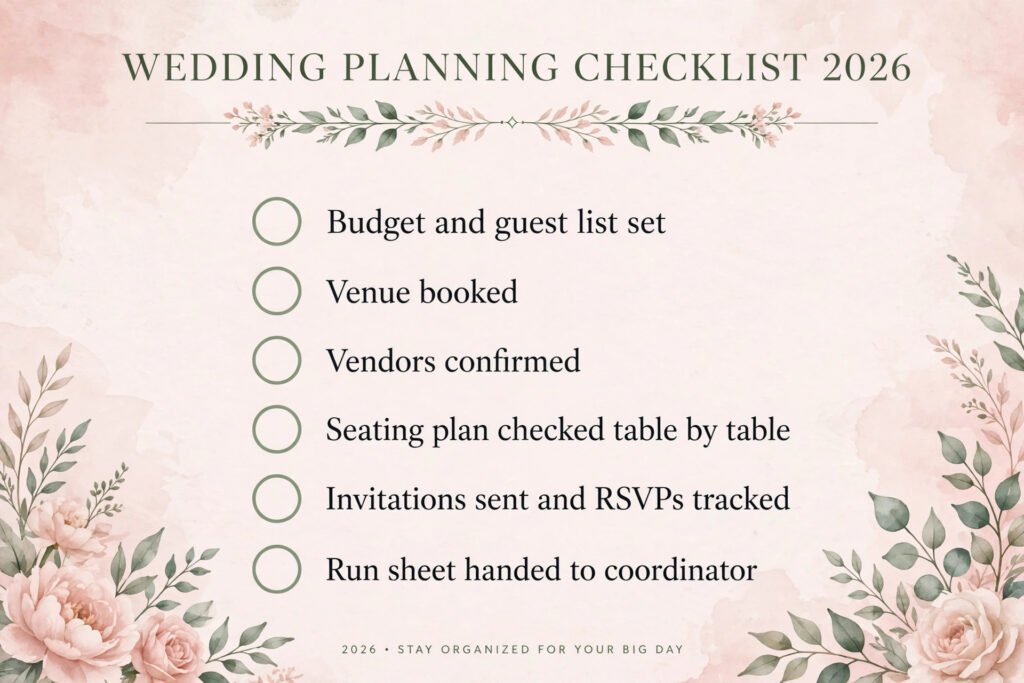
Every wedding planning mistake starts here, because every later decision is priced per guest. A venue that looks affordable for 80 people is a different wedding at 140. So the first job is not decor or dresses. It is two numbers: the total budget and the guest count, agreed before anything else is booked.
Start with the budget as a total, then split it. A common split for a full day wedding looks roughly like this: venue and catering take the largest share, often around half the total. Photography and video take the next chunk, followed by music, flowers and decor, attire, and invitations and stationery. The exact split matters less than writing it down and letting AI track it. Ask an AI assistant to build a simple budget tracker with columns for category, estimate, quote, deposit paid and balance due, and update it every time a quote arrives.
Then build the guest list in three tiers before you invite anyone. Tier one is family and the closest friends, the people the wedding would feel wrong without. Tier two is wider friends and colleagues you genuinely want there. Tier three is everyone else, the polite invitations and plus ones you are unsure about. Total tier one first. If that number already fills the venue or the budget, tier three does not get invited.
AI helps here in two specific ways. First, it can turn a rough total into a per guest cost, which makes trade offs concrete. Cutting 20 guests at a known per guest catering price is a real number, not a vague saving. Second, it can draft the awkward messages: a polite decline to a plus one request, or a note explaining a small wedding. Keep those drafts short and warm, and always read them before sending.
Mistakes at this stage are expensive. The most common is booking a venue before fixing the guest count, then discovering the room holds 30 fewer people than the list. The second is forgetting the costs that are not in the headline price: service charges, corkage, overtime for the band, delivery fees for flowers, and alterations. Ask every vendor for the total, not the headline, and put that total in the tracker.

Step 2: Pick the venue and the vendors with a shortlist, not a search spiral
Venue and vendor research is where AI saves the most time, and where it wastes the most time if you let it. The trick is to give it a tight brief and a shortlist limit. “Find me a wedding venue” returns an endless list. “Find five venues within 30 miles of the city, licensed for ceremonies, holding 100 to 140 guests, with an outdoor photo option and a total hire plus catering estimate” returns something you can actually compare.
Build a comparison table with the same columns for every option: capacity, ceremony licence, catering included or outside caterers allowed, curfew, total estimate, deposit terms, and one line on what you liked. Ask AI to fill the table from venue websites and enquiry replies, then verify the two numbers that matter most, capacity and total cost, by phone or email before you visit. Venue websites are often out of date on prices, and AI can only repeat what it finds.
Visit three venues at most before deciding. More visits blur together, and every visit costs a weekend afternoon. Take the same photos at each one: the ceremony spot, the dining room set for a similar number, the dance floor, the bar queue area, and the wet weather backup space.
Vendors follow the same pattern. Shortlist three photographers, three florists and two bands or DJs, and compare them on the same columns: style, full day price, hours included, travel cost, and delivery time for photos or film. Ask AI to draft the enquiry email once, then personalise the first line for each vendor. Check portfolios by hand. AI can summarise a portfolio page, but it cannot tell you whether you like the photographer’s eye, and that is the whole decision.
One warning: never book a vendor from an AI summary alone. Read the price, hours and cancellation sections of the contract before paying a deposit.
Step 3: Design the theme and decor with AI visuals, then show them to a human
This is the step most couples enjoy, and the step where AI is genuinely fun. A text to image tool can turn “long tables, warm candles, olive branches, cream linen” into a picture in a minute. That picture is not a plan. It is a starting point for a conversation with a florist or stylist, who will tell you what it costs, what is in season, and what will wilt by 9 pm.
Work in this order. First, pick three words for the day: a season, a mood and a colour family. “Late summer, warm, cream and olive” is a brief. “Elegant” is not. Second, generate six to ten images from that brief and pick the two or three you keep coming back to. Third, take those images to the florist and ask for a quote for the look, plus one cheaper version. The gap between the AI picture and the quote is where most decor budgets break, because AI does not know the price of roses in your month or the hire cost of candle holders.
Use AI visuals for the decisions that are hard to describe in words: table layouts, ceremony backdrops, and the difference between a tall centrepiece that blocks conversation and a low one that does not. A picture settles those arguments in seconds. Do not use AI pictures as a promise to guests. An invitation or website that shows an AI generated venue that does not exist will confuse people and disappoint them on the day. Keep generated images in the planning folder, not on the public invitation.
Colour deserves a specific warning. Screens lie about colour, so order fabric swatches for linen and dresses and look at flower samples in daylight before committing. AI can narrow the palette. Only a physical sample confirms it.
For couples sharing ideas online, a tool like Instagram is useful at this stage for saving real venue and florist photos alongside generated ones, so the difference between a real room and a rendered one stays visible. See our guide to the best AI tools for Instagram for apps that help organise and edit those reference photos.
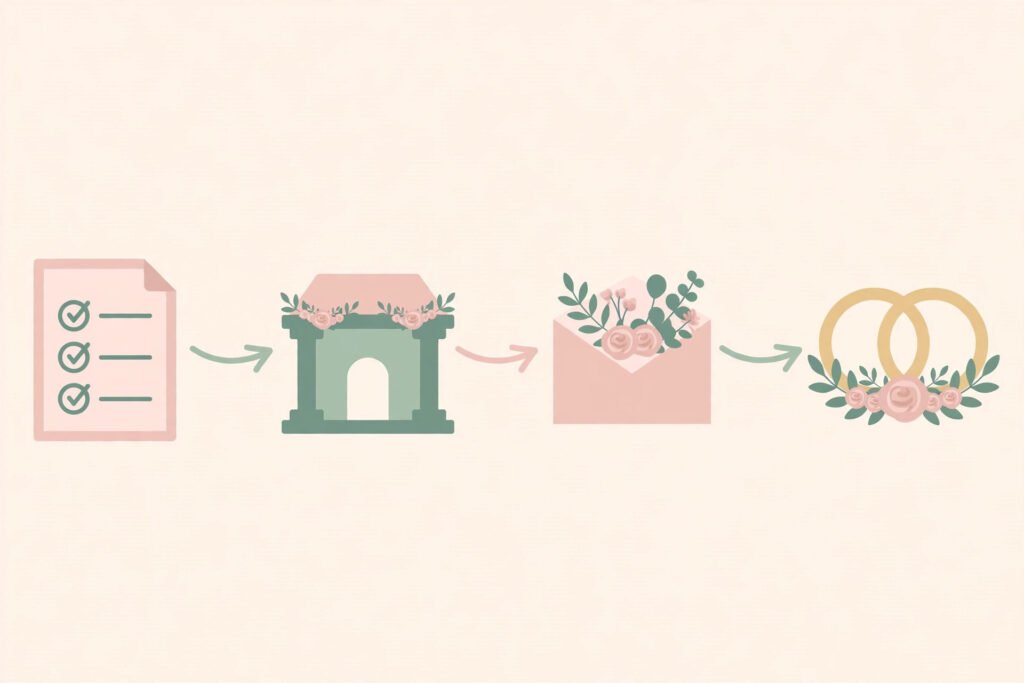
Step 4: Plan the timeline and the seating with drafts you check by hand
A wedding day timeline is a chain: ceremony, photos, reception, speeches, first dance, and every gap between them. AI is excellent at building the first draft, because it is arithmetic. Give it the fixed points, ceremony at 2 pm, dinner at 6 pm, band until midnight, and ask for a timeline working backwards, including travel, hair and makeup, and a buffer for photos. Then add 15 minutes of buffer to every transition. Weddings run late. The buffer is what stops a late ceremony from eating into dinner.
Seating is the opposite problem. AI can produce a tidy table plan in seconds, and it will be wrong in exactly the ways that matter: ex partners at one table, a shy guest surrounded by strangers, children far from parents, or a table of eight people who have nothing in common. Use the AI draft as a starting grid, then check it table by table against what you know about your guests. The useful AI help here is not the plan itself but the checking: ask it to list every table where two guests share a surname but are not seated together, or where a guest is the only person under 30 at a table. Those checks catch the mistakes your eyes miss at midnight.
Build the timeline in two versions. The detailed version, with times for every supplier, goes to the venue coordinator, photographer and band. The guest version, with just ceremony, dinner and dancing times, goes on the invitation and the wedding website. Keeping the detailed version private avoids guests arriving for a 2 pm ceremony to watch a 2:40 pm hair and makeup session, and it stops well meaning relatives from “helping” with supplier timings.
One practical tip: put the group photo list in the timeline, not in someone’s head. List the ten group shots, in order, with names, and give the list to the photographer and one organised friend a week before.

Step 5: Manage invitations and RSVPs without chasing people by hand
Invitations look simple and consume surprising amounts of time, because every invitation creates a small chain of tasks: design, print or send, track the reply, chase the non reply, record dietary needs, and update the table plan. AI and wedding planning tools handle the chain well if you set them up once and let them run.
Start with the wording. Ask AI for three versions of the invitation text: formal, warm and short. Pick the one that sounds like you, then edit it by hand. The details that matter are the date, time, venue address, dress code, RSVP deadline and a link or address for replies. Everything else is decoration. Print a single proof, or send a test digital invitation to yourself, and check it on a phone. Most guests will read it on a phone, and a design that looks perfect on a laptop can be unreadable there.
RSVP tracking is where a tool earns its keep. A wedding website or planning app with an RSVP form collects names, attendance, dietary needs and song requests in one spreadsheet, instead of across text messages, emails and comments. Set the RSVP deadline four weeks before the final numbers are due to the caterer, not the day before. That gap is your chasing window.
Chasing is the part everyone dreads, and AI drafts help here too. A short message, “We need final numbers this week, can you let us know if you can make it?” sent once, gets most replies. Send it once, not three times. Guests who have not replied after one chase usually need a phone call, not another message, and a call also catches the dietary need or access requirement that a form misses.
Keep a single guest spreadsheet as the source of truth, even if you use an app, and export it weekly. Record dietary needs, access needs and children in separate columns, and share only the columns each supplier needs. The caterer needs dietary needs. The DJ does not need them.
Step 6: Build the wedding day run sheet and hand it to someone else
The run sheet is the most valuable document in this guide, and the simplest. It is a one or two page timeline for the day itself: who does what, when, and who to call if it goes wrong. AI can draft it from your timeline in minutes. Your job is to add the phone numbers and hand it to a coordinator, a friend or a family member who is not in the wedding party, because the couple cannot run their own wedding day.
A good run sheet has five sections. First, the morning: hair, makeup, dressing and photographer arrival times. Second, transport: who travels with whom, and what time each car leaves. Third, the ceremony and photos: the order of service and the group photo list. Fourth, the reception: dinner, speeches, cake and first dance times, plus supplier contact numbers. Fifth, the end of the night: who collects gifts and cards, who returns hired items, and what time the venue must be empty.
Give the run sheet to suppliers a week before, not on the morning. A photographer who learns about a 20 minute sunset photo slot on the day cannot plan for it, and a band that learns the first dance song on the day cannot rehearse it.
On the day itself, the couple’s only job is to enjoy it. That sounds like a platitude, but it is a planning decision. If every supplier has the run sheet and one named person holds the phone numbers, nobody needs to ask the couple anything except whether they are happy. Couples who skip this step spend their wedding answering logistics questions. Couples who do it spend it married.

AI wedding planning tools compared
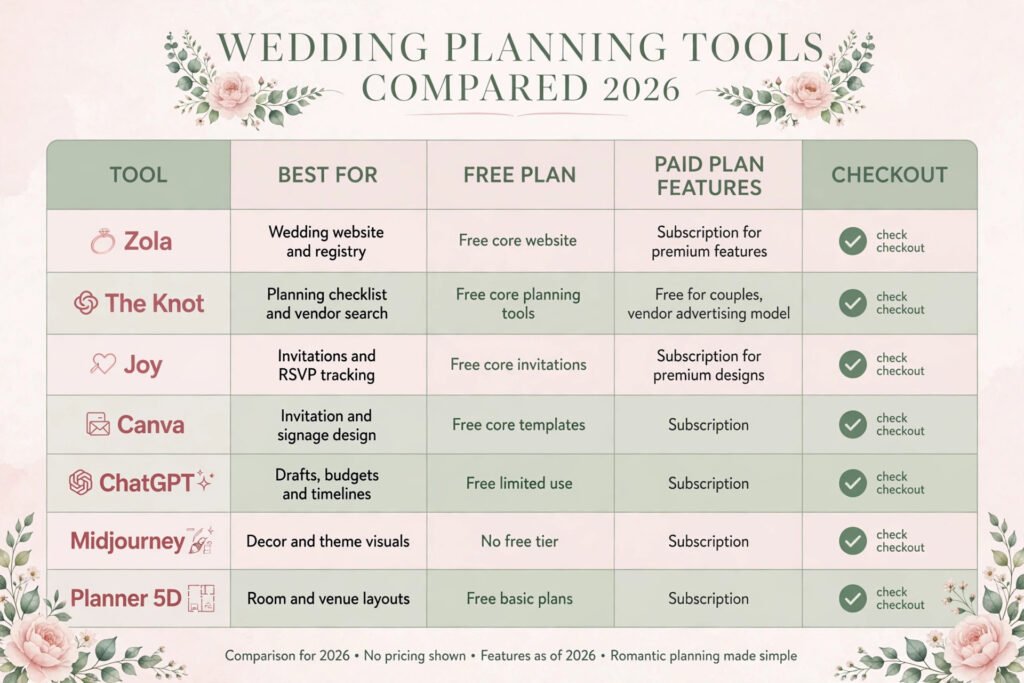
The tools below cover the four jobs in this guide: planning, design, budgeting and invitations. Prices are October 2026 plan models. Where a vendor prices by tier or does not publish a price, this guide says check checkout rather than guessing a number.
| Tool | Best for | Free option | Paid model |
|---|---|---|---|
| Zola | Wedding website and registry | Yes, core website | Subscription for premium features, check checkout |
| The Knot | Planning checklist and vendor search | Yes, core planning tools | Free for couples, vendor advertising model, check checkout |
| Joy | Invitations and RSVP tracking | Yes, core invitations | Subscription for premium designs, check checkout |
| Canva | Invitation and signage design | Yes, core templates | Subscription, check checkout |
| ChatGPT | Drafts, budgets and timelines | Yes, limited use | Subscription, check checkout |
| Midjourney | Decor and theme visuals | No free tier | Subscription, check checkout |
| Planner 5D | Room and venue layouts | Yes, basic plans | Subscription, check checkout |
Start with one planning tool, not four. Couples who open a Zola account, a Knot account and a spreadsheet usually update none of them. Pick the tool whose checklist feels natural, put every date and deposit in it, and use AI assistants only for drafts and visuals. Canva deserves a special mention for invitations and signage, because it produces print ready files that a local printer can use, which is cheaper than ordering every sign from a stationer. Midjourney and similar image tools are for the planning folder only, as noted in step three, not for public invitations.
Try the tools at their official sites only, and check the price at checkout before committing, since wedding tool pricing often changes around peak season.
How to Choose tools for your wedding size
Wedding size changes which tools matter. A small wedding of under 40 guests needs almost no tooling: a spreadsheet, a group chat and one invitation design cover it. The risk for small weddings is over tooling, spending more time setting up apps than planning the day. If your guest list fits on one page, keep the system on one page too.
A medium wedding of 40 to 120 guests is where a planning tool earns its keep. RSVP tracking, the seating draft and the budget tracker all become real work at this size, and a single tool that holds them together prevents the lost spreadsheet problem. This is also the size where a wedding website pays off, because guests stop asking the couple the same five questions.
A large wedding of 120 guests or more needs a coordinator, human or hired, more than it needs another app. The tool still helps, but the run sheet, supplier timings and on the day problem solving need a person whose only job is the day. If the budget does not stretch to a professional coordinator, appoint a confident friend, give them the run sheet two weeks early, and thank them properly. No app replaces that person.
One more filter: pick tools your partner will actually open. A system one person maintains alone becomes a second job. The best system is the one both of you update.
Mistakes to avoid
The first mistake is generating the decor before booking the venue. It feels like progress and it is not. Venue first, theme second, always. The second is trusting an AI budget that has never seen a real quote. Get two real quotes for venue and catering before trusting any split. The third is sending invitations before the guest list is final. Every extra invitation after the first batch creates a new chain of tracking, seating and catering numbers.
The fourth mistake is putting AI images on public invitations or the wedding website. Guests will expect the rendered room, and the real room will disappoint them through no fault of the venue. The fifth is skipping the wet weather plan. If the ceremony is outdoors, the backup plan needs a room, a time and a person who decides, written down before the week of the wedding, not improvised in the rain.
The sixth mistake is over automating guest communication. One chase message is helpful. Three feels like spam, and a guest who feels spammed arrives annoyed. The seventh is forgetting access and dietary needs until the week before. Collect them on the RSVP form, pass them to the caterer and venue early, and check them again at the final numbers meeting. A guest who cannot eat anything at your wedding will remember it longer than the flowers.
The eighth mistake is planning the wedding you think you should have instead of the one you want. AI suggestions drift towards the average, so if you want a morning ceremony, a food truck dinner or no first dance, that is a better wedding than a copy of someone else’s. Use AI to execute your plan, not to choose it.
Frequently asked questions
Can AI plan a whole wedding on its own?
No, and you should not let it try. AI handles drafts, budgets, timelines and visuals well. It cannot visit a venue, taste food, judge a photographer’s style or solve a problem on the day. Use it for paperwork and keep the judgment calls human.
How far in advance should I start using AI wedding tools?
Start with budget and guest list as soon as you have a date in mind, ideally nine to twelve months before. Venue and vendor shortlists follow. Decor visuals and seating drafts work best three to six months before, when the real decisions are already made and AI is refining them rather than inventing them.
Share planning details, not sensitive ones. Budget totals, guest names and venue plans are fine in a private account. Do not paste bank details, passport numbers or home addresses into a chat tool, and do not put a public wedding website live with personal phone numbers on it. Use the tool’s privacy settings and keep the guest list spreadsheet private.
Will AI generated decor pictures match the real thing?
Rarely exactly. AI pictures show an ideal room with ideal light and unlimited flowers. Real rooms have pillars, radiators and budgets. Treat generated images as a brief for your florist, ask for a quote and a cheaper version, and look at physical samples before committing.
What is the best free AI tool for wedding planning?
There is no single best tool, because the best tool depends on the job. A free planning checklist from a site like The Knot covers dates and vendors. A free design tool like Canva covers invitations. A free AI assistant covers drafts and budgets. Start with one planning tool and add others only for a specific job.
Should I tell vendors I used AI to plan?
You do not need to, and it does not matter. Vendors care about clear briefs, realistic budgets and decisions made on time. An AI drafted enquiry email that you personalised is a good brief. A vague message copied without reading is not, whether a human or a tool wrote it.
Conclusion
Learning how to use AI for wedding planning comes down to a simple division of labour. Let AI do the arithmetic, the lists, the drafts and the first visuals. Keep the visits, the tastings, the taste and the final decisions for yourselves. Book the venue before designing the decor, get real quotes before trusting a budget split, and put the run sheet in someone else’s hands before the day.
Do that, and AI gives you back the thing weddings usually steal: time. Time to enjoy the planning, time to make decisions without panic, and on the day itself, time to be present instead of solving logistics. That is the whole point of the tools, and it is worth more than any generated picture.