

If you want to learn how to create a membership site with AI, start with one uncomfortable fact. Most membership sites do not fail because the technology is hard. They fail because nobody wanted to pay every month for what was inside. AI can now build the pages, write the first lessons, design the sales page and answer member questions, but it cannot create demand that was never there. This guide keeps that order straight. You validate first, build second, and launch to a small group before you spend months making content nobody asked for.
A membership site is a website where people pay a recurring fee for access to content, a community, coaching, templates or a combination of those. The best ones solve one ongoing problem. A photography site that teaches one new editing skill each month keeps members longer than a site that dumps fifty random tutorials on day one. The ongoing problem is the product. Everything else is packaging.
The short answer: what to expect
A realistic first version takes four to eight weeks if you already have an audience, and eight to twelve weeks if you are starting from zero. That includes validation, building, and a founding member launch. Tool costs stay modest at the start. Most creators begin with one membership platform, one AI writing assistant, and one design tool, all on subscription plans. Check checkout for current pricing, because platforms change tiers often.
Set honest expectations for members and money. A first launch to a small audience commonly brings 20 to 100 founding members. A site that keeps members needs a monthly churn rate under 10 percent, and the strongest small sites sit under 5 percent. That means if you start a month with 100 members, losing fewer than five is a good result. Revenue follows retention, not launch day. A site with 200 members paying a monthly fee earns more over a year than a site that signs 500 members and loses half of them in three months.
Before you build anything, answer three questions in writing. Who exactly is this for? What result will they get in the first 30 days? What will you publish every month that they cannot easily find free elsewhere? If any answer is vague, your membership idea is not ready yet.
How to create a membership site with AI, step by step
Step 1: Pick a topic and an audience you can name
A topic is not an audience. “Fitness” is a topic. “Busy parents who want 20 minute home workouts with no equipment” is an audience. The second version tells you what to make, what to charge, and where to find members. Write your audience in one sentence that names the person, their problem, and the outcome they want.
AI helps most at this stage as a research assistant, not a decision maker. Ask an AI tool to list ten problems your audience complains about, ten questions they search for, and ten products they already buy. Then check those answers against real evidence: comments on videos, questions in forums, and conversations you have had. Keep the problems that show up repeatedly. Drop the ones that only the AI suggested.
Narrow to one promise for launch. Your founding offer should solve one painful problem well, not five problems thinly. A site for freelance designers could promise “one client winning system per month” rather than “design, pricing, contracts, marketing and mindset.” The narrow promise is easier to sell, easier to deliver, and easier for members to describe to friends.

Step 2: Plan tiers and pricing before you build
Pricing is a retention decision, not just a money decision. Most successful small membership sites use one or two tiers at launch. A single tier keeps everything simple. Two tiers let you offer a basic content tier and a higher tier with community access or live calls. Three tiers at launch usually confuse buyers and split a small audience into groups too small to feel alive.
Price for the result, not for the volume of content. Members pay for outcomes, access, and accountability. A site that helps members land freelance clients can charge more than a site that offers a library of videos, even if the library is bigger. Study what your audience already pays for: courses, software, coaching, and books in the same niche. Price near that range, not far above it, for a first launch.
Offer a founding member rate to your first group. Founding members pay less in exchange for joining early, giving feedback, and tolerating rough edges. This gives you paying members before the site is perfect, and it gives you testimonials for the public launch. Make the founding rate clear and time limited, and tell members what happens when the price rises. Surprise price rises destroy trust faster than almost anything else.
Decide your billing rhythm now. Monthly billing brings members in easily but needs constant retention work. Annual billing brings cash up front and members who stay longer, but it is harder to sell to strangers. Many sites offer both, with annual priced as roughly ten months for twelve. Check checkout on your chosen platform for how it handles failed payments, because failed cards are a quiet cause of churn.
Step 3: Build the site with AI tools, in the right order
Build in this order: payment and access first, then the member area, then the sales page, then extra content. Many creators do the reverse and end up with beautiful pages nobody can buy through. Pick a membership platform that handles payments, logins, and content protection in one place. For most first time creators, an all in one platform beats stitching together five separate tools.
Use AI to draft, never to publish unchecked. A good workflow is to outline each lesson yourself, ask an AI assistant to expand the outline into a first draft, then rewrite it in your own voice and check every fact, example, and instruction. Members can tell when content was pasted straight from a chatbot, and they will not renew for it. Your expertise is the reason they pay. AI is the assistant that helps you produce more of it.
For launch, you need less content than you think. Prepare a welcome lesson, the first month of core content, and one quick win members can complete in their first week. A quick win matters more than a large library. If a member gets a visible result in week one, they are far more likely to stay for month two. Record short lessons rather than long ones. Ten focused lessons of ten minutes beat two rambling hour long lectures.
Design matters, but polish is not the product. Use a clean template from your platform, one readable font pairing, and consistent lesson layouts. AI design tools can generate a logo, a sales page hero image, and lesson thumbnails, but keep the style consistent across all of them. A site that looks patched together from five different styles feels untrustworthy, even if each piece looks good alone.

Step 4: Create launch content that proves the result
Launch content is not the same as member content. Launch content proves to strangers that you can help them. The most effective pieces are short, specific, and useful on their own: a checklist, a teardown of a real example, a short tutorial that solves one problem, or a comparison that helps readers choose. Each piece should end with one clear invitation to join the founding group, not five different links.
Plan four weeks of launch content before you open enrollment. Week one introduces the problem and why common advice fails. Week two shows your method with a real example. Week three answers objections and shows early results or testimonials. Week four opens enrollment with a deadline. If you write launch content with an AI assistant, keep the same rule as member content: outline first, draft second, rewrite and fact check third. For writing help, see the tools in Best AI Tools for Freelance Writers.
Short video works well for membership launches, because buyers want to see the person they will learn from. You do not need studio quality. A phone camera, decent light, and clear audio beat a polished video with weak content. Post where your audience already spends time, and reuse each piece in two places. A tutorial can become a blog post and a short video. A member question can become a public answer that attracts the next member.
Step 5: Launch to a founding group, not to everyone
A founding launch is a small, controlled opening. Invite your email list, your social followers, and people who have bought from you before. Cap the group at a number you can serve well, often 50 to 100 people. Tell them exactly what they get, what is still being built, and how their feedback will shape the site. Honesty at this stage buys patience later.
Set a clear enrollment window of seven to fourteen days. A deadline focuses decisions. During the window, answer questions publicly where possible, because one person’s question is usually ten people’s question. Send three kinds of messages: an opening announcement, a mid window update with early member feedback, and a final reminder before closing. More than that annoys people. Fewer than that leaves sales on the table.
On launch day, watch three numbers: how many people visit the sales page, how many start checkout, and how many complete payment. A large gap between checkout starts and completed payments usually means the price, the payment options, or the page itself needs work. Fix that before you spend more on promotion. After closing, onboard every member personally in the first week. A welcome message, a short orientation lesson, and one question about their goal will do more for retention than any automated sequence.


Step 6: Retain members with a rhythm they can rely on
Retention is a publishing habit. Members stay when they know what arrives, when it arrives, and why it matters. Pick a monthly rhythm you can sustain for a year: for example, two lessons, one live session, and one template or resource each month. Publish on the same days each month. Consistency builds trust faster than occasional bursts of content.
Community is the strongest retention tool most small sites have, and also the easiest to neglect. A community needs a host, not just a room. Ask one good question each week, highlight member wins, and answer within a day. If the community goes quiet for two weeks, members start to wonder why they pay. If you cannot host a community yourself yet, skip it at launch and add it when you have time to run it properly. A dead forum hurts more than no forum.
Track retention from month one. Each month, record how many members joined, how many left, and why the ones who left said they left. Send a short exit question to every cancelling member. The answers will tell you what to fix: too much content, too little new content, wrong level, or price. Act on the most common reason first. Also track which content gets finished. Lessons nobody finishes should be shortened, reworked, or removed, not left to pad the library.
Raise prices for new members only, and only after you have added clear value. Existing members should keep their rate or receive a long notice period. This rewards loyalty and avoids the angry messages that follow a sudden rise. Once a year, review your tiers, your content rhythm, and your churn rate together. A membership site is a living product. The sites that last are the ones whose owners keep adjusting based on what members actually do, not what the owner hoped they would do.

Tools compared: platforms and AI helpers
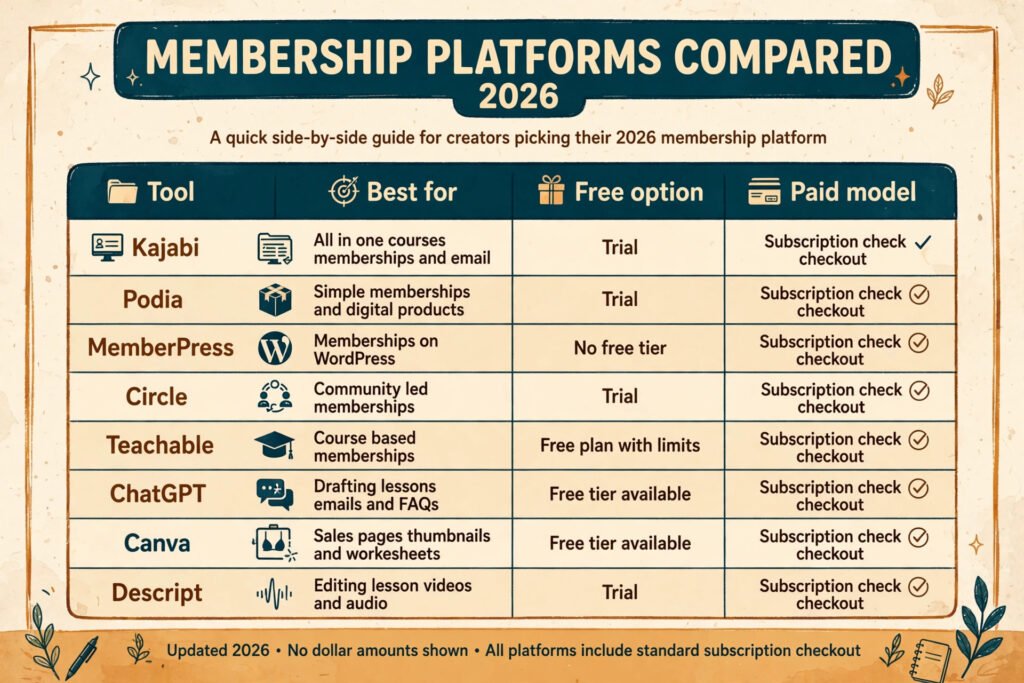
| Tool | Best for | Free option | Paid model |
|---|---|---|---|
| Kajabi | All in one courses, memberships and email | Trial | Subscription, check checkout |
| Podia | Simple memberships and digital products | Trial | Subscription, check checkout |
| MemberPress | Memberships on WordPress | No free tier | Subscription, check checkout |
| Circle | Community led memberships | Trial | Subscription, check checkout |
| Teachable | Course based memberships | Free plan with limits | Subscription, check checkout |
| ChatGPT | Drafting lessons, emails and FAQs | Free tier available | Subscription, check checkout |
| Canva | Sales pages, thumbnails and worksheets | Free tier available | Subscription, check checkout |
| Descript | Editing lesson videos and audio | Trial | Subscription, check checkout |
Choose the platform before you choose the AI tools. The platform decides how payments, logins, and content protection work, and switching platforms later means migrating members. Try the free trial or free plan of two platforms, build one lesson and one checkout page on each, and pick the one that felt easier. The best platform is the one you will actually use every week.
For promotion, short video and visual posts bring in members faster than long articles alone for most niches. The tools in Best AI Tools for Instagram cover scheduling and short video workflows if that channel fits your audience. Do not adopt every channel at once. One channel done well beats four channels done badly.
How to choose a platform
Match the platform to your model, not to a feature list. If your membership is mainly courses and lessons, an all in one course platform fits. If community discussion is the main value, a community platform with course features fits better. If you already run a WordPress site and want full control, a WordPress membership plugin fits, but expect more setup and maintenance.
Ask four questions before paying. Does it handle failed payments and retries automatically? Can members pause instead of cancelling? Does it let you offer founding pricing and annual billing? Can you export your member list? A platform that locks your member list is a risk to your whole business. Test the member experience yourself: sign up, pay, log in on a phone, and complete a lesson. If any step confuses you, it will confuse your members too.
Use free trials the way a member would use your site. Sign up for two platforms, build one lesson and one checkout page on each, and complete a test purchase on your phone. Time how long each setup takes and note where you get stuck. The platform that lets you finish the test fastest is usually the right one, even if its feature list looks shorter. A long feature list you never use is not value. Also check how each platform handles taxes, refunds, and failed payments, because those jobs land on you once members start paying. Finally, read the export options before you commit. You should be able to download your member emails and your content at any time. If a platform makes leaving hard, that is a warning sign, not a feature.
Budget for one platform subscription plus one or two AI tools at launch. Extra tools can wait until member revenue covers them. Many creators waste their first months paying for software they barely open. Start small, prove the offer, then add tools that solve a specific bottleneck, such as video editing or email automation.
Mistakes to avoid
Building everything before selling anything is the most expensive mistake. Months of content for an unproven idea is a gamble. Sell the founding offer first, then build the next month of content with paying members giving feedback.
Pricing too low is the second mistake. A very low price attracts members who leave quickly and leaves no margin for support or improvement. Price for the result, offer a founding rate, and raise the public price after the founding round.
Copying a competitor’s structure is the third mistake. Their tiers, content volume, and community format fit their audience and their time. Yours should fit your audience and your schedule. Borrow ideas, but design your own rhythm.
Ignoring the first week is the fourth mistake. Members decide in week one whether the site is worth the next payment. A welcome lesson, a quick win, and a personal message matter more than a large back catalogue.
Letting AI publish unchecked is the fifth mistake. Wrong facts, generic advice, and invented examples destroy the trust that memberships run on. Every AI draft needs your review, your examples, and your corrections.
Adding too many tiers, too much content, or a community you cannot host is the sixth mistake. Complexity grows support work and confuses buyers. Simple and sustained beats big and abandoned.
Frequently asked questions
How much does it cost to start a membership site?
Most creators start with one membership platform subscription and one or two AI tools, all on monthly plans. Check checkout for current pricing, since tiers change often. Avoid buying extra software before your first paying members arrive.
How many members do I need to make it worthwhile?
That depends on your price and your time. A site with 100 members at a modest monthly fee can cover its costs and pay its creator part time income if churn stays low. Focus on retention first. A small loyal group beats a large group that leaves quickly.
Do I need an audience before I launch?
An audience helps, but you can build one during validation. Publish useful free content for four to eight weeks, collect emails with a free checklist or guide, and invite those subscribers to the founding launch. A list of 200 interested people beats 10,000 uninterested followers.
Can AI run the membership for me?
No. AI can draft lessons, design pages, write emails, and answer common questions, but members pay for your judgment, your examples, and your presence. Use AI to produce faster, and keep yourself as the expert members trust.
How much content should I have at launch?
A welcome lesson, the first month of core content, and one quick win members can finish in week one. Add content monthly after that, guided by member questions and completion rates. A small finished library beats a large unfinished one.
What if members cancel in the first month?
Ask every cancelling member one short question about why they left, and look for patterns. Common causes are a missing quick win, content at the wrong level, or a price that does not match the value delivered. Fix the most common cause before adding new features.
Conclusion
Learning how to create a membership site with AI is mostly about order. Validate the idea with real people, price for the result, build the smallest version that delivers a quick win, launch to a founding group, and then keep a rhythm members can rely on. AI makes each step faster, from drafting lessons to designing pages, but it does not replace the judgment that makes a membership worth paying for every month. Start narrow, launch small, listen to your first members, and let retention, not launch day, decide whether the site grows. That is how a membership site becomes a lasting part of a business instead of a short lived project.