

The best AI invoice generator isn’t the one with the most templates — it’s the one that creates a correct, good-looking invoice in under a minute, handles your tax situation properly, and gives your client a one-click way to pay. In 2026 those three requirements eliminate most of the field: plenty of tools generate a pretty PDF, but the AI features that matter (drafts written from a sentence, automatic reminders that get you paid, smart tax handling) live in very different places.
So we ran a hands-on test: we created the same real invoice — a $2,400 web design project for a client in another country, with a 20% deposit, VAT considerations, and a 14-day payment term — in five tools: Zoho Invoice, Wave, QuickBooks Online, Invoice Simple, and Invoice Ninja. We timed each one, graded the output, checked the tax handling, clicked the payment links, and counted what “free” actually gets you. Here’s what we found.
Quick Answer
Bottom line: For most freelancers and small businesses, Zoho Invoice is the best AI invoice generator in 2026 — it’s genuinely free, handles multi-currency and tax well, and its generated invoices were the most polished in our test. Wave is the pick if you also want free double-entry accounting. QuickBooks wins only if you’re already in its ecosystem. Invoice Simple is fastest on a phone. Invoice Ninja is the tinkerer’s choice.
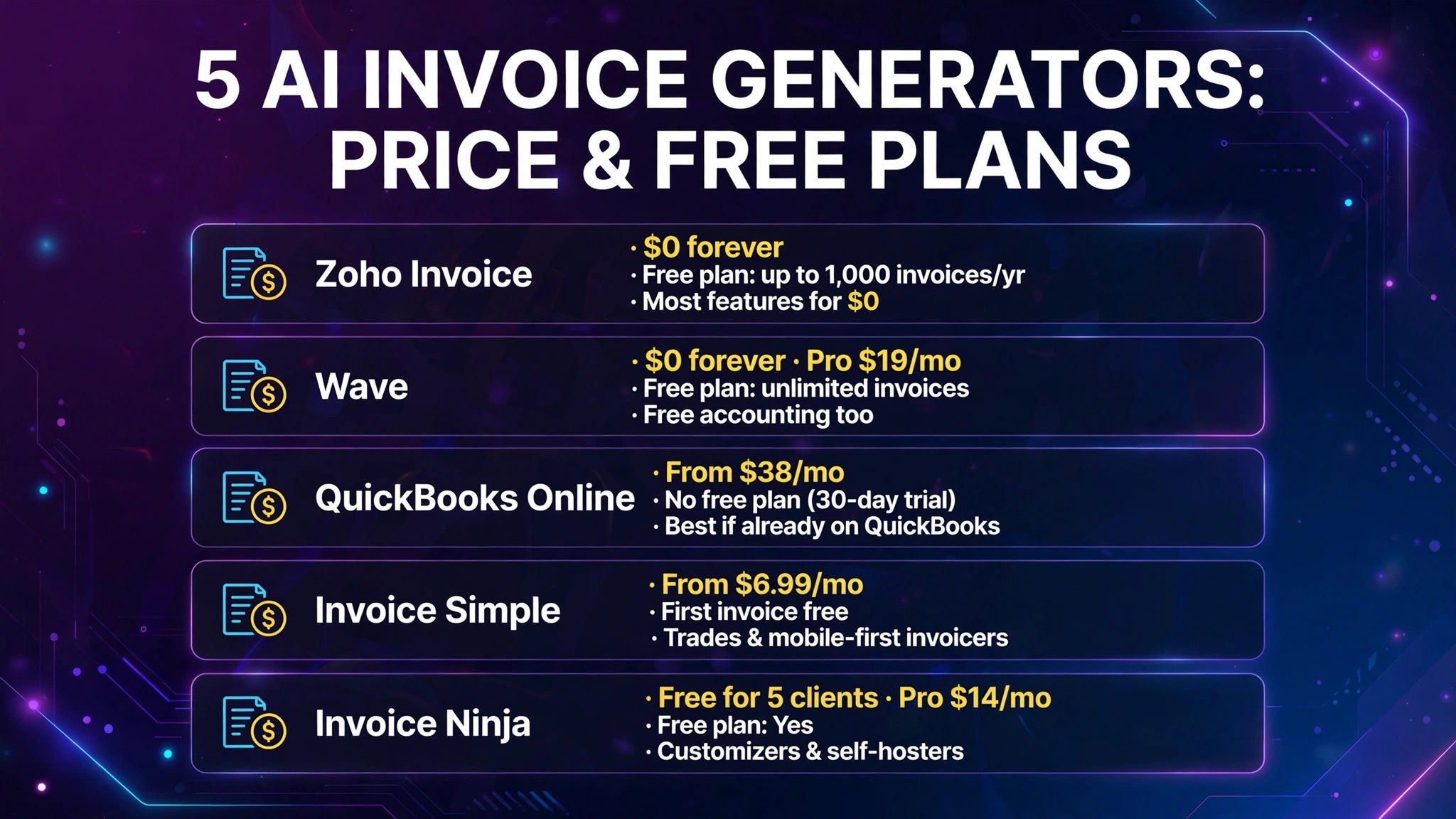
| Tool | Entry price (Oct 2026) | Free plan | AI strength | Best for |
|---|---|---|---|---|
| Zoho Invoice | $0 forever | Yes — up to 1,000 invoices/yr | AI-assisted drafts & reminders | Most features for $0 |
| Wave | $0 forever; Pro $19/mo | Yes — unlimited invoices | Light AI (categorization) | Freelancers who want free accounting too |
| QuickBooks Online | From $38/mo | No (30-day trial) | Intuit Assist drafts & reminders | Businesses already on QuickBooks |
| Invoice Simple | From $6.99/mo | First invoice free | Simple auto-fill drafts | Trades & mobile-first invoicers |
| Invoice Ninja | Free for 5 clients; Pro $14/mo | Yes | AI-assisted invoicing (plan-dependent) | Customizers & self-hosters |
The Test Invoice: What We Sent
Every tool got the identical job:
Invoice: Web design project for a client in the EU — $2,400 total, 20% deposit due upfront, balance on delivery, 14-day terms, VAT/tax note required, payment by card or bank transfer, and an automatic reminder if unpaid after 7 days overdue.
We timed from account creation to a sent invoice, graded template quality (layout, branding, readability), and verified the math (deposit split, tax lines, due dates) line by line.
1. Zoho Invoice — Best Overall (and Genuinely Free)
What it is: Zoho Invoice is Zoho’s dedicated invoicing app — invoicing, estimates, recurring billing, time tracking, expenses, and a client portal, with AI features layered in for drafting and reminders. It’s the rare tool where the free plan isn’t a demo: it’s the product.
2026 pricing (verified): Free forever at $0 — the full feature set, including multi-currency and multi-lingual invoices (templates in 17 languages), payment collection, automated reminders, time tracking, expense management, a client self-service portal, and 30+ reports. The one real cap: up to 1,000 invoices per year on the free plan, which is more than most freelancers and small agencies send. Payment processing fees apply per transaction through connected gateways (Stripe, PayPal, and others), as with every tool here — there is no monthly subscription fee at all.
Our test: fastest quality result. Creating our test invoice took about 4 minutes. The AI-assisted draft filled in sensible line items from a short description, the deposit split (20% upfront) was handled cleanly as a retainer-style structure, and the template output was the best of the five — balanced layout, logo placed properly, payment link prominent rather than buried. Multi-currency and VAT handling were the strongest here: the invoice correctly presented the currency, tax treatment, and compliance fields for a cross-border client, which is exactly the kind of detail that breaks cheaper tools. The automated reminder sequence (before due date, on due date, after) is included free — a feature rivals gate behind paid plans.
Template quality: Best in test. Professional, modern templates with real layout variety, not just color swaps.
Pros:
- Completely free — full invoicing feature set at $0, up to 1,000 invoices/year
- Best multi-currency, multi-language, and VAT/tax handling in our test
- Client portal, recurring invoices, and automated payment reminders included free
- Wide payment gateway support (Stripe, PayPal, Apple Pay, Google Pay, ACH)
Cons:
- Interface feels dated next to newer tools
- The 1,000-invoice annual cap will eventually force a move to Zoho’s paid billing products at scale
- It’s invoicing, not full accounting — growing businesses will pair it with Zoho Books or migrate
Verdict: The best AI invoice generator for most people in 2026 — start here unless you specifically need full accounting in the same tool.
2. Wave — Best Free Invoicing With Real Accounting Attached
What it is: Wave is free double-entry accounting software with invoicing built in — the invoices are one feature of a real ledger, which matters if you want your books to just work without a second tool. Its AI features are lighter (smart categorization and automation rather than generative drafting), but the core invoicing is solid.
2026 pricing (verified): Starter is $0 — unlimited invoices, estimates, bills, and bookkeeping records, no cap on transactions. Pro is $19/month (or $190/year), adding automatic bank transaction imports, OCR receipt scanning, multi-user access, automated late-payment reminders, custom invoice branding, and live support. Wave makes its money on payments: 2.9% + $0.60 per card transaction, 1% for bank payments. Payroll is a separate add-on at $40/month plus $6 per person.
Our test: clean and correct, less polished. Our test invoice took about 6 minutes. The math was flawless — deposit, balance, and due dates all correct — and the invoice looked professional, though noticeably plainer than Zoho’s output: clean and credible, not designed. The cross-border case is where Wave showed its limits: it’s built primarily for US and Canadian businesses, and VAT handling for an EU client required manual workarounds that Zoho handled natively. Payment links worked smoothly, and because the invoice lives inside real accounting software, the payment reconciled itself — a small thing that saves real time every month.
Template quality: Good, not great. Professional and clean; limited design flexibility, and custom branding needs Pro.
Pros:
- Unlimited free invoicing — no annual cap, no invoice-count limit
- Real double-entry accounting included, so invoices reconcile automatically
- Simple, predictable model: pay only when clients pay you
- Recurring invoices and basic reminders on the free plan
Cons:
- AI features are the weakest here — automation, not generative drafting
- No time tracking at any price (a dealbreaker if you bill by the hour)
- US/Canada-centric; VAT and international handling is manual
- Bank imports and receipt scanning moved behind the $19 Pro plan
Verdict: Pick Wave if you want free invoicing and free books in one place and your clients are domestic — skip it if you bill internationally or by the hour.
3. QuickBooks Online — Best If You’re Already in the Ecosystem
What it is: QuickBooks Online is the default US small-business accounting platform, and its invoicing now runs on Intuit Assist — Intuit’s AI layer that drafts invoices and reminders, auto-categorizes transactions, and answers plain-language questions about your books. The invoicing itself is mature; the AI is an increasingly capable assistant on top of it.
2026 pricing (verified): No free plan (30-day trial). After Intuit’s August 2026 price increase: Simple Start $38/month, Essentials $85/month, Plus $140/month, Advanced $340/month. Intuit Assist is bundled into every plan — basic Assist everywhere, with deeper AI agents (accounting, payments) on higher tiers. Payment processing: 1% for ACH transfers and 2.99% for standard card payments. Note that prices rose substantially in 2026, and sources still disagree on some tiers — check quickbooks.intuit.com before subscribing.
Our test: the smartest assistant, the priciest invoice. Our test invoice took about 5 minutes, and Intuit Assist genuinely helped: it drafted a polite payment-reminder sequence, suggested line-item wording from a one-sentence description, and the invoice template was polished and professional. Tax handling for US sales tax was automatic and correct. The EU VAT case, though, needed the same manual attention as Wave — QuickBooks is a US-first product. The real question is value: at $38/month minimum, you’re paying accounting-platform prices for invoicing. If your accountant already runs your books in QuickBooks, that’s fine money. If you only need invoices, it’s the most expensive way to send one.

Template quality: Very good. Polished, brandable templates; the payment experience for clients is slick.
Pros:
- Intuit Assist drafts invoices and reminders and categorizes transactions automatically
- Every US accountant knows it — the smoothest handoff at tax time
- 800+ third-party integrations, the deepest ecosystem here
- Automatic US sales-tax calculation
Cons:
- Most expensive option by far for invoicing alone — plans now run $38–$340/month
- No free plan; prices increased notably in August 2026
- International/VAT handling is not its home turf
- Overkill if invoicing is all you need
Verdict: The right choice only if your business already lives in QuickBooks — as a standalone invoice generator, you’re paying for a platform you don’t need.
4. Invoice Simple — Fastest on a Phone
What it is: Invoice Simple (by the team behind Invoice Maker) is a mobile-first invoicing app for freelancers, contractors, and tradespeople: create an invoice on your phone in the driveway, send it, and get paid by card or QR code. Its “AI” is practical rather than flashy — autofill for clients and items, smart templates, and read receipts that tell you when a client opened the invoice.
2026 pricing (verified): Essentials $6.99/month (up to 3 invoices/month), Plus $14.99/month (up to 10 invoices/month), Premium $21.99/month (unlimited invoices) — annual billing gives two months free. You can send your first invoice free to try it. Note the model: you’re paying for a document count, which is the thing to watch as your volume grows.
Our test: fastest send, simplest output. Our test invoice took about 3 minutes on the mobile app — the fastest of the five. Autofill remembered the client and items, the deposit structure was handled as a partial-payment option, and the read receipt confirmed the client opened it. The invoice itself was the plainest of the five: perfectly professional, zero design flair. The test’s weak spot was tax: VAT-style handling for our EU client wasn’t really in the tool’s vocabulary — this is a domestic, single-business app. For a plumber, electrician, or solo consultant billing local clients, none of that matters; the speed and the “client opened it” notification are the whole product.

Template quality: Basic but clean. Premium templates on the top tier improve things modestly.
Pros:
- Fastest invoice creation in our test — genuinely phone-first
- Read receipts and due-date reminders keep you informed without logging in
- Online payments and QR-code payments built in
- Cheap entry point at $6.99/month
Cons:
- You pay per invoice count at the lower tiers (3 or 10/month)
- Weakest tax/VAT and multi-currency handling in the test
- No accounting — it’s an invoicing app only
- Template design is functional, not impressive
Verdict: The best AI invoice generator for trades and mobile solo operators who invoice from the job site — wrong tool for international or design-sensitive billing.
5. Invoice Ninja — Best for Customizers and Self-Hosters
What it is: Invoice Ninja is the open-source option: invoicing, quotes, expenses, and client portals with deep customization — custom fields, white-labeling, multiple designs — and the option to self-host it for free. AI-assisted invoicing features are available on paid plans and via integrations.
2026 pricing (verified): Free for up to 5 clients; Pro from $14/month for unlimited clients and the full feature set. Self-hosting the open-source version is free if you run your own server. Payment gateways connect through Stripe, PayPal, and dozens of others; processing fees are the gateways’ own.
Our test: most control, most setup. Our test invoice took about 9 minutes — the slowest, because customization options are everywhere and the first run involves real configuration. The payoff: the finished invoice was the most precisely branded of the five (exact fonts, fields, and layout), the deposit and tax lines were fully controllable, and the client portal is genuinely good. The trade-off is that Invoice Ninja asks more of you than any other tool here. If “set it up once, exactly how I want it” sounds appealing, it’s the best value on this list. If you want to send an invoice in the next five minutes, use Zoho.
Template quality: Excellent when configured — the widest design control here, including full white-labeling on paid plans.
Pros:
- Open source with a free self-hosted option — no vendor lock-in
- Deepest customization: fields, designs, white-label client portal
- Free hosted tier for up to 5 clients; Pro at $14/month is cheap
- Strong gateway support without platform processing markups
Cons:
- Slowest setup in our test; the interface rewards tinkerers, not beginners
- AI features are thinner than Zoho’s or QuickBooks’ — it’s automation-first
- Self-hosting means you own updates and backups
- Support is community-led on free tiers
Verdict: The pick for agencies and technical users who want total control and low running costs — overkill for a freelancer sending five invoices a month.
Free Invoice-Count Limits Compared
“Free” means five different things in this category. Read this table before you commit:
| Tool | Free plan? | Free invoice limit | What forces an upgrade |
|---|---|---|---|
| Zoho Invoice | Yes, forever | 1,000 invoices/year | Volume past 1,000/yr |
| Wave | Yes, forever | Unlimited | Bank imports, branding, multi-user ($19/mo Pro) |
| QuickBooks | No (30-day trial) | — | Everything — from $38/mo |
| Invoice Simple | First invoice free | 1 free, then 3/mo at $6.99 | Invoice count |
| Invoice Ninja | Yes | 5 clients (unlimited invoices per client on free tier terms) | Client count past 5 (Pro $14/mo) |
Full Comparison Table
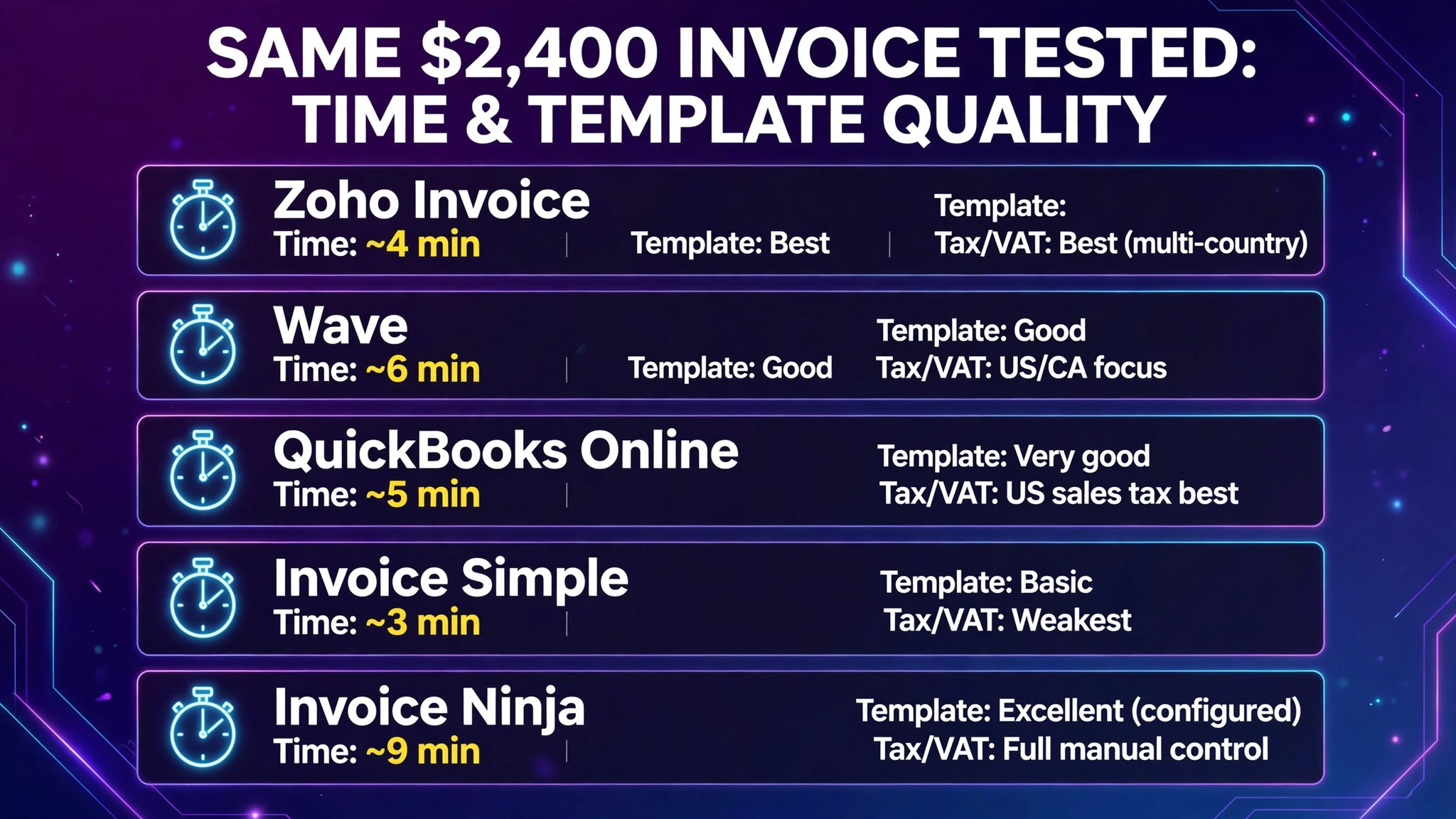
| Zoho Invoice | Wave | QuickBooks Online | Invoice Simple | Invoice Ninja | |
|---|---|---|---|---|---|
| Entry price | $0 | $0 | $38/mo | $6.99/mo | $0 (5 clients) |
| Free invoice limit | 1,000/year | Unlimited | None | 1 free | 5 clients |
| Our test time | ~4 min | ~6 min | ~5 min | ~3 min | ~9 min |
| Template quality | Best | Good | Very good | Basic | Excellent (configured) |
| Tax/VAT handling | Best (multi-country) | US/CA focus | US sales tax best | Weakest | Full manual control |
| Payment links | Yes | Yes | Yes | Yes | Yes |
| Auto reminders | Free | Pro for unlimited | Yes (AI-drafted) | Yes | Yes |
| Accounting included | No | Yes (free) | Yes | No | No |
| Best for | Most SMBs | Free books + invoices | QuickBooks shops | Mobile/trades | Customizers |
How to Choose
- Start free, with Zoho or Wave. Both are genuinely free for invoicing. Zoho if you invoice internationally or care about template polish; Wave if you want your accounting in the same free tool.
- Check your tax situation first. Billing across borders or charging VAT? Zoho handles it natively; the US-first tools (Wave, QuickBooks, Invoice Simple) will make you do it by hand.
- Count your invoices before choosing a metered plan. Invoice Simple’s 3-invoices-a-month tier is fine for a side gig and a trap for a growing practice. If you send more than 10 a month, per-count pricing loses to flat pricing every time.
- Follow your accountant. If a CPA already runs your QuickBooks file, the invoicing premium may be worth it for the handoff alone. Otherwise, don’t buy an accounting platform to send invoices.
- Test the payment link, not the template. Send yourself a test invoice and pay it. The client-side payment experience — how many clicks, which methods — affects how fast you get paid more than any design detail.
Frequently Asked Questions
What is the best free AI invoice generator?
Zoho Invoice — it’s free forever with the full feature set, up to 1,000 invoices a year, including automated reminders, a client portal, and multi-currency support. Wave is the other strong free option (unlimited invoices, plus free accounting), but its AI features are lighter and it’s US/Canada-focused. Watch out for tools whose “free” tier is one invoice or a trial — Invoice Simple’s free allowance is a single invoice.
Can AI invoice generators handle VAT and sales tax?
The good ones can, but it varies by region. Zoho Invoice handled our cross-border VAT test natively, with multi-currency and multi-language templates. QuickBooks is strongest for US sales tax. Wave and Invoice Simple are built for domestic US/Canadian billing and needed manual workarounds for VAT. If you invoice internationally, test your exact scenario during setup — don’t assume.
Do these tools charge extra to accept payments?
The software itself usually doesn’t, but payment processing always costs: typically around 2.9% + a small fixed fee per card payment and about 1% for bank/ACH payments (Wave charges 2.9% + $0.60 per card transaction; QuickBooks charges 2.99% for cards and 1% for ACH). These are the gateways’ economics, not the invoice tool’s markup — but they add up, so factor them into your real cost.
Which invoice generator is best for freelancers?
For most freelancers: Zoho Invoice (free, polished, reminders included). If you bill by the hour and want time tracking feeding invoices, Zoho includes it — while Wave notably has no time tracking at any price. Tradespeople who invoice from a phone should look at Invoice Simple for speed and read receipts.
Can these tools send automatic payment reminders?
Yes — and this is where the “AI” earns its keep. Zoho includes automated reminder sequences free; QuickBooks’ Intuit Assist drafts reminder wording for you; Wave includes basic reminders free with unlimited automated reminders on Pro ($19/month). Set the sequence up once (a nudge before the due date, on the day, and a firmer one a week after) and late payments drop noticeably.
Do I still need accounting software if I use an invoice generator?
If you use Zoho Invoice, Invoice Simple, or Invoice Ninja — yes, eventually, for taxes and reporting (though Zoho pairs with Zoho Books). Wave and QuickBooks are accounting software, so invoices reconcile automatically. For a solo freelancer with simple books, Wave’s free combination may be all you ever need.
Conclusion
The best AI invoice generator in 2026 depends on which job you’re actually hiring it for. Zoho Invoice is the default recommendation: completely free, the best templates and tax handling in our test, and reminders that chase late payers for you. Wave is the best free accounting-plus-invoicing combo for domestic freelancers. QuickBooks Online makes sense only inside its ecosystem. Invoice Simple is the fastest phone in your pocket. Invoice Ninja rewards anyone willing to configure it once.
Whichever you pick, the money features are the same trio: a correct invoice in under five minutes, a payment link your client can pay in one click, and reminders that fire without you. Everything else is decoration.
Next step: create a free Zoho Invoice or Wave account today, recreate your most recent real invoice in it, and send yourself the payment link — if paying it takes more than two clicks, try the other one.