
The best AI comic generators in 2026 are not the ones that produce the prettiest single panel. A single panel is easy. A comic is hard because it asks for the same character, in the same style, doing something new, panel after panel, page after page. That is where most tools break down. A hero who looks one way in panel one and like a stranger in panel three is not a comic. It is a collection of pictures that happen to sit next to each other.
This guide tests the field against that standard. It covers 11 tools across four jobs: short strip comics, longer graphic novels, manga style work, and comics for kids and classrooms. For each tool you get an honest description, a pricing model as of October 2026, who it suits, and what to watch out for. Where a vendor does not publish a clear price, the guide says so and tells you to check checkout rather than guessing a figure.
The central finding is simple. Pick the tool that matches the length and audience of your comic first, and worry about art style second. A strip tool forced into a 40 page graphic novel will frustrate you. A graphic novel tool used for a three panel joke will slow you down. Start from the job, not the demo reel.
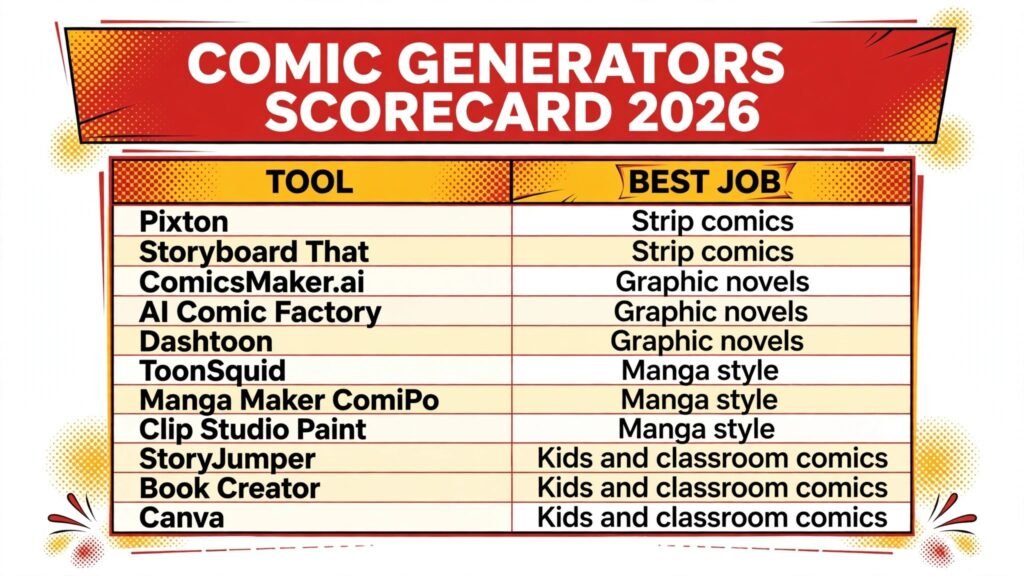
The 11 best AI comic generators at a glance
| Tool | Best job | Free option | Paid model |
|---|---|---|---|
| Pixton | Strip comics | Free tier | Subscription, check checkout |
| Storyboard That | Strip comics | Free trial | Subscription, check checkout |
| ComicsMaker.ai | Graphic novels | Free tier | Subscription by credits, check checkout |
| AI Comic Factory | Graphic novels | Free tier | Subscription, check checkout |
| Dashtoon | Graphic novels | Free tier | Subscription, check checkout |
| ToonSquid | Manga style | Free tier | One time purchase, check checkout |
| Manga Maker ComiPo | Manga style | Free trial | One time licence, check checkout |
| Clip Studio Paint | Manga style | Free trial | One time licence or subscription, check checkout |
| StoryJumper | Kids and classroom comics | Free tier | Paid printing and extras, check checkout |
| Book Creator | Kids and classroom comics | Free tier | Subscription, check checkout |
| Canva | Kids and classroom comics | Free tier | Subscription, check checkout |
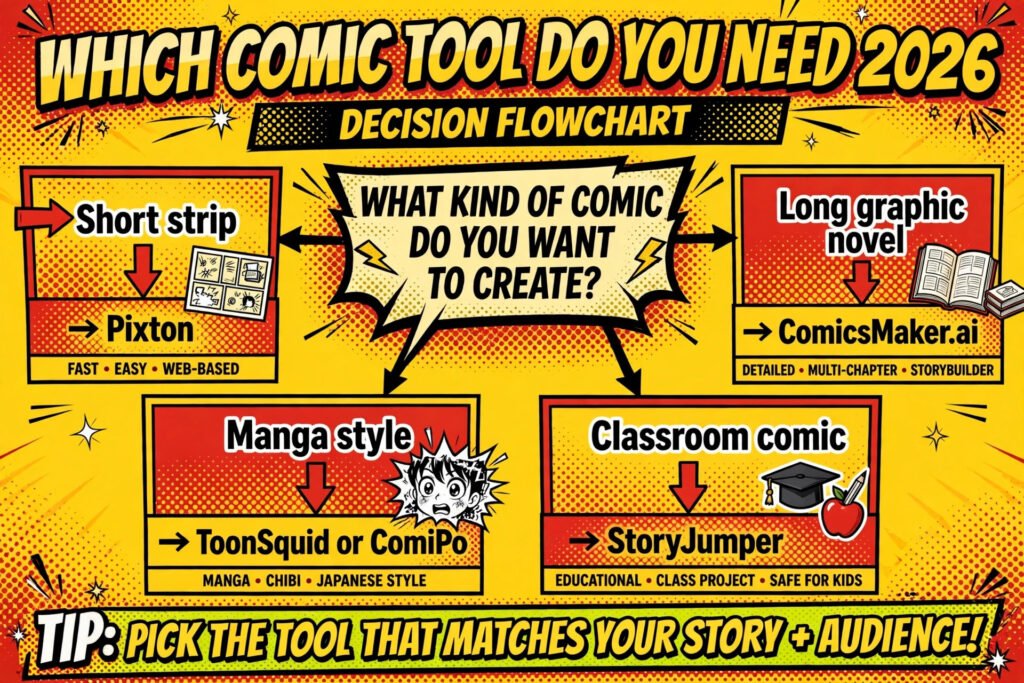
Start here: the best pick by job
| Your situation | Start with | Why |
|---|---|---|
| A weekly three panel strip for social media | Pixton | Fast panel layout, consistent characters, simple publishing |
| A classroom comic project this week | StoryJumper | Built for young writers, easy sharing, low setup time |
| A multi chapter graphic novel | ComicsMaker.ai | Character memory across pages, chapter organisation |
| A manga style series | ToonSquid | Panel and speech tools shaped for manga pacing |
| A one off comic for a presentation | Canva | Templates and text tools you already know |
Strip comics
Strip comics live or die on speed and clarity. You need a joke or a point landed in three or four panels, with characters readers recognise instantly. Art detail matters less than readability.
1. Pixton
Pixton is a character and panel builder aimed at strips and short comics. You build characters once from a large library of poses, expressions and outfits, then reuse them across panels. That reuse is the whole point. Readers recognise your cast from strip to strip, which is something pure image generation struggles to deliver.
The editor is drag and drop, with speech bubbles, captions, sound effects and backgrounds included. You can publish strips to the web or export them for social media and print. Teachers and small teams use it heavily, which shows in the interface: it is plain, fast, and hard to get lost in.
Pricing: free tier with limits, paid plans by subscription. Check checkout for current plan prices.
Best for: weekly strips, social media comics, school projects.
Watch out for: the art style is fixed and cartoon like. If you want painterly or photorealistic art, this is the wrong tool.
Try it at: https://www.pixton.com

2. Storyboard That
Storyboard That began as a storyboarding tool and works well for strips because its strength is sequencing. You lay out scenes in order, add characters and dialogue, and the strip reads as a sequence rather than a set of disconnected images. It suits writers who think in scenes first and art second.
The asset library covers characters, scenes, props and text elements, and you can save characters and scenes to reuse them. Collaboration features let a class or a small team work on the same strip. Export options cover images and PDFs.
Pricing: free trial, then paid plans by subscription. Check checkout for current plan prices.
Best for: classroom strips, explainer comics, team projects.
Watch out for: the style is simple and flat. It reads clearly at small sizes, but it will not win an art award.
Try it at: https://www.storyboardthat.com
Graphic novels
Graphic novels raise the bar. You need character consistency over dozens of pages, scene memory, and a workflow that survives a long project. The tools in this group are judged on whether they help you finish a book, not just start one.
3. ComicsMaker.ai
ComicsMaker.ai is built around AI generated comic pages with reusable characters. You define characters and a style, then generate panels and pages from prompts while keeping the cast recognisable. For a graphic novel, that character memory matters more than any single panel effect.
The workflow supports multi page projects, panel layouts, and dialogue placement. You can iterate on a panel without rebuilding the whole page, which keeps long projects moving. The output suits web publishing and digital reading, with export options for sharing.
Pricing: free tier with limits, paid plans by credits and subscription. Check checkout for current credit and plan prices.
Best for: web graphic novels, multi chapter stories, creators who want AI art with a stable cast.
Watch out for: hands, complex action poses and crowded scenes still need checking panel by panel. Budget editing time, not just generation time.
Try it at: https://comicsmaker.ai
4. AI Comic Factory
AI Comic Factory is an open source style comic generator that turns a short story description into a full comic layout with panels, captions and dialogue. Its strength is speed from idea to readable draft. You describe the story, and it proposes a panel sequence you can then edit.
Because it is open and lightweight, it suits creators who want to experiment without a subscription and developers who want to adapt the tool. The art style is generated rather than drawn from a fixed library, so results vary more from page to page than with character library tools.
Pricing: free to use in its open form, with hosting or hosted versions priced separately where applicable. Check checkout for any hosted plan.
Best for: rapid story drafts, prototyping a graphic novel idea, experimentation.
Watch out for: character consistency across long stories is weaker than in ComicsMaker.ai. Treat its output as a draft to refine, not a finished book.
Try it at: https://huggingface.co/spaces/jbilcke-hf/ai-comic-factory
5. Dashtoon
Dashtoon is a platform for creating and publishing comics, with AI assisted generation and a reader facing publishing side. That combination matters for graphic novels because finishing the book is only half the job. Getting readers is the other half, and a built in audience and publishing flow helps.
Creators build characters and stories on the platform, generate panels with AI help, and publish episodes for readers to follow.
Pricing: free tier for creation and reading, paid plans for extra generation and features. Check checkout for current plan prices.
Best for: serialised graphic novels, webtoon style releases, creators who want publishing included.
Watch out for: publishing on a platform means living with its format and audience rules. If you want full control over distribution, export early and keep your own copies.
Try it at: https://www.dashtoon.com
Manga style
Manga has its own pacing, panel shapes and reading habits. Tools in this group are judged on panel control, screentones and effects, and whether speech and action read in manga rhythm rather than western comic rhythm.
6. ToonSquid
ToonSquid is an animation and comic app for tablets that gives you frame by frame control with a drawing focused workflow. For manga style work, its value is control: you draw and arrange panels, add speech, and keep the timing of a scene in your own hands rather than handing it to a generator.
It suits creators who can draw at least a little and want digital tools that respect hand drawn style. Onion skinning, layers and export options support short manga sequences and animated panels. The learning curve is real, but so is the control.
Pricing: free tier with limits, full version by one time purchase. Check checkout for the current purchase price.
Best for: hand drawn manga shorts, creators who draw, tablet workflows.
Watch out for: this is not a prompt to comic tool. If you cannot or do not want to draw, start with ComicsMaker.ai or Manga Maker ComiPo instead.
Try it at: https://www.toonsquid.com
7. Manga Maker ComiPo
Manga Maker ComiPo is a manga creation tool built around 3D character models posed like figures, with manga style rendering, screentones and panel tools. You pose characters, set camera angles, add speech, and the software renders the result in manga style. That approach gives consistent characters without drawing skill.
The strength is posing and framing. You can try a dramatic low angle or a quiet two shot quickly, which is hard with pure image generation. The weakness is the model library: characters look like ComiPo characters, and pushing far outside that look takes extra work.
Pricing: free trial, then a one time licence for the full software and extra model packs sold separately. Check checkout for current licence prices.
Best for: manga style stories without drawing skill, pose heavy scenes, consistent casts.
Watch out for: the house style is visible. Readers familiar with manga tools will recognise it, so customise colours, tones and framing to make it yours.
Try it at: https://www.smithmicro.com
8. Clip Studio Paint
Clip Studio Paint is the professional standard for manga and comic art, with panel tools, screentones, perspective rulers, speech tools and a huge brush and asset library. It is not primarily an AI generator, and that is exactly why it belongs here: for a serious manga project, craft tools still beat generation for control, consistency and print quality.
Recent versions add AI assisted features, but the core value is the drawing and layout workflow used by working manga artists. You can produce print ready pages, manage multi page projects, and control every line.
Pricing: free trial, then a one time licence or subscription depending on version and device. Check checkout for current prices.
Best for: serious manga projects, print quality pages, artists building a long term practice.
Watch out for: the learning curve is steep, and beginners can spend weeks learning the interface before finishing a page. Pair it with a simpler tool for early drafts if needed.
Try it at: https://www.clipstudio.net
Kids and classroom comics
Comics for kids and classrooms need a different test. Safety, simplicity, sharing and printing matter more than art range. A tool that a ten year old can finish in one lesson beats a powerful tool that needs a tutorial.
9. StoryJumper
StoryJumper lets kids write and illustrate storybooks and comics with a simple editor, a library of art and props, and easy sharing with family and class. The interface is friendly, the steps are clear, and a finished book can be shared online or printed as a real book.
Teachers use it for writing projects because the comic format lowers the barrier to writing. A reluctant writer will often write dialogue for a comic when they would avoid a plain essay. The art is simple and cheerful, which suits the audience.
Pricing: free tier for creating and sharing, with paid printing and extra features. Check checkout for printing and plan prices.
Best for: primary and early secondary classrooms, family storybooks, first comics.
Watch out for: the art library and page tools are simple by design. Older students will outgrow it fast and want Pixton or Storyboard That.
Try it at: https://www.storyjumper.com

10. Book Creator
Book Creator is a digital book tool used widely in schools, and it works well for comics because pages, images, text, audio and video combine freely. Students build a comic page by page, add speech and narration, and publish a book that classmates can read on any device.
The classroom features are the draw: teachers can set up libraries, collect student books, and give feedback in the same place. That workflow beats a prettier art tool that leaves teachers to manage files by hand.
Pricing: free tier with limits, paid plans by subscription for schools and larger libraries. Check checkout for current plan prices.
Best for: school comic projects, multimedia comics with audio, teacher managed classrooms.
Watch out for: it is a book tool first and a comic tool second. Panel layouts and speech tools are good but not as specialised as Pixton or ComiPo.
Try it at: https://bookcreator.com
11. Canva
Canva is the general design tool most readers already know, and its comic templates, drag and drop editor and huge asset library make it a practical choice for a one off comic. You pick a comic template, swap in your text and images, and export for print or social media in minutes.
For kids and classroom use, the advantage is familiarity. Many students and teachers already have accounts and know the interface, so no lesson time is lost to learning a new tool. The comic templates cover strips, posters and short stories, and the text tools handle speech bubbles cleanly.
Pricing: free tier with a large template and asset library, paid Pro plan by subscription for extra assets and features. Check checkout for current plan prices.
Best for: one off classroom comics, posters, social media strips, teams already using Canva.
Watch out for: templates can make every comic look similar. Change colours, fonts and layouts if you want your comic to stand out.
Try it at: https://www.canva.com
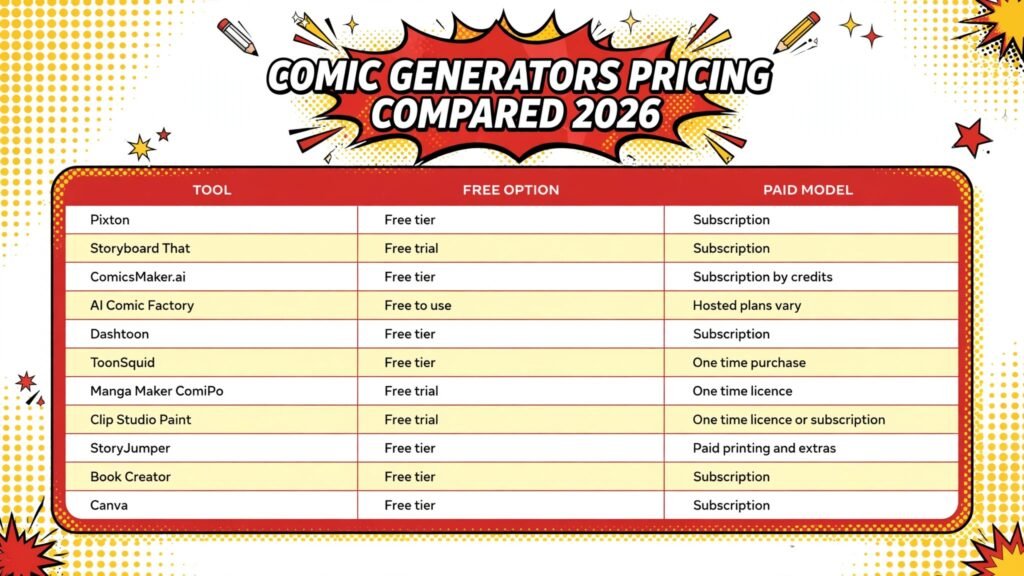
Pricing compared
| Tool | Free option | Paid model |
|---|---|---|
| Pixton | Free tier | Subscription, check checkout |
| Storyboard That | Free trial | Subscription, check checkout |
| ComicsMaker.ai | Free tier | Subscription by credits, check checkout |
| AI Comic Factory | Free to use | Hosted plans vary, check checkout |
| Dashtoon | Free tier | Subscription, check checkout |
| ToonSquid | Free tier | One time purchase, check checkout |
| Manga Maker ComiPo | Free trial | One time licence, check checkout |
| Clip Studio Paint | Free trial | One time licence or subscription, check checkout |
| StoryJumper | Free tier | Paid printing and extras, check checkout |
| Book Creator | Free tier | Subscription, check checkout |
| Canva | Free tier | Subscription, check checkout |
The pricing pattern is clear. Strip and classroom tools lean on subscriptions or school plans. Manga craft tools lean on one time licences. AI generation tools lean on credits, which means your real cost depends on how many panels you regenerate. Before paying, generate one full test comic, not one test panel, and count what it costs.
How to choose the best AI comic generator for your project
Start with length. A three panel strip, a ten page short, and a hundred page graphic novel are different projects, and they need different tools. Short work rewards speed and templates. Long work rewards character memory and project organisation. If you pick a short form tool for a long project, you will feel the pain at page twenty, when every new panel needs rebuilding from scratch.
Next, decide how much drawing you want to do. Prompt based tools suit writers who do not draw. Library and posing tools suit creators who want control without drawing skill. Full drawing tools suit artists who want every line to be theirs. There is no best answer here, only an honest answer about your skills and time.
Then run a consistency test. Take one character and generate or build them in five different situations: happy, angry, running, sitting, and in profile. If the character survives all five and still looks like the same person, the tool can carry a story. If the character changes face, outfit or age between tests, the tool will fight you on every page.
Finally, check export and ownership before you invest weeks in a project. Can you export high resolution pages for print? Can you take your characters and pages with you if you leave the platform? A tool that locks your finished comic inside its own reader is a risk for a long project, however good its generation looks in week one.
Mistakes to avoid
The most common mistake is judging a tool by its best demo panel. Demo panels are chosen because they worked. Your comic will include awkward poses, crowded scenes and dialogue heavy pages, and those are where tools fail. Test the hard cases early.
Another mistake is generating a whole comic before checking the story. Read the script aloud first. If the joke or the scene does not work in plain text, no art style will save it. Fix the story, then generate.
A third mistake is ignoring text. Speech bubbles, captions and sound effects are half of a comic. A tool with beautiful art and clumsy text tools will slow every page. Check bubble placement, font choices and text wrapping before you commit.
A fourth mistake is changing style mid project. Readers notice when chapter one and chapter five look like different comics. Lock your style, palette and character designs early, and resist the urge to switch tools halfway through because a new demo looks tempting.
A fifth mistake is forgetting the reader. A comic that looks good at full screen size can fail on a phone, where most web comics are read. Check your pages at phone size. If speech is unreadable or panels feel cramped, simplify the layout.
A final mistake is skipping backups. Keep your script, character sheets and exported pages outside the tool, in files you control. Platforms change plans and features. Your comic should survive that.
Frequently asked questions
Can AI comic generators keep the same character across a whole story?
Some can, some cannot. Tools with saved characters, like Pixton and ComiPo, keep a cast consistent by design. Prompt based generation tools vary more, and need character sheets, repeated descriptions and manual fixes. Test five panels with the same character before committing to a long story.
Do I need drawing skill to make a comic with AI tools?
No, for strips and short comics. Library, posing and prompt tools cover creators who do not draw. For a professional manga or a print graphic novel, drawing skill still helps a great deal, and tools like Clip Studio Paint reward it.
Which comic generator is best for kids?
StoryJumper for younger kids and first projects, Book Creator for school projects with teacher management, and Pixton for older students who want more control. All three are simple to learn and safe to share in a classroom setting.
Can I sell comics made with these tools?
It depends on the tool and the plan. Most tools allow commercial use of your own creations, but AI generation tools may have terms about generated art, and asset libraries may limit commercial use on free plans. Read the licence for your plan before selling, and keep a copy of the terms.
What is the cheapest honest way to start?
Start free. Use a free tier to make one complete short comic, not just a test panel. That single finished comic tells you more about cost, consistency and workflow than any review, including this one. Pay only when the free tier blocks a real project.
Should I use one tool or several?
Use one main tool per project, and borrow others for specific jobs. A common mix is a prompt tool for early story drafts, a library or posing tool for the finished pages, and Canva for covers and social posts. Mixing tools inside one story, panel by panel, usually breaks visual consistency.
Conclusion
The best AI comic generators in 2026 reward a simple discipline: match the tool to the job, test character consistency early, and finish one short comic before starting a long one. Pixton and Storyboard That carry strips. ComicsMaker.ai and Dashtoon carry longer serial stories. ToonSquid, ComiPo and Clip Studio Paint carry manga style work at different skill levels. StoryJumper, Book Creator and Canva carry classroom and one off comics with the least friction.
Pick the tool that fits the comic you actually want to finish, not the demo that impressed you most. Make the short comic first. If the characters survive five panels and the story reads well on a phone, you have found your tool.