
The problem is not that AI tools are weak. The problem is that most prompts are vague, and vague prompts produce vague outputs. You ask for a blog outline and get a generic list. You ask for ad copy and get lines you could have written yourself. You ask for code help and get an answer that almost works. The best AI prompt generators in 2026 fix that gap. They give you structured starting points, tested variables, and examples you can adapt, so you spend less time guessing what to type and more time judging the result.
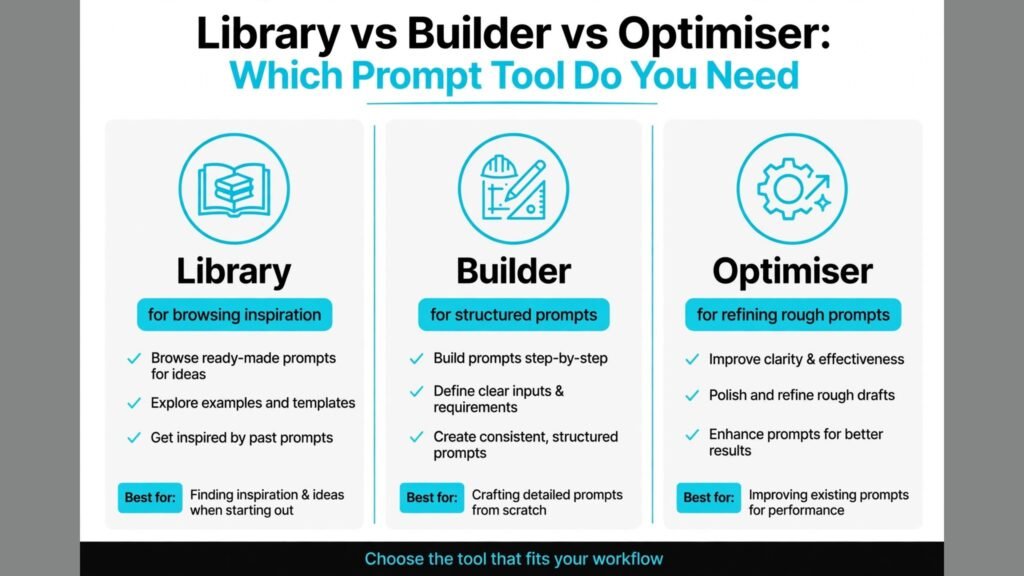
That distinction matters because prompt tools do different jobs. Some are libraries where you browse thousands of prompts written by other users. Some are builders that ask you questions and assemble a detailed prompt from your answers. Some are optimisers that take your rough prompt and rewrite it with clearer role, context, constraints, and output format. Buying or bookmarking the wrong type will not help. A library is useful when you need inspiration. A builder is useful when you need consistency across a team. An optimiser is useful when you already know what you want but your results are uneven.
This guide compares 8 tools across those jobs. It covers large libraries, focused builders, and smaller tools that serve a niche well. For each tool you get what it does best, who it fits, where it falls short, and what to watch out for. Pricing changes often, so check the checkout page before you pay for a premium plan. Many of these tools offer a useful free tier, and for most individual users that free tier is enough to test whether better prompts actually change your output quality.
best AI prompt generators at a Glance
| Tool | Type | Best for | Free option | Watch out for |
|---|---|---|---|---|
| PromptPerfect | Optimiser | Refining rough prompts | Free trial | Output needs human review |
| PromptHero | Library | Image and video prompts | Free browsing | Quality varies by author |
| FlowGPT | Community library | Chat prompts by category | Free browsing | Community quality uneven |
| AIPRM | Browser library | ChatGPT prompts in one click | Free tier | Works best inside ChatGPT |
| Snack Prompt | Curated library | Daily prompts and marketing | Free tier | Smaller library than rivals |
| PromptBase | Marketplace | Buying and selling prompts | Free browsing | Prices vary widely |
| Promptomania | Builder | Building structured prompts | Free to use | Interface is functional, not polished |
| PromptDrive | Organiser | Saving and organising prompts | Free tier | Best as a companion, not a sole source |
best AI prompt generators for Refining and Optimising Prompts
1. PromptPerfect
PromptPerfect takes a prompt you write and rewrites it to be clearer, more specific, and easier for a model to follow. You paste a rough instruction, choose the model or use case, and get a refined version with role, context, and output requirements made explicit. For users who already write decent prompts but get uneven results, this is often the fastest improvement. The refined prompt usually produces more structured answers, fewer generic paragraphs, and clearer formatting.
Watch out for: refinement is not magic. If your original idea is unclear, the optimiser can only make a clearer version of a weak idea. Read the refined prompt before you run it, remove any assumptions it added that you did not intend, and keep your own subject knowledge in the loop. Also test the same refined prompt on two different tasks before you decide it works for your whole workflow.
2. Promptomania
Promptomania, also known as the Prompt Builder, takes the opposite approach. Instead of rewriting your text, it asks you to build a prompt step by step. You pick a type of output, add details about tone, audience, length, and format, and the builder assembles a complete prompt you can copy. This method teaches good prompt habits, because you see which parts matter: role, task, context, constraints, and examples. Beginners often learn faster with a builder than with a library, because they understand why a prompt works.
Watch out for: builders can produce long prompts that feel thorough but slow down simple tasks. For a quick question, a short direct prompt beats a 300 word builder output. Use Promptomania for repeatable work like product descriptions, lesson plans, and reports, and keep short prompts for quick checks.

best AI prompt generators for Browsing Libraries and Inspiration
3. PromptHero
PromptHero is best known as a library for image and video prompts, and it is a strong place to learn how detailed prompts create better visuals. You can search by model, style, subject, and technique, see the prompt behind an image, and adapt it for your own project. For designers, marketers, and content creators who use image tools daily, seeing the full prompt, including style words, lighting terms, and composition notes, is more useful than seeing the finished image alone.
Watch out for: quality varies by author, and some popular prompts are long lists of style tags that only work with a specific model version. When you adapt a prompt, keep the core subject and composition, then test style tags one at a time. Copying a 60 word prompt blindly often produces a muddled image. Also check licensing and use terms if you plan to use an image commercially.
4. FlowGPT
FlowGPT is a large community library for chat prompts, organised by category such as writing, coding, marketing, business, and learning. You can browse trending prompts, save favourites, and test prompts in the interface. For teams and students who need a starting point for many different tasks, FlowGPT offers breadth that a small curated library cannot match. It is especially useful when you face a new task and want to see how others framed it.
Watch out for: community libraries contain prompts of uneven quality, and some prompts promise results they cannot deliver. Treat every prompt as a draft to test, not a proven formula. Run it on a small task, check the output for accuracy, and edit the prompt to fit your facts before you use it for client work or publishing.
5. AIPRM
AIPRM works inside ChatGPT as a browser extension and adds a library of prompts you can run with one click. Instead of copying and pasting from a website, you pick a prompt for SEO, marketing, sales, productivity, or coding, fill in a few variables, and run it in your normal chat window. That convenience matters for daily users, because it removes friction and encourages consistent prompt use across a team. AIPRM also lets teams share private prompt lists, which helps keep brand voice and output format consistent.
Watch out for: AIPRM is tied to the ChatGPT interface, so if your team uses a different model as its main tool, the benefit drops. Also check that any prompt you use from the public library fits your privacy rules. Do not paste confidential client data into a prompt without checking your company policy, even when the prompt itself looks harmless.
6. Snack Prompt
Snack Prompt is a smaller, curated library that focuses on useful daily prompts rather than sheer volume. It highlights prompts for marketing, social media, business writing, and productivity, and it often surfaces one prompt at a time in a way that encourages daily practice. For solo creators and small business owners who feel overwhelmed by libraries with tens of thousands of options, that curation is a feature. You find something usable in minutes, not after an hour of browsing.
Watch out for: the library is smaller, so niche tasks like legal drafting, scientific writing, or advanced coding may have fewer options. Snack Prompt works best as a daily starting point alongside a larger library or a builder. If you need deep coverage in one niche, pair it with PromptHero for images or FlowGPT for chat breadth.

best AI prompt generators for Buying, Selling and Organising Prompts
7. PromptBase
PromptBase is a marketplace where creators sell prompts for text, image, and code tools. You can browse by category, see example outputs, and buy a prompt that solves a specific job, such as writing product listings, generating logo concepts, or creating spreadsheet formulas. For buyers, the value is time saved: a well made prompt that you reuse 50 times can be worth far more than its price. For sellers, it is a way to earn from prompt skill without building a full product.
Watch out for: prices and quality vary widely, and a prompt that worked for the seller may need editing for your brand, audience, or model version. Before you buy, check example outputs carefully, read reviews where available, and test the prompt on your own task during any refund or preview window. Never buy a prompt that claims guaranteed rankings, sales, or exam results. Those claims are marketing, not evidence.
8. PromptDrive
PromptDrive is an organiser for prompts you already use. It lets you save prompts, tag them by project or client, share them with a team, and insert them quickly when you need them. Many users start with a library or a builder, then realise their real problem is losing good prompts in notes, chats, and documents. PromptDrive solves that second problem. Teams that reuse prompts for client reports, social posts, and support replies benefit most, because consistency improves when everyone uses the same approved version.
Watch out for: PromptDrive is a companion tool, not a source of new prompts on its own. If you expect it to generate ideas from scratch, you will be disappointed. Pair it with one library and one optimiser, keep your best prompts tagged and updated, and retire prompts that no longer produce good outputs after a model update.

How to Judge Whether a Prompt Tool Is Actually Helping
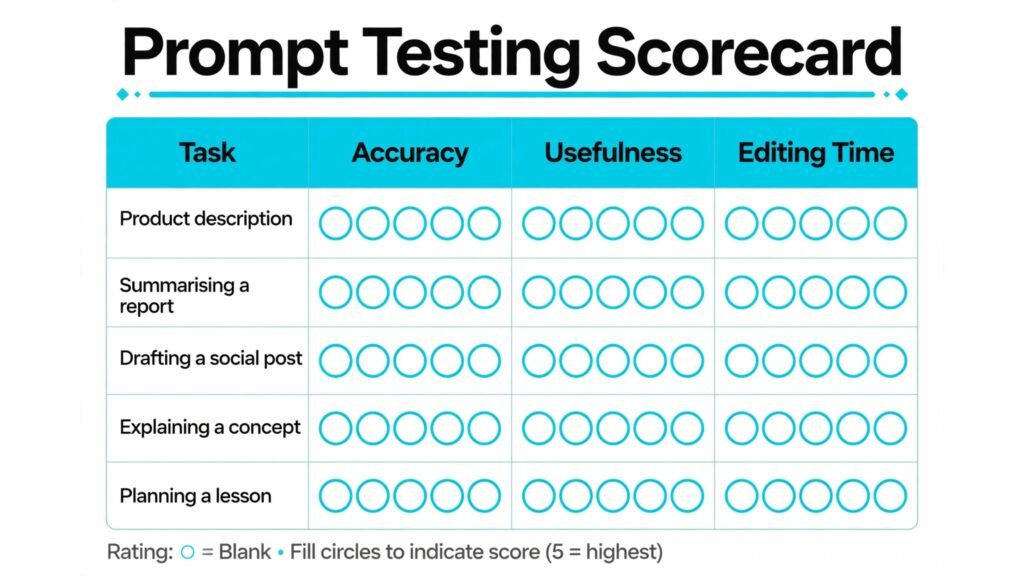
A prompt tool should change your outputs in ways you can measure. Start with a baseline. Take five tasks you do regularly, such as writing a product description, summarising a report, drafting a social post, explaining a concept, and planning a lesson. Run each task with your current prompt, save the output, and score it for accuracy, usefulness, and editing time. Then run the same five tasks with prompts from the new tool and score them the same way. If editing time does not fall, or accuracy does not rise, the tool is not helping, however popular it is.
Also check how the tool handles facts. Good prompts ask for sources, dates, and limits, and they tell the model what to do when it does not know an answer. Weak prompts encourage confident guessing. For any task where accuracy matters, such as health, finance, legal, or technical advice, add a step that asks the model to flag uncertainty and to separate facts from suggestions. A prompt generator that never encourages that check is teaching a risky habit.
Another test is reuse. A good prompt should work across similar tasks with only variable changes, such as product name, audience, and tone. If you have to rewrite the prompt from scratch every time, it is not a system, it is a one off trick. Builders and organisers score well here, because they force you to define variables. Libraries score well for inspiration but often score poorly for reuse unless you save and edit the prompts you find.
Finally, watch for prompt bloat. Longer is not always better. A prompt that is 400 words long for a simple email wastes tokens, slows response time, and can confuse the model with competing instructions. The best prompt generators help you cut as well as add. They remove vague adjectives, replace them with concrete requirements, and put the most important instruction where the model can follow it. If a tool always makes your prompts longer without making them clearer, use it sparingly.
Prompt Examples That Show the Difference
Examples make the value of a prompt tool concrete. Consider a marketing task: write a product description for a reusable water bottle. A weak prompt says, “Write a product description for a water bottle.” The output will be generic, with phrases about hydration and quality that could describe any bottle. A stronger prompt built with a builder says, “You are a product copywriter for an outdoor brand. Write a 90 word product description for a 750 ml stainless steel bottle aimed at hikers. Focus on weight, leak proof lid, and insulation for 12 hours. Use a confident tone, include three bullet benefits, and end with a clear call to action. Do not claim medical benefits.” That prompt gives role, audience, length, features, tone, format, and limits. The output is far more usable, and editing takes minutes instead of a full rewrite.
A second example comes from learning. A student who asks, “Explain photosynthesis,” gets a textbook paragraph. A student who asks, “Explain photosynthesis to a 14 year old using a kitchen analogy, in 200 words, with three stages labelled, and end with two quiz questions,” gets a lesson they can actually study from. Prompt tools help here because they remind you to add audience, length, structure, and a check for understanding. Without those parts, even a strong model defaults to a general answer.
A third example comes from coding. A developer who asks, “Fix this code,” without pasting the error, the language version, and the expected behaviour, will get a guess. A developer who uses a structured prompt that includes the code snippet, the error message, the language and version, what the code should do, and what has already been tried, will get a focused answer. Prompt generators do not replace coding skill, but they reduce the back and forth that wastes time. They also help junior developers learn what information a good technical question needs, which is a skill that transfers to team communication and support tickets.
A fourth example comes from image creation. A prompt that says, “A coffee shop,” produces a plain scene. A prompt adapted from PromptHero that says, “A small neighbourhood coffee shop at morning light, wooden tables, plants by the window, a barista pouring latte art, warm tones, photorealistic, wide angle view,” produces a scene with mood and detail. The lesson is not to add words for their own sake. It is to add decisions: time of day, setting, subject action, colour, and camera view. Prompt libraries teach those decisions by showing full prompts behind strong images, so you learn the vocabulary of visual description rather than copying tags blindly.
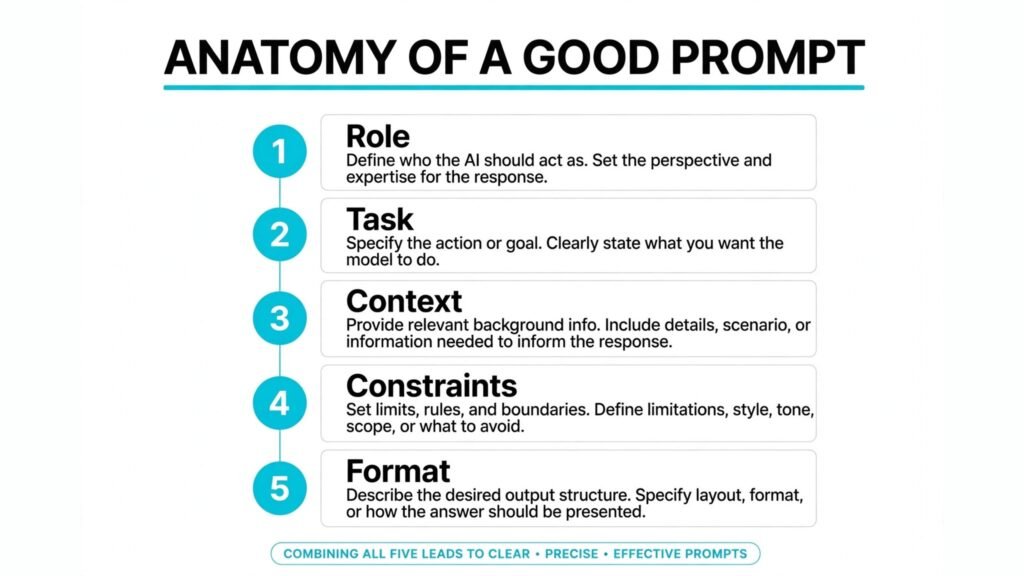
These examples share a pattern. Good prompts are specific about who the output is for, what it must do, how long it should be, what format it should use, and what it must avoid. Prompt generators help you remember those parts consistently, especially when you are tired or rushed. That consistency is the real product. It is not a secret phrase or a magic word. It is a checklist applied every time, and tools that make that checklist easy are the ones worth keeping.
best AI prompt generators by Daily Use Case
Different users need different starting points, so it helps to map tools to daily work. Writers and editors benefit most from AIPRM for one click prompts inside chat, plus PromptPerfect for refining drafts of important prompts. When you write daily, friction matters more than library size, because a tool you open in two clicks will be used, while a tool that needs a separate website visit will be skipped on busy days.
Marketers and social media managers benefit from Snack Prompt for daily ideas and PromptHero for visual prompts. Marketing work needs both text and image prompts, and it needs them fast. A curated daily prompt can break a blank page block, while an image library can show how a visual concept was described. Together they cover the two outputs marketers produce most: short copy and supporting visuals.
Teachers, trainers, and course creators benefit from builders like Promptomania, because lesson prompts need structure: learning goal, audience age, length, activity type, and assessment. A builder forces those choices, which improves lesson quality and makes lessons easier to reuse next term. Teachers who also use AI for grading help or parent communication can save those prompts in PromptDrive, tagged by subject and term, so they do not rewrite the same prompt each semester.
Developers and data analysts benefit from optimisers and organisers more than from large public libraries. Code prompts need precise context, and public prompts rarely contain your codebase details. An optimiser can tighten a technical prompt, while an organiser keeps tested prompts for debugging, documentation, and query writing in one place. Developers should still check every code output by running it and reviewing it, because a well structured prompt does not guarantee correct code.
Small business owners benefit from a simple stack: one library for ideas, one builder for repeatable tasks like product descriptions and emails, and one organiser for the prompts that work. That stack is cheaper and easier to maintain than five overlapping libraries. Start with free tiers, keep the prompts that save at least 15 minutes a week, and drop the rest. The goal is a small set of reliable prompts, not a large collection that looks impressive but is never used.
How to Choose the best AI prompt generators for Your Workflow
Start with your main task. If you mainly create images, start with PromptHero and a builder for structure. If you mainly write and market, start with AIPRM or Snack Prompt for daily use, plus PromptPerfect for refining important prompts. If you lead a team, start with an organiser like PromptDrive and a shared library, so output stays consistent when different people run the same task. If you sell prompts or buy specialised prompts, PromptBase is the marketplace to check, but test before you rely on a purchase.
Next, consider where you work. Browser based libraries suit users who switch devices. Extensions suit users who live inside one chat tool. Builders suit users who want to learn prompt structure. Optimisers suit users who already write prompts and want faster refinement. Choose the form that fits your daily habit, because a tool you do not open will not improve your work, however good its library is.
Then test with real work, not demo tasks. Demo prompts often use simple topics that make any tool look good. Test with your actual product, your actual audience, and your actual constraints, including brand voice, length limits, and legal limits. Save both the prompt and the output, and review them a week later. Prompts that still look good after a week are keepers. Prompts that only looked good in the moment usually relied on novelty, not quality.
Cost is the last check, not the first. Most prompt tools offer free browsing or a free tier that is enough for testing. Paid plans usually add more prompts, team sharing, or advanced optimisation. Check current pricing at checkout, and avoid annual plans until you have used the tool for at least a month on real tasks. A prompt library that you use daily is worth paying for. A library you browse once a month is not.
For related workflows, creators who also make visuals may find the guide to best AI tools for graphic designers useful, and writers building a regular publishing rhythm may also check best AI tools for freelance writers.
Mistakes to Avoid With Prompt Generators
The first mistake is copying prompts without editing. A prompt written for another brand, audience, or model will rarely fit yours exactly. Change the audience, tone, examples, and constraints before you run it. The second mistake is trusting outputs without checking facts. Prompt tools improve structure, but they do not verify truth. Always check names, dates, prices, and claims before you publish or send client work.
The third mistake is collecting prompts instead of using them. A library of 500 saved prompts that you never open is not a system. Keep a short list of 20 to 30 prompts you actually use, tag them by task, and update them when models change. The fourth mistake is using the same prompt for every model. Different models respond differently to length, format, and examples. Test a key prompt on each model you use, and keep a version note for each one.
The fifth mistake is ignoring privacy. Prompts often contain client names, internal data, and unpublished ideas. Before you paste that material into a public library tool or a marketplace prompt, check what the tool stores and whether your plan includes private prompts. The sixth mistake is chasing novelty. New prompt trends appear weekly, but most lasting improvement comes from clear roles, concrete context, specific constraints, and a defined output format. Master those basics before you chase advanced tricks.
Frequently Asked Questions
What is the best AI prompt generator for beginners?
For beginners, a builder like Promptomania or a one click library like AIPRM is easiest, because you do not start from a blank page. Builders teach structure, while AIPRM removes copying and pasting. Try both for a week on real tasks and keep the one you actually open daily.
Are paid prompt libraries worth it?
Paid libraries can be worth it if you reuse prompts daily for client work or publishing, and if the paid tier adds team sharing, private prompts, or better curation. For occasional use, free tiers from AIPRM, Snack Prompt, and FlowGPT are usually enough. Test free first, then pay only for features you miss.
Can prompt generators work for image tools as well as chat tools?
Yes, but the prompt style differs. Chat prompts need role, context, and output format. Image prompts need subject, composition, lighting, style, and medium. PromptHero is stronger for images, while PromptPerfect and AIPRM are stronger for chat. Use a tool that matches the output type you create most.
Do I need a prompt optimiser if I already write good prompts?
An optimiser helps most when results are uneven or when you need consistency across a team. If your prompts already produce reliable outputs and you edit little, you may not need one. Test PromptPerfect on your five most reused prompts. If editing time falls clearly, keep it. If not, skip it.
How do I organise prompts for a team?
Use an organiser like PromptDrive, tag prompts by task and client, keep one approved version per task, and review the list monthly. Retire prompts that no longer work after model updates, and note which model each prompt was tested on. Shared prompts should include variables in brackets, so team members replace only the variable parts.
Is it safe to use prompts from public libraries for client work?
It can be safe if you edit the prompt, remove any confidential data, and check the output before delivery. Do not paste client data into a public tool without checking privacy terms, and do not present a library prompt output as original research without verification. Editing and checking are part of professional use.
What makes a prompt good in 2026?
A good prompt gives a clear role, a specific task, relevant context, concrete constraints, and a defined output format, plus an example when the format matters. It also tells the model how to handle uncertainty. Tools that help you include those parts, without adding filler, tend to produce the most reliable results across models.
Conclusion: Build a Small Prompt System, Not a Large Collection
The best AI prompt generators in 2026 are not the ones with the largest libraries. They are the ones that fit your daily work and improve your outputs in ways you can measure. Start with one library for inspiration, one builder or optimiser for structure, and one organiser to keep your best prompts safe. Test with real tasks, edit every prompt you borrow, check facts before you publish, and keep a short list of proven prompts rather than a large collection you never use. That small system will save more time than any single tool alone, and it will keep working as models change, because it is built on clear thinking, not on tricks.