
Jotform is the best pick for most nonprofits, because it combines a 50 percent nonprofit discount with a form builder that covers donations, volunteer sign-ups and feedback surveys in one place, and its free tier is generous enough for a small organisation to start without a card. The best ai survey tools for nonprofits are not the ones with the most features. They are the ones a small team can run on a tight budget, with donor data kept private and reports that a board member can read in two minutes.
A nonprofit survey has a different job from a corporate one. It must collect feedback from donors, volunteers and programme participants, often from people who are not comfortable with long forms, and it must do that without spending money the organisation does not have. The best tools in this list keep the survey short, make it work on a phone, and turn the answers into a report that shows impact rather than raw numbers.
This guide compares ten tools on the things that matter to a nonprofit. Response limits, logic, nonprofit discounts, data ownership and accessibility all shape the real choice. Prices were checked against live pricing pages in November 2026, and where a vendor does not publish a price, this guide says so instead of guessing.
Response Limits, Logic and the Donor Survey That Gets Answered
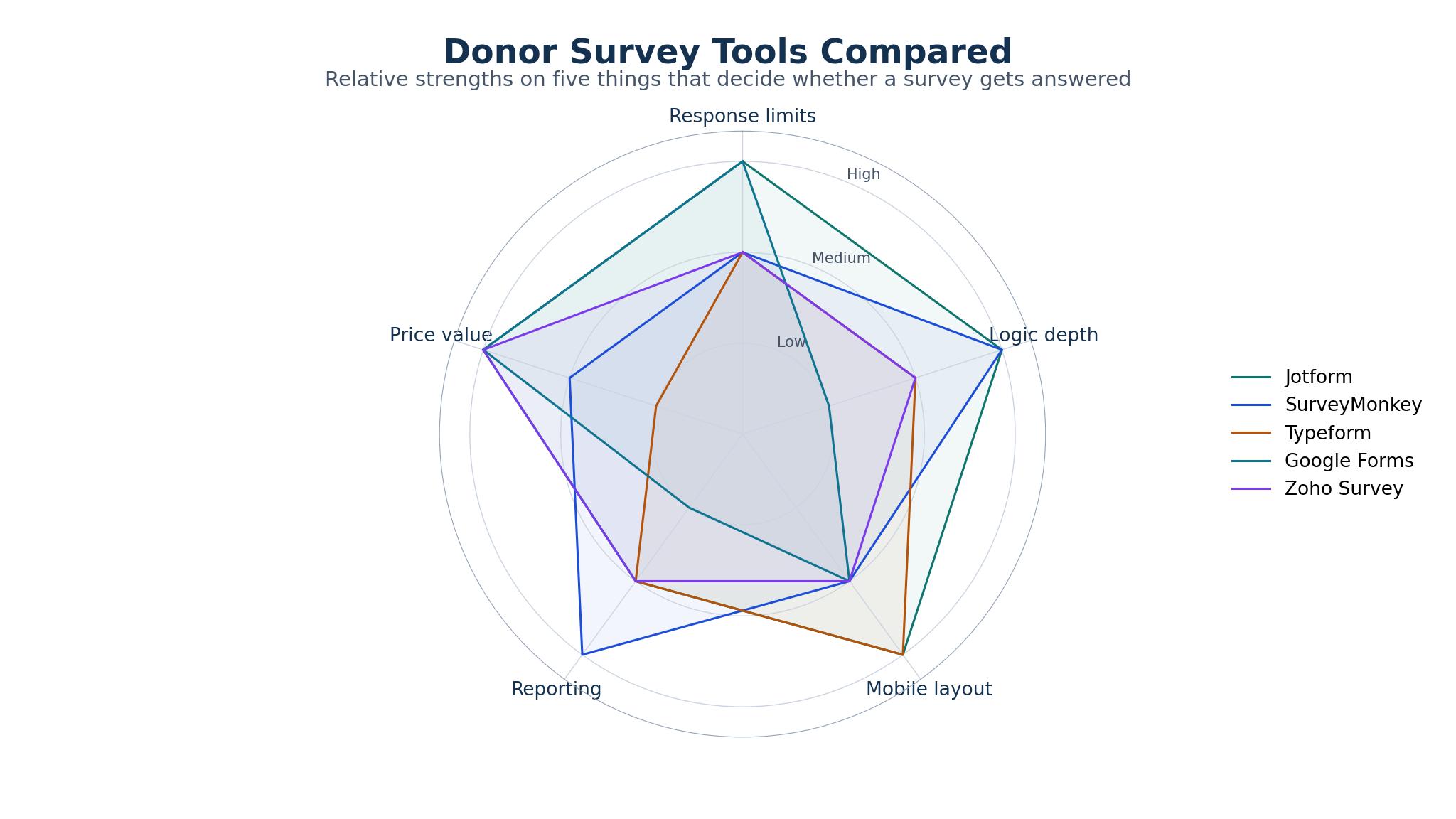
The first limit to check is responses per month. A survey that closes after 100 responses is useless for an annual donor survey that goes to 2,000 people, and a tool that charges per response can turn a successful survey into an unexpected bill. Google Forms has no response limit at all, which is why it still wins for large free surveys, while SurveyMonkey Team Advantage covers 1,000 responses a month and Typeform Basic covers 100 responses a month, which is tight for a donor list.
Logic is the second test. A donor who gives monthly should see different follow-up questions from a first-time donor, and a volunteer who reports a problem should be routed to a different thank-you page from one who had a good day. Jotform, SurveyMonkey, Typeform and Qualtrics all offer branching logic, while Google Forms offers basic section jumps that cover most simple cases. The best ai survey tools for nonprofits let a small team build that logic without a developer, because the person writing the survey is usually the same person who sends it.
The third test is the survey itself. A donor survey that takes ten minutes to finish will lose half its respondents before the last question, so the tool must make short surveys easy to build. Typeform leads here, with one question at a time and a clean mobile layout that feels like a conversation rather than a form.
Nonprofit Discounts and the Real Annual Bill
Nonprofit pricing is where the list separates. Jotform offers a 50 percent discount on paid plans, which brings Bronze to 17 dollars a month, and that discount applies to registered nonprofits that apply through its programme. SurveyMonkey offers a discount too, but it varies by plan and is not published as a fixed percentage, so a nonprofit must contact sales to confirm the number.
Typeform does not offer a standing nonprofit discount, which means its 25 dollar a month Basic plan is the full price, and the response limit of 100 a month makes it expensive for large donor surveys. Zoho Survey starts at 25 dollars a month with no published nonprofit discount, while SurveySparrow starts at 19 dollars a month and offers discounts on request.
Qualtrics does not publish a price at all. It is a research platform built for universities and large organisations, and its annual cost is typically 1,500 dollars or more, which puts it out of reach for most small nonprofits. Google Forms is free, which makes it the default for organisations with no survey budget, and SoGoSurvey starts at 25 dollars a month with a free plan that covers 100 responses a year. The best ai survey tools for nonprofits are the ones whose discount or free tier matches the size of the donor list, not the ones with the longest feature list.
Data Ownership, Privacy and Accessibility
Donor data is sensitive, and the tool that collects it must treat it that way. A nonprofit needs to know where the data is stored, who can see it, and how to export it if the organisation switches tools. SurveyMonkey, Qualtrics and Alchemer all offer data export in common formats, and Jotform offers export plus HIPAA-friendly features on higher plans, which matters for health nonprofits.
Privacy rules vary by country, and a tool that stores data in the United States may not suit a European nonprofit. Zoho Survey offers data centres in several regions, which helps organisations that must keep donor data inside the EU, while Google Forms stores data on Google servers with the controls that come with a Google account.
Accessibility is the test most guides skip. A survey that a screen reader cannot read excludes the very people a nonprofit exists to serve, and a form that fails on a small phone screen loses responses from the donors who give from their phones. Typeform and SurveySparrow score well on mobile layout, while Jotform offers accessibility settings that a careful team can configure. The best ai survey tools for nonprofits are the ones that make an accessible survey the default, not an extra step.
The 10 Tools at a Glance
| Tool | Main job | Best for | Starting price |
|---|---|---|---|
| Jotform | Forms, surveys and donations | Small nonprofits on a tight budget | $34/mo, 50% nonprofit discount |
| SurveyMonkey | Surveys and feedback | Teams that need strong reporting | $30/user/mo |
| Typeform | Conversational surveys | Donor surveys that feel personal | $25/mo |
| Google Forms | Free surveys | Organisations with no budget | Free |
| Zoho Survey | Surveys and polls | Nonprofits already using Zoho | $25/mo |
| SurveySparrow | Conversational surveys | Teams that want chat-style forms | $19/mo |
| Alchemer | Surveys and research | Nonprofits that need deep analysis | $55/user/mo |
| QuestionPro | Surveys and research | Teams that need advanced logic | $99/mo |
| SoGoSurvey | Surveys and feedback | Small teams that want a low entry price | $25/mo |
| Qualtrics | Research surveys | Large nonprofits with a research budget | Custom quote |
Best Pick by Job
| Job type | First pick | Second tool | Why this pair works |
|---|---|---|---|
| Small nonprofit, first survey | Jotform | Google Forms | Jotform covers donations and forms; Google Forms covers large free surveys |
| Donor feedback survey | Typeform | SurveyMonkey | Typeform feels personal; SurveyMonkey reports better |
| Volunteer sign-up and feedback | Jotform | Zoho Survey | Jotform handles forms and payments; Zoho fits existing Zoho users |
| Programme evaluation | SurveyMonkey | Alchemer | SurveyMonkey is easy; Alchemer analyses deeper |
| Large research project | Qualtrics | QuestionPro | Qualtrics leads on research; QuestionPro costs less |
| No budget at all | Google Forms | SoGoSurvey | Google Forms is free; SoGoSurvey adds logic for free |
How to Choose the Best AI Survey Tools for Nonprofits on a Tight Budget
Start with the survey you need to send first, not with the tool. A donor satisfaction survey, a volunteer feedback form and a programme evaluation each need different features, and the tool that covers the first survey well may not cover the third. Write the questions down, count the respondents, and check the response limit on each plan before you sign up. A tool that closes after 100 responses will fail a 2,000-person donor survey, no matter how good its reporting is.
Then check the discount. Jotform 50 percent discount is the clearest in this list, and it changes the maths for a small nonprofit. SurveyMonkey and SurveySparrow offer discounts on request, which means the price you see is not the price you pay, and a phone call to sales is worth the time.
Then test the survey on a phone. Half your donors will open it on a phone, and a form that is hard to use on a small screen will lose responses. Typeform and SurveySparrow feel best on a phone, while Jotform and SurveyMonkey are solid and configurable. Run the test with a real donor, not with a colleague, because a colleague already knows what the survey is for.
Finish by checking the export. A tool that locks your data inside its own dashboard is a trap, because the day you switch tools you will need every response. Jotform, SurveyMonkey, Alchemer and Qualtrics all export to common formats, and Google Forms exports to Sheets, which is the simplest export of all.
The 10 Tools in Detail
1. Jotform
Jotform is a form and survey builder that covers donations, volunteer sign-ups, event registrations and feedback surveys in one place, which is why it leads this list for nonprofits. It offers more than 10,000 templates, branching logic, payment collection through Stripe and PayPal, and a mobile app that lets a team collect responses offline at an event. Bronze costs 34 dollars a month on annual billing, and registered nonprofits get a 50 percent discount, which brings it to 17 dollars a month.
The interface carries a lot of options and can feel crowded for a first-time user. The template library is large, but finding the right one takes time, and the free plan limits storage and submissions.
It suits small nonprofits that need one tool for forms, donations and surveys. If your organisation runs a gala, a volunteer drive and a donor survey in the same month, Jotform handles all three without a second subscription, and the discount makes it the cheapest paid pick among the best ai survey tools for nonprofits.
Test it by building a donor survey from a template, then sending it to five real donors and watching where they stop. If all five finish and the report shows the answers clearly, the tool is doing its job. Check the discount application at the same time, because the 50 percent saving only applies once the nonprofit status is approved.
2. SurveyMonkey
SurveyMonkey is the best-known survey tool in this list, and its strength is reporting. It offers branching logic, a large question bank, benchmarking data from millions of surveys, and dashboards that turn answers into charts a board member can read. Team Advantage costs 30 dollars per user a month, and Individual Advantage costs 39 dollars a month, with a discount for nonprofits available on request.
The response limit and the price both hurt. Team Advantage covers 1,000 responses a month, which is enough for most donor surveys but not for a large annual campaign, and the per-user pricing climbs quickly when a whole team needs access.
It suits nonprofits that need strong reporting and are willing to pay for it. If your board wants a dashboard rather than a spreadsheet, and your team sends surveys every month, SurveyMonkey earns its price through the time it saves on analysis.
Test it by running your last donor survey through it and comparing the report with the spreadsheet you made by hand. If the dashboard answers the board questions in half the time, the price is justified. If the report looks the same as the spreadsheet, the free tier of another tool will do.
3. Typeform
Typeform builds surveys that feel like a conversation, showing one question at a time with a clean layout that works well on a phone. That style lifts completion rates, which matters for donor surveys where every finished response counts. Basic costs 25 dollars a month on annual billing, and it covers 100 responses a month, with higher plans covering more.
The response limit is tight. At 100 responses a month, Basic is too small for a donor list of 500 or more, and the next plan costs considerably more. Typeform also offers less reporting depth than SurveyMonkey or Alchemer, so a team that needs detailed analysis will export the data elsewhere.
It suits nonprofits that send short donor surveys and care about completion rates. If your survey is ten questions and your donors open it on their phones, Typeform will get more finished answers than a traditional form, and that difference is worth the price.
Test it by sending the same five questions as a Typeform and as a Google Form to two halves of a small list, then comparing the completion rates. If Typeform finishes 20 percent more responses, the conversational style is doing real work. If the rates match, the cheaper tool wins.
4. Google Forms
Google Forms is free, with no response limit, no question limit, and a direct link to Google Sheets for analysis. It offers section jumps for basic logic, file uploads, and a simple interface that anyone with a Google account already knows. For a nonprofit with no survey budget, it is the default choice, and for many small organisations it is all they will ever need.
Polish is missing. Google Forms offers no branching logic beyond section jumps, no conversational layout, no payment collection, and no nonprofit-specific features. The reports are basic, and a survey built in Google Forms looks plain next to a Typeform, which can matter when the survey goes to major donors.
It suits nonprofits with no budget, or teams that need a large free survey in a hurry. If your donor list is 2,000 people and your budget is zero, Google Forms is the only tool here that will send the survey and collect every answer without a bill.
Test it by building your donor survey in Google Forms and in Jotform, then asking three donors which one felt easier. If the answers are the same, Google Forms wins on price. If donors prefer Jotform, the 17 dollar a month discounted plan is a small cost for a better experience.
5. Zoho Survey
Zoho Survey is a survey tool inside the Zoho suite, which makes it the natural pick for nonprofits already using Zoho CRM, Zoho Campaigns or Zoho Desk. It offers branching logic, multilingual surveys, offline collection through a mobile app, and reports that feed into Zoho analytics. Plans start at 25 dollars a month, with a free plan that covers 100 responses a year.
It is strongest inside the Zoho world. A nonprofit that does not use Zoho will find less reason to pick it over Jotform or SurveyMonkey, and its template library is smaller than Jotform.
It suits nonprofits already running Zoho, where the survey data can flow straight into the CRM. If your donor records live in Zoho CRM, a Zoho Survey response can update the record automatically, which saves a team hours of manual entry each month.
Test it by connecting a survey to your Zoho CRM and checking whether a response updates the donor record without manual work. If the link works and the data lands in the right fields, the integration is worth more than any feature list. If the link needs manual fixing, the tool is not earning its place.
6. SurveySparrow
SurveySparrow builds conversational surveys that feel like a chat, with one question at a time and a clean mobile layout. It offers branching logic, NPS surveys, offline collection, and integrations with Slack and HubSpot, which suit teams that live in those tools. Plans start at 19 dollars a month, which makes it the cheapest paid conversational tool in this list.
Brand recognition is low. SurveySparrow is less well known than Typeform, which means fewer templates and fewer community answers when something goes wrong. Its reporting is also lighter than SurveyMonkey, so a team that needs deep analysis will export the data.
It suits nonprofits that want a conversational survey without paying Typeform prices. If your donor survey is short and your team wants a chat-style form that works on a phone, SurveySparrow delivers the same feel for less money.
Test it by building a five-question donor survey and sending it to ten donors, then asking them whether the survey felt easy. If most say yes and the completion rate beats your last Google Form, the conversational style is working. If donors report confusion, the simpler tool is the better choice.
7. Alchemer
Alchemer is a survey and research platform built for teams that need deep analysis. It offers advanced logic, quota management, data cleaning, and reporting that goes beyond simple charts, with integrations for Salesforce and other CRMs. Plans start at 55 dollars per user a month, which is the highest entry price in this list.
Price and the learning curve both bite. At 55 dollars per user a month, Alchemer costs more than most small nonprofits can justify, and its interface carries more options than a small team needs.
It suits larger nonprofits with a research programme and a team that analyses data every week. If your organisation runs programme evaluations, needs quota controls, and employs someone whose job is survey analysis, Alchemer is the right depth. For everyone else, it is more tool than the job needs.
Test it by running a programme evaluation through Alchemer and through SurveyMonkey, then comparing the analysis time. If Alchemer cuts the analysis from a day to an hour, the price is justified for a research team. If the reports look the same, the cheaper tool wins.
8. QuestionPro
QuestionPro is a survey and research platform with advanced logic, a large question library, and reporting that covers NPS, conjoint analysis and other research methods. Essentials costs 99 dollars a month, which is the highest fixed price in this list, and it covers unlimited surveys and responses, which softens the cost for a team that surveys often.
The price is high. At 99 dollars a month, QuestionPro costs more than Jotform, SurveyMonkey and Typeform combined for a small team, and its interface is built for researchers rather than for a fundraiser who sends one survey a month. A small nonprofit will not use enough of it to justify the bill.
It suits nonprofits with a dedicated research function and a large survey volume. If your organisation surveys thousands of people every month and needs advanced methods, the unlimited responses make the price reasonable. For a small team, the cost is hard to defend.
Test it by checking how many surveys your team actually sends in a month, then dividing the 99 dollar cost by that number. If the cost per survey is under 10 dollars and the advanced features save real analysis time, the plan earns its keep.
9. SoGoSurvey
SoGoSurvey is a survey tool with a low entry price and a free plan that covers 100 responses a year. It offers branching logic, multilingual surveys, and reports that are clearer than Google Forms, with a simple interface that a small team can learn quickly. Plans start at 25 dollars a month, and the free plan is enough for a small annual survey.
The ecosystem is smaller. SoGoSurvey has fewer integrations than Jotform or SurveyMonkey, and its template library is smaller, which means a team will build more surveys from scratch. Its brand is also less known, so a donor who sees the survey may not recognise the tool.
It suits small nonprofits that want a step up from Google Forms without paying SurveyMonkey prices. If your team needs branching logic and better reports, and your budget is 25 dollars a month, SoGoSurvey covers the basics well.
Test it by building your next donor survey in SoGoSurvey and in Google Forms, then comparing the reports. If the SoGoSurvey report answers the board questions faster, the 25 dollars a month is worth it. If the reports look the same, stay with the free tool.
10. Qualtrics
Qualtrics is a research platform used by universities, large nonprofits and governments, and it offers the deepest survey logic, the strongest analysis tools, and the tightest data controls in this list. It covers conjoint analysis, text analysis, and panel management, with support for complex research designs that no other tool here can match. Pricing is by custom quote, and annual costs are typically 1,500 dollars or more.
Cost and complexity work against it. Qualtrics is built for research teams, not for a fundraiser who needs a donor survey by Friday, and its interface expects a user who understands research design. A small nonprofit will pay for depth it never uses.
It suits large nonprofits with a research department and a budget to match. If your organisation runs multi-year evaluations, publishes research, and employs survey specialists, Qualtrics is the standard. For a small team, it is the wrong tool at the wrong price.
Test it by asking whether your organisation has a research team that would use it every week. If the answer is yes and the budget exists, Qualtrics is the right depth. If the answer is no, Jotform or SurveyMonkey will cover the real work for a fraction of the cost.
From First Survey to a Donor Report in Two Weeks
A first survey does not need a perfect tool, it needs a clear question and a short list of people to ask. Week one is for writing the questions and testing the survey on five people inside the organisation. If they finish in under five minutes and their answers make sense, the survey is ready. If they get stuck on a question, rewrite the question, not the tool.
Week two is for sending and reporting. Send the survey to the donor list, wait three days, then send one reminder to the people who did not open it. When the responses arrive, export them, check the completion rate, and write a one-page report that answers three questions. What did donors say, what will change because of it, and what happens next.
The report is the part most nonprofits skip, and it is the part donors notice. A donor who answers a survey and never hears the result is less likely to answer the next one, while a donor who sees a short report feels heard. Jotform and SurveyMonkey both build that report inside the tool, and Google Forms needs a manual step in Sheets, but the work is the same. Share the result, thank the donors, and keep the promise the survey made. That follow-through is what separates the best ai survey tools for nonprofits from the ones that only collect answers.

Free Tools, Paid Plans and the Point Where You Upgrade
A free tool is the right choice until the survey outgrows it. Google Forms is free with no response limit, which means a nonprofit can run large surveys for years without paying, and SoGoSurvey free plan covers 100 responses a year for a small list. The point to upgrade is when the free tool costs more in time than the paid tool costs in money, which usually happens when the team starts building reports by hand every month.
The upgrade decision should be based on a real number. Count the hours your team spends on survey work each month, multiply by the hourly cost of that time, and compare it with the price of the paid plan. If the team spends four hours a month on manual reports and a plan among the best ai survey tools for nonprofits costs 17 dollars a month with the Jotform discount, the upgrade pays for itself in the first week. If the team spends one hour a month, the free tool is still the right choice.
The second trigger is the response limit. A survey that closes after 100 responses will fail a donor list of 500, and a tool that charges per response will turn a successful survey into a bill. Typeform Basic covers 100 responses a month, which is the tightest limit in this list, while SurveyMonkey Team Advantage covers 1,000 and QuestionPro covers unlimited responses.
Frequently Asked Questions
Which survey tool is best for a small nonprofit with no budget?
Google Forms is the best pick when the budget is zero, because it is free, has no response limit, and links directly to Sheets for analysis. Jotform free plan is the second choice, with a 50 percent nonprofit discount on paid plans when the organisation is ready to upgrade.
How do nonprofit discounts work on survey tools?
Most discounts require proof of nonprofit status, usually a registration document or a charity number, and the discount applies after the organisation applies through the vendor programme. Jotform offers a 50 percent discount, SurveyMonkey and SurveySparrow offer discounts on request, and Typeform and Zoho Survey do not publish a standing nonprofit discount.
Can I collect donations through a survey tool?
Jotform is the strongest pick for donation collection, because it connects to Stripe and PayPal and lets a donor give inside the same form they use to answer questions. SurveyMonkey and Typeform do not collect payments directly, so a nonprofit that needs donations should pick Jotform or use a separate donation page.
Is my donor data safe in a survey tool?
Donor data is safe when the tool offers export, access controls, and a clear privacy policy, and when the organisation limits who can see the responses. SurveyMonkey, Qualtrics and Alchemer all offer strong controls, while Google Forms relies on the Google account settings. Check where the data is stored and who can export it before you send a survey to major donors.
How many questions should a donor survey have?
A donor survey should have ten questions or fewer, and it should take under five minutes to finish. Longer surveys lose respondents, and the answers at the end are less reliable than the answers at the start. If the survey needs more than ten questions, split it into two surveys and send them a month apart.
Do I need a paid plan to send a survey to 2,000 donors?
A free tool can send a survey to 2,000 donors if it has no response limit, which makes Google Forms the right free pick for a large list. Paid plans matter when the survey needs branching logic, payment collection, or detailed reporting, and Jotform discounted Bronze at 17 dollars a month is the cheapest paid route to those features.
The Verdict for Nonprofits
Jotform is the pick for most nonprofits, because the 50 percent discount, the donation collection, and the breadth of forms cover the real work a small team does. A nonprofit that runs events, volunteer drives and donor surveys in the same month gets one tool for all three, and the 17 dollar a month discounted price is the cheapest paid entry that covers donations.
Google Forms is the pick when the budget is zero, because no paid tool can beat free for a large survey, and its link to Sheets makes analysis simple. Typeform is the pick when completion rates matter most, because its conversational style gets more finished answers from donors who open the survey on a phone.
Start with the survey you need to send first, test it on five real donors, and pick the tool that gets the most finished answers for the least money.