

A study chair fails quietly. The first hour feels fine, the second hour brings a dull ache between the shoulder blades, and by the fourth hour you are perched on the front edge, one leg tucked under you, reading the same paragraph three times. That drift is not a discipline problem. It is a support problem, and it is why finding the best chair for long study sessions matters more than finding a chair that looks good in a room tour photo. A chair that holds your pelvis, your lower back and your arms in the right places lets you stay with the work instead of fighting your own body.
This guide compares ten chairs across the full price range, from a 300 dollar IKEA staple to a flagship Herman Miller model, and it judges each one on the same four tests. Does the lumbar support meet your lower back where it actually curves. Can you adjust seat height, seat depth and arm height to fit your body and your desk. Does the price hold up against the warranty and the build. And who is this chair genuinely wrong for. Prices below are typical United States listings checked in October 2026, and they move with material, size and sale timing, so check the vendor page at checkout before you pay.
The Short Answer for Busy Students
If you want one answer without reading ten reviews, start with the Branch Ergonomic Chair Pro at about 499 dollars. It covers the adjustments that matter most for study, including lumbar height and depth, seat depth and five direction arm movement, plus a forward tilt option for readers who lean into a textbook. It is the easiest recommendation for a student who sits for four to eight hours a day and cannot test chairs in a showroom first.
If money is tight, the IKEA Markus at about 300 dollars is the honest budget pick, provided you accept its limits. It gives you a tall mesh back, a built in lumbar curve and tilt tension control, but its armrests move in height only and there is no seat depth control. If you already have back trouble, the Steelcase Leap V2 bought refurbished from about 599 dollars is the stronger long term buy, because its back flexes with your spine and its lumbar firmness and height both adjust. Tall students should look at the Secretlab Titan Evo in XL or the Autonomous ErgoChair Pro. Do not buy on padding alone.
A thick cushion feels kind for twenty minutes in a shop, then compresses and hides a backrest that does nothing for your lower back. Support at hour six is the test that counts, not comfort on day one.
How to Choose the Best Chair for Long Study Sessions
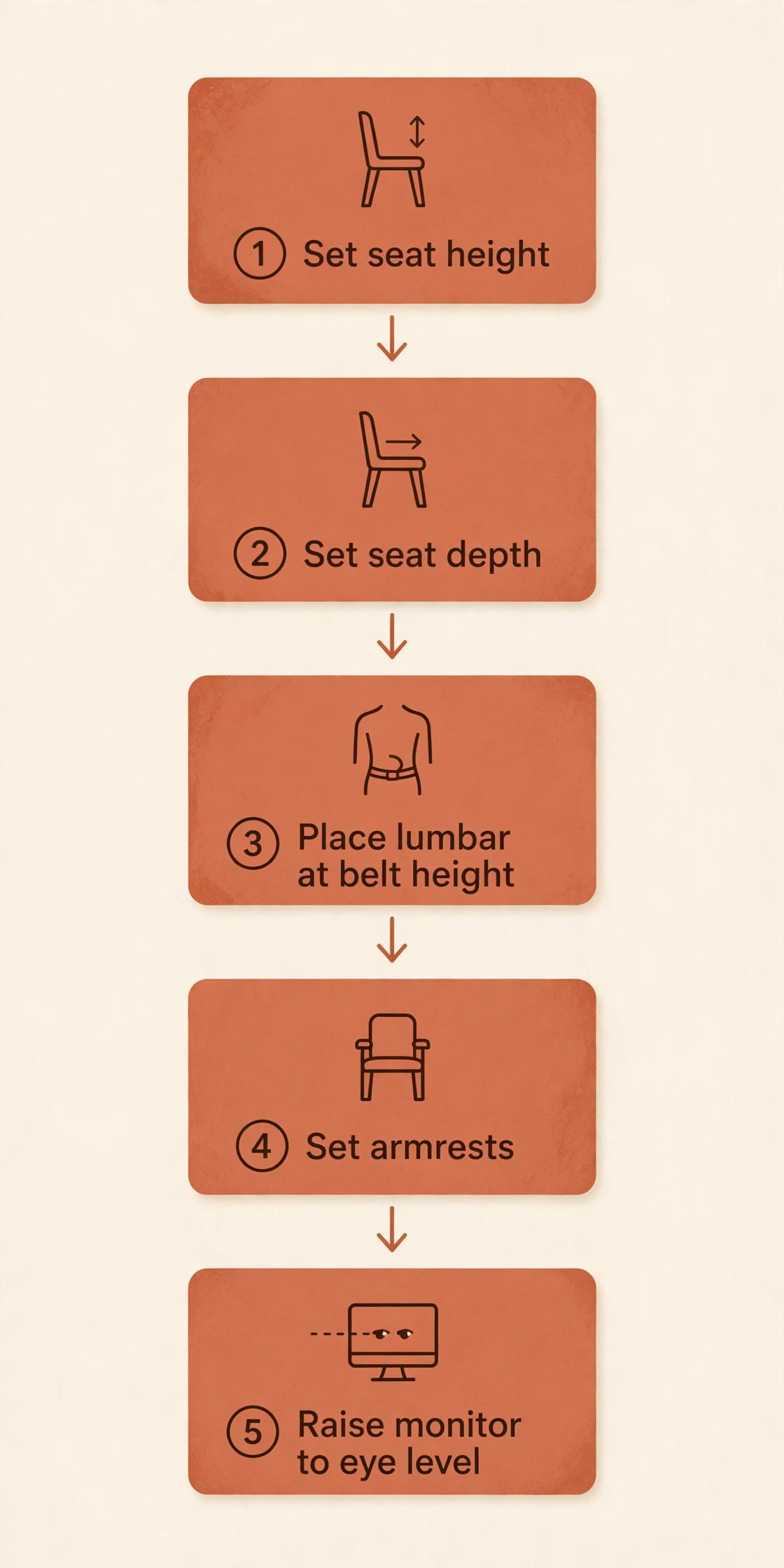
Start with your desk height, not with a brand. Sit at your desk with your feet flat on the floor and your elbows at roughly a right angle. Your forearms should rest on the desk or on armrests at the same height, without your shoulders rising toward your ears. If your desk is a fixed 29 inch dining table and you are under about five feet five inches, you need a chair whose seat drops low enough for your feet to stay flat, or you need a footrest. If you are over six feet, you need a high maximum seat height and a backrest tall enough to support your shoulder blades.
Next, check seat depth. Sit fully back in the chair. You should be able to fit roughly two fingers between the front edge of the seat and the back of your knees. A seat that is too deep pushes you forward off the backrest, which defeats the lumbar support entirely. A seat that is too shallow leaves your thighs unsupported. Adjustable seat depth matters so much for study because students share rooms and chairs, and a fixed seat depth that fits one person often fails the next.
Then look at lumbar support as a position, not as a feature name. A pad that sits too high presses into the ribs. One that sits too low does nothing. Adjustable height is the minimum useful control. Adjustable depth or firmness is better, because it lets you match the support to your own lower back curve. Self adaptive systems, such as the one on the Sihoo chairs below, move as you recline, which suits students who shift between upright typing and leaning back to read. Fixed curves, such as the one on the IKEA Markus, suit students whose back shape already matches the curve, and frustrate everyone else.
Armrests matter too, because reading and writing keep your arms in front of you for hours. Height adjustment is essential, and width, depth and pivot adjustment help with laptop typing and handwriting. Finally, weigh the warranty against the price, because casters, gas lifts and tilt mechanisms wear out with daily use.
Comparison Table for the Ten Chairs
The table below gives the headline facts for each chair. Prices are typical ranges from October 2026 listings, including common sale prices, and they change with size, material and retailer.

| Chair | Lumbar support | Key adjustments | Typical price | Capacity | Best suited to |
|---|---|---|---|---|---|
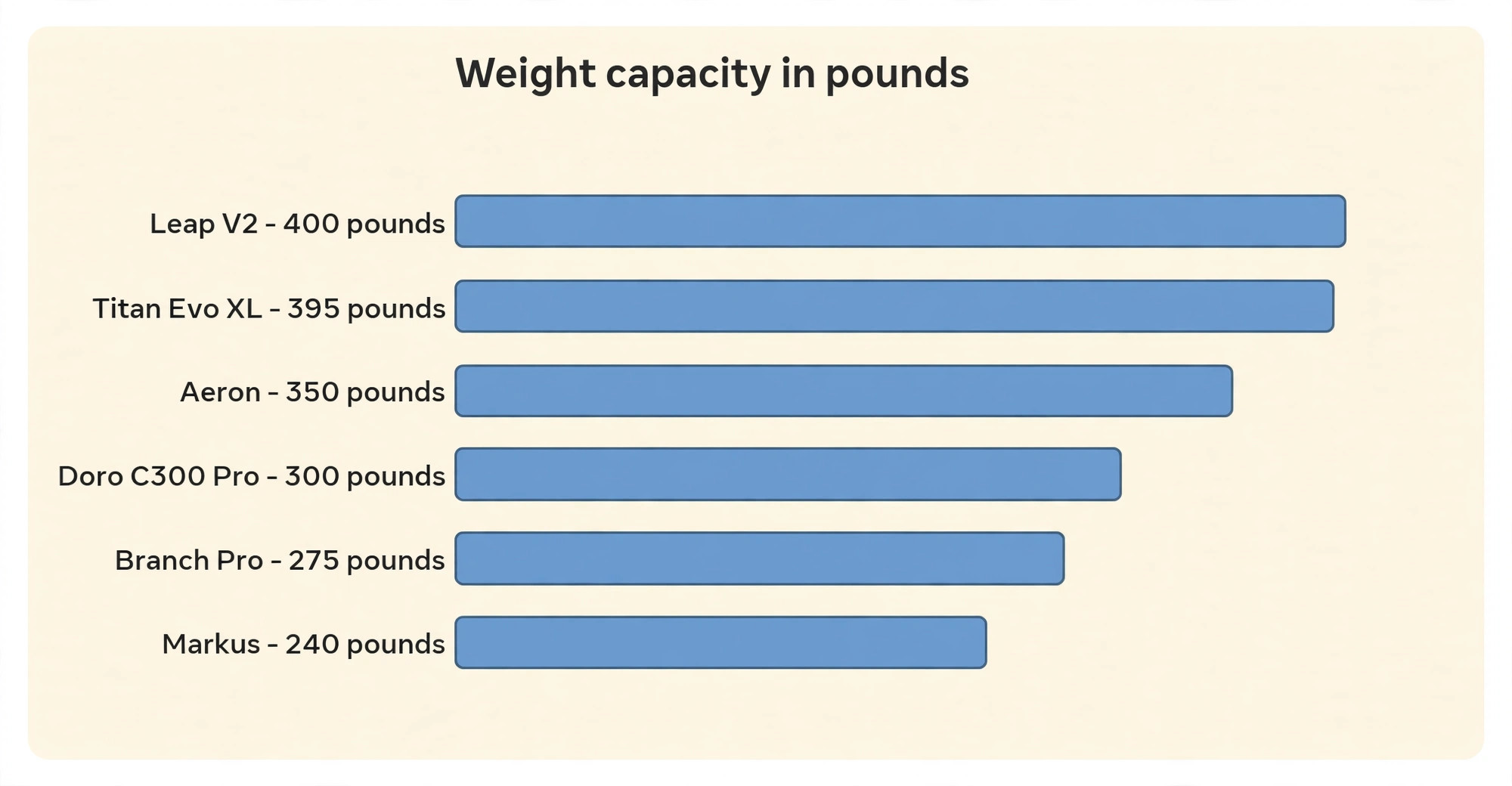
| Herman Miller Aeron Remastered | PostureFit SL, optional | Fully adjustable arms, tilt limiter, three sizes | 1650 to 1930 dollars | 350 pounds | Hot rooms, long daily use |
| Steelcase Leap V2 | Height and firmness adjustable | 4D arms, seat depth, LiveBack back | 599 dollars refurbished, 979 dollars new | 400 pounds | Back trouble, shared spaces |
| Herman Miller Sayl | PostureFit, optional lumbar | Fully adjustable arms, seat depth optional | 600 to 1405 dollars | Standard adult range | Smaller frames, small rooms |
| Steelcase Series 1 | Height adjustable lumbar | Optional 4D arms, seat height 16.5 to 21.5 inches | About 500 dollars | 400 pounds | Heavier users, first ergonomic chair |
| Branch Ergonomic Chair Pro | Height and depth adjustable | 5D arms, seat depth, forward tilt | 499 dollars, headrest 69 dollars | 275 pounds | Most students, best all round |
| Autonomous ErgoChair Pro | Sliding lumbar, 6 inches travel | 4D arms, headrest included, seat depth | 499 dollars | 300 pounds | Students who shift posture |
| Sihoo Doro C300 Pro | Self adaptive lumbar | 6D arms, seat depth, single lever | 360 to 400 dollars | 300 pounds | Value buyers |
| IKEA Markus | Fixed built in curve | Height, tilt tension, height only arms | 300 to 330 dollars | 240 pounds | Tight budgets, simple needs |
| Secretlab Titan Evo | Built in 4 way lumbar | 4D arms, recline to 165 degrees, three sizes | 504 to 729 dollars | 285 pounds Regular, 395 pounds XL | Study plus gaming, tall students |
| Branch Ergonomic Chair | Height adjustable, removable | 3D arms, seat depth, tilt tension | 369 dollars | 275 pounds | Home study rooms |
The Posture Checklist to Run Before You Order
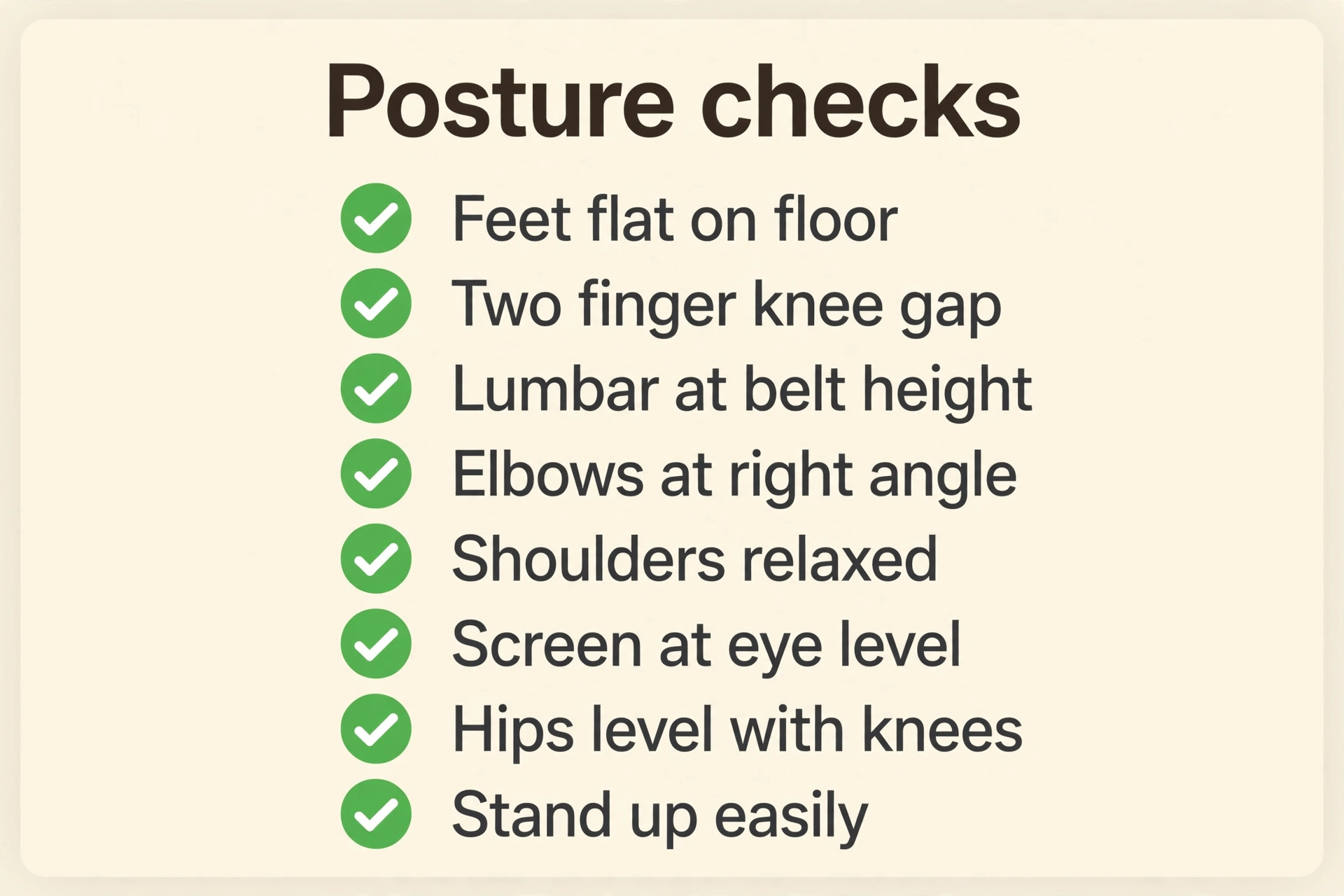
Use this checklist with any candidate for the best chair for long study sessions, and use it again on the day the chair arrives. A chair that passes in a shop can still fail at your desk, because desk height, monitor height and footwear all change the fit.
- Feet flat on the floor, with knees at roughly a right angle and no pressure behind the knees.
- Seat depth leaves about two fingers of space between the seat edge and the back of your knees.
- Lower back touches the lumbar support without you having to push yourself back into the chair.
- Lumbar pad sits at belt height, not up near the ribs and not down near the seat.
- Shoulder blades touch the backrest when you sit upright, without the top edge digging into your neck.
- Elbows sit at roughly a right angle, with forearms supported by the desk or the armrests.
- Shoulders stay down and relaxed, not lifted toward the ears when your hands are on the keyboard.
- Screen top sits at or just below eye level, so your neck stays neutral while reading.
- Hips sit slightly higher than knees, or level with them, never noticeably lower.
- You can stand up without pushing hard on the desk or the armrests, and without knee pain.
If three or more checks fail, change an adjustment before you blame the chair. Raise or lower the seat, slide the seat depth, move the lumbar pad, or raise the monitor on a stack of books. If the same checks still fail, return the chair inside the trial window. Keep the box until the checklist passes, because most retailers require original packaging for a return.
The Ten Chairs Reviewed
The reviews below follow the same order for every chair in this search for the best chair for long study sessions, so you can compare like with like. Each one covers posture support, adjustability, price and warranty, and the student it suits best.

1. Herman Miller Aeron Remastered
The Aeron is the reference chair for hot, long study days, because its 8Z Pellicle mesh holds you up without foam and lets air move through the seat and back, so there is no cushion to flatten and no padded back to trap heat during summer revision. The optional PostureFit SL system adds two pads that support the sacrum and the lower back, which helps students who slump forward over notes, but it is an option, so check the configuration before you buy. Fully adjustable arms and three sizes cover most adults, with size B rated at 350 pounds.
A well equipped size B costs about 1650 dollars from a third party seller, a fully loaded build runs to about 1930 dollars, and the 12 year warranty softens that price over a decade, but no student should stretch into debt for this chair when the Leap or the Branch Pro covers the same study hours. Buy it if you run hot and sit for eight hours or more.
2. Steelcase Leap V2
The Leap V2 suits students with a history of back ache better than any other chair here, because its LiveBack system flexes to mirror the shape of your spine as you move, following you from upright typing to a leaned back reading position, while the lumbar firmness dial and height adjustment let you set how much push you feel and where it sits. Arms move in four directions, seat depth and height adjust widely, and the 400 pound capacity fits students up to six feet four inches.
New chairs start at about 979 dollars at Steelcase, with 4D arms and extra lumbar support adding to that base price, while refurbished chairs from specialist sellers start at about 599 dollars with a five year mechanical warranty from the refurbisher. That refurbished route is the sensible student buy, provided the seller states the warranty and condition grade in writing.
3. Herman Miller Sayl
The Sayl is the Herman Miller chair for smaller rooms and smaller frames, and its frameless suspension back is the feature that defines it. Instead of a framed mesh panel, the back is a stretch material that flexes as you shift, keeping support close to the spine without hard edges, while the optional PostureFit support and adjustable lumbar pad add structure for students who want a firmer lower back feel. Adjustability depends heavily on the configuration you choose, which is the Sayl’s main trap, because fully adjustable arms, adjustable seat depth and a forward seat tilt are all options that add cost, and a stripped base model feels much simpler than reviews suggest.
Seat height runs from about 15 to 20 inches, with a 12 year warranty. Prices vary widely, from about 600 to 750 dollars for common builds to about 775 to 1405 dollars across the full range, with renewed examples from about 525 dollars. Skip the Sayl if you need a headrest or a high weight rating.
4. Steelcase Series 1
The Series 1 is Steelcase’s entry point into serious ergonomic seating, and it makes its case on capacity and warranty rather than on adjustment count. The height adjustable lumbar support suits students who want a clear lower back push without paying Leap prices, and the backrest shape supports an upright typing posture well, though it feels firmer and narrower than the Leap, which some students love for focus work and others find restrictive after several hours, so a trial period matters here. Seat height runs from about 16.5 to 21.5 inches, arms adjust in height as standard, and weight activated recline sets tension automatically. The 400 pound capacity is the standout figure at this price.
A standard configuration costs about 500 dollars through consumer channels, though dealer quotes move that figure, and common listings describe 12 years of parts and labour cover. Buy it for a professional brand, high capacity and long warranty in a compact chair, and skip it if you need seat depth adjustment or a soft cushion.
5. Branch Ergonomic Chair Pro
The Branch Pro is the best all round study chair in this guide, because it gives you fourteen points of adjustment at a mid range price and leaves almost nothing important as an extra. The two way lumbar support moves in height and depth, so you can set both where the pad sits and how firmly it presses, while seat depth adjustment, seat tilt and a forward tilt option cover upright typing, handwriting and leaning back to read without a configuration puzzle at checkout. Five direction armrests bring support close for laptop typing or push it aside for handwriting.
Seat height runs from about 18 to 21.7 inches, suiting average and taller students, with a mesh back and firm foam seat. Price is 499 dollars, with the optional headrest adding 69 dollars for a matched total of 568 dollars, and the seven year warranty covers parts and components, with fabric covered for three years. Buy it if you want one chair for every study posture, and skip it if you weigh over 275 pounds or need a headrest included in the base price.
6. Autonomous ErgoChair Pro
The ErgoChair Pro suits students who never sit still, because its lumbar support slides up and down the backrest through about six inches of travel and flexes as you shift, following you from a forward lean over a textbook to a reclined lecture watch instead of locking one lower back position for the whole day. Arms move in four directions, the headrest is included at 499 dollars, seat height runs from about 18.5 to 22 inches, and seat depth adjusts. The minimum seat height is the weak point, because at 18.5 inches shorter students will need a footrest to keep their feet flat.
The 300 pound capacity covers most students, and the lifetime warranty on frame and mechanism is a strong selling point at this price, though wear parts such as casters still deserve a check in the warranty terms. Buy it if you shift posture constantly and recline often.
7. Sihoo Doro C300 Pro
The Sihoo Doro C300 Pro is the value leader in this guide, because it packs self adaptive lumbar support, six direction arms and seat depth adjustment into a chair that commonly sells for about 360 to 400 dollars. The lumbar system tracks your movement as you recline, so support stays in contact with your lower back instead of falling away when you lean back, and that feature alone would justify a higher price. Seat depth, seat height and a 135 degree recline adjust via a single lever, which makes the chair easy to share. The headrest suits average height students well but sits low for students over six feet, so tall readers should test that detail first.
The three year warranty is shorter than Branch or Steelcase cover, and the armrests can shift more easily than locked arms on premium chairs. Those are fair trade offs at this price. Buy it if you want the most adjustment per dollar.
8. IKEA Markus
The Markus is the chair most students already know, because it is cheap, widely available and tall enough for a proper backrest. Its mesh back lets air through during long sessions, its built in lumbar curve gives a gentle lower back shape, and its padded headrest suits leaning back between study blocks. Adjustability shows its price, with height only arms, no seat depth adjustment and a fixed lumbar curve. Tilt tension adjusts with a manual control under the seat, and seat height adjusts through a normal gas lift range. IKEA tests the chair for 240 pounds, and the ten year warranty is a genuine strength for a chair used daily for several years.
Price is about 299.99 dollars for the medium size and about 329.99 dollars for the large dark gray version in current United States listings. Buy the Markus if you want a simple, sturdy chair from a shop you can visit, with a long warranty and no configuration choices, and skip it if you need seat depth control or a lumbar pad you can move.
9. Secretlab Titan Evo
The Titan Evo is the study chair for students who also game, and for larger students who find office chairs too small. Its cold cure foam seat feels firmer and more shaped than a flat office cushion, and its built in four way lumbar support adjusts in height and depth without a separate pillow to lose. Three sizes matter most here, with Regular for most adults, XL for students up to six feet nine inches, and Small up to five feet six inches.
Arms move in four directions, recline runs to about 165 degrees, and the multi tilt mechanism locks at several angles, which is a bonus for reading breaks but a distraction risk if you recline too far during study. Price runs from about 504 dollars for SoftWeave Plus fabric in older listings to about 649 to 729 dollars for current configurations, capacity is 285 pounds for Regular and 395 pounds for XL, and the five year warranty, extendable with registration, is solid for a gaming chair. Buy it for study plus gaming or XL sizing, and skip it if you run hot, because foam traps more heat than mesh.
10. Branch Ergonomic Chair
The standard Branch Ergonomic Chair is the quieter sibling of the Pro, and it suits students who want Branch build quality and warranty cover without paying for five direction arms. Its removable lumbar support helps students who prefer a flatter back. Adjustability covers eight points, including seat height from about 17 to 21 inches, seat depth, three direction arms and tilt tension, which is enough for most study postures, though the arms lack pivot adjustment and the lumbar pad lacks the depth control found on the Pro. There is no headrest option on this model, so students who recline to read will need to accept a mid back chair or step up to the Pro.
The 275 pound capacity and seven year warranty match the Pro, which keeps the value case strong. Price is 369 dollars, 130 dollars below the Pro, with seat depth adjustment the Markus lacks. Buy it if you want a well built, well warranted study chair without a headrest or pivoting arms.
Best Pick by Job
The table below matches each common study situation to one chair, so you can skip straight to the right review in this guide to the best chair for long study sessions if you already know your constraint. Prices are the typical figures from the reviews above, and they move with configuration and sale timing.
| Study situation | Pick | Why it wins for this job |
|---|---|---|
| Most students, no special constraint | Branch Ergonomic Chair Pro | Full adjustment set, forward tilt, 7 year warranty |
| Tightest budget with a long warranty | IKEA Markus | About 300 dollars, 10 year warranty, simple setup |
| Best adjustment per dollar | Sihoo Doro C300 Pro | Self adaptive lumbar, 6D arms, about 360 to 400 dollars |
| Back trouble or all day sitting | Steelcase Leap V2 refurbished | LiveBack flex, lumbar firmness control, 400 pound capacity |
| Hot room or summer revision | Herman Miller Aeron Remastered | Mesh seat and back, no foam heat build up |
| Smaller frame or smaller room | Herman Miller Sayl | Light frameless back, 15 to 20 inch seat height |
| Larger or taller student | Secretlab Titan Evo XL | 395 pound capacity, tall back, deep recline |
| Constant posture changes | Autonomous ErgoChair Pro | Sliding lumbar, headrest included, 499 dollars |
| Heavier student on a mid range budget | Steelcase Series 1 | 400 pound capacity, about 500 dollars, long warranty |
| Simple, well warranted home chair | Branch Ergonomic Chair | 369 dollars, seat depth control, 7 year warranty |
If your situation appears twice, choose by budget first and by warranty second, and choose the chair with seat depth adjustment if two chairs tie.

Setup Mistakes That Undo a Good Chair
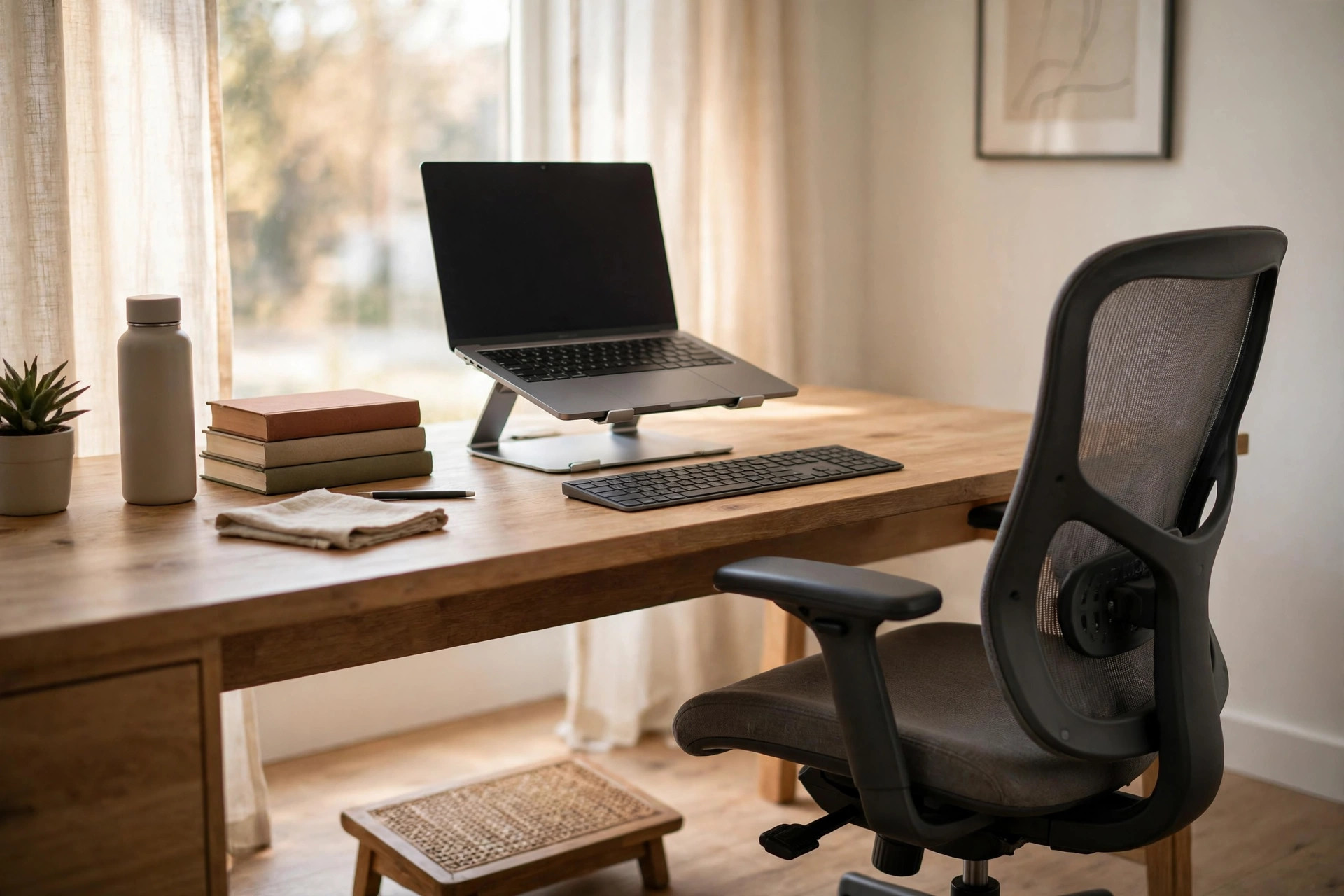
The most common mistake when buying the best chair for long study sessions is setting the chair height to the desk instead of to your body. Students raise the seat until their arms reach the desk, then dangle their feet, which puts pressure behind the knees and pulls the pelvis forward. Set the seat so your feet sit flat first, then raise the desk, the monitor or the keyboard to meet your hands. If the desk cannot move, add a footrest. A 20 dollar footrest fixes a fit problem that a 500 dollar chair cannot fix on its own.
The second mistake is pushing the lumbar pad to maximum firmness on day one. A firm lumbar push feels supportive for an hour and then causes ache, because your back muscles fight the pad instead of resting on it. Start with a light setting, sit for a full study block, and increase firmness only if your lower back still feels unsupported at the end of the block. The third mistake is ignoring the monitor. A perfect chair cannot fix a laptop screen sitting flat on a desk, because that screen forces your neck down for hours. Raise the laptop on a stand, add an external keyboard, and set the screen top at or just below eye level.
The fourth mistake is sitting still for too long in any chair, however good. Stand up every 45 to 60 minutes, walk to get water and stretch, because movement maintains the posture that a chair supports.
Study seating works best as part of a full desk setup, not as a single purchase, so pair this guide to the best chair for long study sessions with the site’s desk and study workflow coverage before you spend. A compact standing desk can solve the height problem that a chair alone cannot fix, and you can read the full size and stability comparison in the guide to the best standing desk for small apartments.
For the study methods that fill those long sessions, the revision workflow in the best note taking apps guide and the student tool roundup in AI tools for students both help you plan work that your new chair then has to support for hours at a time.
Frequently Asked Questions
How long should a study chair last with daily use
A well built example of the best chair for long study sessions should last five to ten years with daily student use, depending on build quality, warranty cover and how often it is shared. Mesh and foam both wear, but the parts that fail first are usually casters, gas lifts and tilt mechanisms, not the backrest.
Is mesh or foam better for long study sessions
Mesh wins for heat management, because air moves through the seat and back and sweat does not build up during warm revision blocks. Foam wins for a shaped, cushioned feel, and many students prefer foam for writing by hand.
Do I need a headrest for studying
A headrest helps if you recline to read, watch lectures or take breaks without leaving the chair, because it supports the neck in a leaned back position. It matters much less for upright typing and handwriting, where your head stays over your work and a headrest never touches you.
What seat height do I need for a standard desk
For a standard desk at about 29 inches high, most students need a seat height between about 17 and 21 inches, with elbows at roughly a right angle and feet flat on the floor. Shorter students often need the lower end of that range or a footrest, while taller students need the upper end and a backrest tall enough for the shoulder blades. Measure your seated elbow height from the floor before you order, because that single measurement predicts fit better than height alone.
Can a cheap chair be good enough for exam season
A cheap chair can carry you through one exam season if it gives you a straight back, a seat at the right height and a lumbar curve that matches your lower back, and if you take regular breaks. The risk with very cheap chairs is not one bad week. It is foam that flattens, a gas lift that sinks and a backrest that loosens over months, which turns a short term fix into a long term ache.
Refurbished is the smartest route to a premium chair such as the Steelcase Leap V2, provided you buy from a seller who states the condition grade, the parts replaced and the warranty in writing. A refurbished Leap from about 599 dollars gives you flagship back support at a mid range price, and the five year mechanical warranty from a reputable refurbisher covers the parts most likely to fail.
Set It Up Once, Then Forget the Chair
The right choice as the best chair for long study sessions is not the most expensive chair on this list, and it is not the chair with the longest feature list. It is the chair that passes the posture checklist at your desk, at your height, with your monitor at eye level, and then disappears from your attention for hours at a time. That is the real test. If you notice the chair during a study block, something still needs adjusting. If you notice only the work, the chair has done its job.
Start from your constraint, not from a brand name. Tight budget points to the Markus or the Sihoo. Back trouble points to the Leap. Heat points to the Aeron. Constant movement points to the Autonomous. Most students, with no single dominant constraint, will be well served by the Branch Pro, and that is why it leads this guide. Order inside a return window and adjust one setting at a time until the chair stops demanding attention.