

The best form builders for small businesses in 2026 put Jotform first for most owners, because it covers contact forms, payment forms, quotes and intake in one place without charging per form. A bakery taking custom cake orders, a plumber booking callouts and a consultant collecting discovery calls can all run on the same tool. The rest of this guide compares nine more builders on what they charge, where they cap responses and which job each one handles best.
Most small businesses do not need the most powerful form builder. They need the one that goes live before lunch, takes a payment without a developer and does not punish a busy month. A builder that looks beautiful but caps responses at 100 a month will cost more in lost leads than a plain builder that lets 1,000 people through.
The second thing that matters is where the form data goes. A form that drops answers into a spreadsheet nobody opens is a chore, while a form that feeds a CRM, sends a confirmation email and notifies the right person saves an hour a day.
The 10 Tools at a Glance
| Tool | Main job | Best for | Starting price |
|---|---|---|---|
| Jotform | All round forms, payments and workflows | Small businesses that want one builder for everything | Bronze at 39 dollars a month, 34 dollars billed yearly |
| Typeform | Conversational one question at a time forms | Customer facing surveys and lead forms | Basic at 39 dollars a month, 28 dollars billed yearly |
| Google Forms | Free simple forms inside Google Workspace | Owners who need a free form today | Free |
| Wufoo | Simple hosted forms with payments | Small teams that want a quick hosted form | Free plan, paid plans above the free tier |
| Zoho Forms | Forms inside the Zoho suite | Businesses already running Zoho apps | Standard from 10 dollars per user a month, reported |
| Paperform | Designed pages that act as forms | Brand led order and booking forms | Essentials at 24 dollars a month billed yearly, reported |
| Cognito Forms | Calculated forms with logic and payments | Quotes, orders and applications with maths | Pro at 15 dollars a month, reported |
| Formstack | Forms plus documents and workflows | Teams that need approvals and signatures | Paid plans from 92 dollars a month, reported |
| Microsoft Forms | Simple forms inside Microsoft 365 | Teams already paying for Microsoft 365 | Included with Microsoft 365, free tier available |
| Fillout | Modern forms with strong logic | Teams that want advanced logic at a low price | Free plan, Pro from 20 dollars a month, reported |
Best Pick by Job
| Job type | First pick | Second tool | Why this pair works |
|---|---|---|---|
| One builder for everything | Jotform | Cognito Forms | Jotform covers the most jobs and Cognito Forms adds stronger calculations |
| Beautiful customer surveys | Typeform | Paperform | Typeform leads on conversational flow and Paperform adds page design |
| Free start with no budget | Google Forms | Microsoft Forms | Google Forms is free for anyone and Microsoft Forms suits Microsoft shops |
| Quotes and orders with maths | Cognito Forms | Jotform | Cognito Forms leads on calculations and Jotform adds payments and workflows |
| Brand led booking pages | Paperform | Typeform | Paperform leads on design and Typeform adds the conversational feel |
A contact form and a payment form ask for different things from a builder. The contact form needs to load fast, look clean and send the answer to the right inbox, while the payment form needs tax handling, receipts and a record that matches the bank statement.
Size decides the second cut. A solo owner needs a builder that works in an afternoon with no training, while a ten person team needs shared templates, user seats and an audit trail of who changed what. The best form builders for small businesses match the business as it runs today, with a clear path to the next tier when the response volume grows.
Which form builder is best for a small business that takes payments?
Jotform takes the payment job because it treats payment as a core feature rather than an add on. Stripe, PayPal and Square connect directly, payment submissions are counted separately from ordinary responses and the Bronze plan covers 100 payment submissions a month before Gold lifts that to 10,000 stored submissions. A business that sells gift cards, takes deposits or collects event fees can run the whole transaction inside the form, with a receipt sent automatically.
Typeform also takes payments through Stripe, but its response caps bite sooner. Basic allows 100 responses a month in total, so a busy payment form can hit the ceiling in a week and stop taking orders until the month resets or the plan rises. That makes Typeform the better pick for a short survey or a lead form where each answer is valuable, and the weaker pick for a storefront form that must never close.
The practical test is a month of real volume. Count how many submissions the busiest form received last month, add a third for growth and check that number against the plan limit, not the headline price. A builder that stops at 100 responses when the business needs 400 is not a bargain at any price, and the best form builders for small businesses are ranked here with that ceiling in mind.
How to Choose the Best Form Builders For Small Businesses
Start with the form that earns money first, because that is the test that separates a builder from a toy. Build the booking form, the quote form or the order form the business actually uses, and run it live for two weeks. A builder that collects the payment, sends the confirmation and files the answer where the team can find it will survive the trial, while one that needs a workaround for any of those steps will be replaced before the month ends.
Next, count responses honestly. Look at last month across every form, not just the busiest one, and compare the total with the plan limit. Free plans from Jotform allow 100 submissions a month and Typeform allows 10 responses, so a business with even modest traffic outgrows both quickly. The right plan is the cheapest one whose limit sits comfortably above real volume, with room for a busy week.
Then check where the answers land. A builder that sends data to the email inbox, the CRM and the spreadsheet at the same time saves the owner from copying answers by hand. Test the integration the business actually uses before paying, because a native connection that works beats a third party connector that needs maintenance. Finally, look at who else can edit the form. A solo owner needs one seat, while a team needs shared access without sharing a password.
The 10 Tools in Detail
The order below follows the small business workflow, so the all rounder opens the list and the logic specialist closes it. Each entry states the price as published or reported, the limit that matters and the job it fits, because the best form builders for small businesses earn their place on the monthly bill as much as on the editor.
1. Jotform
Jotform is the all round form builder for small businesses that want one tool for contact forms, payments, quotes and intake. The catalogue holds thousands of templates, the drag and drop editor needs no training and every plan includes every feature, with only the limits changing between tiers. Bronze costs 39 dollars a month, or 34 dollars billed yearly, and covers 25 forms with 1,000 monthly submissions.
The drawback is the response ceiling on the cheaper tiers. Bronze stops at 1,000 submissions a month, and a business with a popular form can reach that in a busy season, which forces an upgrade to Silver at 49 dollars a month or Gold at 129 dollars. The editor is also dense, so a first time user can spend longer finding a setting than building the form.
Try Jotform free for a fortnight with the form that earns the most money, and watch whether the 100 submission free limit or the workflow fits first.
2. Typeform
Typeform is the conversational form builder for businesses that want each question to feel like a conversation. One question appears at a time, the design is clean and completion rates on customer facing surveys run higher than on long single page forms. Basic costs 39 dollars a month, or 28 dollars billed yearly, and covers 100 responses a month with one user.
The drawback is the tight response cap and the price of removing branding. Basic keeps the Typeform logo and stops at 100 responses, so a business must move to Plus at 79 dollars a month to reach 1,000 responses and drop the logo. Long forms with many questions can also feel slow to a respondent in a hurry, which suits surveys better than quick checkouts.
Run one live survey on the free plan first, count how many of the 10 free responses complete it, and only pay once the finish rate proves the format works.
3. Google Forms
Google Forms is the free form builder inside Google Workspace, and its price is the reason most small businesses try it first. There is no paid tier to buy, responses land in a Google Sheet automatically and sharing a form is as simple as sending a link. A business already using Gmail and Drive can have a working contact form in ten minutes with no new account to manage.
The drawback is the lack of polish and payment depth. Google Forms offers no built in payment collection, limited design control and no advanced logic beyond simple section jumps, so a business that needs branded booking pages or card payments will outgrow it.
Google Forms suits owners who need a working form today at no cost. It fits a new business collecting enquiries, a club gathering signups and a team running an internal poll where design does not matter. The zero price is the feature that matters, because a free form that works beats a paid form that never gets built.
Keep Google Forms for internal jobs and simple enquiries, and move the money taking forms to a paid builder once payments matter.
4. Wufoo
Wufoo is the simple hosted form builder from SurveyMonkey, and its speed is the reason small teams still pick it. Forms build quickly, embed on any site and collect payments through Stripe, PayPal and other gateways without a separate checkout page. The free plan covers a small number of entries, and paid tiers add more entries, more users and more storage as the business grows.
The drawback is the dated feel and the thin free tier. Wufoo has changed little in recent years, so its templates look older next to Paperform or Typeform, and the free plan caps entries low enough that a busy form needs a paid tier within weeks.
Wufoo suits teams that want a hosted form live in an hour without learning a new platform. It fits a small shop taking orders, a service business collecting bookings and an owner who values reliability over fresh design. The quick setup is the feature that matters, because a form that is live today collects answers that a prettier form still in design cannot.
Start on the free plan with a single order form, and check the entry count after two weeks before choosing a paid tier.
5. Zoho Forms
Zoho Forms is the form builder inside the Zoho suite, and its integration is the reason Zoho users pick it over a standalone tool. Answers flow into Zoho CRM, Zoho Creator and Zoho Sheet without a connector, and the Standard plan is reported from 10 dollars per user a month. A business already paying for Zoho gets a form builder that shares the same login, the same contacts and the same reporting.
The drawback is the weaker standalone case. Outside the Zoho suite the builder offers little that Jotform does not do better, and the template catalogue is smaller, so a business that does not use Zoho will find the value thin.
Zoho Forms suits businesses already running Zoho CRM or Zoho One. It fits a team that wants form answers attached to customer records automatically, and an owner who would rather pay one vendor than stitch five tools together. The CRM connection is the feature that matters, because an answer that lands on the right customer record saves a copy and paste job every time.
Test Zoho Forms with a lead form that writes straight into Zoho CRM, and confirm the field mapping matches the sales process before rolling it out.
6. Paperform
Paperform is the design led form builder for businesses whose forms need to look like designed pages. Text, images, video and questions sit together on one page, so a booking form can carry the brand, the story and the price before asking for a name. Essentials is reported at 24 dollars a month billed yearly, with 1,200 submissions a year, and Pro is reported at 49 dollars a month billed yearly with unlimited submissions.
The drawback is the submission counting and the price spread between sources. Essentials counts submissions per year rather than per month, which suits steady volume but punishes a seasonal spike, and published prices differ between comparison sources, so the live pricing page is the authority before budgeting.
Paperform suits businesses where the form is the sales page. It fits a photographer taking bookings, a coach selling a programme and a shop running a styled order form where the page itself must sell. The page design is the feature that matters, because a form that looks like the brand earns trust before the first question.
Build the booking page on the free trial, send it to five real customers and ask whether the page or the questions sold them.
7. Cognito Forms
Cognito Forms is the calculated form builder for quotes, orders and applications that need maths inside the form. Prices, quantities, discounts and tax calculate live as the respondent types, and entries can repeat in sections, which suits order forms with many line items. Pro is reported at 15 dollars a month, with Team and Enterprise tiers above it for more users and entries.
The drawback is the plainer design and the learning curve on complex calculations. A form with many calculated fields takes longer to build than a simple contact form, and the visual style is more functional than beautiful, so a brand led business may prefer Paperform for the customer facing page and Cognito Forms for the quote behind it.
Cognito Forms suits businesses that quote prices on the form itself. It fits a printer pricing jobs, a caterer building menus and a service business that needs an accurate total before the customer submits. The live calculation is the feature that matters, because a quote that is wrong by ten percent costs more than the subscription saves.
Build the most complex quote on the free plan, test it with three real prices and check the totals by hand before trusting it live.
8. Formstack
Formstack is the form builder for teams that need approvals, documents and signatures around the form. A submitted form can trigger a review step, generate a document from the answers and collect a signature, which suits onboarding, contracts and compliance paperwork. Paid plans are reported from 92 dollars a month, with higher tiers adding workflows and more submissions.
The drawback is the price floor and the setup time. Ninety two dollars a month is a lot for a business that only needs a contact form, and the workflow features need configuration before they pay off, so a solo owner will find Jotform faster and cheaper.
Formstack suits teams whose forms start a process rather than end one. It fits a business onboarding staff, collecting signed agreements and routing approvals between departments, where the form is step one of five. The workflow engine is the feature that matters, because a form that moves itself to the next person saves the chasing that eats a small team.
Map the approval steps on paper first, then build one workflow end to end on the trial before paying for the year.
9. Microsoft Forms
Microsoft Forms is the simple form builder inside Microsoft 365, and its inclusion is the reason Microsoft shops use it. There is no extra bill for a business already paying for Microsoft 365, responses land in Excel automatically and sharing inside the organisation needs no new login. A team running Teams and Outlook can send a form to colleagues in seconds.
The drawback is the shallow feature set. Microsoft Forms offers basic branching, no payment collection and limited design control, so a customer facing booking or order form will need a different tool. External sharing works, but the experience is plain, and advanced logic such as calculations is missing entirely.
Microsoft Forms suits teams that already pay for Microsoft 365 and need internal forms fast. It fits a manager running a staff survey, a team collecting training feedback and an office gathering lunch orders where nobody outside the company sees the form. The zero extra cost is the feature that matters, because a form inside a tool the team already opens gets used.
Use Microsoft Forms for every internal survey, and keep customer facing forms on a builder that can take payments and carry the brand.
10. Fillout
Fillout is the modern form builder for teams that want strong logic without a high price. Conditional logic, calculated fields, URL prefill and Airtable or Notion connections come standard, and the free plan covers a useful number of responses before Pro is reported from 20 dollars a month. A team that builds smart forms with many branches will find the editor faster than older builders.
The drawback is the smaller template library and the younger ecosystem. Fillout has fewer ready made templates than Jotform, so a business that wants to start from a finished form will build more from scratch, and third party integrations are thinner than the big names.
Fillout suits teams that build logic heavy forms on a budget. It fits a business qualifying leads with branching questions, a school collecting applications and a startup that lives in Airtable or Notion. The logic engine is the feature that matters, because a form that asks only the relevant questions gets more completions.
Build the branchiest form first on the free plan, test every path with a colleague and confirm the logic before sending it to customers.
Jotform vs Typeform: Value Against Experience
Jotform wins on value and breadth. Bronze at 39 dollars a month allows 1,000 submissions, every feature is included and payments, workflows and templates come standard, so a business that needs many kinds of forms pays once and covers them all. The trade is design, because Jotform forms look capable rather than beautiful, and a brand led business may still want Typeform for the one form customers see most.
Typeform wins on experience and completion. One question at a time feels lighter to answer, and the design lifts response rates on surveys and lead forms where each answer is valuable. The trade is volume, because Basic stops at 100 responses a month and Plus at 79 dollars a month is needed for 1,000, which makes Typeform the expensive choice for a high traffic form.
Pick Jotform when the form must take payments, handle volume or cover many jobs, and pick Typeform when the form is a survey or a lead qualifier where the finish rate matters more than the count. Many small businesses end up with both, using Jotform for orders and Typeform for feedback, and that split is cheaper than forcing one of the best form builders for small businesses to do both jobs badly.

What does a form builder cost a small business per year?
A small business should budget by volume rather than by headline price. A quiet business with one contact form can run free on Google Forms or Microsoft Forms all year, while a business taking 500 submissions a month needs Jotform Bronze at about 408 dollars a year billed yearly, or Typeform Plus at about 672 dollars a year for the same volume. The gap between those two figures is the cost of the conversational experience, and only the business can judge whether the extra completions pay for it.
The hidden costs sit outside the subscription. Payment processing takes about 2.9 percent plus 30 cents per card transaction on most gateways, and a third party connector can add 20 dollars a month. Add those to the plan price before comparing, because a 39 dollar plan with a 20 dollar connector costs more than a 49 dollar plan with the connection built in.
Plan for a busy month, not an average one. Take the busiest month of the last year, add a third for growth and buy the plan that covers that number, because a form that closes mid month during a promotion costs more in lost orders than a year of the next tier.
Can a free form builder handle a growing small business?
A free builder can carry a business further than most owners expect, as long as the job stays simple. Google Forms handles unlimited responses at no cost, Microsoft Forms covers internal work inside a 365 subscription and the free tiers of Jotform and Fillout cover a small but real volume. A business with one enquiry form and a few dozen answers a month may never need to pay.
The ceiling arrives with payments, branding and volume. Free plans cap submissions, keep the vendor logo on the form and offer no payment collection, so a business that starts taking deposits or running a promotion will hit the limit in a visible way. That is the moment to pay, and the right move is to upgrade the builder that already holds the forms rather than rebuilding them elsewhere.
The smart path is to start free, measure real volume for a month and pay only when a limit is hit. A business that pays from day one for capacity it does not use wastes money, while a business that stays free past the limit loses orders, and the monthly submission count is the number that tells the owner which side of that line the best form builders for small businesses place them on.
The First Month Rollout Checklist
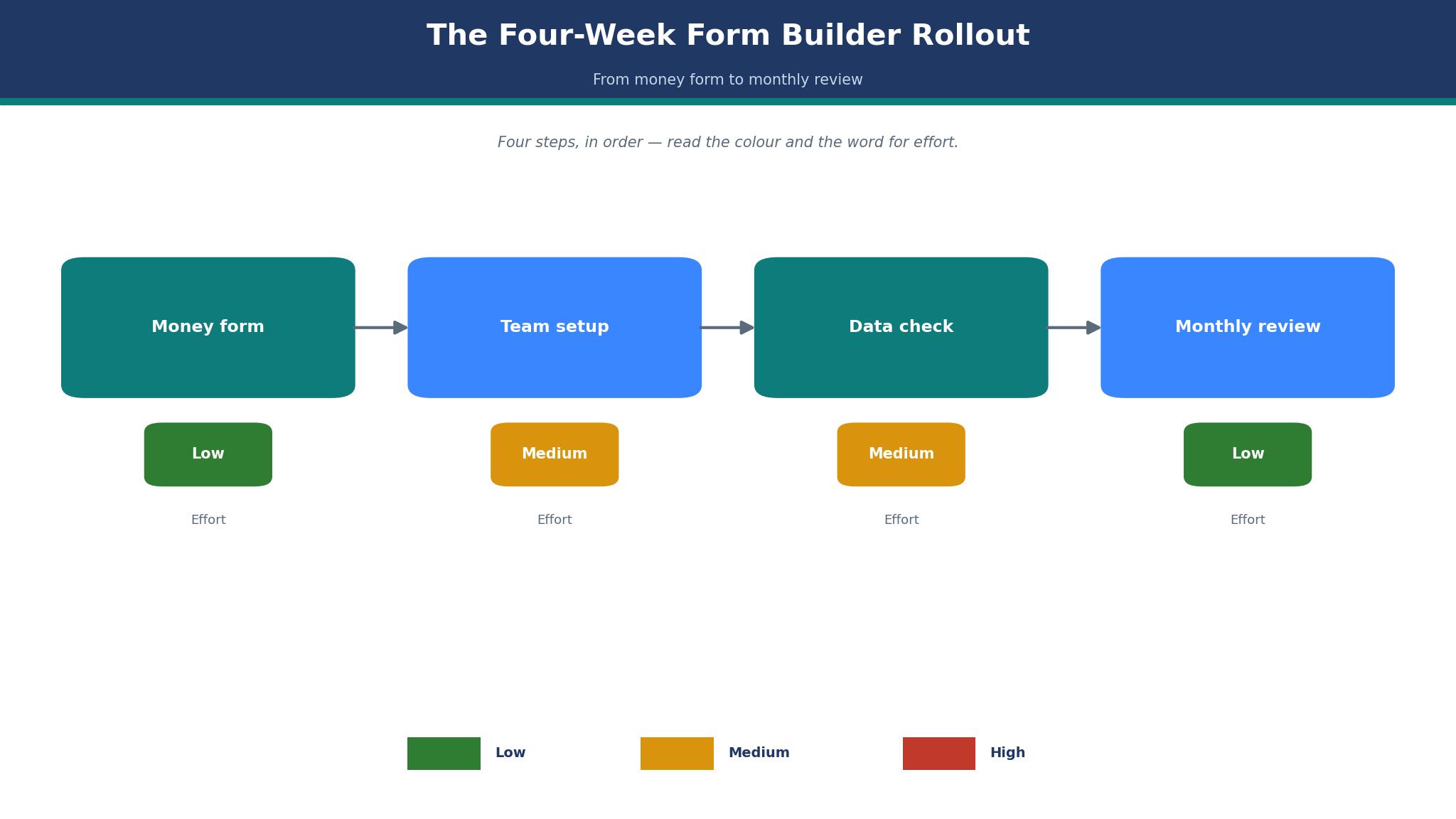
Rolling out a form builder in the first month works best as a short sequence rather than a single launch. Week one belongs to the money form, so build the booking, order or quote form first, connect the payment gateway and test it with a real card payment of one dollar that is refunded after. Week two belongs to the team, so share the form, set who gets notified and agree who answers submissions within a day.
Week three belongs to the data, so check that answers land in the spreadsheet or CRM with the right fields, and fix any mapping that drops a phone number or an address. Week four belongs to the review, so count submissions, check the plan limit and read the abandoned forms to see where people stop.
Keep the checklist short and repeat it for each new form. One money form live and measured beats five forms built and ignored, and the monthly submission count is the metric that decides when to upgrade, when to simplify and when to leave the best form builders for small businesses setup alone.
Frequently Asked Questions
Which form builder is cheapest for a small business?
Google Forms is the cheapest because it costs nothing and handles unlimited responses, with Microsoft Forms close behind for teams already paying for Microsoft 365. Among paid builders, the low cost picks are Cognito Forms Pro reported at 15 dollars a month for calculated forms and Fillout Pro reported from 20 dollars a month for logic heavy forms.
How many responses do I get on Jotform Bronze?
Jotform Bronze allows 1,000 submissions a month, with 25 forms and 10,000 stored submissions, at 39 dollars a month or 34 dollars billed yearly. The free Starter plan allows 100 submissions a month across 5 forms, so Bronze suits a business that has outgrown the free tier but does not yet need Silver at 49 dollars a month, and it is the tier most buyers of the best form builders for small businesses land on first.
Does Typeform work for payment forms?
Typeform takes payments through Stripe from the Basic plan, but the 100 response monthly cap on Basic means a busy payment form can stop taking orders mid month. Plus at 79 dollars a month lifts the cap to 1,000 responses and removes Typeform branding, which makes it the minimum sensible tier for a business that sells through a form every day.
Can I use Google Forms to take payments?
Google Forms has no built in payment collection, so a business must link out to a separate payment page or use an add on, which adds friction and drops completions. A business that takes deposits, sells tickets or collects orders should use Jotform, Cognito Forms or Paperform instead, because the payment lives inside the form and the receipt goes out automatically.
What is the best form builder for quotes with calculations?
Cognito Forms is the best pick for quotes with calculations, because prices, quantities, discounts and tax calculate live as the respondent types, and Pro is reported at 15 dollars a month. Jotform is the second pick, because its calculation widgets cover most jobs and its payment and workflow features are stronger, which suits a business that quotes and then takes a deposit.
Do I need a paid plan to remove branding from my forms?
Most builders keep their logo on free plans and remove it on the first paid tier. Jotform removes branding on Bronze at 39 dollars a month, Typeform on Plus at 79 dollars a month and Paperform on its paid plans, while Google Forms and Microsoft Forms carry their own branding that cannot be removed at any price.
The Final Word on Form Builders for Small Businesses
Jotform takes the top spot for most small businesses because it covers the most jobs at a fair price, with Bronze at 39 dollars a month handling 1,000 submissions and payments built in from the start.
Typeform is the pick for surveys and lead forms where the experience matters, Paperform is the pick for brand led booking pages and Cognito Forms is the pick for quotes with maths. The best form builders for small businesses are not the set with the most features, they are the set that matches the job, the volume and the budget the business actually has.
Choose by the money form first, count real submissions before paying and test the payment with a real card before launch. A business that picks this way will spend less time rebuilding forms and more time answering the customers the forms bring in.