
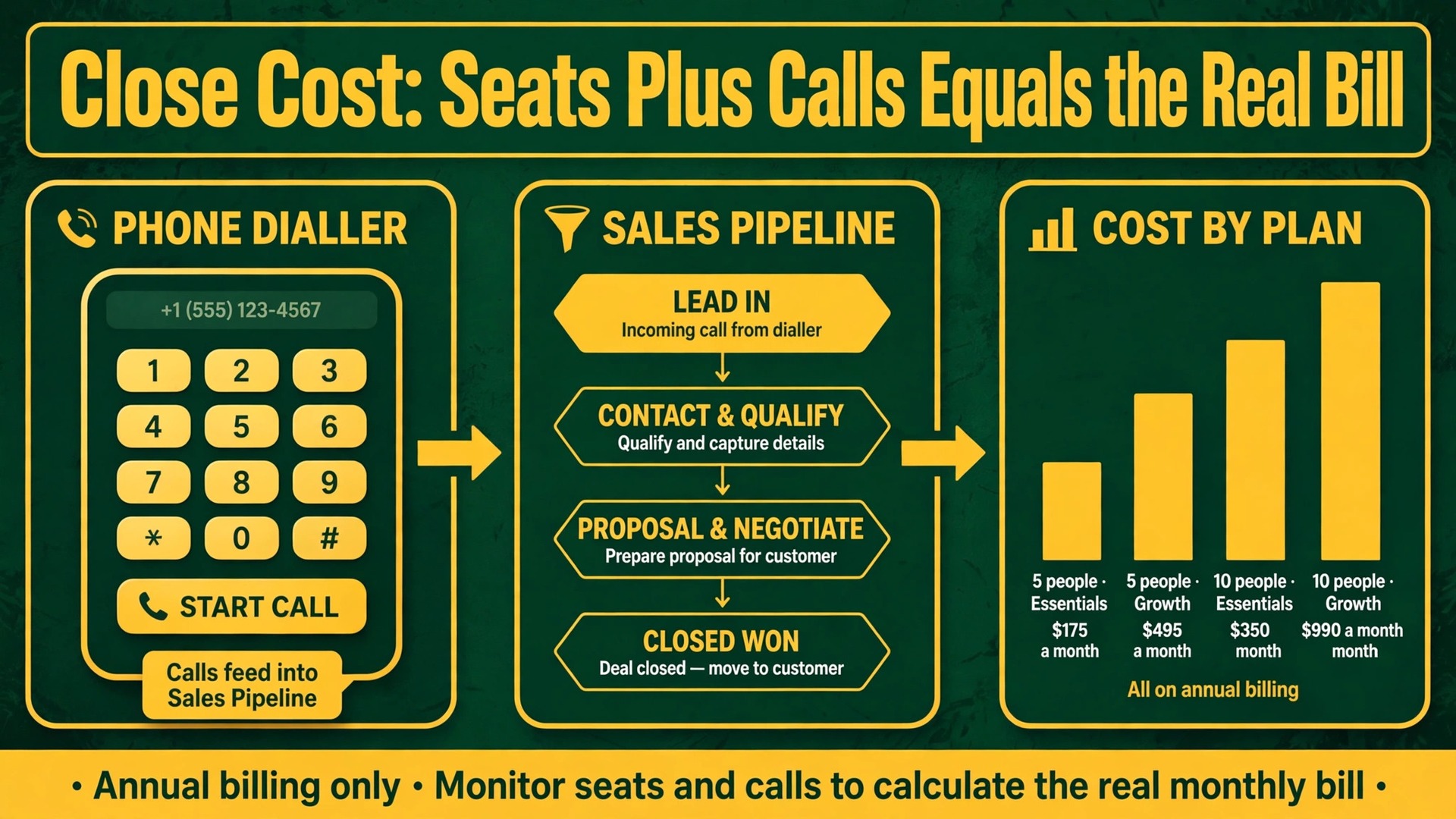
A five person sales team on Close Growth pays 495 dollars a month before making a single call, while the same team on Essentials pays 175 dollars a month, and the 320 dollar gap buys exactly one thing, which is automation. That single comparison explains most of the cost of Close for small business monthly debate, because Close is priced as a calling and automation system rather than as a simple contact database, and teams that buy it for contact storage alone will always feel overcharged. Teams that buy it for outbound calling, automated follow up and dialler driven prospecting can justify the price in recovered deals within weeks.
Close is a sales CRM built around calling, email and SMS in one place, aimed at teams that sell by phone and message rather than teams that mainly track deals on a board. Every plan includes built in calling, email and SMS, which separates Close from CRMs that treat calling as an integration, but calling minutes, SMS credits, phone numbers and AI extras are billed apart from seats, so the seat price is only the first line of the bill. A budget built from seat prices alone will understate the real total for any team that actually calls.
Prices in this guide are starting points drawn from published comparisons checked during research, including figures verified against the vendor pricing page in October 2026. Confirm the current per user prices, plan limits and usage rates on the vendor page before buying, because Close revises its lineup and add ons from time to time. Every total below states its plan and seat count plainly, because seat count multiplied by seat price is the whole subscription story.
Four Plans and a Naming Note, From Solo to Scale
Close currently publishes four plans, and the names matter because older guides use different labels. Solo costs about 9 dollars per user per month on annual billing or about 19 dollars on monthly billing, and it is capped at one user with up to 10,000 leads, built in calling, email and SMS, but no workflows or bulk email. Essentials costs about 35 dollars per user per month on annual billing or about 49 dollars monthly, with unlimited users, pipelines, calling, SMS and email, but still no workflows.
Growth costs about 99 dollars per user per month on annual billing or about 109 dollars monthly, and adds automated workflows, bulk email, the Power Dialer, custom activities and the AI assistant inside workflows. Scale costs about 139 dollars per user per month on annual billing or about 149 dollars monthly, and adds role based permissions, predictive dialing, lead visibility rules and live call coaching.
The naming note matters for budgeting, because a business comparing an older guide that mentions a Starter tier against the live pricing page will not find that name. The entry tier in the current lineup is Solo for a single seller, and the first team tier is Essentials, so a two person team cannot buy Solo at all and must start at Essentials. A guide that quotes a Starter price for a team is therefore quoting a tier the team cannot buy, and the team budget should start at Essentials and move to Growth only when automation justifies it.
Every plan includes a 14 day free trial with no credit card required in recent comparisons, and Close offers no permanent free plan. The trial includes a small amount of calling and enrichment credit in some reports, enough to test real calling and workflows, but not enough to run a campaign. A team should use the trial to make real calls, run one real workflow and test reporting, because a trial that only clicks through demo data proves nothing about call quality, dialler behaviour or support speed.

What the Old Starter Tier Became
Older Close guides describe a Starter tier as the entry point, and readers meeting that name today should translate it to the current entry tiers rather than searching for a plan that no longer exists under that label. For a solo seller, the successor is Solo, at about 9 dollars a month on annual billing, with the same spirit of a low cost single user start. For a team, the successor is Essentials, at about 35 dollars a month per user on annual billing, because Solo cannot hold a second user and the team tier is where multi user work begins.
The practical consequence is that team budgets have a higher floor than older guides suggest. A two person team reading an old Starter price of a few dollars per user might budget under 50 dollars a month, while the real floor on Essentials is about 70 dollars a month on annual billing or about 98 dollars on monthly billing. That gap is not a price rise in disguise, because the lineup changed, but it feels like one to a buyer who planned from an old article, which is why current plan names should always be confirmed before a budget is presented to a partner or a finance approver.
Growth is the tier where the old Starter to Growth comparison still makes sense, because Growth remains the automation tier in every version of the lineup. The question that mattered then still matters now, meaning whether automated follow up, bulk email and the Power Dialer earn their premium over manual follow up on Essentials. That question is answered in the worked totals and the jump section below, because it is the decision that determines most of the bill.
A related naming trap affects teams comparing quotes from different years. A quote that lists Starter, Basic and Business tiers comes from an older lineup and cannot be compared seat for seat against a current quote listing Solo, Essentials, Growth and Scale, because plan boundaries moved along with names. Always ask for the current plan names, seat counts and feature lists on a fresh quote before approving a budget, and keep the quote date attached to every figure. The cost of Close for small business monthly comparison is only valid when both sides use the same lineup vintage, and mixing vintages is the fastest way to approve a wrong total.
What the Cost of Close for Small Business Monthly Really Includes
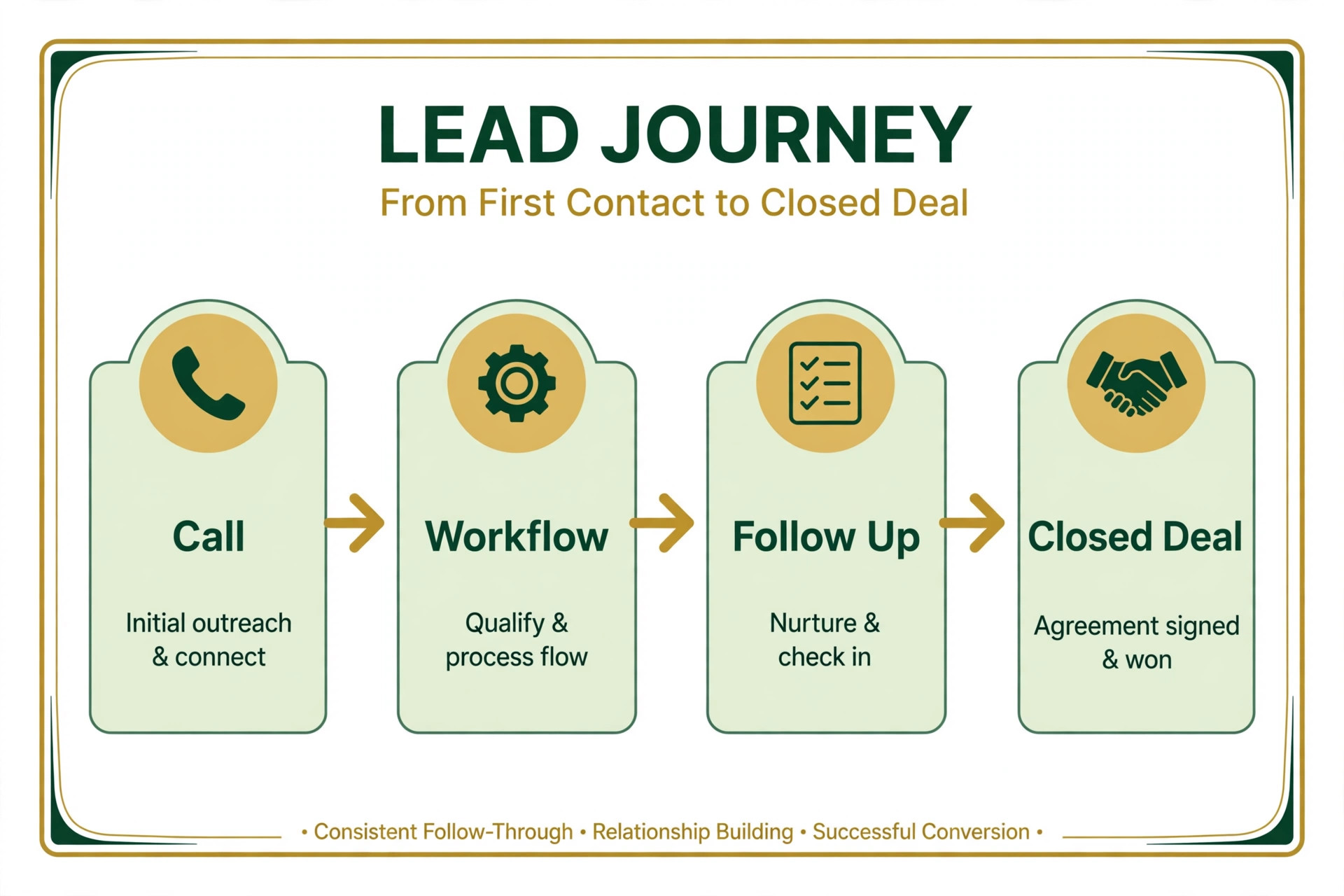
Every plan includes calling, email and SMS from inside the CRM, which is the core Close proposition. A rep can call a lead, send a follow up email and text a reminder without leaving the record, and the call, message and outcome all log against the same lead automatically. That unified record removes the copy work that spreadsheets and separate diallers create, and it gives managers a single view of activity per rep, per lead and per pipeline stage without stitching reports from several tools.
Pipelines, lead management and reporting are included across plans at a level that rises by tier. Essentials includes shared pipelines, unlimited contacts and leads in recent comparisons, and standard reporting, which covers a small team working leads by hand. Growth adds workflows that automate follow up sequences, bulk email for list campaigns, the Power Dialer for list calling, custom activities and AI assistance inside workflows. Scale adds role permissions, predictive dialing, lead visibility rules and live call coaching, plus longer call recording retention, reported at 90 days on Growth and unlimited on Scale against 30 days on lower tiers.
The AI assistant, named Chloe in recent comparisons, appears on every plan, but its workflow use is gated to Growth and above, which is a distinction worth reading carefully. A team on Essentials can use the assistant in basic ways, but cannot embed it inside automated workflows, so the automation gap between Essentials and Growth is wider than a feature list suggests. A team buying Close for AI driven follow up should therefore price Growth from the start, because Essentials cannot deliver that workflow at any seat count.
Worked Monthly Totals for Two, Five and Ten Person Teams
Worked totals turn seat prices into a real bill, and the cost of Close for small business monthly arithmetic is simple multiplication once the plan is chosen. Each scenario below uses annual billing for the subscription, includes only seats, and states the plan plainly so the figures can be adjusted to a real team. Calling minutes, SMS, numbers and AI extras are covered separately, because they sit outside the seat subscription for every team that actually calls.
A two person team on Essentials pays two seats at about 35 dollars, which is about 70 dollars a month on annual billing, or about 840 dollars a year. The same team on monthly billing pays two seats at about 49 dollars, which is about 98 dollars a month, or about 1,176 dollars a year.
On Growth, the two person team pays two seats at about 99 dollars, which is about 198 dollars a month on annual billing, or about 2,376 dollars a year, and about 218 dollars a month on monthly billing. The Growth premium for two people is about 128 dollars a month on annual billing, which must buy automation value, because the calling and pipeline features are already included on Essentials.
A five person team on Essentials pays five seats at about 35 dollars, which is about 175 dollars a month on annual billing, or about 2,100 dollars a year. On Growth, the same team pays five seats at about 99 dollars, which is about 495 dollars a month on annual billing, or about 5,940 dollars a year.
On Scale, five seats at about 139 dollars cost about 695 dollars a month, or about 8,340 dollars a year. The Essentials to Growth gap for five people is about 320 dollars a month, which is the largest single decision in this guide, and it should be justified by deals recovered through automated follow up rather than by enthusiasm for automation in general.
A ten person team on Essentials pays ten seats at about 35 dollars, which is about 350 dollars a month on annual billing, or about 4,200 dollars a year. On Growth, ten seats at about 99 dollars cost about 990 dollars a month, or about 11,880 dollars a year.
On Scale, ten seats at about 139 dollars cost about 1,390 dollars a month, or about 16,680 dollars a year. At ten seats, the Growth premium over Essentials reaches about 640 dollars a month, which means a ten person team should prove automation value on a smaller pilot before committing the whole floor to Growth, because a wrong tier at ten seats wastes more in a quarter than a wrong tier at two seats wastes in a year.
A solo seller deserves a separate line, because Solo at about 9 dollars a month on annual billing, or about 108 dollars a year, is genuinely cheap for a single user CRM with calling built in. The catch is the one user ceiling and the 10,000 lead limit, plus no workflows, which means a solo seller who hires a first rep must move to Essentials immediately, and a solo seller who needs automation must move to Growth. Solo is a starting point for one person, not a team plan at a low price, and any team budget built from Solo pricing is wrong by definition.

Calling Minutes, SMS and Numbers, the Second Bill
Calling and messaging usage sits outside seat prices, and it is the second bill that surprises teams that budget seats alone. Calling minutes, SMS credits, phone number rental and AI extras are billed separately in recent comparisons, with Call Assistant reported near 50 dollars a month per organisation plus per minute usage, and premium phone numbers reported near 19 dollars per line for local presence dialing. Basic lines cost far less in the same reports, but outbound teams that need local presence pay the premium, and those lines multiply per rep or per campaign.
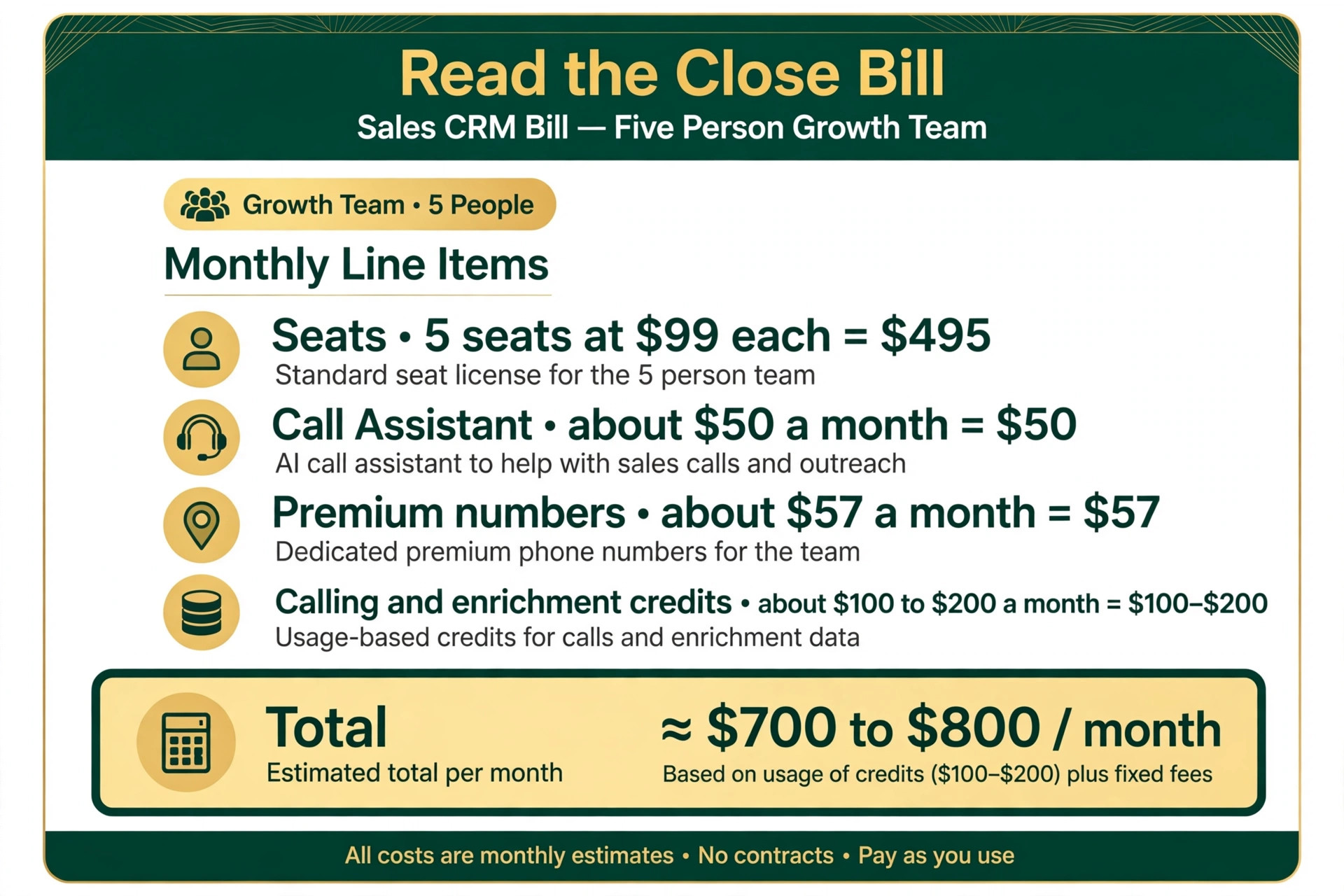
A worked usage example shows how the second bill accumulates. A five person team on Growth at 495 dollars a month on annual billing that adds Call Assistant at about 50 dollars a month, three premium numbers at about 57 dollars a month and 100 to 200 dollars a month in calling and enrichment credits lands near 700 to 800 dollars a month in total.
That total is roughly 40 to 60 percent above the seat subscription alone, which is why reviewers warn that the real per rep cost often lands near 150 to 250 dollars a month once usage is included, against a 99 dollar seat price. The range depends on call volume, so a team should model its own minutes rather than copying a reviewer total.
SMS deserves its own line in the same calculation, because text follow up is powerful and priced by volume. A team that texts every new lead, every appointment reminder and every follow up will consume credits far faster than a team that reserves SMS for hot leads and appointment confirmations. Price SMS from expected message volume before enabling it everywhere, and reserve it for steps where immediacy changes outcomes, because a text habit that feels free during the trial becomes a visible monthly line once volume grows.
Number porting and voicemail setup belong in the same usage budget, because a team that moves existing numbers into Close or buys local presence numbers for several regions will face setup effort and per line charges that a seat quote never mentions. Confirm porting timelines before a launch week, test voicemail and missed call handling with real numbers, and record which rep or campaign owns each number, because unowned numbers keep billing long after the campaign ends. The cost of Close for small business monthly usage control is therefore a number inventory as much as a credit budget, and both should be reviewed quarterly.
The Essentials to Growth Jump, the Decision That Matters Most
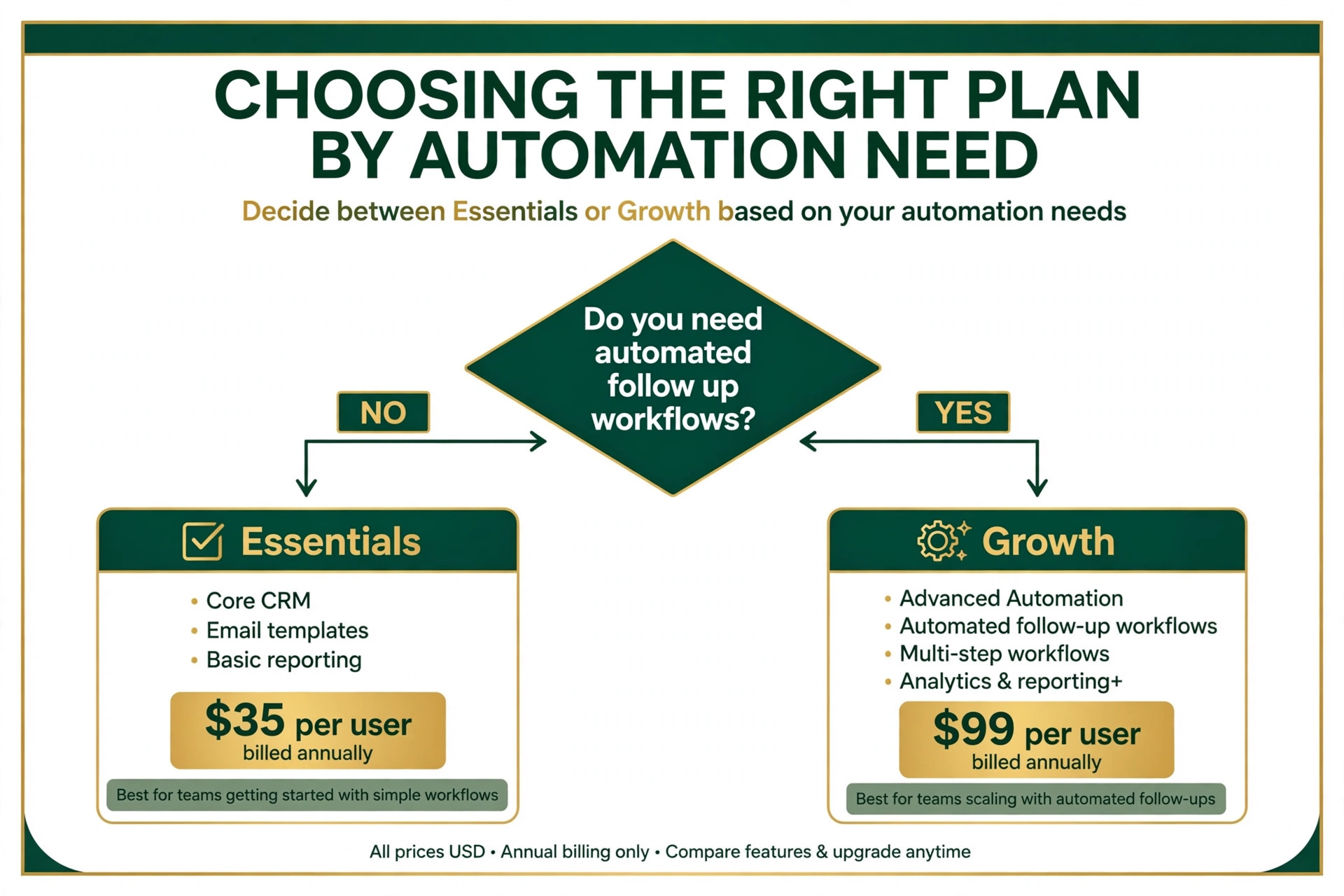
The Essentials to Growth jump costs about 64 dollars per user per month on annual billing, which is the largest step in the Close ladder by a wide margin. What it buys is automation, meaning workflows, the AI assistant inside workflows, the Power Dialer, custom activities and bulk email, none of which exist on Essentials or Solo. A team that does not need automation should never pay the jump, because the price buys nothing it will use, while a team that lives on follow up sequences and list calling cannot do its job without it.
Three tests decide whether the jump pays. First, does the team run follow up sequences that currently depend on reps remembering to call, email or text on schedule, because workflows replace memory with automation and recover the leads that memory loses. Second, does the team call lists of leads in batches, because the Power Dialer changes list calling from manual dialing to a paced queue, and the time saved per rep per day is measurable within a week.
Third, does the team send bulk email campaigns to segments, because bulk email on Growth replaces a separate email tool and its subscription. A team that answers yes to two of the three tests will usually earn the premium back, while a team that answers no to all three should stay on Essentials without guilt.
Timing the jump matters as much as making it. A team that starts on Essentials, proves its pipeline and lead flow for a quarter, then upgrades to Growth when follow up volume strains manual habits will upgrade with evidence and a clear automation map. A team that starts on Growth before its pipeline exists will pay for workflows it has not designed, and the premium will feel like waste even though the features are strong. The disciplined sequence is Essentials first for pipeline proof, Growth second for automation scale, and Scale only when predictive dialing, role permissions or coaching become requirements.
A pilot upgrade is the safest way to time the jump for a larger team. Move two or three reps to Growth first, run their follow up through workflows and the Power Dialer for a month, and compare their conversations, response times and deals against reps still on Essentials.
If the pilot reps clearly outperform, roll Growth out to the whole floor with evidence, and if they do not, the team has spent a small pilot premium rather than a full floor premium to learn that automation was not the constraint. The cost of Close for small business monthly pilot approach turns the largest pricing decision into a measured experiment, which is exactly what a 64 dollar per seat jump deserves.
When Close Earns Its Seat Price, and When a Simpler CRM Wins
Close earns its seat price for a team that sells by phone, because calling, SMS, workflows and the dialler live in one record rather than across four tools. An outbound team, a sales floor, a lead generation business or a small team that lives on follow up speed will feel the difference daily, because every call, text and email lands on the lead without manual logging, and managers see real activity rather than rep reported activity. For those teams, the Growth seat price replaces a CRM plus a dialler plus a texting tool, and the combined rival total often exceeds Close once all three are counted honestly.
A simpler CRM wins for a team that sells by email, referral or inbound enquiry rather than by phone. A visual pipeline tool at a fraction of the per user price covers deal tracking, contact management and basic automation for a team that rarely calls, and Close calling depth sits unused while the premium is paid every month. A solo consultant, a service business with inbound leads, or a team that closes over email and meetings should choose the simpler tool and revisit Close only when outbound calling becomes a real daily habit rather than an occasional task.
Integration costs complete the comparison, because a CRM never lives alone. A team that needs Close connected to an email platform, a calendar, an accounting tool or a custom reporting dashboard should price those integrations, whether native, through a connector, or through custom work, before choosing. A simpler CRM with a native integration the team already uses can beat Close on system total even when Close wins on calling alone, while a team whose stack already centres on calling tools will find Close integrations sufficient. The cost of Close for small business monthly system comparison should therefore include integration effort, not just seat prices, because a cheap seat on an isolated tool is expensive work for the team.
The deciding test is a real week of outbound work on the trial. Connect real lead sources, make real calls, run one real workflow, send real follow up texts and check reporting at week end. A team that ends the week with more conversations, faster follow up and cleaner records has found its tool, while a team that ends the week with the same pipeline and unused dialler features has its answer too. That one week test costs nothing beyond trial effort and answers the value question better than any pricing table.

A Sensible Way to Trial Close Before Committing
Start on the 14 day trial with a real list, real calling and one real workflow, then move to Essentials for a quarter if the pipeline is still being proven, and move to Growth only when follow up volume or list calling strains manual habits. That ladder matches price to proof at every step, and it avoids the two classic mistakes, which are paying for Growth before the pipeline exists and staying on Essentials while follow up leaks deals every week. The ladder also keeps the bill predictable, because each step is triggered by measured strain rather than enthusiasm.
Budget in two layers, meaning seats plus usage. The seat layer is plan multiplied by users, while the usage layer is calling minutes, SMS, numbers and AI extras modelled from expected volume. A five person Growth team should budget near 700 to 800 dollars a month all in on the assumptions in this guide, while a five person Essentials team with light calling should budget near 200 to 250 dollars a month all in. Review both layers quarterly against real numbers, meaning calls made, texts sent, workflows run and seats actually used, rather than against a feeling that a bigger plan must be better.
Exit planning belongs in the same quarterly review, because a CRM holds the pipeline history a business cannot afford to lose. Confirm that leads, contacts, notes, call records and pipeline history can be exported in a usable format, test an export once before it is needed, and record where the export lives. A team that can leave cleanly negotiates renewals from strength, while a team that cannot export negotiates from dependence, and that difference is worth more than any single discount.

Frequently Asked Questions
How much does Close cost per month for a small business?
A small business pays about 9 dollars a month for Solo on annual billing for one user, about 35 dollars per user for Essentials, about 99 dollars per user for Growth and about 139 dollars per user for Scale, all per user per month on annual billing. Monthly billing is higher, near 19 dollars, 49 dollars, 109 dollars and 149 dollars respectively. Those figures together frame the cost of Close for small business monthly at each team size, before calling and SMS usage.
Is there a free plan for Close?
No, Close offers no permanent free plan, but it offers a 14 day free trial with no credit card required in recent comparisons. The trial includes a small amount of calling and enrichment credit in some reports, enough to test real calling and workflows. A team wanting a free tier should look at simpler CRMs with free plans, while weighing the calling depth that Close includes on paid plans.
What is the difference between Essentials and Growth?
Essentials covers shared pipelines, calling, SMS and email for a team working leads manually, while Growth adds automated workflows, bulk email, the Power Dialer, custom activities and AI assistance inside workflows. The gap costs about 64 dollars per user per month on annual billing, which is the largest step in the ladder. A team that needs automated follow up or list calling should price Growth from the start, because Essentials cannot deliver those workflows.
Do calling minutes and SMS cost extra on Close?
Yes, calling minutes, SMS credits, phone numbers and AI extras are billed apart from seat prices in recent comparisons. Call Assistant is reported near 50 dollars a month per organisation plus usage, and premium numbers near 19 dollars per line, so a calling team should model usage from expected call and text volume. The cost of Close for small business monthly planning for a calling team should therefore include a usage layer on top of seats.
Can a two person team use the Solo plan?
No, Solo is capped at one user, so a two person team must start on Essentials at about 35 dollars per user per month on annual billing, or about 70 dollars a month for two seats. Solo suits a single seller with under 10,000 leads who needs no workflows, and the first hire forces a move to Essentials. Budget team totals from Essentials, never from Solo pricing.
When should a small team upgrade to Scale?
Upgrade to Scale when predictive dialing, role based permissions, lead visibility rules or live call coaching become requirements, or when call recording retention beyond 90 days matters. Scale costs about 139 dollars per user per month on annual billing, so the premium over Growth should be justified by a named requirement rather than by team size alone. Until such a requirement appears, Growth covers outbound automation for most small teams.
More Reading on Stratilyze
For a closer look at how other sales systems price the same team, read Best CRM for Mortgage Brokers at a Small Business and Cost of ActiveCampaign for a Small Business Monthly. Comparing those guides against Close seat and usage totals shows where a specialist CRM, a sales automation platform and a calling CRM each earn their price, and where a simpler tool is cheaper in total.