
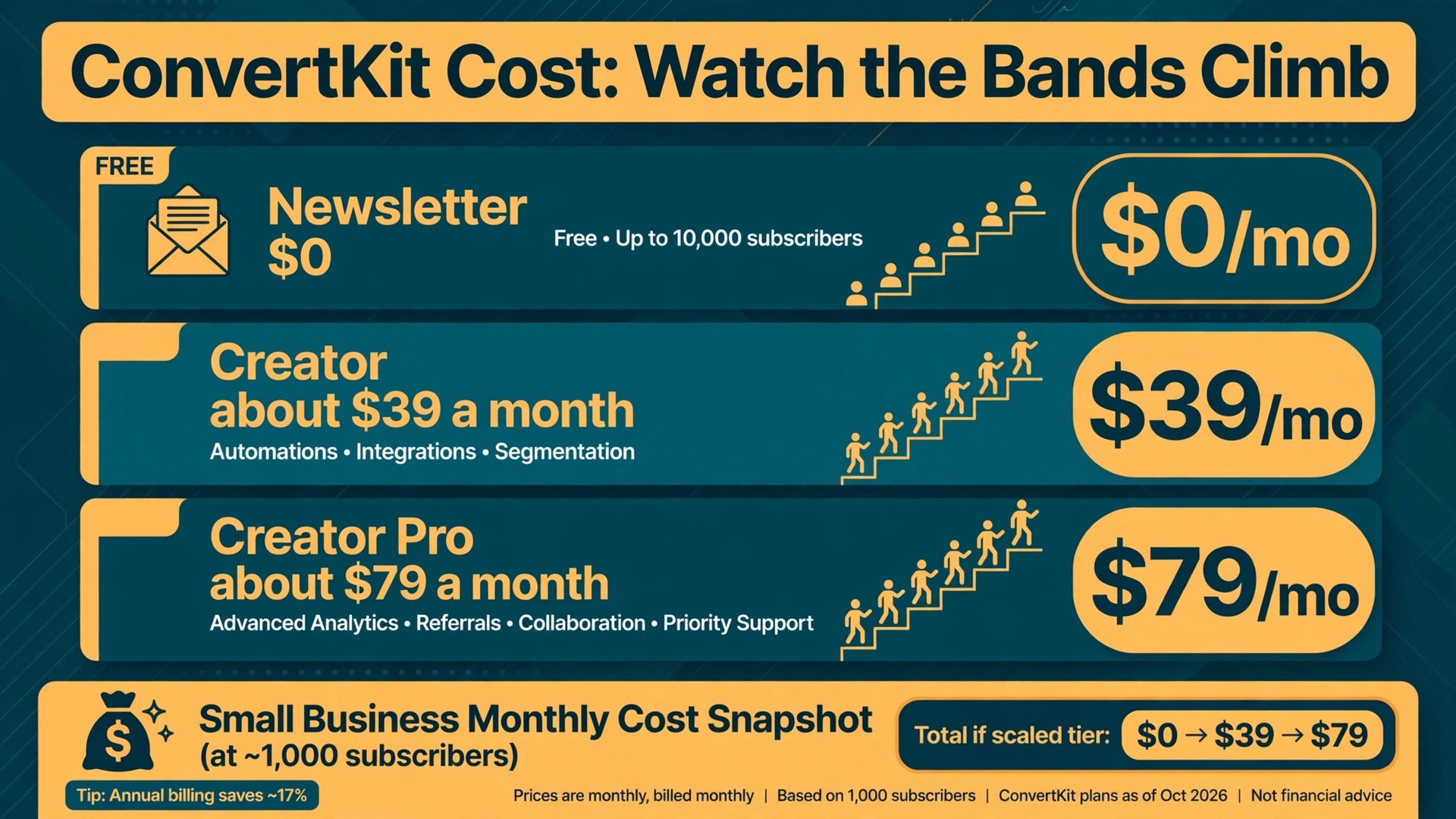
The ConvertKit bill that catches small businesses off guard is rarely the starting price. It is the jump between subscriber bands. A list that grows from 800 subscribers to 3,000 in a good year can triple the monthly charge while the features stay exactly the same, and that step change is the whole story of the cost of ConvertKit for small business monthly planning. ConvertKit, now branded as Kit, charges by subscriber band rather than by email sent, so growth itself is the price driver.
That model has a clear upside. A small business that emails weekly pays the same subscription as a business that emails daily at the same list size and tier, because sending volume is unlimited on paid plans. The downside is equally clear. Every dormant subscriber, every duplicate import and every old lead magnet sign up counts toward the band, whether that person opens anything or not. List hygiene is therefore a billing habit on this platform, not just a deliverability habit.
This guide prices all three tiers from published figures checked during research, then turns those figures into worked monthly totals at 500, 2,000 and 10,000 subscribers. Treat every price as a starting point and confirm the current figure on the vendor page before you buy, because Kit repriced its paid tiers in late 2025 and list based pricing moves with promotions and plan changes.
How Kit Prices Email by Subscriber Band
Kit sells three tiers, and the subscriber band sets the price inside each paid tier. The Newsletter plan is free up to 10,000 subscribers, with unlimited broadcasts, forms and landing pages, Kit branding on emails and tightly limited automation. Creator adds unlimited visual automations, integrations, free migration help and removal of Kit branding. Creator Pro adds the newsletter referral system, sponsor network access, subscriber scoring and advanced reporting.
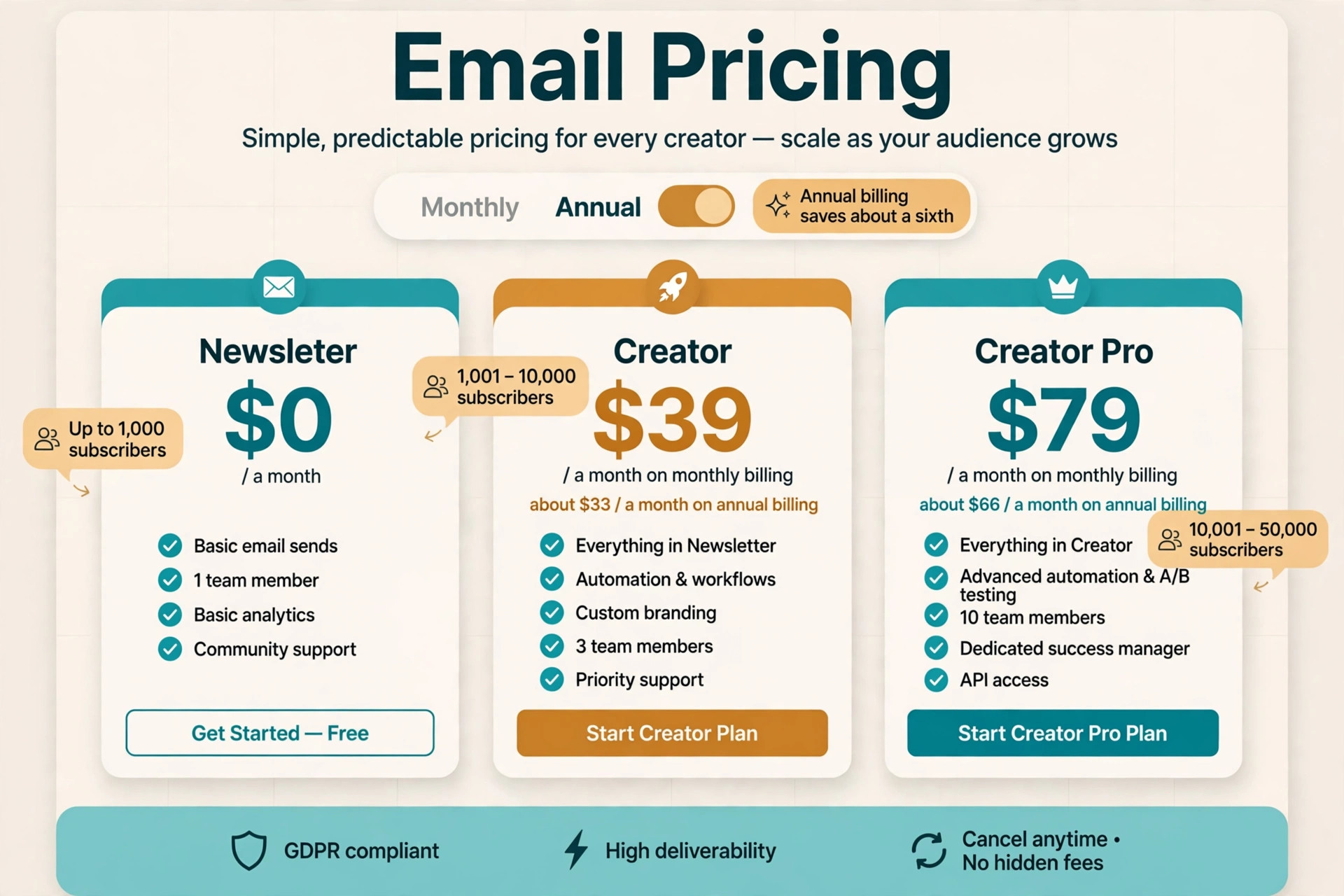
The band ladder is what makes budgeting tricky. Creator costs about 39 dollars a month on monthly billing at the 1,000 subscriber band, about 59 dollars at the 3,000 band, about 89 dollars at the 5,000 band and about 139 dollars at the 10,000 band. Annual billing lowers the monthly equivalent, to about 33 dollars at the 1,000 band, about 75 dollars at the 5,000 band and about 116 dollars at the 10,000 band in recent comparisons. The saving is roughly a sixth, which is real money over a year but locks the business into a tier for twelve months.
Creator Pro follows the same ladder at a higher level. It costs about 79 dollars a month on monthly billing at the 1,000 band, about 99 dollars at the 3,000 band, about 139 dollars at the 5,000 band and about 189 dollars at the 10,000 band. Annual billing brings those equivalents down to about 66 dollars, 116 dollars and 158 dollars at the 1,000, 5,000 and 10,000 bands in recent comparisons. The gap between Creator and Creator Pro is 40 dollars a month at the entry band and 50 dollars a month at the 10,000 band, so the upgrade costs more in cash as the list grows even though the feature gap stays the same.
The practical lesson is to price the band you will reach, not the band you start in. A business adding 150 subscribers a month will cross from the 1,000 band to the 3,000 band in well under a year, and a launch or a viral post can cross it in a week. Budget the next band up from the current list size, and the bill will rarely surprise you.
Billing cycle choice changes the same ladder in a second way. Monthly billing suits a business still proving that Kit fits, because it preserves the freedom to downgrade or leave at short notice. Annual billing suits a business that has already run Kit for a quarter and expects to stay, because the saving of roughly a sixth is worth about 72 dollars a year at the entry Creator band and about 276 dollars a year at the 10,000 Creator band.
The catch is that annual billing prepays the tier, so a business that shrinks or switches mid year cannot reclaim unused months. A sensible compromise is to run monthly for the first quarter, confirm the automation set and the band, and switch to annual billing only at the first renewal. That sequence captures most of the saving while keeping the exit open during the riskiest period, and it keeps the cost of ConvertKit for small business monthly planning honest, because the budget reflects a proven tier rather than a hoped for one.
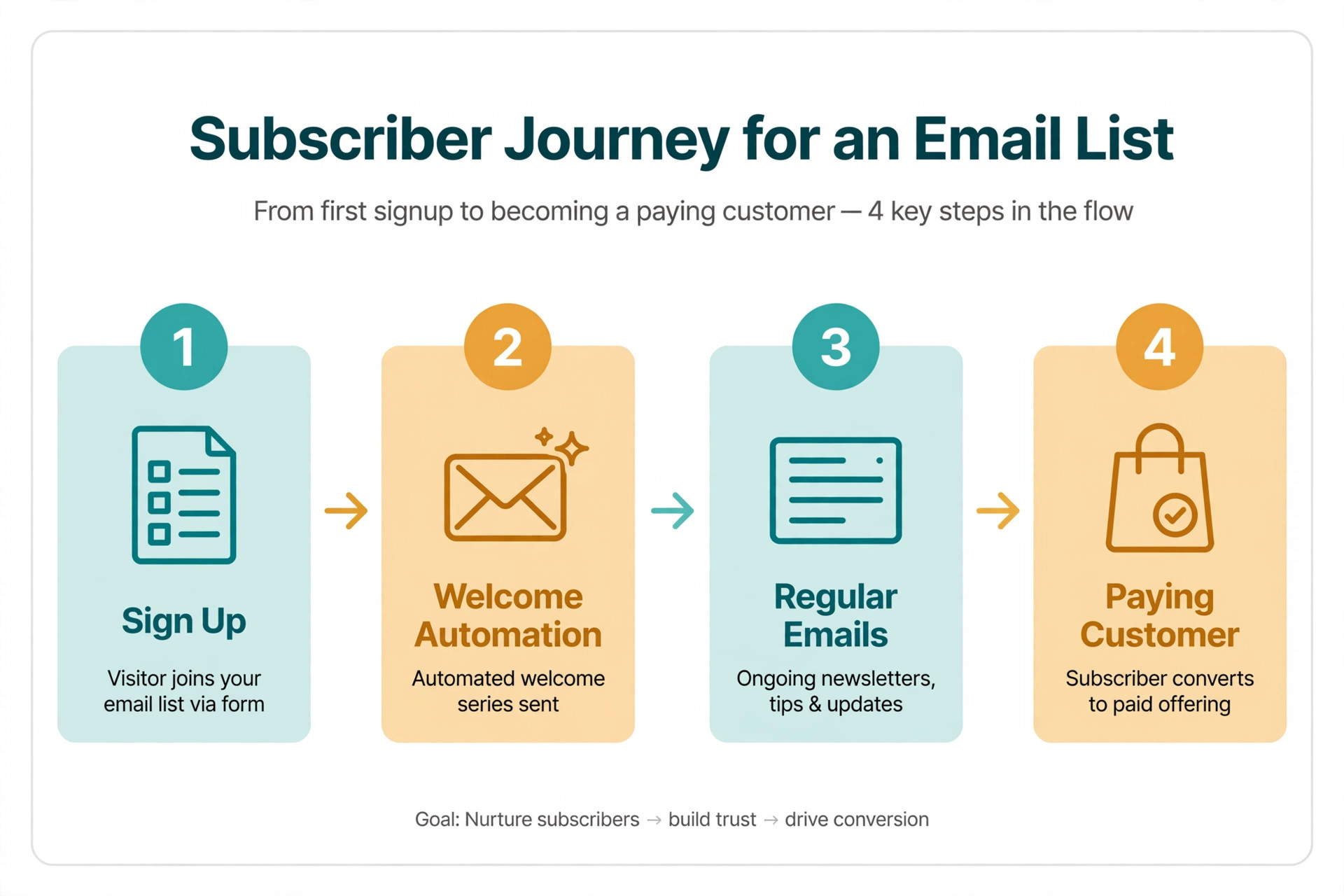
What the Cost of ConvertKit for Small Business Monthly Really Includes
Every tier includes unlimited email sends, which separates Kit from tools that cap monthly sends by plan. A creator who sends a weekly newsletter, a welcome sequence and a launch series in the same month pays the same subscription as a creator who sends one email, provided both sit in the same subscriber band and tier. That structure rewards frequent senders and punishes list hoarders in equal measure.
Creator is the working tier for most small businesses. It includes unlimited visual automations and sequences, more than a hundred integrations, landing pages and forms without limits, and support that answers faster than the free tier. A business running a welcome sequence, a lead magnet follow up and a simple sales sequence will find Creator complete, and the free migration service removes the usual switching pain of moving a list and rebuilding automations.
Creator Pro is a growth tier, not a starter tier with extra polish. The newsletter referral system lets other creators recommend the newsletter and can add subscribers without paid ads, while the sponsor network opens paid sponsorship opportunities for newsletters with real audiences. Subscriber scoring ranks readers by engagement, and advanced reporting shows which sequences and broadcasts actually drive sales. Those features earn their price only when the list is large enough for referrals and scoring to change decisions.
The free Newsletter plan deserves an honest reading. It is genuinely useful for validating a newsletter idea, because 10,000 subscribers at zero subscription cost is generous by any standard. Its limits bite exactly when a creator starts to succeed, because automation is tightly limited, Kit branding appears on every email and reporting stays basic. Price the upgrade the business will need within six months, not just the free tier it starts on.
Team seats are a quieter part of the same picture. Creator includes a small number of team seats in recent comparisons, while Creator Pro allows more, and a business with a designer, a writer and a virtual assistant should confirm seat counts before assuming everyone can edit automations. Viewers and collaborators who only read reports cost less attention than editors, but anyone who builds or changes an automation needs a proper seat. A two person business rarely hits a seat limit, while a five person content team can, and the seat question should be answered during the trial rather than discovered during a launch week.
Read the table as a buying guide rather than a ranking. The free tier suits a starting creator perfectly, while Creator Pro suits a newsletter business that already earns from its list. Pick the tier that matches the work actually running today, then check which features would change a decision next quarter.
| Plan | Monthly billing at 1,000 subscribers | Annual billing equivalent | Best for |
|---|---|---|---|
| Newsletter | 0 dollars | 0 dollars | Validating a newsletter idea |
| Creator | About 39 dollars | About 33 dollars | Automations, integrations and selling |
| Creator Pro | About 79 dollars | About 66 dollars | Referrals, scoring and sponsorship |
The step from free to Creator is the biggest value jump in the range, because it removes branding, unlocks unlimited automations and adds migration help. The step from Creator to Creator Pro is a growth jump, because referrals and scoring only pay when the audience is big enough to refer and score. A creator who buys Pro for a 500 subscriber list is paying for a network effect that cannot happen yet.
Support also differs by tier in ways that matter during a launch. Paid plans include faster support and, on Creator Pro, deeper reporting help, while the free plan relies on slower channels. A creator launching a paid product in a fixed week should weigh support speed alongside features, because a broken automation during launch week costs more than a month of the tier gap.
Worked Monthly Totals at 500, 2,000 and 10,000 Subscribers
Worked totals turn tier prices into a real bill, and the cost of ConvertKit for small business monthly arithmetic is simple once the band is known. Each scenario below uses monthly billing, includes only the subscription, and states the assumption plainly so it can be adjusted to a real list. Commerce fees and add ons are covered separately, because they sit outside the subscription.
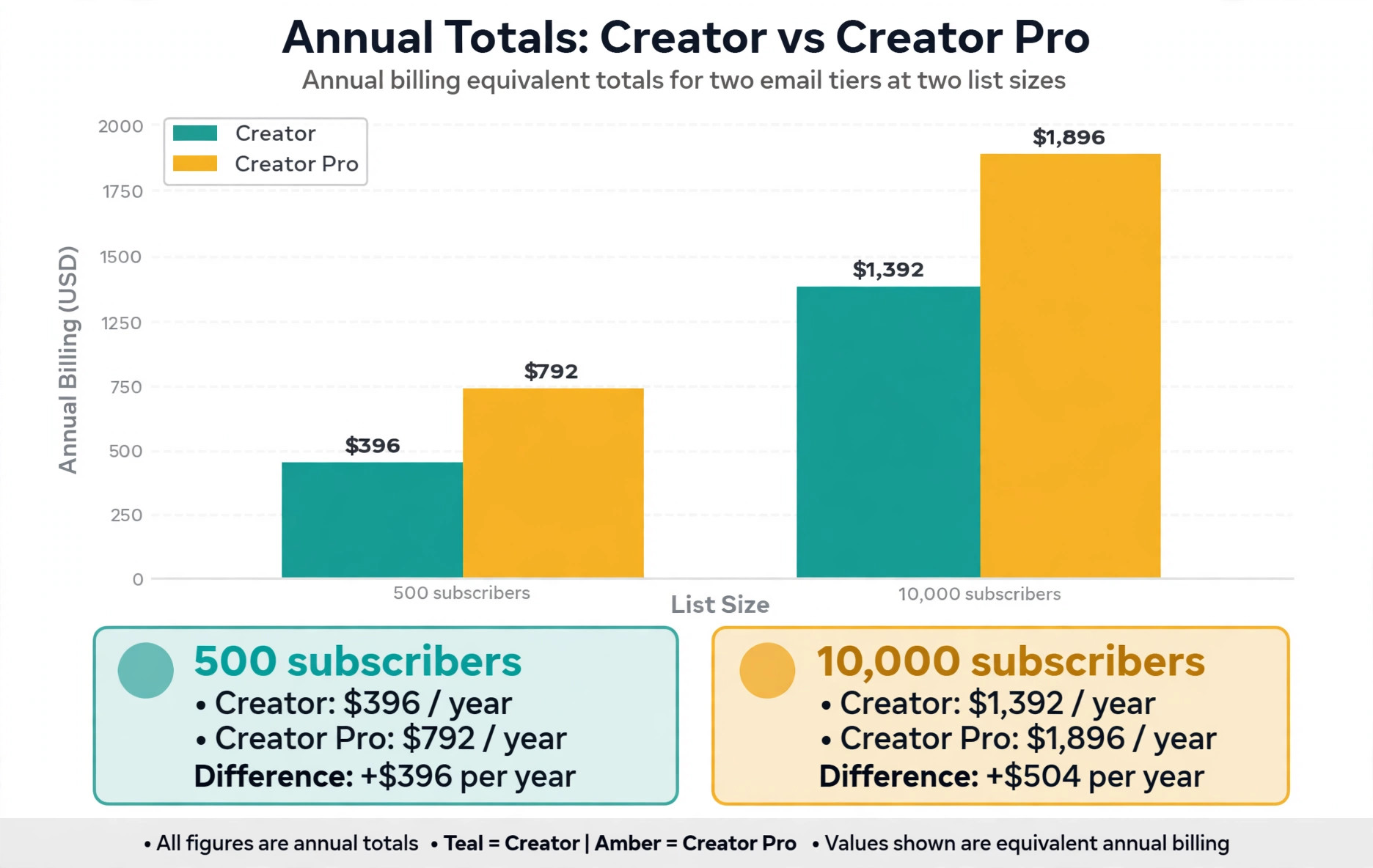
At 500 subscribers, the honest options are free or Creator. The Newsletter plan costs 0 dollars a month, which is 0 dollars a year, and suits a creator testing whether anyone wants the newsletter at all. Creator at the 1,000 subscriber band costs about 39 dollars a month, which is about 468 dollars a year on monthly billing or about 396 dollars a year on the annual equivalent. Creator Pro at the same size costs about 79 dollars a month, which is about 948 dollars a year, and that is hard to justify before the list earns anything.
At 2,000 subscribers, the list sits in the 3,000 subscriber band, because bands are ceilings rather than exact counts. Creator costs about 59 dollars a month, which is about 708 dollars a year on monthly billing. Creator Pro costs about 99 dollars a month, which is about 1,188 dollars a year. The 40 dollar monthly gap between tiers at this size must buy referrals or scoring value, and a creator who runs only a newsletter and a welcome sequence will not see it.
At 10,000 subscribers, the bill becomes a serious budget line. Creator costs about 139 dollars a month, which is about 1,668 dollars a year on monthly billing or about 1,392 dollars a year on the annual equivalent. Creator Pro costs about 189 dollars a month, which is about 2,268 dollars a year on monthly billing or about 1,896 dollars a year on the annual equivalent. At this size, a 50 dollar monthly tier gap is small next to list revenue, and the referral system can plausibly add subscribers faster than paid ads.
Compare those three totals before choosing. The creator who buys Pro at 500 subscribers wastes about 40 dollars a month against Creator. The newsletter business that stays free past 10,000 subscribers faces a forced upgrade at the next subscriber, because the free plan ends there. Match the tier to the list and the revenue it produces, not to the list hoped for next year.
Annual equivalents sharpen the same comparison for a settled business. At 500 subscribers, Creator on annual billing costs about 396 dollars a year against about 468 dollars on monthly billing, a saving of about 72 dollars. At 10,000 subscribers, Creator on annual billing costs about 1,392 dollars a year against about 1,668 dollars monthly, a saving of about 276 dollars, while Creator Pro saves about 372 dollars a year on the same switch.
Those savings are worth capturing once the tier is proven, but they should not drive the tier choice itself, because prepaying the wrong tier for a year costs far more than the discount saves. The cost of ConvertKit for small business monthly budgeting should therefore separate two decisions, meaning which tier fits the work, decided first, and which billing cycle fits the cash flow, decided second.

Kit Against Cheaper Senders at the Same List Size
Kit is no longer the budget pick in its category, and an honest pricing guide should say so plainly. Cheaper general email tools offer similar broadcasting and basic automation for less money at small list sizes, and a creator who only sends a weekly newsletter will struggle to justify Creator against a cheaper sender. The comparison changes when automations, selling and creator specific features enter the picture, because Kit bundles landing pages, forms, commerce and migration help that a cheaper tool may charge for separately or lack entirely.
The fair test is total system cost at the same list size, not headline subscription against headline subscription. A cheaper sender at 20 dollars a month plus a separate landing page tool at 15 dollars a month plus a separate commerce tool with its own fees can easily exceed Creator at 39 dollars a month, while adding three logins and three places where a subscriber record can break. A creator who already owns those separate tools, or who needs none of them, will find Kit expensive by comparison, and should choose the cheaper sender without guilt.
Deliverability and support also belong in the comparison, though they resist neat pricing. Kit built its reputation on creator deliverability and on support that understands creator workflows, and a creator whose income depends on launch week inbox placement may value that more than a 15 dollar monthly saving. The counterweight is that deliverability depends heavily on sender habits, meaning list cleaning, authentication and content quality, and no platform rescues a dirty list. Compare the full system, test with real sends, and let the revenue per subscriber decide, because the cost of ConvertKit for small business monthly debate is only useful when it ends in a number tied to real income.
The Commerce Fees Most Creators Miss
Kit Commerce lets creators sell digital products and paid subscriptions from the same account, and its fees sit outside the subscription price. Recent comparisons report a fee of about 3.5 percent plus 30 cents per digital product sale on Kit Commerce, which means a 50 dollar product sale costs about 2.05 dollars in platform fees before payment processing. A creator selling 100 products a month at 50 dollars therefore pays about 205 dollars a month in commerce fees on top of the subscription, which can exceed the subscription itself.
Paid newsletters carry their own arithmetic. A creator charging 10 dollars a month to 200 paying readers collects 2,000 dollars a month before fees, and the platform share plus processing must be modelled before the launch price is set. A price that looks generous at 100 paying readers can look thin at 1,000, because fees scale with revenue while the subscription stays flat. Model the fee at three revenue levels, not one, before committing to a price.
Paid recommendations add a further revenue share in recent comparisons, reported at a much higher percentage than product sales, so a creator who earns mainly through recommendations should read the current terms on the vendor page with care. The point is not that the fees are unfair, because Kit handles checkout, delivery and subscriber management that would otherwise need separate tools. The point is that the subscription is only the first line of the bill for a selling creator, and the second line grows with sales.
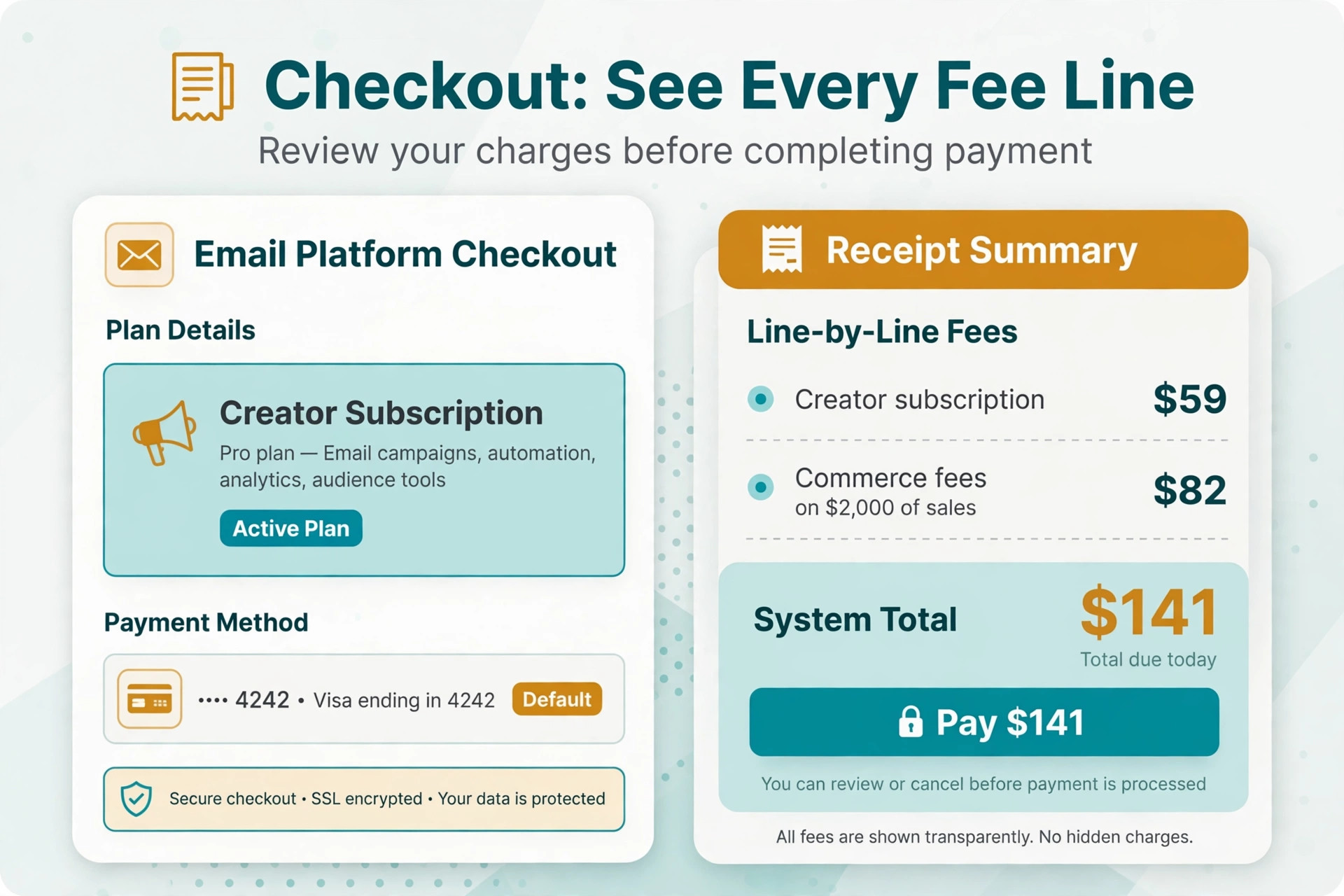
A worked commerce example makes the point concrete. A creator selling a 50 dollar course to 40 buyers a month collects 2,000 dollars in gross sales and pays about 82 dollars in Kit Commerce fees at the reported rate, before payment processing. Add a Creator subscription at 59 dollars for a 2,000 subscriber list, and the realistic monthly system total lands near 141 dollars before processing. That total is still small against 2,000 dollars in sales, but it is nearly two and a half times the subscription alone, which is why a creator who budgets only the subscription will always feel overcharged.
Where the Free Plan Stops Being Enough
The free plan stops being enough at three moments, and recognising them early saves a messy mid launch upgrade. The first moment is the first real automation beyond a simple welcome email, because a creator who wants a multi step onboarding sequence, a course delivery series or a segmented launch will hit the free plan limits quickly. The second moment is branding, because Kit branding on every email undermines a premium product launch, and removing it requires Creator.
The third moment is the 10,000 subscriber ceiling itself. A newsletter growing steadily will cross it without drama, but the crossing forces a paid plan at exactly the moment the creator is busiest. Planning the upgrade a band early, while the list is still at 7,000 or 8,000, turns a forced purchase into a calm decision. It also gives time to test automations on Creator before the audience depends on them.
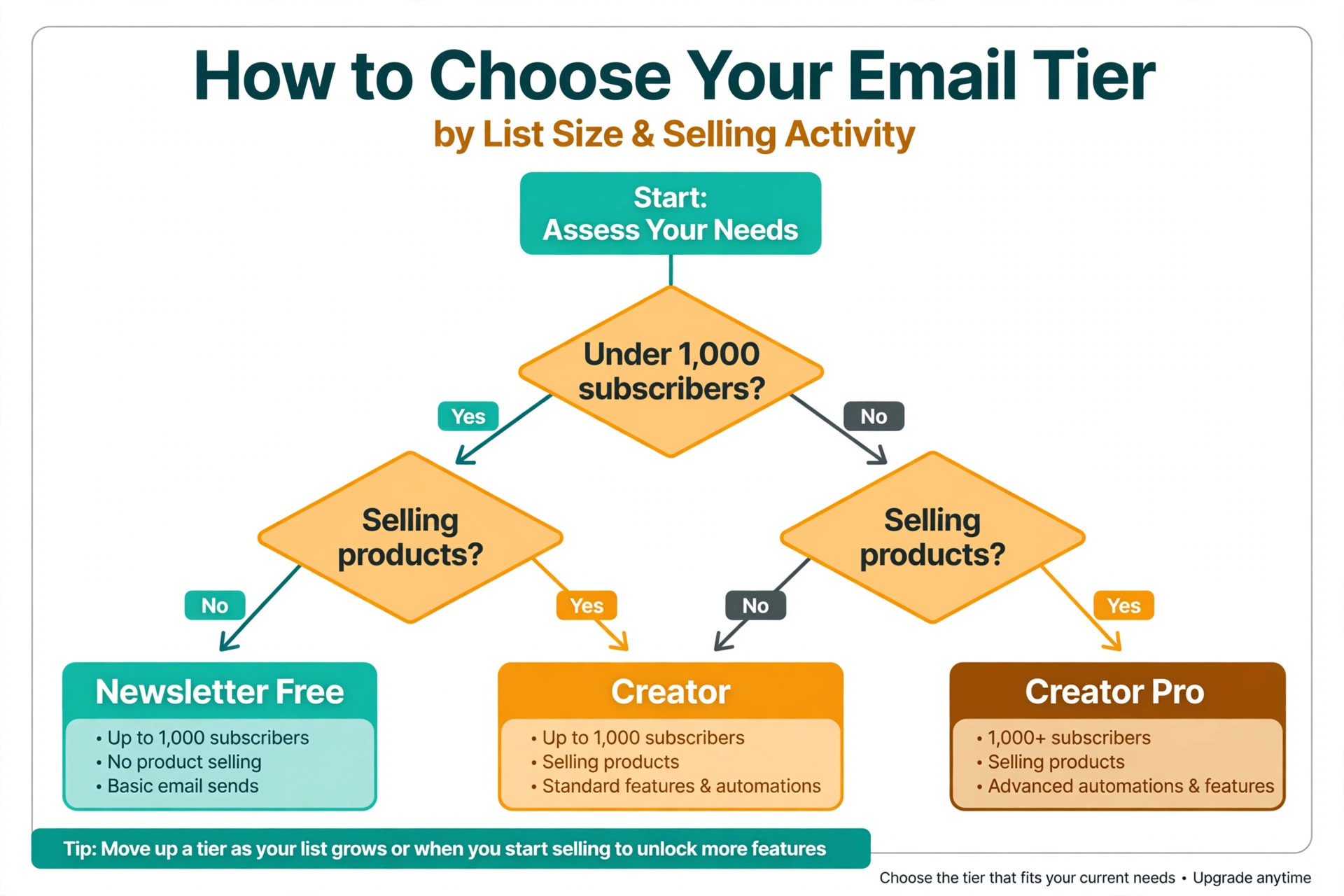
A useful rule is to upgrade when any two of three conditions hold. The list passes 2,000 subscribers, the business runs more than one automation that earns money, or the newsletter carries paid products or sponsorships. One condition alone can wait, but two together mean the free plan is costing more in lost capability than Creator costs in subscription. That rule keeps small creators free for longer and moves growing creators before limits start costing sales.
Sponsorship readiness is a fourth signal worth watching. A newsletter that attracts its first sponsor enquiry usually needs the reporting and audience data that Creator Pro provides, because sponsors ask for engagement figures, growth trends and audience composition before paying. A creator who answers those questions from free plan reports will look less professional than a rival with clean Pro dashboards, and the first sponsorship can easily pay for a year of the tier gap. When sponsor conversations start, price Pro as a sales tool rather than an email upgrade.
How to Keep the Kit Bill Under Control
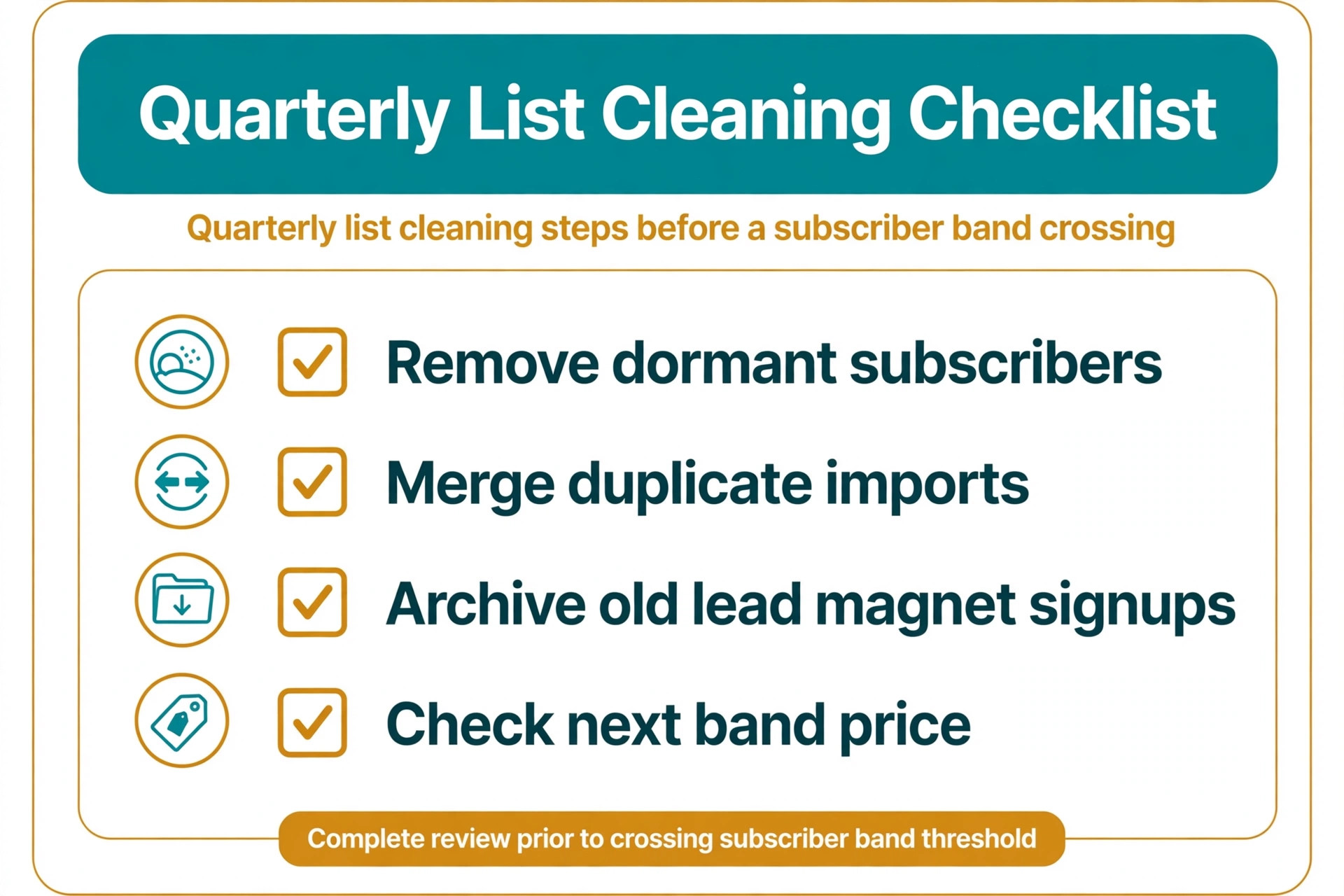
List cleaning is the cheapest cost control Kit offers, and it should run every quarter. Remove bounced addresses, suppress long term non openers after a re engagement attempt, and merge duplicate imports before they push the account into a higher band. A quarterly clean that removes 10 percent of a stale list can hold a business in a lower band for months, and it improves deliverability at the same time, so the saving comes with better inbox placement rather than instead of it.
Annual billing is the second lever, worth roughly a sixth on paid plans, but it suits a settled business rather than a testing one. A creator who has used Creator for a full quarter, knows the automation set and expects the list to stay in its band should switch to annual billing at renewal. A creator still testing whether Kit fits should stay monthly, because the flexibility to leave is worth more than the discount during the testing phase.
Finally, set a band trigger for review. Write down the subscriber count at which the owner must compare Kit against two competitors before the next renewal, for example 3,000 or 10,000 subscribers. Without a trigger, the bill drifts upward year after year while the owner assumes the starting price still applies, which is how a 39 dollar plan becomes a 139 dollar habit. With a trigger, each step up is a decision rather than a surprise.
Migration timing is the last control, and it matters because switching email tools mid launch is painful. Plan any platform move for a quiet period between campaigns, export the list and the automation map first, and run the new tool in parallel for one send before cutting over. A move planned in a quiet week costs a few hours, while a move forced by a band crossing during a launch costs sales and subscribers. The cost of ConvertKit for small business monthly control is therefore mostly calendar discipline, meaning clean quarterly, review at triggers, and never switch during a launch.
A Sensible Way to Decide on Kit
Start on the free plan if the newsletter is unproven, move to Creator when automations or selling begin, and move to Creator Pro when referrals, scoring or sponsorships would change a real decision. That ladder matches price to revenue at every step, and it avoids the two classic mistakes, which are paying for Pro before the audience exists and staying free until limits break a launch.
Run the trial with real work, not demo data. Import a cleaned list, build one real automation, send to a real segment and check reporting after the send. A trial that never sends to real subscribers proves nothing about deliverability, automation behaviour or support speed, and it leaves the tier decision to guesswork. One real week on the platform answers more questions than a month of reading pricing pages, so treat the trial as a working test rather than a tour.
Frequently Asked Questions
How much does ConvertKit cost per month for a small business?
A small business pays 0 dollars on the free Newsletter plan up to 10,000 subscribers, about 39 dollars a month for Creator at the 1,000 subscriber band and about 79 dollars a month for Creator Pro at the same band, on monthly billing. Prices step up with subscriber bands, reaching about 139 dollars for Creator and about 189 dollars for Creator Pro at 10,000 subscribers. Annual billing lowers the monthly equivalent by roughly a sixth, and those figures together describe the cost of ConvertKit for small business monthly at each common list size.
Is the free ConvertKit plan enough for a small business?
The free plan is enough for validating a newsletter and sending regular broadcasts to up to 10,000 subscribers. It stops being enough when the business needs multi step automations, branding removal, advanced reporting or selling tools, because those sit on paid tiers. Most growing businesses move to Creator once automations or products enter the picture.
What happens when my list crosses a subscriber band?
Crossing a band raises the monthly price to the next step, even if only a handful of new subscribers caused the crossing. That step behaviour is why list cleaning matters, because removing bounced and long term inactive subscribers can hold the account in a lower band. Check the current band thresholds on the vendor page, because bands and prices change over time.
Does ConvertKit charge for emails sent or for subscribers?
ConvertKit charges by subscriber count and tier, not by emails sent, and paid plans include unlimited sends. That model suits frequent senders, because a business emailing daily pays the same subscription as a business emailing weekly at the same list size. It also means dormant subscribers raise the bill, so cleaning is a cost control.
Is Creator Pro worth it for a small list?
Creator Pro is rarely worth it for a small list, because its headline features, meaning referrals, sponsor access and scoring, need audience scale to pay off. A creator with a few hundred subscribers gains little from a referral network with few readers to refer. Start on Creator, prove the funnel, and upgrade when referrals or scoring would change a measurable decision, which is the disciplined way to judge the cost of ConvertKit for small business monthly against real revenue.
How does Kit Commerce affect the monthly total?
Kit Commerce adds per sale fees on top of the subscription, reported recently at about 3.5 percent plus 30 cents per digital product sale. A creator selling regularly should add expected commerce fees to the subscription before comparing Kit with a cheaper sender, because at real sales volume the fees can exceed the subscription itself. Confirm the current fee on the vendor page before launch pricing.
More Reading on Stratilyze
For a closer look at how other email platforms price the same list, read Cost of ActiveCampaign for a Small Business Monthly, Cost of Mailchimp for a Small Business Monthly, Cost of Constant Contact for a Small Business Monthly and Cost of Klaviyo for a Small Business Monthly. Comparing those four guides at the same subscriber count shows which pricing model, meaning per contact, per subscriber or flat rate, fits the way the business actually sends.