

For most small businesses, the cheapest sensible answer is Business Basic on annual billing, and the rest of this guide explains why that answer holds and when it breaks. The cost of Microsoft Teams for small business monthly is rarely a standalone chat bill, because Teams arrives inside Microsoft 365 plans that also carry email, Office apps, and cloud storage, and judging Teams alone misses half the value.
That bundling is the whole story. A business already paying for Microsoft 365 effectively gets Teams without a second subscription, while a business buying Teams alone pays for chat and meetings and nothing else. The right question is therefore not which Teams plan is cheapest, but which Microsoft 365 plan the business already needs, and whether Teams inside it covers the meeting and chat job.
This guide works through the three plans a small business will realistically compare, runs worked monthly totals for 5, 15, and 50 person teams, and flags the pricing change that arrived in July 2026, the Copilot variant that confuses every comparison, and the hidden costs that sit outside the per user rate. Prices here are starting points drawn from published pricing guides at writing time, and Microsoft changes prices more often than most vendors, so check the vendor page before you buy.
Three Teams Routes and What Each One Carries
Teams Essentials is the standalone option, priced at about $4 per user a month on annual billing, or about $4.80 on monthly billing, in published guides. It gives unlimited chat, meetings of up to 30 hours with up to 300 participants, and 10 GB of cloud storage per user. It does not include business email or Office apps, which is the key limit, because a business that needs email will pay for it separately anyway.
Microsoft 365 Business Basic is the middle route, at about $7 per user a month on annual billing, or about $8.40 monthly, after a July 2026 rise from $6. It adds a business email mailbox, 1 TB of OneDrive storage per user, and the web and mobile versions of the Office apps, alongside Teams. For a business that needs email and file storage, Basic is usually better value than Essentials, because the extra $3 per user buys a mailbox and vastly more storage.
Microsoft 365 Business Standard is the full desktop route, at about $14 per user a month on annual billing, or about $16.80 monthly, after a July 2026 rise from $12.50. It adds the installed desktop Office apps, webinar hosting, and stronger reporting to everything in Basic. Some current vendor pages instead show Business Standard with Copilot at $23.50 per user a month, and other guides report a $21 list price with an $18 promotional figure, so treat the Standard figure as a starting point and confirm the exact variant on the vendor page before budgeting.
| Plan | Annual billing | Monthly billing | What stands out |
|---|---|---|---|
| Teams Essentials | $4 per user a month | $4.80 per user a month | Chat and meetings only, 10 GB storage |
| Business Basic | $7 per user a month | $8.40 per user a month | Plus email, 1 TB storage, web Office apps |
| Business Standard | $14 per user a month | $16.80 per user a month | Plus desktop Office apps and webinars |
A free version of Teams also exists, with unlimited chat, 60 minute group calls, and 5 GB of storage in published guides. Free suits a tiny team testing chat or a side project, but the meeting limit and storage cap push any active business to a paid plan within months, so price the paid tier the team will need rather than the free tier it starts on.

How the cost of Microsoft Teams for small business monthly scales at 5, 15, and 50 users
Teams pricing is per user per month, which means the bill scales in a straight line with headcount, and there is no per organizer trick to exploit as there is with meeting only tools. Every person who needs email, chat, and apps needs a licence, though guests and external attendees can join meetings without one. Count staff, not meeting hosts, and the budget will stay honest.
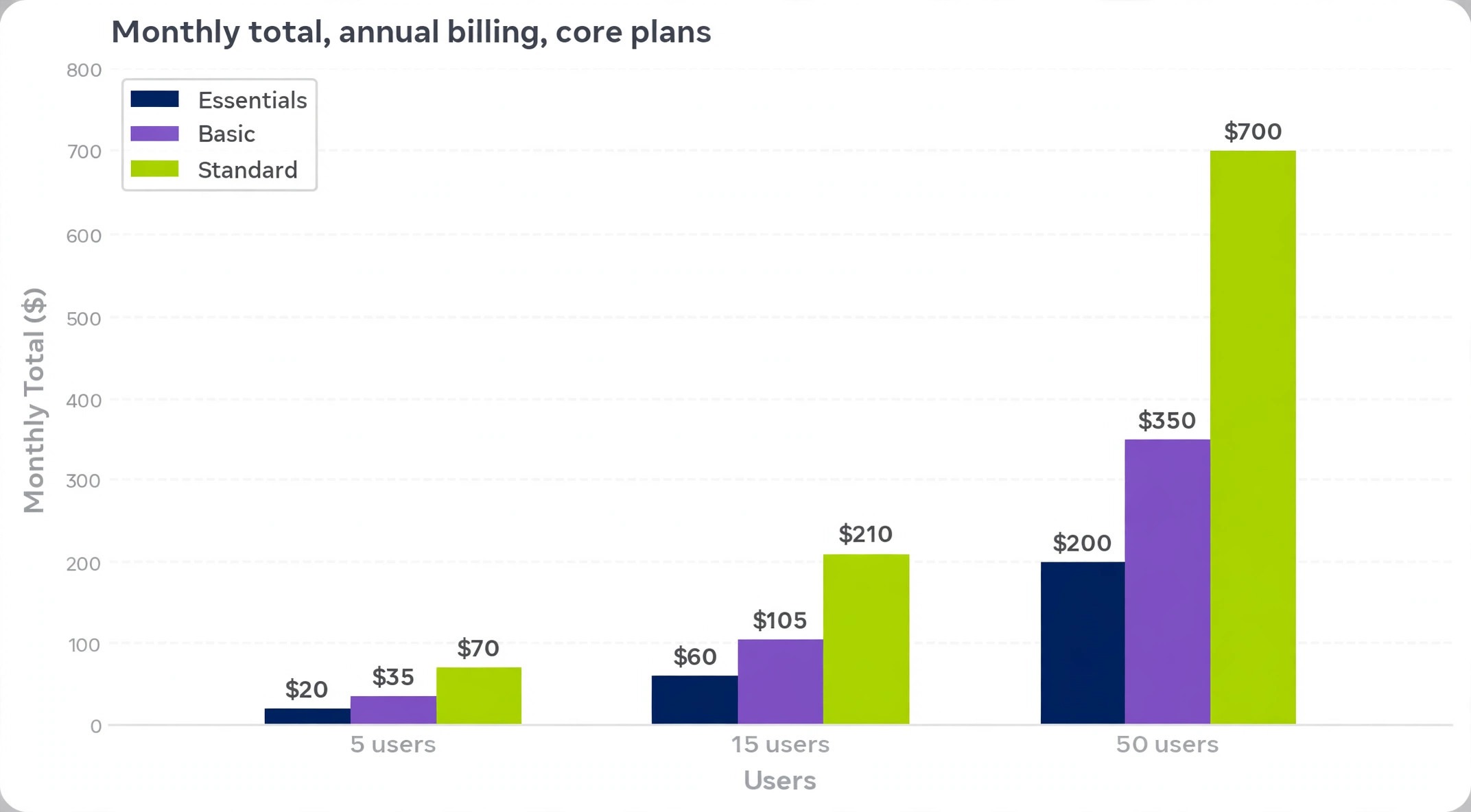
A 5 person team on annual billing pays $20 a month equivalent on Essentials, $35 on Business Basic, and $70 on Business Standard. On monthly billing those figures become $24, $42, and $84. Over a year, annual billing totals $240, $420, and $840, against $288, $504, and $1,008 monthly, so the annual saving at this size is $48, $84, and $168 across the three plans.
A 15 person team on annual billing pays $60 a month equivalent on Essentials, $105 on Business Basic, and $210 on Business Standard. Monthly billing raises those to $72, $126, and $252. The yearly totals are $720, $1,260, and $2,520 on annual billing, against $864, $1,512, and $3,024 monthly, which makes the annual saving $144, $252, and $504. At this size the billing choice matters more than the plan debate, because a settled team leaves hundreds of dollars unclaimed by staying monthly.
A 50 person team on annual billing pays $200 a month equivalent on Essentials, $350 on Business Basic, and $700 on Business Standard. Monthly billing raises those to $240, $420, and $840. Yearly totals reach $2,400, $4,200, and $8,400 on annual billing, against $2,880, $5,040, and $10,080 monthly. The gap between Basic and Standard at fifty users is $350 a month on annual billing, which is $4,200 a year, so the Standard decision must rest on desktop apps the team genuinely uses daily.
| Team size | Essentials annual | Basic annual | Standard annual | Standard with Copilot annual |
|---|---|---|---|---|
| 5 users | $20 a month, $240 a year | $35 a month, $420 a year | $70 a month, $840 a year | $117.50 a month, $1,410 a year |
| 15 users | $60 a month, $720 a year | $105 a month, $1,260 a year | $210 a month, $2,520 a year | $352.50 a month, $4,230 a year |
| Team size | Essentials annual | Basic annual | Standard annual | Standard with Copilot annual |
| — | — | — | — | — |
| 50 users | $200 a month, $2,400 a year | $350 a month, $4,200 a year | $700 a month, $8,400 a year | $1,175 a month, $14,100 a year |
Tax sits on top of list prices, and the Copilot column above uses the $23.50 published figure purely to show the scale of that variant. A team that does not need Copilot should not let a Copilot bundled quote set its budget, and a team that does need it should price it as a separate decision, because it nearly doubles the Standard bill at every team size.
Essentials Against Basic, the Decision Most Teams Actually Face
Essentials looks cheapest on the pricing page and is cheapest in isolation, but isolation is the wrong frame for most businesses. A business on Essentials still needs business email, and buying email separately from another provider adds a second bill, a second admin console, and a second support queue. Once that second bill is added, Essentials plus separate email often costs more than Basic alone, with more admin work attached.
Storage is the second hidden gap. Essentials gives 10 GB per user, which sounds adequate until a team starts sharing recorded meetings, proposal files, and photo heavy project folders. Basic lifts storage to 1 TB per user, which removes storage as a daily worry for years. A team that hits the Essentials storage cap faces either a cleanup project or an upgrade, and both cost staff time that Basic would have avoided.
Basic also adds the web and mobile Office apps, which cover document editing, spreadsheets, and presentations for most office work without installed software. A team that lives in browsers and on phones may never miss desktop apps, which makes Basic the sweet spot. A team that works with large spreadsheets, complex documents, or offline work will feel the absence of desktop apps quickly, and that feeling is the honest trigger for Standard.
The practical test is a two week trial on Basic with real work, not a demo. If nobody asks for a desktop app, for more storage, or for a mailbox feature Basic lacks, then Basic is the plan, and Essentials would only have saved $3 per user a month while adding a separate email problem. That $3 buys a mailbox, a hundredfold storage increase, and one bill instead of two, which is the best value trade in the Microsoft range.

When Desktop Apps and Webinars Justify Standard
Standard earns its price when the team genuinely lives in desktop Office apps. Installed Word, Excel, and Outlook handle large files faster, work offline, and carry advanced features the web versions omit, such as complex macros, advanced formatting controls, and full offline mail. A finance heavy team, a proposal heavy agency, or a business with staff working from planes and rural sites will notice the difference daily, and for them the $7 per user monthly step from Basic is money well spent.
Webinar hosting is the second Standard justification, though it applies to fewer teams. A business running public webinars, large training events, or client onboarding sessions at scale benefits from the hosting and reporting tools Standard adds. A business running one webinar a quarter can handle it with a standalone event tool or a temporary upgrade, rather than carrying Standard all year for a quarterly need, so count real webinar frequency before letting it drive the plan.
Reporting and admin depth round out Standard, and they matter more as headcount grows. At five users the owner knows who does what without a report, but at fifty users, usage reports, compliance tools, and admin controls save real management time. Standard is therefore a safer default for a growing team that expects to pass thirty users within the year, because the upgrade disruption mid growth costs more than the early price difference.
The Copilot variant deserves a separate decision, not a bundled assumption. At $23.50 per user a month on annual billing in published guides, Copilot nearly doubles the Standard bill, and its value depends entirely on whether the team will use AI drafting, meeting summaries, and document assistance daily. Pilot Copilot with five heavy users for a month, measure real use, and only then extend it, because a Copilot licence nobody opens is the most expensive line on the invoice.

Annual Billing, Monthly Billing, and the July 2026 Price Rise
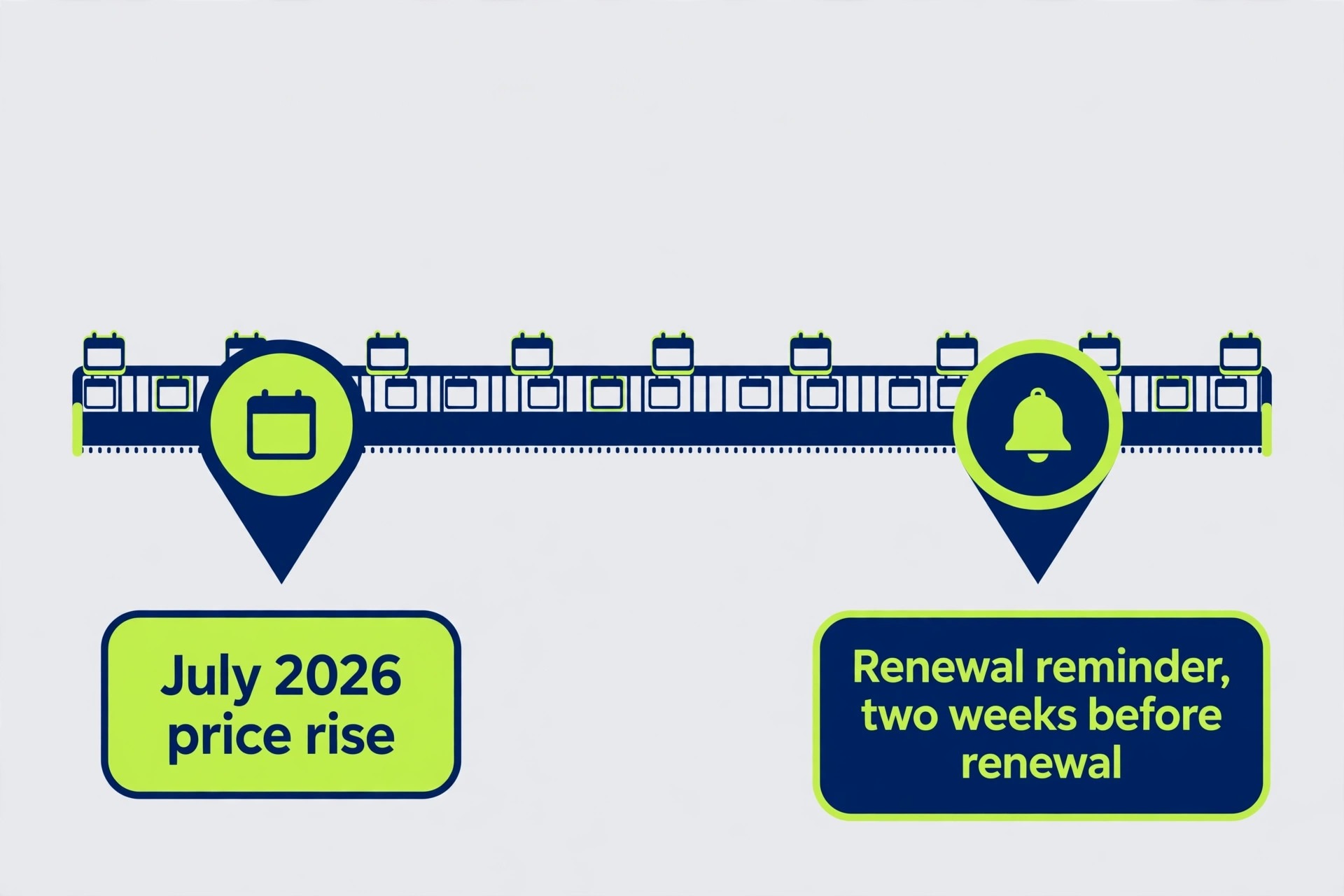
The July 2026 price rise is a warning about budgeting against old figures. Business Basic rose from $6 to $7 per user a month on annual billing, and Business Standard rose from $12.50 to $14, while Essentials stayed at $4. A budget built from a guide written before July 2026 will understate Basic by a dollar per user and Standard by a dollar fifty, which at fifty users is $50 and $75 a month of quiet error.
Annual billing saves about a sixth against monthly billing on each plan, which at fifty users is $480 a year on Essentials, $840 on Basic, and $1,680 on Standard. A settled team should claim that saving, but a new team should pay monthly for a quarter first, prove the habit, confirm the headcount, and then switch. The cost of one quarter on monthly billing is small against a year of licences for staff who leave or a plan the team outgrows.
Renewal terms need the same attention as the headline rate. Microsoft 365 plans auto renew, seat counts can usually be adjusted at renewal rather than mid term, and promotional prices revert to list. Put a calendar reminder two weeks before renewal with a named owner, and review seat count, plan fit, and Copilot use at that moment, because renewals slip when nobody owns them.
Price rises also argue for a price lock question at purchase. Ask the vendor or reseller whether the quoted rate is locked for the term, what happens at renewal, and whether a multi year commitment buys a lower rate. A reseller quote sometimes beats the direct list price, especially at fifty users, so get a second quote before signing, and compare it line by line rather than trusting a headline discount.
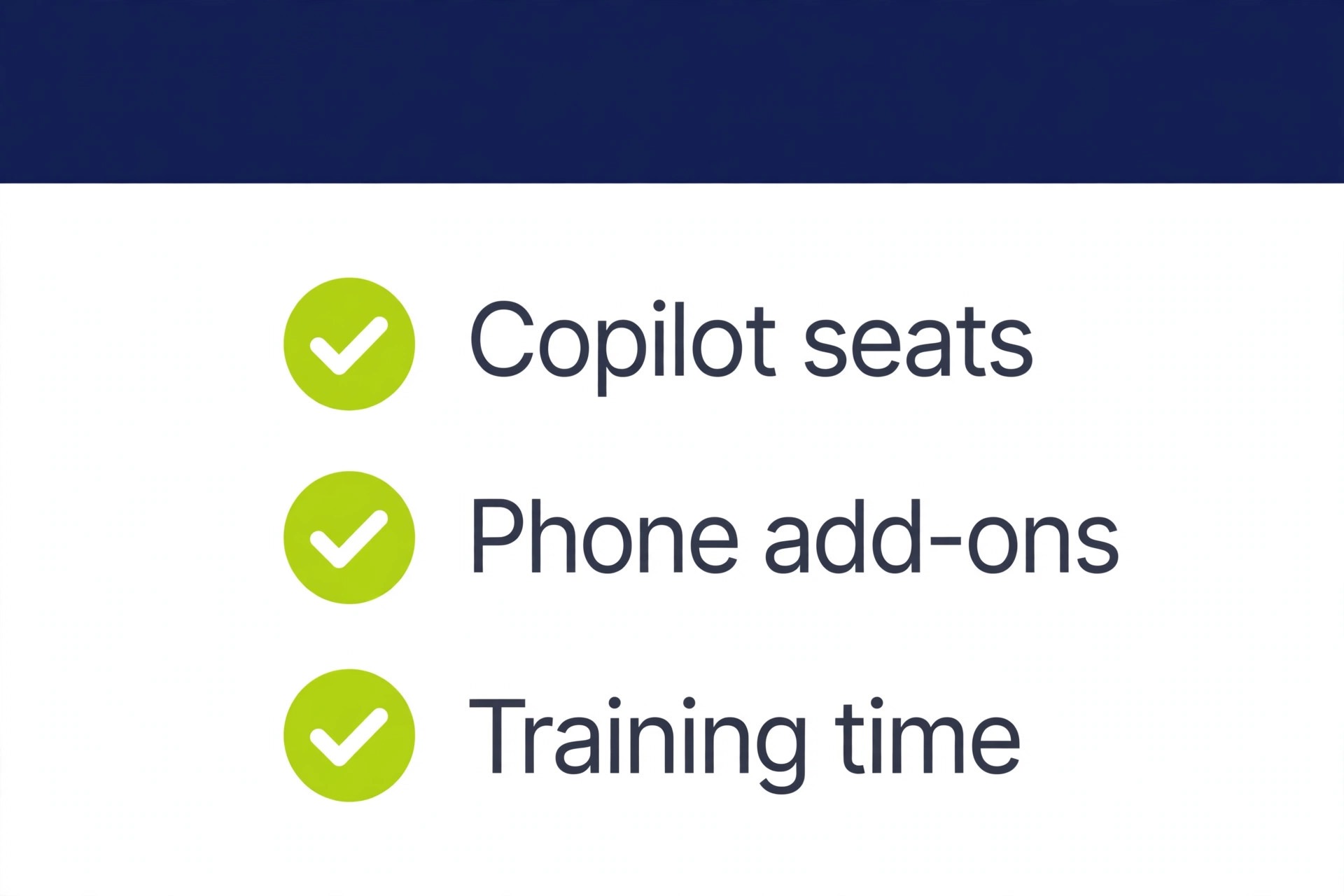
Copilot is the largest hidden cost, because it is easy to add at signup and hard to justify later if usage is low. Beyond Copilot, the next hidden cost is add on storage or compliance tools for regulated work, which some businesses need and most do not. Price those only if a client, a regulator, or an internal policy requires them, and document the requirement, because an undocumented add on is the first cost to cut at renewal.
Phone system features are a separate decision that often gets bundled into a Teams conversation by mistake. Teams Phone requires its own licences and calling plans, and a business that rarely phones customers should not pay for phone features on every seat. Compare a dedicated business phone provider before bundling, because a standalone phone system frequently costs less and fits better than a Teams add on carried across the whole team.
Training and adoption time is a hidden cost in staff hours rather than dollars. Teams is powerful but sprawling, with channels, chats, meetings, files, and apps competing for attention, and a team without norms will drown in notifications. Spend an hour setting channel rules, thread habits, quiet hours, and file naming when the team adopts Teams, because that hour saves many hours of interrupted work later, and a tool adopted messily costs more in lost focus than in subscription fees.
Migration from another chat tool carries its own cost in institutional memory. Chat history, files, and integrations do not move cleanly between platforms, so a team leaving Slack or Google Chat should export what it can, document key decisions elsewhere, and run the new tool in parallel for a pilot team before a full cutover. Budget a week of reduced speed during cutover, and do not cancel the old tool until Teams has survived a busy week with real work.
Who Each Plan Fits, Honestly
Essentials fits a team that already has business email elsewhere and only needs chat and meetings, or a team testing Teams before committing to the full suite. It also fits a business with a tight budget and modest storage needs, provided the email question is answered honestly rather than ignored. Essentials does not fit a business that needs a mailbox, large storage, or Office apps, because buying those separately erases the saving.
Basic fits most small businesses, from a five person startup to a fifty person team, because it bundles the three things every office needs, meaning email, chat, and file storage, at a price below most standalone equivalents. A team that works in browsers, shares files daily, and runs meetings inside Teams will find Basic sufficient for years, and it is the default this guide recommends unless a specific Standard trigger is present.
Standard fits a team that lives in desktop apps, runs webinars regularly, or manages fifty plus users with reporting and admin needs. It also fits a business planning rapid growth, where the upgrade disruption of moving from Basic mid growth would cost more than the early price difference. Standard does not fit a team that opens Word in a browser twice a week and calls that desktop need, because the $7 per user step buys capability the team never touches.
The Copilot variant fits a small pilot group of heavy document and meeting users, not a whole company on day one. Extend it only where measured use justifies it, and review Copilot seats quarterly alongside the main seat audit, because AI licences for staff who never open them are pure waste.

Seat Audits, Guests, and Keeping the Bill Honest
A quarterly seat audit is the single habit that keeps a Teams bill honest. Export the user list, compare it with people who actually signed in during the past ninety days, and remove leavers, contractors whose projects ended, and duplicate accounts. At fifty users, five dormant licences on Basic cost $35 a month, or $420 a year, for accounts nobody uses, and that waste compounds every renewal it survives.
Guests and external meeting attendees do not need paid licences to join meetings, which keeps client facing costs down. A business that invites clients to Teams meetings weekly pays nothing extra for those guests, and that generosity should be used rather than feared. Internal contractors are different, because a contractor who needs email, chat, and file access needs a licence for the project duration, with a removal date set when the licence is granted.
Mixed licensing is legitimate and underused. A business can put most staff on Basic and a smaller group on Standard where desktop apps matter, rather than paying Standard for everyone because five people need it. Check the licence mixing rules on the vendor page for the current terms, because Microsoft changes mixing rules periodically, but the principle holds, which is to pay the higher rate only for the people who use the higher features.
The cost of Microsoft Teams for small business monthly stays fair when the team audits seats quarterly, matches each person to the lowest plan that covers their real work, and reviews Copilot and add ons at every renewal. A team that does those three things pays for productivity it actually uses, and a team that does not pays for accounts, apps, and AI features it never needed.
Mistakes That Inflate a Teams Bill
The first mistake is budgeting from pre July 2026 prices, which understates Basic and Standard and produces a budget that fails at the first invoice. Always check the vendor page and a current pricing guide, and budget against list prices rather than promotional offers, because promotions end and renewals do not.
The second mistake is buying Standard for the whole team because a few people need desktop apps. Mixed licensing, where it is allowed, solves this cleanly, and even where mixing is restricted, a pilot group on Standard with the rest on Basic is worth asking the vendor about. Paying Standard for fifty people because five need it wastes $350 a month.
The third mistake is adding Copilot for everyone at signup. Copilot value varies enormously by role, and a company wide rollout before any pilot data exists is the fastest way to double a bill without evidence. Pilot, measure, then extend, and treat Copilot seats as a separate quarterly review item.
The fourth mistake is letting the suite duplicate a standalone tool. A business on Basic already has Teams, so paying separately for Slack or Zoom on top is paying twice for overlapping work. That duplication can be justified for client preference or a specific feature, but the justification should be written down, because an unjustified duplicate is the easiest saving to find at renewal.
Teams Against Slack, Zoom, and Google Workspace
Slack Pro lists at about $7.25 per user a month on annual billing, which is almost identical to Business Basic at $7, but Slack alone gives chat while Basic gives chat plus email, storage, and Office apps. A business comparing Slack with Teams should therefore compare Slack plus separate email and storage against Basic, not Slack alone, because the bundled comparison is the honest one. Slack wins on chat depth and integrations, while Teams wins on bundle value for a Microsoft office.
Zoom Pro lists at about $14.16 per user a month on annual billing, which is double Basic and equal to Standard, but Zoom gives meetings only. A business that needs meetings plus email plus documents will find Zoom plus a separate office suite far more expensive than Basic alone. Zoom wins for meeting quality and client familiarity, while Teams wins for a business that wants one bill for the whole office.
Google Workspace is the closest true rival, because it bundles email, chat, meetings, and documents in the same way. The choice between Microsoft and Google usually rests on document compatibility, client expectations, and staff familiarity rather than price, because their business plans sit in a similar range. A business whose clients send complex Word and Excel files will lean Microsoft, while a business built around browser based collaboration may lean Google, and either choice is defensible once the bundle is compared honestly.
A Worked Month for Two Different Small Businesses
Take a five person consultancy that needs email, chat, and document sharing but works mostly in browsers. On Business Basic annual billing, five licences cost $35 a month equivalent, or $420 a year. Essentials plus a separate email service would likely cost more once both bills are added, and Standard would cost $70 a month for desktop apps the team rarely opens. Basic is the clear answer, and the $35 monthly figure is the budget line to carry forward.
Now take a fifty person professional services firm with heavy Excel work, regular webinars, and a need for admin reporting. On Business Standard annual billing, fifty licences cost $700 a month equivalent, or $8,400 a year, against $350 on Basic. The $350 monthly step buys desktop apps the whole firm uses daily, webinar hosting the firm runs weekly, and reporting the managers rely on, which makes Standard a working tool rather than a luxury. If Copilot were added for all fifty, the bill would jump to $1,175 a month, which is why Copilot stays a pilot decision even here.
The lesson is that the right plan follows measurable facts, meaning headcount, desktop app use, webinar frequency, and storage needs. Write those four numbers down, price each plan against them, and the choice usually becomes obvious. If two plans both fit, choose the cheaper one and revisit in a quarter, because upgrading is easy and overpaying for a year is not.
Keeping the Teams Bill Honest Through Growth
Growth is where the cost of Microsoft Teams for small business monthly usually drifts, because hiring adds licences one at a time and nobody totals them until renewal. A simple guard is a licence log that records every new user, their plan, and the date they joined, reviewed monthly by the person who owns the budget. When the log is current, the cost of Microsoft Teams for small business monthly is a known number rather than a surprise on a card statement, and known numbers stay lower than surprises.
Role based assignment is the second guard. New joiners should default to Basic unless their role description names desktop app use, webinar hosting, or admin duties that require Standard. That default keeps the cost of Microsoft Teams for small business monthly anchored to Basic, with Standard granted as an exception that needs a reason, rather than handed out because a manager asked for the best plan without defining what best means.
Copilot seats need their own quarterly review, separate from the main seat audit. List every Copilot user, check whether they actually used AI features in the past month, and remove seats that sat idle. Because Copilot nearly doubles a Standard bill per user, the cost of Microsoft Teams for small business monthly can jump sharply from a handful of unused AI licences, and that jump is invisible until someone looks for it specifically.
Finally, compare the bundle against standalone tools at every renewal, not just at first purchase. A business that added Slack for one client or Zoom for one project may now pay for overlapping chat and meetings, and the cost of Microsoft Teams for small business monthly looks very different once duplicate tools are counted. Removing one duplicate at renewal can save more than any plan downgrade, and it simplifies support at the same time.
Frequently Asked Questions About Microsoft Teams Pricing
How much does Teams Essentials cost per user?
Published guides list Essentials at about $4 per user a month on annual billing, or about $4.80 on monthly billing. It covers chat and meetings with 10 GB of storage per user, but it does not include business email or Office apps, so confirm the current figure on the vendor page before budgeting.
What changed in Microsoft pricing in July 2026?
Business Basic rose from $6 to $7 per user a month on annual billing, and Business Standard rose from $12.50 to $14, while Essentials stayed at $4. Older guides still show the pre rise figures, so any budget built from them will understate the current bill, and the vendor page is the final authority.
Is Business Standard with Copilot the same as Business Standard?
No, and the distinction confuses many comparisons. Standard without Copilot is listed around $14 per user a month on annual billing in several guides, while Standard with Copilot is listed at $23.50. Some pages show a $21 list price with an $18 promotional figure, so check which variant a quote describes before comparing it with another vendor.
Can a business mix Basic and Standard licences?
Mixed licensing is commonly used to give desktop apps only to the staff who need them, but Microsoft changes mixing rules periodically. Check the current terms on the vendor page or with a reseller before assuming a mix is allowed, and document the agreed mix so renewal quotes match it.
Does every meeting guest need a paid Teams licence?
No. External guests and clients can join Teams meetings without a paid licence. Only staff and contractors who need email, chat, file access, and app use need a licence, which keeps client facing meeting costs at zero beyond the host licences.
When should a small business choose Teams over Slack or Zoom?
Choose Teams when the business already needs Microsoft email, storage, and Office apps, because the bundle then costs less than separate tools. Choose Slack for chat depth or Zoom for meeting familiarity when a specific feature or client preference justifies paying for a standalone tool alongside or instead of the suite.
More Reading on Stratilyze
– Cost of Slack for a Small Business Monthly – Cost of Zoom for a Small Business Monthly – How to Choose Collaboration Software for a Small Team, plain text title, link not verified at writing time – Remote Work Tools That Actually Save a Small Business Money, plain text title, link not verified at writing time