

A missed deadline can become a malpractice claim, an unbilled hour can quietly erase a month of profit, and a trust account error can draw bar discipline, yet many small firms still run cases on email threads, shared drives and memory. That problem is the starting point for this guide to the best case management software for small law firms, because a small firm does not need enterprise software. It needs one system where deadlines, documents, time, billing and client communication stay together, so nothing important lives only in one person’s head.
Small firms face a sharper version of the software problem than large firms. There is no IT team, no training budget and no room for a tool that takes months to set up, yet the stakes of a missed filing or a mishandled trust balance are just as high. The tools below were judged on whether a firm of one to ten lawyers can set the system up quickly, trust it with deadlines, bill from it daily, and grow without replacing it.
Prices below are starting figures checked at writing time, and several vendors price higher tiers and add-ons by quote. Confirm the current price on the vendor page before you buy, and price every finalist at your real lawyer and staff count.
Why the best case management software for small law firms Must Protect Deadlines First
Deadlines are the non-negotiable job. Court rules-based calendaring, where entering a trial date automatically creates the pre-trial deadlines, turns a single entry into a safety net, while a manual calendar turns every deadline into a chance for human error. A firm that misses a statute of limitations deadline does not lose a feature comparison, it loses a case and possibly a client relationship, so calendaring depth outranks every other feature in this guide.
The second job is billing without leakage. Small firms lose revenue when time is recorded late, rounded down, or never recorded at all, and a tool that captures time inside documents, email and calls recovers hours that a separate timer misses. Billing that flows from time entries to invoices to trust accounting without retyping also removes the reconciliation errors that create client disputes and audit problems.
The third job is client trust. A client portal where clients see case progress, share documents and pay invoices reduces status calls and speeds payment, which matters most for firms without a front desk team. A firm that answers fewer “what is happening with my case” calls has more hours for actual legal work, and clients who can pay online pay faster. Judge every tool below by deadlines, billing capture and client communication together.
What a Small Firm Actually Runs On
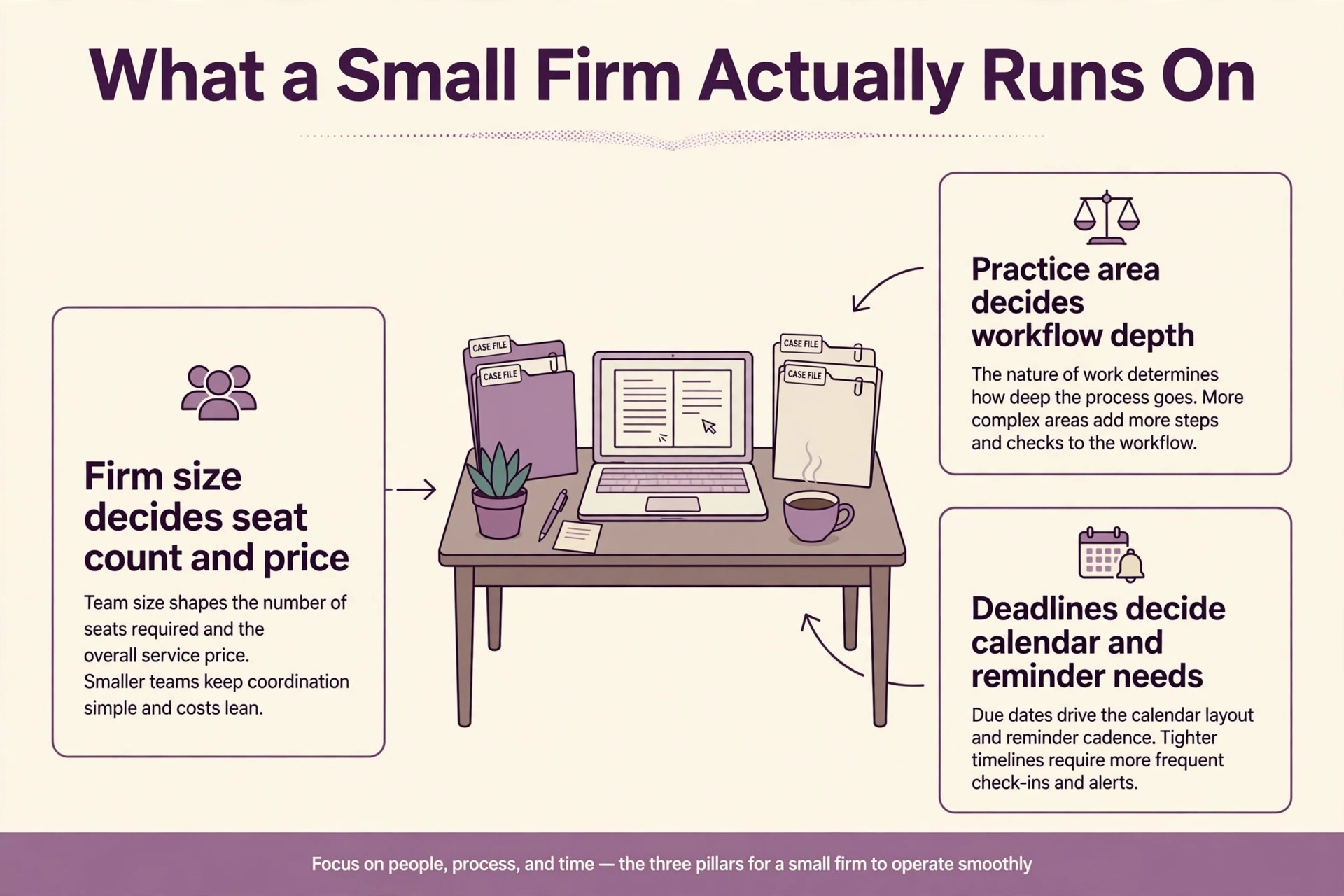
Start with practice area, because it shapes the whole shortlist. A personal injury firm needs medical records, lien tracking and settlement workflows, while a family law firm needs document-heavy case handling and secure client communication, and a general practice firm needs flexibility across matter types. A tool built for one practice area will frustrate another, so name the firm’s real mix before comparing features.
Next, count everyone who touches a case. Lawyers, paralegals, legal assistants and bookkeepers all need seats, and per-user pricing multiplies with every hire, while flat or bundled pricing behaves differently. A solo practitioner pays one seat, but a firm of eight lawyers plus four staff pays twelve, so the same tool can be cheap for one firm and expensive for another. Model the bill at the full team, not at the lawyer count alone.
Finally, test the tool on a real matter from intake to invoice. Open a case, set a deadline, draft a document, record time, send a client message and generate an invoice, all in the trial system. A demo with perfect data hides the slow step and the missing field, while a real matter reveals them before the firm pays for a year of the wrong system.
How Deadlines, Documents and Clients Were Tested
Every tool in this guide was judged on the same four tests, because a feature list cannot show how a tool behaves when a filing date moves. The first test is deadline creation. Entering a trial date should generate the dependent deadlines automatically, and changing that date should move them all, because a system that requires manual updates for every change will eventually miss one. The best case management software for small law firms must make deadline changes feel safe, not stressful.
The second test is document handling. A lawyer should be able to create a document from a template, edit it, store the final version on the matter, and find it again in seconds, without hunting through email attachments or shared drives. Version confusion is a real risk in small firms, where two people editing different copies of a pleading can create a filing error. A tool that keeps one version of the truth on the matter protects the firm from its own filing cabinet.
The third test is client communication. Messages, shared documents and invoices should live on the matter, not in personal inboxes, so any team member can pick up a case and see the full history. A portal that clients actually use reduces status calls and speeds payment, while a portal that clients ignore adds a step without removing one. Test the portal with a real client during the trial, because client adoption decides whether the portal helps or hinders.
The fourth test is trust handling. Deposits, disbursements and reconciliations must post cleanly and report clearly, because trust errors carry consequences far beyond a bookkeeping fix. A tool that makes trust balances visible on every matter, and flags a shortfall before it becomes a violation, earns its subscription in risk reduction alone.
The Seven Tools at a Glance
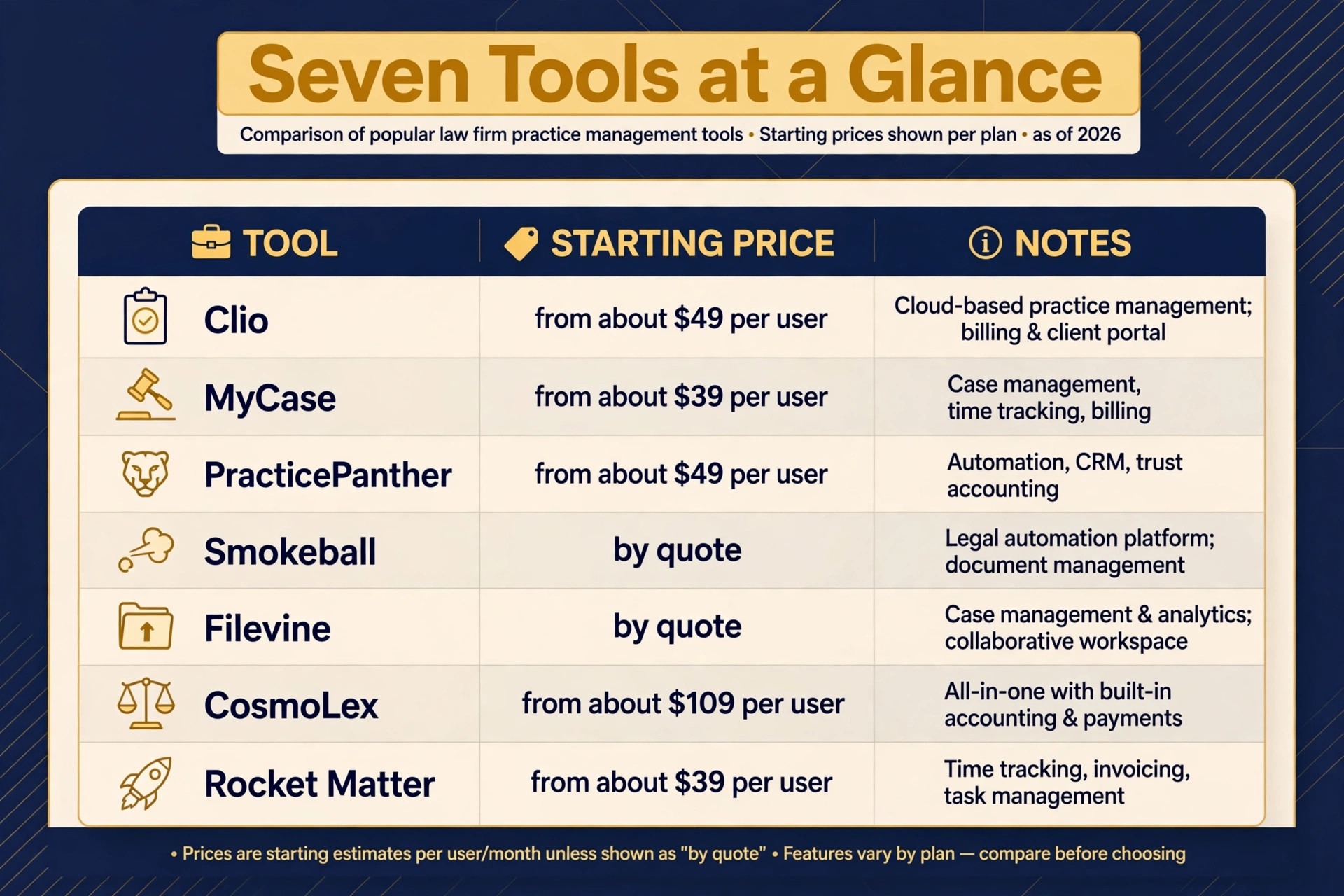
| Tool | Starting price | Best for |
|---|---|---|
| Clio | From about 49 dollars a month per user | General practice firms wanting the largest ecosystem |
| MyCase | From about 39 dollars a month per user | Solo and small firms wanting simplicity |
| PracticePanther | From about 49 dollars a month per user | Billing-led firms wanting automation |
| Smokeball | By quote | Document-heavy firms wanting automatic time capture |
| Filevine | By quote | Litigation and personal injury firms |
| CosmoLex | From about 109 dollars a month per user billed annually | Firms needing built-in legal accounting |
| Rocket Matter | From about 39 dollars a month per user | Firms wanting simple visual matter management |
Read the table as a shortlist, not a ranking. The cheapest tools suit solo and tiny firms, while the quote-based tools suit litigation-heavy practices with deeper workflow needs. Pick three finalists from the table, then read their full sections before deciding.
Each System Under Review
Clio
Clio is the pick for general practice firms wanting the largest ecosystem. Pricing runs from about 49 dollars a month per user on entry plans through about 149 dollars a month per user on higher tiers when billed annually, with the most powerful automation, custom forms and advanced reporting reserved for the upper plans. The platform covers matter management, calendaring, time tracking, billing, trust accounting through its accounting tools, and a client portal, with an integration marketplace running into hundreds of apps.
That ecosystem is the reason Clio leads the market for small to mid-size firms. A firm that already uses common accounting, email or document tools will find fewer workarounds here than anywhere else, and approval by state bars across the country gives cautious firms confidence. The trade-off is that the entry price buys the basics, while the features that make Clio powerful cost materially more per user. Choose Clio if ecosystem breadth and long-term flexibility matter most, and price the tier that actually includes the automation the firm needs.
MyCase
MyCase is the pick for solo and small firms wanting simplicity. Pricing starts at about 39 dollars a month per user when billed annually, with higher plans adding automation and advanced features up to about 89 dollars a month per user. The platform covers matter management, a built-in client portal, texting, billing, trust accounting and a mobile app, in an interface that new users learn quickly without a long implementation project.
The strength is approachability. A solo attorney or a two-to-five lawyer firm can move from spreadsheets or paper to a working system in days rather than months, and the client portal plus built-in texting cut the status calls that eat a small firm’s week. The trade-off is depth, because litigation-heavy firms may find workflow customisation thinner than in Filevine or Smokeball. Choose MyCase if ease of use and fast setup matter more than deep workflow engineering.
PracticePanther
PracticePanther is the pick for billing-led firms wanting automation without complexity. Pricing starts at about 49 dollars a month per user when billed annually, with higher plans adding advanced automation and reporting up to about 89 dollars a month per user. The platform covers matter management, native e-payments, two-way business texting, unlimited e-signatures on higher plans, time tracking, billing and trust accounting, with code-free automation rules that staff can build without technical help.
That automation is the selling point for firms that bill heavily. Rules that move matters, send reminders and trigger documents on their own recover hours that manual follow-up loses, and native payments plus texting remove two separate subscriptions from the budget. The trade-off is ecosystem size, because the integration list is smaller than Clio’s, so firms with unusual tool stacks should check compatibility during the trial. Choose PracticePanther if billing automation is the bottleneck.
Smokeball
Smokeball is the pick for document-heavy firms wanting automatic time capture. Pricing is by quote, which reflects its positioning for firms that need implementation help and deeper configuration, and the platform covers matter management, automatic time tracking, document automation and billing. Its automatic time capture records work inside documents and email, so time that lawyers forget to log still reaches the invoice.
That capture directly addresses the largest revenue leak in small firms, because unbilled time is lost profit that no discount can recover. The platform also ships with a very large library of built-in legal forms, which speeds document drafting for firms that produce similar documents repeatedly. The trade-off is price transparency and setup weight, since quote-based pricing and a deeper system suit firms ready to invest in implementation. Choose Smokeball when document volume and unbilled time dominate the firm’s economics.
Filevine
Filevine is the pick for litigation and personal injury firms that need deep workflow control. Pricing is by quote, and the platform covers advanced case tracking, custom workflows, document management, medical timelines, lien tracking and reporting, with artificial intelligence tools for intake and document work on higher tiers. For personal injury, mass tort and immigration practices, that customisation matches how cases actually move through stages, deadlines and teams.
The strength is flexibility at scale. A firm can shape Filevine around its own litigation process rather than accepting a fixed template, and reporting shows where cases stall. The trade-off is complexity and cost, because a highly customisable system needs more setup, more training and a larger budget than a simple tool. Choose Filevine when litigation volume and case complexity justify the investment, and skip it when a general practice firm only needs clean matters, billing and deadlines.
CosmoLex
CosmoLex is the pick for firms needing built-in legal accounting without a second system. Pricing starts at about 109 dollars a month per user when billed annually, and the platform combines matter management, billing, trust accounting with three-way reconciliation, and business accounting in one place, so firms do not need a separate accounting package. That single-system accounting is the point, because trust compliance and firm finances stay reconciled without exports between tools.
The trade-off is price and breadth. CosmoLex costs more per user than the simple tools, and its integration list is narrower than Clio’s, so firms with unusual stacks should verify compatibility. For firms that hold client funds, though, the built-in trust accounting removes a whole category of risk and reconciliation work. Choose CosmoLex when trust accounting is the priority and a single system for money and matters is worth the premium.
Rocket Matter
Rocket Matter is the pick for firms wanting simple visual matter management. Pricing starts at about 39 dollars a month per user when billed annually, and the platform covers matter management with visual boards, time tracking, billing, trust accounting and a client portal, in an interface that feels closer to a project board than to enterprise software. For firms that think in stages and boards, that visual model matches daily work well.
The strength is speed. A small firm can set Rocket Matter up quickly, move matters across visual stages, invoice fast, and keep client communication in one place without a long learning curve. The trade-off is depth, because litigation-heavy firms and firms needing deep workflow customisation will find the platform simpler than Filevine or Smokeball. Choose Rocket Matter when visual simplicity and fast invoicing matter most.
Best Pick by Firm Shape
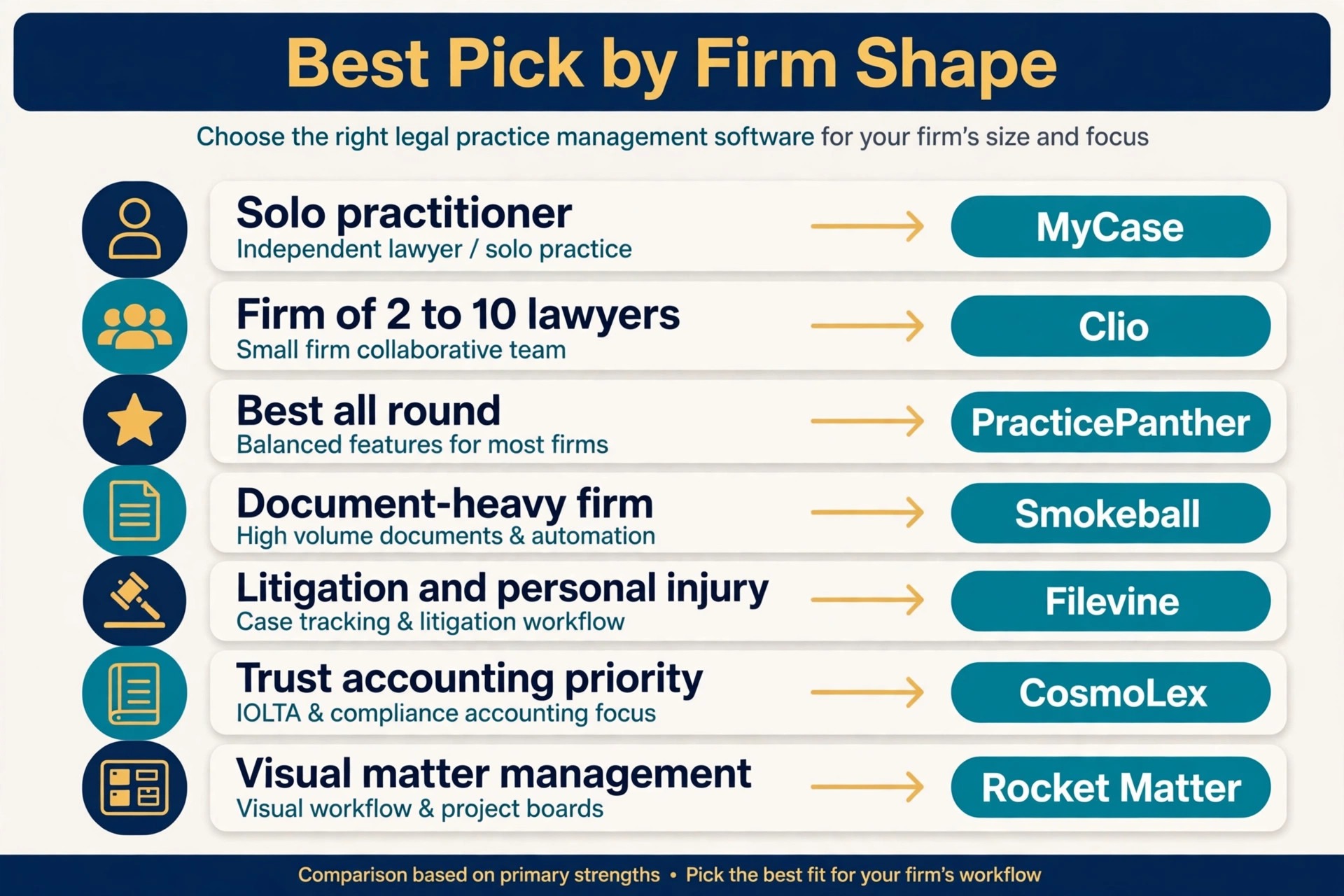
| Job | Best pick | Why it wins for that job |
|---|---|---|
| Solo practitioner | MyCase | Simplest setup with portal and billing included |
| Firm of 2 to 10 lawyers | Clio | Largest ecosystem that scales with the team |
| Best all round choice | PracticePanther | Automation plus native payments and texting |
| Document-heavy firm | Smokeball | Automatic time capture recovers unbilled hours |
| Litigation and personal injury | Filevine | Deepest workflow and case tracking control |
| Trust accounting priority | CosmoLex | Built-in legal accounting without a second system |
| Visual matter management | Rocket Matter | Board-style matters with fast invoicing |
Use this table to match the tool to the job, because the best overall tool is not always the best tool for a specific firm size. A solo practitioner and a ten-lawyer firm run different operations, and the table points each one to the tool built for that exact shape. For the best case management software for small law firms, that size match matters more than any single feature.
The Billing Workflow That Protects Revenue
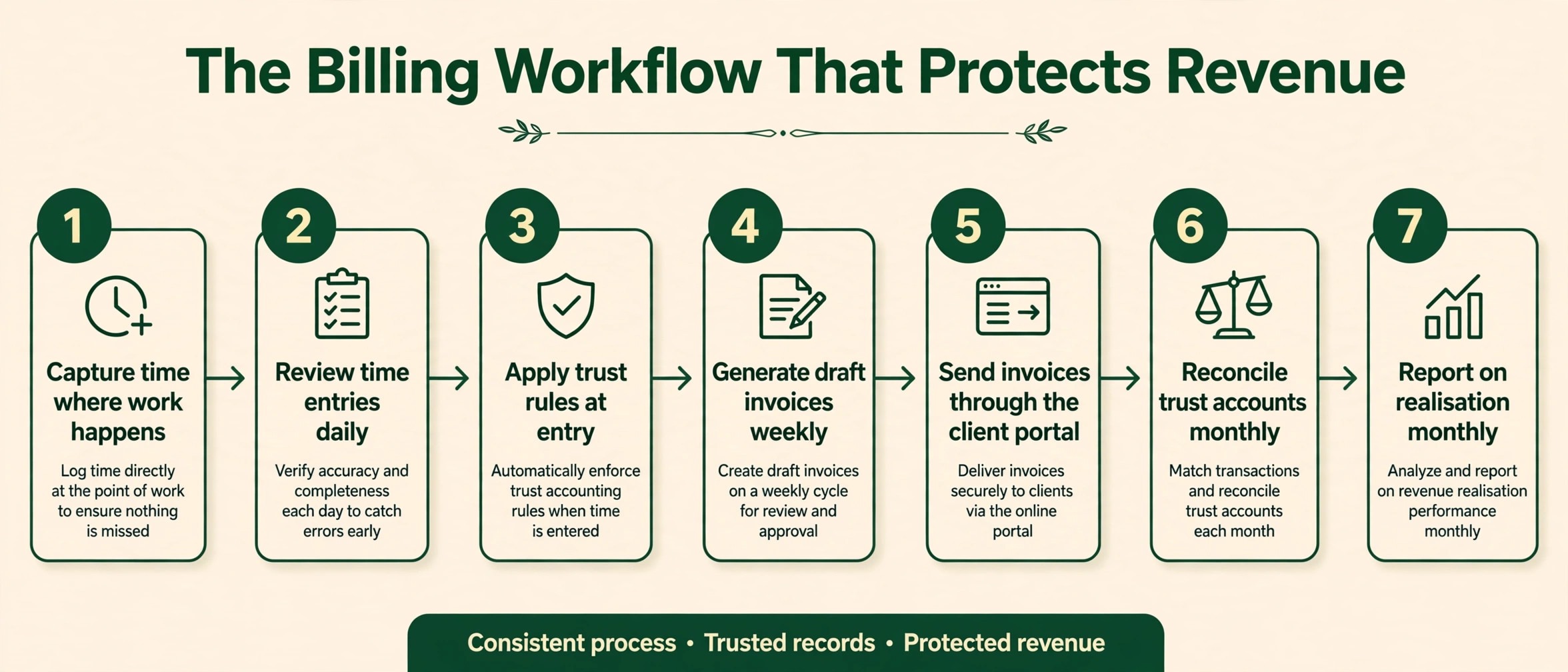
Billing is where small firms win or lose money, so the workflow matters as much as the tool. This workflow is the overview-proof check for this guide, because it shows the steps a firm should run every week regardless of which platform it buys, and it separates tools that support the workflow from tools that fight it.
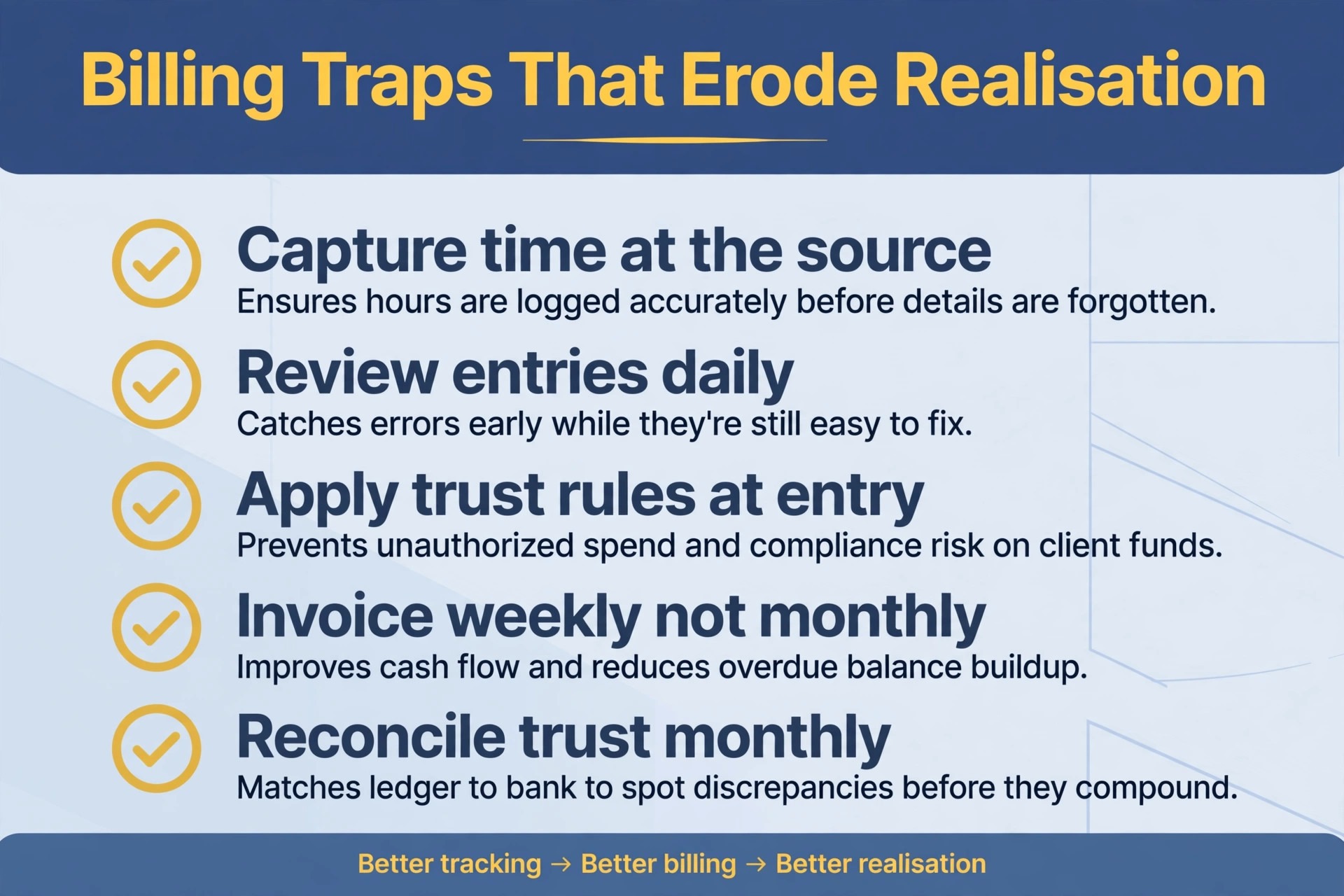
1. Capture time where the work happens, inside documents, email and calls, rather than reconstructing it at day end. 2. Review time entries daily, while the work is fresh, and fix missing or vague entries before they reach an invoice. 3. Apply trust rules at entry, so client funds, retainers and disbursements post to the right matter and account from the start. 4. Generate draft invoices weekly, not monthly, so clients see regular bills and cash flow stays smooth. 5. Send invoices through the client portal with online payment, and follow up automatically on overdue balances. 6. Reconcile trust accounts monthly with three-way reconciliation, and review the reconciliation before it becomes an audit problem. 7. Report on realisation and collection monthly, so the firm sees which matters pay well and which leak time.
A tool earns its place by making each step easier, not by adding steps. Automatic time capture helps step one, portal payments help step five, and built-in trust accounting helps steps three and six. During the trial, run this workflow end to end on a real matter, because a tool that breaks the workflow will break the firm’s cash flow too.
The Whole Monthly Cost Beyond the Fee
The headline price is only the first line of the bill. Per-user seats for lawyers and staff, payment processing, e-signature limits, texting charges and higher-tier automation all sit on top of it, and the total at a realistic team size is what a firm actually pays. A tool that looks cheap for a solo lawyer can double in cost for a ten-lawyer firm once staff seats and add-ons join the bill.
Count staff seats honestly. A firm of five lawyers with three paralegals and two admin staff pays for ten seats on a per-user tool, not five, and that difference changes the ranking entirely. Count processing too, because card percentages on client payments apply to every invoice, and on large matters those fees dwarf the subscription. Check whether the tool adds its own processing margin or passes through a standard rate.
Finally, count implementation as a cost. A quote-based tool may need paid onboarding and training, while a simple tool may be self-serve in days. Implementation cost is paid once, but a failed implementation costs months of lost productivity, so weigh setup help as value rather than treating it as pure expense.
Moving Over Without Losing a Matter
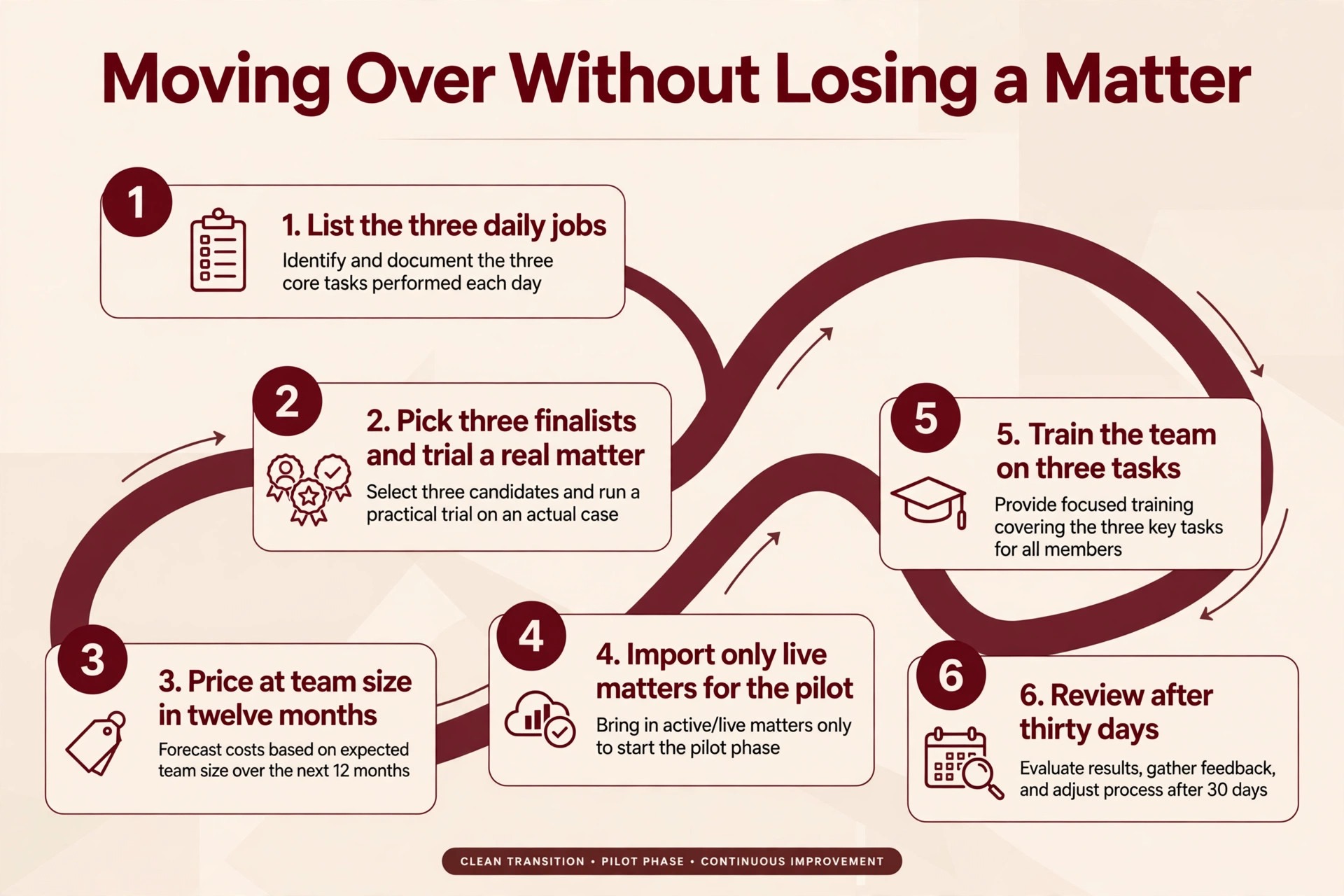
Switching tools fails most often from rushing, not from choosing badly. A short, careful workflow protects matters, deadlines and trust balances during the change. Follow these steps in order, and do not skip the trial, because the trial is where most problems reveal themselves cheaply.
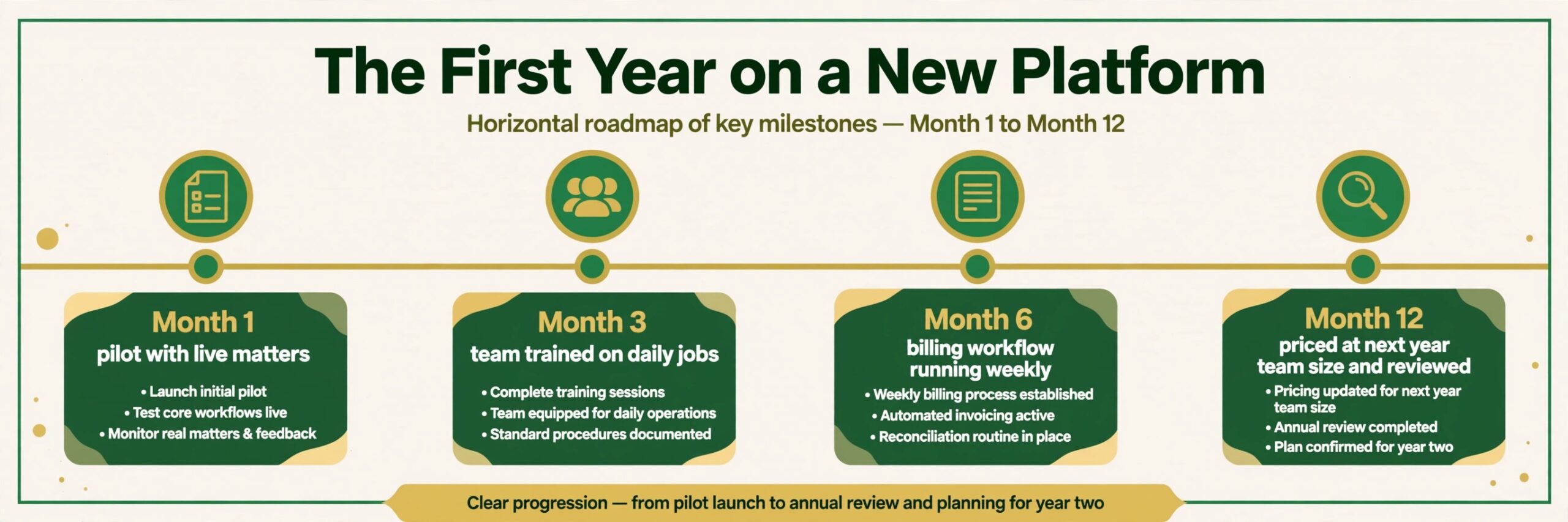
1. List the three daily jobs the new tool must handle, and write down how each job works today. 2. Pick three finalists from this guide, and run each one through a real matter from intake to invoice. 3. Price each finalist at your team size in twelve months, including staff seats and processing. 4. Import only live matters for the pilot, and check that deadlines, balances and documents match the old system. 5. Train the team on three tasks only, then expand training once those three habits feel automatic. 6. Review the bill, the deadline calendar and team feedback after thirty days, and fix the setup before blaming the tool.
Billing Traps That Erode Realisation
The most common mistake is buying for the firm you wish you had, instead of the firm you actually run. A solo practitioner does not need multi-office reporting, and a five-lawyer firm should not pay for enterprise workflow engineering it will never configure. Buy for the next twelve months, not for a future that may never arrive, and upgrade when caseload demands it.
The second mistake is ignoring the exit. A tool that holds matter records hostage, charges heavily to export, or breaks integrations on cancellation will cost far more at exit than it saved at entry. Export matter lists, documents, time entries and trust records regularly, keep a copy outside the system, and know the cancellation terms before you sign.
The third mistake is letting seats pile up. Staff leave, contractors finish and seasonal help moves on, yet their paid seats often stay active for months. A quarterly seat check takes half an hour and routinely cuts a noticeable share off the annual bill, because unused seats are the quietest waste in any subscription budget.
A fourth mistake is buying automation the firm never configures. Higher tiers promise workflow rules, custom forms and advanced reporting, but those features only pay when someone builds and maintains them. If no one on the team owns automation, the firm pays a premium for features that sit unused, while a simpler tier would have covered the real work.
A fifth mistake is skipping the conflict check test. Small firms handle sensitive matters, and a tool that cannot run a fast, reliable conflict check before intake creates risk from the first client meeting. Test conflict searching during the trial with real names and related parties, because a system that buries that check behind slow searches will be skipped under time pressure, and skipped checks are how conflicts slip through.
The Verdict for Small Firms
Start with practice area, then team size, then the trial. For most small firms in this guide, MyCase is the safest first trial for solo and tiny firms, because simplicity and fast setup matter most at that size, while Clio is the safest first trial for firms of two to ten lawyers, because its ecosystem scales with the team. A firm with a very specific need, such as trust accounting or litigation depth, should start instead with the best pick by job table above.
The best case management software for small law firms decision does not need to be perfect, it needs to be tested. Run a real matter through the finalist, price the tool at next year’s team size, and judge it on whether deadlines feel safer and invoices go out faster. A tool that passes that test is worth keeping, even if a rival looks better on a pricing page, because deadline safety and cash flow are the tests that actually matter.
For a final check, compare the shortlist against the best case management software for small law firms on total cost at your real team size before you pay for a year. A shortlist built around the best case management software for small law firms should still be tested on a live matter, because a pricing page cannot show how a tool behaves when a deadline moves.
More Reading on Stratilyze
Readers comparing law firm tools usually check the neighbouring guides next. The guide to AI tools for lawyers covers a closely related decision, the guide to AI for law firm client intake explains a workflow that pairs well with this choice, and the guide to AI for law firm document drafting helps with the wider setup around it.
Frequently Asked Questions
Do I need case management software or will a general project tool work
A general project tool works when the firm mainly tracks tasks, because task boards are its strength. A law firm needs matter records, court deadlines, trust accounting, time capture and client confidentiality controls, and a general tool forces those jobs into custom fields. Once legal work lives outside the system, the software has stopped being the system of record.
How much should a small firm budget per user each month
A small firm should budget for the per-user subscription plus payment processing and any add-ons, modelled at full team size including staff. Entry tools start near 39 dollars a month per user, mid-range tools cluster near 49 to 89 dollars a month per user, and quote-based tools climb above that. The honest budget is the second-year total at next year’s headcount, not the first-month price.
Is per-user pricing fair for firms with many support staff
Per-user pricing is fair when every seat does billable or case work, because the bill follows the team that uses the system. It feels unfair when admin and bookkeeping seats cost the same as lawyer seats, so check whether the vendor prices non-lawyer seats differently or includes them in a bundle. Some tools include non-clinical or support seats more generously than others, and that detail changes the total materially.
Can one tool handle both cases and trust accounting
Yes, when the tool includes built-in trust accounting with three-way reconciliation alongside matter management. Several tools in this guide do, while others pair with a separate accounting package. A firm that holds client funds should prefer built-in trust accounting, because reconciliation between two systems creates the errors that audits punish.
What happens to matter records if I cancel
Matter records usually remain exportable for a period after cancellation, but the exact terms, format and fees vary by vendor. Export matter lists, documents, time entries and trust records before cancelling, and keep a copy outside the system. A tool with easy bulk export is worth a small premium, because rebuilding matter history from scratch costs weeks of staff time.
Should a solo lawyer buy the cheapest tool
A solo lawyer should buy the tool that fits the practice, not automatically the cheapest one, because deadline safety and billing capture matter more than a small monthly saving. The cheapest tool wins when it covers deadlines, billing and client communication well, while a slightly pricier tool wins when it recovers unbilled hours or prevents a missed deadline. Judge the choice by revenue protected, not by subscription alone. That revenue test is the fairest way to compare the best case management software for small law firms, because a single recovered hour or avoided error can exceed a year of price difference.