
Two pool routes can look identical on a map and still produce very different weeks. One route groups pools by neighbourhood, finishes by mid-afternoon, and leaves time for a repair call. The other route zigzags across town, burns fuel and daylight, and pushes the last three stops into tomorrow. That gap is the whole case for best route scheduling software for pool service companies, and it is why this guide judges tools on stops per day, not on feature lists.
Pool work is recurring, which makes routing unusually powerful. The same pools need service every week, so a good route built once keeps paying every week, while a bad route built once keeps costing every week. Software that sequences stops tightly, handles skipped pools cleanly, and records chemistry at each stop will change the economics of a route far more than a prettier invoice ever could.
Why the Best Route Scheduling Software for Pool Service Companies Lives on the Route
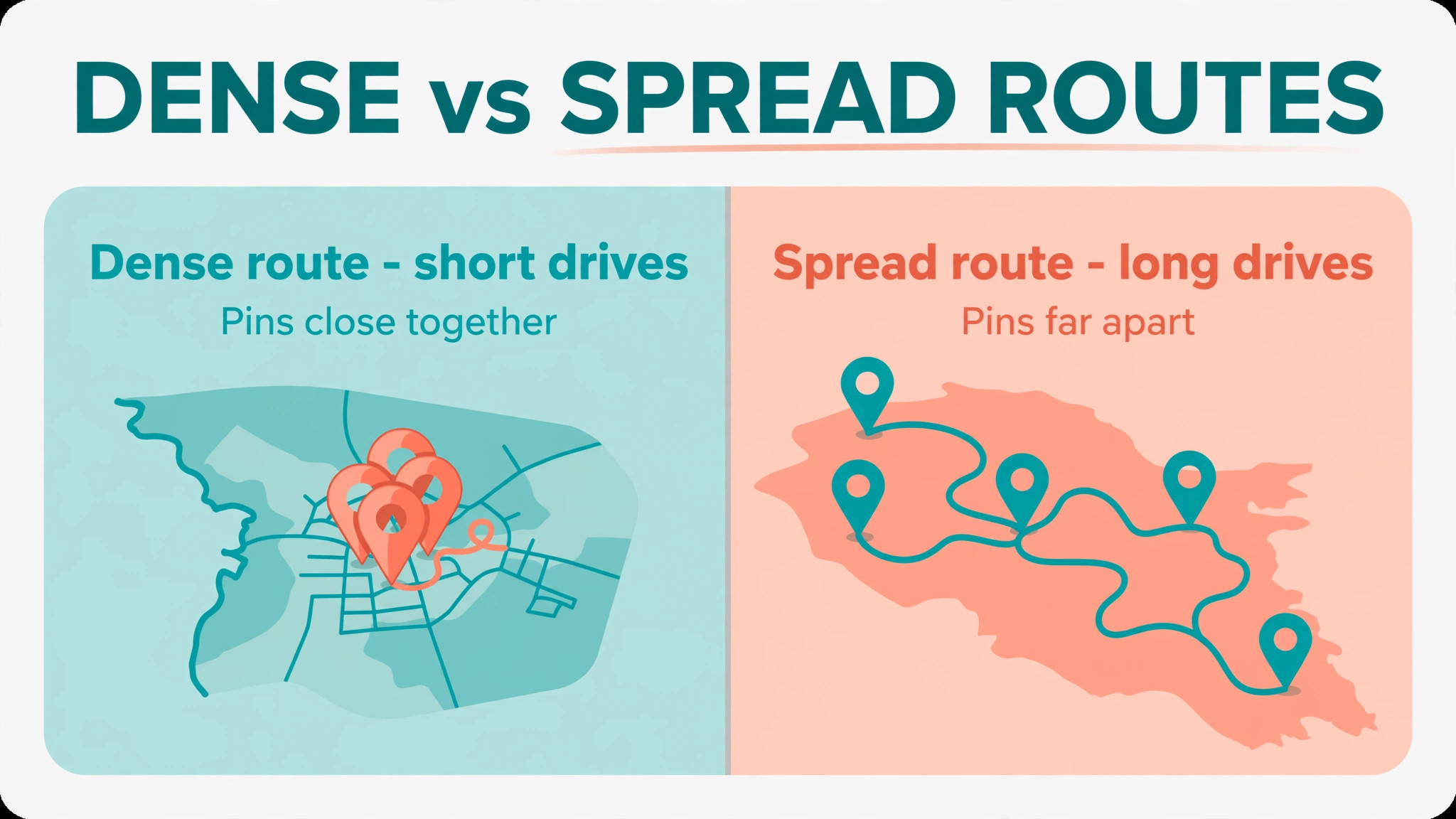
Density is the first test. A route with twelve pools inside a small area will always beat a route with twelve pools spread across a county, because drive time is unpaid time. Good software shows density clearly, lets a dispatcher move a pool to a nearer route in seconds, and warns when a new customer would stretch a route past its sensible limit. A tool that hides density behind a long job list will let routes drift until they become unprofitable.
Chemistry is the second test. Every stop produces readings, doses, and notes, and those records protect the company when a customer questions water quality or a heater fails. A pool-specific tool records readings in the field flow, calculates doses, and sends a service report with photos automatically. A general tool forces technicians to log readings elsewhere, which means readings get skipped on busy days, and skipped readings become disputes later.
Billing is the third test. Recurring pools should bill from completed visits, not from manual invoices typed at month end. A tool that turns a finished route into invoices, flags skipped stops, and syncs to accounting will cut office hours sharply. A tool that leaves billing disconnected will create a monthly scramble that delays cash and hides missed visits.
How to Run a Route Trial That Tells the Truth
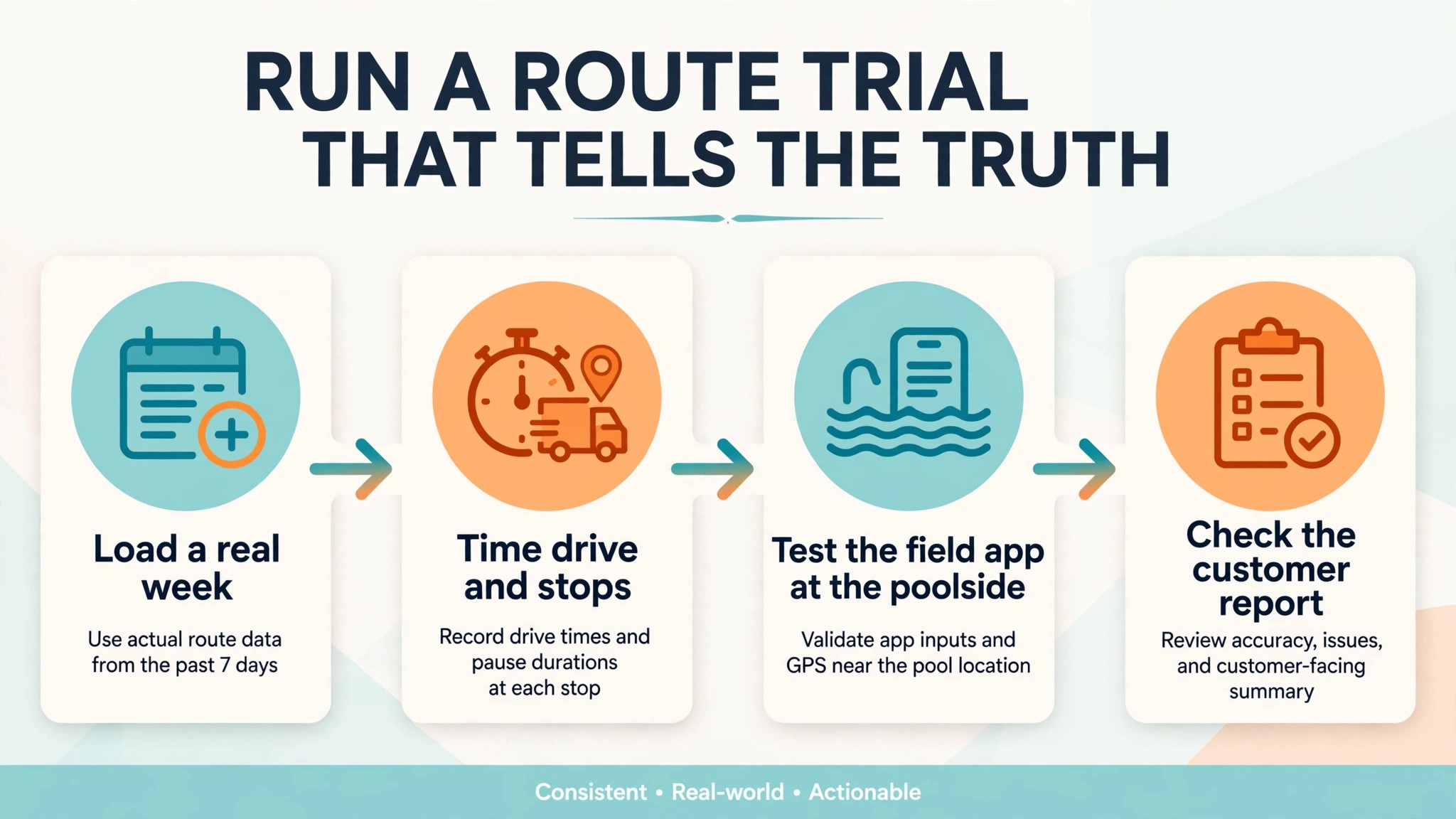
Build a real week, not a demo week. Load one full route with its real pools, real addresses, real service frequencies, and real skipped-pool cases, then run it for a week in the trial. A tool that handles a skipped pool, a gate code change, and a repair added mid-route without manual retyping will handle real life. A tool that breaks on any of those three cases will break every week.
Time the route before and after. Record drive time, stops per technician per day, fuel use, and office time spent on billing for the same route on the old system and in the trial. Routing claims are easy to make and hard to fake when those four numbers are measured on the same pools. If the trial route is faster on paper but slower in practice, trust the practice numbers and move on.
Check the field app on a phone in sunlight, with wet hands, at a real pool. A beautiful office dashboard means nothing if technicians cannot record readings quickly at the poolside. The app must work offline, sync when signal returns, and let a technician finish a stop in under two minutes. If it takes longer, technicians will batch-record later, and batch-recorded readings are less accurate.
Also test the customer side of the trial. Send a service report to a real customer, ask them to pay an invoice from the link, and check whether the report reads clearly on a phone. A report that looks tidy in the office but confusing on a phone will still generate calls, and those calls erase the time the route software was meant to save.
Routes, Prices and Billing Compared
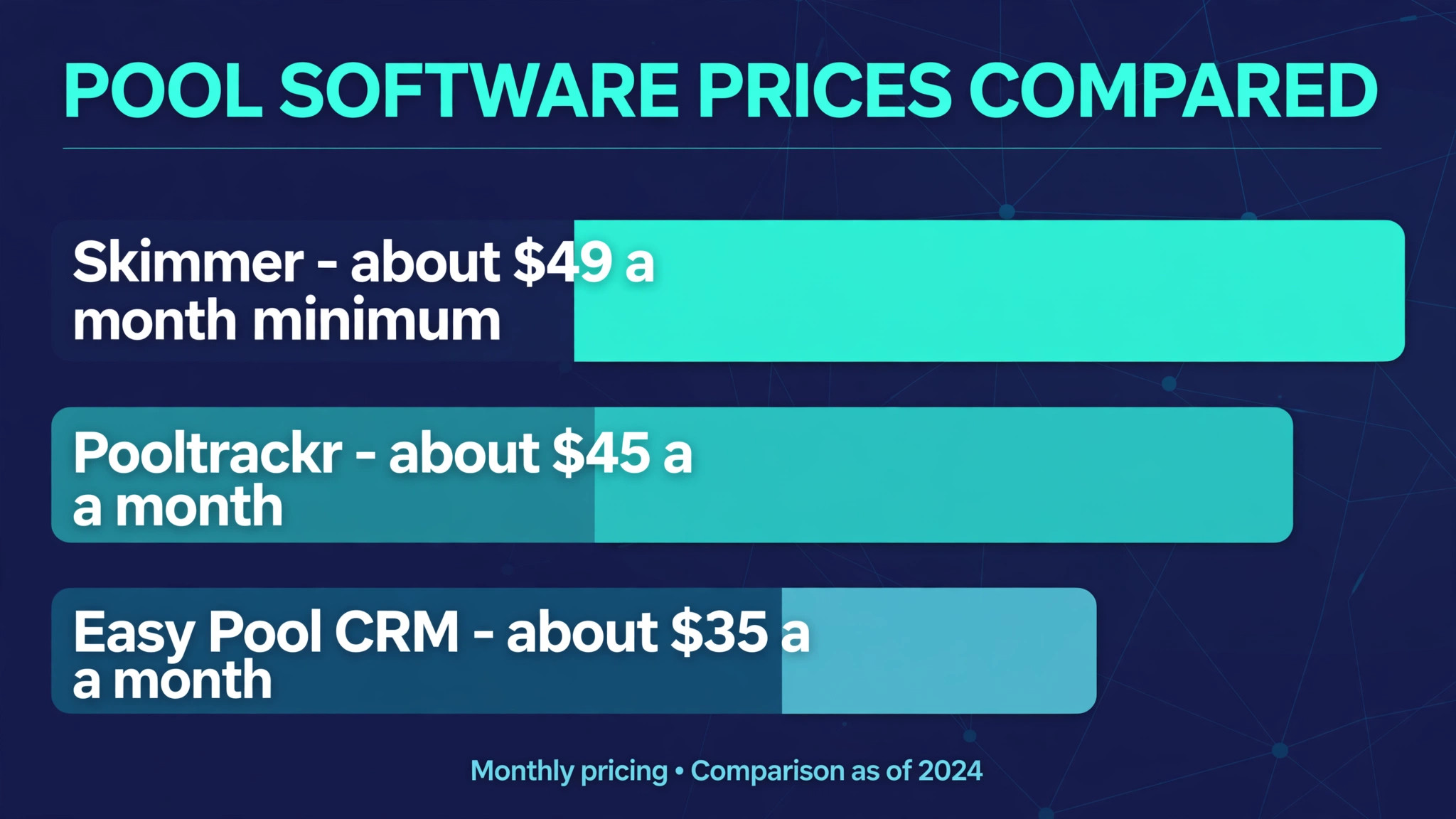
| Tool | Starting price | Best for |
|---|---|---|
| Skimmer | about $49 a month minimum, then per serviced location | pool-specific routes at scale |
| Paythepoolman | about $50 a month plus about $15 per technician | small crews that want per-tech pricing |
| Pooltrackr | about $45 a month to start | firms that want water testing plus billing |
| Pool Office Manager | pricing varies, confirm with the vendor | firms that want office and route tools together |
| Jobber | about $29 a month billed annually for Core | multi-trade firms that also service pools |
| Pool Brain | about $65 a month per technician plus a base fee | firms that want per-tech route billing |
| Easy Pool CRM | about $35 a month for its Starter plan | small crews that want a flat low bill |
Read the table as a shortlist, not as a ranking. The cheapest tool may suit a single-van firm perfectly, while a dearer tool may be the only one that handles chemistry and route optimisation together. Use the table to pick three finalists, then read their full sections below before deciding.
Seven Route Platforms Reviewed

Skimmer
Skimmer is the pick for pool companies that want the most established pool-specific platform. It covers route building, recurring visits, water readings, dosing calculations, service reports, invoicing, and a customer portal, with unlimited technicians and administrators on every plan. Technicians can review pool details, record readings, calculate doses, and complete service reports inside one field workflow.
Pricing starts at about $49 a month on Getting Started, at about $1 per serviced location, while Scaling Up starts at about $98 a month at about $2 per serviced location, with the first 49 locations included in each minimum. The trade-off is that the bill grows with every serviced location, so a firm should model the cost at 100 and 200 pools before committing. Route optimisation and quotes sit on Scaling Up, so a firm should not judge Skimmer on Getting Started alone.
Paythepoolman
Paythepoolman is the pick for owner-operators and small crews that want deep billing without per-pool charges. It charges about $50 a month plus about $15 per technician, with no per-pool charge and no contract, and it lists invoicing with QuickBooks sync, route optimisation, GPS tracking, bids, and a financial ledger. For a firm where each technician services many pools, per-tech pricing beats per-pool pricing quickly.
The trade-off is support hours and add-on costs, because payroll and some extras sit outside the core price, and support runs on weekday business hours. A firm that needs weekend support or a branded customer app should price those add-ons before deciding. If the crew is small and billing depth matters most, Paythepoolman is a strong, honest-priced choice.
Pooltrackr
Pooltrackr is the pick for firms that want water testing, invoicing, and route work in one platform. It covers jobs, staff, customers, invoicing, water testing with a chemical calculator and dosage recommendations, point of sale, and accounting, with GPS tracking and on-the-spot invoicing. A technician can test water, record the result, invoice, and move to the next stop without switching apps.
At about $45 a month to start, it is one of the cheapest entries in this guide, though higher tiers and local pricing vary. The trade-off is that it is a broader platform than a pure pool specialist, so some pool-specific reporting may feel less deep than Skimmer. Test the chemistry flow and the service report on a real route before deciding, because those two flows decide whether technicians actually use it daily.
Pool Office Manager
Pool Office Manager is the pick for firms that want office management and route tools in one specialised system. It covers scheduling, dispatch, work orders, customer management, inventory, invoicing, GPS tracking, and reporting, with a chemical calculator for accurate water treatment. Real-time route management aims to cut drive time and fuel, while integrated billing keeps completed visits close to cash.
Pricing varies across listings, so this guide gives no starting number, and the firm should confirm the current vendor price for its user count before budgeting. The trade-off is price clarity, because conflicting directory figures make early comparison difficult. If the feature set fits, get a written quote, compare it against Skimmer and Paythepoolman at the same pool count, and judge the total, not the headline.
Jobber
Jobber is the pick for a multi-trade firm that services pools alongside other work. It covers scheduling, quotes, invoices, online booking, and payments, with route optimisation and a strong mobile app. A firm that also does lawn care, cleaning, or repairs will value one system for every trade, rather than a pool tool plus a general tool for everything else.
At about $29 a month billed annually for Core, or about $49 a month with no commitment, with extra users at about $29 a month each, it is cheap to start and clear to price. The trade-off is chemistry, because Jobber does not log water readings natively, so a pool-heavy firm will need a workaround for readings and dosing. If pools are a side line, Jobber fits, but if pools are the whole business, a pool specialist serves technicians better.
Pool Brain
Pool Brain is the pick for firms that want per-technician pricing with a route focus. It charges about $65 a month per technician plus a base fee for unlimited office users, which suits a firm where each technician runs a full route and office staff should not raise the bill. Route work, service records, and billing sit in one system shaped for pool service days.
The trade-off is that the base fee varies by setup, so the firm must run the vendor calculator for its exact technician count before budgeting. A firm with many office users and few technicians may find the shape attractive, while a firm with many technicians should compare the per-tech total against Skimmer at the same pool count. Test the route builder on a real dense route, because density handling is where this tool must prove itself.
Easy Pool CRM
Easy Pool CRM is the pick for a small crew that wants a flat, low bill with pool basics covered. Its Starter plan costs about $35 a month for one field technician, one office admin, and up to 120 pools, covering route management, chemistry logging, estimates, invoicing, online payments, a customer portal, and service reports. For a firm under 120 pools, that flat price is easy to justify.
The trade-off is technician limits, because each plan caps field technicians, and a firm with four technicians needs a higher tier. Route optimisation and a dosing calculator are also not listed in the same way as in Skimmer, so a firm should test those flows carefully. If the crew is small and the route is simple, Easy Pool CRM is a smart low-cost start.
Best Pick by Route Shape
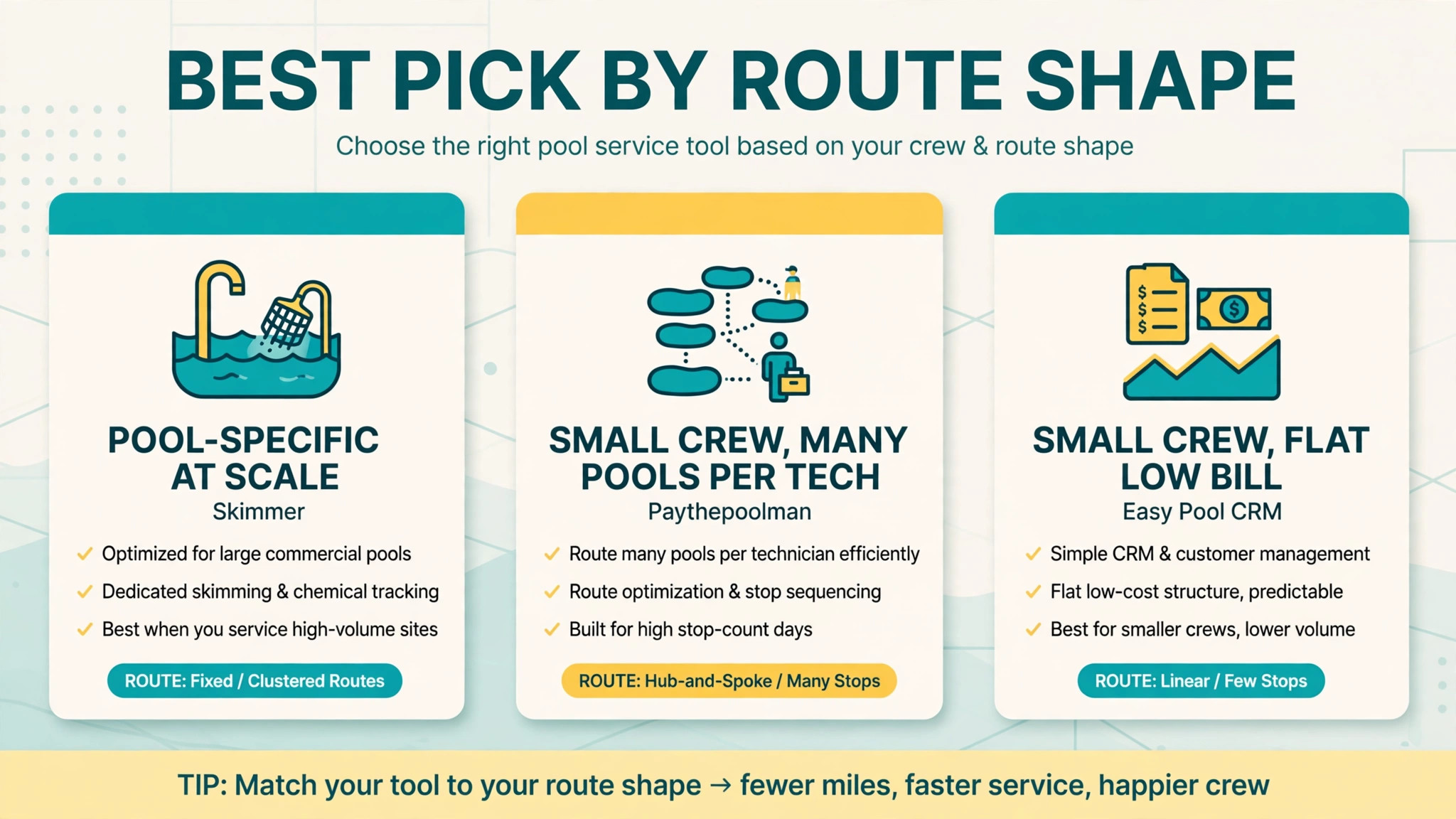
| Firm shape | Best pick | Why it wins for that shape |
|---|---|---|
| Pool-specific firm at scale | Skimmer | Deepest chemistry, routes, and reports together |
| Small crew, many pools per tech | Paythepoolman | Per-tech pricing with no per-pool charge |
| Small crew, flat low bill | Easy Pool CRM | Starter covers up to 120 pools at a low flat rate |
| Multi-trade firm with pools | Jobber | One system for pools and other trades |
| Water testing first | Pooltrackr | Testing, calculator, and invoicing in one app |
Use this table as the decision shortcut. If your firm matches one row closely, start the trial there, and use the second-best row as your comparison. A tool that matches your shape will forgive small feature gaps, while a tool built for a different shape will fight you on daily tasks no matter how good its reviews look.
Route-Density Fee Maths That Changes the Choice
Route density is where best route scheduling software for pool service companies earns or loses money, and the maths is simple enough to run on one route. Take a route of 100 pools served by two technicians, each working five days a week. If tighter sequencing saves each technician one hour of driving per day, the firm saves ten technician hours per week, before fuel savings are counted at all. Those hours can become extra stops, repair work, or simply an earlier finish that keeps staff from quitting.
Fuel follows the same logic. A route that cuts twenty miles per technician per day saves two hundred miles per week across two technicians, and that saving repeats every week the route runs. Over a season, the fuel saving alone can exceed the monthly software subscription several times over, which is why a dearer tool with better optimisation can still be the cheaper choice overall. Price the tool against drive time and fuel saved, not against the subscription alone.
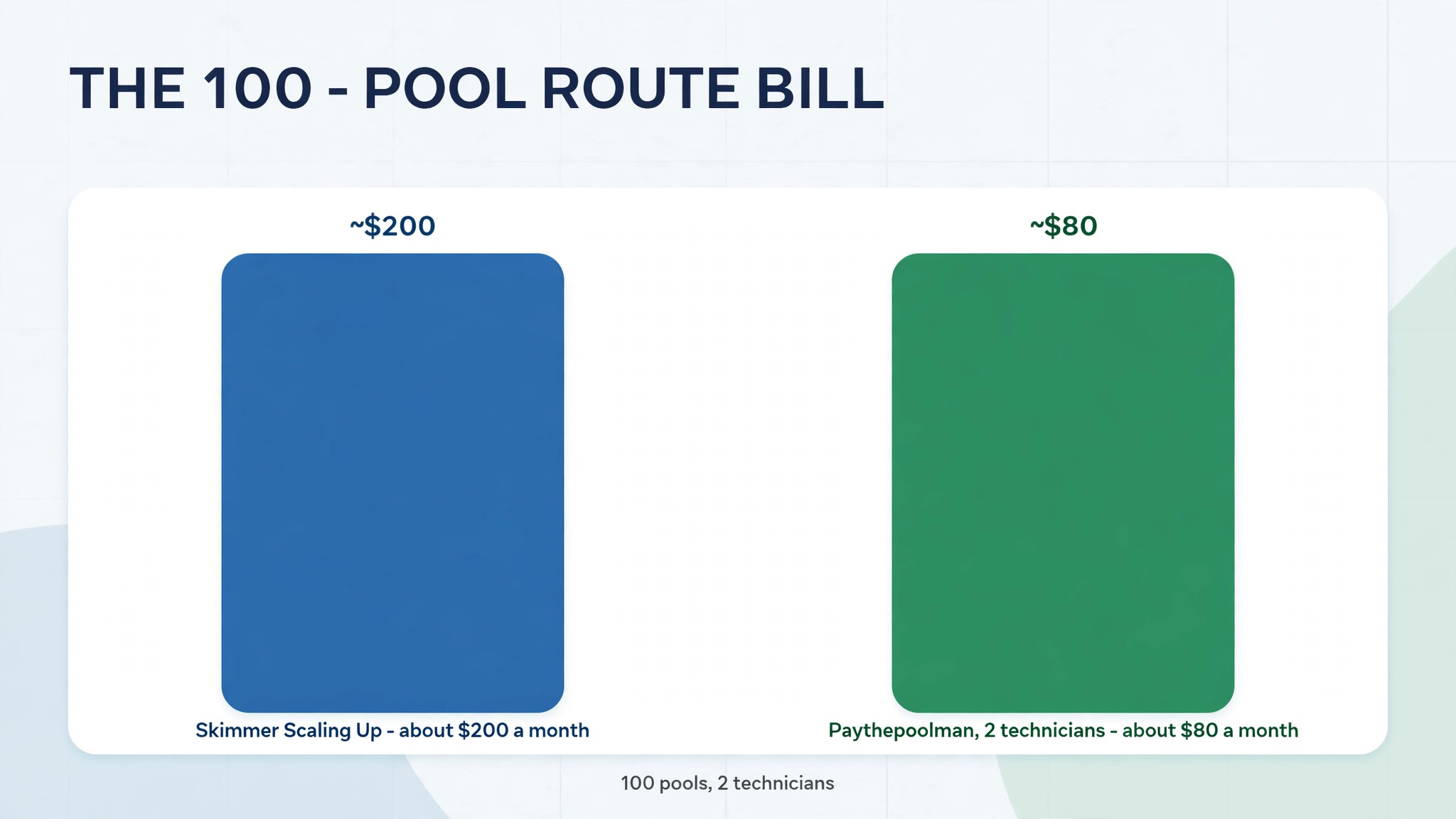
Now compare the two pricing meters on that same 100-pool route. On Skimmer Scaling Up, 100 serviced locations cost about $200 a month, from a $98 minimum plus 51 locations at $2 each. On Paythepoolman with two technicians, the same firm pays about $80 a month, from $50 plus two technicians at $15 each. That gap shows why meter choice matters more than headline price, because the same route, the same pools, and the same technicians produce very different bills under different meters.
The lesson is to model three numbers together, namely stops per technician per day, miles per route per week, and software cost per pool per month. A tool that raises stops per day by even one, while keeping miles flat, will usually beat a cheaper tool that leaves routes loose. Run that model on your densest route and your loosest route, because a tool that only helps dense routes will disappoint a firm whose routes are still spread out.
The Monthly Bill at Three Route Sizes
The headline price hides the real bill. Per-location charges, per-technician charges, transaction fees, SMS costs, add-ons, and payment processing all sit on top of the subscription. For best route scheduling software for pool service companies, the honest comparison is the total at your pool count and technician count together, not either number alone.
| Firm size | What to count |
|---|---|
| 50 pools, one technician | Minimum fees, per-pool or per-tech total, SMS costs |
| 150 pools, three technicians | Per-pool growth versus per-tech growth, route optimisation tier |
| 400 pools, six technicians | Volume pricing, multi-route reporting, support hours |
Model the bill at the size you expect in twelve months, not at the size you are today. A per-pool tool that looks cheap at 50 pools may cost more than a per-tech tool once the firm reaches 200 pools, while a per-tech tool that looks dear for one technician may become the cheapest option once each technician carries many pools. Growth is the point, so price for it, and get add-on costs in writing.
Switching Routes Without Chaos
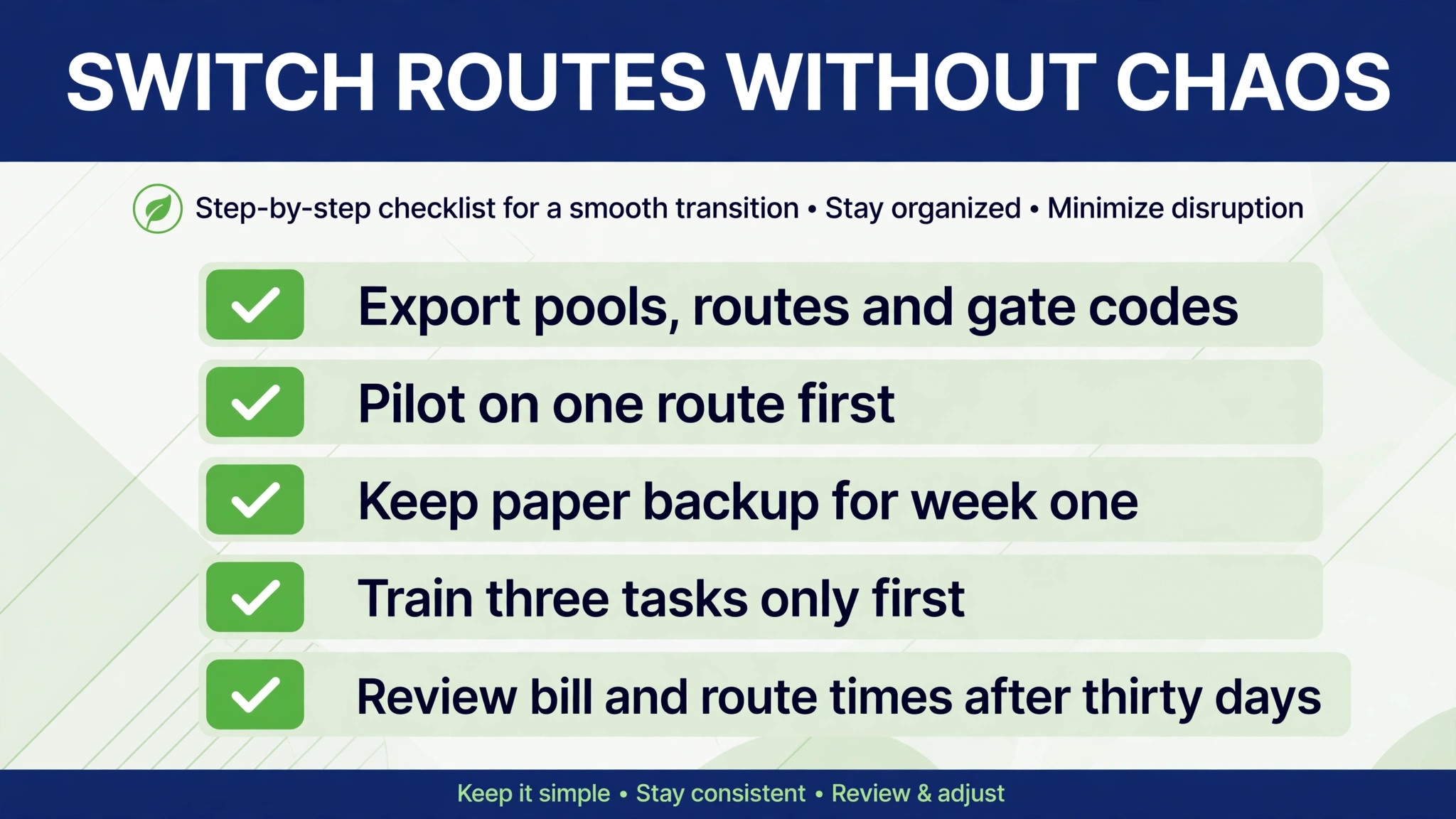
Switching routing tools fails most often from rushing, not from choosing badly. Export pools, routes, service histories, chemical records, and balances before you touch the new system, and check that addresses, gate codes, and equipment notes survive the import. A lost gate code creates a failed stop, and a failed stop creates a customer complaint that the new software gets blamed for, fairly or not.
Run the new tool on one route first, while other routes stay on the old system for a week. Compare stops per day, drive time, and billing totals on that route against the old numbers, and fix route order before rolling out further. Tell customers on that route about any new service day in advance, and give them a single contact for questions during the change week, so a timetable improvement does not feel like a surprise.
Keep paper backup for the first week of the pilot, even if the team dislikes it. A printed route list lets technicians finish the day if a phone fails, a signal drops, or an app update misbehaves, and it gives the office a fallback record while the new system proves itself. Remove the backup only after a full week runs cleanly without it. Train technicians on three tasks only at first, namely recording readings, completing a stop, and flagging a problem, then expand training once those habits feel automatic. Review the bill, the route times, and customer messages after thirty days, and fix the setup before blaming the tool.
Building Density Into Existing Routes
Most firms do not need new customers to improve density, they need to rebuild the routes they already have. Start by mapping every pool on one route, then look for pools that belong on a neighbouring route because they sit closer to its other stops. Moving even five pools between routes can cut drive time noticeably, and the move costs nothing except one careful week of customer communication about new service days.
Next, protect the new shape. Write a simple rule for adding customers, namely that a new pool joins the route whose other pools are nearest, not the route with the most free time that day. A route with free time today but distant pools will still be a loose route next month, while a dense route with a tight day can often absorb one nearby pool without harm. When best route scheduling software for pool service companies is used well, that rule becomes a habit, because the software shows the density cost of each new booking before it is confirmed.
Finally, review routes every season, not once a year. Pools close, customers move, and new housing estates change where demand sits, so a route that was dense last spring may be loose by autumn. A seasonal review that moves a handful of pools, retires empty detours, and rebalances technician loads will keep stops per day high without hiring extra staff. Density is not a one-time project, it is a routine, and software makes the routine visible enough to keep.
Pricing Traps on the Route
The most common mistake is buying for the firm you wish you had, instead of the firm you actually run. A single-van firm does not need multi-route enterprise reporting, and a small firm does not need a marketing suite. Buy for the next twelve months, not for a future that may never arrive, and upgrade when pool count demands it.
The second mistake is ignoring the exit. A tool that holds pool histories hostage, charges heavily to export, or breaks every integration on cancellation will cost far more at exit than it saved at entry. Export data monthly, keep a copy outside the system, and know the cancellation terms before you sign. The third mistake is letting routes drift, because new customers get added to whichever route has space, rather than to the nearest route, until density quietly collapses. When judging best route scheduling software for pool service companies, ask how the tool warns you when a new booking would stretch a route, because a warning at booking time is worth far more than a report at month end.
Making the New Routes Stick
Start with one dense route before you roll a new tool out everywhere. A small pilot shows whether the route order matches real drive patterns, whether technicians actually record readings at the poolside, and whether service reports reach customers correctly. Ask technicians directly what slowed them down during the pilot week, because the slowest step is usually a small setup fix, such as a missing gate code field or a report template that hides the dose. Fix the pilot first, then copy the working setup to the rest of the firm, because a clean pilot beats a rushed firm-wide launch that nobody trusts.
Write down who owns the tool on day one. That person approves new users, checks the billing page each month, answers basic questions from the team, and talks to support when something breaks. Without a named owner, old staff keep access after they leave, and small problems sit unanswered until they become urgent. Ownership takes ten minutes to assign and saves hours later, especially at season start when routes change fastest. That owner should also track best route scheduling software for pool service companies results monthly, namely stops per day, miles per week, and software cost per pool, so the firm knows whether the tool still earns its keep as routes grow.
The Verdict for Pool Firms
Start with the route, then the meter, then the trial. For most pool-specific firms, Skimmer is the safest first trial, because it balances chemistry depth, route tools, and reporting better than the extremes. A firm with a very specific shape, a small crew, or a multi-trade diary should start instead with the best pick by job table above, because that table points to the tool built for that exact situation.
The best route scheduling software for pool service companies decision does not need to be perfect, it needs to be tested. Run a real trial week on a real route, price the tool at next year’s pool count, and judge it on stops per day and miles per week. A tool that passes that test is worth keeping, even if a rival looks better on a pricing page, because daily work is the test that actually matters.
More Reading on Stratilyze
Readers comparing pool software usually check the neighbouring guides next. The guide to pool cleaning route ideas covers the routing workflow behind this choice, the guide to cleaning route ideas explains a related route decision, and the guide to lawn care route ideas helps with the wider route setup around it.
Frequently Asked Questions
Is pool-specific software worth it over a general field tool
Yes, when pools are the main work and chemistry is recorded at every stop. A general tool handles scheduling and invoicing well, but it rarely handles readings, dosing, and service reports without a workaround. If technicians already skip readings on busy days, a pool-specific field flow will improve records, reports, and customer trust at once.
How many stops should one technician complete per day
That depends on pool size, distance between pools, and service type, so no single number fits every firm. A dense route of nearby pools can support far more stops than a spread-out route with long drives, which is why density matters more than a raw stop target. Measure stops, drive time, and finish time together, and judge a route on all three numbers, not on stops alone.
Should a firm pay per pool, per technician, or flat
Per-pool pricing suits a firm with few pools per technician and steady growth, because the bill follows serviced locations. Per-technician pricing suits a firm where each technician carries many pools, because the bill stays flat while pool count rises. Flat pricing suits a small firm that wants a predictable bill regardless of small pool changes. The right meter depends on pools per technician, so calculate that ratio first.
Can routing software really cut fuel costs
Yes, when routes are rebuilt around density rather than inherited habit. Tighter sequencing cuts miles, and fewer miles cut fuel directly, while also freeing technician hours for extra stops or repairs. The saving is only real if the new route order is actually followed in the field, so check drive patterns after launch, not just the planned route on screen.
What happens to pool histories if the firm switches tools later
That depends on export options, so check them before you buy. A good tool exports pools, service histories, chemical records, and balances in a usable format, while a weak one exports only customer names and addresses. Ask for a sample export during the trial, and keep a monthly export outside the system as insurance against any future move.
Does the best route scheduling software for pool service companies need route optimisation on every plan
Not always, but it helps a firm with spread-out routes more than any other feature. Basic route ordering may be enough for a dense, stable route that rarely changes, while optimisation earns its keep when routes change weekly or cover a wide area. If the firm’s routes are already dense and stable, a simpler tool may be enough, but a growing firm should buy optimisation before routes drift.