
A catering business that pays 99 dollars a month for its software spends 1,188 dollars in a year, while a venue platform at 375 dollars a month costs 4,500 dollars in the same year, and the gap between those two numbers decides more than any feature list. That arithmetic opens this guide to the best event management software for catering businesses, because caterers do not buy software the way venues do. A caterer buys production control, menu costing and staff scheduling, while a venue buys booking flow and room sales, and a tool built for one job will disappoint at the other.
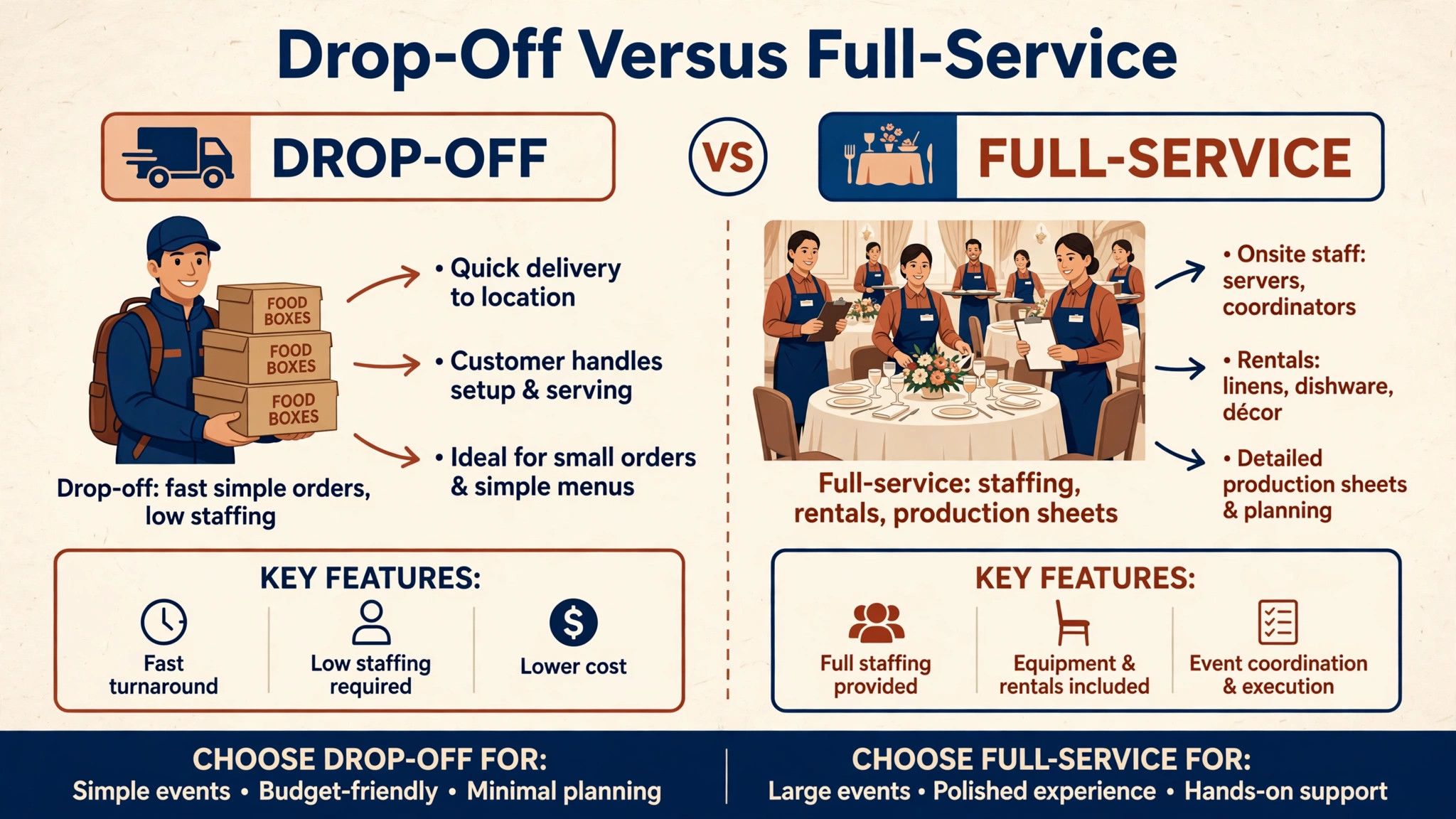
Catering work has two very different shapes. A drop-off caterer runs high volume, tight margins and simple orders that must move fast. A full-service events firm runs fewer events with staffing, rentals, timelines and kitchen production that must stay in sync for hours. This guide compares eleven tools against both shapes, so a reader can find the tool that fits the business they actually run rather than the business a vendor imagines.
Prices below are starting figures checked at writing time, and several vendors price by quote or by user count. Confirm the current price on the vendor page before you buy, and price every finalist at your real event volume and team size. A price checked today can still move before renewal, so treat the second-year figure as the real budget.
Why the best event management software for catering businesses Must Fit the Kitchen
Catering software lives or dies in the kitchen, not on the sales page. A proposal tool that cannot scale a recipe, cost a menu, or generate a prep sheet will force the kitchen back to spreadsheets, and the moment staff keep two systems, the software has already failed. Menu building, recipe costing, production sheets and packing lists are catering features, not extras, and a general event tool that lacks them is a booking tool wearing a catering label.
The second test is the event day itself. Staff schedules, delivery routes, rental tracking and timeline changes all move at once, and a tool that cannot show who is where, with what equipment, at what time will be abandoned mid-service. Full-service firms feel this hardest, because a missed rental return or a short-staffed station shows up in front of guests, not in a report.
The third test is money. Catering margins are thin, and a quoting error of a few percent can erase the profit on an event. Tools with real food costing, margin reporting and deposit tracking protect the quote, while tools that only invoice after the event leave the most important number to guesswork. Judge every tool below by whether it protects margin before the event, not just by whether it bills after it.
Choosing by Business Shape First
Start by naming your shape honestly. A drop-off caterer needs fast ordering, simple proposals, delivery tracking and clean invoicing, and will rarely use banquet event orders or staffing modules. A full-service firm needs all of those plus production detail, staff scheduling, rentals and timeline management. Buying full-service depth for a drop-off business wastes money, while buying drop-off simplicity for a full-service firm creates chaos on event day.
Next, count events and users together. Some tools charge per location with unlimited users, which suits a venue with a large team, while others charge per user, which punishes a growing staff. A caterer with three coordinators and ten event staff faces a very different bill on a per-user tool than on a per-location tool, so model the price at the team you actually staff, not the team on the pricing page illustration.
Finally, test the tool on a real event from inquiry to final invoice. Use a genuine menu, a genuine guest count and a genuine change midweek, because catering always changes midweek. A trial that survives a menu swap, a guest count increase and a staff callout tells you more than a demo with perfect data ever will.
The Eleven Tools at a Glance
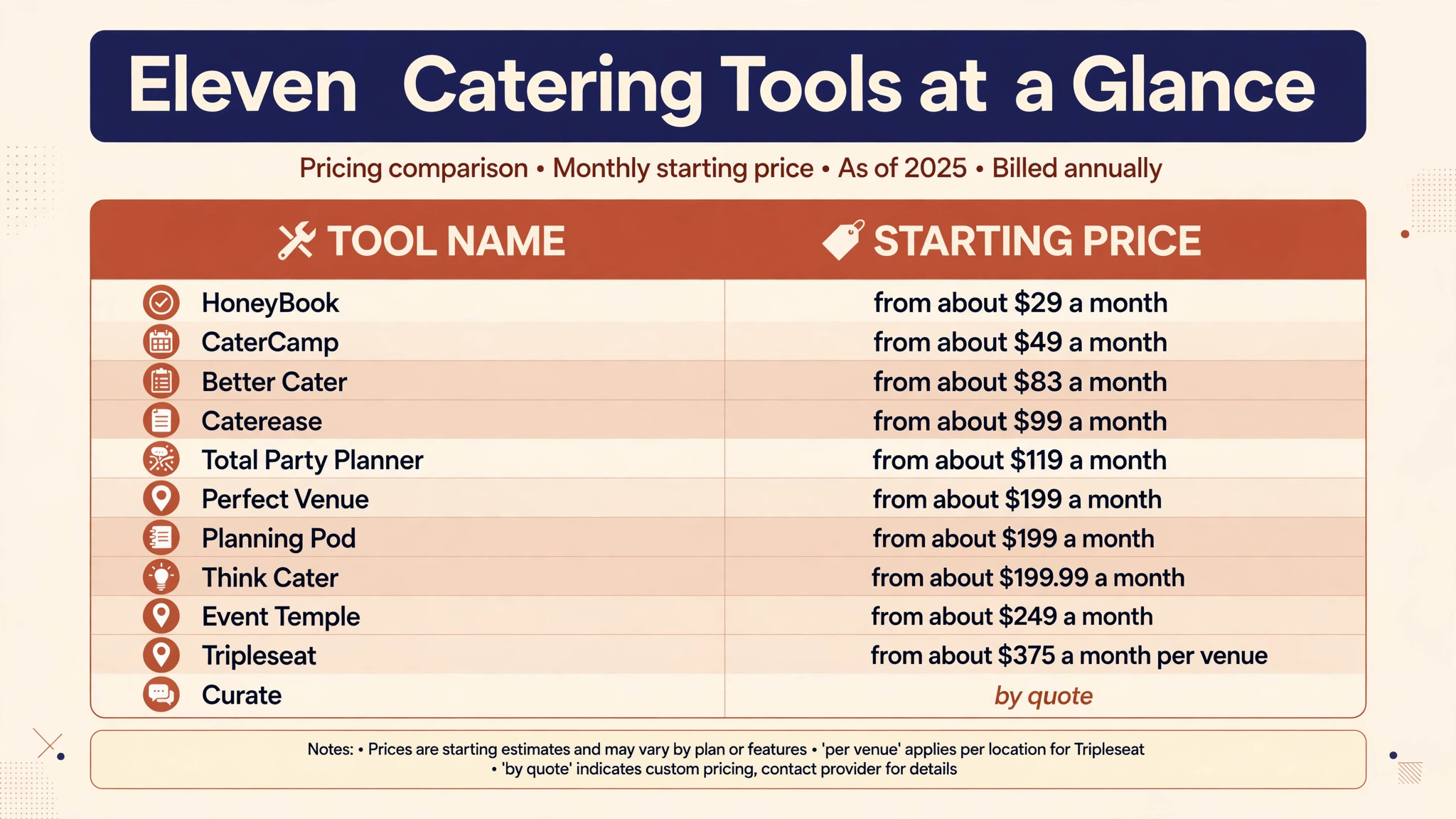
| Tool | Starting price | Best for |
|---|---|---|
| Caterease | From about 99 dollars a month | Catering-first production depth |
| Tripleseat | From about 375 dollars a month per venue | Venue-attached catering sales |
| Total Party Planner | From about 119 dollars a month | Full-service caterers on one platform |
| Perfect Venue | From about 199 dollars a month billed annually | Venues and caterers selling events fast |
| Planning Pod | From about 199 dollars a month | Banquet and wedding venues |
| HoneyBook | From about 29 dollars a month | Solo operators and tiny teams |
| Event Temple | From about 249 dollars a month | Hotels and multi-property groups |
| Better Cater | From about 83 dollars a month billed annually | Small catering teams on a budget |
| CaterCamp | From about 49 dollars a month | Drop-off and wedding caterers |
| Think Cater | From about 199.99 dollars a month | Caterers who need automated costing |
| Curate | By quote | Visual proposals for weddings and florists |
Read the table as a shortlist, not a ranking. The cheapest tool suits a small drop-off operation, while the most expensive suits a venue group with complex sales. Pick three finalists from the table, then read their full sections before deciding.
Each System in Depth
Caterease
Caterease is the pick for catering-first production depth. Express starts at about 99 dollars a month, Standard at about 149 dollars and Professional at about 199 dollars when billed annually, with additional users and optional modules priced separately and a one-time setup fee per user. The platform covers catering event booking, menu building, recipe scaling, staff scheduling and payments, with the kitchen detail that general event tools lack.
That depth is why established caterers stay with it. Production sheets, packing lists and menu costing keep the kitchen and the quote in agreement, and the system handles the multi-event weeks that break simpler tools. The trade-off is price structure, because per-user fees and module charges add up as the team grows. Choose Caterease if kitchen production is the core of the business, and skip it if the business only needs booking and invoicing.
Tripleseat
Tripleseat is the pick for venue-attached catering sales. Pricing is reported from about 375 dollars a month per venue, with add-ons for floor plans, direct booking and hotel tools priced separately, and unlimited users on the base package. The platform covers lead capture, branded proposals, contracts with deposit schedules and banquet event orders, with a sales pipeline that venues rely on.
The strength is the booking workflow from inquiry to signed proposal and deposit, especially for restaurants, breweries and event spaces that also cater. The weakness for pure caterers is production depth, because recipe costing and deep prep engineering are thinner here than in catering-first tools. Choose Tripleseat if the business sells events from a venue, and pair it with a costing tool if kitchen margins need tighter control.
Total Party Planner
Total Party Planner is the pick for full-service caterers who want one platform. The Nibble plan starts at about 119 dollars a month for one user, with extra users priced per month, and higher plans adding team and production features. The system bundles customer management, recipe costing, banquet event orders and invoicing, which lets small and mid-size caterers avoid buying four separate systems.
The integrated costing module is unusual at this price and directly protects quoted margins, because menu costs flow into proposals instead of living in a spreadsheet. The trade-off is a learning curve, since the depth that makes it powerful also makes setup slower than a simple booking tool. Choose Total Party Planner if one system for the whole business matters more than the fastest possible setup.
Perfect Venue
Perfect Venue is the pick for venues and caterers who want to move from inquiry to signed proposal and deposit fast. Professional costs about 239 dollars a month, or about 199 dollars a month when billed annually, while Premium costs about 339 dollars a month, or about 299 dollars a month billed annually. Pricing is per location with unlimited users, which suits teams that add staff without adding subscription cost.
The platform covers branded inquiry forms, proposals with menu search, e-signatures, deposits, banquet event orders and a shared calendar, with reporting on leads, response times and payments. The gap for pure caterers is production depth, because the system does not handle online drop-off ordering or delivery routing. Choose Perfect Venue if event sales speed is the bottleneck, and look elsewhere if delivery operations dominate the week.
Planning Pod
Planning Pod is the pick for banquet and wedding venues that want many tools in one system. Typical single-location pricing runs from about 199 dollars to about 319 dollars a month, based on active event volume, with integrated payments and instalment options. The platform bundles venue and catering management, customer records, contracts, payments and event insurance in one place, with tour scheduling for venues that sell on site visits.
That breadth suits independent venues running weddings, banquets and club events, because one login covers sales, operations and documents. The trade-off is that catering production features are less deep than in catering-first tools, so high-volume production caterers may still need a costing companion. Choose Planning Pod if the business is venue-led with catering attached, and test the event volume pricing carefully before committing.
HoneyBook
HoneyBook is the pick for solo operators and tiny teams booking events on the side. Pricing starts at about 29 dollars a month, and the platform covers proposals, contracts, scheduling, invoicing and payments in one simple flow. For a caterer just starting out, or a small team that also runs another business, that low entry price and fast setup are genuine advantages.
The limit is depth. HoneyBook is a general client management tool, not a catering production system, so recipe costing, prep sheets, staffing and banquet event orders are missing or manual. A growing caterer will outgrow it once event volume or kitchen complexity rises. Choose HoneyBook as a starting point for a tiny operation, and plan to move to a catering-first tool when production work starts living in spreadsheets.
Event Temple
Event Temple is the pick for hotels and multi-property groups that need a sales pipeline across properties. Starting pricing is about 249 dollars a month, with an annual minimum, and the platform covers group bookings, e-proposals, digital invoicing and property management integrations. For a hotel group selling events across several sites, that chain view is the point.
The trade-off for an independent caterer is fit and price. Event Temple is built for hotel sales teams, so catering production, menu costing and kitchen workflows are not its strength, and the starting price exceeds what a small caterer needs to pay. Choose Event Temple if the business is hotel-led and multi-property, and skip it if the business is a single independent catering operation.
Better Cater
Better Cater is the pick for small catering teams on a budget. Pricing is about 99 dollars a month, or about 83 dollars a month when billed annually, for one user, with food costing and banquet event order templates included. The platform suits teams that need real costing and event documents without paying for a large venue system.
The honest limit is scale and payments. Online payments are still maturing on the platform, and larger teams will feel the per-user structure as staff are added. For a small team doing steady catering volume with tight margins, though, the costing depth at this price is hard to match. Choose Better Cater if food costing is the priority and the team is small, and confirm payment handling during the trial.
CaterCamp
CaterCamp is the pick for drop-off and wedding caterers on a tight budget. Pricing starts from about 49 dollars a month, which makes it one of the lowest entry points in this guide. The platform covers the essentials for smaller caterers, including event management, proposals and order tracking, without the weight of a venue sales system.
The trade-off is depth at scale. High-volume full-service operations will find production, staffing and rental features thinner than in the catering-first leaders, and the smaller vendor footprint means fewer integrations. Choose CaterCamp if the business is small, drop-off heavy and price sensitive, and upgrade when event complexity starts forcing workarounds.
Think Cater
Think Cater is the pick for caterers who want automated recipe costing and prep sheets. Pricing starts from about 199.99 dollars a month, and the platform focuses on turning menus into costed recipes, prep lists and event documents automatically. For caterers whose quotes live or die on food cost accuracy, that automation protects margin on every event.
The limit is breadth. Think Cater is stronger on costing and production than on venue sales, marketing or multi-property management, so venue-led businesses may need a second tool for booking flow. Choose Think Cater if costing accuracy is the bottleneck and the kitchen drives the business, and test the proposal flow during the trial to confirm it fits client expectations.
Curate
Curate is the pick for visual proposals in weddings, floristry and high-end events. Pricing is by quote across three tiers, and the platform covers visual client-facing proposals, recipes and purchase orders on higher plans, with payments handled through a connected processor. For event professionals whose clients buy on presentation, the visual proposal is the selling tool itself.
The trade-off is price transparency and production breadth. Quote-only pricing makes comparison slower, and pure high-volume caterers may find the visual focus less useful than costing depth. Choose Curate if proposals win the work and the business serves weddings or design-led events, and get a written quote at real event volume before deciding.
Best Pick by Catering Style
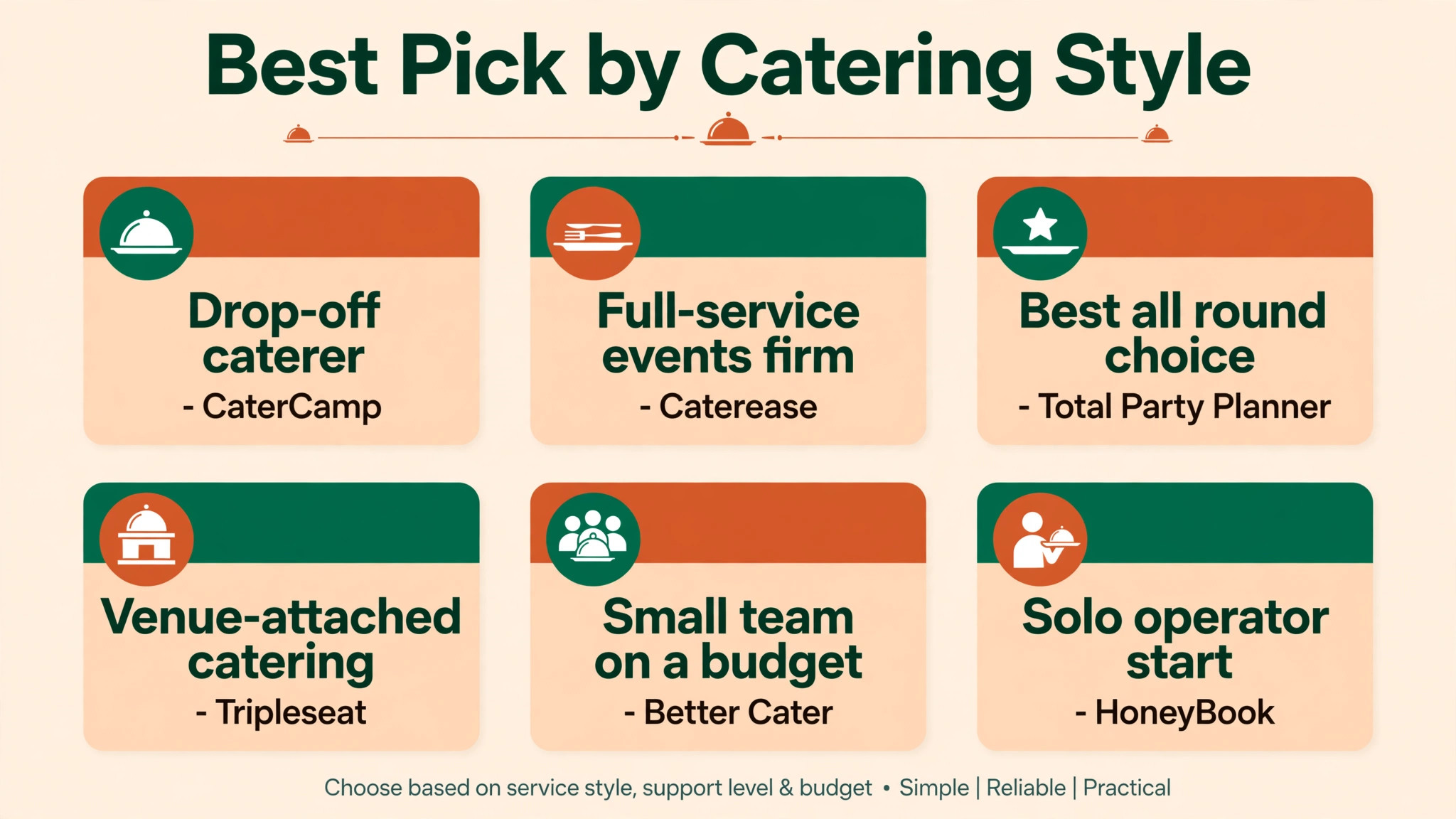
| Job | Best pick | Why it wins for that job |
|---|---|---|
| Drop-off caterer | CaterCamp | Lowest entry price with fast simple orders |
| Full-service events firm | Caterease | Deepest production, staffing and menu control |
| Best all round choice | Total Party Planner | Costing, events and invoicing in one platform |
| Venue-attached catering | Tripleseat | Strongest booking and proposal pipeline |
| Small team on a budget | Better Cater | Real costing at a small team price |
| Solo operator start | HoneyBook | Cheapest fast start for tiny teams |
Use this table to match the tool to the job, because the best overall tool is not always the best tool for a specific catering business. A drop-off caterer and a full-service events firm run different operations, and the table points each one to the tool built for that exact shape. For the best event management software for catering businesses, that shape match matters more than any single feature.
What to Test on a Trial Week
A trial should mirror a real catering week, not a quiet demo. Start with an inquiry that turns into a proposal, then change the guest count, swap a menu item, and add a last-minute staff callout. A tool that handles all four changes without breaking the quote or the prep sheet has earned its place. A tool that needs a workaround for any of them will need that workaround every week, and workarounds are where errors enter.
Test payments the same way. Take a deposit, send a final balance, and process a refund for a cancelled item, then check that the books match at each step. Catering money moves in stages, and a tool that only handles a single invoice will struggle with the deposit and balance rhythm that clients expect. For the best event management software for catering businesses, payment stages must work as smoothly as the proposal itself.
Finally, test the kitchen handoff. Print or share the prep sheet, the packing list and the delivery schedule, and ask the kitchen lead whether anything is missing. If the kitchen still needs a spreadsheet to fill the gaps, the tool has not replaced the old workflow, it has only added a step to it. A trial week that ends with the kitchen trusting the system is a trial week that justifies the subscription.
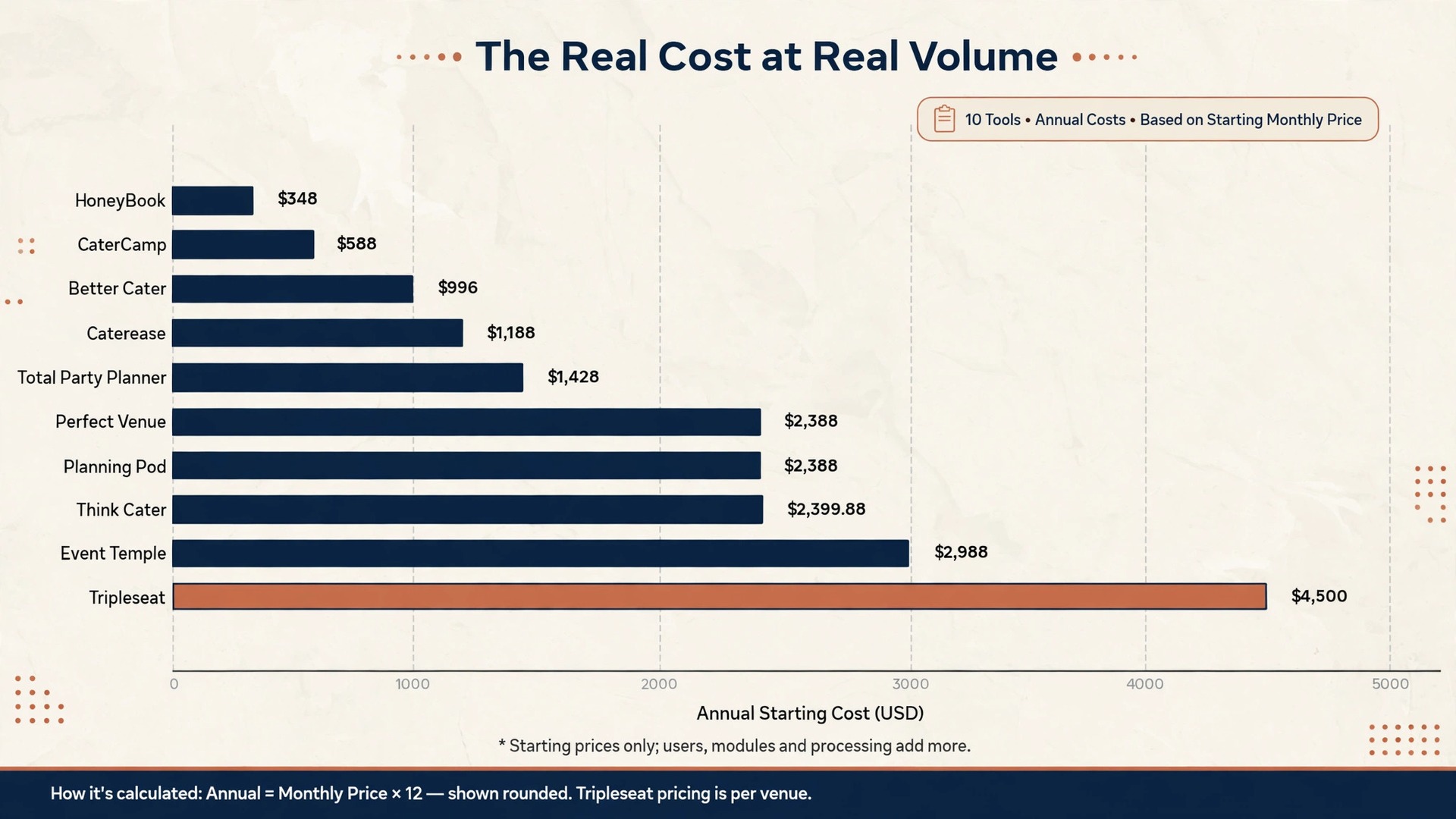
The Real Cost at Real Volume
The headline price hides the second year. Per-user fees, setup charges, payment processing and module costs all sit on top of the subscription, and the total at a realistic team size is what a caterer actually pays. A per-location tool that looks expensive for one user becomes cheap for a team of eight, while a per-user tool that looks cheap for one coordinator becomes expensive when event staff need access too.
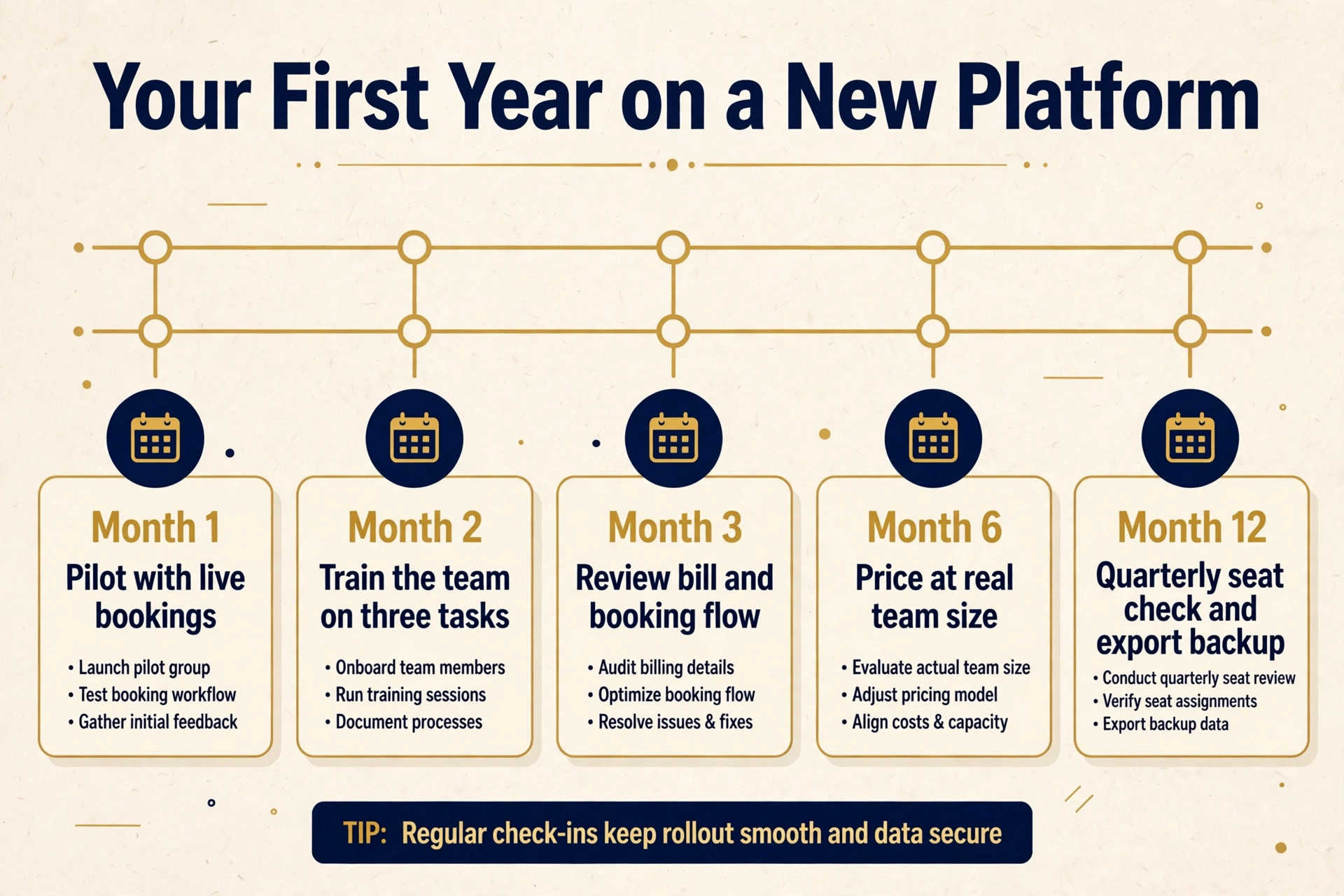
Model the bill at three points before you buy. Price the tool for today, for the team you will staff in twelve months, and for a peak month with extra event staff. A tool that stays fair across all three points is a safer long-term choice than a tool that only looks cheap at launch. Growth is the point of a catering business, so price for it rather than for the quietest month.
Payment processing deserves its own line in the model. Card percentages and per-transaction fees apply to every deposit and final balance, and on high-value events those fees dwarf the subscription. Check whether the tool passes processing costs through, adds its own margin, or offers bank payment options that cut the rate. A small processing difference, multiplied across a year of events, can exceed the entire software bill.
Moving Over Without Losing an Event
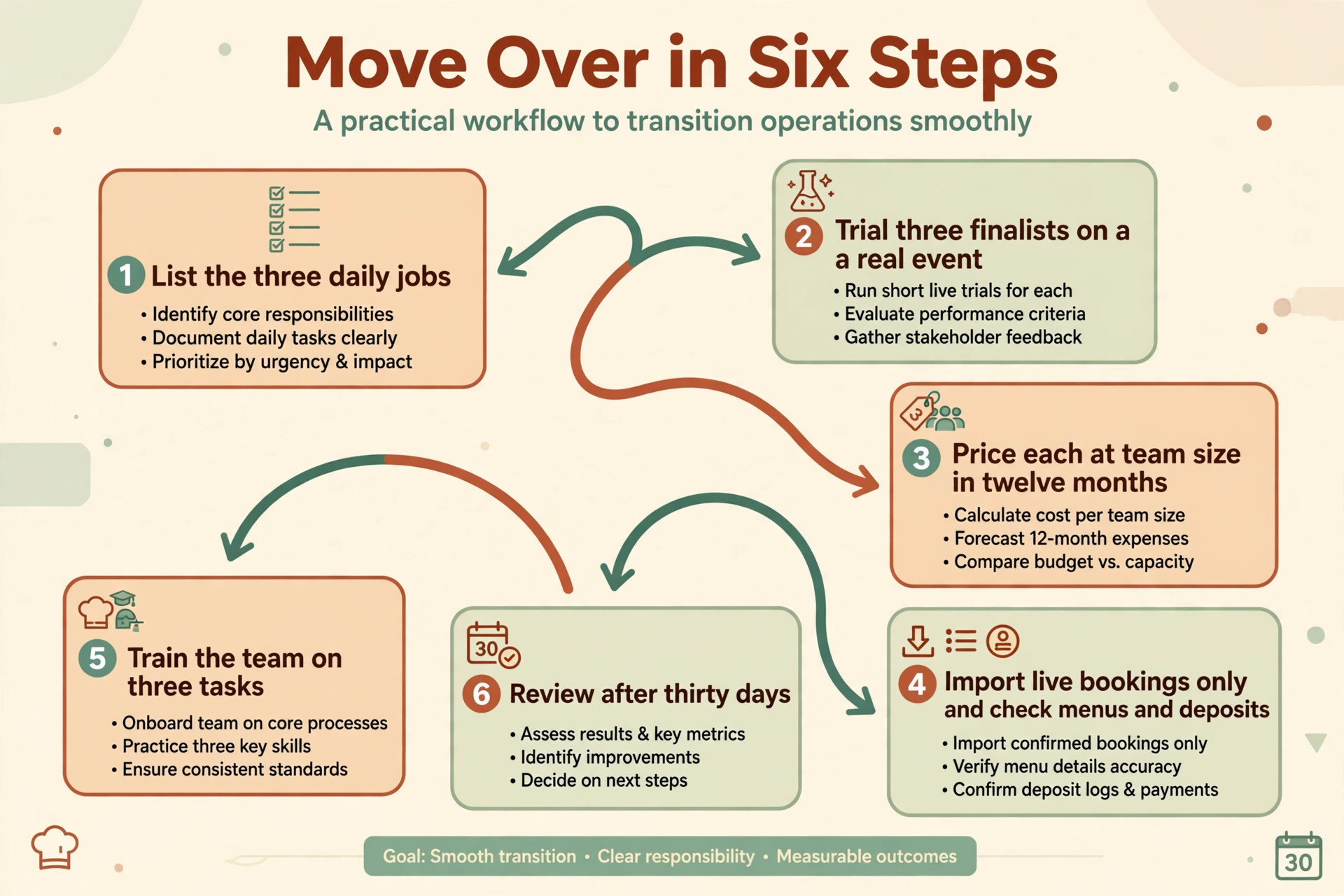
Switching tools fails most often from rushing, not from choosing badly. A short, careful workflow protects bookings, menus and deposits during the change. Follow these steps in order, and do not skip the trial, because the trial is where most problems reveal themselves cheaply.
1. List the three daily jobs the new tool must handle, and write down how each job works today. 2. Pick three finalists from this guide, and run each one through a real event from inquiry to final invoice. 3. Price each finalist at your team size in twelve months, including users, modules and processing. 4. Import only live bookings for the pilot, and check that menus, deposits and balances match the old system. 5. Train the team on three tasks only, then expand training once those three habits feel automatic. 6. Review the bill, the booking flow and team feedback after thirty days, and fix the setup before blaming the tool.
Event Budget Traps to Avoid
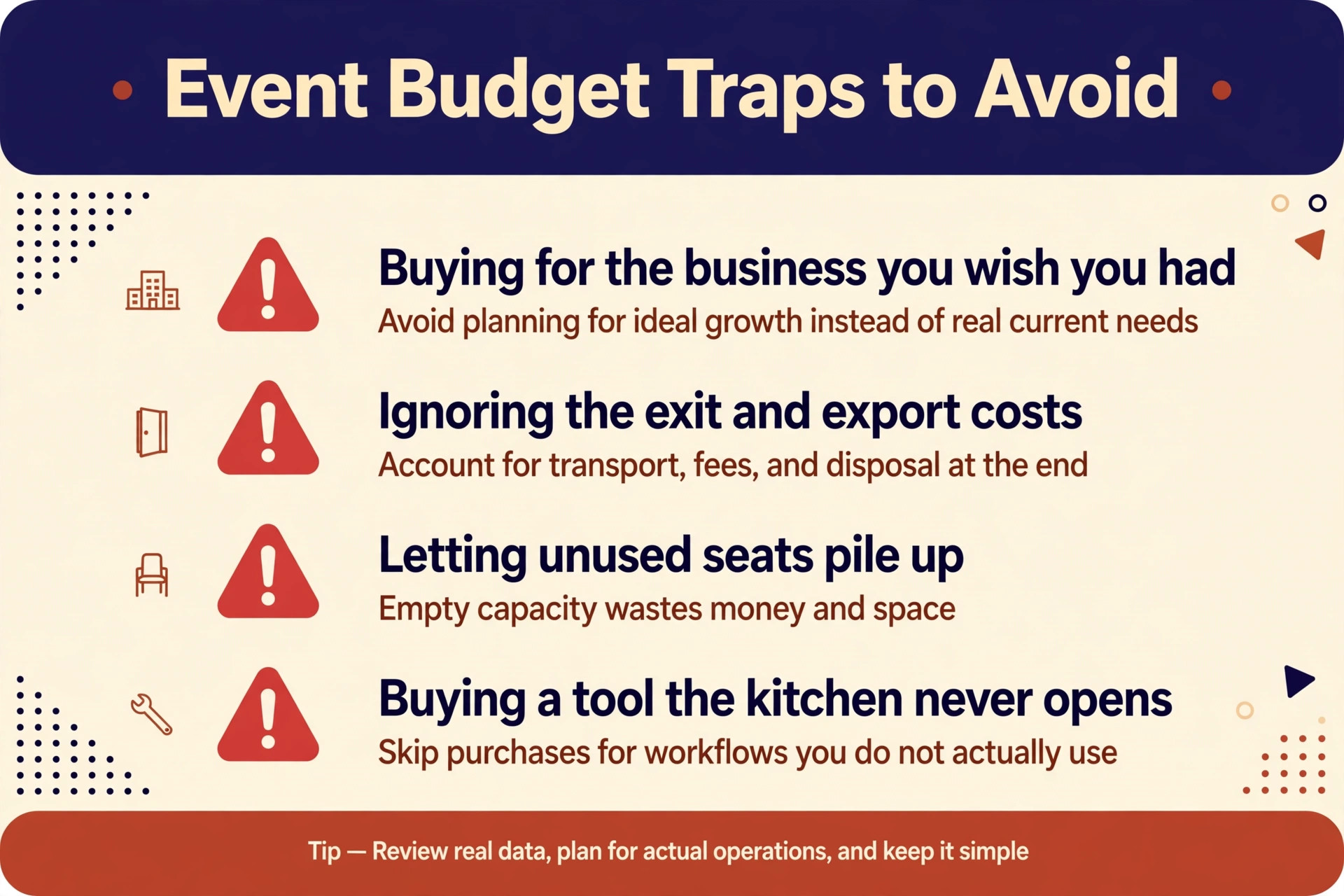
The most common mistake is buying for the business you wish you had, instead of the business you actually run. A drop-off caterer does not need staffing modules and rental tracking, and a full-service firm should not run production on a booking tool built for venues. Buy for the next twelve months, not for a future that may never arrive, and upgrade when volume demands it.
The second mistake is ignoring the exit. A tool that holds menus, client records and booking history hostage, charges heavily to export, or breaks integrations on cancellation will cost far more at exit than it saved at entry. Export menus, client lists and booking history monthly, keep a copy outside the system, and know the cancellation terms before you sign.
The third mistake is letting seats pile up. Event staff join for a season, coordinators move on, and seasonal workers finish, yet their paid seats often stay active for months. A quarterly seat check takes half an hour and routinely cuts a noticeable share off the annual bill, because unused seats are the quietest waste in any subscription budget.
A fourth mistake is buying a tool the kitchen never opens. Sales teams choose software on proposal beauty, while kitchen teams live on prep sheets and packing lists, and a tool that pleases one group while frustrating the other will be half-used within a month. Bring the kitchen lead into the trial, give that person veto power over production features, and only buy a tool both sides trust. Half-used software costs the full subscription while delivering half the value, and that gap grows with every event the kitchen works around the system.
The Verdict for Caterers
Start with business shape, then the fee math, then the trial. For most catering businesses in this guide, Caterease is the safest first trial for full-service work, because production depth protects margin where it matters most. A drop-off caterer should start with CaterCamp or Better Cater instead, because a low price and fast orders beat production depth that the business never uses. Whichever shape you run, let the trial week include a real menu change and a real payment, since those two moments reveal more than any sales demo.
The best event management software for catering businesses decision does not need to be perfect, it needs to be tested. Run a real event through the finalist, price the tool at next year’s team size, and judge it on whether the kitchen, the staff schedule and the quote all stay in agreement. A tool that passes that test is worth keeping, even if a rival looks better on a pricing page, because event day is the test that actually matters.
For a final check, compare the shortlist against the best event management software for catering businesses on total cost at your real event volume before you pay for a year. A shortlist built around the best event management software for catering businesses should still be tested on a live event, because a pricing page cannot show how a tool behaves when a menu changes midweek.
More Reading on Stratilyze
Readers comparing catering tools usually check the neighbouring guides next. The guide to AI tools for catering businesses covers a closely related decision, the guide to AI tools for event planners explains a workflow that pairs well with this choice, and the guide to AI for catering quote estimates helps with the wider setup around it.
Frequently Asked Questions
Do I need catering-specific software or will a general event tool work
A general event tool works when the business mainly books rooms and sells tickets, because booking flow is its strength. A catering business needs menu costing, recipe scaling, prep sheets and staffing, and a general tool forces those jobs into spreadsheets. Once production work lives outside the system, the software has stopped being the system of record.
How much should a small caterer budget for software
A small caterer should budget for the subscription plus payment processing and any per-user fees, modelled at real team size. Entry catering tools start near 49 dollars a month, mid-range tools cluster near 99 to 199 dollars a month, and venue platforms climb well above that. The honest budget is the second-year total, not the first-month promotion. When comparing the best event management software for catering businesses, that second-year total is the number that separates a bargain from a burden.
Is per-user or per-location pricing better for caterers
Per-location pricing suits teams with many staff, because adding an event worker costs nothing extra. Per-user pricing suits a tiny team with one or two coordinators, because the bill follows headcount. The right choice depends on how many people actually log in during a busy week, not on the team chart.
Can one tool handle both drop-off and full-service work
Yes, when the tool covers both simple ordering and full production, staffing and rentals in one system. Catering-first platforms handle that range best, while drop-off-only tools strain under full-service complexity. Test both order types during the trial, because a tool that handles one shape well may still fail the other.
Menus, client records and booking history usually remain exportable for a period after cancellation, but terms vary by vendor. Export menus, recipes, client lists and live bookings before cancelling, and keep a copy outside the system. A tool with easy export is worth a small premium, because rebuilding a menu library from scratch costs weeks.
Should a caterer pay for recipe costing separately
A caterer should not need a separate costing tool when the chosen platform includes recipe scaling and margin reporting. Separate costing only makes sense when the main tool is venue-led and production lives elsewhere. In that case, price both tools together, because the combined bill is the real comparison against a catering-first platform.