
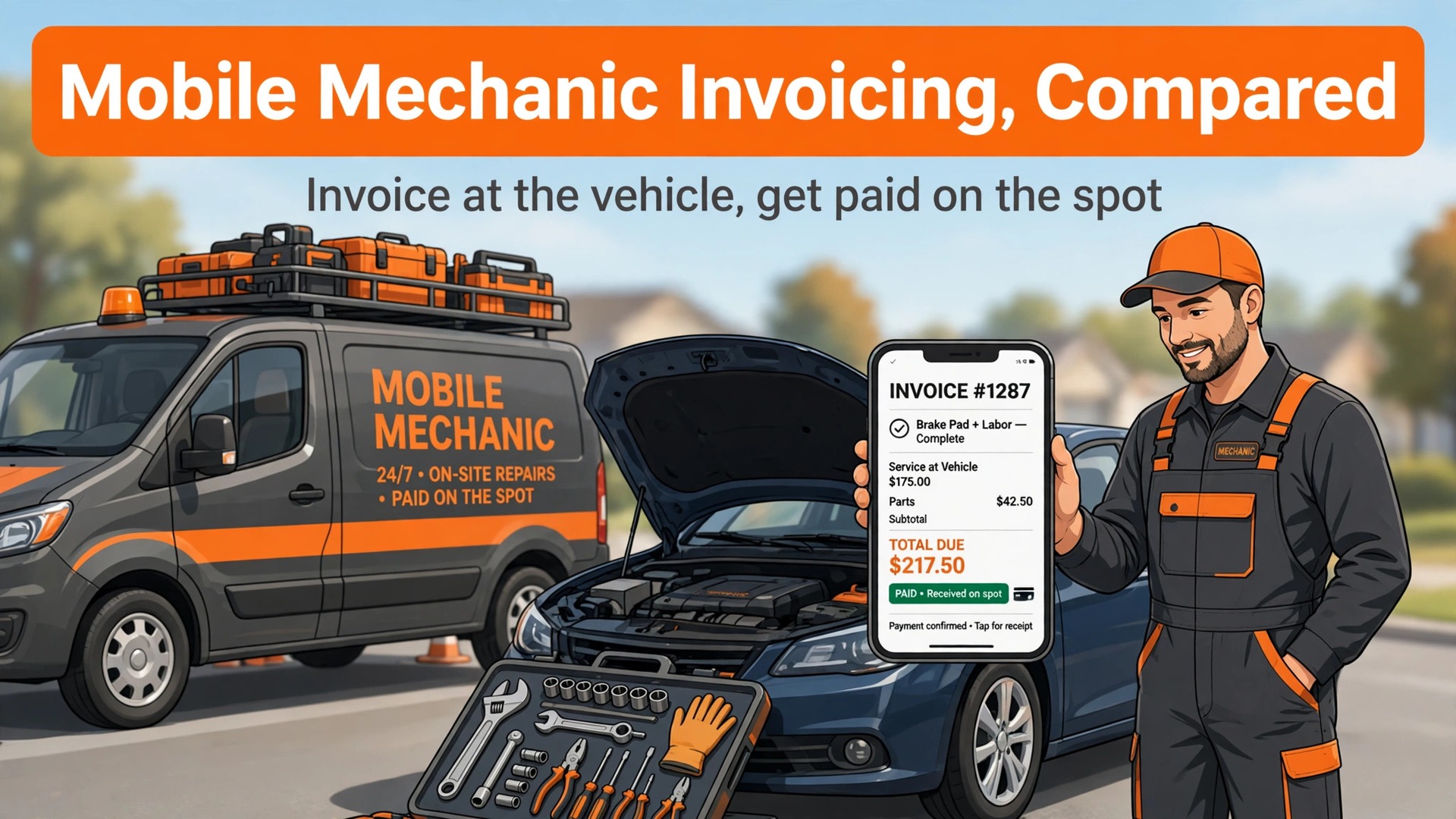
A solo van operator should expect to pay roughly $30 to $130 a month for software, yet many mechanics still invoice from notebooks and lose hours each week to paperwork that a phone could finish on the driveway. That gap between cost and habit is the starting point for this guide to the best invoicing software for mobile mechanics, where the winner is decided by on-site payment, parts lines and mileage, not by accounting depth alone.
Mobile work punishes slow invoicing more than shop work does. There is no front counter, no second chance to catch the customer before they leave, and no desk where the paperwork waits politely. If the invoice is not written, sent and paid before the van pulls away, it joins a pile that gets chased late, disputed often and sometimes never paid.
The eight systems below were judged on the same tests. Can an invoice be built at the vehicle with parts and labour on separate lines. Can the customer pay on the spot by card. Does mileage, time and vehicle history survive into the record. And does the bill stay fair for one van before it ever has to serve a fleet.
Why the Best Invoicing Software for Mobile Mechanics Starts at the Vehicle
An invoice written hours later is a worse invoice. Details blur, parts get forgotten, and the customer who happily approved the work in person becomes a stranger questioning a line item by email. Software that builds the invoice during the job, with photos, parts and labour captured as they happen, removes the most common cause of slow payment.
Parts and labour must sit on separate lines, because customers accept a parts bill they can check and a labour bill they can understand, but resist a single lump sum they cannot. A system that forces parts and labour into one line will cost goodwill on every job, while a system that separates them, shows tax plainly and carries the vehicle record forward will get paid faster.
Mileage and time are the quiet profit leaks of mobile work. A van that drives forty miles between jobs without logging it is giving away fuel, time and wear for free. The better systems log mileage and time against the job automatically, so the invoice reflects the real cost of showing up, not just the hour under the bonnet.
Trust is the currency of mobile work, because the customer invites a stranger to work on an expensive vehicle at their home. A professional invoice, with the vehicle named, the work described plainly and the price broken down, builds that trust instantly. A vague handwritten note, however honest the work behind it, invites doubt and delay.
Cash flow is the second reason invoicing speed matters so much. A mobile mechanic who invoices weekly instead of daily is effectively lending customers money interest-free, while still paying for fuel and parts immediately. Daily invoicing, paid on the spot, turns completed work into money in the bank within days rather than weeks.
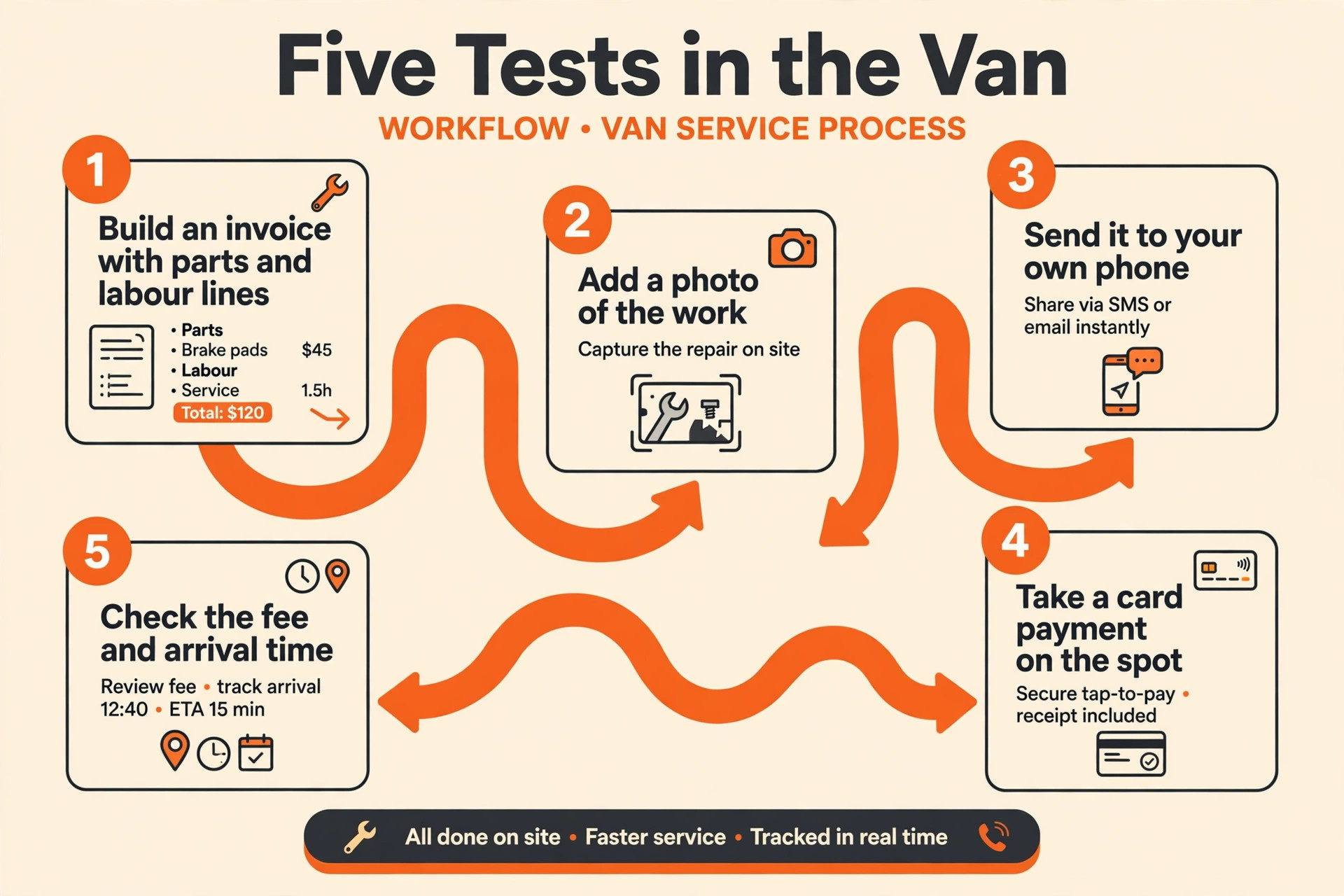
Five Tests to Run in the Van Before You Pay
Test the invoice at a real vehicle, not at a desk. Build an invoice with three parts lines, two labour lines and a call-out charge, add a photo of the work, and send it to your own phone. If any step needs a laptop, a second app or a return to the office, the system has failed the mobile test.
Then test payment on the spot. Ask a friend to pay the test invoice by card on your phone, and check how long the money takes to arrive and what fee was taken. A system that invoices beautifully but pays slowly is only half a system.
- Parts and labour on separate lines, with tax shown plainly on every invoice.
- Card payment on the spot, from the same phone that built the invoice.
- Vehicle history that carries forward, so repeat work needs no retyping.
- Mileage and time logged against the job, not guessed at month end.
Prices and Best Fits at a Glance
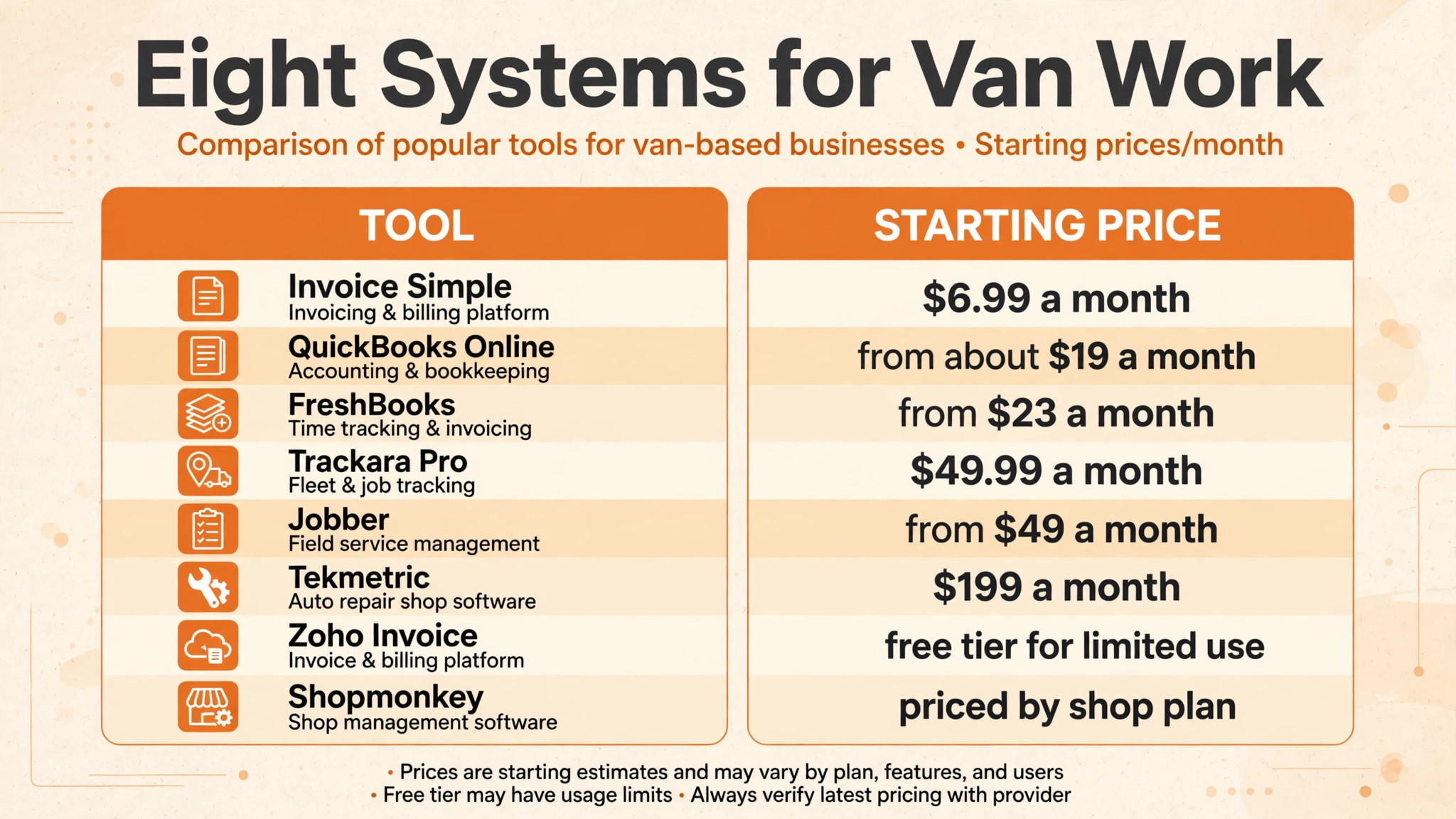
Use the table to pick three finalists, then run each one through a real week of jobs. A pricing page cannot show whether an invoice feels fast on a driveway in the rain.
| Tool | Starting price | Best for |
|---|---|---|
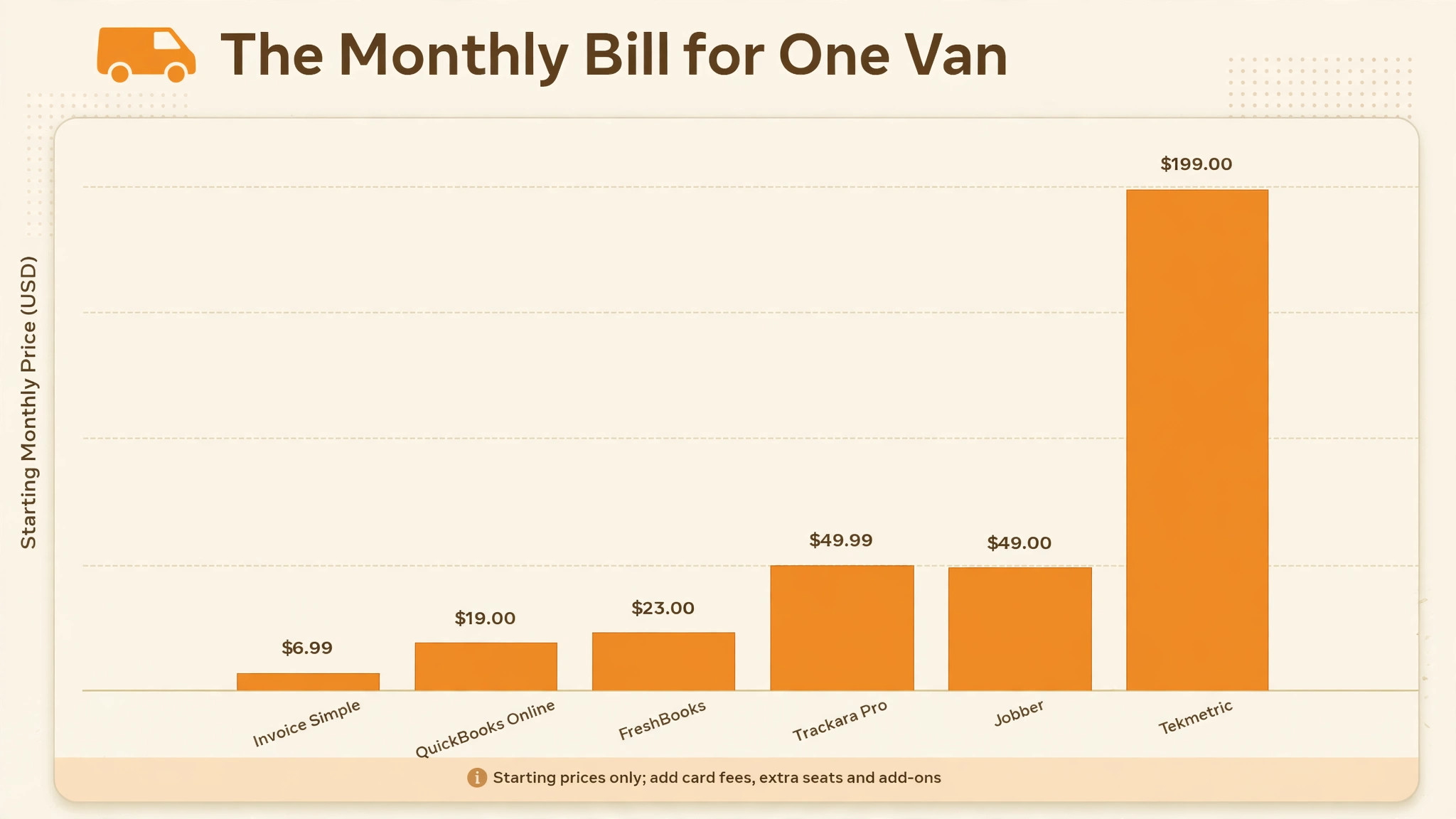
| Trackara Pro | $49.99 a month | mobile mechanics wanting one app for invoicing, work orders and diagnostics |
| FreshBooks | from $23 a month | solo mechanics wanting polished invoices plus light accounting |
| QuickBooks Online | from about $19 a month | mechanics wanting invoicing inside full accounting |
| Zoho Invoice | free tier for limited use | mechanics starting out who need a free invoicing tier |
| Invoice Simple | from $6.99 a month | mechanics who invoice from a phone between jobs |
| Jobber | from $49 a month month to month | mechanics wanting quoting, scheduling and invoicing in one system |
| Tekmetric | from $199 a month | mechanics growing toward a shop with team workflows |
| Shopmonkey | priced by shop plan | repair businesses wanting full shop management depth |
The Eight Systems, Tested Against Van Work
Trackara Pro
Trackara Pro is the pick for mobile mechanics wanting one app for invoicing, work orders and diagnostics. Trackara Pro is built for mobile mechanics specifically, with invoicing, work orders, digital signatures, mileage tracking, time tracking and Bluetooth diagnostics in one phone app that works offline. Its published price is $49.99 a month or $499.99 a year, with no per-client or per-invoice fees, and an extra app login at $15 a month.
The strength is its mobile-first design for van work and its offline mode The limit to test in a trial is its narrower accounting depth next to full bookkeeping platforms When that limit touches daily work, shortlist a rival whose limits sit elsewhere.
FreshBooks
For solo mechanics wanting polished invoices plus light accounting, start with FreshBooks. FreshBooks is built around the invoice, with estimates, time tracking, expenses and online payments in one friendly system, plus accounting reports from the middle plan. Published pricing puts Lite at $23 a month, Plus at $43 a month and Premium at $70 a month, with extra team members at $11 a month each.
What stands out is its polished invoice templates and its automatic payment reminders What to check before paying is its five-client limit on Lite, which most busy mechanics outgrow fast A trial week with real orders shows whether that limit matters for your shop.
QuickBooks Online
QuickBooks Online suits mechanics wanting invoicing inside full accounting best. QuickBooks Online puts invoicing inside a full accounting system, with expense tracking, job costing and reports that an accountant can use directly. Published comparisons put its entry plan from about $19 a month.
The case for it rests on its accounting depth and its wide accountant familiarity The case against it is its steeper learning curve for a mechanic who only needs fast invoices Weigh those two against the work your team actually does each day.
Zoho Invoice
If mechanics starting out who need a free invoicing tier is the job that matters most, Zoho Invoice deserves the first trial. Zoho Invoice offers custom invoice templates, expense tracking and a mobile app, with a free tier for small volumes and paid plans for heavier use. Pricing starts with a free tier for limited use, which suits a mechanic testing whether invoicing software earns its keep.
It earns its place through its free starting point and its clean templates It loses ground where its limited depth on the free tier, which needs a paid plan as volume grows If that weakness never touches your daily jobs, it is a strong buy.
Invoice Simple
Invoice Simple is the pick for mechanics who invoice from a phone between jobs. Invoice Simple is built for fast phone invoicing, with estimates, invoices and receipts on mobile and desktop, and payment collection inside the app. Published pricing puts Essentials at $6.99 a month, Plus at $14.99 a month and Premium at $21.99 a month.
The strength is its speed for building an invoice between jobs The limit to test in a trial is its invoice-volume limits on the cheaper plans, which charge busier mechanics more When that limit touches daily work, shortlist a rival whose limits sit elsewhere.
Jobber
For mechanics wanting quoting, scheduling and invoicing in one system, start with Jobber. Jobber covers quoting, scheduling, invoicing and payments in one field-service system, with a client hub where customers approve quotes and pay invoices themselves. Published pricing puts Core at $49 a month with no commitment or $29 a month billed annually, with extra users at $29 a month each.
What stands out is its quote-to-payment flow in one app What to check before paying is its per-user pricing, which climbs as soon as helpers need access A trial week with real orders shows whether that limit matters for your shop.
Tekmetric
Tekmetric suits mechanics growing toward a shop with team workflows best. Tekmetric adds workflow management, real-time job tracking and team scheduling to invoicing, which suits a mobile mechanic growing into a small shop team. Published comparisons put it from $199 a month.
The case for it rests on its job tracking and team workflow depth The case against it is its shop-level price, which is heavy for a one-van operation Weigh those two against the work your team actually does each day.
Shopmonkey
If repair businesses wanting full shop management depth is the job that matters most, Shopmonkey deserves the first trial. Shopmonkey is the full shop platform, with invoicing, scheduling, parts tracking, digital inspections and customer messaging in one system. Pricing is by shop plan on request, so get a written quote at your team size before comparing it with solo-priced rivals.
It earns its place through its depth across inspections, parts and customer messaging It loses ground where its shop-level cost and setup time, which overshoot a one-van job If that weakness never touches your daily jobs, it is a strong buy.
The Best Pick for One Van, a Small Fleet or a Growing Shop
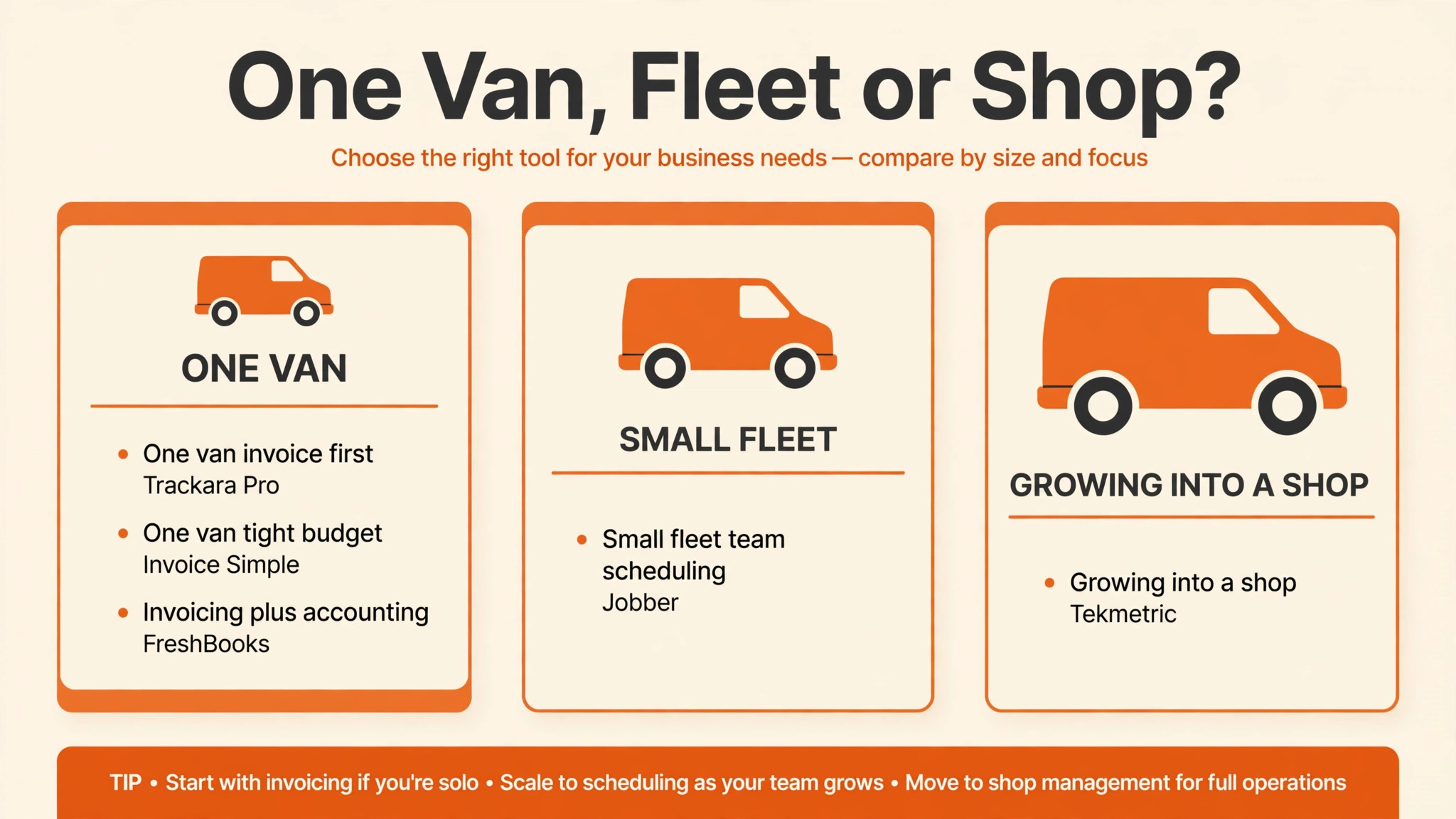
One van, a small fleet and a growing shop need different invoicing tools, even when they fix the same vehicles. The table below matches the best invoicing software for mobile mechanics to the size of the operation, so a solo mechanic does not pay shop prices and a growing team does not outgrow a solo app in six months.
| Job | Best pick | Why it wins for that job |
|---|---|---|
| One van, invoice first | Trackara Pro | Mobile-first invoicing with diagnostics and offline mode |
| One van, tight budget | Invoice Simple | Fast phone invoicing from a low entry price |
| Invoicing plus accounting | FreshBooks | Polished invoices with reports an accountant can use |
| Small fleet, team scheduling | Jobber | Quoting, scheduling and invoicing in one flow |
| Growing into a shop | Tekmetric | Job tracking and team workflows beyond solo invoicing |
If the operation sits between two rows, choose the row for next year’s size. A solo app outgrown in six months costs more in migration and retraining than a slightly larger plan does now.
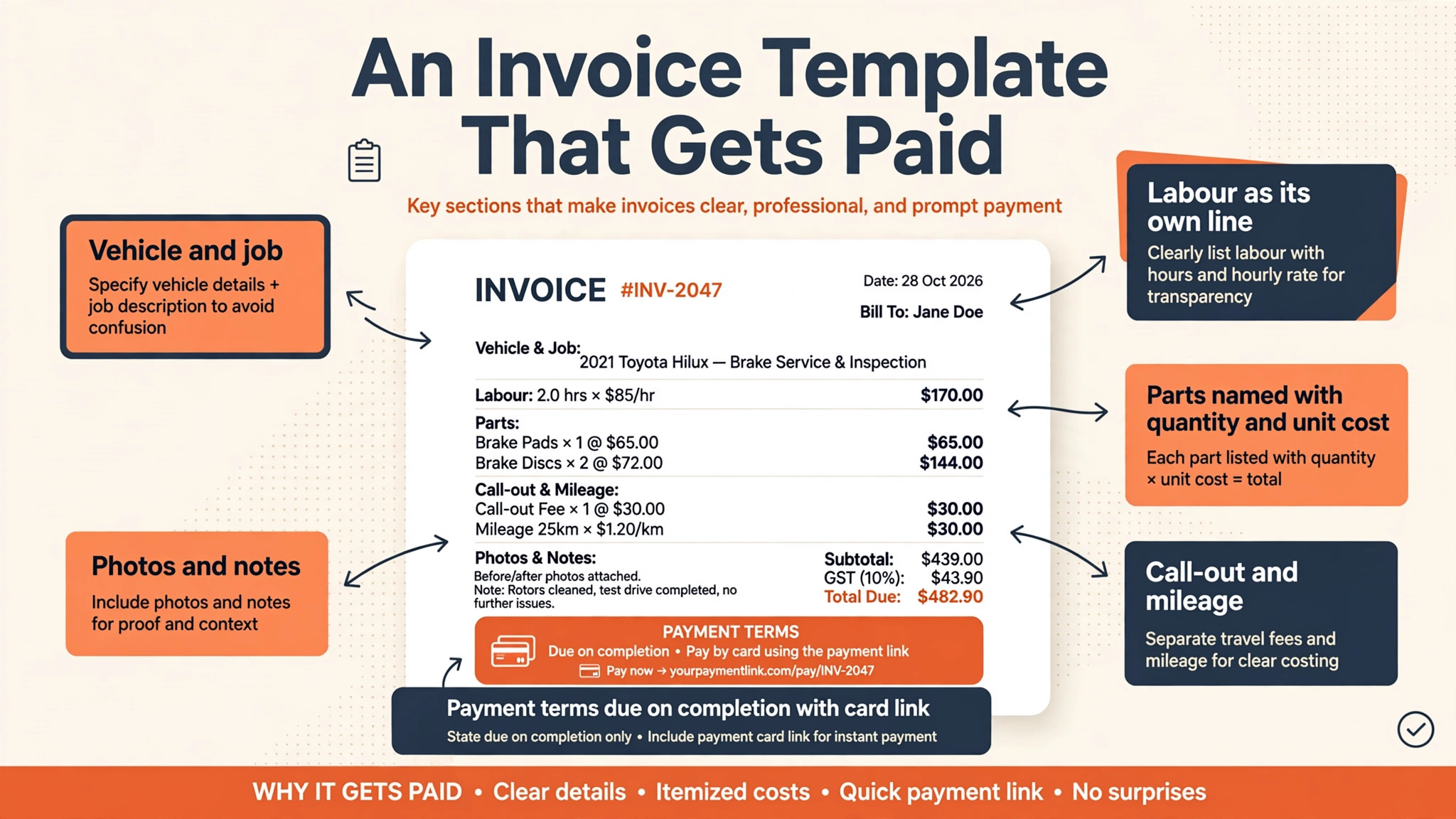
A Parts and Labour Invoice Template That Gets Paid
Most disputed mobile invoices fail on the same three points. Parts and labour are lumped together, the vehicle is not named, and the call-out charge appears as a surprise. The template below fixes all three, and it works in any of the systems above that support separate line types.
| Invoice line | What to write |
|---|---|
| Vehicle and job | Registration, make and model, plus the fault as the customer described it |
| Labour | Hours worked multiplied by the shop labour rate, shown as its own line |
| Parts | Each part named, with quantity and unit cost shown separately |
| Call-out and mileage | Distance and call-out charge agreed before the job started |
| Photos and notes | Before and after photos attached, with any advice for the customer |
| Payment terms | Due on completion, with the card payment link on the invoice itself |
Add a fee table beside the template before choosing a system, because the subscription is only part of what invoicing costs. Card processing, extra seats and payment features all sit on top of the monthly price.
| Fee line | What the published figures show |
|---|---|
| Trackara Pro subscription | $49.99 a month with no per-invoice fees |
| Jobber card processing | 2.9 percent plus 30 cents per card transaction |
| FreshBooks extra seat | $11 a month per extra team member |
| Invoice Simple plans | $6.99 to $21.99 a month by invoice volume tier |
Price the template, not the headline. A system with no per-invoice fees suits a mechanic sending many small invoices, while a system with low subscription but card fees on every job suits fewer, larger jobs better.
The Real Monthly Bill for a One-Van Business
The best invoicing software for mobile mechanics should be judged at real job volume, not at the cheapest tier. A mechanic sending thirty invoices a month faces a different bill from one sending ten, especially where plans limit invoice counts or charge per extra user.
Count every seat that touches an invoice, including a helper who only needs to view jobs and a partner who handles the books. Seats left active after helpers move on are the quietest waste in any subscription, so review them quarterly.
| Cost line | What to count |
|---|---|
| Subscription | The tier that fits real monthly invoice volume |
| Processing | Card fees on every on-site payment |
| Extra seats | Helpers, office help and accountant access |
| Add-ons | Diagnostics tools, scheduling or accounting links |
Model the bill at double the current job count. A system that stays fair at that volume is a safer buy than one that only looks cheap at launch.
Getting Paid Faster Without Chasing Customers
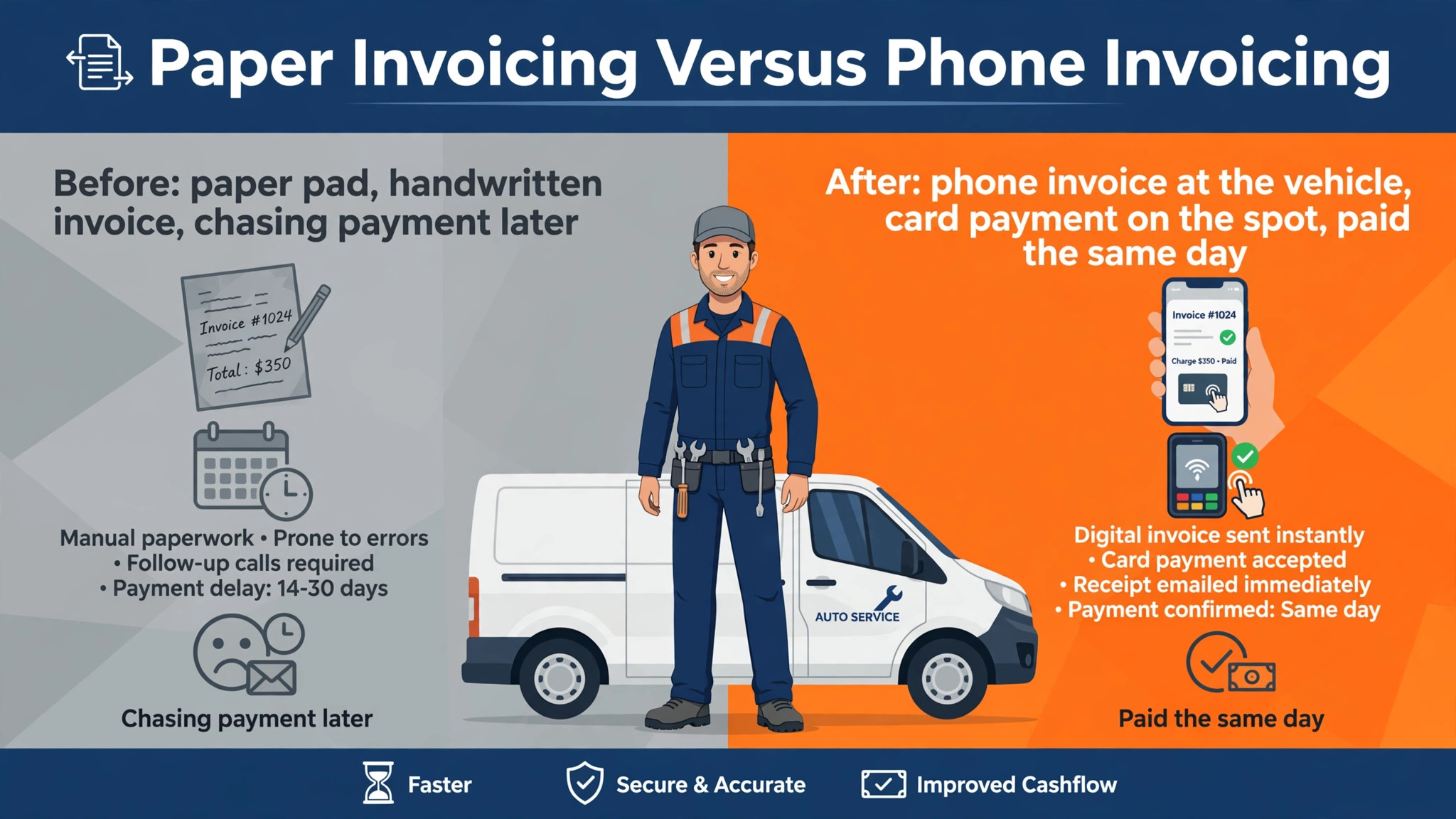
Getting paid faster starts before the job, not after it. A deposit or an approved estimate with a payment link sets the expectation that payment follows completion immediately. Mechanics who agree payment terms in writing before starting work spend far less time chasing money afterwards, and customers are rarely surprised by an invoice they already approved.
Payment reminders should be automatic, polite and short. A reminder sent the day after an unpaid invoice, then again a week later, recovers more money than a single awkward phone call a month later. Systems that send reminders on a schedule the mechanic controls keep cash flowing without damaging the customer relationship.
Recurring fleet work is the steadiest income a mobile mechanic can win. Small businesses with vans, taxis or delivery vehicles need regular servicing, and a system that handles recurring jobs, repeat invoicing and service reminders turns one-off repairs into a monthly income base. Price fleet work as a package, not as a series of surprises.
Estimates that convert cleanly into invoices save time and arguments. When the estimate, the job sheet and the invoice share the same parts and labour lines, the customer sees one consistent story from quote to payment. Systems that force retyping between those stages introduce errors that cost goodwill and money.
Warranty work needs a paper trail that survives months. Recording the parts fitted, the supplier, the date and the mileage at fitting lets the mechanic handle a warranty claim without hunting through old messages. A system that links parts to jobs and vehicles makes that trail automatic.
Reviews are worth asking for at payment time, not weeks later. A customer who has just paid happily on the driveway is the most likely to leave a useful review, and a short message with a review link at that moment captures goodwill while it is fresh. Reviews from real local jobs bring in the next customer more reliably than any advert.
Bookkeeping handoff should be a monthly routine, not a year-end panic. A system that syncs invoices, expenses and payments to accounting software, or exports them cleanly, lets the accountant work from accurate records all year. The mechanic who hands over clean monthly data pays less for accounting and faces fewer tax-time surprises.
Fuel, tolls and parts runs are real job costs that often go unbilled. Logging mileage and parts-collection trips against the job, and showing them plainly where the customer agreed them, turns hidden costs into visible ones. Customers accept costs they agreed in advance and dispute costs that appear without warning.
A job that goes wrong needs a clear record, not a blame game. Photos before and after, notes on the fault found and parts fitted, and messages with the customer all protect the mechanic when a repair is questioned later. Systems that attach that evidence to the job record make disputes shorter and fairer for everyone.
Diagnostic reports are a selling tool as well as a technical record. A customer who sees the fault codes, the readings and the recommended work in plain language understands why the repair costs what it does. Sharing a short diagnostic summary with the invoice builds trust and often wins approval for work the customer might otherwise delay.
Seasonal work patterns affect mobile mechanics too. Winter brings batteries and heating faults, summer brings air conditioning and cooling work, and rainy weeks bring wipers and brakes. A system with year-on-year job history shows the pattern, so parts stock and marketing can be planned around it.
Spare parts pricing needs a rule, not a guess. A consistent markup on parts, shown separately from labour, keeps every invoice defensible and every job profitable. Systems that store parts prices and apply the markup automatically remove the temptation to discount parts under pressure at the driveway.
Insurance and breakdown work follows different rules from private work. Authorisation numbers, approved labour rates and insurer invoice formats all matter, and a system that stores those details per customer type prevents rejected claims. Ask how the system handles insurer jobs before taking on that work at volume.
A second van changes invoicing from a solo habit into a team process. Shared customer records, shared parts prices and one view of outstanding invoices stop two vans from billing the same customer differently. Set the shared price list and invoice template before the second van starts, not after the first billing clash.
Finally, review the invoicing system each quarter against three numbers, average days to payment, share of invoices disputed and share paid on the spot. Those three numbers show whether the system is earning its subscription far more honestly than any feature list ever will.
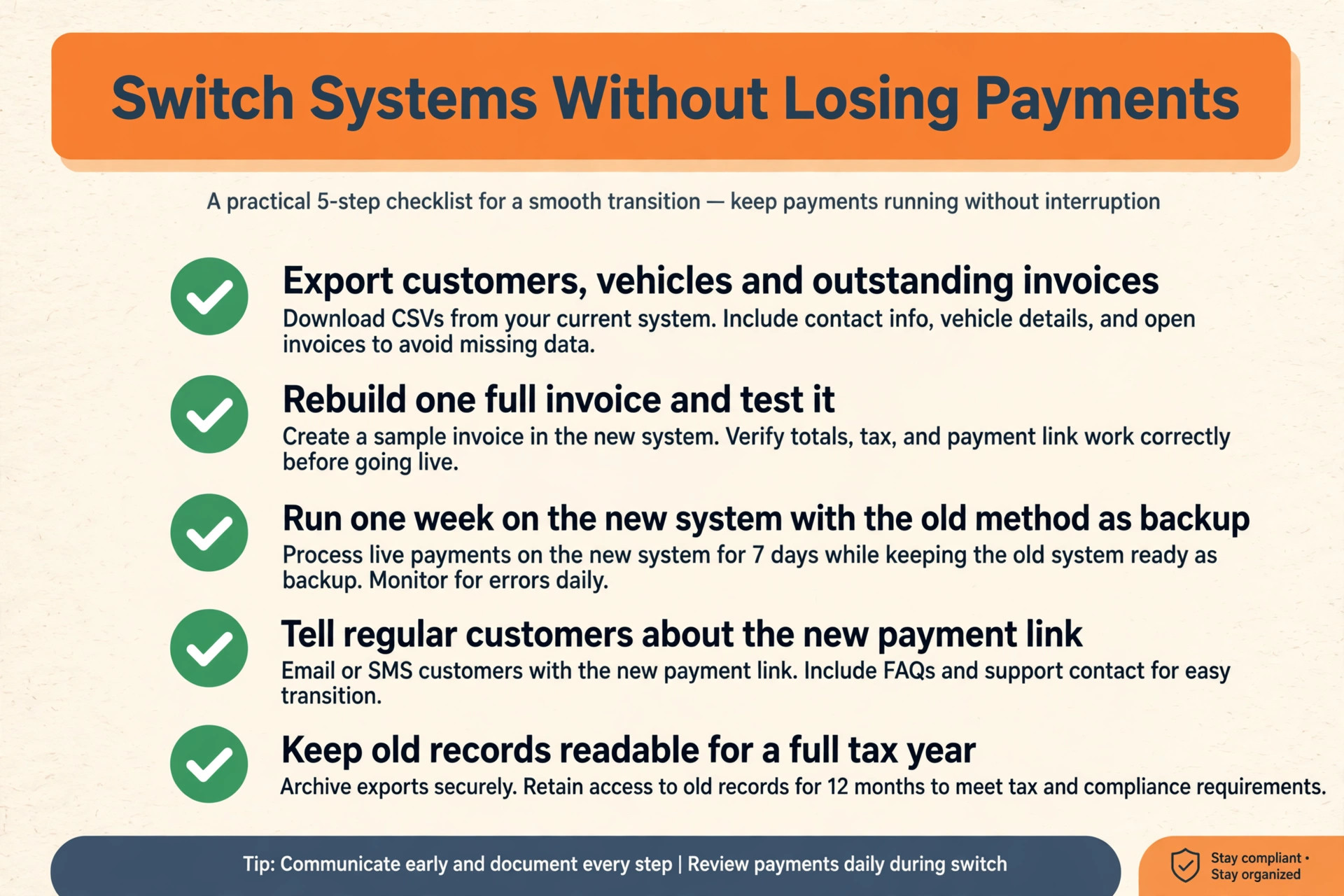
Switching Invoicing Systems Without Losing Payments
Export customers, vehicles, outstanding invoices and parts prices from the old system, and check that vehicle history survives the move.
Rebuild one full invoice in the new system with parts, labour, call-out and tax, and send it to your own phone as a test.
Run one week of real jobs on the new system while the old method stays as backup, then compare takings line by line.
Tell regular customers about the new payment link before the first job on the new system, so nobody is surprised at the driveway.
Keep the old records readable for a full tax year, even after the new system is live.
Invoice Traps That Delay Payment
The most common mistake is buying shop depth for a van job. Multi-bay scheduling, stock control and inspection suites look powerful, but a one-van mechanic pays for them every month without using them. Buy the invoicing job first, and add shop tools when a real shop exists.
The second mistake is invoicing late. Software cannot fix a habit of writing invoices at midnight, so set a rule that no van leaves a job without a sent invoice. The best system in this guide is the one the mechanic actually opens before driving away.
The third mistake is hiding the call-out charge. Customers accept a call-out fee agreed before the job, and dispute the same fee discovered on the invoice. Put it on the quote, on the job sheet and on the invoice, in the same words every time.
A fourth trap is pricing labour by guesswork instead of by a rate card. When labour rates drift from job to job, customers compare notes, margins swing wildly and the mechanic cannot tell which jobs actually made money. Set a labour rate, publish it on estimates and hold it, adjusting it deliberately once a year rather than per customer.
A fifth trap is keeping customer vehicle history in your head. Repeat customers expect the mechanic to remember their vehicle, its last service and its known faults, and a system that surfaces that history at the job makes every repeat visit faster and more professional. Memory feels personal until it fails, and then it feels careless.
The Verdict for Mobile Mechanics
Start with the driveway test, then the fee table, then the bill at double volume. For most solo mechanics, Trackara Pro is the safest first trial for the best invoicing software for mobile mechanics, because it was built for van work, works offline and charges no per-invoice fees.
A mechanic who mainly needs polished invoices plus light accounting should trial FreshBooks, and a mechanic growing a team should trial Jobber, because those systems match the jobs those operations actually do each week.
Whatever the shortlist, judge the winner on one week of real jobs. The best invoicing software for mobile mechanics is the one that gets an invoice built, sent and paid before the van pulls away, not the one with the longest feature list.
The cheapest system is not the best value if it leaves invoices unpaid. One recovered invoice, one avoided dispute and one hour saved each week together outweigh most monthly subscriptions in this guide, so judge systems on money recovered and time saved rather than on subscription alone.
Build the habit alongside the tool. The best invoicing app in the world cannot help a mechanic who writes invoices at midnight from memory, so pair the new system with a simple rule, no van leaves a job without a sent invoice, and watch payment times fall within a month.
More Reading on Stratilyze
Mechanics comparing tools usually read the neighbouring guides next. The guide to invoicing software for freelancers covers the same billing job from another angle, the guide to CRM software for small businesses explains the customer records behind repeat work, and the guide to booking software for service businesses helps with the scheduling side of van work.
Frequently Asked Questions
Can I invoice and take card payment at the vehicle
Yes, with a mobile-first system. Build the invoice on your phone at the vehicle, show the customer the parts and labour lines, and take card payment on the spot through the same app. That single flow is the main reason mobile mechanics move away from paper invoices.
Should parts and labour sit on separate invoice lines
Yes, always. Customers accept a parts bill they can check and a labour bill they can understand, but resist a lump sum they cannot break down. Separate lines also make disputes shorter, because the argument can focus on one line instead of the whole job.
What does mobile mechanic invoicing software cost
A solo van operator should expect roughly $30 to $130 a month depending on the tool and tier, based on published guides for van operators. Shop-level platforms cost more, while phone-first invoicing apps start lower, so match the price to the size of the operation.
Do I need shop management software or just invoicing
Just invoicing, until the operation grows. A handful of jobs a week with a calendar you trust needs only a good invoicing app. The moment scheduling, quoting, payments and follow-ups live in four places, a field-service system earns its keep.
Is the best invoicing software for mobile mechanics worth it for one van
Yes, when late or forgotten invoices already cost money. One recovered invoice a month usually covers the subscription, and on-site payment removes the chasing that eats evenings.
How do I handle mileage on an invoice
Log mileage against the job, either automatically in the app or as a call-out line agreed before the job. Showing distance plainly on the invoice stops arguments, and it makes the real cost of mobile work visible instead of absorbed silently.