
Most small business websites fail before they launch. The owner spends weeks choosing a template, writes three pages, gets stuck on the contact form, and the half finished site sits unpublished for months. Learning how to build a website with AI removes the blank page problem. You describe the business, the AI generates a full site with pages, copy and images, and you spend your time fixing and improving it instead of starting from nothing.
This guide shows the process first, then the tools. It covers 12 tools grouped by the job each one does best: AI website builders, AI design help, AI copy and SEO, and hosting and launch. Prices are October 2026 figures in US dollars. Where a vendor does not publish pricing, or where sources disagreed, the guide says check checkout rather than guessing. One rule runs through the whole guide: AI generates the first version, not the final version. A human must check every fact, price, phone number and claim before the site goes live, because AI builders invent details with confidence.
The 5 step process: how to build a website with AI
Step 1: Plan before you prompt
Write down the goal of the site in one sentence: bookings, phone calls, online sales, or credibility for a service business. List the five pages you need: home, services or products, about, contact, and one proof page such as testimonials or work samples. Gather the real facts the AI cannot guess: business name, phone number, opening hours, service area, and prices. A good prompt with real facts beats a clever prompt with none.
Step 2: Generate the first version
Pick a builder from the list below, answer its setup questions, and let it generate the site. Expect a complete draft in under 30 minutes: homepage, service pages, navigation, contact form, and placeholder images. Generation is the rough draft stage, and every AI site needs the next step.
Step 3: Customise the draft
Replace every AI written sentence with facts about your business. Swap stock images for real photos of your work, team, or products. Fix the headline so it says what you do and who it is for, not a generic slogan. Check the contact form actually sends to an email you read. This step takes two to four hours for a small site, and it is where the site stops looking like a template.
Step 4: Publish and connect
Connect a custom domain, turn on SSL, and set up basic analytics. Test the site on a phone, because most visitors will arrive on one. Click every button, submit the form yourself, and check that the confirmation arrives.
Step 5: Optimise after launch
Add one page per week for the first month: a service page, a location page, or a short answer to a question customers ask. Track which page gets visits and which page gets enquiries, then improve the weak one. AI builders handle SEO basics, such as sitemaps and mobile friendly pages, but ranking still needs real content.
The 12 best AI website tools at a glance
| Tool | Best job | Free option | Paid from |
|---|---|---|---|
| Wix | All round AI builder | Free plan | Around $17 per month |
| Squarespace | Design led business sites | 14 day trial | Around $16 per month, check checkout |
| Hostinger | Lowest cost AI builder | No | Around $2.99 per month intro, renews higher |
| Durable | Fastest service business site | Free to build | Around $15 per month, check checkout |
| Framer | Design forward marketing sites | Free tier | Around $10 per month |
| Relume | AI sitemaps and wireframes | Free tier | Check checkout |
| Jimdo | Simple sites with bookings | Free plan | Check checkout |
| 10Web | AI built WordPress sites | No | Around $10 per month |
| GoDaddy Airo | Domain to site in one place | Free tier | Around $9.99 per month |
| WordPress.com | Content sites you own | Free plan | Around $4 per month |
| Webflow | Designer grade sites and CMS | Free starter plan | Around $14 per month |
| Shopify | Selling products online | 3 day trial | Around $29 per month |
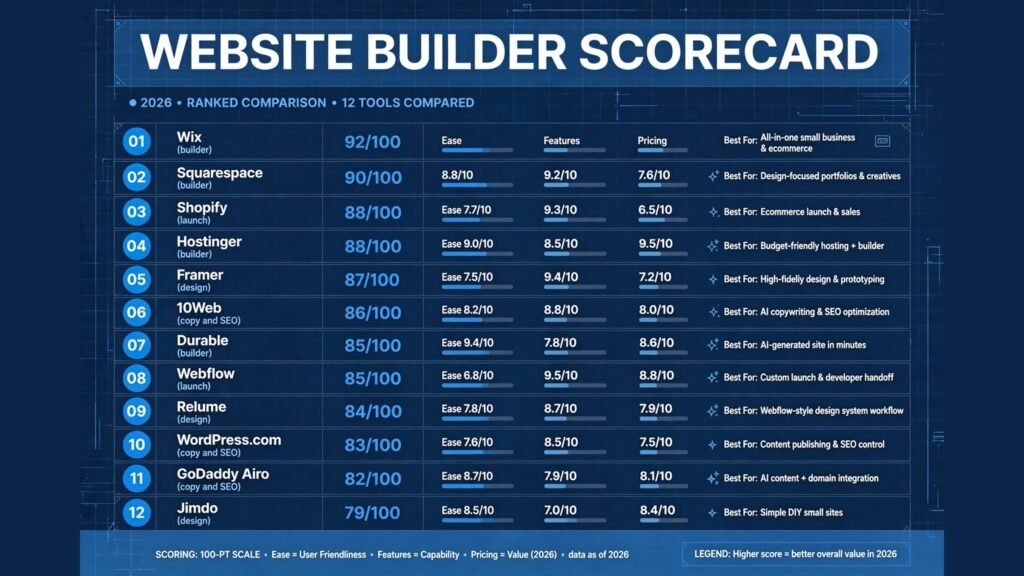
Best pick by job
| Your job | Start with | If that fails, try |
|---|---|---|
| One builder for almost anything | Wix | Squarespace |
| A site that must look expensive | Squarespace | Framer |
| Lowest year one cost | Hostinger | Jimdo |
| Live today for a service business | Durable | GoDaddy Airo |
| A marketing site with polish | Framer | Webflow |
| Plan a site structure fast | Relume | Framer |
| Bookings and payments quickly | Jimdo | Durable |
| A real WordPress site, AI built | 10Web | WordPress.com |
| Domain, email and site together | GoDaddy Airo | Hostinger |
| A content site you fully own | WordPress.com | 10Web |
| Full design control and CMS | Webflow | Framer |
| Sell products at scale | Shopify | Wix |
AI website builders: describe it, get a site
These four builders do the most work for you. Answer questions about the business and they generate pages, copy, layout and images.
1. Wix
Wix is the safest all round AI builder. Its AI chat interviews you about the business, then builds a site you can edit with a drag and drop editor. The app market adds bookings, stores, email marketing and memberships as the business grows, so the site you generate today can still fit in two years. It is the best default choice when you are unsure what you will need later.
Pricing: A free plan lets you test the AI builder with Wix branding and no custom domain. Paid plans are reported from around $17 per month on annual billing, with selling from higher tiers. Check checkout for the current plan prices, since Wix runs frequent promotions.
Best for: Small businesses that want one platform for a site, bookings, store and marketing, and room to grow without migrating.
Watch out for: You cannot export a Wix site to another host, so leaving later means rebuilding. AI generated copy almost always needs rewriting with real business facts.
Try it at: wix.com

2. Squarespace
Squarespace is the design led choice. Its Blueprint AI asks about the business and generates a site from a smaller set of curated templates that tend to look more polished than the average builder output. It also bundles useful tools, including scheduling for service businesses and solid built in commerce for small stores.
Pricing: No free plan, only a trial. Paid plans are reported from around $16 per month on annual billing, with some 2026 comparisons listing $19 or $25 for the entry tier depending on the plan. Check checkout for the current entry price before budgeting.
Best for: Portfolios, service businesses, restaurants and anyone whose site must look expensive without hiring a designer.
Watch out for: Template choice is smaller than Wix, and large catalogue ecommerce is weaker than Shopify. Test load times on a phone before launch.
Try it at: squarespace.com
3. Hostinger
Hostinger is the budget pick. Its AI builder sits inside a hosting bundle with a free domain and SSL, and the intro price is the lowest on this list. The generated sites are clean and modern, if less fancy than Squarespace, and the editor is approachable for a first time builder.
Pricing: Reported from around $2.99 per month on a long prepaid term, renewing at around $10.99 per month after the intro period. Check checkout for the renewal price, because the year two cost is the real cost.
Best for: First time builders on a tight budget, and small businesses that need hosting, domain and site in one bill.
Watch out for: Intro pricing is the trap. Price the renewal before you commit, and note that advanced ecommerce is limited compared with Shopify or Wix.
Try it at: hostinger.com
4. Durable
Durable is the speed pick. Type a business name and location and it generates a full website in about 30 seconds, including copy, images, a contact form and a built in CRM with invoicing. For a local service business that needs to be online today, nothing else is this fast.
Pricing: Free to build, with paid plans reported from around $15 per month on monthly billing and around $12 to $25 on annual billing depending on the source. Check checkout for the current plan, since Durable has changed its pricing several times.
Best for: Local service businesses, trades, consultants and anyone who needs bookings, a contact form and invoicing in one place today.
Watch out for: Durable invents details. It can generate plausible sounding services, prices and testimonials that are not real, so check every line before publishing. Design control is limited and there is no real ecommerce.
Try it at: durable.co
AI design help: make it look deliberate
Builders generate a site. These tools make it look designed. Use them when the default output looks generic, or when you need a site structure and design system before the build starts.
5. Framer
Framer is the design forward builder for marketing sites and portfolios. Its AI generates a site from a prompt, then gives you real design control: animations, layouts, breakpoints and components, with hosting included. Sites built in Framer look like a design studio made them, which is why designers and startups use it for landing pages.
Pricing: A free tier covers building on a Framer subdomain. Paid plans are reported from around $10 per month on annual billing for Basic, with Pro at around $30. Check checkout for the current AI credit limits, since generation is metered.
Best for: Designers, startups and creators who care about how a landing page looks and moves, and who want more control than a template builder allows.
Watch out for: The learning curve is steeper than Wix or Durable. AI credits run out, so a heavy generation session can hit a limit. There is no native ecommerce, so stores need a third party tool.
Try it at: framer.com
6. Relume
Relume is the planning tool in this group, and it is smaller than the builders above. It generates a sitemap and wireframes from a prompt, which you can then build in Webflow or Figma. It suits teams that want to agree the structure of a site before anyone writes copy or picks a template.
Pricing: A free tier covers basic sitemaps and wireframes. Paid plans are not consistently published, so check checkout for the current price for your team size.
Best for: Agencies and designers planning a site structure, and owners who want to see the full page map before committing to a builder.
Watch out for: Relume does not publish a finished site by itself. It is a planning step, not a builder, so budget for a second tool to build and host the result.
Try it at: relume.io
7. Jimdo
Jimdo is the simplest builder on this list for a solo business. Its AI asks a few questions and builds a small site with bookings and payments included, with very few decisions for the owner to make. It suits solopreneurs who want a site up with minimal fuss.
Pricing: A free plan is offered. Paid plans are reported from around $11 per month, but pricing varies by region and plan, so check checkout for the current figure.
Best for: Solo businesses, freelancers and small service providers who need a simple site with bookings fast. Freelancers building a client facing site should also see our best AI tools for freelance writers guide for the wider solo business stack.
Watch out for: Control is limited by design. If you later want advanced layouts or a large store, Jimdo will feel small.
Try it at: jimdo.com
AI copy and SEO: fill it with words that rank
A generated site with generic copy does not rank and does not convert. These three tools focus on the words: AI generated copy, SEO basics, and a platform where content can grow.
8. 10Web
10Web is the AI builder for people who want real WordPress. It generates a WordPress site from a prompt, with managed hosting, AI generated copy and SEO meta tags, and a co-pilot for edits. Because the output is a genuine WordPress site, you own it and can move it to any WordPress host later.
Pricing: Reported from around $10 per month for AI Starter on annual billing, with Premium around $15 and Ultimate around $23. Prices are tied to longer commitments and rise at renewal, so check checkout for the renewal figure.
Best for: Owners who want WordPress power and portability without the usual WordPress setup headache, and businesses that plan to publish content regularly.
Watch out for: WordPress still has a learning curve, even AI built. Plugin choices, updates and theme settings remain your job.
Try it at: 10web.io

9. GoDaddy Airo
GoDaddy Airo is the domain to site tool. If you already own a domain at GoDaddy, Airo generates a site, logo, marketing copy and social content from that domain, and keeps email and payments in the same account. It suits owners who bought a domain first and never got around to building the site.
Pricing: A free tier is offered. Paid plans are reported from around $9.99 per month on annual billing. Check checkout for the current bundle, since Airo features are tied to GoDaddy plans.
Best for: Small businesses already inside the GoDaddy ecosystem, and owners who want domain, email, site and marketing in one account.
Watch out for: Site design quality trails Squarespace and Framer, and the tool works best if you already buy domains from GoDaddy.
Try it at: godaddy.com
10. WordPress.com
WordPress.com is the content site option. Its AI helps generate a starter site, and the platform behind it is real WordPress, which means thousands of themes and plugins, blogging built in, and full ownership of your content. It suits sites that will grow through publishing rather than through a single landing page.
Pricing: A free plan is offered, with paid plans reported from around $4 per month on annual billing. Plugin access and advanced customisation need higher plans, so check checkout for the plan that unlocks what you need.
Best for: Bloggers, content sites and businesses that plan to publish regularly and want to own their content and export it freely.
Watch out for: The free and low tiers limit plugins and customisation, so the real cost is higher than $4 for a serious site. Building a store needs WooCommerce, which adds setup work.
Try it at: wordpress.com
Hosting and launch: publish it properly
The last two tools cover the launch end of the job: a designer grade platform with a real CMS, and the store platform for businesses that sell.
11. Webflow
Webflow is the designer grade builder. Its AI helps generate a starting point, then you get visual control over layout, styles and interactions, plus a real CMS for blogs, portfolios and directories. It is the choice when a template builder feels limiting but hiring a developer feels excessive.
Pricing: A free starter plan covers building and staging. Paid site plans are reported from around $14 per month on annual billing for Basic, with CMS plans higher and ecommerce from around $29. Workspace seats and CMS costs can stack, so check checkout for the full total.
Best for: Designers, agencies and growing businesses that need a CMS, custom layouts and a site that can scale in content without a rebuild.
Watch out for: Webflow has the steepest learning curve on this list, and its pricing stacks: site plan, workspace seats and ecommerce are separate.
Try it at: webflow.com

12. Shopify
Shopify is the store platform. Its AI helps generate product descriptions, store sections and marketing copy, and the platform behind it handles payments, shipping, discounts, taxes and multi channel selling. If the site exists to sell products, start here rather than bolting a store onto a general builder.
Pricing: No free plan, only a short trial, with paid plans reported from around $29 per month on annual billing. Apps and card processing fees add to the monthly cost, so check checkout for the full total.
Best for: Product businesses selling online and in person, and any store that expects to scale beyond a handful of products.
Watch out for: Shopify is a store first, so a simple brochure site costs more here than on a general builder. App costs creep up, and the cheapest plan still needs a theme and payment setup before launch.
Try it at: shopify.com
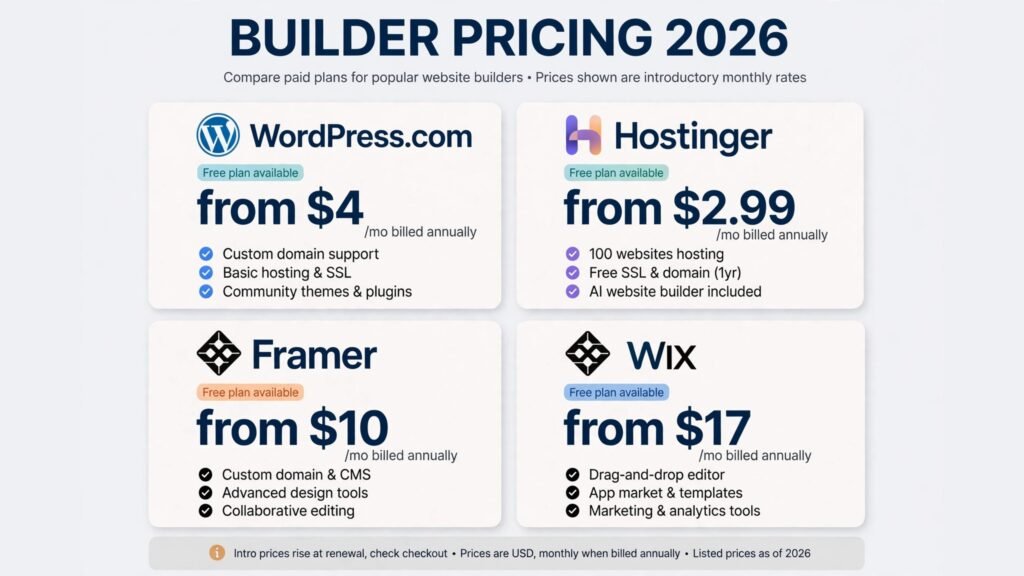
Pricing compared: what a site really costs
| Tool | Free option | Paid from | Pricing note |
|---|---|---|---|
| Wix | Free plan | Around $17 per month | Selling from higher tiers |
| Squarespace | 14 day trial | Around $16 per month | Entry price varies by source, check checkout |
| Hostinger | No | Around $2.99 per month intro | Renews around $10.99 per month |
| Durable | Free to build | Around $15 per month | Pricing has changed several times |
| Framer | Free tier | Around $10 per month | AI credits metered |
| Relume | Free tier | Check checkout | Planning tool, not a host |
| Jimdo | Free plan | Check checkout | Varies by region |
| 10Web | No | Around $10 per month | Rises at renewal |
| GoDaddy Airo | Free tier | Around $9.99 per month | Tied to GoDaddy plans |
| WordPress.com | Free plan | Around $4 per month | Plugins need higher plans |
| Webflow | Free starter | Around $14 per month | Seats and CMS can stack |
| Shopify | 3 day trial | Around $29 per month | Apps and card fees add up |
A realistic first year budget for a small business site is $50 to $200: a builder plan, a domain, and nothing else. A content site on WordPress.com or 10Web lands at the low end, a design led site on Squarespace or Framer in the middle, and a store on Shopify with two or three apps at the high end. In every case, price year two, not year one, because intro pricing is where builders hide the real cost.
How to Choose the right builder
Start with the goal, not the tool. If the goal is bookings for a local service, start with Durable or Jimdo and be live this week. If the goal is a site that looks expensive, start with Squarespace or Framer. If the goal is selling products, start with Shopify. If the goal is a content site you own, start with WordPress.com or 10Web.
Next, test the edit step before you commit. Generate a site, change a headline, swap an image, add a page, and publish it. If that loop feels hard on day one, it will feel harder on day thirty.
Then check the exit before you enter. Wix, Squarespace, Framer, Durable, Jimdo and GoDaddy are proprietary: content exports, but design stays behind. 10Web and WordPress.com build real WordPress, so the site can move. If portability matters, that decides it.
Finally, check the facts before you publish. AI builders invent services, prices, testimonials and opening hours with confidence. Read every page as a customer would, click every link, submit every form, and fix every invented detail.
Frequently Asked Questions
Can AI build a whole website by itself?
It can generate a complete first version: pages, copy, images, navigation and forms. It cannot check your facts, know your prices, or judge whether the design fits your customers. Treat generation as the first half of the job, and editing as the rest.
How long does it take to build a website with AI?
Generation takes minutes. An honest small business site takes one to two days including editing, real photos, form testing and domain setup. A store or a content heavy site takes one to two weeks.
Is an AI built website good for SEO?
The basics are covered: mobile friendly pages, SSL, sitemaps and editable meta titles. Ranking still needs real content, real pages for real searches, and links from other sites. No builder replaces keyword strategy and useful content.
Can I move my AI built site to another host later?
It depends on the builder. 10Web and WordPress.com build real WordPress sites that can move. Wix, Squarespace, Framer, Durable, Jimdo, GoDaddy and Hostinger are proprietary: you can usually export content, but the design stays behind.
How much should a small business pay for an AI website builder?
Between $4 and $29 per month covers almost every small business site on this list, plus a domain at roughly $10 to $15 a year. Pay more only when you need a store or a CMS. Price the renewal, not the intro offer.
Do I still need a designer or developer?
Not for a standard small business site. You need one when the site needs custom features, complex integrations, or a brand identity that no template can carry.
Which single tool should a new business start with?
Wix, for most new businesses, because it covers a site, bookings and a store in one place and the free plan lets you test generation before paying. If design quality matters most, start with Squarespace. If budget matters most, start with Hostinger and check the renewal price.
Conclusion
Knowing how to build a website with AI in 2026 means knowing where the AI stops and you start. The AI handles the blank page: it generates structure, draft copy and a design in minutes. You handle the truth: real facts, real photos, working forms, a connected domain, and a site that answers the customer’s question in the first screen.
Start with the goal. Generate one site, not five. Edit every line, test every button, and publish it this week. Then improve one page a week. The businesses that win with AI websites are not the ones with the fanciest generated design. They are the ones whose site is live, accurate, and easy for a customer to act on.