
The average knowledge worker now pays for four or five AI tools and uses two of them properly. The rest sit on a card statement, renewed every month, opened once a quarter. The best AI subscriptions worth paying for are not the ones with the longest feature list. They are the ones that replace a task you do every week, save a measurable hour, or produce work you could bill a client for. Everything else is a free tier waiting to happen.
This guide compares 12 subscriptions grouped by the job each one does best: general AI assistant, writing and editing, image and video creation, coding help, and research and productivity. Prices are October 2026 figures in US dollars. Where a vendor does not publish pricing, or where sources disagreed, the guide says check checkout rather than guessing. One rule runs through the whole guide: pay for the job you do most, not for the tool with the best demo.
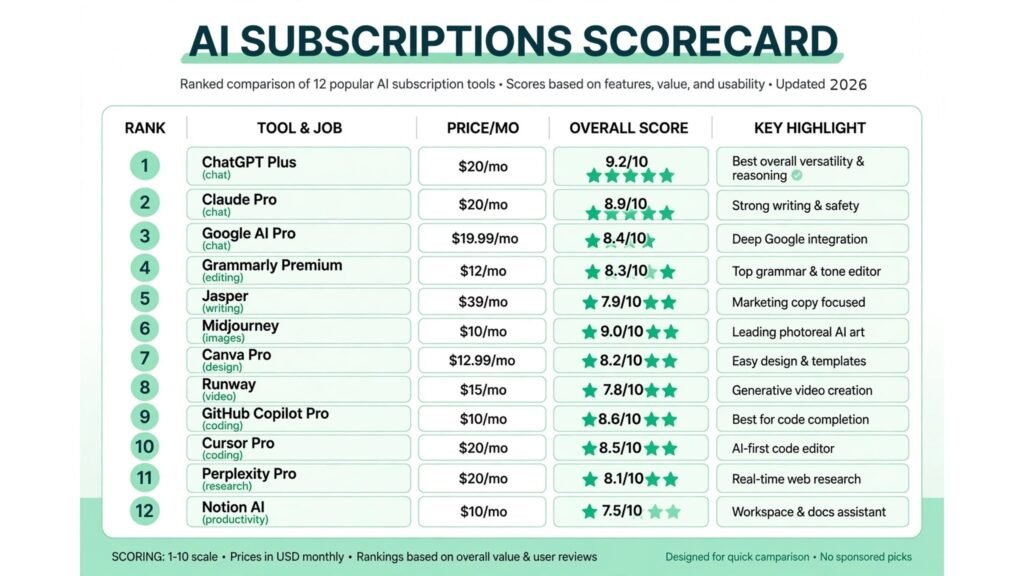
The 12 best AI subscriptions worth paying for at a glance
| Subscription | Best job | Free option | Paid from |
|---|---|---|---|
| ChatGPT Plus | Everyday AI assistant | Yes, limited | $20 per month |
| Claude Pro | Long writing and analysis | Yes, limited | $20 per month, around $17 on annual billing |
| Google AI Pro | Google Workspace AI | Yes, limited | $19.99 per month |
| Grammarly Premium | Editing and quality control | Free tier | Around $12 per user per month on annual billing |
| Jasper | Brand voice drafting | 7 day trial | Around $39 per month |
| Midjourney | Stylised image generation | No | $10 per month |
| Canva Pro | Design and social content | Free tier | Around $12.99 per month |
| Runway | Short AI video | Free tier, limited credits | Around $12 per month on annual billing |
| GitHub Copilot Pro | Code completion | Yes, limited | $10 per user per month |
| Cursor Pro | Agentic coding in an editor | Yes, limited | $20 per month |
| Perplexity Pro | Research with citations | Yes, limited | $20 per month, around $17 on annual billing |
| Notion AI | Notes and workspace AI | No standalone free tier | Around $10 per user per month as an add on |
Best pick by job
| Your job | Start with | If that fails, try |
|---|---|---|
| One assistant for everything | ChatGPT Plus | Claude Pro |
| Long documents and careful writing | Claude Pro | ChatGPT Plus |
| Work inside Gmail and Docs | Google AI Pro | ChatGPT Plus |
| Error free client deliverables | Grammarly Premium | Jasper |
| Drafts in a consistent brand voice | Jasper | Grammarly Premium |
| Beautiful images for content | Midjourney | Canva Pro |
| Fast social and marketing design | Canva Pro | Midjourney |
| Short video clips from text or images | Runway | Canva Pro |
| Code completion in any editor | GitHub Copilot Pro | Cursor Pro |
| Agent driven coding sessions | Cursor Pro | GitHub Copilot Pro |
| Answers with sources attached | Perplexity Pro | Google AI Pro |
| AI inside your notes and docs | Notion AI | ChatGPT Plus |
General AI assistant: pick one, not three
Every provider now charges about $20 a month for its flagship assistant, so the choice is about fit, not price. Most people need one of these three. Paying for all three is the single most common AI subscription mistake.
1. ChatGPT Plus
ChatGPT Plus is the safest default subscription in AI. It gives access to the flagship model with higher usage limits, image generation, voice mode, file uploads, and the widest ecosystem of integrations and custom assistants. If you do a bit of everything, drafting, brainstorming, spreadsheet help, image ideas, quick research, this is the one plan that covers all of it at a usable level.
Pricing: $20 per month. A cheaper Go tier is reported at $8 per month in some markets, and a Pro tier at $200 per month exists for heavy users. Check checkout for the current tiers in your region.
Best for: Generalists who want one subscription that handles writing, analysis, images, voice, and everyday questions without switching tools.
Watch out for: The free tier covers a lot of casual use. Pay for Plus when you hit free limits, need image generation regularly, or use voice mode daily.
Try it at: openai.com

2. Claude Pro
Claude Pro is the writer’s subscription. Its long context window handles whole reports, contracts, and codebases in one conversation, and its output on sustained writing tasks is widely rated the most natural of the three flagship assistants. It is also the strongest choice for careful analysis where you need the reasoning shown step by step rather than a confident short answer.
Pricing: $20 per month, or around $17 per month on annual billing. Higher Max tiers at $100 and $200 per month exist for heavy users. Check checkout for the current annual price.
Best for: Writers, analysts, researchers, and lawyers who work with long documents and want careful, well structured output they can edit rather than rewrite.
Watch out for: Claude has no built in image generation comparable to ChatGPT, and fewer third party integrations. If images and voice matter as much as writing, pick ChatGPT Plus instead.
Try it at: claude.com
3. Google AI Pro
Google AI Pro, formerly Gemini Advanced, is the subscription for people whose working life already runs on Google. Gemini sits inside Gmail, Docs, Sheets, and Meet, so summaries, drafts, and research happen where the work already lives. It also carries a very large context window and a storage bundle that makes the $19.99 price easier to justify if you would pay for storage anyway.
Pricing: $19.99 per month. A cheaper Plus tier is reported at $7.99 per month in some markets. Check checkout for the current bundle, since storage amounts and tiers have changed before.
Best for: Google Workspace users who want AI inside email and documents, and anyone who values live, search grounded answers over pure writing polish.
Watch out for: Writing quality is competent but often flat, so plan on an editing pass for client facing work. If you rarely open Google Docs, the integration advantage disappears.
Try it at: gemini.google.com
Writing and editing: pay for the pass, not the draft
AI drafting tools are easy to overspend on because every one promises finished content. The subscriptions that earn their fee here do something narrower: they make the draft you already wrote safe to send.
Grammarly Premium is the cheapest subscription on this list that protects your professional reputation. It checks grammar, clarity, tone, and consistency, and its business tier adds style guides and brand tone checks across a team. It does not write the piece, and that is the point: it catches the errors that make a client question the whole deliverable.
Pricing: A free tier covers basic checks. Premium is reported from around $12 per user per month on annual billing, higher month to month. Check checkout for the current team pricing.
Best for: Anyone who sends client facing writing, and especially freelancers and small teams without a dedicated editor. Writers building a freelance practice should also see our best AI tools for freelance writers guide for the wider writing stack.
Watch out for: Accepting every suggestion flattens voice. Accept clarity and grammar fixes, reject style suggestions that fight the client’s tone, and keep the final judgment human.
Try it at: grammarly.com
5. Jasper
Jasper is the most established AI writing platform for teams. It stores brand voice profiles, produces drafts from briefs and templates, and supports campaigns, social copy, and long form content from one workspace.
Pricing: Creator plans are reported from around $39 per month per seat, with Pro and business tiers above. Check checkout for the current seat and feature limits.
Best for: Marketing teams and agencies producing regular content in defined brand voices, where a shared voice profile saves every writer an hour per piece.
Watch out for: Jasper drafts are fluent but generic until the voice profile and brief are strong. Feed it thin briefs and you get thin drafts. If you write alone and in one voice, ChatGPT Plus or Claude Pro plus Grammarly will cover you for less money.
Try it at: jasper.ai
Image and video creation: pay for output you can sell
Image and video subscriptions are easy to justify and easy to waste. All three tools below earn their fee when visual output is a deliverable. None earns it as a hobby expense you feel guilty about.
6. Midjourney
Midjourney remains the benchmark for beautiful, stylised images: concept art, mood boards, editorial illustrations, and cinematic stills. No other subscription produces its look as consistently, and all paid plans include commercial use rights, which matters the moment an image goes into client work or a product.
Pricing: Basic $10 per month, Standard $30 per month, Pro $60 per month, Mega $120 per month, with about 20 percent off on annual billing. There is no free tier. Check checkout for the current plan limits, since fast hour allowances change by tier.
Best for: Designers, illustrators, content creators, and marketers whose images need a distinctive visual style rather than a literal illustration of a prompt.
Watch out for: Basic only buys about 200 fast image jobs a month with no unlimited slow mode, so regular users should budget for Standard at $30. Midjourney is also weak at exact text inside images. Content creators weighing the wider visual stack should also see our best AI tools for content creators guide.
Try it at: midjourney.com
7. Canva Pro
Canva Pro is the highest value subscription on this list for non designers. It turns a blank page into a finished social post, presentation, thumbnail, or one pager in minutes, with a template library, background removal, brand kits, and a growing set of AI design features. If Midjourney is for images you admire, Canva Pro is for designs you ship.
Pricing: Around $12.99 per month, or around $120 per year on annual billing. Check checkout for the current annual price and team pricing.
Best for: Small business owners, marketers, and creators who produce social graphics, presentations, and marketing material weekly and cannot justify a designer for every asset.
Watch out for: Template output looks like template output unless you customise it. Set up a brand kit first and never publish a first template draft. Teams comparing the wider small business stack should also see our best AI tools for small business guide.
Try it at: canva.com
8. Runway
Runway turns text or images into short video clips, and it is the most accessible video generation subscription for non professionals. Its models produce usable b roll, product shots, and social clips, and its editing tools let you extend and restyle footage without a full video suite.
Pricing: A free tier offers limited credits. Standard is reported at around $12 per month on annual billing, with higher tiers for more credits and faster generation. Check checkout for the current credit allowances, since video generation is metered by seconds used.
Best for: Creators and marketers who need short video clips weekly and do not have the budget or skills for a full video production workflow.
Watch out for: Video credits burn fast, and output still needs human selection and editing. If you need video less than twice a month, use the free tier instead of a subscription.
Try it at: runwayml.com
Coding help: the cheapest productivity gain in software
Coding subscriptions have the clearest return here, because the saving is measured in hours per week and the price starts at $10 a month. If you write code daily, one of these two is almost always worth it.
9. GitHub Copilot Pro
GitHub Copilot Pro is the best value coding subscription available. It provides code completions in the editor, chat, agent mode, and code review, and it works across editors and repositories rather than locking you into one environment. Completions are unlimited on paid plans, with premium agent and chat features metered by credits.
Pricing: $10 per user per month for Pro, with Pro Plus at $39 and Max at $100 for heavier agent use. A limited free tier covers 2,000 completions a month. Check checkout for the current credit allowances, since metering changed during 2026.
Best for: Professional developers and students who write code daily and want completions, chat, and agent help inside the editor they already use.
Watch out for: Heavy agent sessions burn credits, so track one billing cycle before upgrading to Pro Plus or Max.
Try it at: github.com

10. Cursor Pro
Cursor Pro is the agentic coding subscription: an editor built around an AI agent that reads a codebase, plans multi file changes, runs commands, and revises until tests pass. Where Copilot completes what you are typing, Cursor takes on whole tasks while you review. For developers doing refactors and feature work, that difference is worth the higher price.
Pricing: $20 per month for Pro, with Pro Plus at $60 and Ultra at $200 for heavier agent use. A free Hobby tier covers limited agent and tab use. Check checkout for the current usage pools, since agent pricing is metered on top of the seat.
Best for: Developers doing multi file feature work and refactors, and teams that want an agent inside the editor rather than a separate terminal tool.
Watch out for: Cursor’s real cost depends on model choice and usage, so heavy agent days cost more than $20. Developers learning to code should also see our best AI tools for learning to code guide first.
Try it at: cursor.com
Research and productivity: pay for answers you can cite
The last group covers the two subscriptions that save research time rather than production time: fewer open tabs, fewer unverified claims, and notes that write themselves from meetings and documents.
11. Perplexity Pro
Perplexity Pro is a research engine with citations attached. Ask a question and it returns a sourced answer with links you can open and check, plus file uploads for research on your own documents. It replaces the first hour of open ended searching with a sourced starting point.
Pricing: $20 per month, or around $17 per month on annual billing. Check checkout for the current annual price.
Best for: Researchers, analysts, journalists, and anyone whose work requires verifiable facts rather than fluent guesses.
Watch out for: Citations still need checking. Perplexity can misread sources, and a citation is not proof until you open it.
Try it at: perplexity.ai

12. Notion AI
Notion AI brings AI inside the workspace where notes, docs, and project pages already live. It summarises long pages, drafts from prompts, answers questions across your workspace, and turns meeting notes into action items.
Pricing: Around $10 per user per month as an add on to a paid Notion plan. Check checkout for the current plan requirement, since Notion AI is not sold as a standalone subscription.
Best for: Teams and individuals who already run their docs, wikis, and projects in Notion and want AI inside that workspace rather than in a separate window.
Watch out for: Notion AI is an add on, not a replacement for a general assistant. If you do not already use Notion daily, buy the general assistant first.
Try it at: notion.so
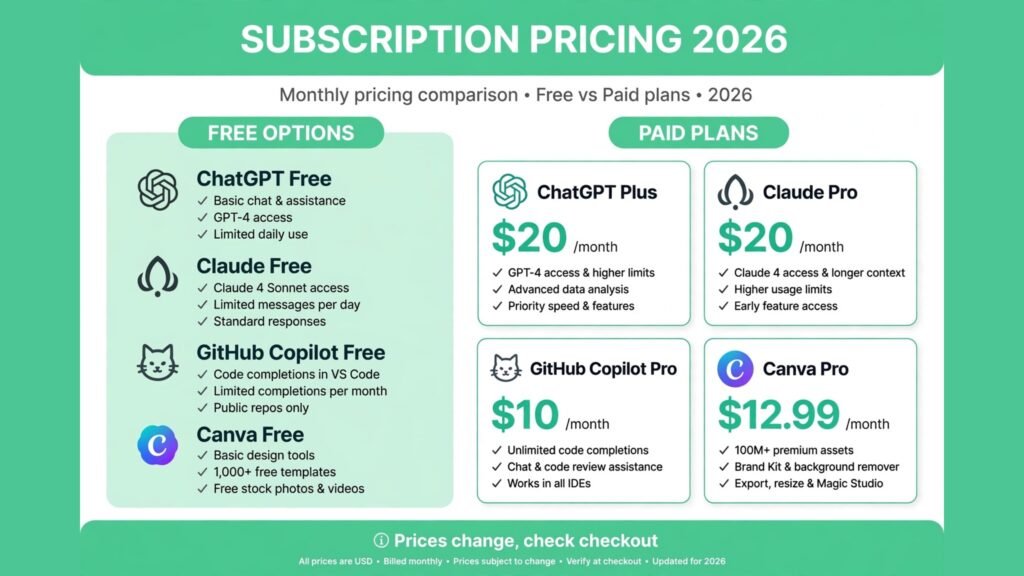
Pricing compared: what the full stack actually costs
| Subscription | Monthly price | Annual equivalent | Worth it if you |
|---|---|---|---|
| ChatGPT Plus | $20 | $240 | Use AI daily for varied tasks |
| Claude Pro | $20 | Around $204 | Write or analyse long documents weekly |
| Google AI Pro | $19.99 | Around $240 | Live inside Google Workspace |
| Grammarly Premium | Around $12 | Around $144 | Send client facing writing weekly |
| Jasper | Around $39 | Check checkout | Draft in brand voices for clients |
| Midjourney | $10 to $120 | 20 percent off | Produce stylised images weekly |
| Canva Pro | Around $12.99 | Around $120 | Design social and marketing assets weekly |
| Runway | Around $12 | Check checkout | Need short video clips weekly |
| GitHub Copilot Pro | $10 | $120 | Write code daily |
| Cursor Pro | $20 | $240 | Run agent driven coding sessions |
| Perplexity Pro | $20 | Around $204 | Research with sources weekly |
| Notion AI | Around $10 | Around $120 | Already live in Notion daily |
A sensible starter stack costs $30 to $50 a month: one general assistant at $20, Grammarly Premium at around $12, and either Copilot Pro at $10 or Canva Pro at around $13. A professional creator stack lands around $80 to $120 a month by adding Midjourney Standard at $30 and Perplexity Pro at $20. A full agency stack with Jasper, Midjourney Pro, and Cursor Pro can pass $200 a month, and should only exist when client revenue pays for it directly. Teams pricing client work should also see our best AI proposal software guide for turning tool costs into honest quotes.
What not to pay for
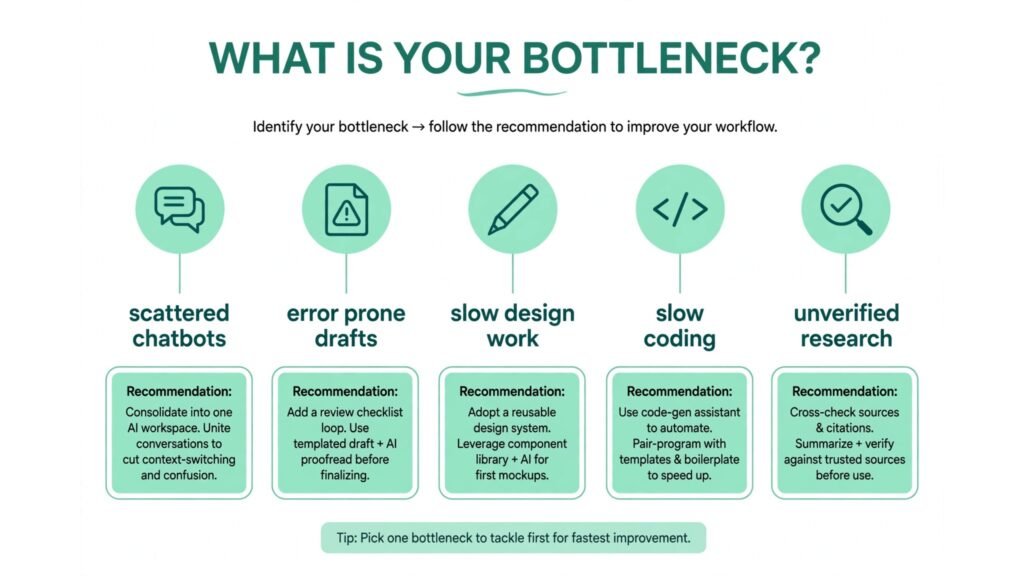
The most expensive AI habit is not any single subscription. It is the stack: three chatbots, two writing tools, two image tools, and a video tool, all renewing quietly. Audit your subscriptions every quarter with one test: count how many times you used each tool in the last 30 days. Anything under four uses goes to the free tier or gets cancelled. Free tiers in 2026 are genuinely good for occasional use, and most vendors let you resubscribe in minutes when a project demands it.
Also skip the top tiers unless usage forces you there. The $100 and $200 plans from OpenAI, Anthropic, and Cursor exist for power users hitting daily limits, not for people who like the idea of unlimited access. Start at the entry paid tier and upgrade only when a limit actually blocks your work.
Emerging tools worth watching
Three smaller tools are worth a free trial before they become subscriptions. Krea AI offers fast, real time image generation with a free tier that suits quick visual exploration. Gamma turns a prompt into a presentable deck in minutes. Poe bundles many models behind one subscription, useful for a month when you are deciding between ChatGPT Plus and Claude Pro. None replaces the 12 above yet, but each solves a narrow job cheaply.
How to Choose
Start with the job you do most, not the tool with the best reviews. If you write code daily, start with Copilot Pro. If you write documents daily, start with Claude Pro. If you design weekly, start with Canva Pro. One subscription that matches your main job beats three that cover jobs you do monthly.
Next, run a one month test with a kill rule. Subscribe, use the tool for real work, and count the hours it saves. If it does not save at least twice its price in time or revenue within the month, cancel it. Subscriptions are easy to restart.
Then check the overlap before adding a second subscription. ChatGPT Plus already generates images, drafts, and research summaries. Canva Pro already includes AI image features. Every overlap is a subscription you may not need, and overlap is where most stacks quietly double in price.
Finally, set a calendar reminder for every renewal date. A quarterly audit takes ten minutes and typically cancels one or two tools that stopped earning their fee months ago.
Frequently Asked Questions
Do I need more than one AI chatbot subscription?
No, for most people. One flagship assistant at around $20 a month covers daily chat, drafting, analysis, and image generation. Pay for a second only when your work genuinely splits, for example Claude Pro for long writing plus ChatGPT Plus for images and voice.
Which single AI subscription is the best value?
ChatGPT Plus, for most users, because it covers the widest range of tasks at $20 a month. The exceptions are clear: Google Workspace users get more from Google AI Pro, long document writers get more from Claude Pro, and daily coders get more from GitHub Copilot Pro at $10.
Are free AI tools good enough in 2026?
For occasional use, yes. Free tiers of ChatGPT, Claude, Gemini, Perplexity, Canva, and Copilot cover short questions, basic design, and limited coding help. Pay when you hit usage limits or use a tool daily for client work.
How much should a freelancer budget for AI subscriptions?
Between $30 and $60 a month covers a working stack: one general assistant, Grammarly Premium, and one job specific tool such as Copilot Pro or Canva Pro. Add tools only when a client project pays for them, and cancel between projects when the work dries up.
Do AI subscriptions replace software I already pay for?
Sometimes, partly. Canva Pro can replace a basic design tool for social content, and Notion AI can replace a separate summarising tool. It rarely replaces a specialist tool entirely: Midjourney does not replace a photo editor, and Copilot does not replace code review.
Should I pay annually or monthly?
Monthly for the first month, always. Confirm the tool earns its fee on real work before committing to a year. Annual billing saves 15 to 20 percent on most tools here, so switch only after two consecutive months of regular use.
Conclusion
The best AI subscriptions worth paying for in 2026 are tied to work you already do. ChatGPT Plus, Claude Pro, or Google AI Pro covers the general assistant job, and you only need one of them. Grammarly Premium protects everything you send. Midjourney and Canva Pro cover images and design, Runway covers short video, Copilot Pro and Cursor Pro cover coding, and Perplexity Pro and Notion AI cover research and notes.
Start with one subscription for your main job, add a second only when a limit blocks you, and audit the stack every quarter. The goal is not to own every AI tool. It is to pay for the few that save real hours and cancel the rest without guilt.