

For most teams, Zoom is the default. For most teams, it is also not the best fit. If your company already pays for Google Workspace or Microsoft 365, you are paying twice. If your meetings are small and casual, you are paying for webinar and enterprise features you never open. And if your callers join from a browser, a phone or a weak connection, Zoom’s app-first workflow adds friction every single day. The best Zoom alternatives fix one of those problems properly, and the right one depends on which problem your team actually has.
This guide compares 12 tools grouped by the job each one does best: everyday meetings, enterprise and security, lightweight browser meetings, and webinars and events. Prices are October 2026 figures in US dollars. Where a vendor does not publish pricing, or where sources disagreed, the guide says check checkout rather than guessing. One rule runs through the whole guide: judge a meeting tool by the worst call, not the best one. Audio that holds up on a bad connection matters more than any virtual background or whiteboard.
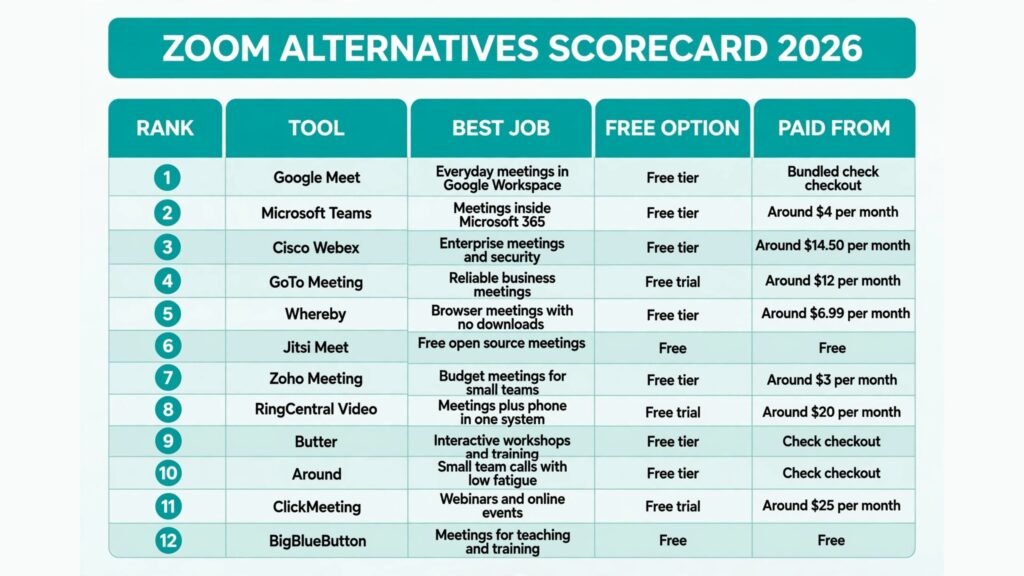
The 12 best Zoom alternatives at a glance
| Tool | Best job | Free option | Paid from |
|---|---|---|---|
| Google Meet | Everyday meetings in Google Workspace | Free tier | Bundled, check checkout |
| Microsoft Teams | Meetings inside Microsoft 365 | Free tier | Around $4 per month |
| Cisco Webex | Enterprise meetings and security | Free tier | Around $14.50 per month |
| GoTo Meeting | Reliable business meetings | Free trial | Around $12 per month |
| Whereby | Browser meetings with no downloads | Free tier | Around $6.99 per month |
| Jitsi Meet | Free open source meetings | Free | Free |
| Zoho Meeting | Budget meetings for small teams | Free tier | Around $3 per month |
| RingCentral Video | Meetings plus phone in one system | Free trial | Around $20 per month |
| Butter | Interactive workshops and training | Free tier | Check checkout |
| Around | Small team calls with low fatigue | Free tier | Check checkout |
| ClickMeeting | Webinars and online events | Free trial | Around $25 per month |
| BigBlueButton | Meetings for teaching and training | Free | Free |
Best pick by job
| Your job | Start with | If that fails, try |
|---|---|---|
| Meetings inside Google Workspace | Google Meet | Whereby |
| Meetings inside Microsoft 365 | Microsoft Teams | Webex |
| Enterprise security and compliance | Webex | GoTo Meeting |
| Reliable meetings on weak connections | GoTo Meeting | Jitsi Meet |
| Browser meetings with no app | Whereby | Jitsi Meet |
| Free meetings with no account needed | Jitsi Meet | Whereby |
| Cheapest meetings for a small team | Zoho Meeting | Jitsi Meet |
| Meetings plus a business phone system | RingCentral Video | Teams |
| Interactive workshops and classes | Butter | BigBlueButton |
| Small team calls all day | Around | Whereby |
| Webinars with registration and polls | ClickMeeting | Webex |
| Teaching and online classrooms | BigBlueButton | Butter |
Everyday meetings: the tools most teams actually need
These four cover the daily standup, the client call and the team review. They differ mainly in ecosystem: the best one is usually the one bundled with the apps your team already pays for.
1. Google Meet
Google Meet is the strongest Zoom alternative for any team already using Gmail, Calendar and Drive. Meetings start from a calendar event, guests join from a browser link with no download, and captions, noise cancellation and recording work well. It is also one of the easiest tools here for outside guests, which matters when clients and suppliers join your calls.
Pricing: A free tier covers one hour meetings for up to 100 people. Paid access comes bundled with Google Workspace, starting at around $7 per user per month. Check checkout for the current bundle, since Google has changed Workspace pricing before.
Best for: Google Workspace teams, schools and small businesses that want meetings with no extra subscription and no app install for guests.
Watch out for: Breakout rooms, polls and advanced host controls are thinner than Zoom’s, and large meetings over 250 people need a higher Workspace tier. For teams hiring remotely, our AI tools for HR teams guide covers the wider remote hiring stack.
Try it at: meet.google.com

2. Microsoft Teams
Microsoft Teams is the natural alternative for Microsoft 365 organisations. Chat, channels, file sharing and meetings live in one app, and meetings join from Outlook with one click. Its meeting features are now close to Zoom’s: breakout rooms, together mode, live captions, recording and transcription are all included, and it handles large all hands meetings well.
Pricing: A free tier covers basic meetings. Paid plans start at around $4 per user per month as an add on, and most business plans bundle Teams. Check checkout for current bundle pricing.
Best for: Enterprises, schools and teams standardised on Microsoft 365 that want meetings, chat and documents in one system.
Watch out for: Teams is heavier than Meet or Whereby for a quick call, and guests outside Microsoft can find the join flow confusing. Small teams that only need meetings will find it more app than they need.
Try it at: microsoft.com
3. Cisco Webex
Webex is the enterprise pick. It is built for organisations with strict security and compliance needs: end to end encryption options, detailed admin controls, webinar and event tools, and hardware room systems that work out of the box. Its audio quality on poor connections is also among the best here, which is why large companies with global teams stay with it.
Pricing: A free tier covers meetings up to 40 minutes for 100 people. Paid plans start at around $14.50 per user per month. Check checkout for current enterprise pricing.
Best for: Large companies, healthcare, finance and government teams where security, compliance and room hardware matter more than price.
Watch out for: Webex costs more than Meet or Teams for the same basic meeting, and its interface feels dated next to newer rivals. Small teams will pay for controls they never use.
Try it at: webex.com
4. GoTo Meeting
GoTo Meeting is the reliability pick. It has been doing business meetings for longer than most rivals, and it shows in the details: dial in numbers for almost every country, a simple join flow, solid recording and transcription, and meetings that stay stable when a connection drops. It is not the flashiest tool here, but it is the one least likely to ruin a client call.
Pricing: A free trial is offered. Paid plans start at around $12 per organiser per month. Check checkout for current organiser pricing.
Best for: Sales teams, consultancies and businesses whose client calls must work first time, including for callers on phones and slow connections.
Watch out for: Its chat and collaboration features are thinner than Teams, and it has fewer fun extras like virtual backgrounds and reactions. It is a meeting tool first, not a collaboration suite.
Try it at: goto.com
Lightweight browser meetings: no downloads, no friction
Some meetings should start in seconds. These four run in a browser, need little or no install, and suit guests, small teams and anyone tired of app updates before every call.
5. Whereby
Whereby is the simplest meeting tool on this list. Create a room with a custom link, share it, and guests join from a browser with no download and no account. Breakout groups, recording and screen sharing are included, and the interface stays out of the way. It is the closest thing here to a meeting link that just works.
Pricing: A free tier covers small meetings. Paid plans start at around $6.99 per month for a Pro room. Check checkout for current room pricing.
Best for: Freelancers, coaches, small teams and anyone who meets clients and guests who should not need to install anything.
Watch out for: Whereby suits small meetings best. Large all hands calls and webinars need a bigger platform, and its admin controls are light compared with Webex or Teams.
Try it at: whereby.com

6. Jitsi Meet
Jitsi Meet is the free and open source option, and the most private tool on this list. Meetings run in a browser, need no account, and can be self hosted so no third party holds your call data. It handles screen sharing, chat, recording and live streaming well, and it costs nothing for unlimited meeting time on the public service.
Pricing: Free on the public service, and free to self host. The only cost is your own server if you host it yourself.
Best for: Privacy conscious teams, open source projects, schools and anyone who needs free meetings with no account and no time limit.
Watch out for: The public service can slow down at peak times, and support is community based rather than a help desk. Large meetings over 75 people work better on a self hosted server with proper capacity.
Try it at: meet.jit.si
7. Zoho Meeting
Zoho Meeting is the budget pick for small teams, especially those already using Zoho apps. It covers video meetings, webinars, screen sharing and recording at a fraction of Zoom’s price, and it integrates with Zoho CRM, Mail and Calendar. For a small business that needs reliable meetings and nothing more, it is hard to beat on price.
Pricing: A free tier covers small meetings. Paid plans start at around $3 per host per month. Check checkout for current host pricing.
Best for: Small businesses, startups and Zoho users that want dependable meetings at the lowest monthly cost on this list.
Watch out for: Its meeting features are solid but not leading: fewer integrations outside Zoho, and webinar tools are simpler than ClickMeeting or Webex. Teams that live outside Zoho will get less value from it.
Try it at: zoho.com
8. RingCentral Video
RingCentral Video suits businesses that want meetings and a phone system in one place. Video meetings, team messaging and cloud phone come together, so a sales or support team can move from a call to a video meeting to a chat without switching apps. Its meeting quality is strong, with HD video, breakout rooms and recording included.
Pricing: A free trial is offered. Paid plans with video and phone start at around $20 per user per month. Check checkout for current bundle pricing.
Best for: Sales teams, support teams and small businesses replacing both a phone system and Zoom with one vendor.
Watch out for: If you only need meetings, RingCentral costs more than Meet, Whereby or Zoho, and you pay for phone features you may never use. Support teams comparing phone first tools should also see our AI call centre software guide.
Try it at: ringcentral.com
Workshops, webinars and events: meetings with an audience
Regular meetings and audience events are different jobs. These four are built for interaction, teaching and presenting to larger groups, where Zoom’s standard meeting view falls short.
9. Butter
Butter is built for workshops, training sessions and interactive meetings. Its rooms include built in timers, polls, breakout rooms, whiteboards and a waiting room with music, all designed for facilitators running sessions rather than passive calls. It feels like a workshop tool first and a meeting tool second, which is exactly its strength.
Pricing: A free tier covers small sessions. Paid plans are available for larger rooms and longer sessions; check checkout for current pricing, since Butter has adjusted its tiers.
Best for: Trainers, facilitators, coaches and teams running workshops, retrospectives and interactive classes.
Watch out for: Butter is not the cheapest daily meeting tool, and its feature set is overkill for a simple standup. Use it for sessions where participation matters, not for every call.
Try it at: butter.us

10. Around
Around is designed for small teams that spend all day on calls. It uses floating video bubbles instead of full screen grids, which reduces meeting fatigue and lets people keep working while talking. Noise cancellation, note taking and screen sharing are included, and it feels lighter than any other tool here for always on team communication.
Pricing: A free tier is offered. Paid plans add larger rooms and admin controls; check checkout for current pricing.
Best for: Remote startups, design teams and small groups that call each other constantly and want a tool that stays out of the way.
Watch out for: Around suits small groups best. Large meetings, webinars and enterprise controls are not its job, and guests may need a minute to understand the bubble layout.
Try it at: around.co
11. ClickMeeting
ClickMeeting is the webinar specialist. It covers registration pages, automated webinars, polls, Q and A, paid events and detailed attendee analytics, all in one platform. For marketers and trainers running regular webinars, it replaces a meeting tool plus a separate webinar and landing page stack.
Pricing: A free trial is offered. Paid plans start at around $25 per month. Check checkout for current attendee limits per plan.
Best for: Marketers, course creators and trainers running scheduled, automated or paid webinars with registration and follow up.
Watch out for: ClickMeeting is priced for webinars, not daily meetings, so it costs more than Meet or Whereby for a simple team call. It also has a learning curve for first time webinar hosts.
Try it at: clickmeeting.com
BigBlueButton is the open source classroom platform, built for teaching. It integrates with learning systems like Moodle and Canvas, and includes shared notes, breakout rooms, polling, whiteboard and lecture recording designed for lessons. Schools and universities use it because it is free, self hostable and built around how classes actually run.
Pricing: Free and open source. The only cost is your own server if you host it, or a hosting provider’s fee.
Best for: Schools, universities, training providers and anyone teaching online inside a learning management system.
Watch out for: BigBlueButton needs technical setup or a hosting provider, and its interface is plain next to Butter or ClickMeeting. It is a classroom tool, not a general business meeting app.
Try it at: bigbluebutton.org

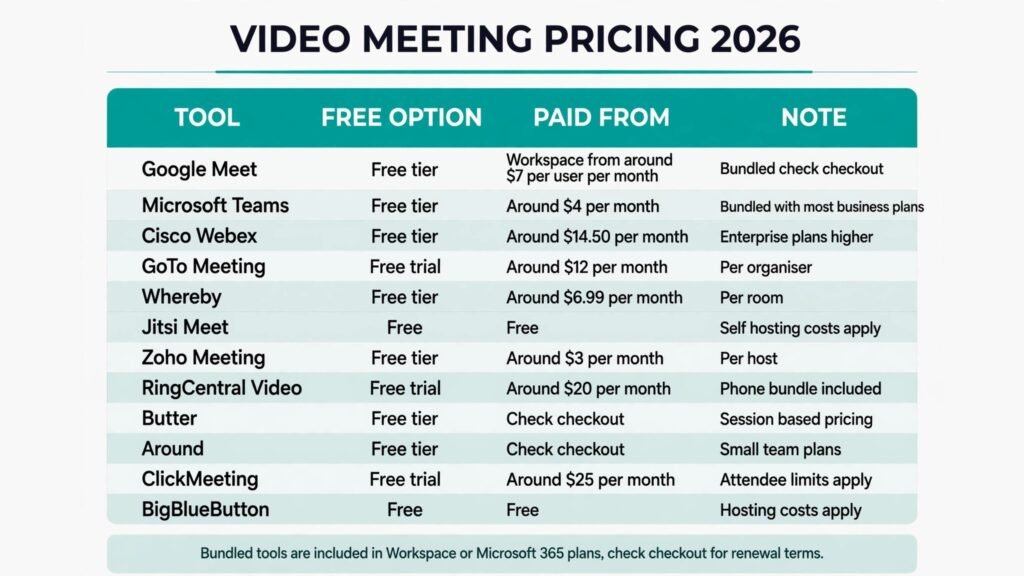
Pricing compared: what video meetings really cost
| Tool | Free option | Paid from | Pricing note |
|---|---|---|---|
| Google Meet | Free tier | Bundled, check checkout | Workspace from around $7 per user per month |
| Microsoft Teams | Free tier | Around $4 per month | Bundled with most business plans |
| Cisco Webex | Free tier | Around $14.50 per month | Enterprise plans higher |
| GoTo Meeting | Free trial | Around $12 per month | Per organiser |
| Whereby | Free tier | Around $6.99 per month | Per room |
| Jitsi Meet | Free | Free | Self hosting costs apply |
| Zoho Meeting | Free tier | Around $3 per month | Per host |
| RingCentral Video | Free trial | Around $20 per month | Phone bundle included |
| Butter | Free tier | Check checkout | Session based pricing |
| Around | Free tier | Check checkout | Small team plans |
| ClickMeeting | Free trial | Around $25 per month | Attendee limits apply |
| BigBlueButton | Free | Free | Hosting costs apply |
A realistic small team setup costs $0 to $10 a month: Jitsi or Whereby free for guests, plus Meet or Teams bundled with apps you already pay for. A business setup with admin controls lands around $12 to $20 per user per month. Webinar and event teams should budget $25 and up, and remember that attendee limits, not seat price, usually decide the real cost. In every case, check checkout for renewal terms, because free meeting time limits change often.
How to Choose the right Zoom alternative
Start with the ecosystem, not the feature list. If your team lives in Google Workspace, Meet is already paid for and guests join with no friction. If your team lives in Microsoft 365, Teams is the same story. Switching to a third tool on top of either bundle rarely pays unless you need something specific, like webinars or self hosting.
Next, test the guest experience before you commit. Send a meeting link to someone outside your company and watch them join. The tools that win this test, Whereby and Jitsi, also win the most goodwill with clients, because nobody enjoys installing an app for a 15 minute call.
Then check the hard limits that matter for your meetings: maximum participants, meeting time limits on free tiers, recording storage, and whether dial in numbers cover the countries your callers are in. A tool that caps meetings at 40 minutes will cost you more in awkward restarts than a paid plan costs in a month.
Finally, test audio on a bad connection. Join a call from a phone on mobile data, with background noise, and compare. The tools with the best noise cancellation and the most stable audio on weak connections, Webex and GoTo Meeting among them, are the ones worth paying for when client calls are on the line.

Mistakes to avoid
Paying for Zoom and a bundled alternative at the same time is the most common waste. Audit your Workspace or Microsoft 365 plan first: most teams already own Meet or Teams and never use it. A second mistake is choosing on webinar features when 90 percent of your meetings are internal calls; buy for the daily job, not the quarterly event. A third is ignoring the free tier time limit until a client meeting cuts off mid sentence. Test the free tier on a real call, with real guests, before you rely on it. Finally, do not judge a tool by its demo on a fast office connection. Test it from home, from a phone and from a noisy room, because that is where your meetings actually happen.
Frequently Asked Questions
Is there a free Zoom alternative?
Yes, several. Jitsi Meet and BigBlueButton are free outright, Google Meet and Whereby offer free tiers, and Teams has a free plan. Free tiers limit meeting time or participant numbers, so heavy users will still want a paid plan, but casual use costs nothing.
Which Zoom alternative is best for large meetings?
Microsoft Teams and Cisco Webex handle large meetings best, with breakout rooms, admin controls and capacity for hundreds of participants. ClickMeeting suits large webinar audiences rather than interactive meetings.
Which Zoom alternative works without downloading an app?
Whereby and Jitsi Meet run fully in a browser with no download and no account for guests. Google Meet also joins from a browser link, though the app gives a better experience on phones.
Which Zoom alternative is best for webinars?
ClickMeeting for scheduled and automated webinars with registration and analytics, and Webex for enterprise events with strict security. Butter suits interactive workshops better than passive webinar audiences.
Can I use a Zoom alternative for teaching?
Yes. BigBlueButton is built for classrooms and integrates with Moodle and Canvas, while Butter suits live workshops and training sessions with polls, timers and breakout rooms.
Which single tool should most teams start with?
Google Meet for Google Workspace teams and Microsoft Teams for Microsoft 365 teams, because both are already paid for. Teams outside either ecosystem should start with Whereby for simplicity or Jitsi Meet for free, private meetings.
Conclusion
The best Zoom alternatives do not try to beat Zoom at everything. They win one job: Meet and Teams win the bundled ecosystem, Webex wins enterprise security, GoTo Meeting wins reliability, Whereby and Jitsi win frictionless browser meetings, Zoho wins budget, RingCentral wins meetings plus phone, Butter wins workshops, Around wins all day small team calls, ClickMeeting wins webinars, and BigBlueButton wins classrooms.
Start with the apps you already pay for. Test the guest join flow and audio on a bad connection, and only then pay for a specialist tool. The right alternative is the one your guests can join in seconds and your team can hear clearly, not the one with the longest feature list.