

The average knowledge worker checks team chat more than 70 times a day, and Slack is the tool most of them check. That habit is also the problem: endless channels, constant pings and a message history that disappears on free plans. Teams switch from Slack for three reasons that keep repeating in 2026: cost at scale, a desire to host their own data, and a need for calmer, more focused communication. The best Slack alternatives below solve at least one of those problems properly, and the right one depends on which problem your team actually has.
This guide compares 12 tools grouped by job: enterprise chat, open source and self hosted chat, focused and async chat, and chat for small teams. Prices are October 2026 figures in US dollars. Where a vendor does not publish pricing, or where sources disagreed, the guide says check checkout rather than guessing. One rule runs through the whole guide: judge a chat tool by whether your team can find an old decision in under a minute, because searchable history is the feature teams miss most after switching.
The 12 best Slack alternatives at a glance
| Tool | Best job | Free option | Paid from |
|---|---|---|---|
| Microsoft Teams | Enterprise chat and meetings | Free tier | Around $4 per month |
| Google Chat | Google Workspace chat | Free tier | Bundled, check checkout |
| Zoho Cliq | Budget business chat | Free tier | Around $3 per month |
| Mattermost | Self hosted team chat | Free version | Around $10 per month |
| Rocket.Chat | Open source team chat | Free version | Around $7 per month |
| Zulip | Threaded team chat | Free tier | Around $8 per month |
| Element | Secure federated chat | Free tier | Around $5 per month |
| Twist | Calm async team chat | Free tier | Around $6 per month |
| Chanty | Simple small team chat | Free tier | Around $3 per month |
| Flock | Small business chat | Free tier | Around $4.50 per month |
| Discord | Community and creator chat | Free tier | Around $3 per month |
| Telegram | Fast group messaging | Free | Free |

Best pick by job
| Your job | Start with | If that fails, try |
|---|---|---|
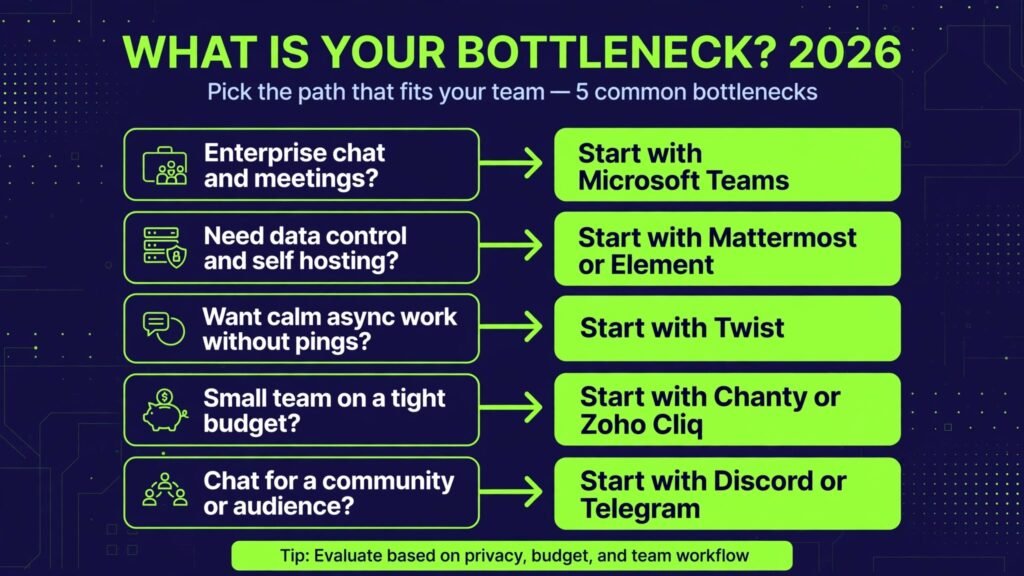
| Enterprise chat and meetings | Microsoft Teams | Google Chat |
| Chat inside Google Workspace | Google Chat | Microsoft Teams |
| Cheapest business chat | Zoho Cliq | Chanty |
| Host chat on your own servers | Mattermost | Rocket.Chat |
| Open source chat with apps | Rocket.Chat | Mattermost |
| Threaded discussions that stay readable | Zulip | Twist |
| Secure chat with full control | Element | Mattermost |
| Calm async work without pings | Twist | Zulip |
| Simple chat for a small team | Chanty | Flock |
| Small business chat on a budget | Flock | Zoho Cliq |
| Chat for a community or audience | Discord | Telegram |
| Fast free group messaging | Telegram | Discord |
Enterprise chat: the big organisation options
These three tools suit companies that need admin controls, compliance, meetings and integrations at scale, which is where Slack pricing hurts most.
1. Microsoft Teams
Microsoft Teams is the default Slack alternative for companies already paying for Microsoft 365. It combines chat, channels, video meetings, file storage and Office apps in one place, and for many organisations it costs nothing extra on top of an existing subscription. Its admin and compliance controls are also among the strongest here.
Pricing: A free tier covers basic chat and meetings. Paid plans start at around $4 per user per month as an add on, and most business plans bundle Teams. Check checkout for current bundle pricing.
Best for: Enterprises, schools and teams standardised on Microsoft 365 that want chat, meetings and documents in one system.
Watch out for: Teams is heavier and slower than Slack for pure chat, and its channel structure can feel cluttered for small teams that only need messaging.
Try it at: microsoft.com

2. Google Chat
Google Chat is the natural choice for Google Workspace organisations. It offers rooms, threads, direct messages and tight integration with Gmail, Drive and Meet, so a team that lives in Google apps gets chat without a new vendor. Its search across Workspace is a genuine advantage for finding old decisions.
Pricing: A free tier covers basic chat for personal accounts. Business use is bundled with Google Workspace plans; check checkout for current pricing in your region.
Best for: Teams, schools and companies standardised on Google Workspace that want chat inside the apps they already open daily.
Watch out for: Google Chat is simpler than Slack for bots and workflow automation, so teams with heavy Slack app usage should test their key integrations first.
Try it at: chat.google.com
3. Zoho Cliq
Zoho Cliq is the budget enterprise option. It offers channels, threads, video calls, bots and automation at a fraction of Slack pricing, with strong integration into the wider Zoho suite for CRM, projects and mail. For cost conscious companies, it is the most complete cheap alternative.
Pricing: A free tier covers basic chat. Paid plans start at around $3 per user per month. Check checkout for current pricing and user limits.
Best for: Small and mid sized businesses that need full team chat and automation on a tight budget, especially those already using Zoho apps.
Watch out for: Cliq’s third party integration library is smaller than Slack’s, so teams with unusual tool stacks should check their key apps before migrating.
Try it at: zoho.com
Open source and self hosted: own your data
Some teams cannot put internal discussion on a vendor’s servers, or simply prefer to own their data. These four tools give that control.
4. Mattermost
Mattermost is the leading self hosted Slack alternative. It offers channels, threads, file sharing, bots and integrations, with deployment on your own servers or private cloud. Its enterprise edition adds compliance, retention and advanced admin controls for regulated industries.
Pricing: A free open source version covers core chat. Paid plans start at around $10 per user per month. Check checkout for current enterprise pricing.
Best for: Enterprises, government teams and developers that need self hosting, compliance and full data control.
Watch out for: Self hosting needs IT time for setup, updates and backups. Budget that effort honestly, or choose the hosted version instead.
Try it at: mattermost.com
5. Rocket.Chat
Rocket.Chat is the most flexible open source chat tool on this list. It supports team chat, omnichannel customer messaging and live chat in one platform, with extensive customisation and a large app marketplace. Community and enterprise versions cover very different needs.
Pricing: A free community version covers core chat. Paid plans start at around $7 per user per month for hosted and enterprise features. Check checkout for current pricing.
Best for: Teams that want open source chat plus customer messaging in one system, and developers who need deep customisation.
Watch out for: Rocket.Chat’s breadth can feel complex for a team that only needs simple chat. Smaller teams should prefer Chanty or Flock.
Try it at: rocket.chat
6. Zulip
Zulip solves the problem Slack creates: conversations that become unreadable when many topics share one channel. Its topic based threading keeps every discussion separate and searchable, which makes it popular with open source projects and research teams that juggle dozens of threads.
Pricing: A free tier covers basic use. Paid plans start at around $8 per user per month. Check checkout for current pricing and hosting options.
Best for: Engineering teams, research groups and open source projects with many parallel discussions that need to stay findable.
Watch out for: Zulip’s threading model takes a week to learn, and teams used to Slack’s free flowing channels may resist it at first. Run a pilot with one team before a full migration.
Try it at: zulip.com

7. Element
Element is built on the Matrix protocol, which means chat is federated: different organisations can run their own servers and still talk to each other, with end to end encryption for private rooms. For security conscious teams, that architecture is the selling point.
Pricing: A free tier covers basic use on public servers. Paid plans start at around $5 per user per month for hosted and enterprise features. Check checkout for current pricing.
Best for: Security focused teams, government and healthcare organisations, and communities that need encrypted, federated messaging.
Watch out for: Federation and encryption add setup complexity, and Element’s interface is less polished than Slack’s. Test it with your security team before committing.
Try it at: element.io
Focused and async: chat that respects attention
Slack’s always on culture burns teams out. These two tools are designed to slow communication down and make it more deliberate.
8. Twist
Twist, from the makers of Todoist, is built for async work. Conversations live in threads organised by topic, notifications are calmer by default, and there is no expectation of an instant reply. For distributed teams across time zones, that design is a genuine productivity gain. Agencies running distributed creative teams often pair it with the stack in our AI tools for content agencies guide.
Pricing: A free tier covers basic use. Paid plans start at around $6 per user per month. Check checkout for current pricing.
Best for: Remote and distributed teams that want thoughtful discussion without the pressure of real time chat.
Watch out for: Twist is poor for urgent real time coordination. Teams that need instant incident response should pair it with a real time tool or keep a separate urgent channel elsewhere.
Try it at: twist.com

9. Chanty
Chanty is the simplest business chat tool on this list. It offers channels, direct messages, voice messages, tasks and file sharing in a clean interface that a small team can learn in an afternoon. It trades depth for simplicity, which is exactly right for teams under twenty people.
Pricing: A free tier covers basic chat with history limits. Paid plans start at around $3 per user per month. Check checkout for current pricing and history limits.
Best for: Small teams, startups and agencies that need straightforward chat plus light task management without enterprise complexity.
Watch out for: Chanty lacks the automation and integration depth of Slack or Teams, so larger teams will outgrow it as their tool stack grows.
Try it at: chanty.com

10. Flock
Flock is a small business chat tool with channels, video calls, polls, reminders and to do lists built in. It is designed for businesses that want chat plus a few productivity features in one cheap app, without assembling a stack of separate tools.
Pricing: A free tier covers basic chat. Paid plans start at around $4.50 per user per month. Check checkout for current pricing in your region.
Best for: Small businesses, retailers and service teams that need chat, calls and simple task tracking in one place.
Watch out for: Flock’s integrations are limited compared with Slack, so check your essential apps before migrating a team that depends on many tools.
Try it at: flock.com
Community and free messaging: audiences, not just staff
The last two tools suit communities and audiences as well as internal teams, and both are free for basic use.
11. Discord
Discord started for gamers and is now a major community platform. It offers text channels, voice rooms, stages, streaming and bots, with a free tier that covers most community needs. Creator and brand communities use it where Slack would be far too expensive at audience scale.
Pricing: A free tier covers core chat and voice. Nitro plans start at around $3 per month for individuals, with server boosts sold separately. Check checkout for current pricing.
Best for: Creator communities, gaming groups, open source projects and brands that need a free, lively community space.
Watch out for: Discord is informal by design and lacks business admin controls, so it suits communities far better than internal company chat with compliance needs.
Try it at: discord.com
12. Telegram
Telegram is the fastest free messaging tool on this list, with huge groups, channels, bots and file sharing up to large sizes. It is not a full team chat replacement, but for announcements, large groups and fast coordination it is unmatched at zero cost.
Pricing: Free for core messaging. A Premium plan exists for individuals; check checkout for current pricing.
Best for: Announcements, large communities, event coordination and teams that need fast group messaging without a per user bill.
Watch out for: Telegram lacks threaded channels, task management and business admin features, so pair it with a proper team tool for internal work rather than replacing one entirely.
Try it at: telegram.org
Pricing compared: what team chat really costs
| Tool | Free option | Paid from | Pricing note |
|---|---|---|---|
| Microsoft Teams | Free tier | Around $4 per month | Bundled with Microsoft 365 |
| Google Chat | Free tier | Check checkout | Bundled with Workspace |
| Zoho Cliq | Free tier | Around $3 per month | Cheapest business option |
| Mattermost | Free version | Around $10 per month | Self hosting needs IT time |
| Rocket.Chat | Free version | Around $7 per month | Community version free |
| Zulip | Free tier | Around $8 per month | Hosting options vary |
| Element | Free tier | Around $5 per month | Hosted plans vary |
| Twist | Free tier | Around $6 per month | Async by design |
| Chanty | Free tier | Around $3 per month | History limits on free tier |
| Flock | Free tier | Around $4.50 per month | Small business focus |
| Discord | Free tier | Around $3 per month | Nitro is per individual |
| Telegram | Free | Free | Premium is optional |
A realistic starter setup costs $0 to $5 per user per month: a free tier for testing, then one paid plan for the team size you actually have. An enterprise setup lands around $4 to $10 per user per month, often bundled with an existing suite like Microsoft 365 or Google Workspace. Pay more only when a specific job, such as compliance, self hosting or community scale, justifies it. In every case, check checkout for renewal terms and per user pricing, because both change often.

How to Choose the right Slack alternative
Start with the constraint, not the feature list. If the constraint is cost at scale, start with Teams, Google Chat or Zoho Cliq and check what your existing suite already includes. If the constraint is data control, start with Mattermost or Element and involve your IT or security team early. If the constraint is attention, start with Twist and test it with a distributed team.
Next, test the history step before you commit. Search for an old decision, a file and a link in each finalist, and time how long it takes. The tool that finds things fastest will save more hours than any chat feature.
Then check the integration step. List the five tools your team opens daily and confirm each finalist connects to them, either natively or through a bot. A chat tool that isolates your team from its other apps will be abandoned, however nice its interface is.
Finally, test the migration step. Move one team, not the whole company, and run it for two weeks with real work. The tool that team actually keeps using, after the novelty fades, is usually the right one for the wider rollout.
Mistakes to avoid when switching chat tools
The first mistake is migrating the whole company at once. A company wide switch on a single day creates confusion, lost history and a flood of support questions, and it leaves no team able to help the others. Move one team first, run it for two weeks on real work, and let that team become the internal guide for the wider rollout. A pilot migration reveals problems while they are still small.
The second mistake is ignoring message history. Teams underestimate how often they search old decisions, links and files, and a new tool with empty history feels broken on day one even when it works perfectly. Check what each finalist imports from Slack, including files and threads, and plan a read only archive for anything that cannot move. Searchable history is the feature teams miss most after switching.
The third mistake is keeping Slack habits inside an async tool. Moving to a calmer tool like Twist and then treating it like real time chat, with instant reply expectations and constant pings, destroys the benefit of the switch. Agree new norms before migration: response times, thread use, and which channel is genuinely urgent. A tool change without a habit change is just a reskin.
The fourth mistake is skipping the integration audit. List the five tools your team opens daily and confirm each finalist connects to them, either natively or through a bot. A chat tool that isolates your team from its project tracker, code host or CRM will be abandoned, however nice its interface is, because people will drift back to wherever their work actually lives.
The fifth mistake is launching without channel rules. A new workspace with no naming conventions, no archiving habit and no guidance on public versus private channels becomes cluttered within a month. Set simple rules on day one: one channel per project, archive finished work, and keep decisions in threads where they can be found later. Good hygiene at launch is far cheaper than a cleanup later.
Frequently Asked Questions
Is there a free Slack alternative?
Yes. Telegram and Discord are free for core use, Mattermost and Rocket.Chat offer free self hosted versions, and Teams, Google Chat, Zoho Cliq, Zulip, Element, Twist, Chanty and Flock all offer free tiers. Free tiers limit history, storage or users, so growing teams will still want a paid plan.
Which Slack alternative is best for large companies?
Microsoft Teams for Microsoft shops, Google Chat for Google shops, and Mattermost for companies that need self hosting and compliance. All three scale to thousands of users with admin controls Slack charges heavily for.
Which Slack alternative is best for small teams?
Chanty or Flock for simplicity and low cost, and Zoho Cliq for the most features per dollar. Small teams should avoid enterprise tools that add complexity they will never use.
Can I host team chat on my own servers?
Yes, with Mattermost, Rocket.Chat, Zulip and Element. Self hosting gives full data control but needs IT time for setup, updates and backups, so budget that effort before choosing it.
Which tool should a remote team start with?
Twist for async discussion across time zones, plus a real time tool like Teams or Google Chat for urgent coordination. Most successful remote teams use one async tool and one real time tool rather than forcing one tool to do both jobs.
Do these tools replace Slack bots and workflows?
Partly. Teams, Google Chat and Zoho Cliq offer strong automation, and Mattermost and Rocket.Chat support bots and webhooks. Teams with heavy custom Slack workflows should audit those workflows before migrating, since rebuilding them takes time.
Conclusion
The best Slack alternatives do not try to copy Slack exactly. They win one job: Teams and Google Chat win suite integration, Zoho Cliq wins low cost, Mattermost and Element win data control, Zulip wins readable threads, Twist wins calm async work, Chanty and Flock win small team simplicity, and Discord and Telegram win free community scale.
Start with your constraint: cost, control or attention. Test the free tier with one team on real work, check search and integrations, and only then migrate widely. The right alternative is the one your team still uses happily after two weeks, not the one with the longest feature list.