
Verdict first. For most consultants, FreshBooks is the strongest pick for hourly billing, HoneyBook fits project fees sold with proposals, and Zoho Invoice fits a consultant who wants solid invoicing at no subscription cost. That split matters because consultants do not all bill the same way, and a tool built for one billing model will fight the other two. The best invoicing software for consultants therefore has to match how you charge before it matches how you look.
This guide compares 5 tools on time tracking, project and retainer billing, reminders and late fees, payment options, client limits, and price. Where a vendor caps billable clients or charges per team member, that is stated plainly, because those limits change the real cost as a practice grows. Prices change, so confirm every figure on the vendor page before you sign.
Consultants also need a system clients trust. An invoice that is clear, on time, and easy to pay gets paid faster than a perfect invoice sent late or buried in an email thread. Payment speed, reminder discipline, and a professional invoice presentation therefore matter as much as any accounting feature in this guide.
Consultant Invoicing Tools at a Glance
The table below gives a fast read on price and fit. Watch the client cap column beside the price, because a low plan with a five client cap fits a new practice and strains a growing one.
| Tool | Starting price | Best for |
|---|---|---|
| FreshBooks | Lite 23 dollars per month, Plus 43 dollars, Premium 70 dollars reported | Hourly billing consultants that want time to invoice in one flow |
| HoneyBook | Starter 29 dollars per month billed annually, Essentials 49 dollars, Premium 109 dollars reported | Project fee consultants that sell with proposals and contracts |
| Zoho Invoice | Free, up to 500 invoices per year and 2 users reported | Consultants that want strong invoicing at no subscription cost |
| Wave | Starter free, Pro 19 dollars per month reported | Consultants that want free invoicing plus bookkeeping |
| Invoice Ninja | Free up to 5 clients, Pro 14 dollars per month reported | Budget conscious consultants that want control and self hosting options |
Why the best invoicing software for consultants beats a spreadsheet invoice
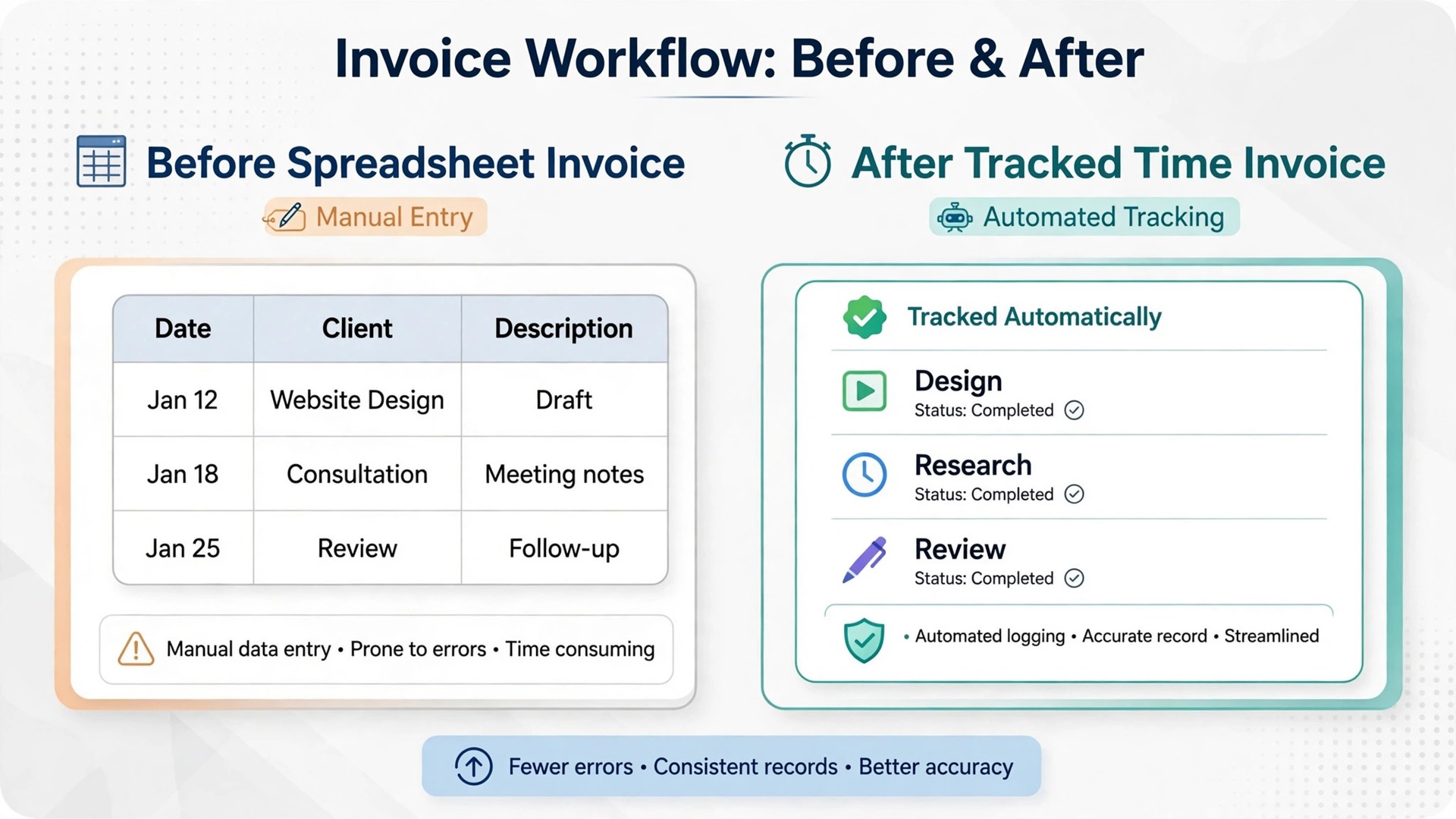
A spreadsheet invoice can look professional, but it cannot chase itself. A consultant who must remember every due date, every late fee, and every follow up message will eventually let a payment slip, usually during the busiest delivery week. Invoicing software sends reminders on schedule, applies late fee rules where set, and keeps the chase visible until the invoice is paid.
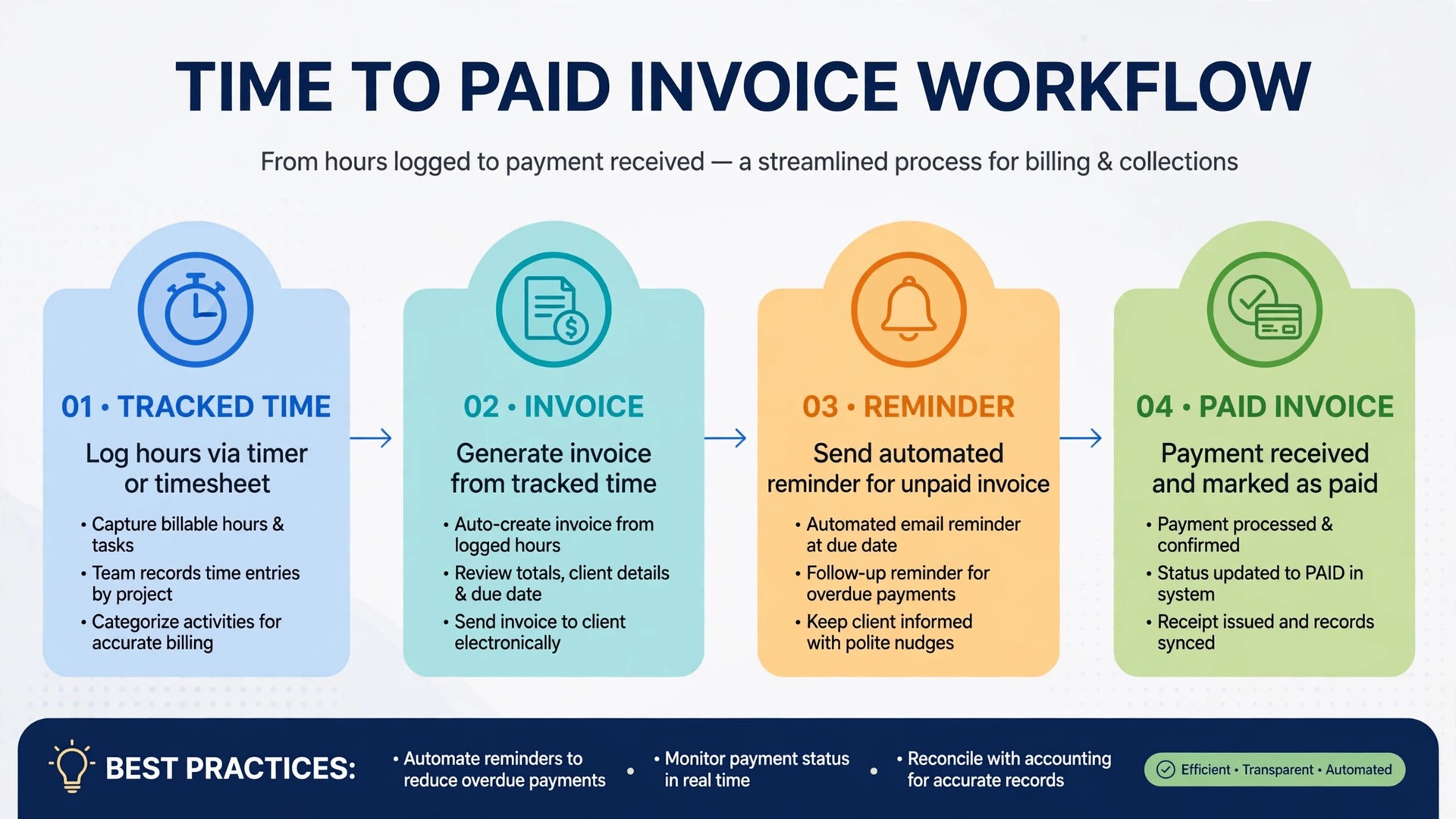
Time tracking is the second difference. A consultant who bills by the hour needs hours captured as work happens, not reconstructed from memory at month end. Tools that turn tracked time into an invoice line in a few clicks reduce both lost hours and client disputes, because the invoice reflects a real record rather than a recalled estimate.
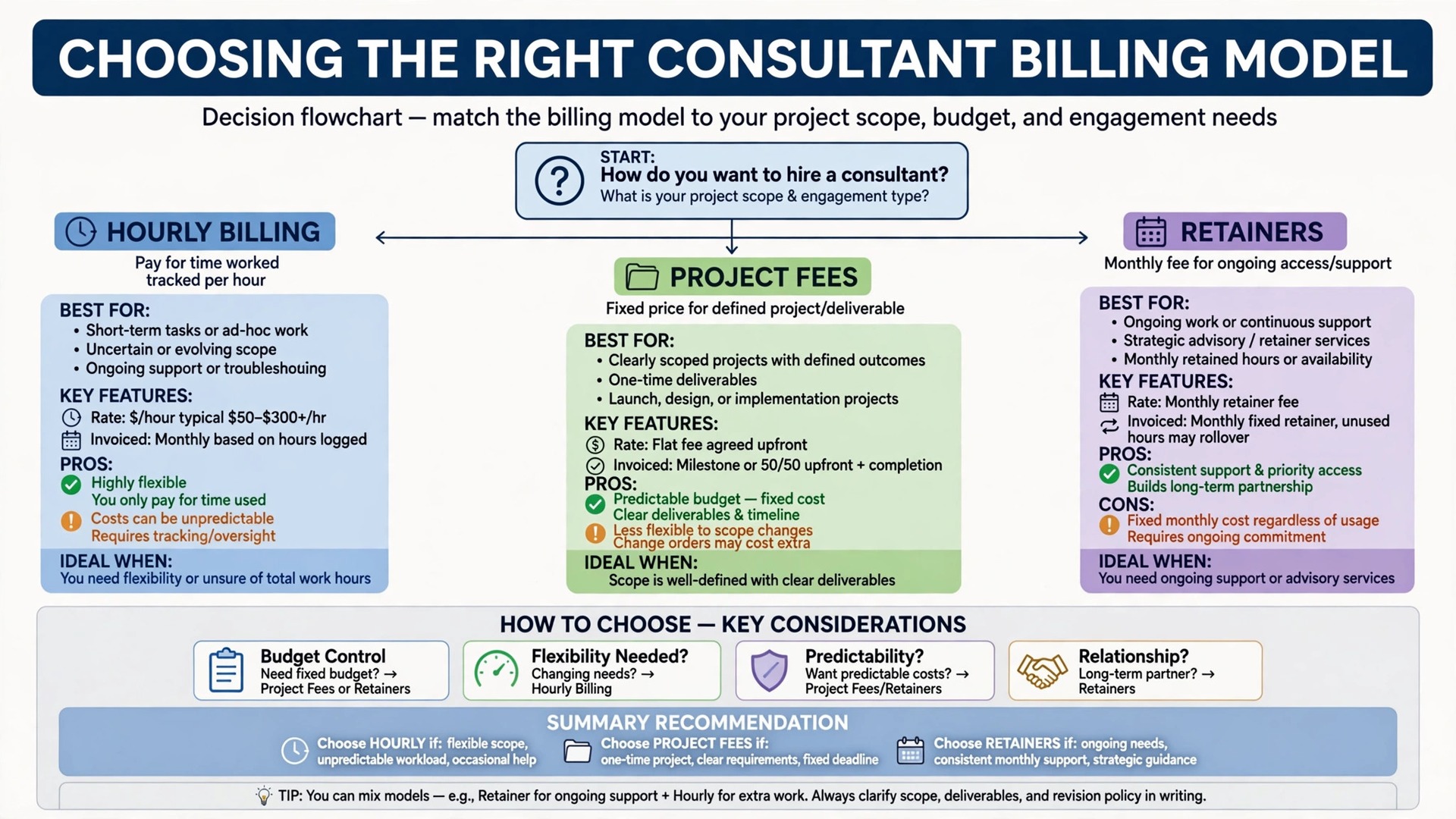
Retainer and project billing is the third difference. A spreadsheet handles one invoice at a time, while invoicing software can run recurring retainer invoices, project milestones, and payment plans from the same client record. That structure supports steadier cash flow, which matters more to a solo consultant than to a firm with a finance team.
Finally, invoicing software creates a payment record that supports better decisions. Which clients pay late, which services earn most, and which months dip are visible in reports rather than hidden across email threads. The best invoicing software for consultants turns that record into pricing and client decisions, not just into sent invoices.
Five Invoicing Tools Compared
FreshBooks
FreshBooks is built for service professionals who bill hours, with time tracking, expense capture, estimates, and invoicing in one place. The Lite plan at 23 dollars per month caps billable clients at five, while Plus at 43 dollars raises the cap to fifty and adds proposals, retainers, and e-signatures, which is the tier most working consultants land on. Premium at 70 dollars offers unlimited clients and project profitability reporting. Extra team members cost 11 dollars per month each in recent comparisons, and card processing runs near 2.9 percent plus 30 cents.
Choose FreshBooks when hourly billing and time tracking drive the practice. Skip it when you need a free plan, because there is no free tier, only a 30 day trial.
A further strength is reminder and late fee handling, which suits consultants tired of chasing payments by email. Set reminder rules once, and the system follows up on schedule while you deliver work. That discipline alone often pays for the subscription in faster payment.
HoneyBook
HoneyBook runs client work from inquiry to final payment, with proposals, contracts, invoices, payment plans, and reminders in one flow. Billed yearly, pricing runs 29 dollars per month on Starter, 49 dollars on Essentials, and 109 dollars on Premium in recent comparisons, with a 30 day free trial and no card required. Card fees start near 2.9 percent plus 25 cents in one pricing section, with a lower rate shown elsewhere, so confirm your rate before signing. ACH payments cost 1.5 percent in recent reports.
Choose HoneyBook when project fees are sold through proposals and contracts, and the client journey matters as much as the invoice. Skip it when you only need simple invoicing, because the breadth and price exceed a bare invoice tool.
A further strength is the client experience, with a single flow from proposal to contract to payment that looks professional to a new client. That polish helps a consultant win project work, not just bill it, which is a real advantage in a competitive practice.
Zoho Invoice
Zoho Invoice is a free invoicing tool with time tracking, expense handling, client portal, and payment gateway connections, capped in recent comparisons at 500 invoices per year and two users. That free tier suits a solo consultant or a very small practice that wants real invoicing without a monthly bill. Payment fees depend on the gateway chosen, so confirm the gateway rate before comparing totals.
Choose Zoho Invoice when cost is the main constraint and the invoice count fits the cap. Skip it when you need deep accounting, payroll, or a large team, because those needs belong in a fuller accounting system.
A further strength is the clean invoice presentation and client portal, which give a free tool a professional feel. Clients can view, discuss, and pay invoices in one place, which shortens the payment cycle without adding software cost.
Wave
Wave offers free invoicing and bookkeeping on its Starter plan, with Pro at 19 dollars per month reported for automatic bank feeds and deeper bookkeeping. Card processing runs near 2.9 percent plus 60 cents on Starter in recent comparisons. That combination suits a consultant who wants invoices and books in one free system while starting out, with a low cost upgrade when automation matters.
Choose Wave when free invoicing plus bookkeeping matters most. Skip it when you need proposal and contract workflows, because Wave stays focused on invoicing and books rather than client sales flow.
A further strength is the bookkeeping link, which keeps income, expenses, and invoices together for tax time. A consultant who dreads year end reconciliation will value that link more than any single invoice feature.
Invoice Ninja
Invoice Ninja offers free invoicing for up to five clients, with Pro at 14 dollars per month reported for unlimited clients and deeper features. It covers invoices, quotes, time tracking, expenses, and payment gateway connections, with card fees set by the chosen gateway. That control suits a consultant who likes to configure the invoice workflow precisely and grow slowly past the free cap.
Choose Invoice Ninja when budget control and configurability matter most. Skip it when you want the most polished client sales flow, because proposal and contract depth sits behind other tools here.
A further strength is the quote to invoice flow, which turns an accepted quote into an invoice without retyping client or line details. That small saving, repeated across every engagement, removes a common source of billing errors.
Best Picks by Billing Model
Use this table to match the tool to the way you charge. A tool that fits hourly billing can strain on project fees, where proposals and contracts matter more than time capture. Keep the best best invoicing software for consultants in view as you compare, and judge each pick on the job it must do daily.
| Job | Best pick | Why it wins |
|---|---|---|
| Hourly billing | FreshBooks | Time tracking to invoice in one flow, with reminders and late fees |
| Project fees | HoneyBook | Proposals, contracts, and payment plans in one client flow |
| Retainers | FreshBooks Plus or Zoho Invoice | Recurring invoices with reminders, at paid or free cost |
Late Payment Follow Up Checklist
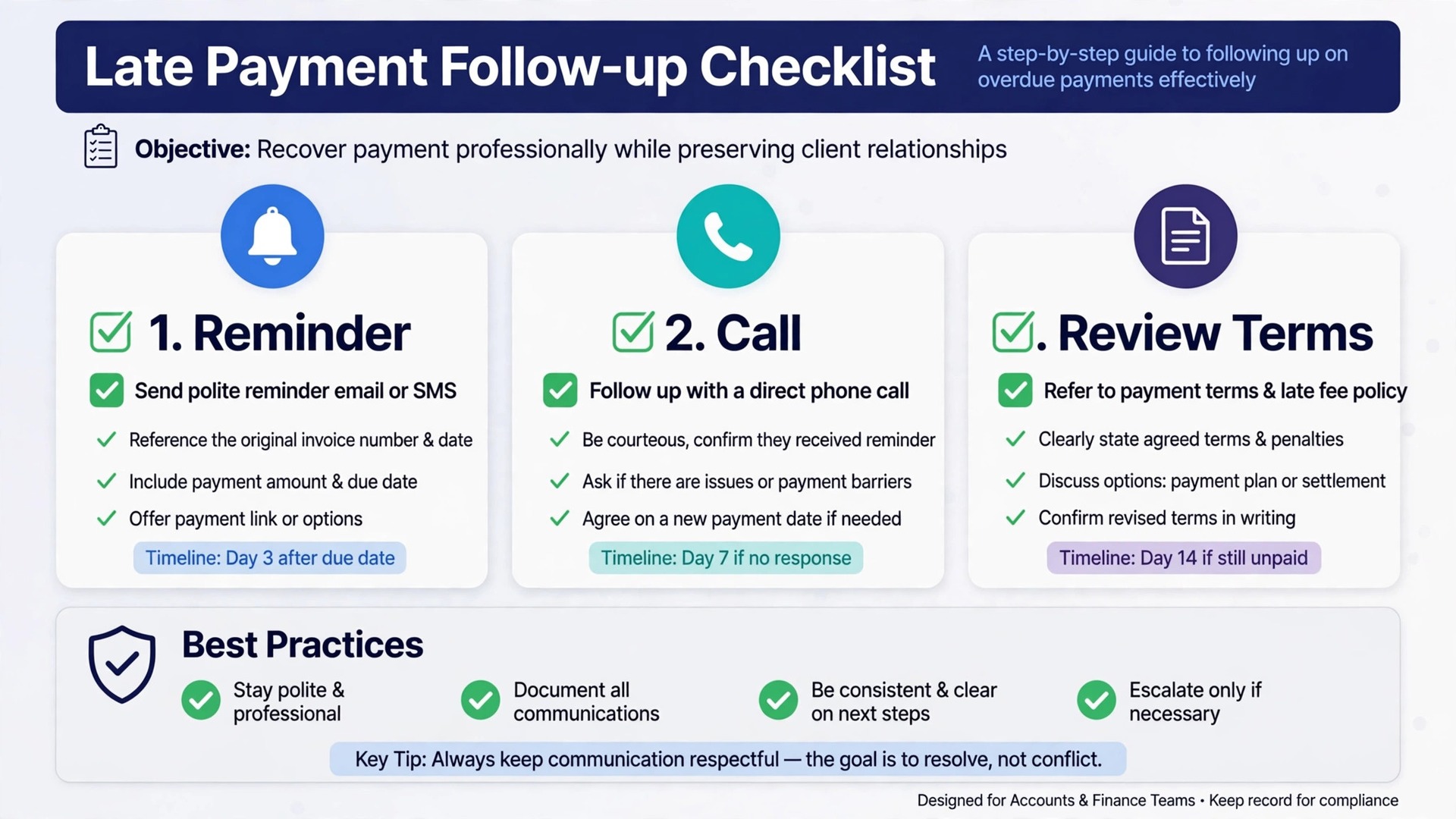
– Send the invoice on the agreed day, not at month end, so the payment clock starts when the client expects it. – Set a payment term on every invoice, and state it in the same place on every invoice so clients learn it. – Send a polite reminder three days before the due date, not only after the invoice is late. – Send a firm follow up on the due date itself, with the invoice attached and a payment link included. – Call the client on day seven past due, and agree a payment date in that conversation, then confirm it in writing. – Pause new work politely when an invoice passes an agreed threshold, and state that rule in the engagement terms. – Review late payers monthly, and adjust terms, deposits, or client fit before the pattern repeats.
What Invoicing Really Costs
The subscription is rarely the largest cost in consultant invoicing. Card processing, often near 2.9 percent plus a fixed fee per payment, can exceed the monthly subscription on a single large invoice. Model processing at your real invoice values, and consider bank transfer options where the client accepts them, because the saving on a large project fee is real.
Client caps are the second cost to model. A 23 dollar plan that caps billable clients at five fits a new practice and breaks the moment a sixth client signs. Price the tier you will need at twelve months, not the tier that fits today, and include per team member fees where they apply.
Late payment is the largest hidden cost of all. An invoice paid sixty days late costs working capital, chasing time, and sometimes a strained client relationship. A tool with strong reminders and late fee rules can shorten that cycle enough to outweigh a higher subscription many times over.
Accounting depth is a further cost fork. A pure invoicing tool is cheap until the practice needs full books, payroll, or accountant collaboration, at which point a second system appears. If those needs are near, price the fuller system now rather than migrating mid year.
Separate the subscription from the total cost of ownership before you compare finalists. Training time, setup help, extra users, and any second tool all sit outside the headline price, and they decide the real first year bill. The best best invoicing software for consultants on subscription price alone can still be the expensive choice once those items are added, so build one total per finalist and compare totals, not headlines.
Ask every vendor for the renewal price in writing, not just the first year price. Introductory offers, first month discounts, and launch pricing all expire, and the renewal figure is the price you will actually live with. A vendor that will not put renewal pricing in writing is telling you something useful about the second year.
Mistakes That Cost Consultants Cash Flow
The most common mistake is invoicing late. Consultants who deliver excellent work and invoice weeks later teach clients that payment can wait. Invoice on the agreed day, every time, and treat invoicing as part of delivery rather than as administration after delivery.
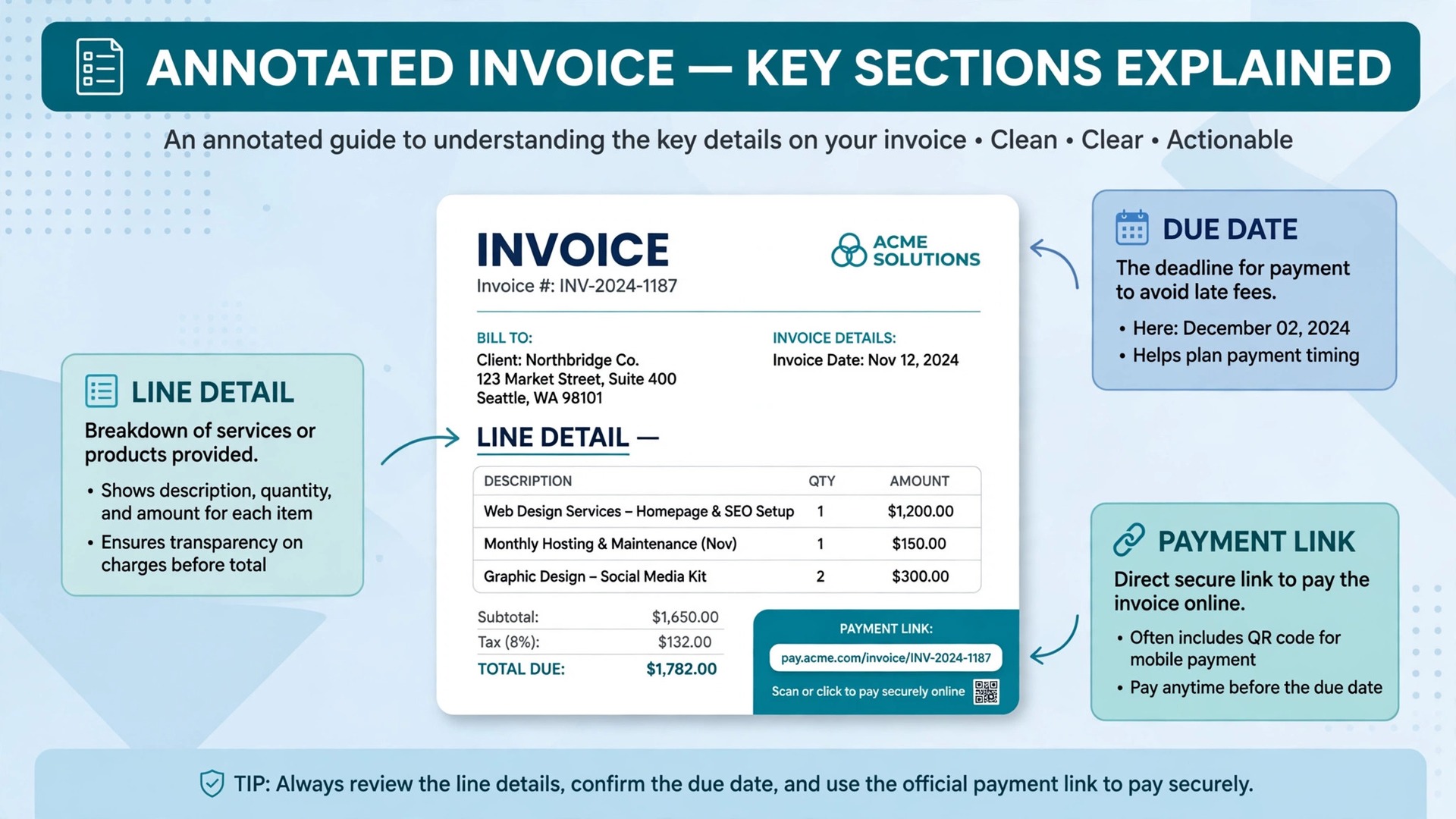
A second mistake is vague invoice lines. A line that reads consulting services invites questions and delays, while a line that names the deliverable, the period, and the agreed rate gets paid faster. Write invoice lines a client can approve without asking for clarification.
A third mistake is no deposit on project work. A consultant who starts a large project with no deposit carries the full payment risk. Set a deposit in the engagement terms, invoice it before work starts, and tie milestones to payments from the start.
A fourth mistake is chasing late payment only by email. Email reminders are easy to ignore, while a short call on day seven past due resolves most delays. Pair automated reminders with a human call, and record the agreed payment date in writing.
Another common mistake is letting one person hold all the system knowledge. If only the owner knows how to fix time capture and reminder handling, a holiday or a sick day becomes a system outage. Train at least two people on the core routines, write the routines down on one page, and keep that page where the team works.

How to Test Finalists During a Billing Month
Pick two finalists and run them through a real billing month in trial. Track hours, invoice a project fee, and run a retainer invoice, then let one invoice go past due and watch the reminder flow. Score how each system handles time capture, invoice clarity, payment ease, and late follow up.
Ask a trusted client to score the invoice experience if they are willing. A consultant values features, while a client values clarity, a working payment link, and no surprises. A tool that only pleases the consultant will still get paid slowly.
Check support before you need it. Send a question about reminders, payment setup, or client caps and note how fast and how clearly the team replies. Support quality matters most at month end, when invoicing cannot wait.
Finally, write down the three numbers that will prove success, such as response time, unpaid invoices, or repeat bookings, and agree on them with the team before launch. Without agreed numbers, every later argument about the tool becomes opinion, while with agreed numbers the review after three months is a simple check, not a debate.
How to Choose an Invoicing Tool
Start with the work that happens every day, not with the feature list that impressed a demo. Write down the five tasks your team repeats most in consulting billing, then score each finalist only on those tasks. A tool that handles the daily loop cleanly will earn its fee, while a tool that shines on rare tasks and stumbles on daily ones will frustrate the team within a month.
Next, list the must have features separately from the nice to have features, and keep the must have list short. Three features used daily beat thirty features used once, so buy for the daily work and ignore the rest of the catalogue. The best best invoicing software for consultants for your firm is the one that does the must have list without workarounds, even if a rival lists more features overall.
Check the mobile experience before anything else, because staff and clients now do most of this work on phones. If the mobile view hides key buttons, shrinks text too far, or forces endless scrolling, adoption will suffer no matter how good the desktop version looks. Judge the product on the smallest screen your team actually uses, not on a large office monitor.
Ask for references from businesses of a similar size, not just from large success stories. A vendor that serves a fifty person firm well may still fail a three person firm, because support, pricing, and setup differ by scale. A reference from a firm like yours is worth more than a polished case study, so ask for two and actually call them.
Review the contract line by line with the same care you give to a supplier agreement. Note the minimum term, the notice period, the price change clause, and any fee for extra users, locations, or transactions. A clear contract protects both sides, while a vague contract protects only the vendor, so ask for any unclear term in plain writing before signing.
Decide what happens when the system is down, because every online tool fails at some point. Write a simple fallback, such as a paper record or a phone tree, and keep it where staff can find it. A fallback plan turns a system outage into a minor delay rather than a lost day of trading, and it is a sign of a mature operation.
Plan for growth in the contract, including the price at the next tier and the cost of adding a location, a team, or a new channel. A tool that punishes growth will be replaced just when the business succeeds, which is the worst time to migrate. Growth pricing agreed in advance removes that trap and keeps the decision honest.
Finally, set a review date three months after launch and judge the tool against the reasons you bought it. Write those reasons down now, while they are fresh, and compare them with the actual results at review time. If the tool met them, keep it and deepen its use, and if it did not, change the workflow or change the tool before another year of fees passes.
Setting Up Without Disrupting Billing
Migration works best in small steps. Move one group of records at a time and check each group before moving the next, because a big move on a Friday night creates a Monday morning of missing records and confused staff. Small steps take longer on paper, yet they protect the business from the one error that stops trading for a day.
Keep the old system running in parallel for two weeks, so staff can check a record in the old place if the new place looks wrong. Parallel running feels like extra work, yet it catches migration errors before they affect clients. Stop the old system only after two clean weeks, and only when the team agrees the new system is trustworthy. Choosing the best best invoicing software for consultants is only half the job, and a careful cutover is the other half.
Protect data quality from day one by setting clear rules for names, phone numbers, and record titles. Duplicate records and misspelled addresses create double bookings and failed messages, and cleaning them later takes far longer than entering them correctly at the start. A short data rule sheet, shared with the team, prevents most of the mess.
Schedule training in the week before launch, not in the month before, so skills are fresh when real work starts. Training that happens too early fades, and training that happens after launch arrives too late. A short session, followed by a real day of work, builds confidence faster than either alone, especially before a month end billing run.
Name one owner for the new system, give that person protected time in the first fortnight, and write down the three routines that must happen every day. Without an owner, even a strong product drifts back to spreadsheets and group chats within a month, and the subscription becomes a cost without a benefit.
After Launch, Keep Billing Honest
Celebrate the first month of wins with the team, such as faster follow up, fewer missed bookings, or a happier customer. A new system feels like a burden until staff see it working, and a small celebration marks the change as a success. Recognition builds the habit of using the tool well, which matters more than any launch announcement.
Keep one channel for internal questions during the first month, so staff do not learn different workarounds in separate chats. A single place for questions lets the owner spot the same problem twice and fix the workflow once, rather than answering the same question five times in five places. That discipline keeps the system clean as the team grows.
Document the daily, weekly, and monthly tasks for the new system on one page, and pin that page where the team works. A one page routine beats a long manual that nobody opens, because staff will follow a short list they can see. Update the page when the workflow changes, so it stays true to how work actually happens.
Measure customer satisfaction after launch, with a short survey or a simple rating after each job. A tool that improves internal efficiency but annoys customers has not improved the business. Customer feedback, read weekly, will show whether the new system helps the people who pay for it, and where it still needs work.
Agree on response times and support hours in writing, especially if the business trades evenings or weekends. A support team that answers only on weekday mornings is little help when the system fails on a Saturday. Ask for the real support channel, test it during the trial, and note how long a genuine question takes to reach a person who can fix it.
Review user permissions before launch, so each role sees only what it needs. Office staff need financial views, field staff need job details, and customers need only their own records. Clear permissions protect privacy, reduce confusion, and prevent accidental changes to prices or schedules that are hard to unwind later.
Build a simple weekly routine around the new system, with one person checking the key figures and one short meeting to fix problems. A tool that nobody reviews will slowly fill with stale records, duplicate customers, and outdated prices. Fifteen minutes a week keeps the data clean, and clean data keeps every later report honest and useful.
Map the customer journey before you change any setting, from first enquiry to final payment, and note every step where a customer waits, repeats information, or gets confused. A system that fixes those steps will feel like an improvement, while a system that only adds a dashboard will feel like extra work. Journey first, features second, is the order that protects adoption.
More Reading on Stratilyze
– Best Invoicing Software for Trades Businesses – Best Invoicing Software for Mobile Mechanics – Best CRM Software for Consultants
Frequently Asked Questions
Which invoicing tool is best for an hourly consultant?
FreshBooks leads for hourly consultants because time tracking turns into an invoice in a few clicks, with reminders and late fees built in. Zoho Invoice is a strong free alternative when the invoice count fits its cap and time tracking needs are simpler.
What is the best free invoicing software for consultants?
Zoho Invoice and Wave Starter both offer genuinely free invoicing. Zoho Invoice fits a consultant who wants a clean invoice tool, while Wave fits one who also wants free bookkeeping in the same system.
How much does consultant invoicing software cost per month?
Starting prices in this guide run from free for Zoho Invoice and Wave Starter to 23 dollars per month for FreshBooks Lite, with working tiers near 43 to 49 dollars. Model card processing and client caps beside the subscription, because those lines change the total.
Can invoicing software handle retainers?
Yes, through recurring invoices and payment plans on most tools here. FreshBooks Plus adds retainer handling explicitly, while Zoho Invoice and Wave handle recurring invoices at lower or no subscription cost. Test the exact retainer flow during a trial.
How do I get clients to pay faster?
Invoice on the agreed day, write clear invoice lines, offer an easy payment link, send a reminder before the due date, and call on day seven past due. A tool that automates the first steps and supports the call with a clear record gets paid fastest.
Should I charge a deposit on project work?
Yes for most project work. A deposit before work starts reduces payment risk and signals commitment on both sides. State the deposit, milestones, and late terms in the engagement agreement before the project begins.
The Verdict for Consultants
The practical answer for consultants is that the best invoicing software for consultants is FreshBooks for hourly billing, HoneyBook for project fees sold with proposals, and Zoho Invoice or Wave for a consultant who wants strong invoicing at no subscription cost. Invoice Ninja fills the budget control slot for a consultant who grows slowly past a small client list.
Start with how you charge, test two finalists through a real billing month, and price the full year including card processing and client caps. A invoicing system that bills on time, chases politely but firmly, and makes payment easy will improve cash flow faster than any single feature promise.