
Payroll fails quietly in a franchise, then loudly. One unit pays hourly staff late, another files a state form incorrectly, and a third mixes salaried managers with tipped hourly workers in the same run. The best payroll software for franchises small business is the system that keeps every unit correct, on time, and comparable, without turning the owner into a part time payroll clerk.
A franchise adds three payroll problems a single shop does not face. Staff work across units, states have different rules, and the franchisor or owner needs comparable reports across locations. A tool that handles one location beautifully yet cannot report across units will create spreadsheet work every pay period, which defeats the purpose of buying software.
This guide compares 8 tools on multi state payroll, multi unit reporting, staff types, tax filing, and price, with clear guidance on when to choose or skip each one. Prices are reported from vendor pages and recent comparisons, and every figure should be confirmed on the vendor page before you buy, because plans change.
Payroll Tools and Prices at a Glance
The table below gives a fast read on price and fit. Read it as a starting point, then use the tool sections for the trade offs that decide a purchase. The best payroll software for franchises small business for your group depends on whether a single unit, a small multi unit group, or mixed staff types dominate.
| Tool | Starting price | Best for |
|---|---|---|
| Gusto | 49 dollars per month plus 6 dollars per employee per month, Simple plan | Single units and small groups that want clear pricing |
| Paychex Flex | 39 dollars per month plus 5 dollars per employee per month, Essentials reported | Growing groups that want HR depth and scale |
| SurePayroll | 29 dollars per month plus 7 dollars per employee per month, Full Service | Small teams working across several states |
| OnPay | 49 dollars per month plus 6 dollars per worker per month, single plan | Owners who want one simple flat price |
| Patriot Payroll | 37 dollars per month plus 5 dollars per worker paid, Full Service reported | Tight budget teams that file taxes through the vendor |
| Square Payroll | 35 dollars per month plus 6 dollars per person paid | Franchise units already running Square point of sale |
| ADP Run | Quote based, confirm on vendor page | Larger groups that want compliance and HR scale |
| Rippling | Quote based per employee, confirm on vendor page | Groups that want payroll plus IT and HR in one system |
Why the best payroll software for franchises small business beats manual payroll runs
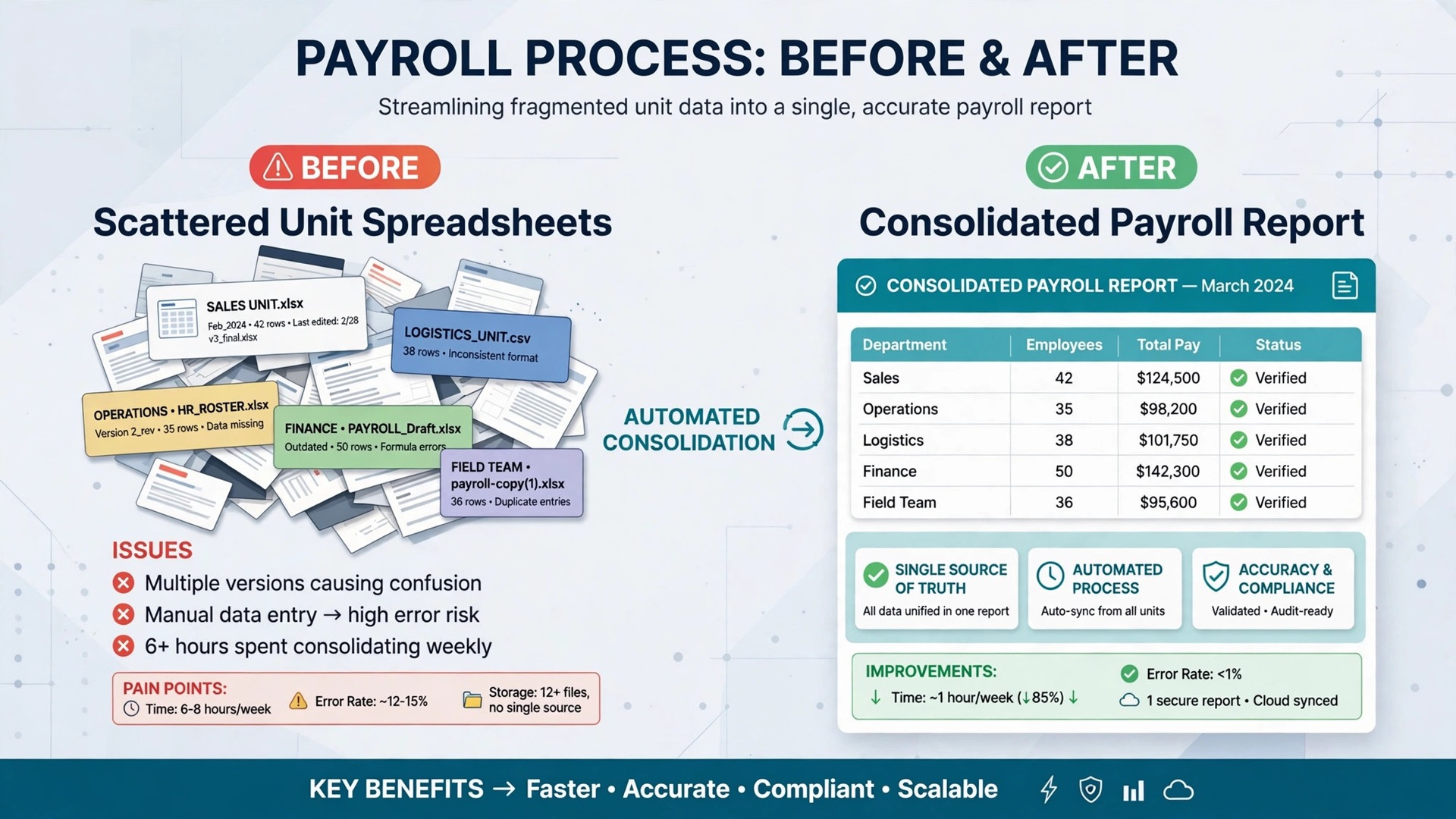
Multi state payroll is the first franchise test. Staff may live in one state and work in another, units may sit in several states, and each state has its own filing, withholding, and local rules. A tool that handles multi state filings cleanly, with a clear price for extra states, saves the owner from manual forms and late penalties. A tool that charges per state without warning can also surprise the budget.
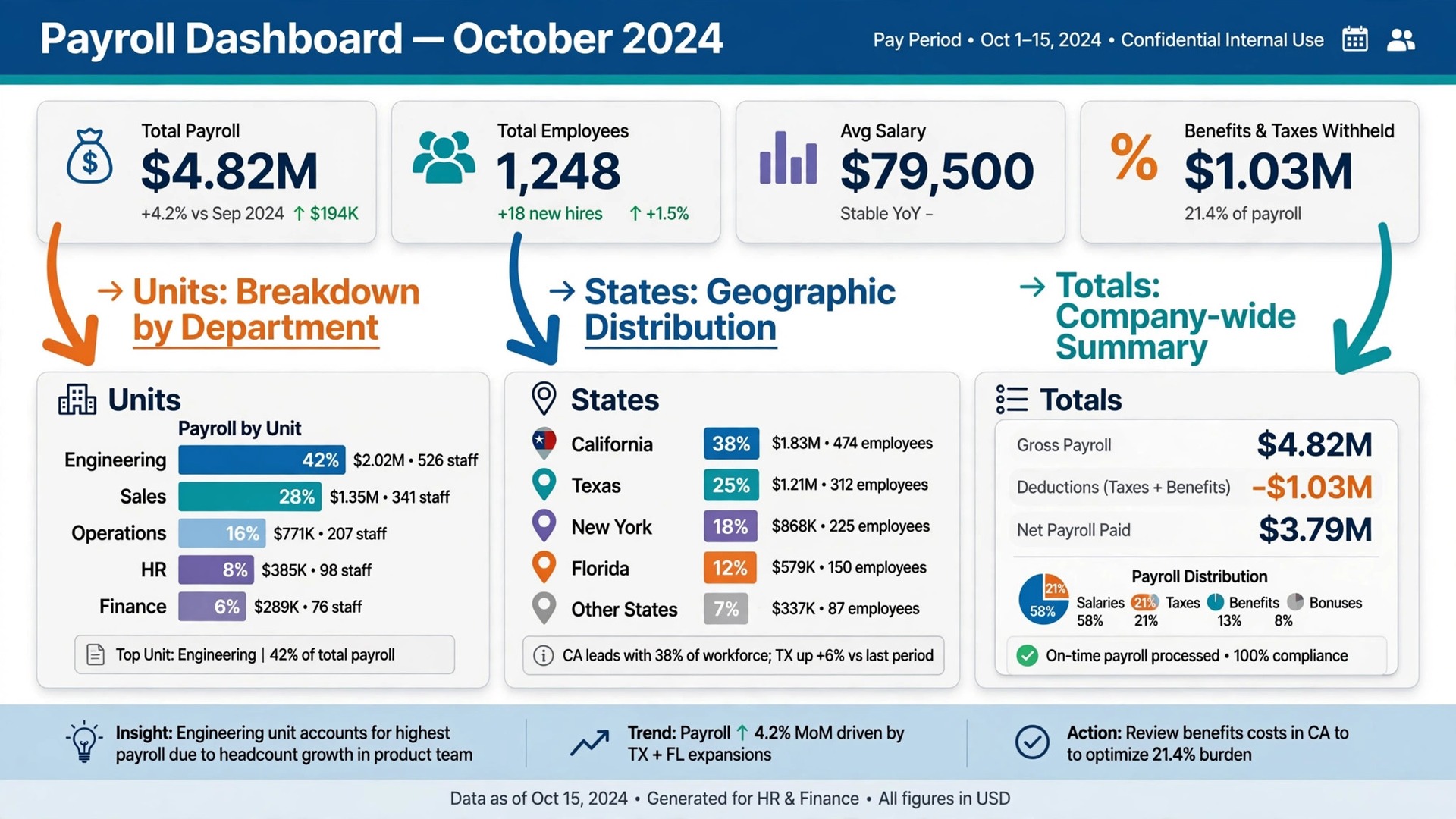
Multi unit reporting is the second difference. An owner with three units needs to compare labour cost, overtime, and turnover across locations without exporting and rebuilding spreadsheets every pay period. Software that reports by unit, and that lets the owner see the group total and the unit detail together, turns payroll from an admin chore into a management view.
The third difference is staff mix. Franchises often combine salaried managers, hourly crew, part time staff, and sometimes contractors or tipped workers in one business. A payroll tool must handle each type correctly, including overtime, tips, and different pay schedules, without forcing the owner to run separate systems for each group.
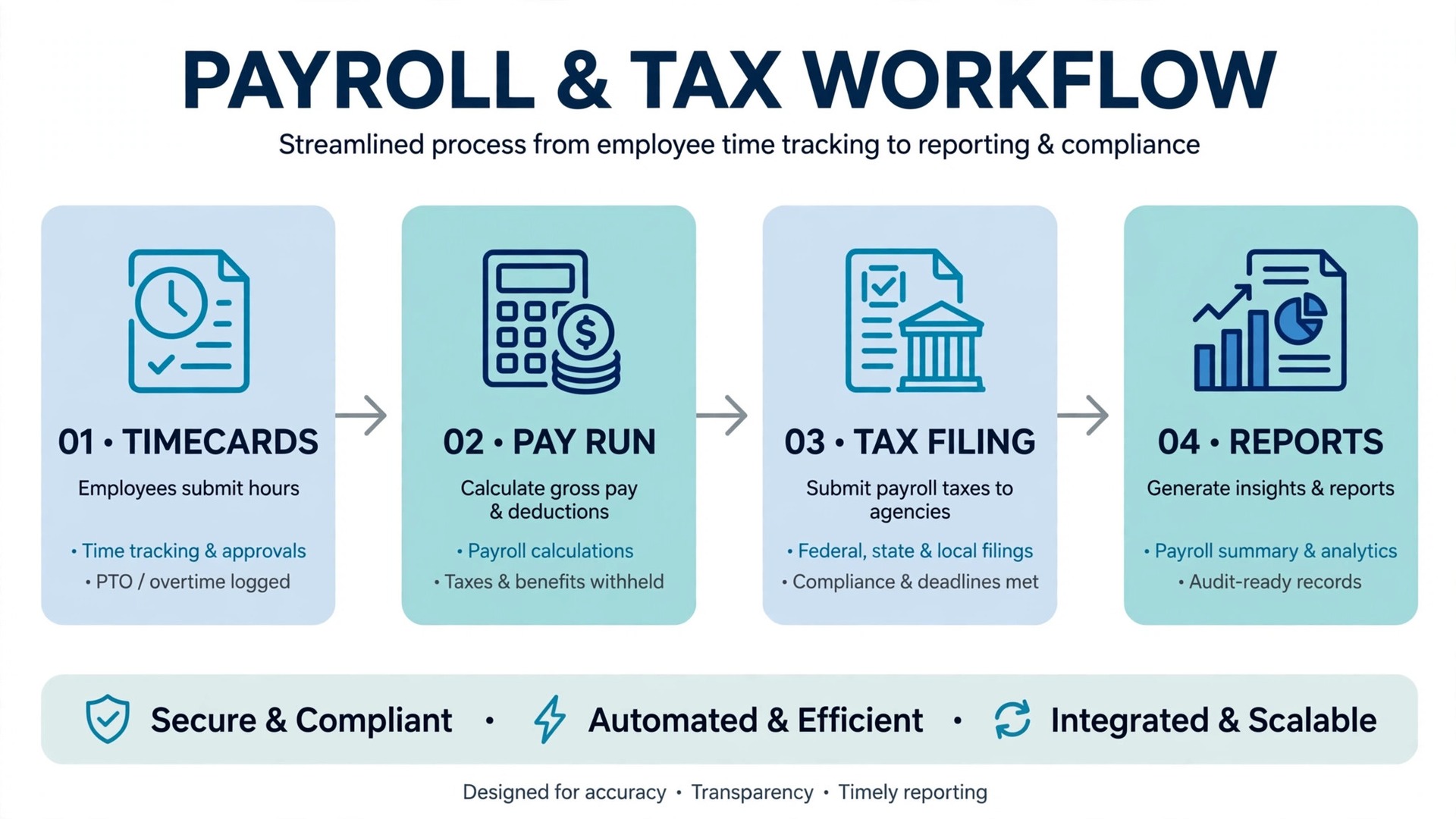
Finally, tax filing accuracy protects the business. Full service payroll, where the vendor calculates, files, and deposits taxes, removes the most error prone work from the owner. A cheaper plan where the owner files taxes may look attractive, yet one missed filing can cost more than a year of the price difference.
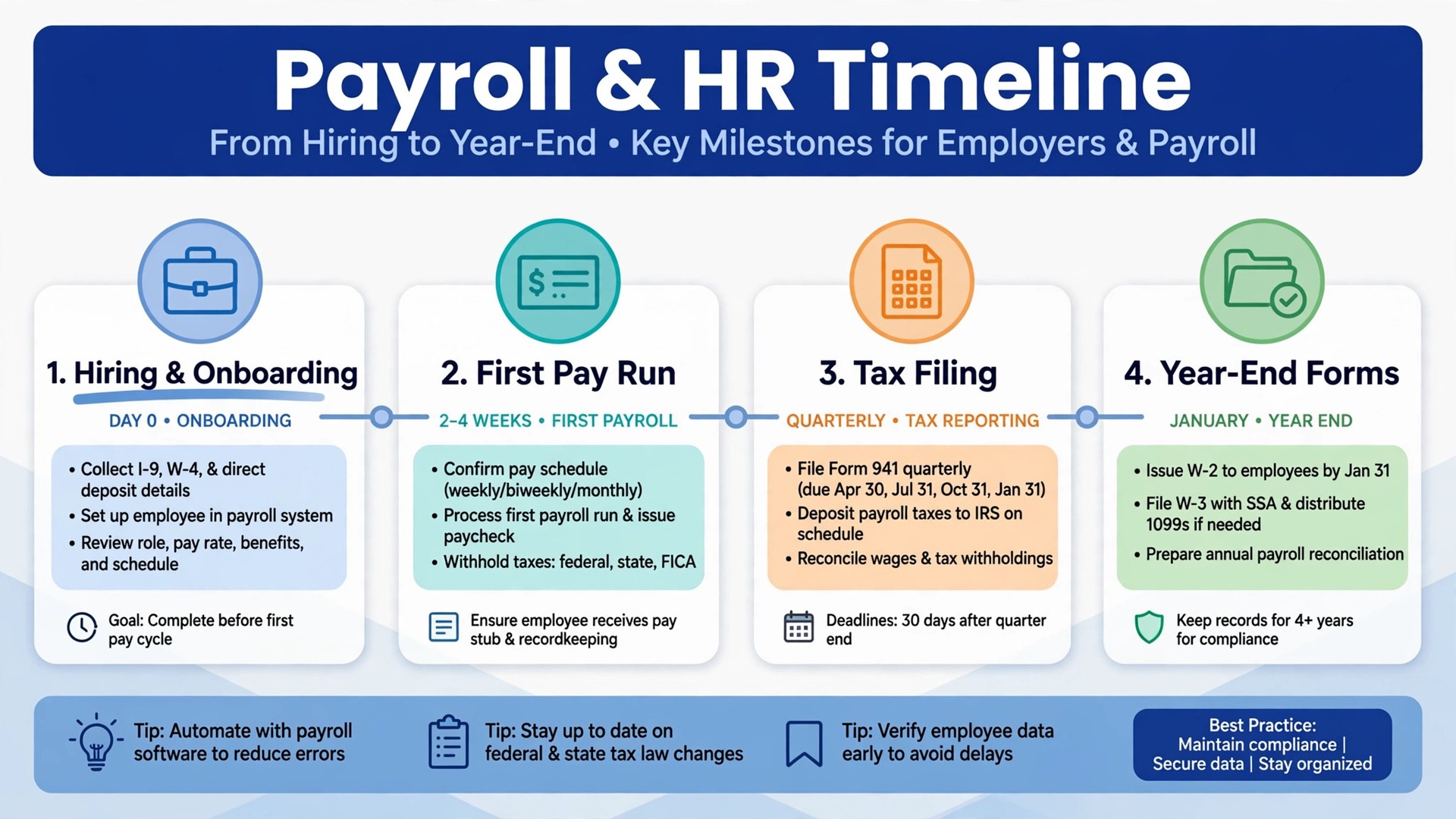
Onboarding speed matters too, because franchise units hire often and sometimes seasonally. A tool with employee self service, digital onboarding, and clear manager permissions lets a new hire start correctly without the owner retyping forms. That speed matters most during a hiring wave, when payroll errors are most likely.
Benefits and time tracking complete the picture for many groups. A tool that connects timecards, time off, and benefits to payroll reduces the retyping that causes pay errors. Check those connections during a trial, because a payroll tool that cannot read time data will force manual entry every period.
8 Tools Compared
Gusto
Gusto suits franchise owners who want predictable, published pricing and an easy online setup. The Simple plan at 49 dollars per month plus 6 dollars per employee per month covers hiring, onboarding, benefits administration, and single state payroll, while the Plus plan adds multi state payroll, time tracking, and performance tools. A single unit owner can sign up without a sales call and run payroll the same week.
The franchise watch point is multi unit structure. Gusto handles multiple businesses through separate accounts and higher tiers, yet a franchise group that needs consolidated reporting across units, brand level controls, or franchise specific workflows may find the structure less centralised than a franchise focused system. Test how unit reporting works before committing a group.
Pricing is published at 49 dollars per month plus 6 dollars per employee per month for Simple, rising to 80 dollars plus 12 dollars for Plus, so confirm the current plan on the vendor page. Price each unit at its real headcount, because per employee fees dominate the total as teams grow.
Choose Gusto when single units and small groups that want clear pricing is the main job. Skip it when a different priority in this guide matters more, and test that priority first during a trial.
Paychex Flex
Paychex Flex suits franchise groups that want payroll plus HR, benefits, and compliance depth in one system. The Essentials tier is reported at 39 dollars per month plus 5 dollars per employee per month, with onboarding, payroll tax administration, employee self service, and reporting included. Larger groups can add time, benefits, and HR outsourcing as they grow, which suits a group moving from one unit to several.
The trade off is setup and sales process. Paychex setup runs through a sales representative rather than a quick online wizard, so implementation takes longer and quoted totals can vary with add-ons. A single unit owner who wants instant setup may prefer a simpler published price tool, while a growing group will value the depth once live.
Pricing is reported at 39 dollars per month plus 5 dollars per employee per month for Essentials, so confirm the current quote on the vendor page and get every fee in writing. Ask how multi unit reporting and franchise permissions are structured before signing.
Choose Paychex Flex when growing groups that want hr depth and scale is the main job. Skip it when a different priority in this guide matters more, and test that priority first during a trial.
SurePayroll
SurePayroll, backed by Paychex, suits small franchise teams that operate in multiple states. The Full Service plan at 29 dollars per month plus 7 dollars per employee per month includes federal and state tax filing, unlimited runs, and direct deposit, while a multi state add-on is reported at a flat 9.99 dollars per month after the first state. That flat add-on beats per state pricing once staff sit in three or more states.
The limits are HR depth and scale. SurePayroll is a payroll tool first, with limited HR features compared with Gusto or Paychex Flex, so a group that needs performance, training, or benefits depth will need a second system. A small multi state team that mainly needs correct, affordable payroll will not miss that depth.
Pricing is reported at 29 dollars per month plus 7 dollars per employee per month for Full Service, with a no tax filing tier at 20 dollars plus 4 dollars, so confirm the current plan on the vendor page. Price the multi state add-on at the real state count.
Choose SurePayroll when small teams working across several states is the main job. Skip it when a different priority in this guide matters more, and test that priority first during a trial.
OnPay
OnPay suits franchise owners who want one simple plan without tier confusion. A single plan at 49 dollars per month plus 6 dollars per worker per month covers payroll, tax filing, and HR basics, and the vendor handles migration from a current provider within days in reports. A single unit or small group owner who dislikes comparing tiers will appreciate the simplicity.
The trade off is depth at scale. OnPay covers the core payroll and HR needs well, yet a larger multi unit group that needs advanced reporting, franchise level controls, or deep benefits administration may find the single plan thinner than a tiered enterprise system. Test consolidated reporting across units before committing a group.
Pricing is reported at 49 dollars per month plus 6 dollars per worker per month, so confirm the current plan on the vendor page. The simplicity helps budgeting, because there is no higher tier to drift into unexpectedly.
Choose OnPay when owners who want one simple flat price is the main job. Skip it when a different priority in this guide matters more, and test that priority first during a trial.
Patriot Payroll
Patriot Payroll suits budget conscious franchise owners who want low published prices and a clear choice between self service and full service. The Full Service plan is reported at 37 dollars per month plus 5 dollars per worker paid, with tax filing handled by the vendor, while a basic tier is reported lower for owners who file taxes themselves. A single unit with a small team can keep payroll costs notably below several rivals.
The watch point is multi state pricing and HR depth. Additional states are reported at 12 dollars per month each in comparisons, which adds up for a group spread across many states, and HR features are thinner than Gusto or Paychex. A single state unit will feel the value most, while a multi state group should price every state before choosing.
Pricing is reported at 37 dollars per month plus 5 dollars per worker paid for Full Service, so confirm the current plan on the vendor page. Compare the total at the real state count, not just the base fee.
Choose Patriot Payroll when tight budget teams that file taxes through the vendor is the main job. Skip it when a different priority in this guide matters more, and test that priority first during a trial.
Square Payroll
Square Payroll suits franchise units that already run Square point of sale, because tips, timecards, and sales data sync with payroll. The plan at 35 dollars per month plus 6 dollars per person paid covers full service payroll, and staff who already clock in through Square will find the flow natural. A food or retail franchise unit with hourly staff and tips will benefit most from that connection.
The limits are franchise group structure and HR depth. Square Payroll is built around the individual business location, so a multi unit group that needs consolidated franchise reporting should test how units combine before committing. A single unit already on Square will not face that problem, while a group should check reporting first.
Pricing is reported at 35 dollars per month plus 6 dollars per person paid, so confirm the current plan on the vendor page. Add any Square point of sale costs already paid to the true total for a fair comparison.
Choose Square Payroll when franchise units already running square point of sale is the main job. Skip it when a different priority in this guide matters more, and test that priority first during a trial.
ADP Run
ADP Run suits larger franchise groups that want deep compliance support, HR tools, and a vendor with scale. Payroll, tax filing, benefits, and reporting run through a system built for multi location employers, and compliance teams support complex state and local rules. A group with many units, varied staff types, and growth plans will use that depth.
The trade off is price transparency and setup. ADP publishes no single starting price in the sources checked, so a sales process and a written quote are needed, and implementation takes longer than an online signup tool. A single unit owner who wants instant published pricing will find that process heavy, while a larger group will accept it for the compliance depth.
Pricing is quote based in the sources checked, so request a quote and confirm every fee in writing on the vendor page. Ask how franchise unit reporting, permissions, and multi state filings are structured before signing.
Choose ADP Run when larger groups that want compliance and hr scale is the main job. Skip it when a different priority in this guide matters more, and test that priority first during a trial.
Rippling
Rippling suits franchise groups that want payroll, HR, benefits, and device and app management in one system. Employees can be onboarded with payroll, benefits, and software access together, which helps a group opening new units quickly. A franchise group that hires often and opens locations will value that combined onboarding most.
The trade off is price and complexity. Rippling is quote based per employee in the sources checked, and the breadth of features can be more than a single unit needs. A small single unit owner may pay for IT and HR depth that never gets used, while a growing multi unit group will use it daily.
Pricing is quote based in the sources checked, so request a quote and confirm the current terms on the vendor page. Ask for the per employee total at the real headcount, including any HR or IT modules, before comparing it with published price tools.
Choose Rippling when groups that want payroll plus it and hr in one system is the main job. Skip it when a different priority in this guide matters more, and test that priority first during a trial.
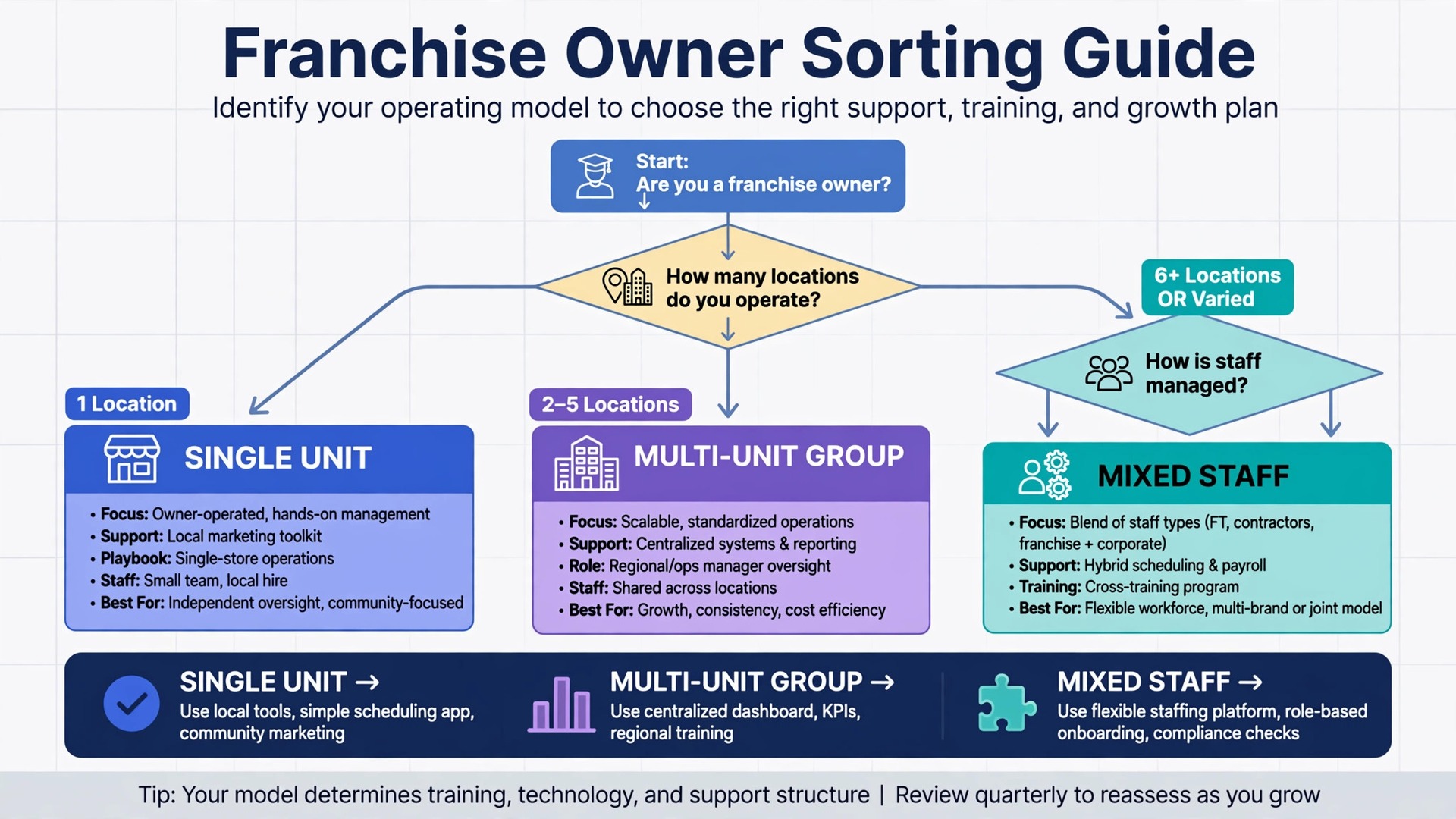
Picks by Franchise Size
Use this table to match the tool to the franchise size that pays the bills. The best payroll software for franchises small business changes with the group, so pick by franchise size rather than by feature count alone.
| Job | Best pick | Why it wins |
|---|---|---|
| Single unit | Gusto or Square Payroll | Clear pricing and easy setup matter most |
| Small multi-unit group | Paychex Flex or ADP Run | Consolidated reporting and compliance matter most |
| Mixed staff types | OnPay or SurePayroll | Multi state handling and staff flexibility matter most |
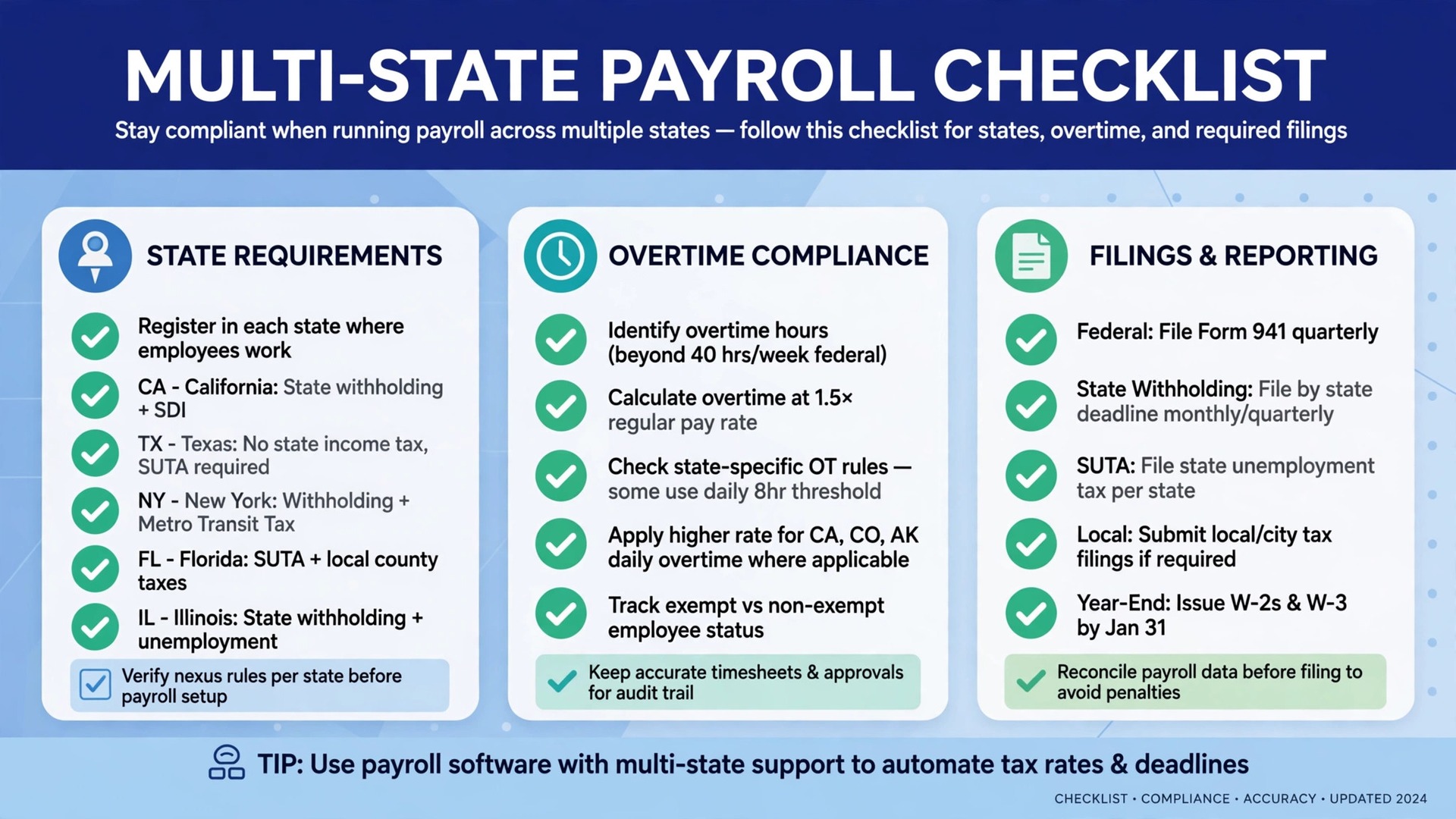
Multi-State Payroll Checklist Before You Run Payroll
Run through this checklist before the first multi state pay run on a new platform. The best payroll software for franchises small business should handle every item without manual forms.
– Confirm state withholding, unemployment registration, and local taxes for every state where staff live or work. – Record work location separately from home address, because the two can trigger different state rules. – Check overtime, meal break, and scheduling rules for each state before setting pay policies. – Confirm contractor payments are kept separate from employee payroll, with correct year end forms. – Test a pay run with hourly, salaried, part time, and tipped staff together before going live. – Review tax filing confirmations for every state after the first run, not just the home state. – Set manager permissions by unit, so a unit manager sees only that unit payroll data.
What Franchise Payroll Really Costs
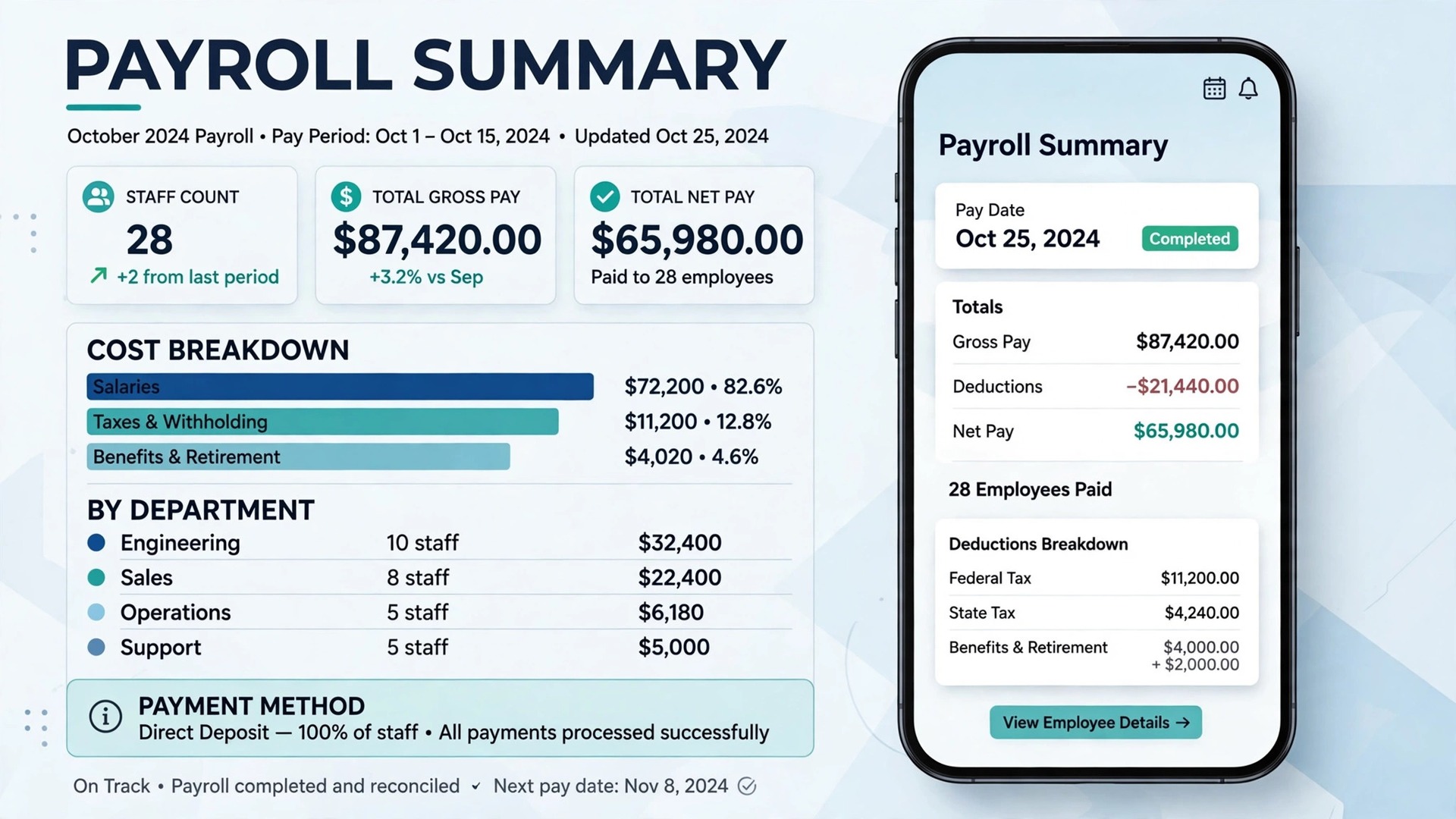
The monthly plan is only part of the bill. Add per employee fees, extra state charges, time tracking, benefits administration, and year end form fees. A low base fee can still be the expensive choice once twenty staff across three states are added, while a higher base fee with a flat multi state add-on can be cheaper at the same scale.
Pricing units matter more in payroll than in most software. A 49 dollar base plus 6 dollars per employee behaves very differently from a 37 dollar base plus 5 dollars per worker paid, once part time staff and seasonal hires are counted. Price the tool at the real headcount in a peak month, not the quiet month headcount.
Quote based tools need a written total before comparison. ADP and Rippling publish no single starting price in the sources checked, so request a quote that lists base, per employee, state, and add-on fees together. A verbal quote without that breakdown cannot be compared fairly with a published price tool.
One avoided penalty or one saved day per pay period can pay for the system many times over. Track admin time and filing errors during the trial, not just the monthly fee, when you judge value, because correct payroll protects the franchise reputation as well as the budget.
Support hours matter for a business that runs payroll on weekends or evenings. A vendor with weekday only support is little help when a pay run fails on a Friday night. Ask for the real support channel, test it during a trial, and note how long a genuine question takes to reach a person who can fix it.
Finally, price the second year, not the first month, because introductory rates and launch discounts expire. Write down the renewal price, the price at the next tier, and the cost of the add-ons you actually need. A plan that looks cheap at launch and dear at renewal is not cheap.
Ask how each finalist handles a seasonal hiring surge, because franchise units often double staff for holidays or summer. A tool that charges per worker paid will rise in peak months, while a tool that charges per active employee may behave differently. Model both peak and quiet months before signing.
Test the mobile experience before anything else, because managers and staff do most of this work on phones. If the mobile view hides key buttons, shrinks text too far, or forces endless scrolling, adoption will suffer no matter how good the desktop version looks. Judge the product on the smallest screen the team actually uses.
Plan the migration in small steps, moving one unit at a time and checking filings before moving the next. A big move across all units at once creates a pay period of missing records and confused managers. Small steps take longer on paper, yet they protect the business from the one error that delays pay.
Review user permissions before launch, so each role sees only what it needs. Unit managers need their own unit views, group owners need consolidated views, and staff need only their own pay records. Clear permissions protect privacy and prevent accidental changes to pay or tax settings.
Keep one channel for internal questions during the first month, so managers do not learn different workarounds in separate chats. A single place for questions lets the owner spot the same problem twice and fix the workflow once, rather than answering the same question five times in five places.
Payroll Mistakes That Cost Franchise Owners Money
The most common mistake is pricing payroll at the wrong headcount. Owners compare base fees while forgetting per employee charges, seasonal hires, and part time staff who still count. Price the tool at peak headcount, with every state included, before signing.
A second mistake is choosing a single unit tool for a multi unit group. A tool that cannot report across units will force spreadsheet consolidation every pay period, and that manual work introduces errors exactly where accuracy matters most. Test consolidated reporting with real unit data during the trial.
A third mistake is filing taxes manually to save a small monthly difference. A missed state filing, a wrong local tax, or a late deposit can cost more than a year of full service pricing, and it consumes owner time that should go to running units. Full service filing is worth the difference for most franchise owners.
A fourth mistake is mixing contractors and employees in one workflow. Contractors need different payments and year end forms, and treating them as employees, or vice versa, creates compliance risk. Keep the two groups separate in the system from day one, and check the year end forms before they are due.
Another mistake is giving every manager full payroll access. Unit managers should see their own unit, not the whole group payroll, both for privacy and for error prevention. Set permissions by unit before the first live run, and review them when managers change.
Finally, many owners launch payroll without a fallback for a failed run. A missed pay day damages trust faster than almost any other error, so write a simple fallback for a system outage or a bank delay, and keep the vendor support number where managers can find it quickly.
How to Test Finalists With a Real Pay Run
Pick two finalists and run the same real pay period through both. Include hourly staff, a salaried manager, a part time hire, staff in two states, and one contractor payment kept separate. The platform that calculates correctly and files cleanly is usually the right pick.
Ask a unit manager to test permissions and reports. Their confusion is more useful than any feature list, because managers will use those views every pay period. A report that is hard to read will be ignored, and an ignored report cannot catch labour cost problems early.
Check tax filing confirmations during the trial. Confirm that federal and state filings are acknowledged, that deposits are scheduled, and that year end forms are included. A payroll tool that calculates correctly yet files unclearly still leaves the owner uncertain.
Finally, write down the full first year cost for each finalist, including per employee fees, state charges, and add-ons at peak headcount. A clear total makes the decision easier and prevents a cheap plan from quietly becoming the expensive choice as the group grows.
Also check how each finalist handles a new unit opening. Ask how a second or third unit is added, whether reporting consolidates automatically, and what the added unit costs. A tool that makes expansion awkward will be replaced just when the group succeeds, which is the worst time to migrate payroll.
More Reading on Stratilyze
– Best Payroll Software for Restaurants – Best CRM for Cleaning Companies – Best Invoicing Software for Freelancers
Frequently Asked Questions
What is the cheapest payroll tool for a small franchise?
Patriot Payroll Full Service at a reported 37 dollars per month plus 5 dollars per worker paid and SurePayroll Full Service at a reported 29 dollars plus 7 dollars are among the cheapest published starts. The cheapest total depends on headcount and state count, not the base fee alone.
Do I need franchise specific software or will general payroll work?
General payroll works when units are few and reporting needs are simple. A franchise focused structure works better when consolidated reporting, unit permissions, and multi state filings decide the workflow, because those features are central rather than added.
How should a single unit choose differently from a multi-unit group?
A single unit should favour clear published pricing and easy setup, so Gusto or Square Payroll often fit. A multi-unit group should favour consolidated reporting and compliance depth, so Paychex Flex or ADP Run often fit, because group reporting matters more than setup speed.
Can payroll software handle hourly, salaried, and tipped staff together?
Yes, most tools in this guide handle mixed staff types, yet overtime, tips, and timecard connections vary. Test a mixed pay run during the trial, and confirm tip reporting and overtime calculations for the states where units operate.
How fast should payroll setup take?
Online tools can set up a single unit within days, while sales led tools for larger groups take longer. A hiring wave or a new unit opening should allow extra setup time, and migration from a current provider should be tested with a parallel run before going live.
Can I switch payroll tools later?
You can usually export employee records and pay history, but tax filing history, benefits enrolments, and unit permissions rarely transfer cleanly. Ask for a sample export during the trial, and plan the switch between tax quarters where possible to reduce filing complexity.
The Verdict for Franchise Owners
For most franchise owners, Gusto leads for single units and small groups that want clear pricing, Paychex Flex leads for growing groups that need HR depth, and SurePayroll leads for small multi state teams that want a flat state add-on. Square Payroll fits units already on Square, while ADP Run fits larger groups that need compliance scale.
Start with the franchise size that pays the bills, test two finalists with a real mixed pay run, and price the tool at peak headcount across every state. A payroll system that files correctly, reports by unit, and handles mixed staff will protect margins and trust in every unit. That is the practical way to choose the best payroll software for franchises small business for the work you actually sell. That is the practical way to choose the best payroll software for franchises small business for the work you actually sell.