

A seller can source a good product, price it fairly, and still watch it sit on page five, because the listing does not say what shoppers search for, or the main image does not read at thumbnail size. That is the listing problem in one sentence, and it is why sellers use AI for ecommerce seller product listing creation, to fix findability and clarity together. Shoppers cannot buy a product they cannot find, and they will not buy a listing they cannot understand in ten seconds. This guide fixes both halves, with a workflow for titles, descriptions, image briefs and keyword checks, plus a listing quality checklist you can run on every product before publishing.
Listings now serve two audiences at once. The first is the human shopper reading a product page on a phone. The second is the marketplace search and AI discovery layer, which reads the listing the way a person would, looking for whether the content answers the question the shopper actually asked. Keyword stuffing no longer works, because the systems reward listings that cover intent clearly, with complete attributes and honest claims. Sellers who write for both audiences, with clear titles, benefit led bullets, and images that prove the claims, win the click and the sale.
Where Most Seller Listings Lose the Sale
The first loss happens in search. A title that leads with the brand name, or with a clever phrase nobody searches, buries the product type where shoppers and search systems look last. The product type and the main attribute belong in the first few words, because that is what a shopper scans and what a search system weights most heavily. A title that fails that test rarely gets the chance to persuade anyone.
The second loss happens on the page. Shoppers decide from the main image, the title, and the first bullets, often on a phone, often in seconds. A main image with a cluttered background, a bullet list that repeats the title five times, or a description that hides the size, material and fit will lose to a competitor whose listing answers those questions at a glance. Clarity beats cleverness on a product page every time.
The third loss happens after publishing. Marketplaces change listings, rewrite titles, and shift search behaviour, and a seller who never rechecks a listing will not notice when a title was shortened, a bullet was dropped, or a keyword stopped converting. Listing creation is not a one time job. It is a draft, a check, a publish, and a review cycle, and the workflow below treats it that way.
How to Use AI for Ecommerce Seller Product Listing Creation in Seven Steps
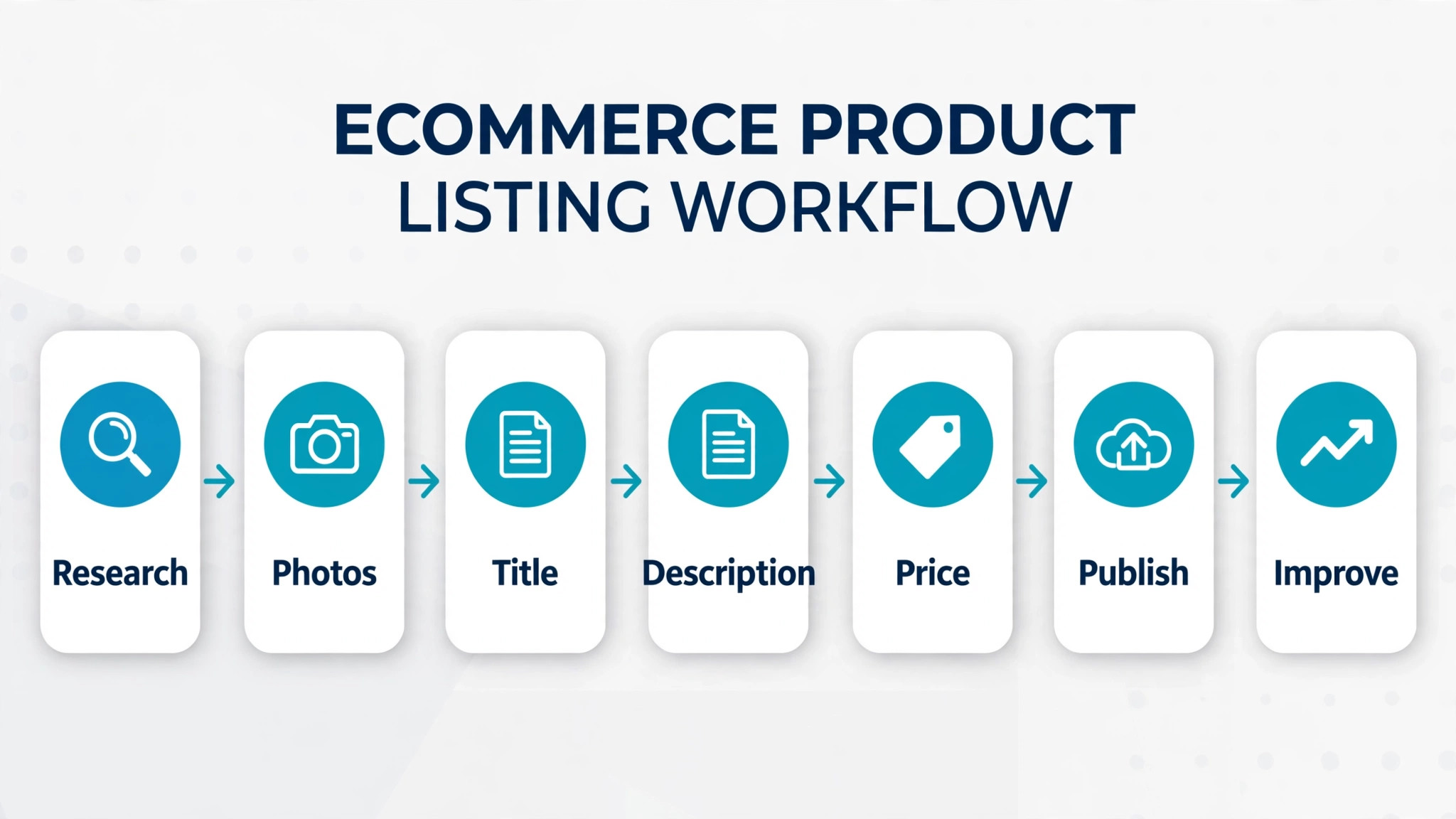
This workflow takes a product from raw facts to a published listing in a repeatable order. Each step has an input, a draft, and a check, so the listing that goes live is accurate, searchable and persuasive. When you use AI for ecommerce seller product listing creation in this order, the tool drafts quickly, while you verify every claim and keep the final judgment on what the product really is.
Step 1. Gather the Product Facts Before Writing Anything
Write the fact sheet first, before any title or description work. Record the product type, brand, model, materials, dimensions, weight, capacity, colours, sizes, contents of the box, care instructions, safety warnings, and the exact problems it solves. Add the target buyer, the main use cases, and the three strongest differentiators against the closest competitors. A listing written from a fact sheet is accurate. A listing written from memory invents details.
Use AI to organise the fact sheet and to flag gaps, such as a missing dimension, a size range with no measurements, or a claim with no evidence behind it. Fill every gap before drafting, because a draft built on a missing fact will either omit a key detail or invent one. Photograph or measure anything uncertain, and check the supplier specification sheet rather than copying a competitor listing.
Keep the fact sheet as the single source of truth for the product. Every later draft, title, bullet and image brief should trace back to it. When a fact changes, update the fact sheet first, then the listing. That discipline prevents the common mess where the title says one size, the bullets say another, and the images show a third.
Step 2. Draft Titles That Lead With What Shoppers Search
A strong title follows a simple order. Product type first, then the main attribute, then the brand and secondary attributes, within the marketplace character limit. For Amazon, recent guidance notes a title limit that triggers automatic rewrites for sellers who are not prepared, so check the current marketplace rules for your category before publishing, and keep titles short enough to survive them. A title under the limit, with the product type in the first few words, is safer than a long title that gets rewritten by the platform.
Use AI to draft five title variants from the fact sheet, each with a different emphasis, such as size, material, use case, or bundle. Then test each variant by reading it on a phone screen, where most shoppers will first see it. The winning title is the one a stranger understands in three seconds, not the one with the most keywords squeezed in. Remove promotional language, special characters, and superlatives the marketplace forbids, because those trigger suppression or rewrites.
Check the title against the fact sheet one last time before moving on. Every word in the title must be true of the product, spelled correctly, and consistent with the bullets and images that follow. A title that promises a feature the product lacks will earn returns and bad reviews, which cost far more than a slightly lower click rate.
Step 3. Write Bullets That Sell Benefits, Not Features Alone
Bullets are where most listings waste their best space. A bullet that only repeats a feature, such as a capacity figure, tells the shopper nothing about why that figure matters. A benefit led bullet pairs the feature with the outcome, in one short sentence. State what the product does, for whom, and in what situation, then stop. Five bullets, each covering a distinct benefit or use case, beat ten bullets that repeat the same claim.
Use AI to draft bullet variants from the fact sheet, then edit each one yourself. Cut any bullet that duplicates another, cut jargon the target buyer would not use, and check that each claim matches the fact sheet. Keep bullets short, because marketplace guidance recommends brief bullets, and shoppers on phones skip long blocks of text. If a detail needs more room, it belongs in the description, not in a bullet.
Order the bullets by buyer priority, not by your pride in the product. The first bullet should answer the most common buyer question, such as fit, size, or compatibility. The last bullet can carry the secondary detail, such as care instructions or warranty. That order respects how shoppers actually read, which is top down until they are convinced or bored.
Step 4. Build Description Variants for Different Shoppers
One description rarely serves every shopper. A gift buyer wants to know what is in the box and whether it is ready to give. A practical buyer wants dimensions, compatibility and care details. A comparison shopper wants to know why this product beats the cheaper alternative. Write a core description that covers all three, then create shorter variants for channels that need them, such as a marketplace description, a store description, and a social product blurb.
Use AI to draft the variants from the core description, keeping the facts identical across all of them. Then check each variant for claims that drifted in drafting, because a variant that adds a feature the product lacks will create returns on that channel. Keep the tone consistent with the brand, but let the emphasis change by audience. The gift variant leads with presentation, the practical variant leads with specifications, and the comparison variant leads with the differentiator.
Include the questions shoppers actually ask, answered in plain words. Check competitor questions, reviews and returns reasons for the questions your description must answer, such as sizing, fit, or what is not included. A description that answers the top five buyer questions before purchase will cut returns more effectively than any return policy wording.
Step 5. Write Image Briefs That Prove the Listing Claims
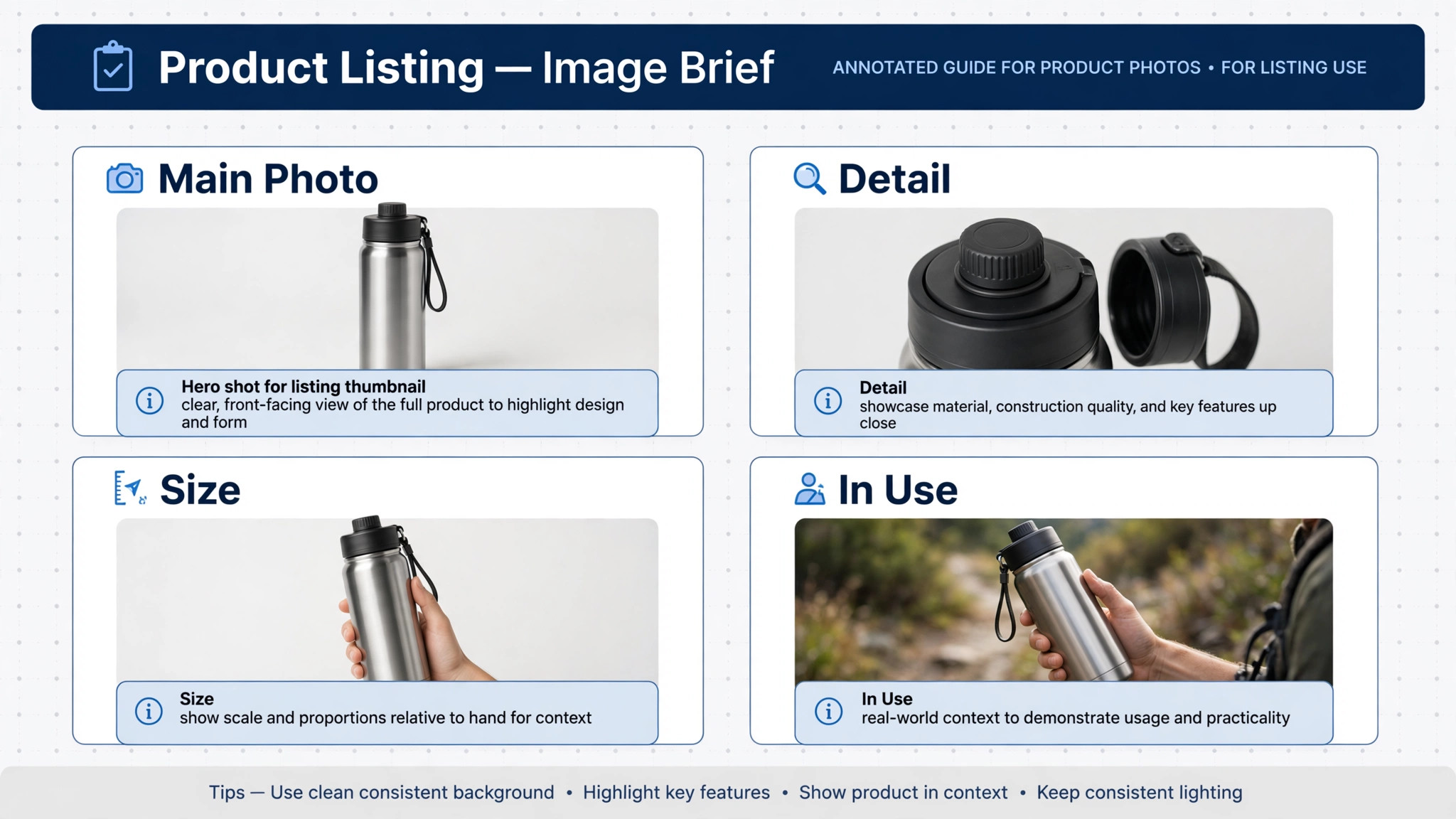
Images sell the product, and the brief is what makes them do it well. A good brief lists every image the listing needs, in order, with the claim each image must prove. The main image shows the product clearly on a clean background, readable at thumbnail size. The second image shows scale, such as the product beside a familiar object. Later images show the product in use, the contents of the box, the key detail close up, and the size or fit guidance.
Use AI to draft the brief from the fact sheet and the bullets, matching each image to a specific claim or question. Then review the brief yourself, and remove any image that only decorates. Every image should answer a question or prove a claim, because a shopper who cannot see the size, the material, or the contents will guess, and a wrong guess becomes a return. Include text guidance for any overlay, such as keeping words short, large, and accurate, and spell checking every word before the image is made.
Check the finished images against the fact sheet and the listing copy before publishing. A photo that shows a different colour, a different size, or an accessory that is not included will mislead shoppers, however attractive it looks. Accuracy in images matters as much as accuracy in words, and it is checked far less often, which is why it causes so many avoidable returns.
Step 6. Run Keyword Checks Without Stuffing
Keyword work has changed. Search and AI discovery systems now read a listing for intent coverage, not for keyword repetition. Start with keyword research from a marketplace tool or the marketplace own search data, and identify the high volume terms and the buyer intent phrases for the product. Then map each term to exactly one place in the listing, such as the title, a bullet, the description, or the backend search terms, and write the content to cover the intent behind the term.
Use AI to draft the keyword map and to check coverage, then review it yourself for stuffing. If a term appears in the title, it does not need repeating in every bullet. Backend search terms should use the full available space without repeating words already in the visible listing, and they should never include competitor brand names or misleading terms. That restraint is what keeps a listing safe from suppression while still ranking for the terms that matter.
Recheck keywords after publishing, on a monthly rhythm for important products. A term that stopped converting, a new term that shoppers started using, or a competitor bundle that changed the market all justify a listing update. Treat keyword checks as maintenance, not as a launch task, because search behaviour moves and listings that do not move with it fade.
Step 7. Publish, Proof, and Review on a Live Page
Before publishing, run the listing quality checklist in the next section, on the live preview if possible, not only in a document. Read the title on a phone, look at the main image at thumbnail size, and read the bullets in order. Check every attribute field, every backend term, and every image against the fact sheet. Fix anything that fails before the listing goes live, because early shoppers form the first reviews.
After publishing, check the live page within 24 hours, because marketplaces sometimes rewrite titles, crop images, or drop fields on publish. Confirm the title, the bullets, the images and the attributes all survived intact. If the platform rewrote anything, correct it or shorten the original so the rewrite does not happen again. That 24 hour check catches more listing damage than any later audit.
Set a review date for every listing, such as 30 days after launch, and again quarterly for top sellers. At each review, check search rank for the main terms, conversion rate, return reasons, and customer questions. Update the listing where the data points to a gap, and record what changed, so the next review starts from evidence rather than memory.
Listing Quality Checklist You Can Copy
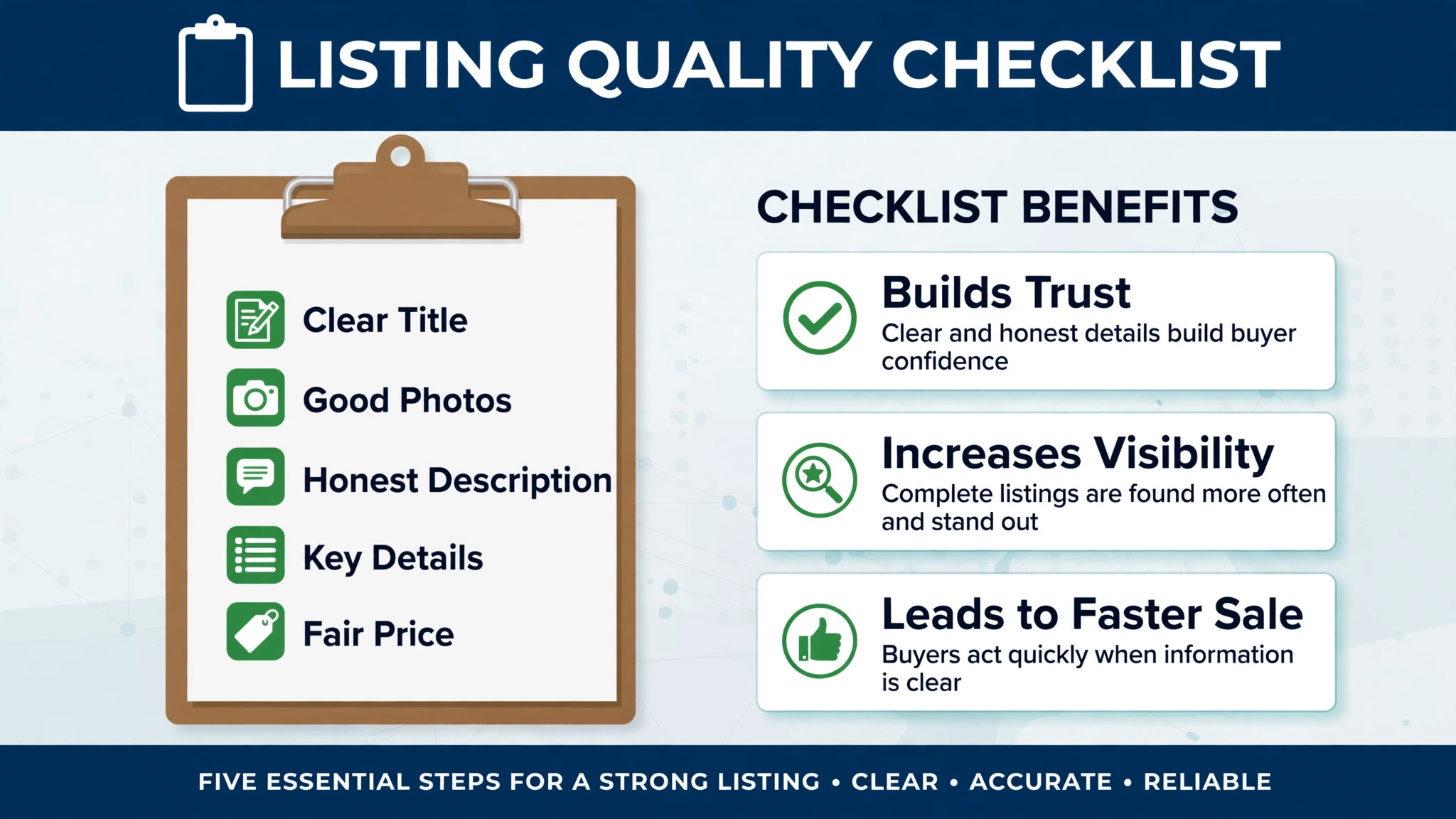
Run this checklist on every listing before publishing, and again at the 30 day review. A listing that fails any item is not ready, however good the rest looks.
Title check. Product type in the first few words, main attribute included, within the marketplace character limit, no promotional language, no special characters, and every word true of the product.
Main image check. Product clear on a clean background, readable at thumbnail size, correct colour and size shown, and no misleading accessory included in the shot.
Bullets check. Five bullets, each covering a distinct benefit or use case, each leading with the benefit, each short enough to read on a phone, and no claim repeated across bullets.
Description check. Core description answers the top five buyer questions, facts match the fact sheet, variants keep the same facts, and no invented feature appears in any channel.
Image set check. Scale image, in use image, box contents image, detail close up, and size or fit guidance all present, each matched to a claim or question, and all text spell checked.
Keyword check. Main terms mapped to one place each, backend terms used without repetition or competitor brands, and no stuffing in visible copy.
Attributes check. Every attribute field completed, dimensions and materials matching the fact sheet, and safety or care information included where required.
Live page check. Title, bullets, images and attributes confirmed intact on the live page within 24 hours of publishing, with any platform rewrite corrected.
Tools That Fit a Seller Listing Workflow
Pick tools by the weakest part of your listing when you use AI for ecommerce seller product listing creation, because a copywriting tool will not fix bad images, and an image tool will not fix missing keywords. The tools below cover the main jobs, and they work best as a small stack rather than a single purchase.
Helium 10 for Keyword Research and Listing Building
Helium 10 is an Amazon seller suite with a listing builder fed by keyword research. Its strength for listing creation is the connection between research and writing, so the terms shoppers actually use flow into the title, bullets and backend fields rather than sitting in a separate report. That connection is what makes keyword mapping practical at scale, across many products.
The limit is scope. Helium 10 suits Amazon sellers first, and multichannel sellers will still need a separate route for other marketplaces. Check the vendor current pricing page for the plan that includes the listing builder and the keyword tools you need, since features vary by plan.
Jungle Scout for Listing Grading Before Publishing
Jungle Scout is an Amazon seller suite with a listing builder and a grader, which scores a listing before it goes live. Its strength is the pre publish check, because a grade that flags a weak title, a missing attribute, or a keyword gap is far cheaper to fix than a live listing with poor conversion. Use the grade as a second opinion alongside the checklist in this guide, not as a replacement for it.
The limit is that a grade measures the listing against known patterns, not against your actual buyers. A high grade with a wrong product fact still misleads shoppers, so verify every claim against the fact sheet yourself. Check the vendor current pricing page before subscribing, and confirm which plan includes the grader.
CopyMonkey for Fast AI Listing Drafts
CopyMonkey is an AI Amazon listing generator that drafts optimised listings in seconds from product details. Its strength is speed for sellers launching many products, because a first draft in seconds beats a blank page, and the time saved can go into verification and image work. Use it for the first draft, then edit hard, because a fast draft is a starting point, not a finished listing.
The limit is accuracy and distinctiveness. AI drafts can repeat generic claims, invent details, or sound like every other listing in the category. Check every claim against the fact sheet, rewrite the bullets in your own brand voice, and never publish a generated draft without the checklist pass.
Amazon Enhance My Listing for Marketplace Native Drafts
Enhance My Listing is Amazon own generative AI tool for improving listings already published, announced in September 2024. It suggests better titles, bullets and descriptions from your product data and shopper search behaviour, and you accept or reject each suggestion. Its strength is that it works inside Seller Central, with direct access to your product data, and it costs nothing extra to try.
The limit is control. Amazon own tool can rewrite your listing in ways that suit the marketplace generally rather than your product specifically, and it does not know your margin, your competitor bundle, or a keyword that quietly stopped converting. Review every suggestion against the fact sheet, accept only what improves accuracy and clarity, and recheck the live page after any change.
What AI Can and Cannot Do in Listing Creation
When you use AI for ecommerce seller product listing creation, AI is strong at drafting, mapping and checking. It can draft five title variants, map keywords to listing fields, draft description variants for different channels, and check coverage against a fact sheet. Those tasks are repetitive and slow by hand, and automating them means a seller can launch more products without lowering the standard of each listing.
AI cannot know the product the way the seller does. It cannot verify a dimension, a material, or a fit claim it was not given, and it cannot judge whether a photo shows the true colour. It cannot decide pricing, positioning, or which competitor to beat on which attribute. Those decisions belong to the seller, and any workflow that publishes an AI draft without a human check will eventually publish a wrong claim.
Image accuracy deserves special care. AI generated or AI edited images can change a colour, add a feature, or smooth a detail that matters to a buyer. Check every finished image against the physical product before publishing, and spell check every overlay word. A beautiful image of the wrong product is worse than a plain photo of the right one.
Mistakes That Break Seller Listings
The first mistake when you use AI for ecommerce seller product listing creation is publishing a generated draft without checking it. AI drafts sound fluent, which makes errors hard to spot, and a fluent error still misleads shoppers. Run the checklist on every draft, and verify every claim against the fact sheet, no matter how polished the draft reads.
The second mistake is leading the title with the brand or a clever phrase. Shoppers search for the product type and the main attribute, and a title that buries those words loses the click before the bullets get a chance. Put the product type in the first few words, and save cleverness for the description, where it cannot hide the product.
The third mistake is repeating one claim across every bullet. Five bullets that say the same thing in different words waste the space that should answer five different buyer questions. Give each bullet a distinct benefit or use case, and cut any bullet that duplicates another, however well written it is.
The fourth mistake is never rechecking the live page. Marketplaces rewrite titles, crop images, and drop fields, and a seller who never looks at the live page will not notice. Check within 24 hours of publishing, and again at 30 days, and record what changed, so the listing improves from evidence rather than guesswork.
How AI Assisted Listings Compare With Manual Listing Writing
| Feature | AI assisted listing creation | Manual listing writing only |
|---|---|---|
| First draft speed | Minutes, five variants at once | Hours, one variant at a time |
| Keyword coverage | Mapped to one place per term | Often stuffed or forgotten |
| Channel variants | Drafted from one fact sheet | Rewritten by hand, facts drift |
| Image briefs | Matched to claims and questions | Often vague or missing |
| Accuracy risk | Fluent errors, needs a checklist | Slow errors, needs a checklist |
| Review rhythm | Scheduled, data driven | Often never revisited |
The table shows the trade clearly. AI wins on speed and coverage, manual writing wins on nothing except familiarity, and both need the same human check before publishing. The seller who combines fast drafts with a strict checklist gets the best of both, while the seller who skips the check gets the worst of AI, which is fluent inaccuracy at scale.
A Five Week Implementation Plan
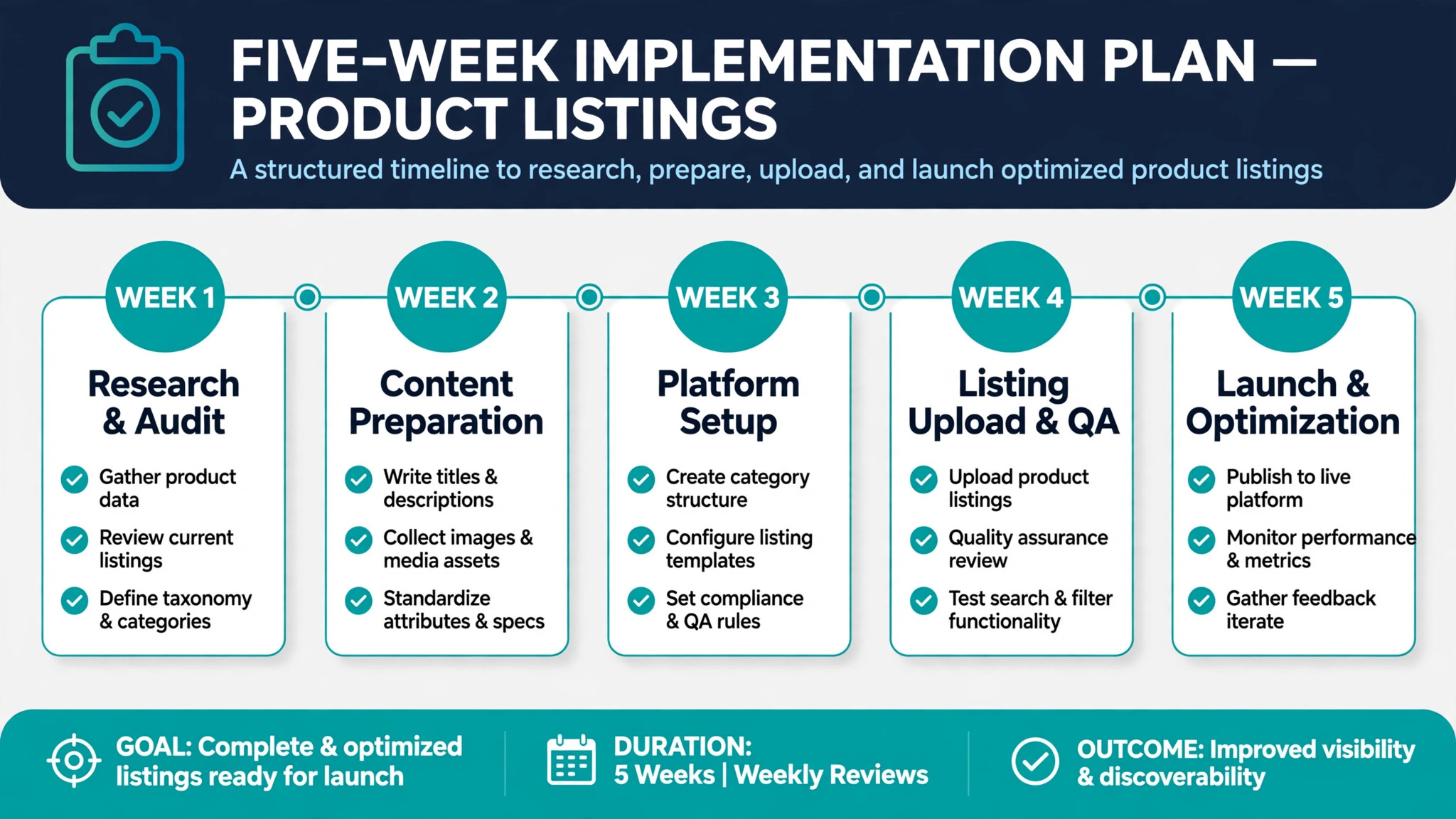
Week one is fact sheets and templates. Write the fact sheet format, the title order, the bullet format, and the image brief format, and apply them to your three best selling products. That small test will reveal which fields are routinely missing and which template parts need simplifying.
Week two is drafting and checking. Draft new listings with AI from the fact sheets, run the checklist on every one, and record which checklist items fail most often. Fix the template or the fact sheet that causes the most common failure, rather than fixing each listing by hand forever.
Week three is images. Write image briefs for the same three products, matched to claims and questions, and check the finished images against the fact sheet. Replace any image that misleads, however attractive, and note the brief change that prevents the error next time.
Week four is keyword maintenance. Map keywords for your top ten products, check backend terms for repetition, and set the monthly recheck rhythm. Update any listing where a term stopped converting or a new term appeared, and record the change.
Week five is steady state. Make the checklist the gate for every new listing, put the 30 day review in the calendar, and refine one template at a time. Listing creation is now a routine, not a rush before launch, and the routine is what keeps conversion steady as the catalogue grows.
Verdict
Shoppers buy listings they can find and understand in ten seconds. Lead with the product type, sell benefits in distinct bullets, answer the real buyer questions in the description, and prove every claim with an image. When you use AI for ecommerce seller product listing creation in that order, with a fact sheet underneath and a checklist on top, you get speed without sacrificing accuracy.
Start with the fact sheet and the title order. Those two changes alone will lift more listings than any new keyword tool, because they fix the foundation every later draft stands on. Add the checklist gate next, and never publish a draft, however fluent, without running it. Sellers who do those things will launch faster, convert better, and return less, which is the whole point of a good listing.
Frequently Asked Questions
How long should an Amazon title be?
Short enough to survive the marketplace current limit and to read on a phone, with the product type in the first few words. Recent guidance notes a title limit that triggers automatic rewrites for sellers who are not prepared, so check the current rules for your category before publishing. A concise title with the product type and main attribute beats a long title that gets rewritten by the platform, because a rewrite can drop the words that mattered most.
How many bullets should a listing have?
Five, each covering a distinct benefit or use case, each leading with the benefit, and each short enough to read on a phone. Ten bullets that repeat one claim waste the space that should answer ten different buyer questions, or five questions well. Order them by buyer priority, so the first bullet answers the most common question, such as fit, size, or compatibility, and the last bullet carries the secondary detail.
Should keywords be repeated in every bullet?
No. Map each keyword to exactly one place in the listing, such as the title, a bullet, the description, or the backend search terms, and write the content to cover the intent behind the term. Repetition no longer helps ranking, because search and AI discovery systems read for intent coverage rather than keyword density. Backend terms should use the full available space without repeating words already visible, and never include competitor brand names.
Can I publish an AI generated listing without editing it?
No. AI drafts sound fluent, which makes errors hard to spot, and a fluent error still misleads shoppers and earns returns. Check every claim against the fact sheet, rewrite the bullets in your own brand voice, and run the listing quality checklist before publishing. Treat the draft as a starting point that saves time, not as a finished listing, and keep the final judgment with the seller.
What images does a listing need at minimum?
A clear main image on a clean background, a scale image, an in use image, a box contents image, a detail close up, and a size or fit guide. Each image should answer a question or prove a claim from the listing copy, not merely decorate the page. Check every finished image against the physical product, including colour, size, and included accessories, and spell check every overlay word before publishing.
How often should I update a live listing?
Check the live page within 24 hours of publishing, review it at 30 days, and recheck top sellers quarterly. Update when search rank, conversion, return reasons, or customer questions point to a gap, such as a missing size detail or a keyword that stopped converting. Record what changed at each review, so the next update starts from evidence rather than memory, and so a platform rewrite is spotted quickly.
Does AI image generation risk misleading shoppers?
Yes, if the finished image is not checked against the physical product. AI editing can change a colour, add a feature, or smooth a detail that matters to a buyer, and a beautiful image of the wrong product causes returns and bad reviews. Compare every image with the real product before publishing, and remove any image that shows a colour, size, or accessory the buyer will not receive, however attractive it looks.
What is the single biggest listing mistake for new sellers?
Writing from memory instead of from a fact sheet. A listing written without recorded dimensions, materials, box contents, and differentiators will either omit a key detail or invent one, and both errors cost sales. Build the fact sheet first, keep it as the single source of truth, and let every title, bullet, description and image brief trace back to it. That discipline prevents most listing errors before drafting begins.