
Two small stores can run the same sale and get opposite results. That contrast is the starting point when you fix Shopify discount code not working small store cases. One store sends a code on a Friday morning, watches orders arrive with the discount applied cleanly, and ends the day with a tidy promotion report. The other store sends the same kind of code, gets a flood of messages saying the code does not work, and ends the day discounting orders by hand, apologising to customers, and wondering whether the promotion did more harm than good. The difference between those two stores is rarely luck.
It is usually one rule buried in the discount settings, one product that sits outside the eligible set, or one automatic promotion quietly blocking the code at checkout. When you fix Shopify discount code not working small store problems, you are not hunting a mystery bug. You are checking a short list of rules in the right order, and the first check on that list solves most cases.
A discount code that fails at checkout costs more than the lost sale. A customer who typed a code, expected a saving, and saw an error message feels misled, even when the store did nothing dishonest. Some customers abandon the cart and never return. Others complete the order at full price and then complain, which creates refund or partial refund work that eats the margin the sale was meant to protect. A few share the code publicly with a warning that it does not work, which turns a small settings error into a reputation problem. That is why speed matters, but guessing does not help.
Changing the code, raising the discount, or creating a second code on top of the first often hides the original rule problem and creates a second one. A calm diagnosis, done once, protects both the sale and the margin.
This guide works through that diagnosis in the order a small store owner should use it. It starts with the most likely causes, which are dates, usage limits, product eligibility, and combination rules, and moves toward the less likely causes, which are customer targeting, app conflicts, and checkout settings. It gives you the real settings paths in Shopify admin, a test method that reproduces the exact customer cart, and a discount test checklist you can reuse before every future promotion. It does not promise that every code should work for every cart. Some carts should be rejected, because the code was never meant for them.
The goal is to know, for each failed code, whether the rejection is correct or a settings error, and to fix only the errors.
How to Fix Shopify Discount Code Not Working Small Store in Order
Before you change anything, gather the facts of one failed attempt. Ask the customer, or check your own test, for four details. The exact code as typed, including capital letters. The exact products and variants in the cart, with quantities. Whether the customer was logged in, and whether they had used the code before. And whether any other discount was already showing on the cart before the code was entered. Those four details point straight at the rule that failed, and they save you from changing settings blindly. A code that fails for one customer but works for another is almost always a targeting, usage limit, or minimum spend problem.
A code that fails for everyone is almost always a date, status, or combination problem. A code that applies but gives the wrong amount is usually an eligibility or stacking problem, not a broken code.
The diagnosis below follows a simple rule. Check the cheapest, most likely cause first, test after each change, and change one thing at a time. If you change three settings at once and the code starts working, you will never know which change fixed it, and you may have loosened a rule you meant to keep. Work through the steps in order, and stop as soon as a test order succeeds with the intended discount and no unintended discount.
Start With Status, Dates, and the Exact Code Text
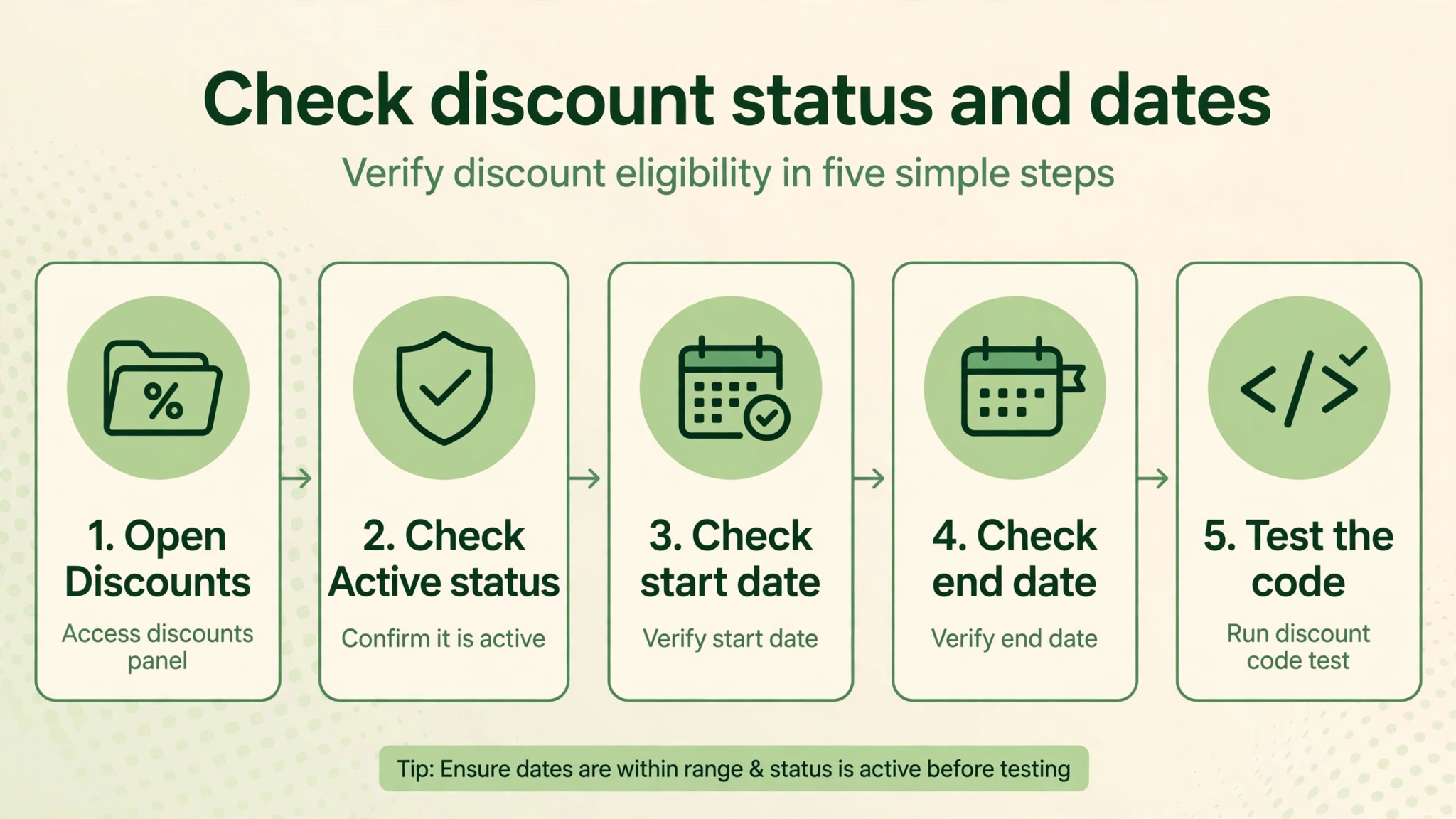
When you fix Shopify discount code not working small store cases, start in Shopify admin. Open Discounts, find the code in the list, and check its status first. A code set to draft, scheduled for a future start, or past its end date will not apply, no matter how correctly the rest of the settings are built. This is the most common failure for sale codes, because sale codes are often created days ahead and shared early, or left running past an end date that was set during a busy launch week.
Check the start date, the end date, and the time zone behaviour of the store, since a code that starts at midnight in one time zone may still be inactive for a customer shopping the evening before in another.
Next, check the code text itself. Codes are case sensitive in the sense that customers must type them as created, and a code shared with a trailing space, a lookalike character, or an extra word will fail. The letter O and the number zero, the letter I and the number one, and hyphens versus underscores are classic sources of failed entries. If customers received the code in an email, check whether the email template added punctuation right after the code, which some customers copy along with it.
A code that works when you paste it from admin but fails when customers type it from a graphic is a communication problem, not a settings problem, and the fix is to share the code as selectable text and to keep the code short and free of confusing characters.
Check Usage Limits Before You Blame the Customer
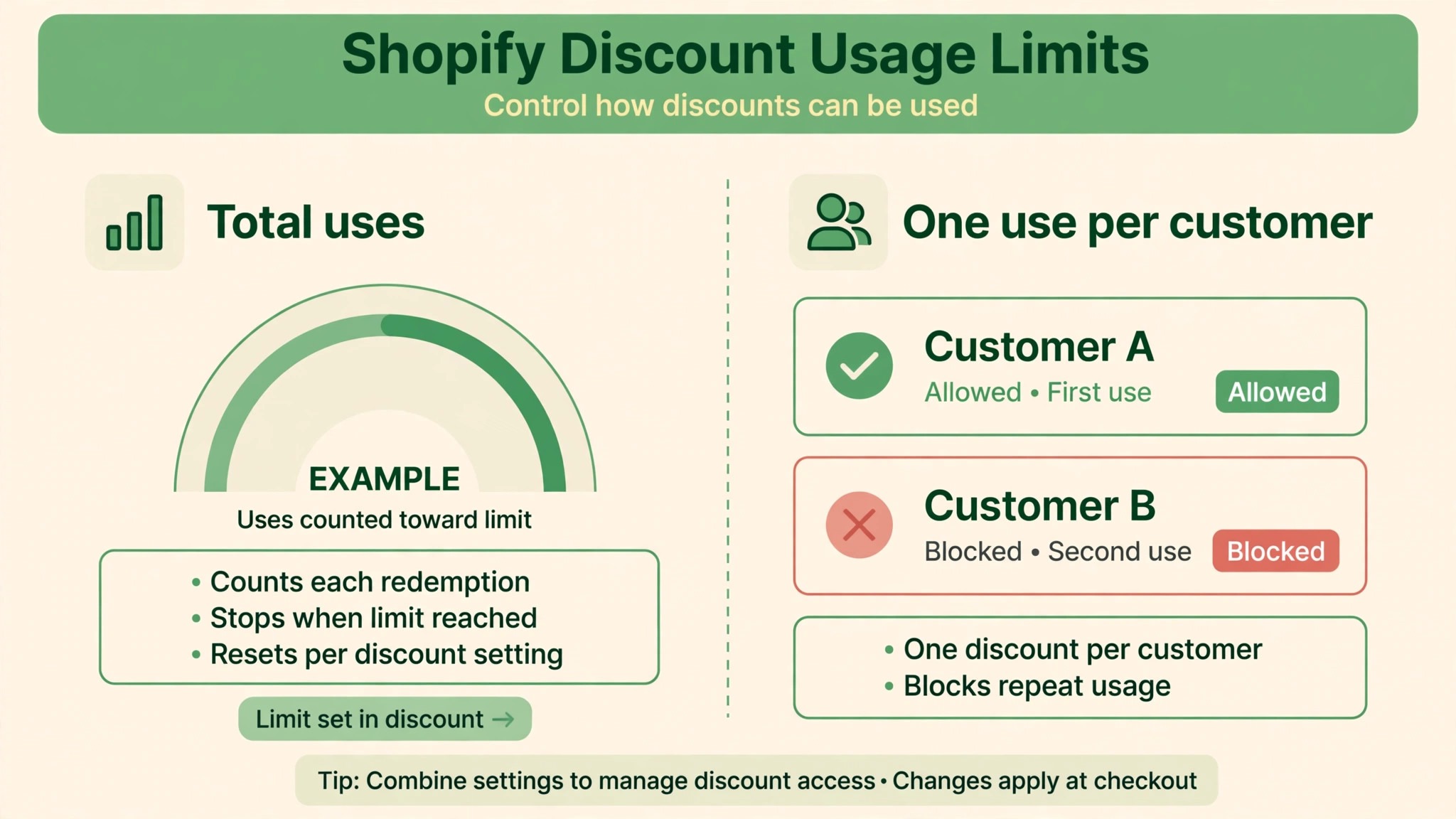
Usage limits fail quietly, and they are the second most likely cause after dates. Open the discount and look at two separate limits. The total number of times the code can be used across the whole store, and the limit of one use per customer. A code with a total cap that has been reached will fail for every new customer, while the store owner still sees it listed as active.
A code with a one use per customer limit will fail for a returning customer who already used it once, even if that first use was a test order, an abandoned checkout that later completed, or a small order placed months earlier.
Check the discount timeline or usage information in admin to see how many times the code has been redeemed. If the count sits at the cap, you have your answer, and the decision is a business one, not a technical one. Extending the cap costs margin, but refusing to extend it while the code is still being promoted costs trust. If the code was meant to be limited, update the promotion wording to say the offer has ended, rather than leaving customers to discover the limit at checkout.
If the cap was set by accident, for example a default limit carried over from a duplicated discount, raise it deliberately and record why.
Product and Collection Eligibility Is Where Most Codes Fail
When dates and limits check out, eligibility is the next place to look, and it is where most genuine settings errors live. When you fix Shopify discount code not working small store cases, eligibility is the next place to look. Open the discount and read the section that says what the discount applies to. It may apply to all products, to specific products, or to specific collections. A code limited to a collection will reject a cart that contains only items outside that collection, even if those items look similar to the customer.
A code limited to specific products will reject a new variant that was added after the code was created, because the variant was never added to the eligible list.
Sale items deserve a separate check. Many stores exclude items that are already discounted, or the discount is set in a way that does not stack with a sale price, and customers read that as the code doing nothing. Check whether the product in the failed cart is already on sale, whether it is a gift card, and whether it is part of a bundle built by an app.
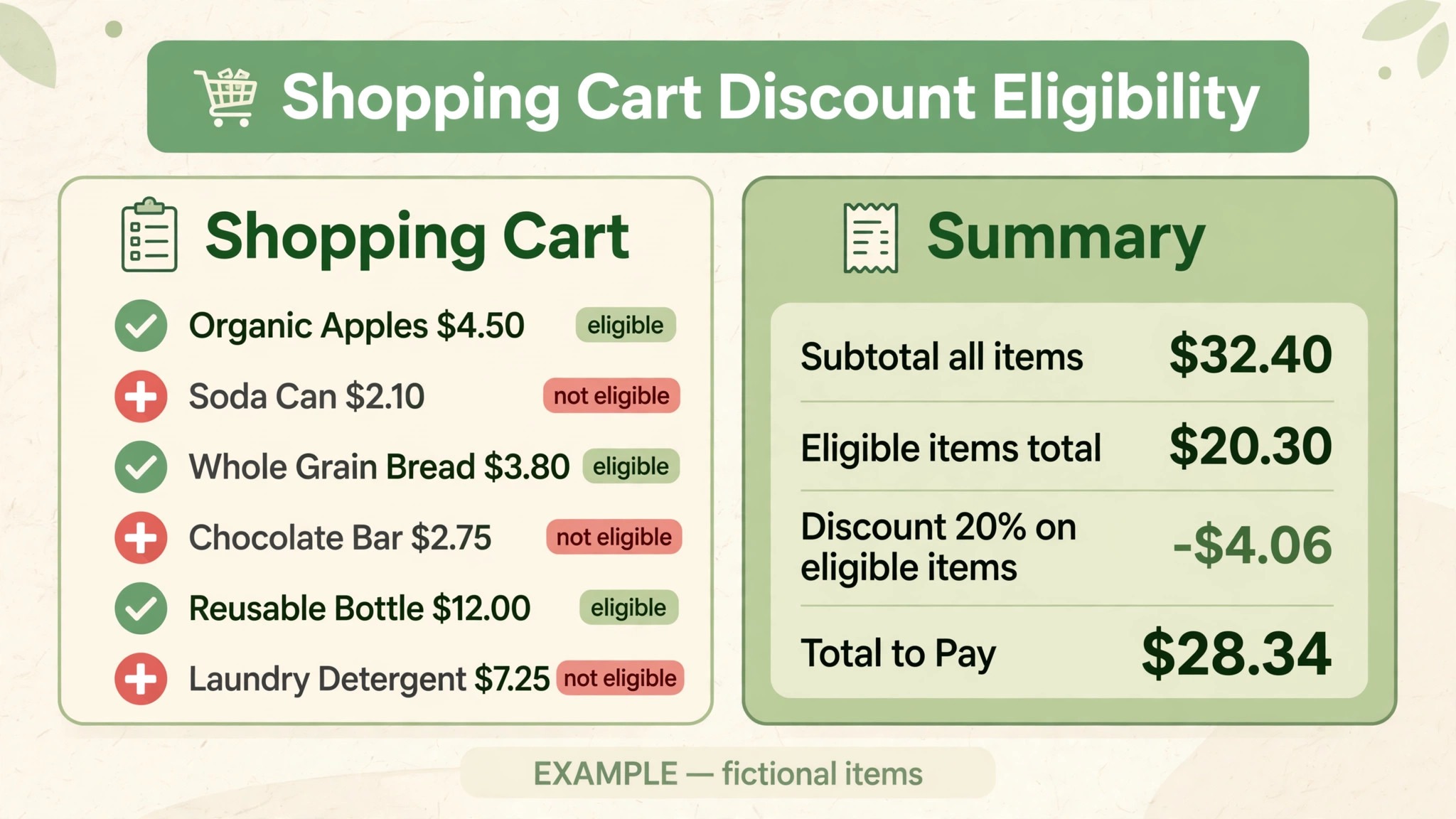
Gift cards are commonly excluded from discount codes, and bundles built by apps sometimes sit outside the product set the code expects, because the bundle is a separate product or because the discount applies to the components rather than the bundle itself. If the failed cart contains a mix of eligible and ineligible items, the discount may apply only to the eligible lines, which can look like a smaller discount than promised. Test with a cart that contains only eligible items first, then add the other items back one at a time, so you can see exactly which line breaks the expectation.
Collections need care too, because a product can leave a collection without anyone noticing. A collection built on a rule, such as a tag or a product type, will drop a product when that tag or type changes. A manual collection will drop nothing, but it will also never gain the new product you assumed was included. Open the collection, confirm the failed product is actually in it, and check whether the collection is published to the sales channel the customer is using.
A product that is in the collection but unpublished on that channel can still cause confusion at checkout, and a collection that was renamed after the code was created should be rechecked, since the code points at the collection itself, not at its name.
Minimum Spend, Minimum Quantity, and Cart Maths
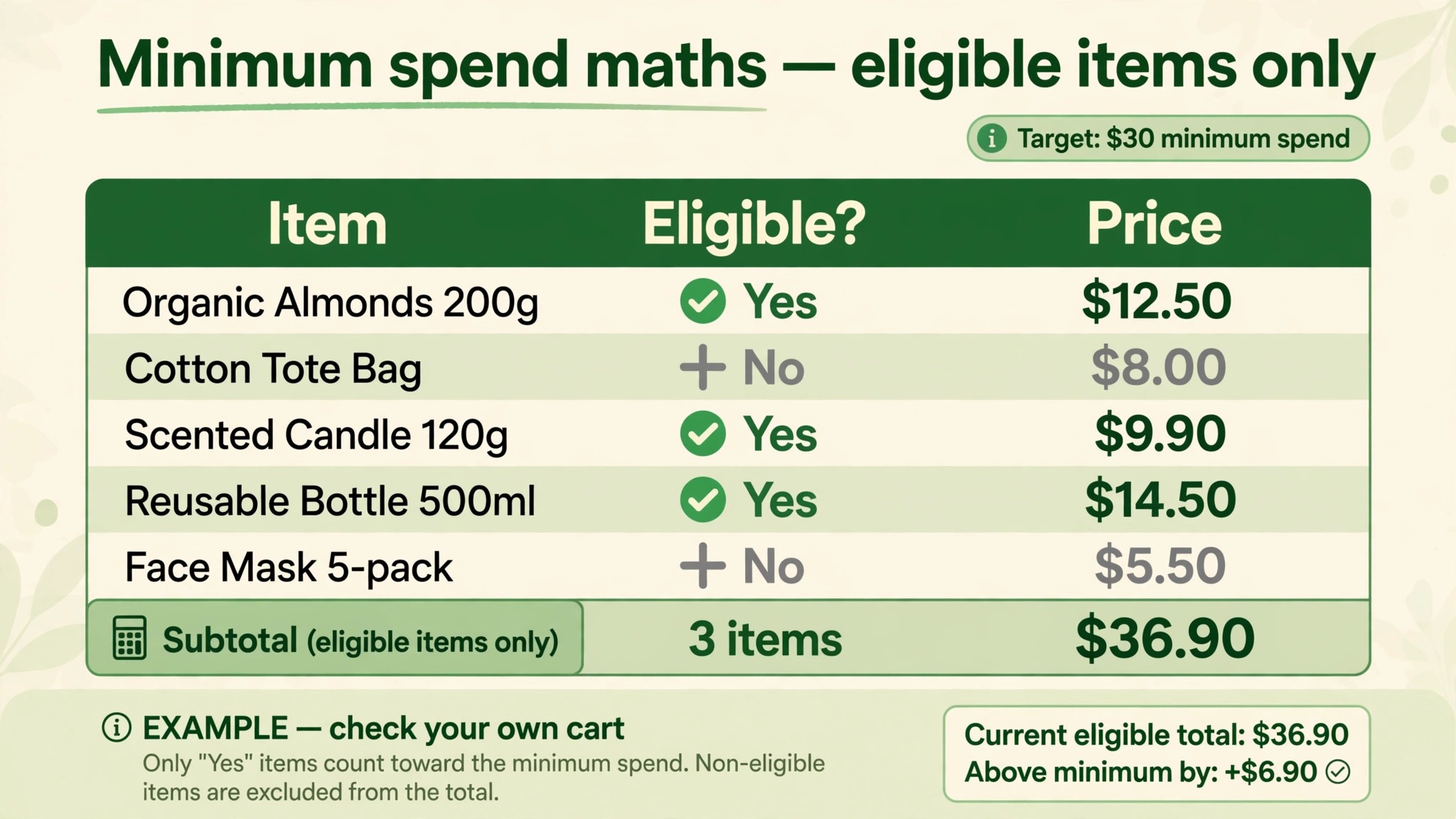
Minimum requirements are the quietest failure of all, because the customer sees no rule, only a rejection. Open the discount and check whether it requires a minimum purchase amount or a minimum quantity. Then check how that minimum is calculated. The common question is whether the minimum counts the cart subtotal before or after other discounts, whether it counts only eligible items, and whether shipping or taxes are included. A customer whose cart totals just above the threshold in their head may be below it once ineligible items are removed, or once a sale price is used instead of the compare at price.
Test this with the exact failed cart, not with a round number cart you invent. Add the same products, variants, and quantities, and watch the subtotal for eligible items only. If the cart is short, the fix may be to lower the threshold, to widen eligibility, or to make the threshold clearer in the promotion. Do not raise the discount to compensate for a threshold problem, because that changes the margin on every order, while the real problem affects only carts near the line.
Also check quantity rules carefully for buy one get one style offers, where the cheapest item, the quantity counted, and the variant counted can all differ from what the customer assumed. A buy two get one offer that counts only eligible variants will fail when the second item is a variant that was never added to the list.
Combination Rules and Automatic Discounts Blocking the Code
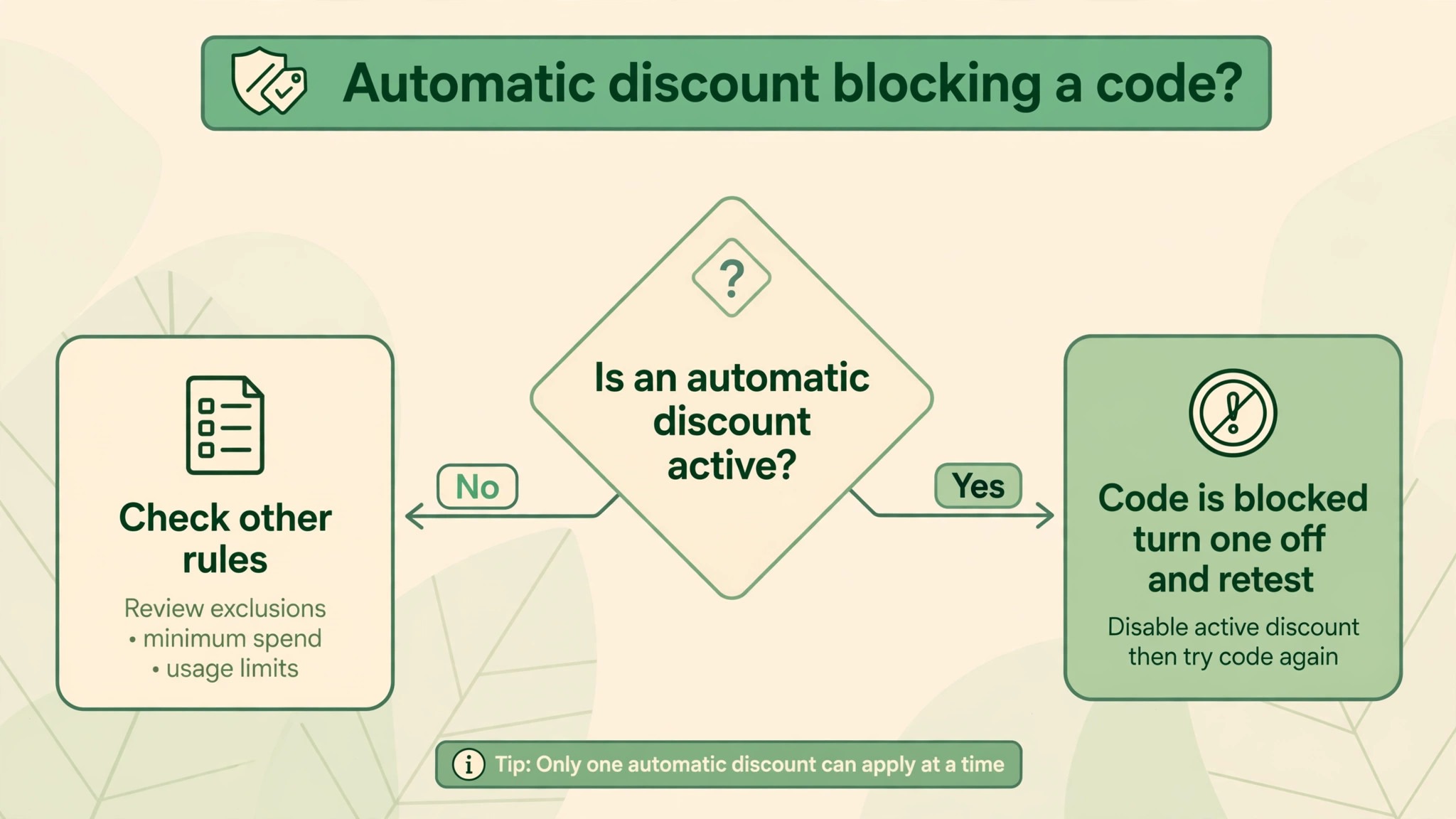
Shopify allows only one discount code per order, and combination rules decide whether a code can sit alongside an automatic discount. This is the cause most often missed by busy store owners, because the blocking discount may be invisible on the product page. A free shipping automatic discount, a sitewide sale automatic discount, or a discount created by an app can all block a code that is set not to combine with other discounts. The customer then sees a code error, even though the store is already giving them a discount they did not ask for.
To fix Shopify discount code not working small store stacking failures, open Discounts in admin and list every active automatic discount, not just the code you are fixing. For each one, check whether your code is set to combine with product discounts, order discounts, or shipping discounts, and check whether the automatic discount is set to combine back. Combination is a two way setting in practice, since both discounts must allow the combination for it to apply. If either side blocks it, the code fails. The cleanest test is to pause the automatic discounts one at a time, test the code alone, and then restore them.
If the code works alone but fails when a specific automatic discount is active, you have found the blocker, and the decision is which promotion should win for that cart.
The business choice here matters. Allowing combinations increases the total discount and can erode margin fast, especially if a code for ten percent combines with an automatic sale of twenty percent and free shipping. Pausing the automatic discount during a code campaign protects margin but removes a benefit other customers expected. A middle path that many small stores use is to run the code campaign after the automatic sale ends, or to set the code to combine only with shipping discounts and not with product discounts, so the customer still gets free shipping plus the code, but not two product discounts at once.
Whatever you choose, write it into the promotion wording, so customers know whether the code stacks or not before they reach checkout.
Customer Targeting, Login State, and Segments
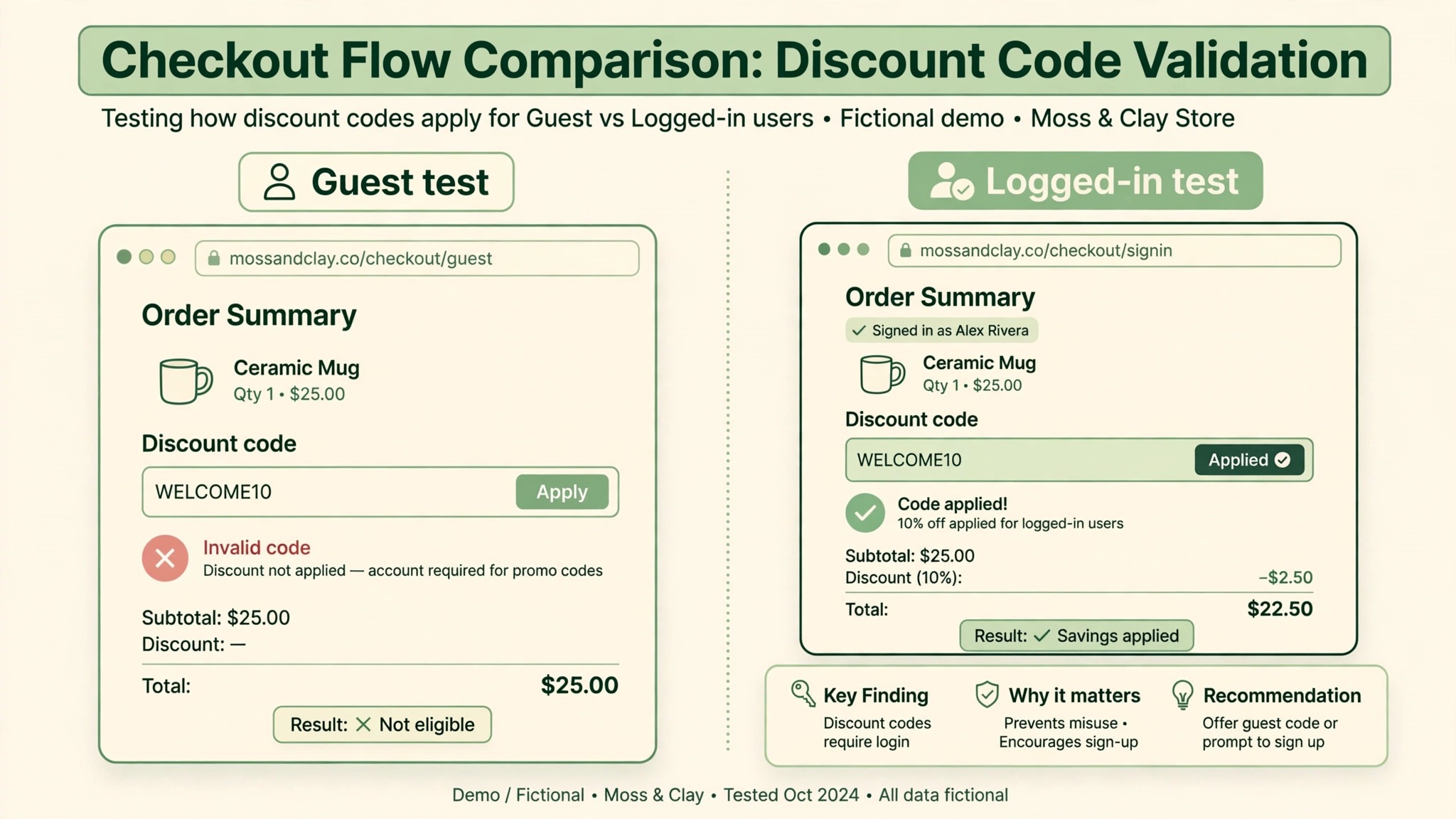
Customer eligibility is the next check, and it fails in a way that looks personal, because the code works for some shoppers and not for others. Open the discount and check whether it is set for all customers, for specific customer segments, or for specific customers. A code limited to a segment, such as new customers, email subscribers, or customers with a particular tag, will fail for anyone outside that segment, even if they received the code through a forwarded email or a shared social post. That forwarding problem is common, because codes travel far beyond their intended audience once they are posted publicly.
Login state is closely linked. Discounts tied to tags, order history, or segment membership cannot be checked until Shopify knows who the shopper is. A guest shopper, or a shopper who has not logged in yet, may see a failure that disappears once they log in or enter their email at checkout. Test both states. Test as a guest, test logged in as a customer inside the segment, and test logged in as a customer outside the segment. Those three tests separate a targeting rule from a broken code in minutes.
If the code works only after login, add a short note near the code field or in the promotion email, asking customers to log in before applying a targeted code, and consider whether a targeted code should have been shared in a public channel at all.
Segments themselves need checking, because a segment built on a tag or on purchase history can drift. A customer who was tagged last month may have lost the tag after an app updated customer records, or a segment built on a date range may have expired for customers who joined just outside it. Open Customers, open the segment, and confirm the failed customer is actually in it. If the segment is wrong, fix the segment, not the code, and retest.
If the segment is right but the customer still fails, check whether the customer account has more than one email address, since a shopper logged in with a different email from the one that holds the tag will look like a different person to the discount engine.
Discount Apps, Checkout Settings, and Theme Problems
When native settings all check out, look at apps. Many small stores use a discount app for advanced rules, such as tiered discounts, bundle offers, or quantity breaks, and those apps add their own logic on top of Shopify native discounts. An app discount can conflict with a native code, duplicate it, or fail when its own instruction limits are hit, for example when a cart has many lines or many conditions. Open Apps in admin and list every app that touches pricing, discounts, bundles, or checkout.
Check whether the app created its own discount that shares a name or a code with your native discount, and check the app settings for combination rules that differ from the native settings.
The test here is isolation. Temporarily disable the discount app, or pause its offers, and test the native code alone on a test product. If the code works with the app off and fails with it on, the app is involved, and the next step is to read the app documentation for its combination and eligibility rules, or to contact the app developer with the exact cart that fails. Do not delete the app in a panic, since deleting it may remove discounts that other customers are using. Pause, test, and restore, and keep a note of what you changed, so you can reverse it.
Also check whether the app was recently updated, since an update can change how its rules interact with native discounts, and a failure that started on a specific date often points at an update on that date.
How to Test a Discount the Way a Customer Experiences It
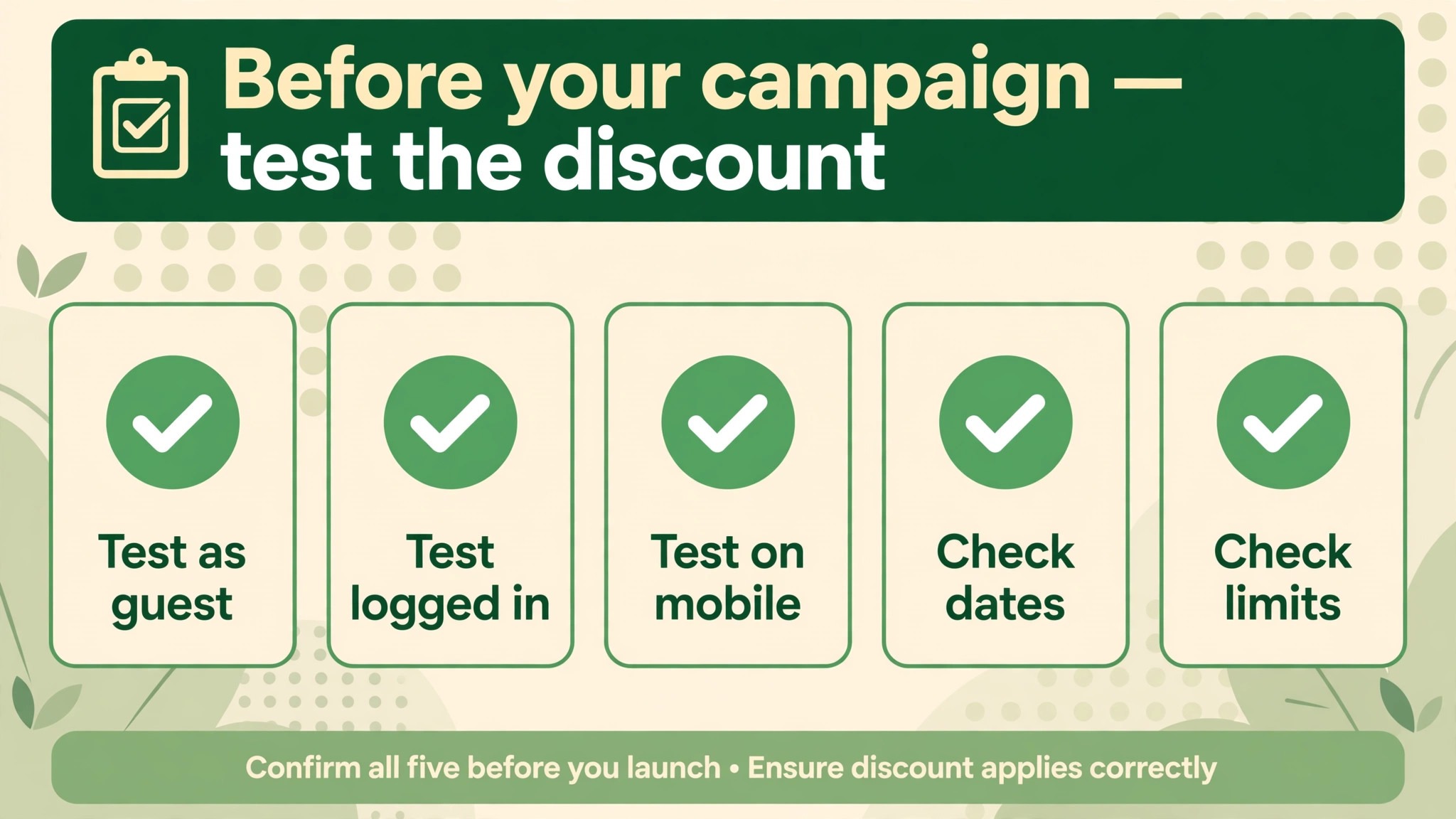
A good test for anyone who must fix Shopify discount code not working small store problems reproduces the failed cart exactly, and it does so without polluting your real order data. Start by creating a test product or using a duplicate of the real product, and build the cart with the same variants and quantities the customer reported. Apply the code as a guest first, then as a logged in customer inside the target segment, then as a customer outside it. Note the result of each test, including the exact discount amount, the lines it applied to, and any other discount already on the cart.
If you cannot reproduce the failure, ask the customer for a screenshot of the cart and the error, since a small difference in variant, quantity, or login state often explains why your test passed and theirs failed.
Record the test results in a simple note attached to the campaign, so the next person who runs a similar code does not repeat the same mistakes.
The Discount Test Checklist to Run Before Every Campaign
Use this checklist before you share any new code, and again after you change any discount setting. It is the overview proof element of this guide in practical form, a short routine that prevents most failures.
Step 1, confirm status and dates
Check that the discount is active, that the start date has passed, and that the end date is in the future. Check the code text for confusing characters, and share it as selectable text, not only inside an image.
Step 2, confirm limits
Check the total usage cap and the one use per customer setting. Check how many times the code has already been redeemed, and decide deliberately whether to raise a cap or to close the offer.
Step 3, confirm eligibility
Check that every product and variant you promised is in the eligible set, that sale items and gift cards are treated as promised, and that every collection in the rule still contains the intended products.
Step 4, confirm minimums
Check the minimum amount or quantity, how it is calculated, and whether it counts eligible items only. Test a cart just above and just below the threshold.
Step 5, confirm combinations
List every active automatic discount, check combination settings on both sides, and test the code alone and alongside each automatic discount.
Step 6, confirm targeting
Check whether the code is for all customers or a segment, confirm a test customer is inside that segment, and test as a guest and logged in.
Step 7, confirm apps and channels
Pause discount apps one at a time if native settings pass but the code still fails, and test on the same channel and device the customer used.
Step 8, confirm the promise
Read the promotion wording again, and fix any gap between what was promised and what the code does, before more customers reach checkout.
What to Tell Customers While You Fix a Broken Code
Communication during a fix matters as much as the fix itself. If a code is genuinely broken, say so plainly, give a short timeframe, and offer a workaround that does not require the customer to wait. A manual discount on a draft order, a replacement code with the same value, or a promise to refund the difference once the order completes are all better than asking the customer to keep trying a code that will keep failing. Be specific about the workaround.
Tell the customer whether to complete the order at full price and expect a refund, or to wait for a new code, since those two paths lead to different actions and different expectations.
Mistakes That Turn a Small Discount Error Into a Margin Leak
A common error when you fix Shopify discount code not working small store problems is creating a second code to patch the first, without fixing the original rule. The second code may work, but the first code remains live, and customers may find and use both, or use the first code in a way you did not intend. Always fix or close the original code before creating a replacement, and set an end date on the replacement so it does not run forever. The second mistake is removing all limits in a hurry.
Removing a total cap or a one use limit during a live complaint wave can turn a small goodwill gesture into an open ended discount that spreads on deal sites. Raise limits deliberately, by a specific amount, and restore a tighter limit once the campaign ends.
The third mistake is allowing combinations without checking the combined total. A code that gives ten percent, combined with an automatic sale and free shipping, can cut margin far more than any single discount suggests, especially on low margin products. Always test the combined total on a real cart, and check the order breakdown, not just the headline percentage. The fourth mistake is forgetting to end the promotion. A code with no end date, or with an end date far in the future, will keep being used long after the campaign, and may be shared on deal sites months later.
Set an end date for every code, review active codes monthly, and close codes that are no longer promoted. A monthly discount review, taking only a few minutes, prevents most of these leaks.
When the Code Is Correct and the Customer Is Outside the Rules
Not every failed code needs a settings change, and learning to recognise a correct rejection saves margin and time. A code for new customers that fails for a returning customer is working as designed. A code for one collection that fails for a different collection is working as designed. A single use code that fails on its second use is working as designed. In each case, the work is not to change the code, but to explain the rule and to decide whether the business wants to make an exception.
Exceptions should be deliberate, limited, and recorded, such as a one time manual discount for a loyal customer, rather than a quiet loosening of the rule for everyone.
For related reading, see Shopify payments on hold, choosing a payment processor, Etsy listing not showing in search and setting up a client feedback loop. Diagnose in order, test the exact cart, and fix the rule.
Frequently Asked Questions
Why does my Shopify discount code work for some customers and not others?
Usually the answer is a per customer limit, a minimum spend that some carts miss, a product condition, or a segment rule. Ask the failing customer for their cart contents and login state, and test that exact combination as a guest, inside the segment, and outside it. Those three tests separate a targeting rule from a broken code quickly.
Can a discount code conflict with an automatic discount?
Yes, and this is a common cause. If the code is set not to combine with other discounts, an active automatic discount will block it at checkout. Either allow the combination on both discounts, pause the automatic discount during the campaign, or run the campaigns at different times, and state the stacking rule in the promotion wording.
Do discount codes work on gift cards and sale items?
Often they do not, or they apply only to part of the cart. Many stores exclude gift cards, and sale items may be excluded if the code is set to skip already discounted products. Check the code settings, test with a sale item alone, and state exclusions in the promotion so customers know before checkout.
Why does my code say invalid when I just created it?
Check the status and dates first, since a code scheduled for a future start, or left in draft, will fail today. Then check the exact code text for a typo, a trailing space, or a confusing character. A code that works when pasted from admin but fails when typed from a graphic is usually a sharing problem, not a settings problem.
Should I create a new code when the old one fails?
Fix or close the old code first, then create a replacement only if needed. Creating a second code on top of a broken one leaves two live codes, confuses reporting, and can let customers use both. Set an end date on any replacement, and record why the original failed.
How do I test a discount before a sale goes live?
Build the exact carts you promised, including a cart just above and just below any minimum, an eligible product alone, an ineligible product alone, and the code alongside each active automatic discount. Check the order breakdown for each test, not just the total, and run the tests as a guest and as a logged in customer.
A Practical Verdict for a Small Store
A discount code is a promise written in settings, and customers judge the store by whether that promise holds at checkout. The stores that handle this well do not have fewer rules. They have clearer rules, tested before launch, and a diagnosis order they follow when something fails. Start with status and dates, then limits, then eligibility, then minimums, then combinations, then targeting, then apps. Test the exact cart, change one thing at a time, and fix the promotion wording whenever the wording and the settings disagree.
When you fix Shopify discount code not working small store problems this way, the next campaign starts from a tested checklist, not from a guess, and the code does what the customer was told it would do.