

Put a Freshsales sequence next to a HubSpot sequence and the difference looks small at first. Both send a series of emails, both log replies, both nudge a rep when a prospect goes quiet. Look closer and the gap opens up. Freshsales sequences live inside a sales-first tool, tuned for reps working a list. HubSpot sequences live inside a shared system where marketing, sales, and service all read the same record, and every step can trigger work in another part of the business. That gap is the real reason teams switch Freshsales to HubSpot small business, and it is also the reason the move needs more care than a CSV export suggests.
Any plan to switch Freshsales to HubSpot small business sales teams rely on must treat sequences as the system, not as an afterthought.
This guide is built around that gap. It covers what exports cleanly from Freshsales, how to rebuild sequences and scoring by hand, how to handle the leads problem, and how to run a cutover week that does not drop a single live conversation. If you switch Freshsales to HubSpot small business teams usually find the data move is the easy half. The sequence rebuild is the work that decides whether the new system feels better on day one or just different. The plan below shows how to switch Freshsales to HubSpot small business owners can run without pausing sales for a week.
Freshsales vs HubSpot at a Glance
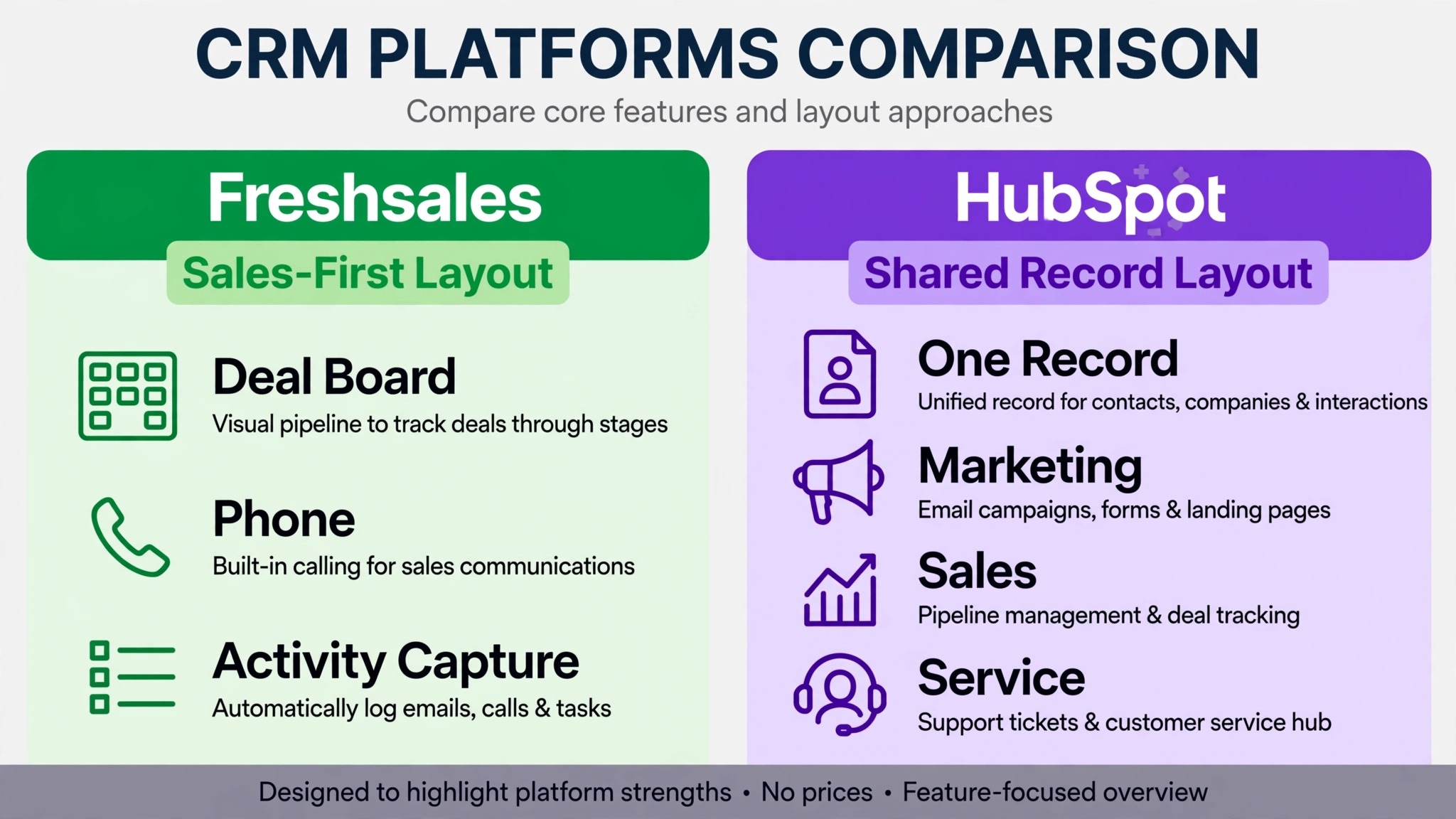
Freshsales earned its place as a sales-first CRM. Built-in telephony, automatic activity capture, and a clean deal board made it a natural pick for small teams that live on the phone and in the inbox. Many teams adopted it when sales was the only department using a CRM, and it fit that job well. The friction starts when marketing wants the same records, or service wants visibility into the same accounts, and the sales tool has to stretch into jobs it was never shaped for.
HubSpot takes the opposite starting point. One record serves marketing, sales, and service, with lifecycle stages marking where each contact sits. That shared record is the main attraction for teams that have outgrown a sales-only view. The trade is that HubSpot asks for clearer definitions up front. Lifecycle stages, deal pipelines, and user roles need to be settled before import, or the shared record becomes a shared mess.
| Area | Freshsales strength | HubSpot strength |
|---|---|---|
| Daily sales work | Built-in phone and activity capture | Sequences tied to shared records |
| Team visibility | Deal board and sales reports | One record across marketing, sales, service |
| Automation | Workflows inside sales | Workflows across the whole business |
| Lead handling | Leads and contacts as separate objects | Lifecycle stages on one contact record |
| Pricing shape | Lower per user cost on many tiers | Per seat pricing that grows with the team |
Price deserves a plain note. Freshsales often costs less per user, and HubSpot paid tiers charge per seat, so confirm current pricing on each vendor page before you budget. The case for moving is rarely a lower invoice. It is a shared system that removes handoffs between teams.
For context on where HubSpot sits among small business CRMs generally, see our guide to the best CRM software for small business. It compares the field on features and fit rather than on one migration alone.
The Sequence Rebuild Comes First, Not Last
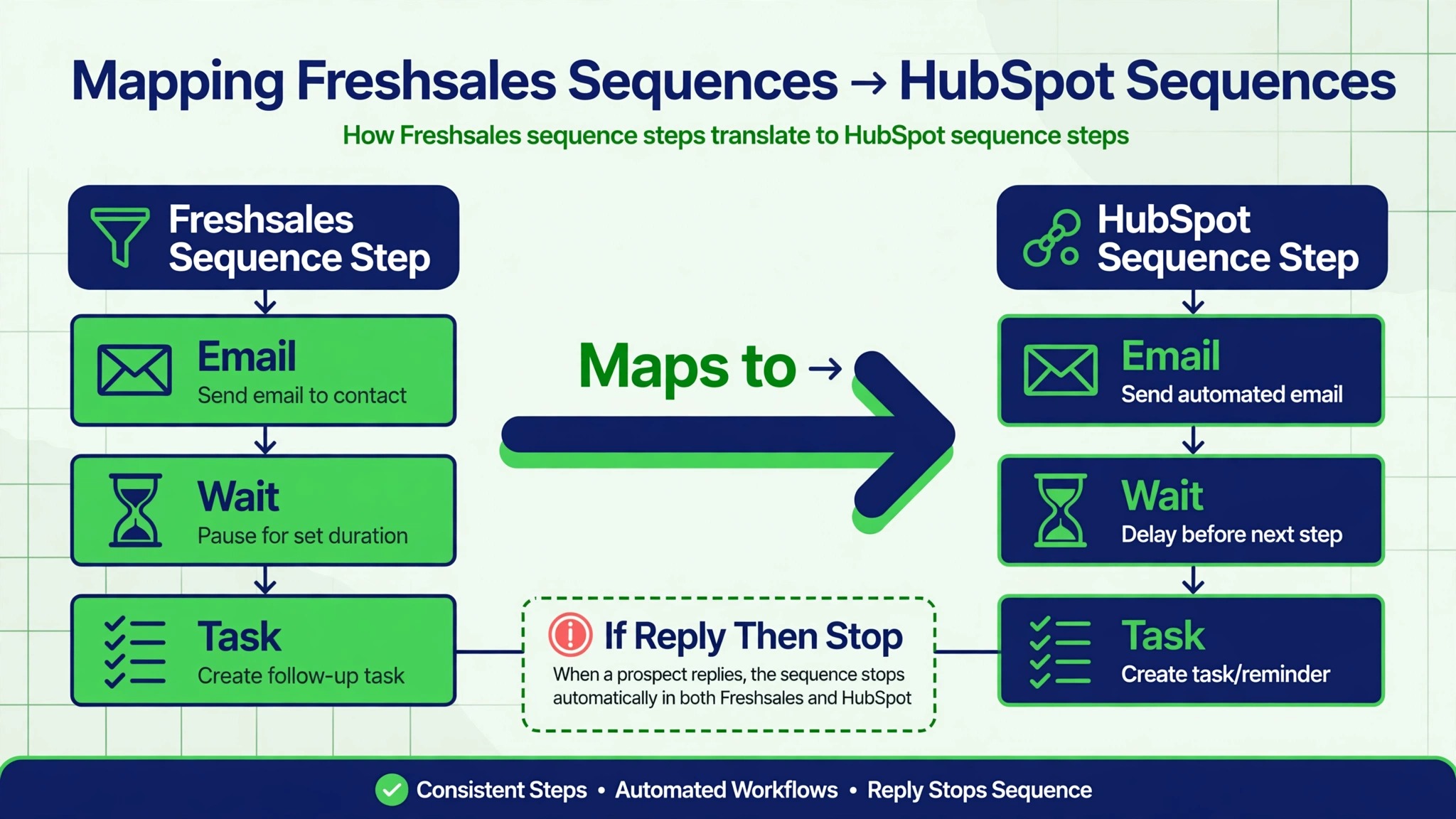
Most migration guides treat automation as a final step. For a Freshsales move, that order is wrong. Sequences are the daily workflow of a Freshsales team, and if they are not rebuilt before cutover, reps arrive on Monday with records but no rhythm. Rebuild sequences first, in draft form, while the data work runs in parallel. That way cutover day delivers a working system, not a database.
Start by listing every active sequence in Freshsales, with its steps, delays, and enrollment rules. You will usually find three kinds. Prospecting sequences that run for two to four weeks, follow-up sequences tied to a deal stage, and nurture sequences for leads that are not ready. Map each one to a HubSpot sequence, and note where the logic differs. HubSpot sequences enroll contacts, not leads, which changes how you handle the leads problem covered below.
Score each sequence by usage before rebuilding it. A sequence that enrolled three contacts last quarter does not deserve a rebuild. A sequence your whole team runs daily deserves a careful rebuild with its templates rewritten for HubSpot, not pasted in with stale personalization tokens. Freshsales templates and HubSpot templates use different token formats, and a broken token in a live sequence emails a prospect a piece of code instead of a name.
Test every rebuilt sequence on internal contacts before cutover. Send it to yourself and two colleagues, reply to one step, and confirm the sequence stops, logs the reply, and updates the record as expected. A sequence that works in a demo and fails on a reply is worse than no sequence, because it keeps emailing a prospect who already answered.
What the Freshsales Export Actually Contains
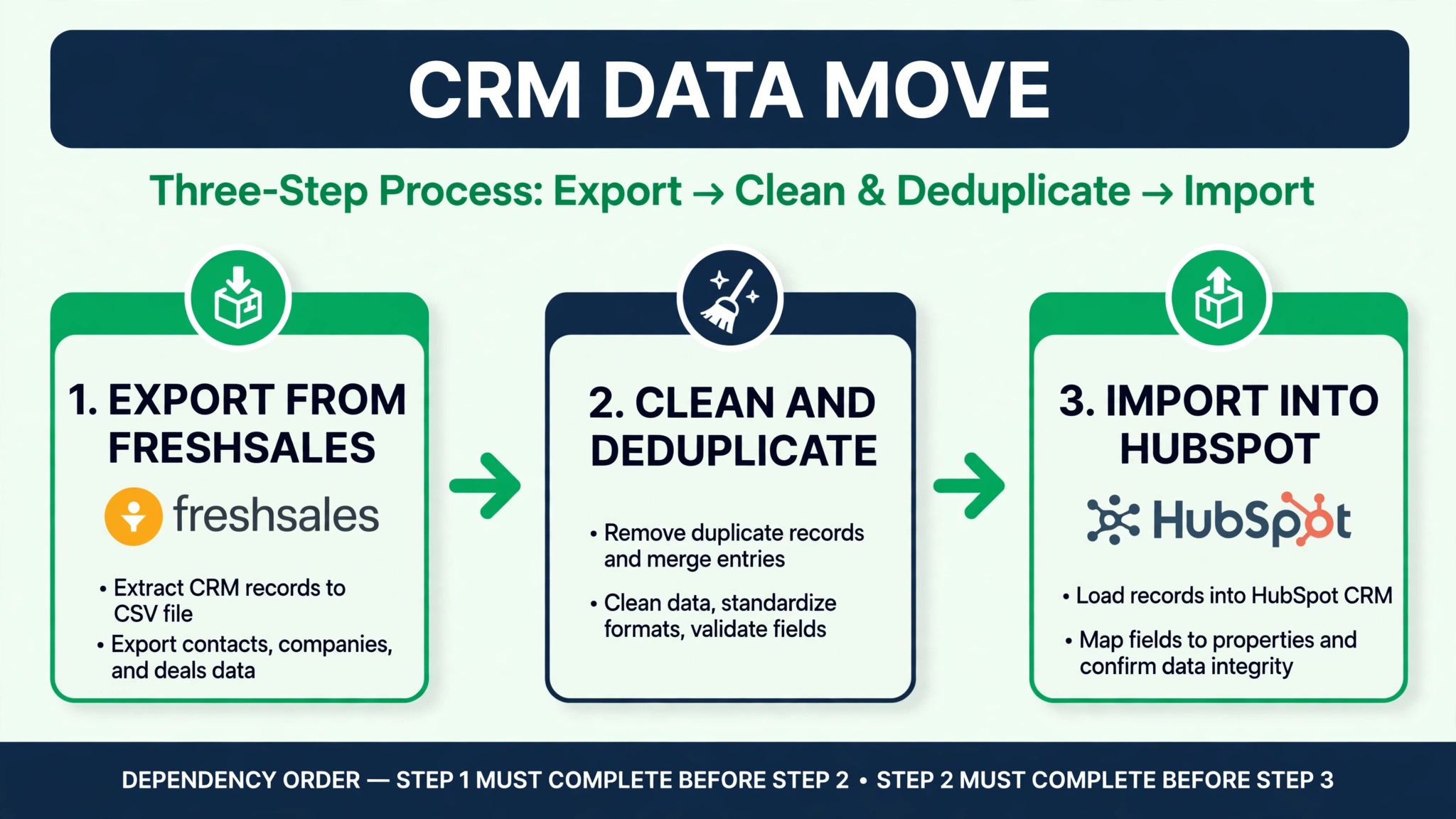
Export from Freshsales in CSV files, one per object. Contacts, accounts, deals, notes, and activities each get a file. Take the export during a quiet window and keep Freshsales unchanged while you work, because a record edited after export creates a version mismatch that surfaces as a duplicate or a missing note later.
The export is honest about records and quiet about relationships. Contacts and accounts export as rows, but the links between them, and between deals and contacts, need rebuilding on import. Keep a unique identifier column in every file, ideally the Freshsales record ID, and use it to rebuild associations in HubSpot. Name matching alone fails whenever two contacts share a company domain or a contact uses a personal email address.
Activities need a decision before export. Freshsales captures calls, emails, and meetings automatically, and that history is valuable for coaching and context. HubSpot stores activities as engagements on the timeline. Migrating all history is possible through migration tools or the API, but for most small teams a cutoff is saner. Move the last ninety days of activity per active deal, keep the rest in a Freshsales archive, and keep Freshsales accessible in read only mode for six months.
Records without an email address need a manual list. HubSpot matches and merges primarily on email, so a contact with no email cannot be matched reliably. Review that list by hand, add emails where you can find them, and import the remainder as a clearly labeled batch so they can be merged later without contaminating clean records.
Mapping the Data, Field by Field
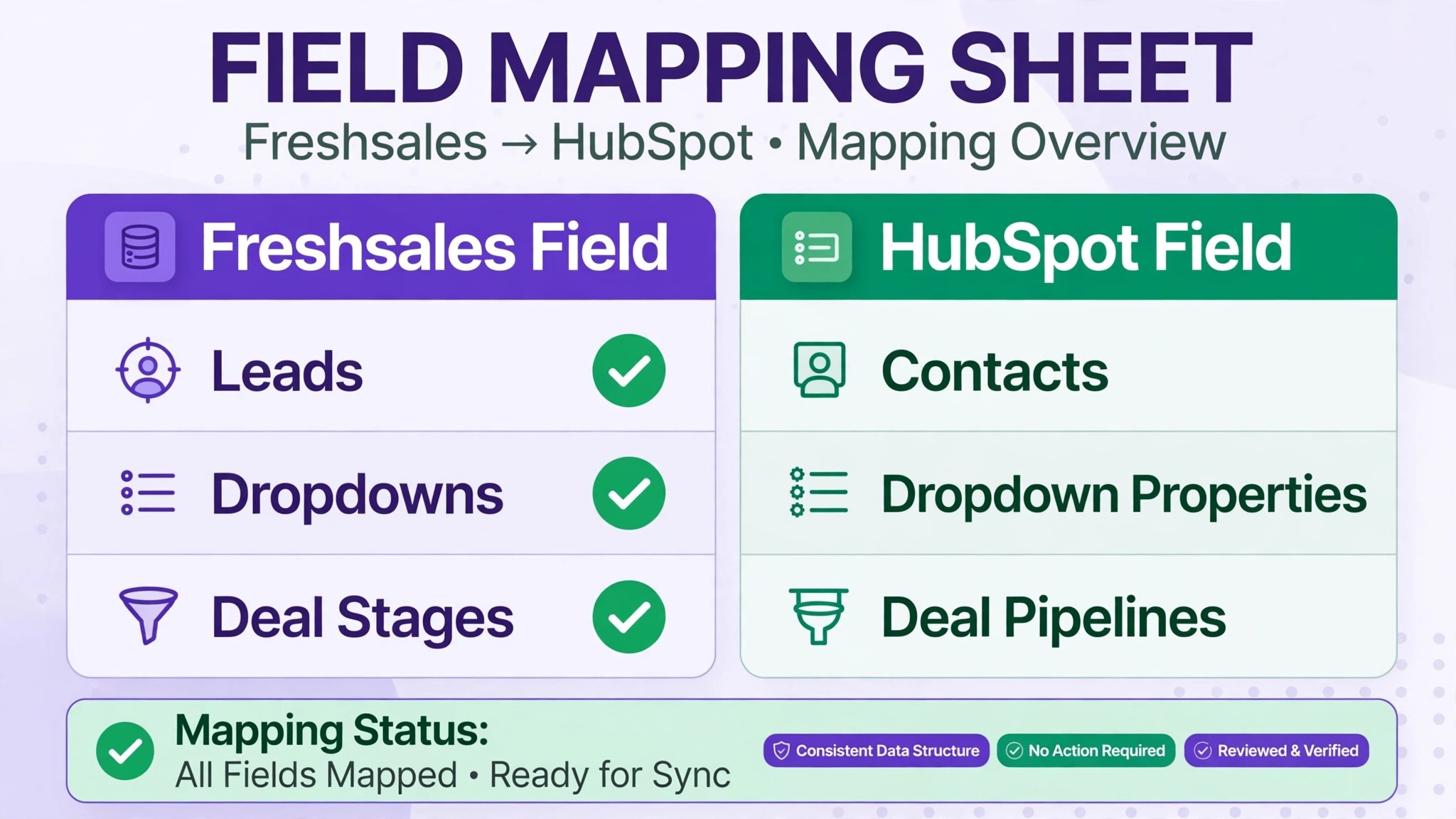
Freshsales and HubSpot use different field structures, and the mapping document is where the migration is truly decided. Build a simple three column sheet. Freshsales field on the left, HubSpot property in the middle, and a note on the right for anything that needs cleaning or a decision. Work through it with the person who actually uses each field, not just the admin, because fields that look unused in settings are often load bearing in a weekly report.
Leads are the sharpest mapping problem. Freshsales treats leads and contacts as separate objects, while HubSpot keeps one contact record and marks its lifecycle stage. A Freshsales lead that has never been qualified becomes a HubSpot contact with a lead lifecycle stage. A converted lead becomes a contact associated with a company and possibly a deal. Decide the rule for each lead status before import, and apply it consistently, or your new database will mix qualified and unqualified records in one list.
Custom fields follow the same discipline. Create matching custom properties in HubSpot before importing, with the same field types. A Freshsales dropdown must map to a HubSpot dropdown with matching options, not to a text field, or your filters and reports break. A number field must stay a number field, or pipeline math turns into text sorting. This preparation takes an afternoon and saves a week of cleanup.
Deal pipelines deserve the same care. Freshsales pipelines do not all map one to one onto HubSpot pipelines, and this is a good moment to ask whether each pipeline still reflects how you sell. Merge pipelines that describe the same motion, drop stages nobody uses, and set probabilities that match your real win rates. Importing a messy pipeline into HubSpot preserves the mess in a prettier interface.
One mapping decision deserves a second look before you finalize the sheet. When you switch Freshsales to HubSpot small business contact records gain lifecycle stages, which means a field that tracked lead source in Freshsales may now need to feed both a source property and a lifecycle rule. Decide which system owns each definition, write it in the mapping note column, and test it with five sample records before the full import. A mapping that looks right on paper and fails on sample data is still cheap to fix.
Travel advisors and other client-facing businesses run this same mapping with their own fields, so if your work centers on clients rather than deals, compare notes with our guide to the best client management software for travel advisors. The objects differ, but the mapping discipline is identical.
Telephony and Call History, the Part Teams Forget
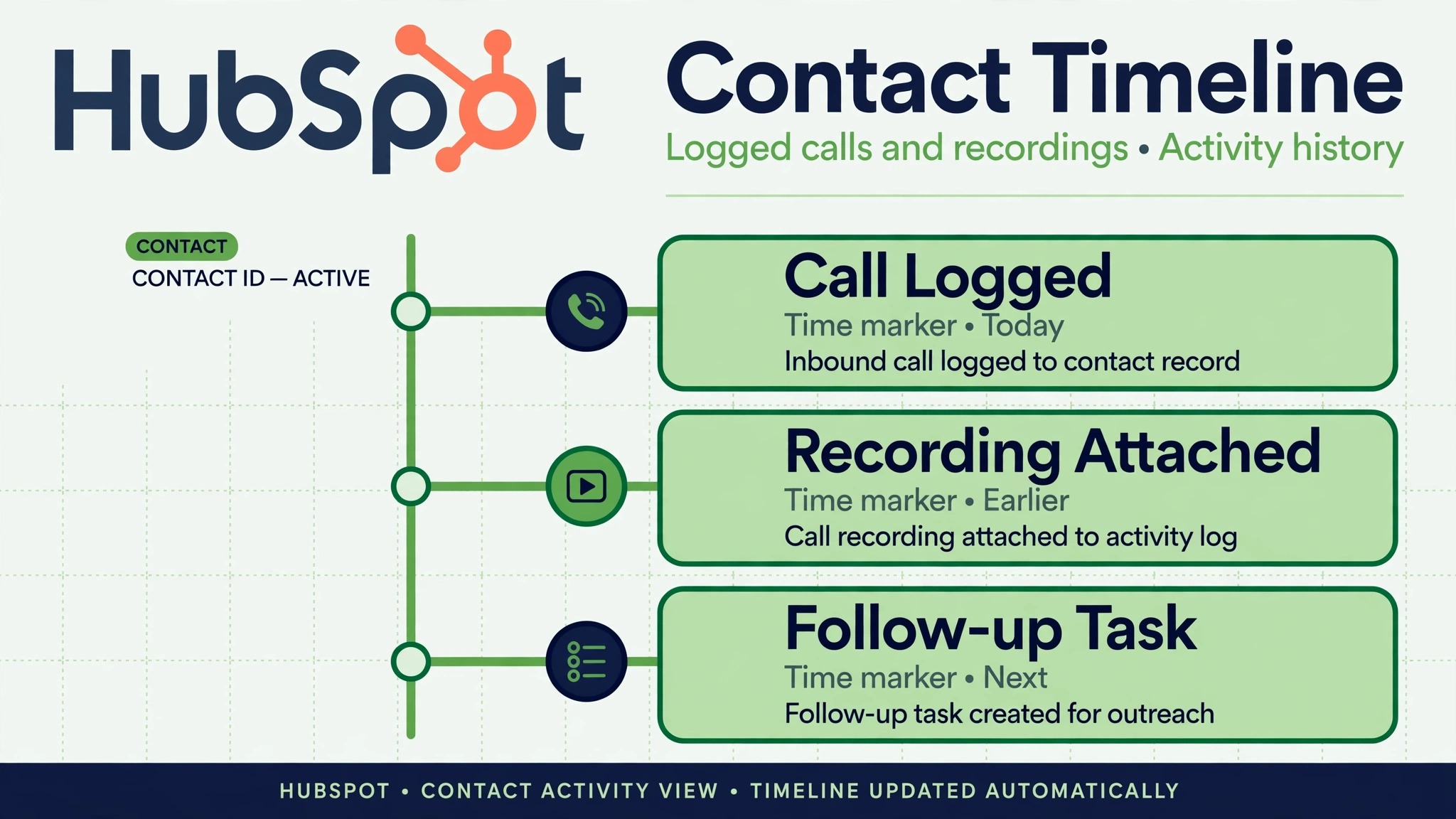
Freshsales built-in telephony is a major reason many teams chose it, and it is the part most often forgotten in migration planning. Call logs, recordings, notes, and activity timelines form the backbone of sales reporting and coaching for phone heavy teams. Decide early how much of that history moves and how future calling works in HubSpot.
HubSpot offers native calling and integrations with external telephony providers, but the structure differs from Freshsales. Call outcomes, dispositions, and recording links map to engagement fields, not to a phone module, and some detail will not transfer through CSV at all. If call recordings matter for coaching or compliance, plan a separate archive. Export recording links or files before cutover, store them in a dated folder, and link them from the relevant HubSpot records.
For future calling, set up the HubSpot calling integration before cutover and test it with every rep. A rep who cannot call from the CRM on Monday morning will fall back to a personal phone, and those calls will never be logged. Test call logging, test the click to call button, and confirm that call outcomes appear on the timeline the way your reports expect.
If your team relies on automatic activity capture, note the change in habit. Freshsales captures much of this in the background, while HubSpot expects a mix of automation and deliberate logging. Train the team on the new habit before cutover, not after, because the first week sets the logging standard that lasts.
The Scoring and Pipeline Rules That Must Be Rebuilt
Sequences get the attention, but scoring rules quietly shape which leads reps call first, and they do not transfer either. Freshsales scoring usually mixes email engagement, page visits, and deal activity into one number. HubSpot scoring splits into explicit fit signals, like job title and company size, and implicit engagement signals, like email opens and site visits. Rebuilding means translating your old score into two HubSpot scores, then testing the result against last quarter’s closed deals.
Run that test before cutover. Take twenty deals your team won last quarter and twenty leads that went nowhere, and check where each one would land under the new scoring. If won deals do not score clearly higher than dead leads, the thresholds are wrong, not the model. Adjust the weights until the separation is visible, and only then turn scoring on for the live team. A scoring model nobody trusts gets ignored within a week, and an ignored model is worse than no model, because it still consumes attention.
Pipeline rules need the same rebuild. Freshsales workflow rules that moved deals, assigned owners, or fired notifications on stage change must become HubSpot workflows, and each one needs an owner on your team who can say what it should do. When you switch Freshsales to HubSpot small business workflows often shrink in number, because several Freshsales rules existed to patch gaps that HubSpot covers natively, like automatic company association or deal amount rollups. Dropping a rule is fine. Dropping it without checking what it did is how a notification your best rep relied on silently disappears.
Document every rebuilt rule in one page, with its trigger, its action, and the person who asked for it. That page becomes your troubleshooting guide in week one, when someone asks why a deal did not move or why an email did not send. It also becomes your audit trail in month three, when someone proposes a new rule that duplicates one you already built.
Swapping the Integrations Around the CRM
List every integration before cutover, including website forms, email sync, calendar sync, accounting links, and marketing tools. Website forms are the most commonly forgotten connection, and a form still pointing at Freshsales after cutover sends new leads into a system nobody monitors. Move forms first, then email and calendar, then the rest in order of revenue impact.
HubSpot connects natively to common email and calendar providers, and its marketplace covers most accounting and form tools, but each connection needs its field mapping checked. A form that mapped a Freshsales picklist to a HubSpot text field will accept values your reports cannot filter. Test each form with a test submission and confirm the record, owner assignment, and notification all behave as expected.
Calendar sync deserves the same test, because a missed calendar connection shows up as double bookings, not as an error message. Book a test meeting through the new form, confirm it lands on the right calendar with the right video link, then reschedule and cancel it, confirming each change propagates. A sync that handles creation but not cancellation will quietly fill calendars with ghost meetings within a month.
The Freshsales HubSpot integration itself can help during transition, since it syncs leads and contacts between the two systems, but only for records with a valid email address, and it does not move deals, sequences, or history. Use it as a bridge if you need a phased cutover, not as the migration. A bridge that runs too long creates two systems of record, and reconciling them costs more than the phased comfort was worth.
If you do run a bridge, set a hard end date for it in writing before cutover week starts. When you switch Freshsales to HubSpot small business teams that leave the bridge running indefinitely end up answering the same question every month, which system is right. The answer should be HubSpot from cutover day, with Freshsales as a read only archive. A bridge without an end date is not a transition plan. It is a second system.
A Cutover Week Plan to Switch Freshsales to HubSpot Small Business Owners Can Follow
A good cutover week is deliberately boring. Nothing dramatic should happen on any single day, because each day has one job and the team knows what it is. Here is a plan that works for a small team with no dedicated IT staff.
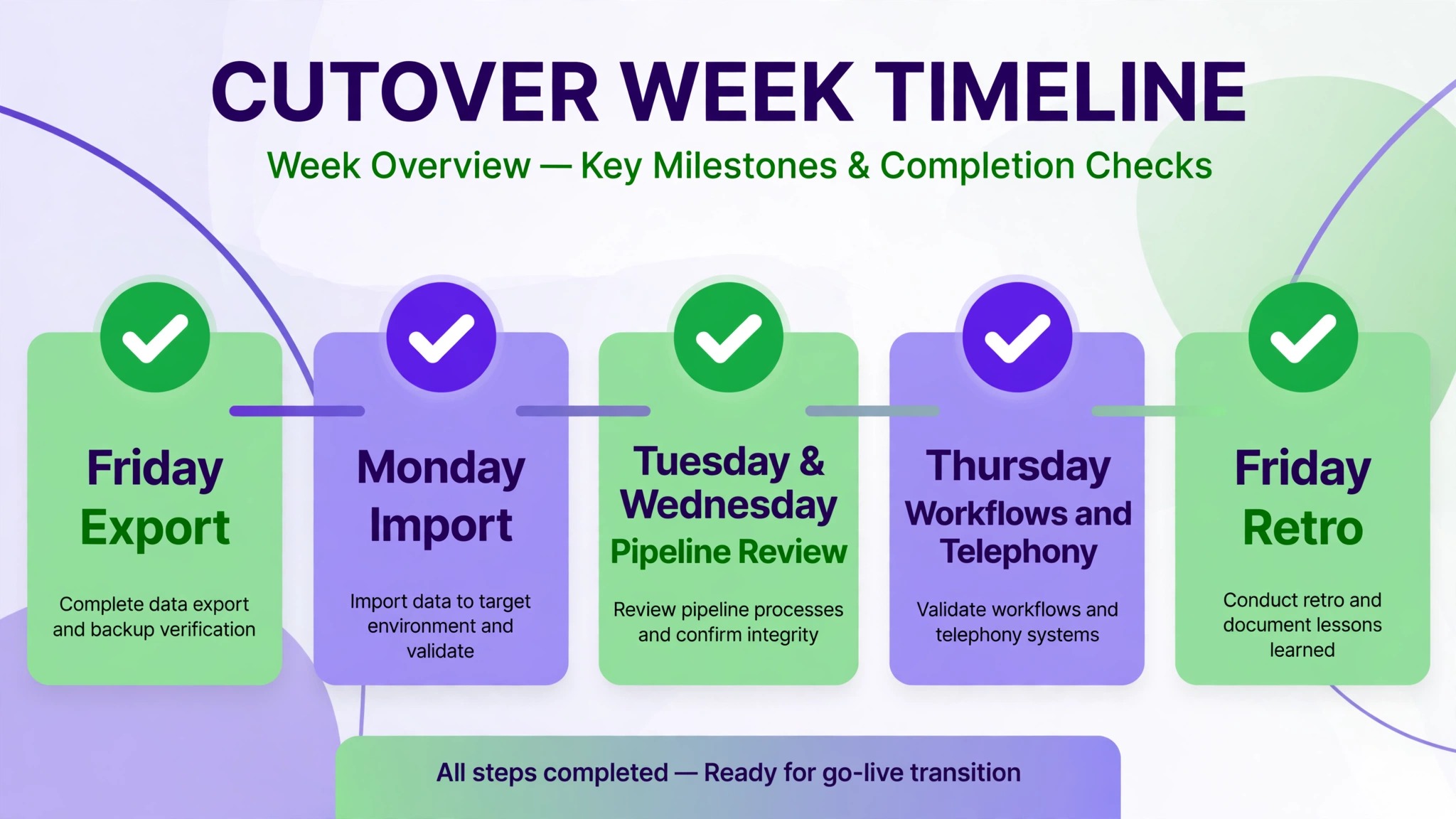
On Friday before cutover, take the final Freshsales export, run the last deduplication pass, and confirm row counts. Pause Freshsales automations so no customer receives a message from the old system after the switch. Send the team a short note with the cutover date, the new login, and the name of the person to ask for help.
On Monday, import companies, then contacts, then deals, in that order, using the identifier columns to build associations. Verify row counts after each import and spot check ten deals end to end, confirming company, contact, amount, stage, and owner. Turn on lead assignment and the rebuilt sequences only after those checks pass.
On Tuesday and Wednesday, run the first pipeline review from HubSpot reports, not from a spreadsheet. This review exposes stage confusion, missing probabilities, and ownership gaps while they are still cheap to fix. Log every issue in one shared list and fix from that list, so reps do not build private workarounds.
On Thursday, turn on the remaining workflows and confirm telephony and form integrations with live tests. On Friday, hold a short retro. What broke, what confused people, and what needs a second week of attention. Then keep Freshsales in read only mode for reference, and stop creating new records there. The retro matters because it converts complaints into fixes before bad habits set.
The First Thirty Days After Cutover
Cutover week gets the attention, but the thirty days after it decide whether the migration sticks. In week one, watch sequence enrollment daily. A sequence that enrolls nobody has a broken trigger, and a sequence that enrolls everybody has a broken filter. Both failures look quiet from the outside, because no error appears, only missing follow-up. Check enrollment counts every morning until they match what Freshsales used to produce.
In week two, run the first honest comparison of old and new reporting. Pull the same pipeline report you ran in Freshsales, rebuild it in HubSpot, and compare the numbers for the same period. Small gaps usually trace to a stage mapping or a probability setting, and fixing them now protects every forecast that follows. If the numbers differ by more than a few percent, do not shrug it off. Find the records that explain the gap, because they reveal a mapping rule that needs correcting.
In weeks three and four, retire the workarounds. Every team keeps one or two side spreadsheets through cutover out of caution, and caution is wise for a week. After a month, a surviving spreadsheet is a second system, and it will quietly diverge from HubSpot. When you switch Freshsales to HubSpot small business reporting only becomes trustworthy when the spreadsheet dies, so pick a date, move the last spreadsheet data into HubSpot, and delete the file. Then hold a short team review. Which sequences earned their keep, which scoring thresholds need adjusting, and what still feels slower than Freshsales. That review turns a migration into an improvement, which is the point of the whole project.
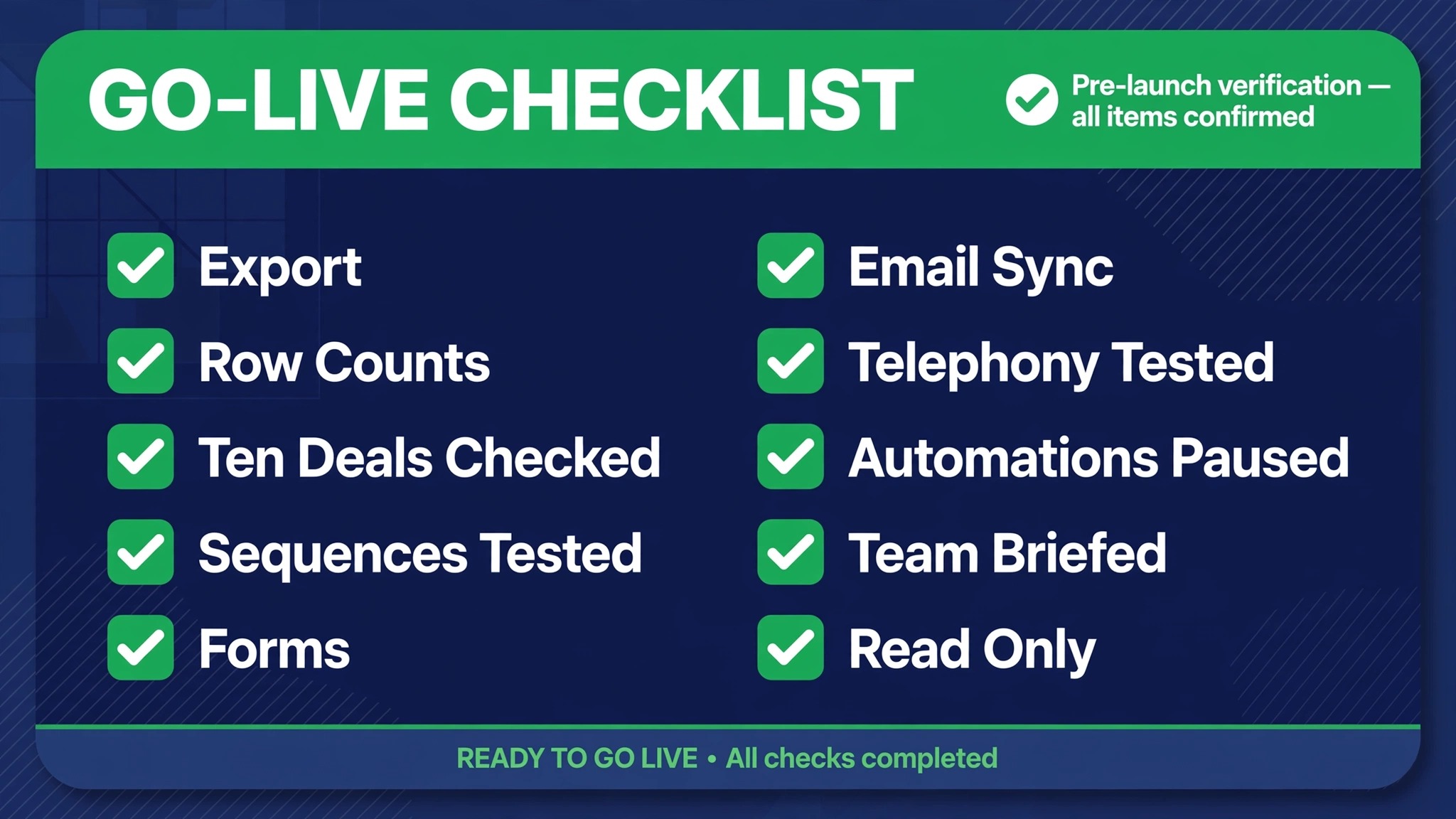
Run this checklist in the final forty eight hours, with a named person checking each item.
1. Final Freshsales export taken, with record IDs, and stored in a dated backup folder. 2. Row counts in HubSpot match the export counts for accounts, contacts, and deals. 3. Ten deals spot checked, including company, contact, amount, stage, and owner. 4. Sequences rebuilt and tested with internal contacts, including reply handling. 5. Website forms point at HubSpot, with a test submission confirmed. 6. Email and calendar sync connected for every user. 7. Telephony tested for every rep, with call logging confirmed. 8. Old Freshsales automations paused. 9. The team knows the cutover date, the new login, and who to ask. 10. Freshsales kept in read only mode, not deleted.
A rollback note belongs with this checklist. Name the point of no return, usually the moment new deals are created in HubSpot, and name who can call a rollback before that point. Naming it in advance stops a panicked reversal when a minor issue feels major on cutover afternoon.
Cost and Timing Reality
Most small teams finish in two to four weeks from scope freeze to stable daily use, with the record import taking a day and the rebuild and training taking the rest. Teams with heavy sequence use or deep telephony reliance should budget toward the longer end. The internal owner should expect to spend roughly half their week on the project, plus a few hours from each rep for testing.
On cost, compare total cost per seat and the features you will actually use, and confirm current pricing on the vendor pages, since both vendors change tiers and limits. Freshsales often wins on headline price, while HubSpot wins on shared visibility across teams. If your team also weighs lighter CRM options, check our breakdowns of the cost of EngageBay for small business monthly and the cost of Nutshell for small business monthly to see how the budget end of the market compares before you commit to a paid HubSpot tier.
Timing honesty matters as much as price honesty. A plan to switch Freshsales to HubSpot small business teams run in two to four weeks assumes one internal owner driving the project. If that owner also carries a full sales quota, add a week, because migration work loses every contest with a live deal. Protecting four hours a week of owner time is the cheapest schedule insurance in the whole project.
Frequently Asked Questions
Can I switch Freshsales to HubSpot small business data without a consultant?
Yes, for a typical small team. Contacts, accounts, deals, and notes move through CSV export and HubSpot import, and the import wizard handles field mapping. Bring in help only if you have complex sequences, heavy telephony history, or a very large database, since those cases reward experience.
Will my sequences transfer automatically?
No. Sequences, workflows, and scoring rules must be rebuilt by hand in HubSpot. Export your sequence list with steps and delays first, rebuild the high usage ones before cutover, and test each one with internal contacts, including what happens when a prospect replies.
What happens to my Freshsales leads?
Leads become HubSpot contacts with a lifecycle stage, since HubSpot keeps one contact record rather than separate lead and contact objects. Decide the rule for each lead status before import, so qualified and unqualified records do not mix in one list.
Do I lose call history?
Call logs and notes can migrate as engagements, but recordings and some telephony detail usually need a separate archive. Export recording links before cutover, store them in a dated folder, and link them from the relevant records. Set up HubSpot calling before cutover so no rep falls back to an unlogged personal phone.
How long does the migration take?
Most small teams finish in two to four weeks, including testing and training. The import itself may take a day. The longer work is rebuilding sequences, mapping fields, and retraining the team on new logging habits.
Should I keep Freshsales running after cutover?
Keep it in read only mode for a few months as a reference and backup, but stop creating new records there on cutover day. Running two live systems creates conflicting records and doubles the work of every update.
Move If the Sequence Gap Is Real, Stay If It Is Not
Here is the honest verdict, framed as a test rather than a slogan. Move to HubSpot if your sequences serve more than sales, if marketing and service need the same records, or if your team keeps rebuilding visibility that a shared system would give for free. Stay with Freshsales if your team is small, phone heavy, and happy with a sales-only view, because the migration cost is real and the benefit only pays when the shared record gets used.
If you move, the order in this guide is the advantage. Rebuild sequences first, map leads deliberately, archive call history properly, and run a boring cutover week with a checklist. Teams that follow that order arrive on Monday with a working rhythm, not just a migrated database. Teams that skip it spend the next month explaining to prospects why the follow-up stopped.
One last check before you commit. Ask your team which sequence they would miss most if it vanished tomorrow, and rebuild that one first, before anything else. When you switch Freshsales to HubSpot small business momentum survives on that one workflow, because it is the habit the team already trusts. Get it right, and the rest of the migration earns patience. Get it wrong, and no clean data import will win the team back.
Real estate teams face the same sequence question with their own lead sources, so compare notes with our guide to the best CRM for real estate agents if your pipeline runs on listings and showings. The migration steps stay the same. Only the fields and the follow-up cadence change.