
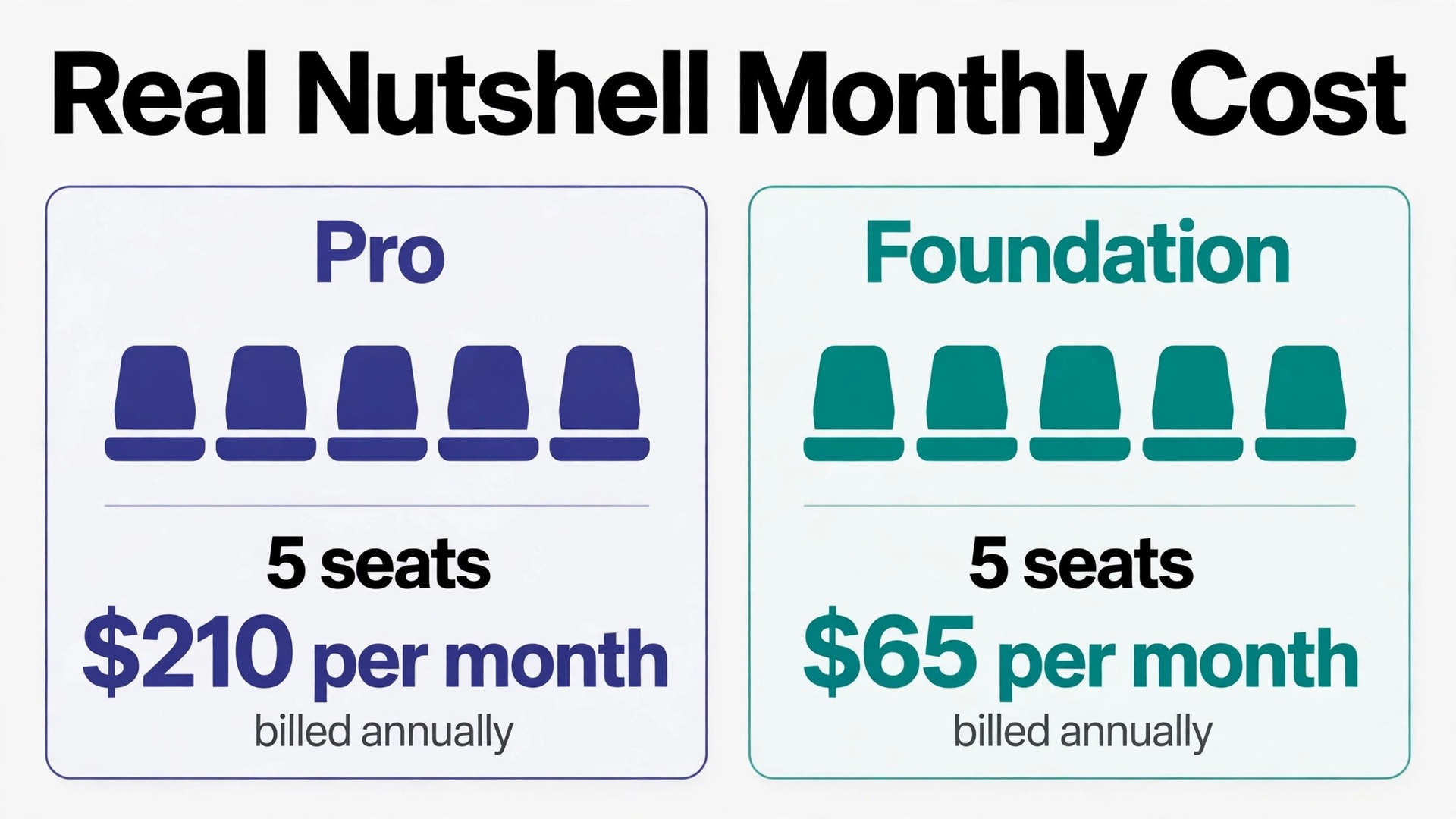
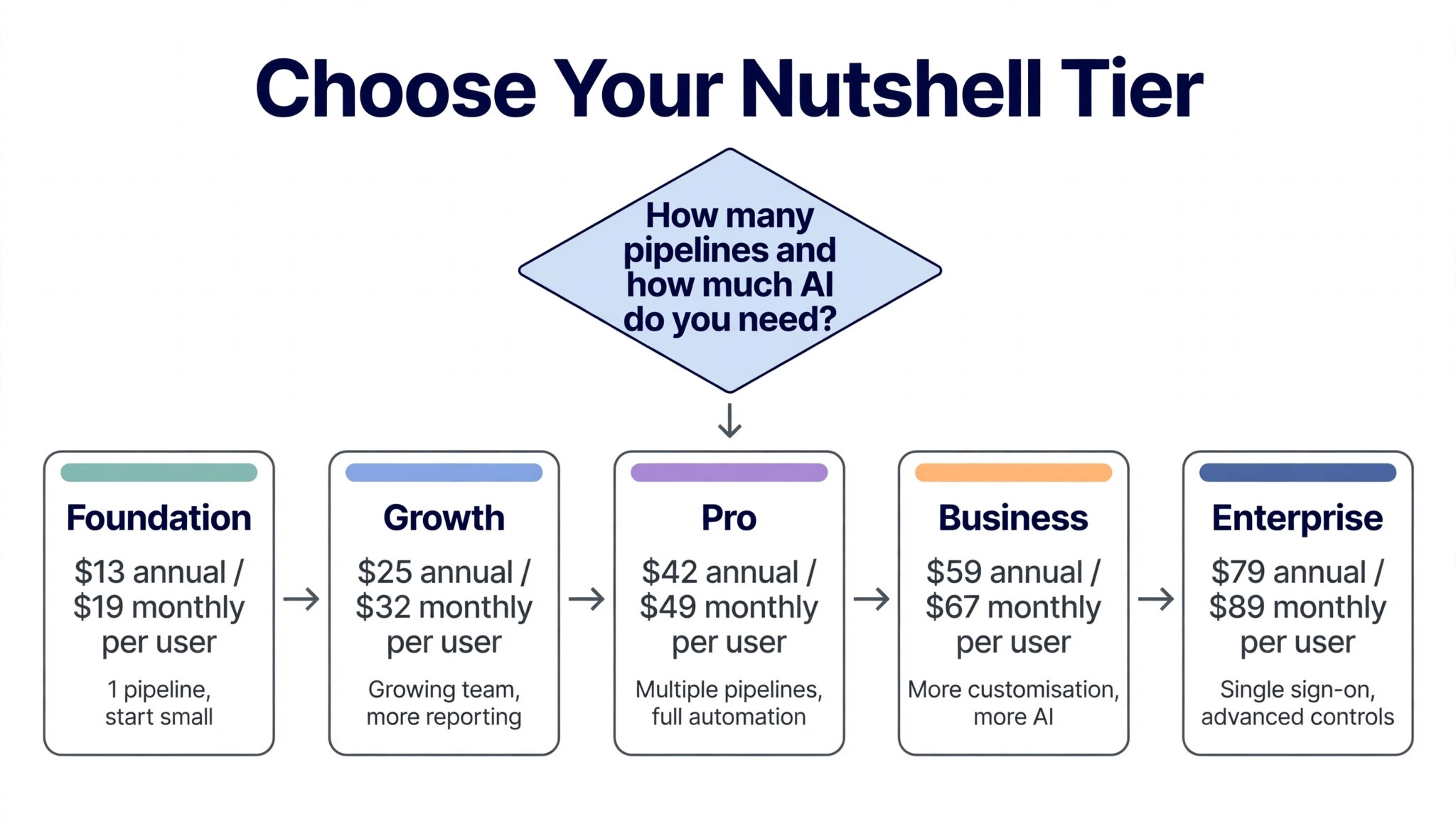
Five tiers run from $13 to $79 per user per month on annual billing, and that spread is the first number to grasp, because the cost of Nutshell for small business monthly depends far more on tier choice than on headcount alone. A team of five on the most popular tier, Pro, pays $210 a month billed annually, while the same team on Foundation pays just $65. The gap between those two totals is $145 a month for features the team may or may not use, which is why this guide prices the whole team, tier by tier, before recommending anything.
Nutshell is a sales CRM built for small business to business teams, with contact management, a visual pipeline, email sequences and built-in AI tools in one place. Every plan includes unlimited contacts and storage, which removes one common CRM trap at once, since the buyer never pays more because the list grew. The tiers differ instead on pipelines, automation depth, AI allowance and admin controls, so the buying question is about how the team sells, not about how many names it holds.
This guide works through the published tiers, the real monthly totals for teams of 2, 5, 10 and 25, the add-ons that sit outside the seat price, and the situations where each tier earns its fee. Prices below come from Nutshell pricing summaries checked in October 2026 that repeat the vendor figures, in United States dollars. Nutshell can change its prices, so treat every figure here as a starting point for a written quote, and check the vendor pricing page before you sign.
The Cost of Nutshell for Small Business Monthly by Team Size
The table below leads with Pro, the tier most small teams land on, because it is the first tier with multiple pipelines and full automation depth. Foundation totals sit beside it for contrast, and the final column adds Marketing Pro, the flat company-wide add-on, so the buyer can see the bundled total at once. Annual billing means paying for a full year in advance, so the monthly figure looks lower but the cash leaves the business sooner. Monthly billing costs more per user but keeps the commitment short.
| Team size | Foundation annual | Pro annual | Pro monthly | Pro annual plus Marketing Pro |
|---|---|---|---|---|
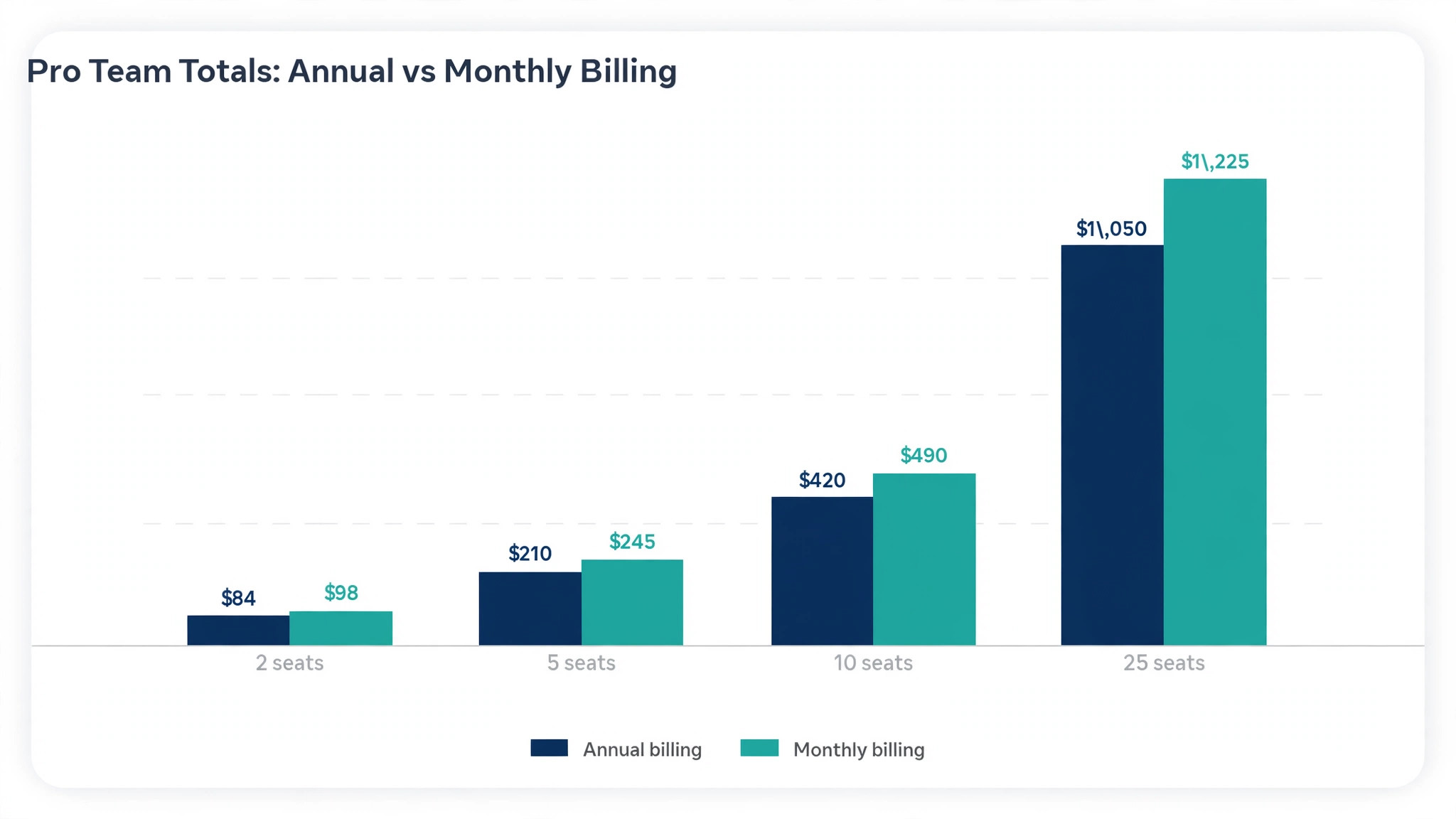
| 2 seats | $26 | $84 | $98 | $133 |
| 5 seats | $65 | $210 | $245 | $259 |
| 10 seats | $130 | $420 | $490 | $469 |
| 25 seats | $325 | $1,050 | $1,225 | $1,099 |
A two person team on Pro pays $84 a month billed annually, which is easy to approve and easy to keep. The same team on monthly billing pays $98, a gap of only $14 a month, so a new team loses little by starting monthly and proving the fit first. At 10 seats the annual saving on Pro reaches $70 a month, or $840 over a year, which is real money but still small beside the cost of choosing the wrong tier. At 25 seats the Pro annual total hits $1,050 a month, and adding Marketing Pro lifts it to $1,099, so at that size the buyer should set a clear target for what the system must return.
The Foundation column shows why tier discipline matters more than seat discipline at small sizes. A team of five on Foundation pays $65 a month billed annually, less than a third of the Pro total, but Foundation caps the team at a single pipeline with 100 open leads and a small AI allowance. A team that sells one product through one process may never notice those limits. A team that sells three products, or that runs separate pipelines for new business and renewals, will hit them in the first month. Price the tier against the pipelines the team runs today, not against the hope that one pipeline will be enough.
Monthly billing changes the same example in a way that matters for cash flow. Pro for five seats rises from $210 to $245 a month, a difference of $420 over a year. That difference buys flexibility, and flexibility has real value during a trial period, but it should be a deliberate choice rather than an accident of signing up on the monthly option and forgetting to switch. Mark the billing choice at signup and review it after ninety days of real use, once the team knows which tier it actually lives in.
All Five Tiers, Priced and Explained
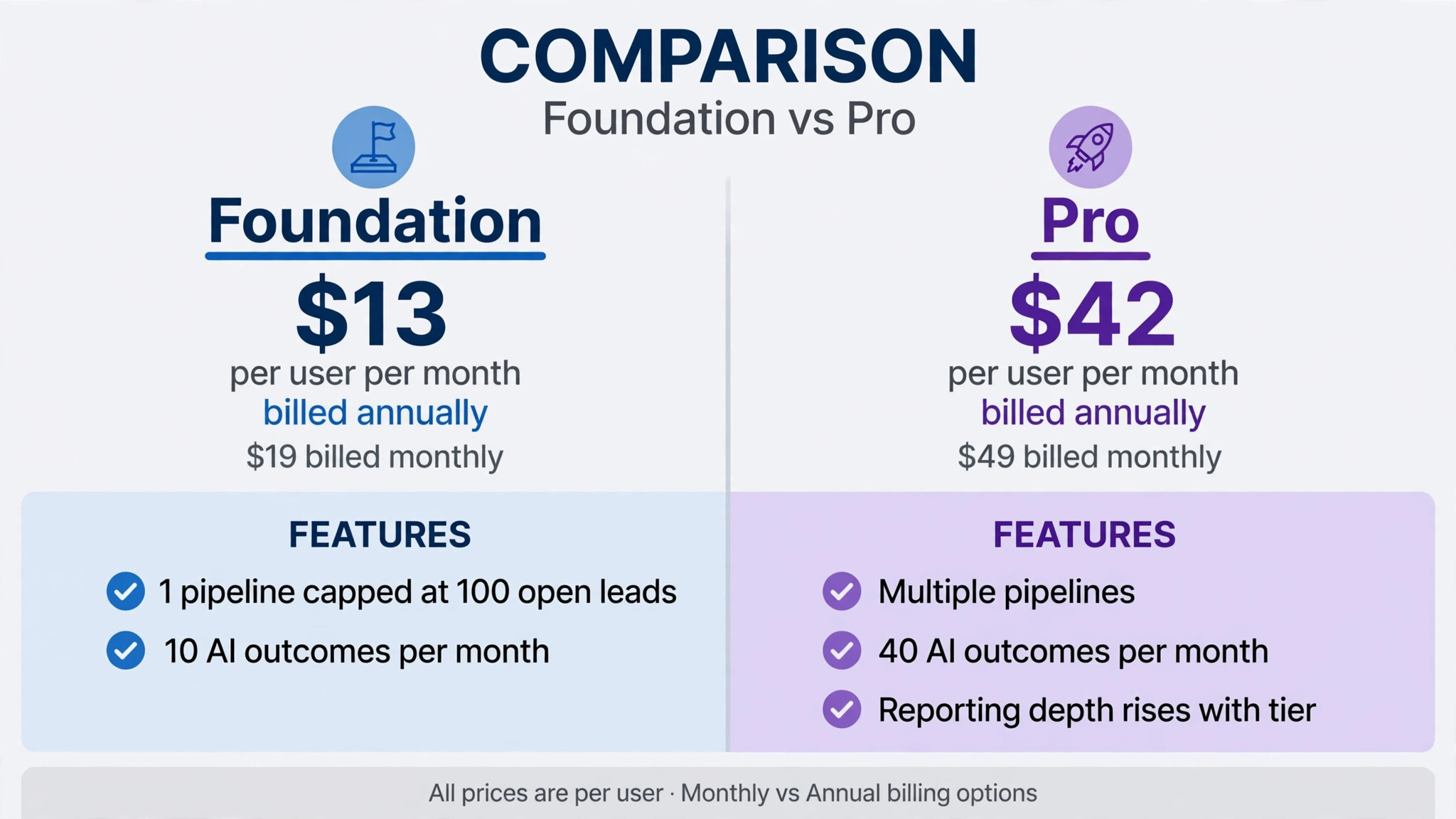
Nutshell sells five sales tiers, and the steps between them are even enough that each tier has a clear buyer. Foundation suits a solo seller or a tiny team getting started. Growth adds reporting power for a team that is starting to scale. Pro adds multiple pipelines and admin features for teams that sell full time. Business adds customisation and a larger AI allowance. Enterprise adds single sign-on, SQL access and scheduled phone support for larger operations.
| Tier | Annual billing | Monthly billing | AI outcomes per month | What unlocks |
|---|---|---|---|---|
| Foundation | $13 per user per month | $19 per user per month | 10 | Unlimited contacts, 1 pipeline capped at 100 open leads, email and calendar sync |
| Growth | $25 per user per month | $32 per user per month | 20 | More reporting power, wider pipeline room for a growing team |
| Pro | $42 per user per month | $49 per user per month | 40 | Multiple pipelines, automation depth, admin features |
| Business | $59 per user per month | $67 per user per month | 100 | More customisation, larger AI allowance for busy teams |
| Enterprise | $79 per user per month | $89 per user per month | 150 | Single sign-on, SQL access, scheduled phone support, advanced controls |
Foundation is best understood as a starting CRM with a ceiling, not as a cut-down version of Pro. The single pipeline and 100 open lead cap will suit a solo seller with one process, but a team with two products or two sales motions will feel cramped fast. The unlimited contacts soften the blow, since the list itself never forces an upgrade, but the pipeline cap can. Test the pipeline count during the trial with real deals, not with demo data, and count open leads honestly before choosing Foundation.
Growth is the sensible middle step for a team that has outgrown Foundation but does not yet need Pro depth. At $25 per user per month billed annually, a team of five pays $125 a month, against $210 on Pro, a saving of $85 a month. That saving buys time to prove that reporting and pipeline room are the real constraints, rather than automation depth. Growth is also the tier to choose when the buyer is unsure, because upgrading later is quick while downgrading after an annual payment is not refunded for unused months.
Pro is where Nutshell starts to behave like a full time sales system, with multiple pipelines, admin features and a 40 outcome AI allowance. For a team that sells every day, that combination is the difference between a shared list and a working process. Business then adds customisation and a 100 outcome AI allowance for teams that lean on AI heavily, while Enterprise adds controls that matter once a business has compliance or reporting requirements beyond a small team. Judge Business and Enterprise by AI usage and admin need, not by a feeling that a higher tier must be safer.
The Add-On Bill That Sits Beside the Seats
The seat price is only the first line of the bill, and the cost of Nutshell for small business monthly is often decided by the add-ons underneath it. Nutshell prices its add-ons in two different ways, and that split is what catches buyers out. Some add-ons charge per user, so they grow with headcount, while others charge a flat company rate, so they stay fixed no matter how many seats the team buys. Work through the list below before you sign, and put a figure beside each line for your own team size.
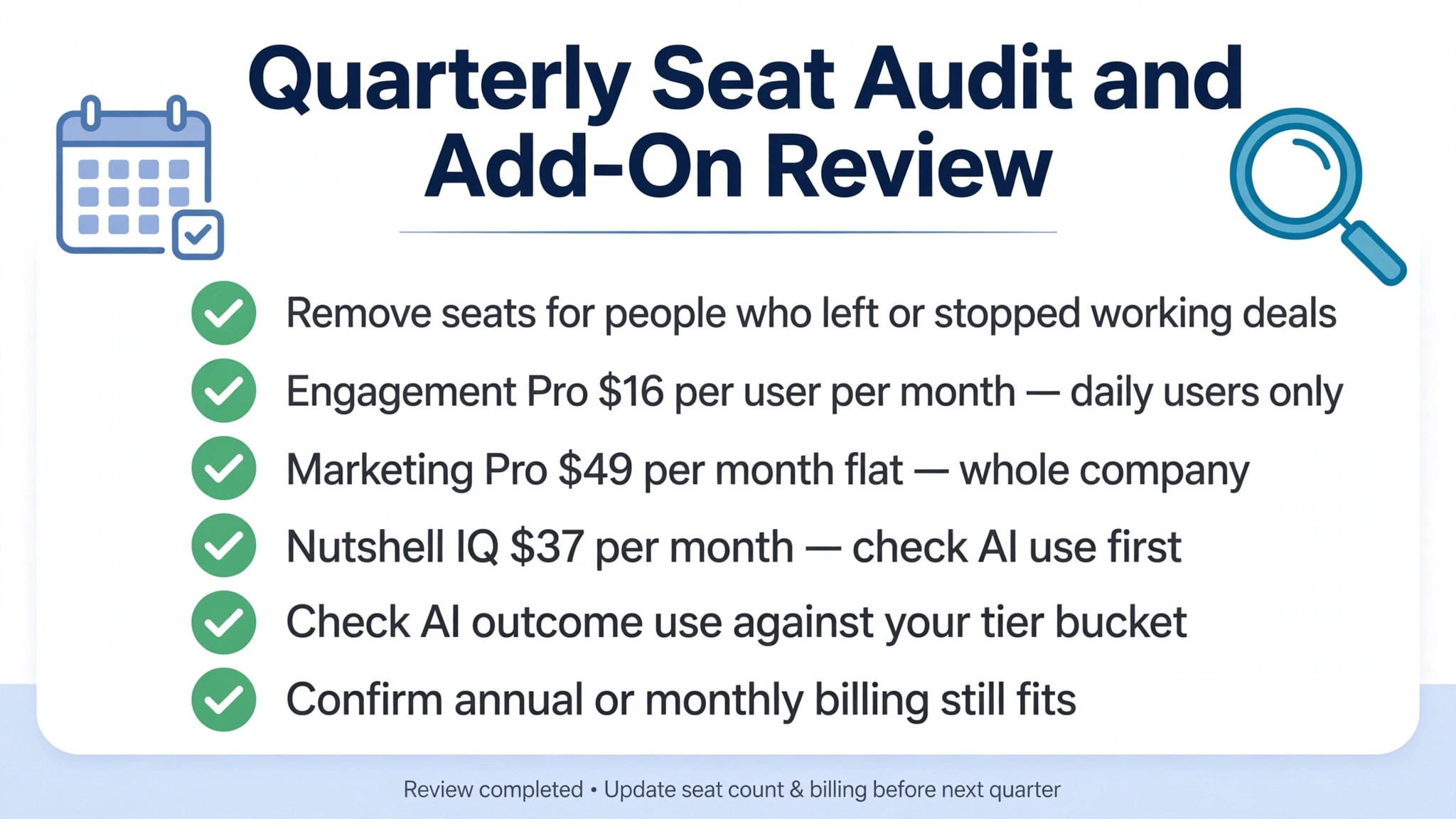
– Marketing Pro at $49 a month flat for the whole company, not per user. A team of 25 pays the same $49 as a team of two, which makes it cheap per head at scale and worth pricing into every Pro comparison. – Engagement Pro at $16 per user per month, which grows with headcount. A team of ten pays $160 a month for this add-on alone, so it deserves a usage test before it is added for everyone. – Nutshell IQ at $37 a month company-wide, for teams that want the extra AI layer beyond the included AI outcomes. – Email marketing contact packs, with published FAQ pricing around $25 a month for 1,000 marketing contacts and a send allowance. Count marketing contacts separately from CRM contacts, since the two meters differ. – SMS at around $15 a month, plus usage, for teams that follow up by text. Price it against the volume of messages the team actually sends. – Proposals and invoices at $79 a month, for teams that want quoting inside the CRM rather than in a separate tool. Compare that fee with the quoting tool it replaces before adding it. – AI outcomes beyond the included monthly bucket, where heavy AI use can add usage cost on top of the tier price. Track outcome usage in the first month rather than guessing it. – Annual prepayment, which lowers the monthly figure but takes the full year payment at once, and can strain a small business in a quiet month.
The per user add-ons deserve the most care, because they multiply. Engagement Pro at $16 per user per month adds $80 a month for a team of five and $400 a month for a team of 25, before the seat price itself. A team that adds it for everyone on day one, then discovers only two people use it, has bought a company-wide habit that does not exist.
A better path is to add per user add-ons for the people who will use them daily, prove the value for a month, and then widen the rollout. Flat add-ons work the other way, since Marketing Pro costs the same $49 whether two people or 25 people use it, so a team should adopt it early if marketing is part of the plan.
The AI bucket works quietly too. Each tier includes a set number of AI outcomes per month, from 10 on Foundation to 150 on Enterprise, covering heavier AI jobs such as call summaries, email campaigns and lead scoring. A team that leans on AI daily can burn through a small bucket fast, and the fix is either a higher tier or extra AI spend. Track outcome usage during the trial with real calls and real campaigns, and choose the tier whose bucket covers a normal month with room to spare. Guessing AI usage is the fastest way to an unexpected second bill.
A Five Seat Example, Worked Out in Full
Take a five person business to business team that sells by email and phone, runs two pipelines, and wants automation plus a monthly email campaign. On Foundation billed annually the team pays $65 a month, but gets only one pipeline, so the two-pipeline setup cannot run.
On Growth billed annually the team pays $125 a month and gains reporting power and wider pipeline room. On Pro billed annually the team pays $210 a month and adds full pipeline and admin depth. Adding Marketing Pro lifts the Pro total to $259 a month. The honest comparison is therefore not $13 against $42, but $65 against $125 against $259 for the whole working setup, and that team view is what the cost of Nutshell for small business monthly should be judged on.
Monthly billing changes the same example in a way that matters for cash flow. Pro for five seats rises to $245 a month, and Marketing Pro stays flat, so the bundled monthly total is $294 a month. Over a year, monthly billing on Pro alone costs $420 more than annual billing for the same five seats. That difference buys flexibility during the trial period, but it should be a deliberate choice rather than an accident of signing up on the monthly option and forgetting to switch. Prove the tier first, then take the annual saving.
The example also shows why headcount discipline still matters, even with unlimited contacts. Adding one seat on Pro billed annually adds $42 a month, or $504 over a year, and adding five seats adds $210 a month. Teams that hand out logins to part time helpers and occasional contractors can lift the bill without adding any selling capacity. A better rule is to give full seats only to people who work deals every week, and to keep everyone else on shared reports or exports until their usage justifies a seat. Review the user list every quarter and remove seats for people who left or changed roles.
What the Monthly Fee Actually Buys
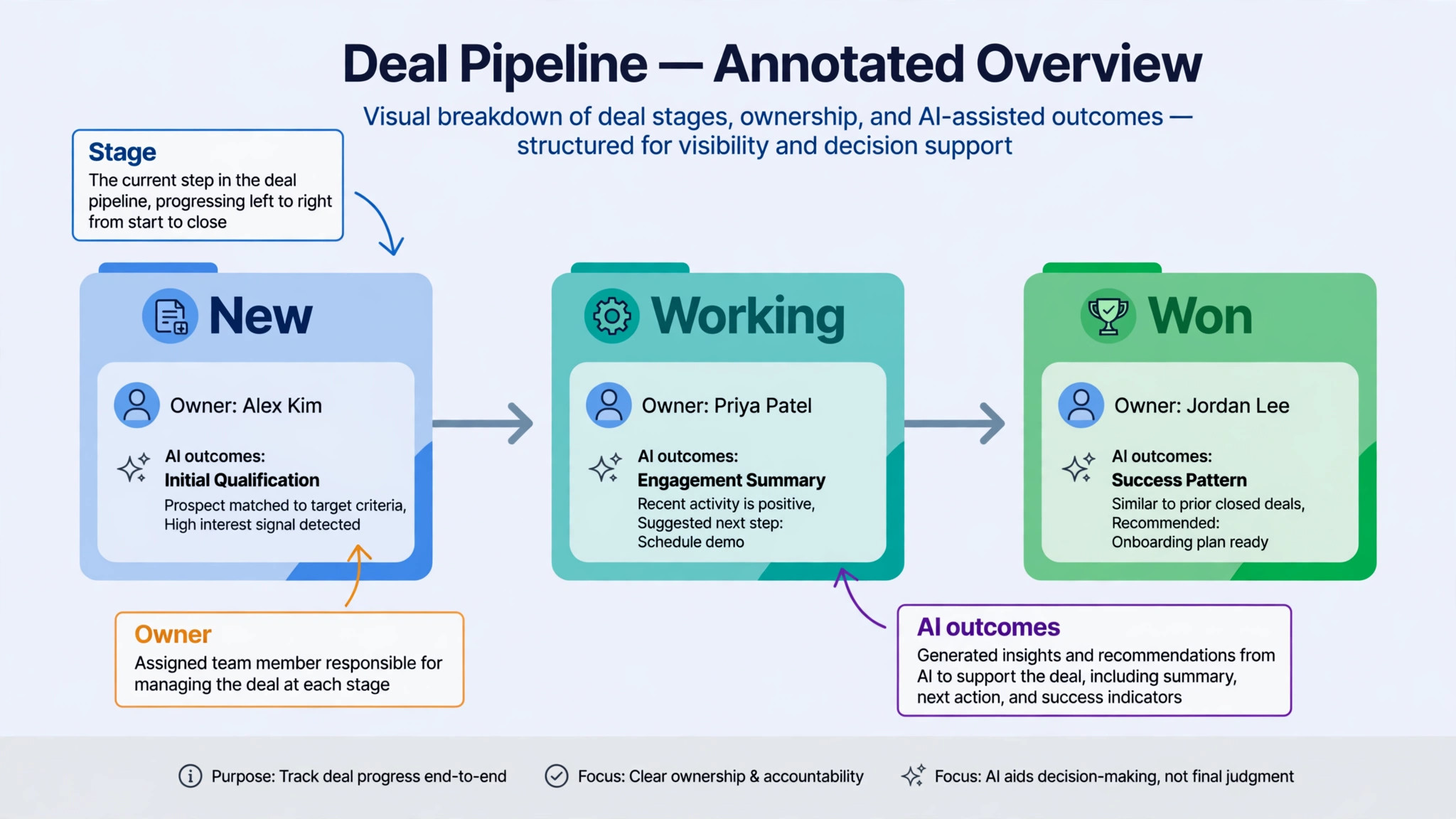
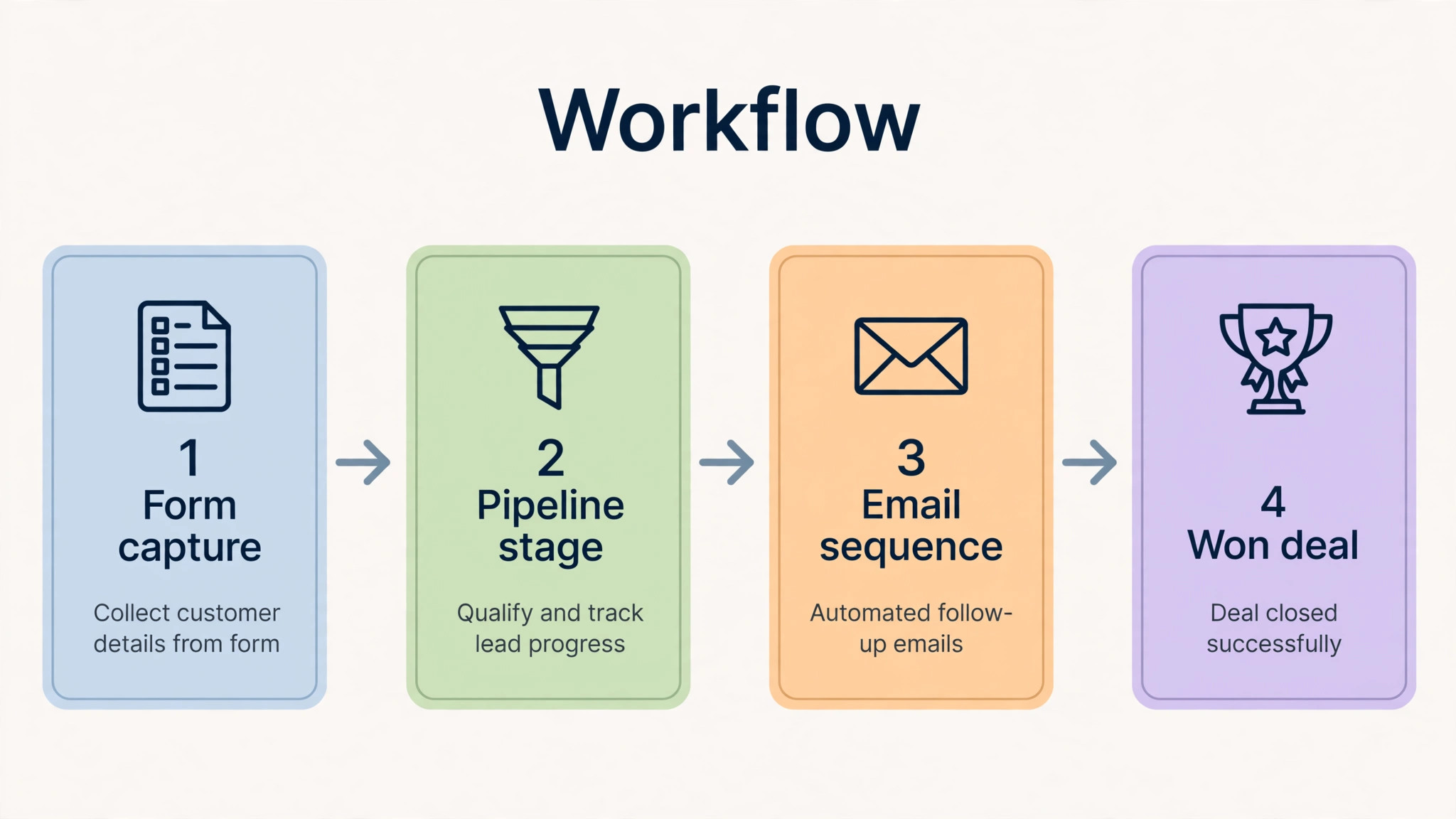
The fee buys a system that keeps selling, marketing and follow-up in one place, and that closeness is the core of the product. Contacts, pipelines, email sequences and forms live together, so a lead captured on a form can enter a pipeline, receive a sequence and be scored without moving between tools.
For a small business to business team, that single flow saves small amounts of time many times a day, and those savings add up to more than any single headline feature. That single flow is also where the cost of Nutshell for small business monthly earns its keep for a team that lives in its pipeline. Teams that need deep custom objects or complex approval chains will get less from the same fee, which is why the fit question should be settled first.
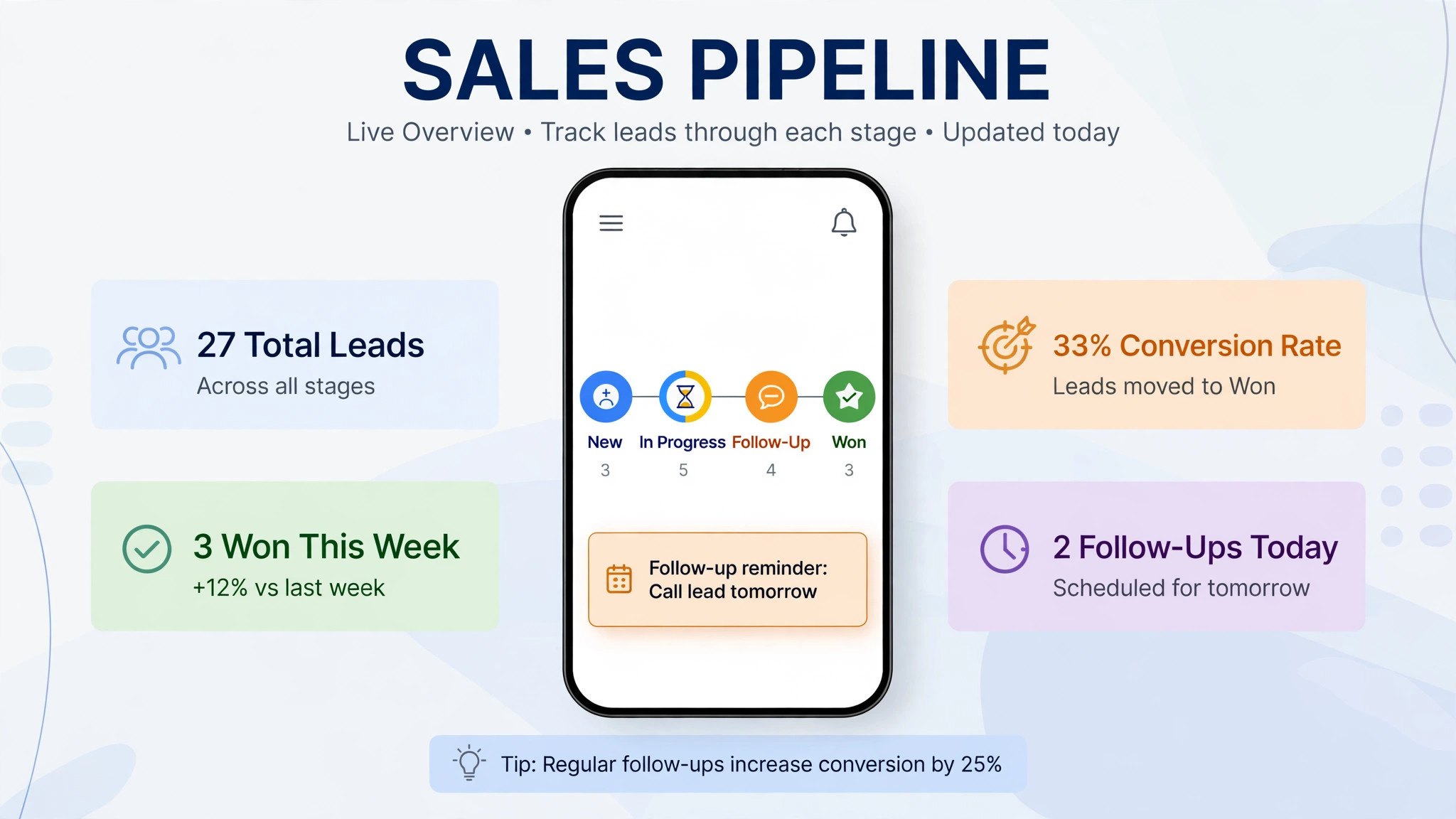
Pipelines turn a list of names into a visible sales process, with stages that show what is new, what is being worked and what is stuck. Automation then handles the repetitive steps, such as moving a deal when a meeting is booked or reminding an owner when a stage has sat untouched for too long. Reporting shows which stages lose deals and which owners carry the most open work, so a manager can coach from evidence rather than from memory. None of that is unusual in modern CRM tools, but Nutshell strength is that it bundles those tools with email marketing and AI at a price a small team can approve without a procurement process.
The fee also buys limits and guardrails that are easy to overlook. Pipeline counts, AI outcome buckets and reporting depth all rise with the tier, and each one can become the reason a team upgrades later. A team that plans to run many pipelines, build its own reports or run AI summaries daily needs to check those specific features against the tier table, not against a general feeling that a higher tier must include everything. The cheapest way to buy Nutshell is to match the tier to the three features the team will use every week, and to ignore the rest of the feature list until those three are working well.
Support and administration are part of the purchase too. Every plan includes free live support, which is unusual and worth weighing, since small teams often need help at the moment a pipeline breaks rather than at a scheduled call. All tiers still bring the usual admin work of managing users, permissions and pipelines, so a small business should name one person as the CRM owner, even if that person also sells. The owner does not need to be technical, but the role needs to exist, or the monthly fee buys a tidy database that slowly stops matching reality.
When It Is Worth It and When It Is Not
Nutshell is worth the fee when a small business to business team sells through pipelines, wants email follow-up in the same system, and will use the tool every day. In that situation, the cost of Nutshell for small business monthly buys back selling time that would otherwise go to copying details between email, calendar and spreadsheet. The test is simple. If the team opens the pipeline first each morning, logs deals in stages, and follows up from the pipeline rather than from memory, Nutshell fits the working day instead of fighting it. Pro is usually the tier that passes that test, because it is the first tier with multiple pipelines and full admin depth together.
Nutshell is a weaker buy when the team does not need pipelines at all, when deals are few and simple, or when a dedicated email platform is the main job. A team with ten deals a month and a short sales cycle may do fine with a spreadsheet and a shared inbox for far less money, and a team that mainly needs newsletters should compare email tools before buying a sales CRM. Nutshell is also a weak buy when nobody will own the system, because pipelines and sequences need tending, and an untended CRM becomes a second inbox that nobody trusts.
Team size changes the answer as well. A two person team can often justify Foundation or Growth, because the bill is small and the contact organisation alone saves time. A team of 25 on Pro billed annually pays $1,050 a month, which is a serious line item that needs to earn its keep in won deals, not in tidiness alone. At that size, the buyer should set a clear target before signing, such as faster follow-up, fewer lost deals or a shorter sales cycle, and should check progress against that target after ninety days. If the target is not moving, the tier or the tool is wrong, and changing early is cheaper than paying for another year.
How to Keep the Bill Down
Start on the lowest tier that contains the features you will actually use in the first month, not the tier you hope to grow into. Many teams buy Pro for automation depth they plan to build later, then pay for months while the automation stays on a to do list. A better path is to run Growth until pipelines are a daily habit, then upgrade when a specific need appears and can be named. Upgrades take effect quickly, while downgrades after an annual payment do not refund the unused months, so the safe direction is to start low and climb.
The cost of Nutshell for small business monthly also falls when seat discipline and add-on discipline are taken seriously together. Review the user list every quarter and remove seats for people who left, changed roles or stopped working deals. Add per user add-ons only for the people who use them daily, and adopt flat add-ons early when the whole team benefits, since their cost never grows with headcount. Annual billing is the other large saving, worth roughly a sixth of the monthly billing total on Pro, but only take it after a monthly trial has proved the tool fits, because the saving disappears if the team abandons the system.
Other savings come from preparation rather than negotiation. Count pipelines and open leads before buying, so the team starts on the right tier instead of upgrading for a second pipeline it could have planned for. Build one pipeline well instead of five pipelines badly, because a single working process beats a set of half built stages. Use the fourteen day free trial with real deals and real emails, not with demo data, and judge the trial by whether follow-ups happened faster. Finally, check each year whether the tier still matches usage, because teams change, and a tier bought for a busy hiring year can be too large for a quieter one.
– Audit seats every quarter and remove logins that are no longer working deals. – Start on Growth if one extra pipeline is the only gap, and upgrade only for a named automation need. – Add Engagement Pro only for daily users, and adopt Marketing Pro early since it costs a flat $49. – Take annual billing only after a monthly trial has proved the fit. – Track AI outcome usage in the first month, and choose a tier whose bucket covers a normal month. – Name one CRM owner, so pipelines and sequences stay current. – Re-check the tier each year against real usage, not against the plan made at signup.
Frequently Asked Questions
What does Nutshell cost each month for a team of five?
A team of five on Pro pays $210 a month billed annually or $245 a month billed monthly, and that team total is the number to put in a budget. Adding Marketing Pro lifts the annual total to $259 a month. On Growth, the same team pays $125 a month billed annually or $160 billed monthly, while Foundation costs $65 a month billed annually or $95 billed monthly but caps the team at one pipeline. Add any per user add-ons to reach the true monthly total, and check the vendor pricing page before signing, since prices can change.
Is annual billing worth it for a small business?
Annual billing is worth it once the tool has proved itself, because it cuts the monthly billing total on every tier, by $7 per user on Pro and $6 per user on Foundation. It is not worth it during the first trial period, because the saving is lost if the team stops using the system and the unused months are not refunded. A sensible path is to pay monthly for one to three months, confirm that pipelines and follow-ups are actually happening in Nutshell, and then switch to annual billing for the saving. Mark the renewal date at signup, so the decision to continue is deliberate.
Why does Nutshell charge for add-ons on top of the seat price?
Nutshell splits its product into a sales core plus marketing, engagement and AI layers, so a team pays for the layers it uses rather than for one bundle that includes everything. That split keeps the entry price low, but it means the seat price alone understates the bill for a team that wants email campaigns, SMS or quoting. That split is the reason the cost of Nutshell for small business monthly cannot be read off the seat price alone. Price the full working setup, seat plus add-ons, before comparing Nutshell with a bundled rival. A rival that looks dearer on seats can be cheaper once add-ons are counted, and the reverse is just as common.
What happens when the AI outcome bucket runs out?
Each tier includes a set number of AI outcomes per month, from 10 on Foundation to 150 on Enterprise, covering heavier AI jobs such as call summaries, email campaigns and lead scoring. Running past the bucket can add usage cost or force a tier move, depending on current terms, so track outcome usage in the first month rather than guessing it. A team that leans on AI daily should choose a tier whose bucket covers a normal month with room to spare, and should check the current overage terms at signup.
Does Nutshell offer a free plan or a free trial?
Nutshell does not offer a permanent free plan, but published pricing pages list a fourteen day free trial with no credit card required. The trial covers the plan tiers, so a team can test Pro pipelines and automation rather than only the entry tier. Use the trial with real deals, real contacts and real emails, and set a clear pass mark before it starts, such as five deals moved through a pipeline and three follow-ups sent from Nutshell. A trial judged on demo data tells a buyer almost nothing about daily fit.
Can a team downgrade after paying annually?
Downgrades are possible in principle, but annual payments are generally not refunded for unused months, so a team that downgrades mid year may not see the saving until the next billing cycle. That is why starting low matters more than starting high. Monthly billing keeps downgrades simple, at the cost of a higher per user price, while annual billing rewards certainty with a lower price. Check the current terms at signup and get the renewal and downgrade rules in writing if the contract value is large.
What should a team check before signing up?
Check five things in order. First, count pipelines and open leads honestly, including every product line. Second, count seats, including part time users. Third, name the three features that must work in week one, and test those features in the trial. Fourth, get the total bill in writing, including add-ons and the billing period. Fifth, name a CRM owner and set a ninety day review against a clear target, such as faster follow-up or fewer lost deals. A team that checks those five points will rarely be surprised by the bill.
Verdict
For a small business to business team that sells through pipelines and wants email follow-up in the same system, Pro is the sensible default, and the cost of Nutshell for small business monthly at that tier is fair for what it returns in follow-up speed and pipeline visibility. Start on monthly billing, prove the fit with real deals, then move to annual billing for the saving, and keep seats and per user add-ons tight. Growth suits a team that is still proving its pipeline habit, while Foundation suits a solo seller with one process.
Nutshell is not the cheapest CRM on the market, and it does not try to be. Its value comes from bundling sales, email and AI at a price a small team can approve, with unlimited contacts removing one common upgrade trap. Price the whole team, price the add-ons, and re-check the tier every year. Done that way, Nutshell is a predictable, workable cost for a small business, and done carelessly, it is an easy way to pay for add-ons that only two people ever use.
More Reading on Stratilyze
– Cost of Copper for Small Business Monthly – Cost of Freshsales for Small Business Monthly – Cost of Keap for Small Business Monthly – Best CRM for Independent Car Dealers – Best CRM for Staffing Agencies Small Business