
The best AI translation tools in 2026 are not the ones that support the most languages. They are the ones that get the sentence right when the sentence matters: a contract clause, a medical instruction, a product name, or a joke that falls flat if it is translated word for word. Free tools have closed much of the gap on everyday text, but they still fail in different places, and the failures are what cost money. A mistranslated price, a flipped negative, or a brand name rendered as a common noun can undo an otherwise careful launch.
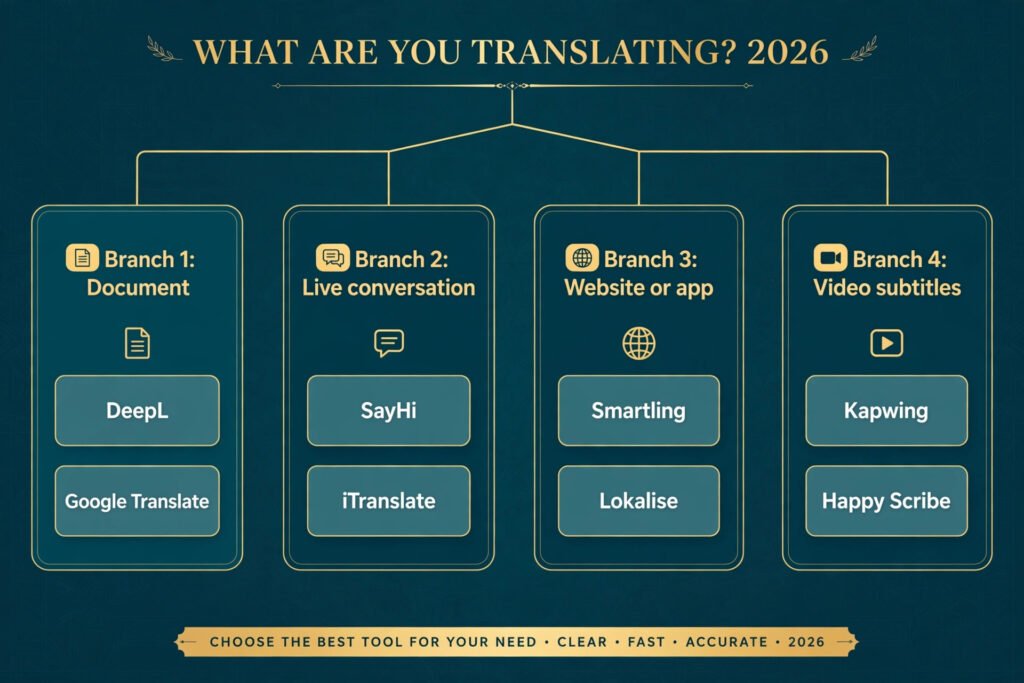
That is why this guide ranks tools by job, not by language count. A tool that shines on a ten page PDF may be useless in a live meeting, and a tool built for website localisation will slow you down if all you need is a subtitle file. The 8 tools below cover four jobs: document translation, real time conversation, website localisation, and subtitling. Each one is priced as of October 2026, with a clear note on where its accuracy breaks down.
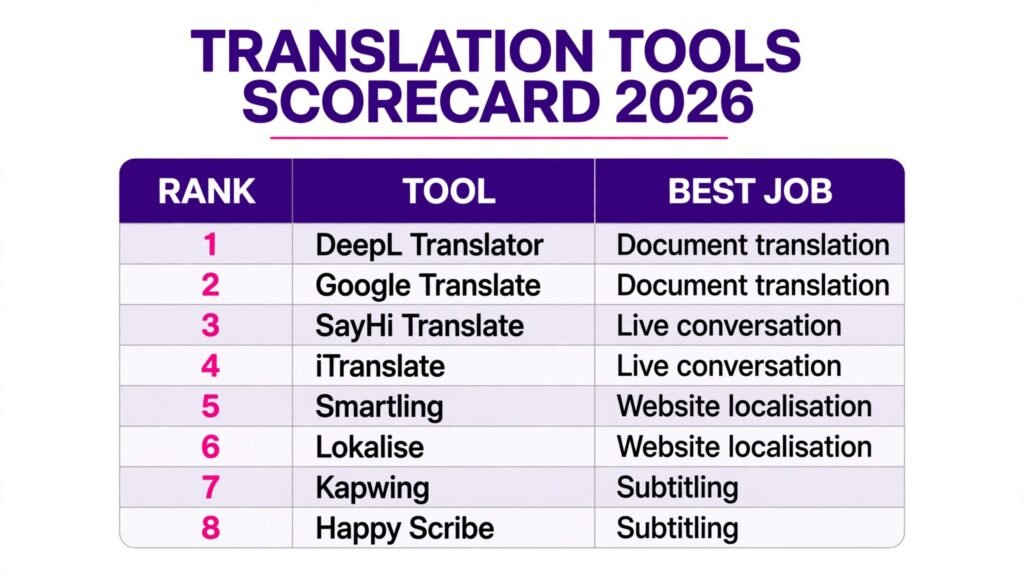
The 8 best AI translation tools at a glance
| Tool | Best job | Free option | Standout strength |
|---|---|---|---|
| DeepL Translator | Document translation | Free tier | Most natural sounding European language output |
| Google Translate | Document translation | Free | Widest language coverage, 130 plus languages |
| SayHi Translate | Real time conversation | Free | Fast voice translation for travel |
| iTranslate | Real time conversation | Free tier | Offline mode and camera translation |
| Smartling | Website localisation | Custom quote | Full workflow for large multilingual sites |
| Lokalise | Website localisation | Free trial | Fast setup for apps and product teams |
| Kapwing | Subtitling | Free tier | Subtitles inside a full video editor |
| Happy Scribe | Subtitling | Free trial | Accurate transcripts with subtitle export |
Best pick by job
| Your job | Start with | Why |
|---|---|---|
| Translate a contract or report | DeepL Translator | Reads most naturally in major European languages |
| Translate on the move | Google Translate | Camera, voice and offline modes in one free app |
| Talk to someone face to face | SayHi Translate | Two way voice mode is built for conversation |
| Localise a whole website | Smartling | Manages translators, review and publishing in one place |
| Localise an app quickly | Lokalise | Connects to code and ships translations fast |
| Add subtitles to video | Kapwing | Edit video and subtitles in the same timeline |
The accuracy test: judge a tool before you trust it
No vendor accuracy claim survives contact with your own documents. Before you commit to any tool on this list, run the same three sentence test through it. First, a sentence with a negation, such as a warranty exclusion. Second, a sentence with an idiom or a cultural reference. Third, a sentence containing your product name and a number, such as a price or a dosage. If the tool flips the negation, flattens the idiom into nonsense, or translates your brand name, you have learned more in five minutes than any marketing page will tell you.
The second part of the test is a back translation. Translate the output back into the original language with a different tool and compare it with the source. Large meaning shifts show up at once. This habit matters most for legal, medical and safety text, where a single wrong word changes the obligation. For that kind of text, treat every tool below as a first draft and budget for a human review pass. The tools save time. They do not remove responsibility.
Document translation
1. DeepL Translator
DeepL has earned its reputation the slow way, by producing translations that read as if a fluent human wrote them, at least across major European languages. German, French, Spanish, Dutch and Polish output is usually smoother than what general purpose tools produce, with better handling of word order and formal versus informal address. Its document mode keeps the formatting of Word and PDF files intact, which matters when the layout itself carries meaning, as in a table of terms or a signed form.
Pricing: free tier with character limits; DeepL Pro from $8.74 per user per month billed annually, check checkout for current rates. Best for: business documents, reports and contracts in European languages. Watch out for: coverage is narrower than Google, with fewer Asian and African languages, and the free tier caps document size. Freelance writers translating client work often pair it with a second tool for languages DeepL does not cover well, and our guide to the best AI tools for freelance writers covers that kind of combined workflow.
Try it at deepl.com.

2. Google Translate
Google Translate is the default for a reason. It covers more than 130 languages, it is free, and it is the only tool on this list that handles text, voice, camera and handwriting in one app. Point a phone at a sign, a menu or a form and the translation appears over the original image, which is genuinely useful on the ground. For short, everyday text it is fast and usually good enough, and its offline language packs make it usable without a connection.
Pricing: free for the app and web translator; the Cloud Translation API is pay as you go, check checkout. Best for: travel, quick messages, and languages other tools ignore. Watch out for: longer documents drift in tone, formal and informal address can flip mid paragraph, and low resource languages still produce rough output. Use it for understanding, not for publishing, unless a human checks the result.
Try it at translate.google.com.
Real time conversation
3. SayHi Translate
SayHi is built for one moment: two people, one phone, a conversation that cannot wait for a laptop. Open the app, pick two languages, and each person speaks in turn while the phone speaks the translation aloud. The interface is deliberately simple, with large type and a single screen, so it works in a shop, a clinic waiting room or a taxi without a learning curve. Voice recognition is quick, and the app handles the back and forth rhythm of real talk better than tools that treat every input as a document.
Pricing: free app; premium features by subscription, check checkout. Best for: travel, face to face meetings and customer facing conversations. Watch out for: it needs a connection for most languages, background noise hurts accuracy, and it is not a tool for documents or websites. Keep sentences short and pause between speakers for the best results.
Try it at sayhi.com.
4. iTranslate
iTranslate combines conversation mode with two features travellers actually use: offline translation and camera translation. Download a language pack before a trip and the app keeps working on a plane or in a rural area with no signal. Point the camera at a sign or a label and the translation replaces the original text on screen. It also offers a phrasebook of common expressions, which sounds minor until you are trying to explain a food allergy in a language you do not speak.
Pricing: free tier with ads; Pro subscription, check checkout. Best for: travellers who need offline access and camera translation in one app. Watch out for: the free tier is ad supported, offline packs cover fewer languages than the online mode, and long conversations are smoother in SayHi or Google Translate.
Try it at itranslate.com.
Website localisation
5. Smartling
Smartling is not a translator app. It is a localisation platform, built for companies that run a website, an app or a help centre in many languages at once. Content flows in from a CMS, translators work in context with screenshots of the live page, reviewers approve, and finished translations publish back without manual copying. That workflow is the whole point: at scale, the cost is rarely the translation itself, it is the coordination, the version control and the missed updates when one language lags behind the rest.
Pricing: custom quote, check checkout. Best for: large sites and companies with ongoing multilingual content. Watch out for: it is priced and set up for teams, not individuals, and a small site with five pages will find it heavy. Human translation services can be ordered through the platform, which is a strength for regulated content but adds cost and turnaround time.
Try it at smartling.com.
6. Lokalise
Lokalise targets product teams that ship software in several languages and cannot afford a translation process that takes weeks. It connects to code repositories and design tools, so new strings appear for translators as soon as developers add them, and finished translations flow back into the build. Screenshots give translators context, and the built in quality checks catch missing placeholders, inconsistent terms and untranslated strings before release. For a small team, the setup is measured in hours rather than weeks.
Pricing: free trial; paid plans by subscription, check checkout. Best for: apps, SaaS products and teams that release often. Watch out for: it is built around software strings, so long form marketing copy and legal pages fit less naturally, and the per seat pricing adds up as the team grows. Teams localising employee content, such as onboarding material, should also look at our guide to the best AI tools for HR teams for the people side of the same problem.
Try it at lokalise.com.

Subtitling
7. Kapwing
Kapwing is a video editor first and a subtitling tool second, and that order is its advantage. Auto subtitles are generated on the timeline, translated into another language, and then edited in the same place where the video itself is cut, so timing, line breaks and styling stay under one roof. For creators publishing the same video in several languages, this removes the round trip between a transcription tool and an editor, which is where timing errors usually creep in.
Pricing: free tier with watermark; Pro subscription, check checkout. Best for: creators and marketers who edit video and subtitles together. Watch out for: the free tier exports with a watermark, subtitle accuracy depends on the clarity of the source audio, and it is not a replacement for a dedicated transcription service on long form content. For fiction and scripted work, note that translated subtitles also change tone, and our guide to best AI story generators covers the writing side of scripted content.
Try it at kapwing.com.

8. Happy Scribe
Happy Scribe starts from transcription and does it well, then turns the transcript into subtitles in more than one language. The workflow suits journalists, researchers and course makers who already work from a transcript: upload audio or video, get a time coded transcript, correct it in the editor, then export subtitles in standard formats. Speaker identification and a clean editor make the correction pass faster, and that correction pass is where subtitle quality is actually decided.
Pricing: free trial; pay per minute or by subscription, check checkout. Best for: interviews, lectures and podcasts that need accurate subtitles. Watch out for: heavy accents and crosstalk still need manual fixes, and translation quality varies by language pair, so budget review time for anything public facing.
Try it at happyscribe.com.
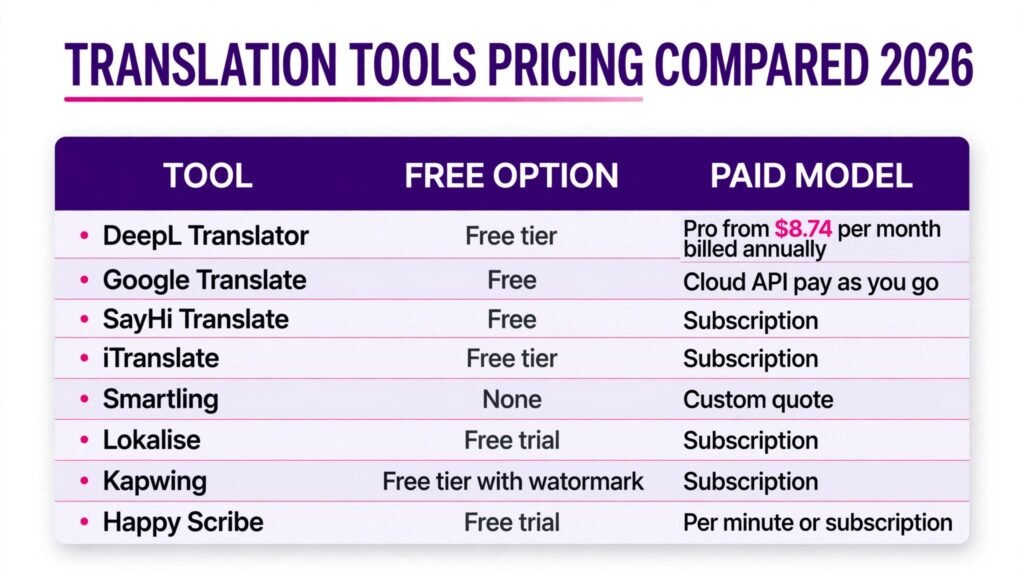
Pricing compared
| Tool | Free option | Paid model | Best value for |
|---|---|---|---|
| DeepL Translator | Free tier | From $8.74 per user per month, billed annually | European document work |
| Google Translate | Free | Cloud API pay as you go | Everyday use in many languages |
| SayHi Translate | Free | Subscription, check checkout | Travel conversations |
| iTranslate | Free tier | Subscription, check checkout | Offline travel use |
| Smartling | None | Custom quote | Large multilingual sites |
| Lokalise | Free trial | Subscription, check checkout | App teams shipping often |
| Kapwing | Free tier with watermark | Subscription, check checkout | Creators editing video |
| Happy Scribe | Free trial | Per minute or subscription | Interviews and lectures |
The cheapest honest stack for most individuals is free: Google Translate for everyday text, DeepL free tier for important European documents, and Kapwing free tier for short subtitled videos. Pay only when a limit bites, such as document size, watermark removal, or team workflow features. For businesses, the real cost is rarely the subscription. It is the review time, the glossary setup and the cost of fixing a bad translation after it reaches customers.
How to Choose
Start from the job, not the tool. If the job is a document, pick by language pair first: DeepL for European languages, Google for everything else. If the job is a conversation, pick by setting: SayHi for face to face talk, iTranslate when you will be offline, Google when you need camera translation as well. If the job is a website or an app, pick by volume and team size: Lokalise for a small product team, Smartling when localisation is a company wide programme.
Then run the three sentence accuracy test from earlier in this guide on your own text, in your own language pair. A tool that scores well on Spanish marketing copy may fail on Japanese contracts, and only your text reveals that. Check three practical points before paying: whether the tool keeps document formatting, whether it stores your text and for how long, and whether it works offline if your setting demands it. Privacy policies differ, and confidential documents should never go through a free consumer tool without reading the data terms first.
Finally, decide where humans stay in the loop. For published, legal, medical or safety content, a human review pass is not optional, and the tool choice should make that pass easy, with side by side editing and change tracking. For internal drafts and personal understanding, a raw machine output is often enough. Matching the review level to the risk is the decision that separates a smooth workflow from an expensive correction.
Mistakes to avoid
The most common mistake is publishing raw machine output. It reads fluently, which is precisely why errors survive: a fluent wrong sentence looks right. Always read the output in the target language, not just the source, and have a native speaker check anything public facing.
The second mistake is translating brand names, slogans and product terms. Add them to a glossary or a do not translate list before the first run, or your product name will become a dictionary word in another market. The third mistake is ignoring formality. Many languages mark formal and informal address, and a tool that flips between them makes a business sound careless. Check the setting before a long document, and keep it consistent.
The fourth mistake is choosing a tool for its language count instead of its strength in your pair. Coverage is a marketing number. Accuracy in your pair is the working number. The fifth mistake is skipping the data question. Free tools may retain submitted text, which is a poor fit for contracts, patient notes or unreleased products. Read the terms, and use a business plan with clear data handling for sensitive material.
FAQs
Is DeepL better than Google Translate?
For major European languages, DeepL usually produces more natural sounding text, especially in longer documents. Google Translate wins on language coverage, camera translation and offline use, and it is free. Many professionals use both: DeepL for the first draft of an important document, Google for quick checks and languages DeepL does not cover.
Can AI translation replace a human translator?
Not for published, legal, medical or literary work, where nuance, liability and style matter. It replaces the first draft and the rough understanding stage, and it handles high volume, low risk content well, such as internal messages and product descriptions that a human then reviews. The best workflow is machine first draft plus human review, not machine only.
Which translation tool is best for business documents?
DeepL for European languages, thanks to document formatting and natural output, with Google Translate as the fallback for languages DeepL does not cover. Whatever you choose, keep a human review pass for contracts and compliance documents.
Is free machine translation safe for confidential documents?
Read the data terms before uploading anything sensitive. Free consumer tiers may retain text for service improvement, while business plans usually offer clearer data handling and deletion controls. For contracts, patient data or unreleased products, use a business plan or a tool that states its retention policy plainly.
How do I translate a whole website?
Use a localisation platform, not a translator app. Smartling suits large sites with many languages, and Lokalise suits app teams that release often. All three connect to a CMS or codebase so new content flows to translators and finished translations publish back without manual copying.
What is the best tool for subtitles?
Kapwing if you also edit the video, since subtitles stay on the same timeline. Happy Scribe if you work from transcripts of interviews or lectures. In every case, budget time to correct names, numbers and timing, because subtitle quality is decided in the correction pass.
Conclusion
The best AI translation tools in 2026 share one trait: they are honest about the job they do well. DeepL leads on European documents, Google Translate on coverage and everyday use, SayHi and iTranslate in live conversation, Smartling and Lokalise on website localisation, and Kapwing and Happy Scribe on subtitles. Pick by your job and your language pair, run the three sentence accuracy test on your own text, and keep a human in the loop wherever the words carry risk. That combination, a good tool plus a short review pass, is what turns machine translation from a shortcut into a dependable part of your work.