

The best AI tools for course creators in 2026 are not the ones that generate the most lessons in the least time. Most courses do not fail because the creator ran out of content. They fail because students stop watching, stop doing the exercises, and never reach the outcome they paid for. Industry completion figures vary by format, but the pattern is consistent: a course with fifty videos and no feedback loop usually performs worse than a shorter course with clear checkpoints, fast answers, and a reason to return each week.
That is the test this guide uses. Every tool below is judged on one question: does it help a student finish, or does it only help a creator publish? A tool that shortens feedback time, makes a lesson easier to revise, or turns a finished course into repeat sales earns its place here.
The thirteen tools are grouped by the job they do: course building, video and audio, quizzes and assessment, and sales and marketing. Buy one strong tool per job before you buy a second tool for the same job. Most creators with an expensive stack are paying for three tools that overlap and zero tools for the stage where their students drop out.
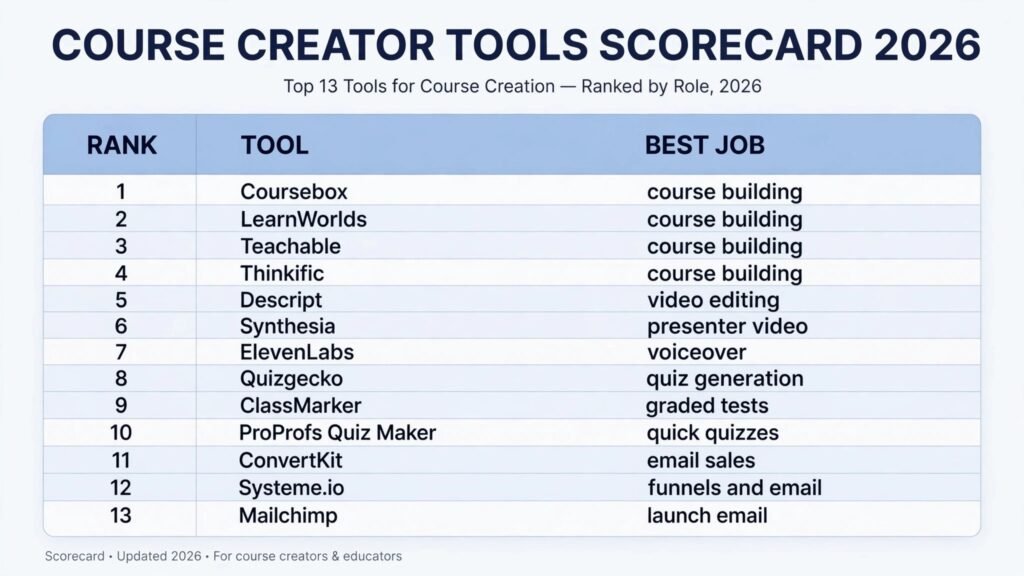
The 13 best AI tools for course creators at a glance
| Tool | Best job | Best for |
|---|---|---|
| Coursebox | Course building | Turning documents into a structured course fast |
| LearnWorlds | Course building | Interactive courses with a branded school |
| Teachable | Course building | A simple, proven place to host and sell |
| Thinkific | Course building | A branded school with quizzes and certificates |
| Descript | Video and audio | Editing video by editing text |
| Synthesia | Video and audio | Presenter videos without filming |
| ElevenLabs | Video and audio | Natural voiceover and dubbing |
| Quizgecko | Quizzes and assessment | Quizzes generated from your own material |
| ClassMarker | Quizzes and assessment | Graded tests with certificates |
| ProProfs Quiz Maker | Quizzes and assessment | Quick quizzes inside a lesson flow |
| ConvertKit | Sales and marketing | Email that sells without a funnel maze |
| Systeme.io | Sales and marketing | Funnels, email, and sales in one place |
| Mailchimp | Sales and marketing | Launch emails at scale |
Start here: the right pick for each creator job
| Your bottleneck | Start with | Why |
|---|---|---|
| You have material but no course structure | Coursebox | It turns notes, slides, and documents into lessons, quizzes, and a logical order |
| Students watch but do not interact | LearnWorlds | Interactive video, note taking, and community features keep attention inside the lesson |
| You need to launch without learning a platform | Teachable | Setup is short, checkout works, and students get a clean learning experience |
| You want a branded school with certificates | Thinkific | Drag-and-drop building, quizzes, assignments, and certificates under one school |
| Recording and editing eats your week | Descript | Cut filler words and mistakes by deleting text, then export clean video |
| You cannot film, or you hate being on camera | Synthesia | A presenter delivers your script on screen while you keep control of the words |
| Your voiceover sounds flat or takes too long | ElevenLabs | Generate consistent narration, then revise a sentence without re-recording |
| Students say the course was interesting but they learned nothing | Quizgecko | Short quizzes after each module force recall while the material is still fresh |
| You need proof of completion for employers | ClassMarker | Graded tests, pass marks, and certificates give a defensible record |
| You want a quick check inside a lesson | ProProfs Quiz Maker | Embed a short quiz without sending students to another platform |
| Your list is small and your launch depends on email | ConvertKit | Simple sequences, landing pages, and tagging that a solo creator can run |
| You are paying for five tools to sell one course | Systeme.io | Funnels, email, checkout, and affiliates live in one account |
| You need a large launch list handled reliably | Mailchimp | Strong deliverability, segmentation, and automation for bigger audiences |
Course building: structure first, polish second
1. Coursebox
Coursebox turns existing material into a course. Upload documents, slides, or notes, and it drafts a course structure, lesson text, and quiz questions. The draft is a starting point, not a finished course. The best use is for creators who already know their subject and need to stop staring at a blank outline.
Pricing: check checkout for the current plan and limits. The free option is limited, and paid plans are subscription based.
Best for: experts with existing material who want a working first draft in a day.
Watch out for: generated lessons can sound generic. Rewrite examples in your own voice, add your own cases, and check every factual claim before publishing.
Try it at: https://coursebox.ai/
2. LearnWorlds
LearnWorlds is a full course school with interactive video, assessments, and community tools. Students can take notes inside a video and answer questions at set points, so interaction happens inside the lesson instead of after it, when most students have already left.
Pricing: check checkout. Plans are subscription based, and some features sit on higher tiers.
Best for: creators who sell a flagship course and want interaction built into the learning experience.
Watch out for: the range of features can slow a first launch. Turn on one interactive feature per module, measure whether students use it, and only then add more.
Try it at: https://www.learnworlds.com/
3. Teachable
Teachable remains the low friction choice. It hosts video, handles checkout, manages students, and gives a clean player. It does not try to be a funnel builder, an email platform, and a community app at once, and that restraint is a strength for a first course. If your course is ready and your audience is waiting, Teachable gets you to a sales page fast.
Pricing: check checkout. Plans are subscription based, with a free option for getting started.
Best for: first time creators and creators who want hosting and checkout handled.
Watch out for: advanced marketing automation and deep customisation are limited compared with a dedicated funnel tool. Pair it with an email tool from the sales section rather than forcing it to do everything.
Try it at: https://teachable.com/
4. Thinkific
Thinkific is a course platform for creators who want a branded school rather than a single course page. The drag-and-drop builder covers lessons, chapters, quizzes, and assignments, and the platform handles hosting, checkout, and student management. Certificates can be issued on completion, which matters when buyers need proof for an employer or a professional body.
Pricing: check checkout. Plans are subscription based, with a free trial for getting started.
Best for: creators building a branded school with several courses, certificates, and live cohorts.
Watch out for: the broader feature set can tempt a first time creator into building a whole school before selling a single course. Launch one course first, and add memberships, communities, and live cohorts only when students ask for them.
Try it at: https://www.thinkific.com/
Video and audio: the stage where most courses stall
Recording is where good courses die quietly. A creator plans ten lessons, records two, spends a weekend editing, and never records the third. The tools below attack that stall with faster editing, no filming, and faster narration.
5. Descript
Descript lets you edit video and audio by editing a transcript. Delete a sentence from the transcript and it disappears from the video. Remove filler words in one pass. Add captions automatically. For course creators, the practical gain is revision speed. When a lesson needs a correction, you retype a line instead of re-recording a whole video, and the result still sounds natural in most cases.
Pricing: check checkout. Plans are subscription based, with a free option for trying the editor.
Best for: creators who record their own lessons and dread the editing stage.
Watch out for: overdub style voice cloning needs care. Use it for small corrections in your own voice, disclose it where your audience would care, and never clone another person’s voice.
Try it at: https://www.descript.com/

6. Synthesia
Synthesia creates presenter videos from a script. Choose a presenter, paste your text, and get a video with a person speaking to camera. It is useful when filming is impractical, when you need the same lesson in several languages, or when you update a lesson often and do not want to refilm each time.
Pricing: check checkout. Plans are subscription based, and video minutes are usually limited per plan.
Best for: corporate training, software walkthroughs, and lessons that change often.
Watch out for: presenter videos can feel distant if every lesson uses the same presenter and the same framing. Mix presenter videos with screen recordings, real examples, and your own short introductions so students still feel a human teacher behind the course.
Try it at: https://www.synthesia.io/
7. ElevenLabs
ElevenLabs generates voiceover that sounds close to a real narrator, with control over tone and pacing. It is strong for narration over slides, for audio versions of written lessons, and for dubbing a course into another language. The revision advantage is large: change one paragraph, regenerate one clip, and the rest of the lesson stays untouched.
Pricing: check checkout. Plans are subscription based, usually priced by character or minute limits.
Best for: slide based courses, audio lessons, and multilingual versions.
Watch out for: long narration can drift in tone, and a fully synthetic voice can reduce trust for a personal brand course. Listen to a full lesson before publishing, and consider recording your own introduction and closing so students hear the real you at the start and the end.
Try it at: https://elevenlabs.io/
Quizzes and assessment: proof that learning happened
A course without assessment is a video playlist. Assessment does not need to be harsh. It needs to be frequent, short, and tied to the exact skill the lesson promised. The three tools below cover three different needs: fast generation, formal grading, and quick in lesson checks.
8. Quizgecko
Quizgecko generates quizzes, flashcards, and study notes from text you supply. Paste a lesson, a chapter, or a set of notes, and it returns questions that test recall and understanding rather than word matching. For a creator, the value is speed: a ten minute quiz after each module becomes a realistic habit instead of a task that gets postponed until launch week.
Pricing: check checkout. Plans are subscription based, with a free option for trying question generation.
Best for: creators who want recall checks after every module without writing every question by hand.
Watch out for: generated questions need review. Check that each question has one clearly correct answer, that distractors are plausible but wrong, and that no question tests a detail you never taught.
Try it at: https://quizgecko.com/

9. ClassMarker
ClassMarker is built for formal testing. Set a pass mark, randomise question order, time the test, and issue certificates on completion. That structure matters when a course is sold to employers, used for compliance, or offered as a credential. Students take the test more seriously when the result is recorded, and buyers can defend the purchase to a manager.
Pricing: check checkout. Plans are subscription based, often priced by test volume or user count.
Best for: professional training, compliance courses, and certificate programs.
Watch out for: formal tests can punish good students if questions are ambiguous. Pilot every test with a small group, review the questions most students miss, and fix the question or the lesson before you blame the student.
Try it at: https://www.classmarker.com/
10. ProProfs Quiz Maker
ProProfs Quiz Maker sits in the middle: fast to build, easy to embed, and good enough for most lesson checks. Create a short quiz, add it to a lesson page, and see results without moving students to a separate testing platform. It is the right choice when the goal is a quick pulse check, not a formal exam.
Pricing: check checkout. Plans are subscription based, with a free option for basic quizzes.
Best for: quick knowledge checks inside lessons and lead magnets that test readiness.
Watch out for: do not use a quick quiz tool for a high stakes certificate. If the result affects employment or a paid credential, use a formal tool like ClassMarker instead.
Try it at: https://www.proprofs.com/quiz-school/
Sales and marketing: a good course still needs buyers
Many creators spend ninety percent of their effort on content and ten percent on selling, then wonder why a strong course sells slowly. The sales tools below cover the three things that actually sell a course: a list you own, a launch sequence that answers objections, and a checkout that does not lose buyers at the last step.
11. ConvertKit
ConvertKit, now also known as Kit, is built for creators who sell through email. Landing pages, forms, tags, and sequences are simple enough to run alone. A typical course launch needs only four emails done well: the announcement, the lesson preview, the objection answers, and the closing reminder. ConvertKit handles that sequence without extra software.
Pricing: check checkout. Plans are subscription based, with a free option for smaller lists.
Best for: solo creators whose main sales channel is email and content.
Watch out for: if you need complex funnels, affiliate management, and course hosting in one account, ConvertKit alone will leave gaps. Pair it with a hosting platform rather than stretching it into a full funnel suite.
Try it at: https://convertkit.com/

12. Systeme.io
Systeme.io combines funnels, email, checkout, and affiliate management in one account. For a creator starting out, the appeal is cost and simplicity: one login, one bill, and no integration failures between tools. It is a practical choice for a first funnel, a free mini course that leads to a paid course, and an affiliate program for early students who want to recommend the course.
Pricing: check checkout. Plans are subscription based, with a free option for getting started.
Best for: new creators who want funnels and email in one place at a low starting cost.
Watch out for: as a course business grows, dedicated tools often beat an all in one tool at each job. Revisit the stack once you have steady sales, and move a job to a specialist tool only when the all in one version is clearly holding you back.
Try it at: https://systeme.io/
13. Mailchimp
Mailchimp is the safe choice for larger lists and bigger launches. Segmentation, automation, and deliverability tooling are mature, and most integrations already exist. When a launch involves tens of thousands of subscribers, multiple segments, and timed sequences across time zones, reliability matters more than novelty, and Mailchimp has a long record of handling that load.
For creators who write regularly, Mailchimp also pairs well with a writing workflow. If you publish articles alongside your course, the habits in our guide to the best AI tools for freelance writers transfer directly to launch emails: draft fast, edit hard, and keep one clear promise per email.
Pricing: check checkout. Plans are subscription based, with a free option for smaller lists.
Best for: creators with larger lists, multiple courses, and segmented launches.
Watch out for: pricing rises with list size, including subscribers who never open an email. Clean inactive subscribers regularly, or a large dead list will quietly become your biggest marketing cost.
Try it at: https://mailchimp.com/
If your course teaches a technical skill, students often arrive from tutorial content. A short free lesson that teaches one useful skill, linked from a relevant guide such as our roundup of the best AI tools for learning to code, can convert better than a generic discount, because the student has already experienced how you teach.
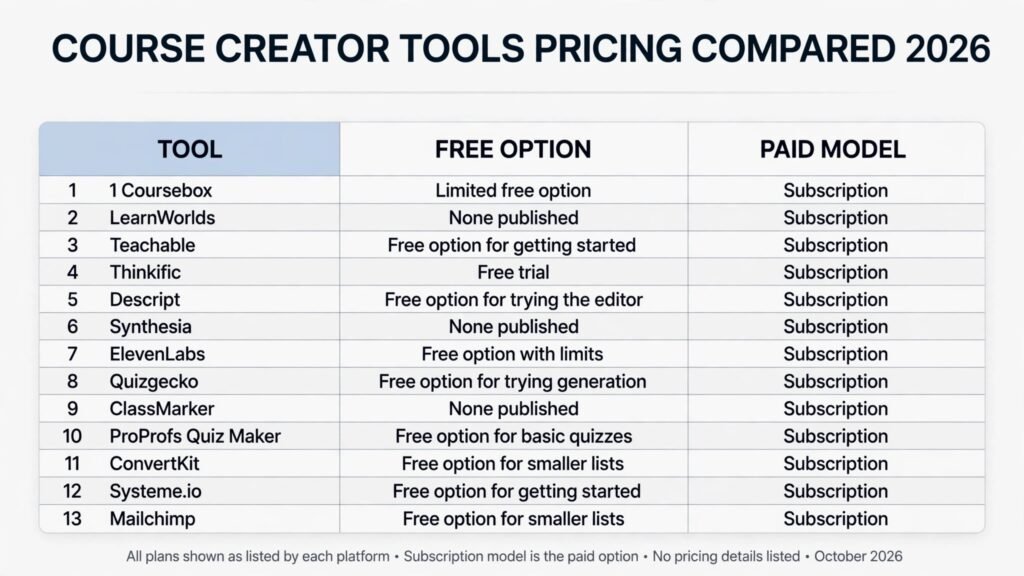
Pricing compared: what a creator actually pays in 2026
| Tool | Free option | Paid model |
|---|---|---|
| Coursebox | Limited free option | Subscription, check checkout |
| LearnWorlds | None published | Subscription, check checkout |
| Teachable | Free option for getting started | Subscription, check checkout |
| Thinkific | Free trial | Subscription, check checkout |
| Descript | Free option for trying the editor | Subscription, check checkout |
| Synthesia | None published | Subscription, check checkout |
| ElevenLabs | Free option with limits | Subscription, check checkout |
| Quizgecko | Free option for trying generation | Subscription, check checkout |
| ClassMarker | None published | Subscription, check checkout |
| ProProfs Quiz Maker | Free option for basic quizzes | Subscription, check checkout |
| ConvertKit | Free option for smaller lists | Subscription, check checkout |
| Systeme.io | Free option for getting started | Subscription, check checkout |
| Mailchimp | Free option for smaller lists | Subscription, check checkout |
The pattern matters more than any single price. Almost every tool in this guide is subscription based, so the real cost is the monthly total across the stack, not the price of one tool. Before buying, add up the four jobs: building, video, assessment, and sales. If the total exceeds ten percent of your expected monthly course revenue, cut a tool, not a lesson. A cheaper stack that you actually use beats an expensive stack that you pay for and ignore.
Also watch for limits that are not prices. Video minutes, quiz generations, email sends, and student counts all cap what a plan can do. Check those limits before launch, not during it.
How to Choose without buying thirteen tools
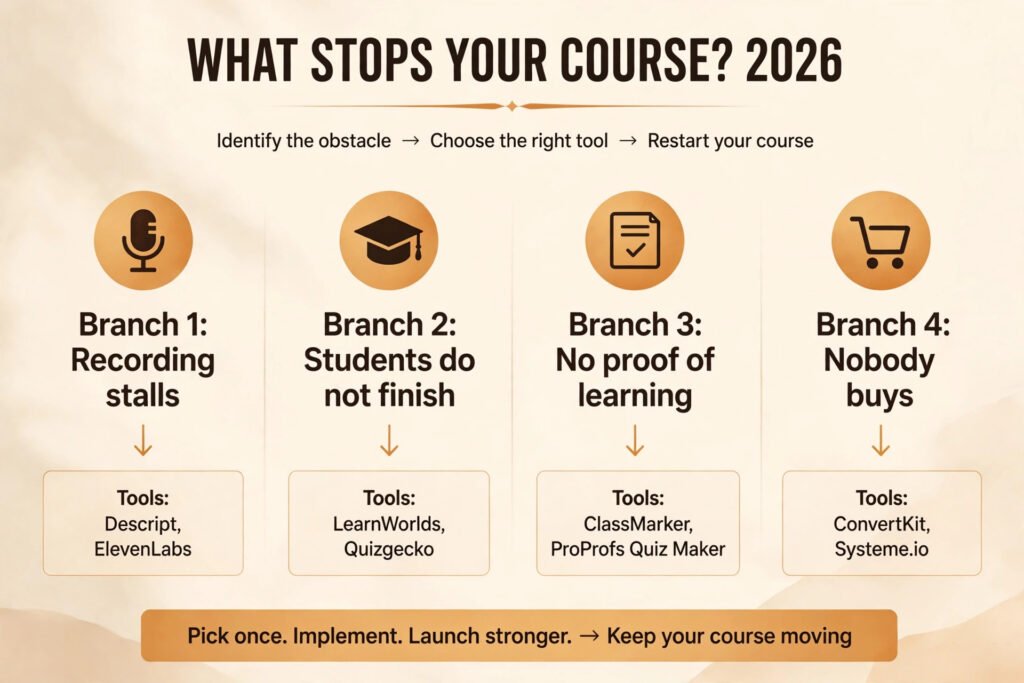
Start with the bottleneck, not the demo. Where do students stop, or where do you stop? If you never finish recording, buy an editing or narration tool first. If students finish videos but learn nothing, buy an assessment tool first. If the course is good but nobody buys it, buy an email tool first. A tool that solves a problem you do not have is a cost, not an investment.
Then run a one week test. Build one real module with the tool, not a toy example. Record one lesson, generate one quiz, send one email sequence to a small segment. Measure three things: time saved, student response, and how much cleanup the tool created. If a tool saves two hours but creates three hours of fixing, it failed the test even if the demo looked impressive.
Next, check overlap. Put each tool under one job only. If two tools sit under the same job, keep the one that produces the finished output with less cleanup, and cancel the other. Overlap is the most common reason a creator stack costs twice what it should.
Finally, check the exit. Can you export your lessons, your student list, and your quiz questions? Prefer tools with export options, and keep a master copy of scripts, slides, and videos outside any single platform.
Mistakes to avoid when selling a course
The first mistake is generating a whole course and publishing it untested. AI can draft fifty lessons in a day, but students will find the gaps in the first week. Publish one module to a small group, watch where they pause, and fix those points before you build the rest.
The second mistake is teaching everything you know. A course is not a textbook. Students pay for an outcome, not for coverage. Cut any lesson that does not move the student closer to that outcome, even if the material is interesting.
The third mistake is trusting generated content without review. Quiz answers, voiceover scripts, and lesson examples all need a human check. One wrong answer in a quiz damages trust more than ten correct answers build it. Review generated material as if a student will quote it back to you, because the best students will.
The fourth mistake is ignoring the student after purchase. A welcome email, a first week check in, and a clear next step after each module all raise completion, and completion raises reviews and future sales.
The fifth mistake is pricing from cost instead of outcome. Students pay for the result: a skill, a certificate, a portfolio piece, or a solved problem. Price the outcome and show proof that past students reached it.
The sixth mistake is building on one platform with no backup. Keep your scripts, videos, student list, and quiz bank in your own files. A course you cannot move is a course you do not fully own.
Frequently asked questions
Do I need all thirteen tools to launch a course?
No. Most creators need four: one for building, one for video or audio, one for assessment, and one for email. Start with those four, launch, and add a specialist tool only when a specific bottleneck appears. Buying all thirteen before your first sale is a common way to feel productive while avoiding the real work of finding students.
Can AI generate a whole course for me?
It can draft structure, lessons, quizzes, and scripts, but a generated course still needs your examples, your judgment, and your review. Students buy your experience, not a generic summary. Use AI to remove blank page time, and spend the saved time on examples, feedback, and support that only you can provide.
Which tool matters most for student completion?
Short quizzes and interactive checkpoints matter most, because they turn passive watching into active recall. A course with a five minute quiz after each module usually outperforms a longer course with no checks. If you buy only one improvement, buy assessment.
Should I use a synthetic presenter or record myself?
It depends on the course and the brand. A synthetic presenter works well for training that updates often and for lessons where the content matters more than the teacher. A personal brand course usually converts better with your own voice and face, at least for introductions, conclusions, and the lessons students care about most. Many creators mix both: synthetic video for routine lessons, real video for the moments that build trust.
How do I price a course built with AI tools?
Price the outcome, not the tools. A short course that helps a student pass a test, build a portfolio piece, or win a client is worth more than a long course with no clear result. Research what comparable courses charge, offer a clear guarantee or refund policy you can honour, and test price with a small launch before committing to a permanent figure.
What should I check before publishing a lesson made with AI?
Check facts, check quiz answers, listen to the full audio, and watch the full video once at normal speed. Look for invented examples presented as real, for questions with no correct answer, and for voiceover that drifts in tone. One careful review pass per lesson prevents most of the complaints that damage a new course reputation.
Conclusion: buy the finish, not the draft
The best AI tools for course creators in 2026 are the ones that help students finish and help creators sell without drowning in software. Start with a simple stack: a building platform, an editing or narration tool, a quiz tool, and an email tool. Test each tool on one real module, cut overlap ruthlessly, and keep your content exportable.
A course is not finished when it is published. It is finished when students complete it, use it, and recommend it.